Sukrara (alpha)
02 — The phone app reads the sensor itself (no Juggluco)
2026-10-15 · investigation report · follows 01 — connectivity
Goal
In PoC 1 the phone companion (GlucoBridge) got its data from Juggluco’s local web server. That means two apps, an HTTP server on loopback, and a dependency on an app whose UI the user wants to replace. PoC 2: GlucoBridge talks to the Libre 3 sensor itself, and does it in a battery-conscious way.
Result
It works. GlucoBridge resumed the sensor’s BLE session on its own, decrypted the 1-minute glucose packets and pushed them to the Mac — with Juggluco force-stopped the entire time.
| First reading | 2026-10-15 19:59:47 — 83 mg/dL, −0.59 mg/dL/min, delivered to the Mac the same second |
| Steady state | a reading every minute for 7+ minutes, no disconnects, Mac latency ~1 s |
| History | the sensor’s own stored 5-minute values: 34 points (~3 h) in about a second on connect |
| Correctness | values matched Juggluco’s own backfill exactly (80, 82, 83, 84 at 20:09–20:13) once it took the sensor back |
| Sensor state | Juggluco reconnected afterwards and filled its gap by itself |
Architecture now:
Libre 3 sensor ──BLE──▶ GlucoBridge (Android) ──BLE GATT──▶ GlucoseBar (Mac)
No Juggluco, no HTTP server, no network of any kind.
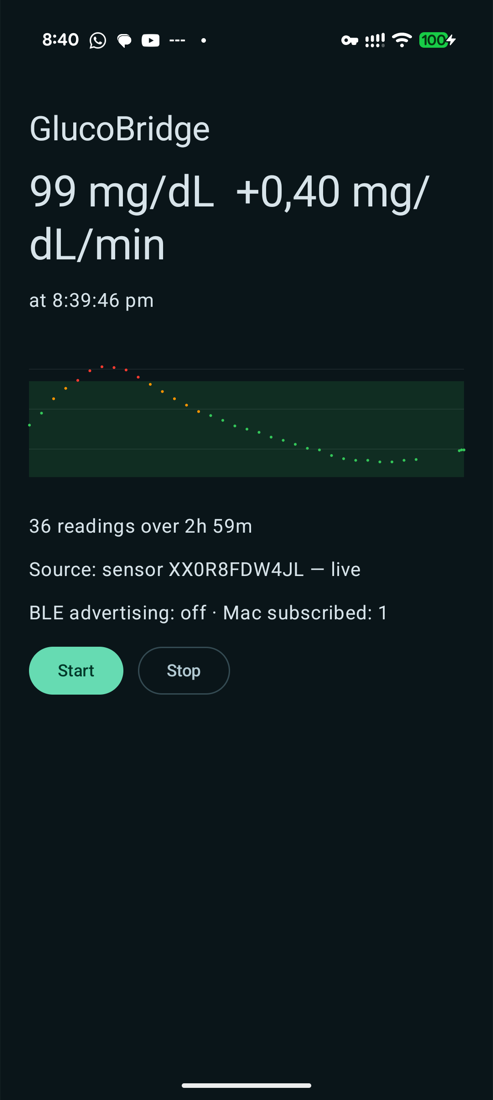
99 mg/dL at +0.40 mg/dL/min, 36 readings over 3 h — all from the sensor. “BLE advertising: off · Mac subscribed: 1” is the power optimisation below doing its job: a client is connected, so the phone stops advertising.
How it is built
Two Gradle product flavors share everything except where glucose comes from, so PoC 1 stays runnable:
| Flavor | Source | Build |
|---|---|---|
juggluco |
Juggluco’s web server on 127.0.0.1:17580 (PoC 1) |
./gradlew assembleJugglucoDebug |
direct |
the sensor itself (PoC 2) | ./gradlew assembleDirectDebug |
Shared src/main holds the Mac-facing GATT server, the foreground service and the UI; each flavor provides
createGlucoseSource(context). Everything is Kotlin; the only native code is the sensor’s security core
(C, called through a small JNI layer).
Pairing data (which sensor, and the credentials to resume its session) is read from a private file in the app’s data directory. For the spike it is imported once from the app that activated the sensor; the real app will produce it during its own NFC activation. It is a per-sensor secret and never leaves the phone.
History
A sensor-reading app starts with nothing and would take hours to fill a chart, because each packet only carries the current minute. The sensor also stores a value every 5 minutes, but it only sends them when asked.
On connect GlucoBridge now reads the sensor’s current position from its status packet, then requests the last 3 hours of stored values. They arrive as a short burst of notifications (6 values each) and are merged into the same series as the live readings. Cost: well under a second.
This is the one place the app writes to the sensor — the request is the same one Juggluco sends on every connection, so it is routine traffic, not a state change. Everything else is listen-only.
Battery
Design choices, and what they are worth:
| Choice | Why |
|---|---|
No scanning. Connect to the sensor by address with autoConnect, so the Bluetooth controller does the waiting. |
Measured: zero BLE scan time attributed to the app in batterystats. App-level scanning is one of the most expensive things a BLE app can do. |
| No wakelocks. The notification callback does the work and returns. | Measured: no partial wakelocks held by the app. For comparison, Juggluco took 973 partial wakelocks (~16 s cumulative) in the same battery session — it holds one for up to 30 s per reading. |
Advertise only while no Mac is subscribed, in ADVERTISE_MODE_LOW_POWER. |
The Mac scans continuously, so a slow advertising interval costs nothing; advertising to nobody is pure waste. See the trap below. |
| One persistent sensor connection instead of connect-per-reading. | See the finding below — reconnecting is far more expensive than idling. |
| History blob built on demand, not per reading. | Trivial, but it keeps the per-minute path to “decrypt, 8-byte notify”. |
Finding: trimming subscriptions backfires
The sensor exposes seven notifying characteristics; GlucoBridge only parses two. Subscribing to just the ones we use looked like an easy saving. It is not:
| Subscriptions | Behaviour |
|---|---|
| Only the ones we parse | Sensor dropped the link at exactly 60 s, every time → reconnect loop, one reading per 2 minutes (half the data, plus a full reconnect and re-handshake each time) |
| All seven (what Juggluco does) | Stable, one reading per minute |
The sensor runs a full data cycle every minute and does not tolerate a partially subscribed client. Staying subscribed to everything is both more reliable and cheaper than the reconnect loop it causes. The code keeps the trimmed set behind a flag plus an automatic fallback, so a bad choice self-heals instead of silently halving the data.
Caveat: that test also changed the connection interval at the same time (a low-power interval was requested in the failing run, not in the passing one), so the 60 s drop is not isolated to the subscription set — only strongly implied by its exact 1-minute period. Worth isolating before treating it as settled.
Not yet measured
Real battery drain. batterystats only attributes power while the phone is discharging, and the phone was on
USB for the whole session (needed for the test tooling). A proper A/B — same hours, screen off, unplugged, PoC 1 vs
PoC 2 vs Juggluco alone — is the obvious next step. The CPU totals in batterystats are not comparable as they
stand: they cover different time windows, and GlucoBridge’s include Compose UI startups.
Trap: your own sensor link looks like an incoming client
Stopping the adverts while a client is connected broke the Mac’s ability to find the phone at all. Android reports the phone’s outgoing connections — the sensor — through the same GATT-server callback as incoming clients, so connecting to the sensor made the app believe a Mac had arrived.
The fix is to ignore connection events entirely and key off the subscription write, which only a real client of ours performs. The logs now distinguish the two peers plainly. Worth remembering for the real app — on Android, “a device connected to my GATT server” does not mean what it sounds like.
Also fixed: the Mac could go deaf without noticing
During the stable run the phone kept notifying every minute to a subscribed central, but the Mac stopped showing
new values after ~2 minutes — with no disconnect callback. CoreBluetooth left the peripheral in .connected
while the link was actually gone.
GlucoseBar now treats silence as a disconnect: if a connected bridge sends nothing for 150 s (readings are 1/minute), it drops the peripheral and rescans. Worth remembering for the real Mac app — “still connected” is not evidence that data is flowing.
Open questions / next PoCs
- Isolate the 60 s drop: subscription set vs connection interval, one variable at a time.
- Real unplugged battery A/B (PoC 1 vs PoC 2 vs Juggluco), screen off, several hours.
- Verify the Mac watchdog actually recovers the link (the fix is written, not yet observed firing).
- Sensor activation from the app (NFC) — currently pairing data is imported from another app, so a brand new sensor still needs one.
- Persist history across app restarts (it is in memory only; a restart re-fetches 3 h from the sensor).
- Secure the phone↔Mac link (still unauthenticated) and survive Mac sleep.
- Long soak: deep Doze, Bluetooth toggles, out-of-range and back.
Reproducing
cd spikes/glucobridge-android
export JAVA_HOME=$(brew --prefix openjdk@17)/libexec/openjdk.jdk/Contents/Home PATH="$HOME/.local/bin:$PATH"
./gradlew assembleDirectDebug
android install --apks=app/build/outputs/apk/direct/debug/app-direct-debug.apk --install-options=-g
./tools/import-pairing.sh            # one-time, needs root; imports this sensor's pairing data
adb shell am force-stop tk.glucodata # the sensor serves one app at a time
adb shell am start -n dev.spike.glucobridge/.MainActivity
Afterwards, relaunch Juggluco to hand the sensor back; it reconnects and backfills the gap on its own.
Toolchain added in this investigation: NDK 28.2.13676358 and CMake 4.1.2 (android sdk install ndk/… cmake/…).