Sukrara (alpha)
05 — Glucose in the Android status bar
2026-10-15 · investigation report · Pixel 10 Pro, Android 17 (CP3A.261005.005), rooted with KernelSU Next + LSPosed
Goal
Show the glucose number and trend permanently in the phone’s status bar, like the Mac menubar item. Three
candidate approaches were given (Live Update chip, number as the notification icon, an icon among the system icons
with a choosable position), plus the question of whether there are others. Spike code:
spikes/statusbar-android (GlucoStatus, one APK that is the app and the LSPosed
module).
Result
All approaches work on the phone, side by side:

From left: LSPosed hook after the clock (red = above 185), the Live Update chip (its icon is approach 2’s bitmap), and the system-icon pair next to the VPN key, Wi-Fi and battery.
| # | Approach | Needs | Colour | Position | Verdict |
|---|---|---|---|---|---|
| 1 | Live Update chip | nothing | no | fixed (after clock) | Works; yields to other Live Updates. Hidden while the app is open, and number lost whenever ≥ 2 chips show |
| 2 | Number as the notification icon | nothing | no | first notification icon | Works, but a 2–3 digit number squeezed into a square icon is small |
| 3a | System icons (next to Wi-Fi/battery) via IStatusBarService.setIcon |
adb or root — no LSPosed | no (tinted like the other icons) | leftmost of the system icons | Works; real system rendering, follows light/dark |
| 3b | LSPosed hook in SystemUI: our own TextView | root + LSPosed | yes | before/after the clock, left of the system icons, lock screen | Works; best looking |
| 3a+3b | 3a’s icons reordered by a tiny hook | root + LSPosed | no | exactly after any icon (e.g. between Wi-Fi and battery) | Works |
Recommendation for the real app: 3b (hook) when LSPosed is present, 3a (root/Shizuku) otherwise, and always the Live Update (1) + dynamic icon (2) — they cost nothing, and the promoted notification is also what shows the value on the lock screen/AOD card.
1 — Live Update chip

The foreground-service notification asks to be promoted (setRequestPromotedOngoing(true)) and sets
setShortCriticalText("138⇈"). Android 17 granted it straight away (FLAG_PROMOTED_ONGOING), no user action.
What the device’s own SystemUI code (decompiled) and the screen say:
- Eligibility: ongoing, has a title, style ∈ {none, BigText, Call, Progress, MetricStyle}, no custom views, not colorized, channel importance > MIN, and the user hasn’t revoked “Live Updates” for the app.
- Chip content: the notification’s small icon (so approach 2’s bitmap shows up in the chip) + the short text. Max text width ~74 dp; 4–5 characters fit. No colour: the API to style the chip exists but is flag-disabled on this build.
- Hidden while our app is on screen (SystemUI hides an app’s chip when the app is visible).
- Not on the lock screen status bar (the lock screen shows promoted notifications as a card instead).
- No battery/process benefit from being promoted — the foreground service is what keeps the app alive.
- Updating every minute is far below the rate limit (5 updates/s).
Priority vs. other chips (e.g. Google Maps navigation). There is no API for it: chips are sorted newest first,
one per app, max 3 — and as soon as 2 or more chips show, all of them become icon-only, so the number would be
lost anyway. Implemented instead: a NotificationListenerService watches other apps’ notifications for
FLAG_PROMOTED_ONGOING (it is visible to listeners) and re-posts ours without the promotion request while one
exists. Tested with the Clock stopwatch:

Only the stopwatch chip shows; the value stays visible through 3a/3b. When the stopwatch was reset, our chip came back by itself. While yielding, the notification is posted as a colorized foreground-service notification, which keeps its icon first in the status bar (see 2).
Android 17 MetricStyle: a new notification style made for exactly this (a value + unit + “semantic style”).
The semantic style colours the value green / yellow / red in the notification card (shade, lock screen, AOD) —
mapped here to in range / slightly high / low-or-high. It does not colour the chip.
2 — Number as the notification icon

The small icon is Icon.createWithBitmap(…), re-rendered on every reading: number on top, rotated trend arrow below
(the 97 further right is the user’s existing GlucoDataHandler doing the same thing).
- Status bar notification icons are an alpha mask (tinted by SystemUI) fitted into a square (~15 dp): wide bitmaps are shrunk, not widened. So 3 digits + arrow are small; number-only would be more readable.
- Up to 4 notification icons show, then a dot. Order is by section, then newest — the old knobs
(
PRIORITY_MAX, category, importance HIGH) no longer decide it. What puts ours first: being promoted (1), or a colorized foreground-service notification. Either also counts as “not silent”, so the icon is shown even though the channel is IMPORTANCE_LOW (no sound, no heads-up) and “hide silent notification icons” is on. - New Android 17 setting
notification_icons_status(0 all / 1 hide silent / 2 none) is read but ignored on this build — if Google wires it up, this approach could disappear for users who pick “none”.
3a — System icons, no SystemUI code
The same hidden API the keyboard uses for its status icon:
IStatusBarService.setIcon(slot, iconPackage, iconResId, iconLevel, contentDescription)
It needs android.permission.STATUS_BAR, which the adb shell already holds — so it works from adb, from a
Shizuku-style helper, or as root. SystemUI then loads the icon from our APK’s resources:
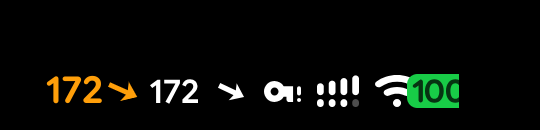

Right: 385 ↘ set by the app through its root helper. Left: lock screen, with the hook’s coloured view (3b) next
to it.
Findings:
- On Android 17 the right side of the status bar is Jetpack Compose. It renders external icons leftmost of
the system icons, newest first, sized by height with their real aspect ratio (wide icons stay wide), tinted like
the rest — and it ignores the icon level, so a single level-list drawable can’t select the number. The app
therefore ships one vector per value:
sb_n40 … sb_n400,sb_lo/sb_hi, and the arrow every 5° (sb_t00 … sb_t36+ double arrows), generated from Google Sans Flex (SIL OFL) bytools/gen-slot-drawables.swift. ~400 small drawables; number and arrow are two slots so the arrow angle stays fine-grained. - Implementation: a tiny Kotlin
main()in the APK, started withapp_process(SlotDaemon), readingset …/remove …lines on stdin. The app launches it throughsu; the same command works over adb as the shell user. When the app goes away the pipe closes and the daemon removes its icons, so no stale value is left on screen. - SystemUI restarts re-deliver icons in hash order, which can swap number and arrow. The daemon watches SystemUI’s pid (and its age when the daemon starts) and re-adds both icons in order a few seconds later — verified.
- Position: fixed (leftmost of the system icons). The framework’s slot order list (
config_statusBarIcons) doesn’t apply to external icons on this build, and runtime overlays can’t change string arrays. Exact positioning needs 3b.
Without root: adb shell can run the very same daemon (tested, uid 2000). A real app would use Shizuku (the
helper runs as the shell user) — the only rootless route to a true system-icon look.
3b — LSPosed hook inside SystemUI
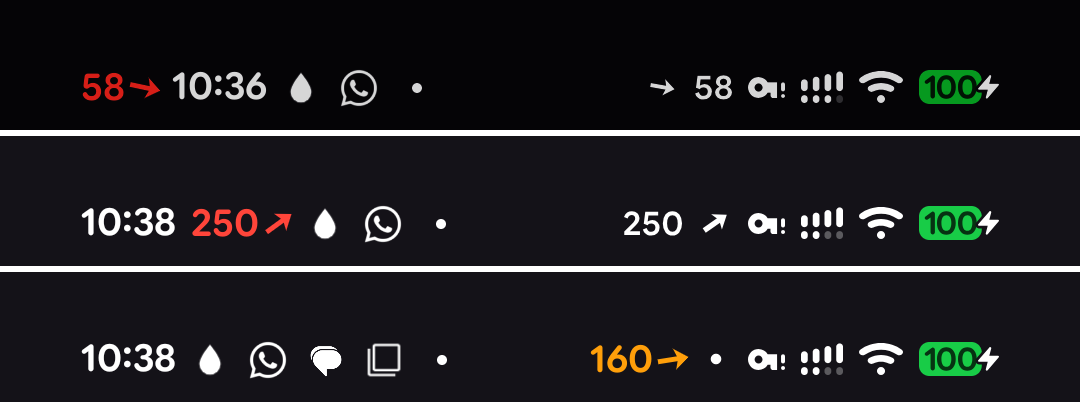
Before the clock (58, red = low), after the clock (250, red = high), left of the system icons (160, orange = slightly high). The right-side pair in the first rows is 3a running at the same time.
The module (same APK, libxposed API 102: META-INF/xposed/{java_init.list,module.prop,scope.list}, scope
System UI) hooks:
PhoneStatusBarView.onFinishInflate— the collapsed status bar is still a View hierarchy on Android 17 (Compose only wraps it and adds the chips and the right-side icons). ATextViewis inserted before/after theclock, or intostatus_bar_end_side_contentleft of the Compose icon row.KeyguardStatusBarView.onFinishInflate— the lock screen bar, left of its system icons.- The view copies the clock’s text size and font, follows its tint (light/dark bars) and its alpha/visibility
(the clock fades on the lock screen and under heads-up notifications; without this the view lingered as a ghost).
In-range values use the clock colour; slightly high is orange, low/high red; stale (> 5 min) is dimmed with a
strikethrough. The arrow is the Mac’s continuous-angle arrow drawn by a custom
Drawable. - Data: the app sends a broadcast to SystemUI, protected by a signature permission only the app holds; SystemUI says “hello” when it (re)starts so the value appears immediately. Changing position is live (no restart).
Exact position among the right-side icons (“between Wi-Fi and battery”): those icons are Compose, so a View can’t be inserted between them. Instead the hook reorders the list SystemUI renders, moving 3a’s two icons right after the chosen slot (the list is built in an R8-named lambda, found by its shape rather than its name):

Not viable: right of the battery — the end of that container is clipped by the rounded screen corner.
Safety (no bootloop risk, but a factory-reset prompt risk)
Nothing here modifies /system, the boot image or KernelSU modules; LSPosed only injects into SystemUI. The real
risk is different: SystemUI is exempt from the crash-recovery cap, so 5 SystemUI crashes within 60 s escalate to a
warm reboot and then to the recovery screen offering “Factory data reset” (choose Try again). Mitigations used:
- every hook body is wrapped (
ExceptionMode.PROTECTIVE+ catch-all), so a bug degrades to “no glucose view”; tools/hook-safety.sh armraises the crash-recovery threshold (device_config, no root) during experiments,disarmrestores it;killmakes the hook a no-op on the next SystemUI start via a global setting;- SystemUI is restarted with a kill, not
am crash(crashes count towards the escalation); - last resorts:
adb uninstall dev.spike.glucostatus, or KernelSU safe mode (Volume Down ×3 at the boot logo disables all modules incl. LSPosed).
The one real failure during the spike (a Handler created before the main looper existed) was caught by LSPosed:
the module didn’t load and SystemUI kept running normally.
Other approaches considered
| Approach | Verdict |
|---|---|
Accessibility overlay drawn over the status bar (TYPE_ACCESSIBILITY_OVERLAY) |
Rootless and can be coloured, but it’s a floating window: no knowledge of icon layout, collides with the cutout/icons, sideloaded apps hit the “restricted setting” gate, Play policy risk. Not built |
CallStyle notification (green call chip) |
Requires a real call context; misuse. Not built |
| Quick Settings tile with the value | Only visible with the shade open. Not built |
Runtime resource overlay of config_statusBarIcons (KernelSU module) |
Doesn’t affect external icons on Android 17’s Compose status bar — useless here |
| SystemUI plugins | Need a debuggable SystemUI (not on user builds) |
For the real app
- Keep 1 + 2 always (zero setup): the promoted MetricStyle notification is also the coloured lock-screen/AOD card; yield the chip via a notification listener.
- Offer 3a through Shizuku or root (no LSPosed): genuine system-icon look, position fixed.
- Offer 3b when LSPosed is installed: colour, font match, clock-side or exact placement. Keep hooks few and shape-based (the R8 lambda names change between builds), keep everything wrapped, ship a kill switch.
- Number-only small icon (2) is probably more readable than number + tiny arrow.