
12 — Android home-screen widgets
Esta página aún no está disponible en tu idioma.
2026-10-16 · investigation report · Android 16 emulator (API 36, Pixel Launcher), Jetpack Glance 1.2.0
Glucose on the home screen with native-feeling widgets: current value (number, continuous trend arrow, age,
colour by range, stale state), graph (last hours, 70–180 target band, coloured by range, more hours when wider)
and graph + value, several sizes each, picker previews, tap → app — updated every minute without hurting the
battery. Spike code: poc/spikes/widgets-android (app Glucose Widgets,
dev.spike.glucowidgets, Kotlin + Glance only).
Result
Section titled “Result”| Item | Status | Notes |
|---|---|---|
| Value widget (1×1 / 2×1 / 2×2) | Works | SizeMode.Responsive with 3 breakpoints; 2×1 verified on the launcher, 1×1/2×2 layouts exist but weren’t screenshotted |
| Graph widget (4×2, resizable) | Works | SizeMode.Exact, bitmap drawn at the real pixel size; 2 h < 200 dp wide, 3 h < 400 dp, 4 h < 520 dp, 6 h beyond |
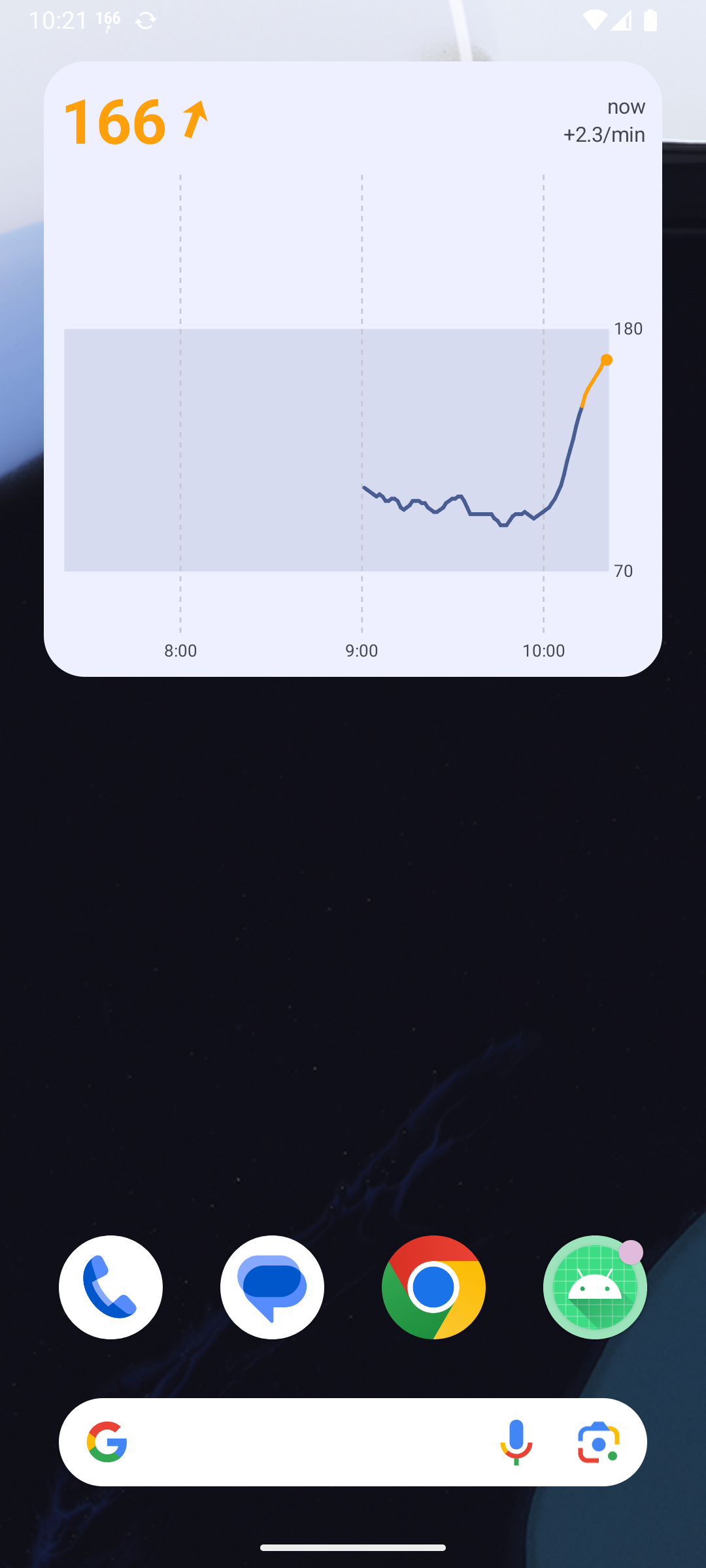
| Graph + value widget (4×3, resizable) | Works | Exact; value header on top when ≥ 120 dp tall, value column on the left when shorter |
| Trend arrow, continuous angle | Works | 0 → flat, ±3 mg/dL/min → vertical, quantised to 5° (37 vector drawables reused from the status-bar spike, tinted); ≥ 3 → double arrow |
| Colour by range | Works | Same mapping as the Mac / status bar: red < 65 or > 185, orange 146–185, theme colour otherwise; graph segments coloured the same way |
| Stale (> 5 min) | Works | Number + arrow turn the theme’s outline grey and the number is struck through; age keeps counting |
| Light / dark, dynamic colour | Works | GlanceTheme (dynamic colours); the graph bitmap reads the API 34+ system_*_light/dark colour tokens and is re-rendered on night-mode change |
| Generated previews in the picker (Android 15+) | Works | providePreview + GlanceAppWidgetManager.setWidgetPreviews (rate-limited by the system) |
| Tap → opens the app | Works | actionStartActivity<MainActivity>() |
| Pin from the app | Works | requestPinGlanceAppWidget (the launcher’s “Add to home screen” sheet) |
| Live updates every minute | Works (synthetic source) | Foreground service pushes updateAll() on each reading; ~60–150 ms per refresh of 3 widgets on the emulator |
| Juggluco source (127.0.0.1:17580) | Built, not tested | Same code as the status-bar spike (history + /x/live SSE), plus a network-security-config for cleartext to 127.0.0.1 |
| Release build (R8) | Works | assembleRelease (minified, shrunk, signed with ~/.android/debug.keystore), 2.7 MB; screenshot 07 is the release APK |
| Real phone screenshot | Not done | An outage stopped the run; afterwards the phone was reserved for the showcase install. Never installed on the phone |
| CPU measurement (10 min) | Done (emulator) | 3.8 s CPU in 10 min (≈ 0.6 % of one core) with 3 widgets on screen, screen on, 10 renders — see “Battery” |
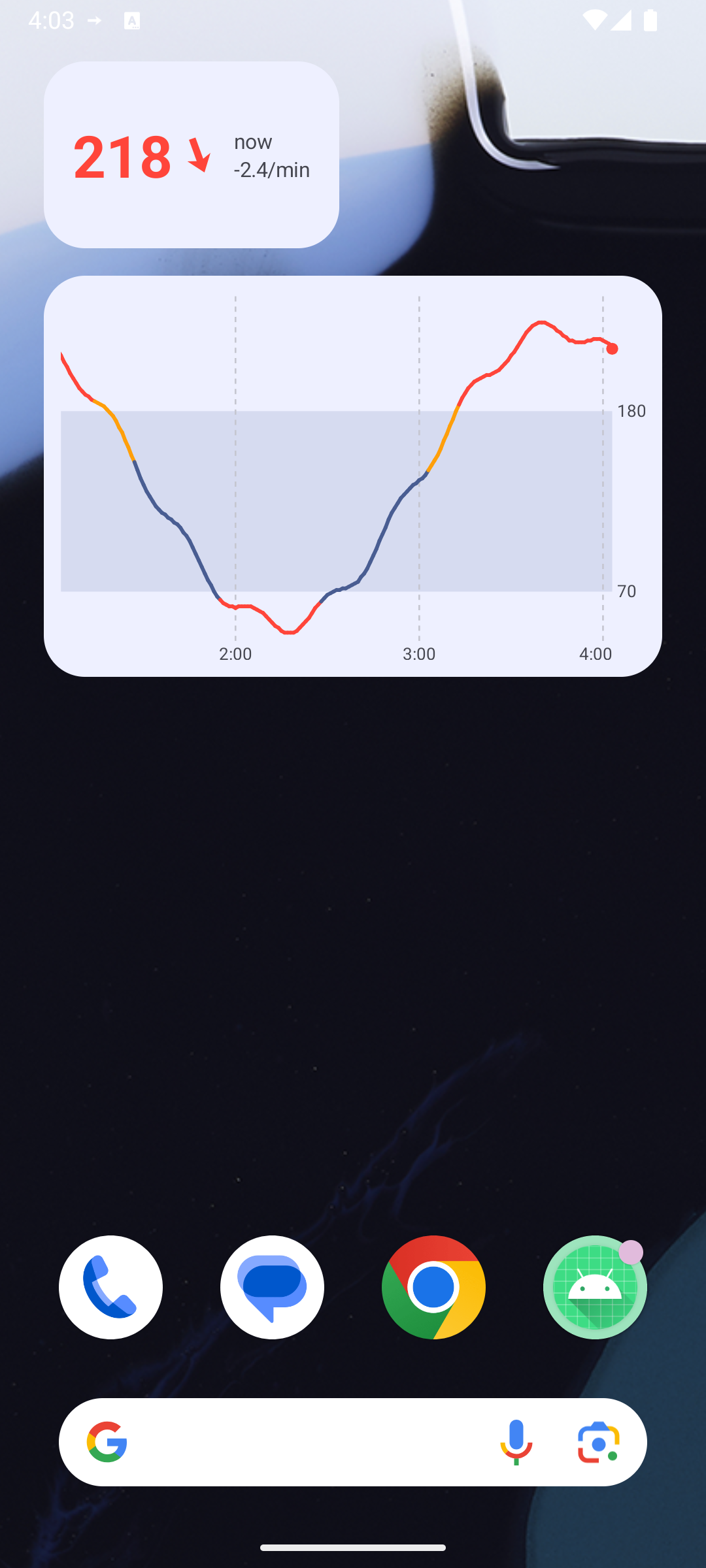
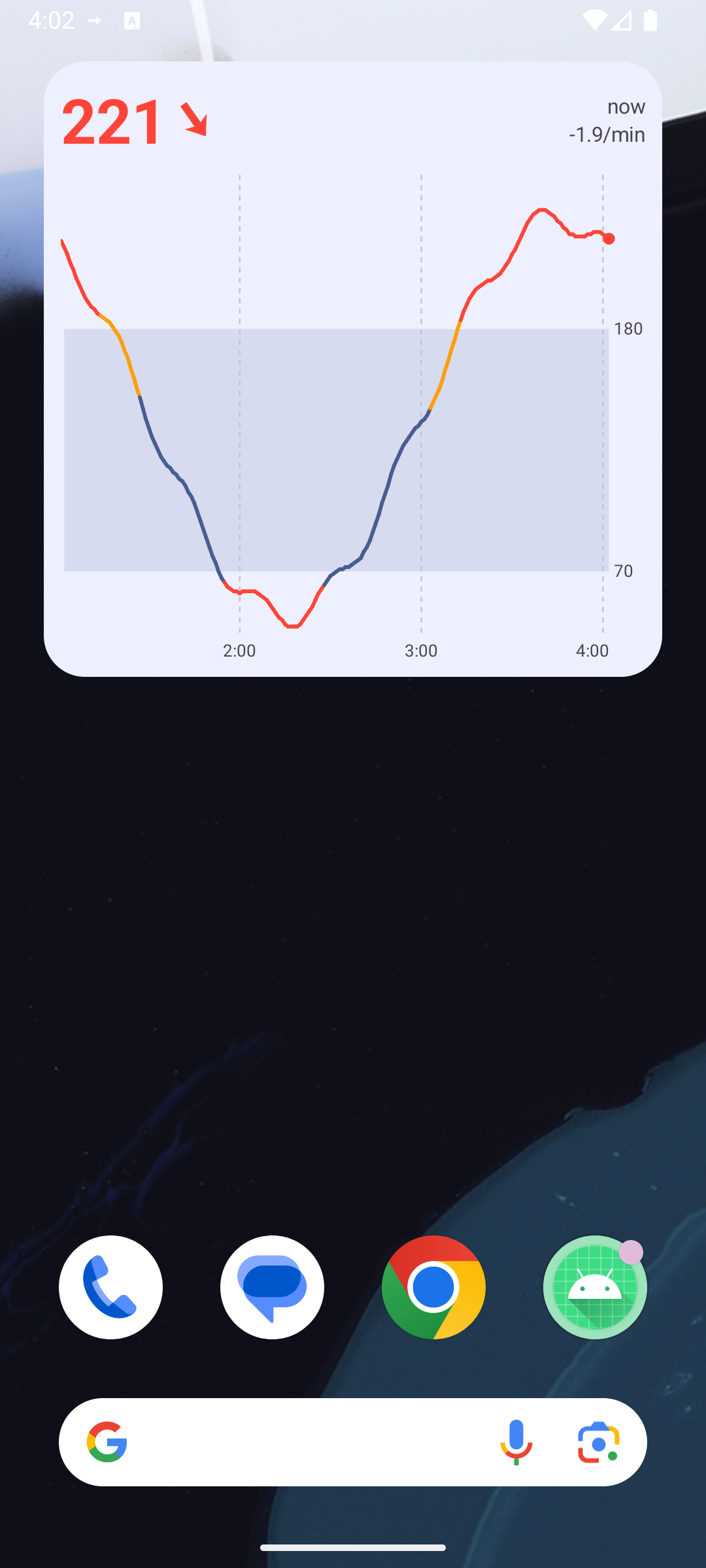
Screenshots (poc/spikes/widgets-android/evidence):
 |
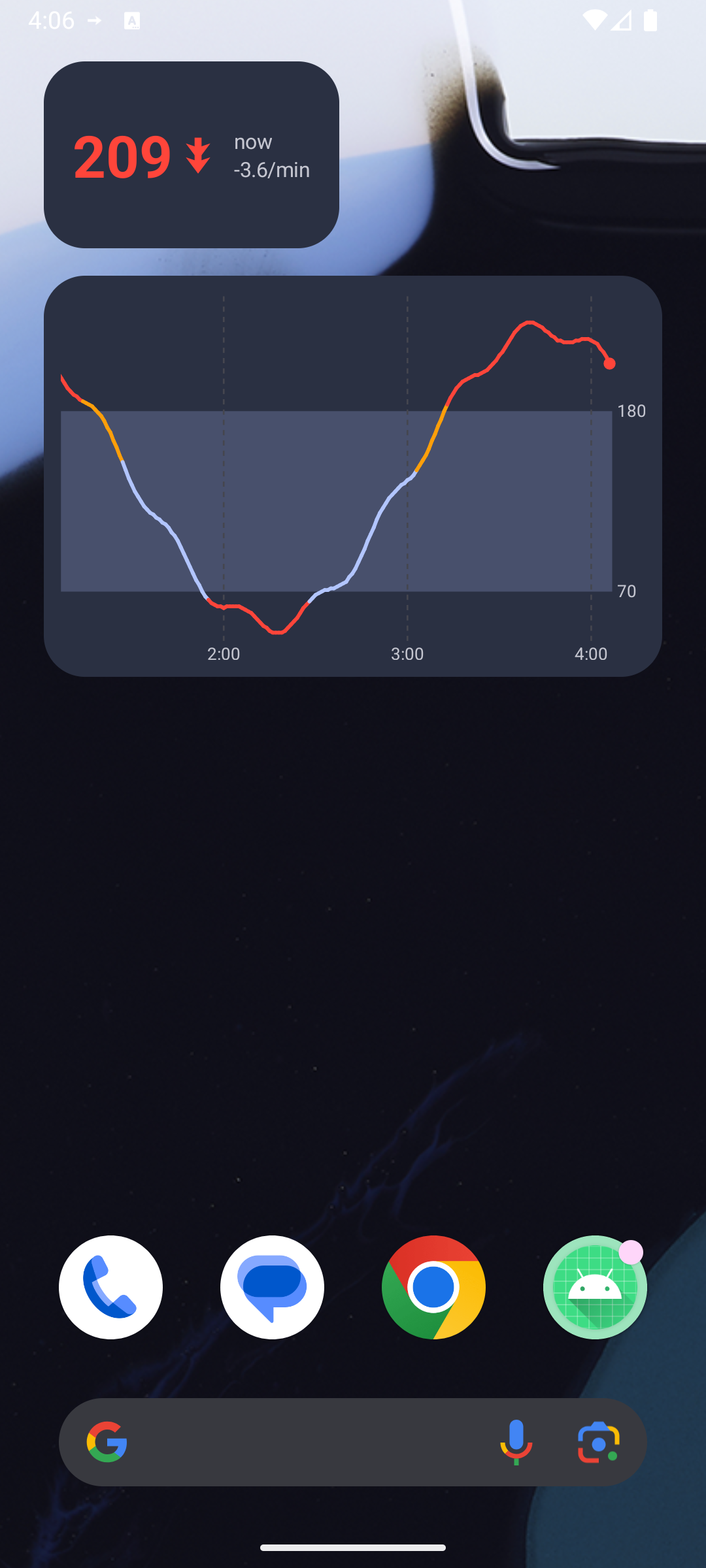 |
| Value 2×1 (218 mg/dL, falling) + graph 4×2, light | Same in dark mode (−3.6/min → double arrow) |
 |
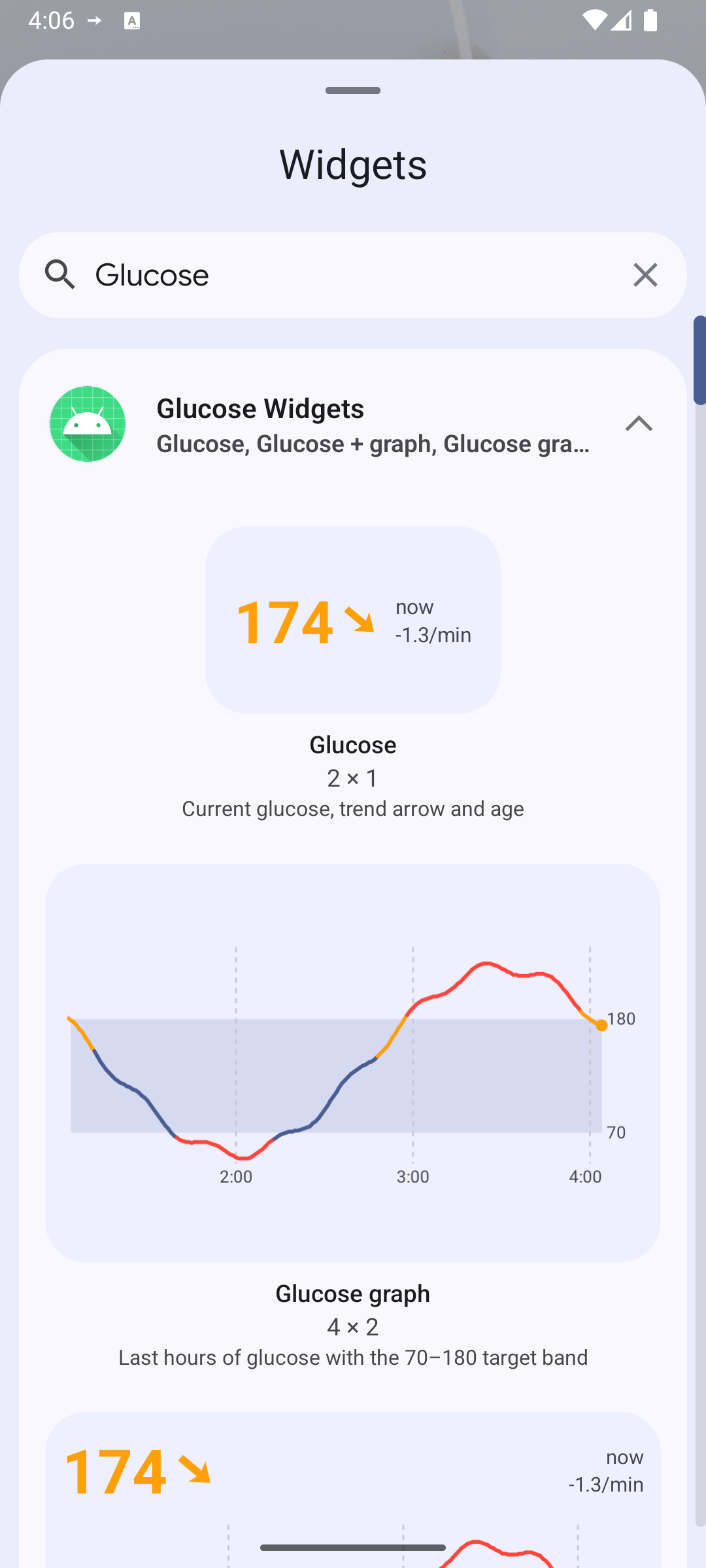 |
| Graph + value | Widget picker with generated previews |
 |
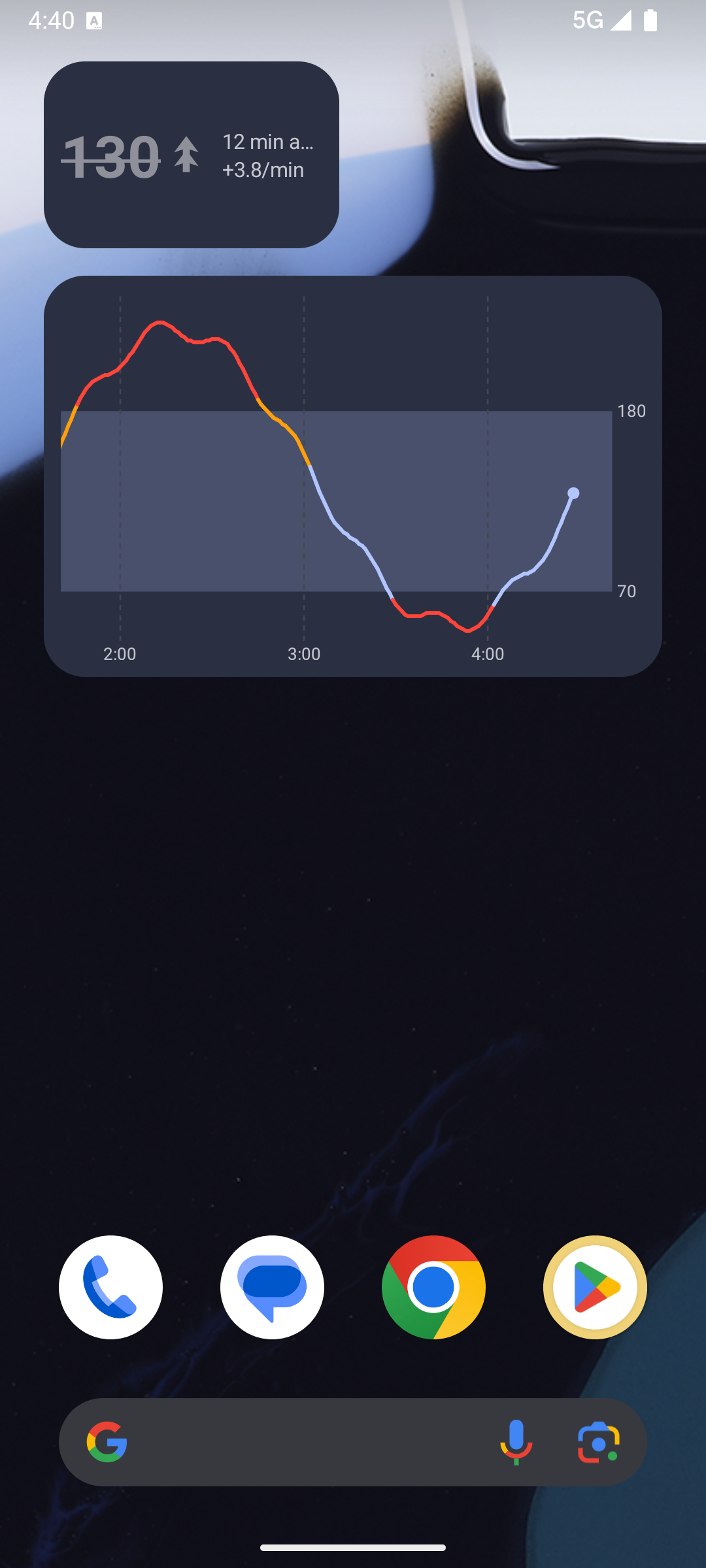 |
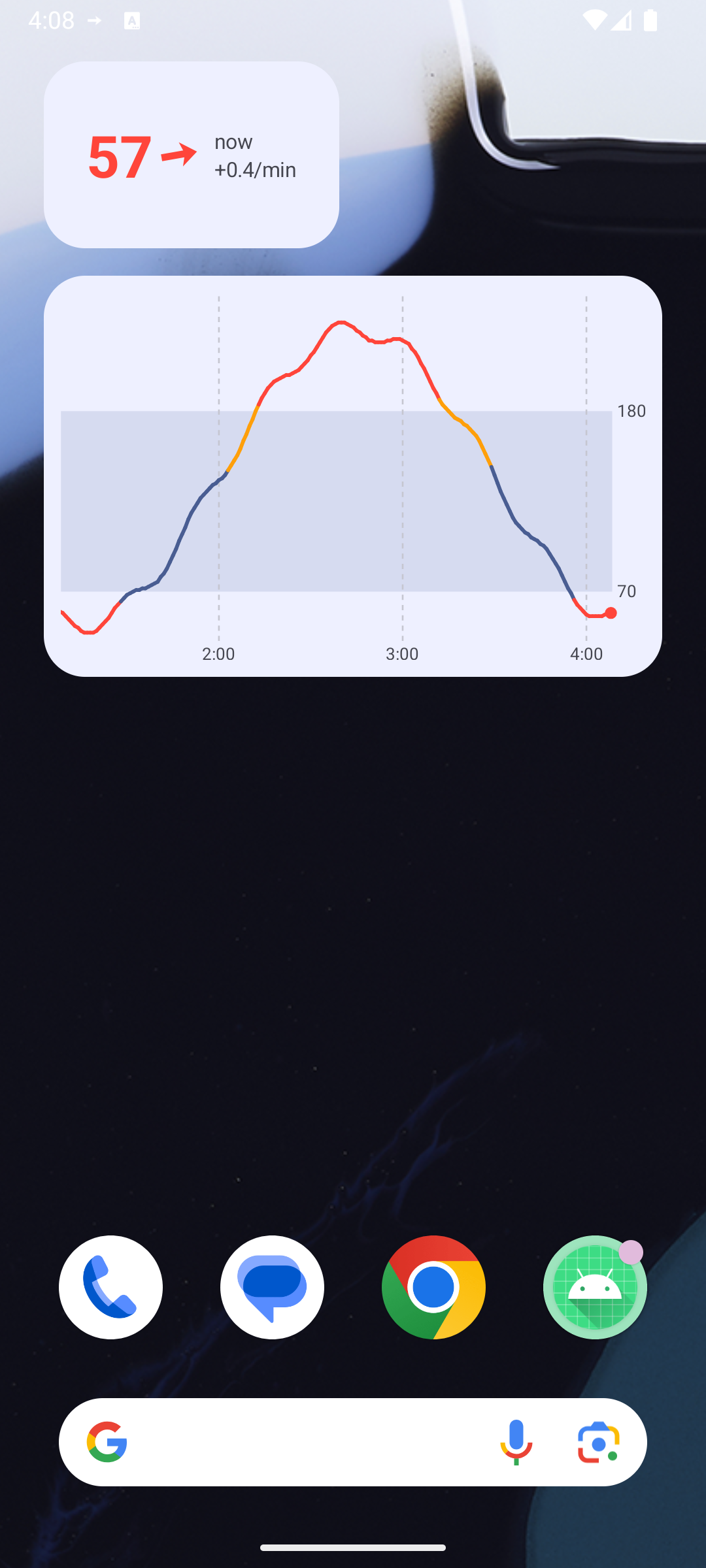
| Low (57, red) | Stale: last reading 12 min ago, struck through and grey |
 |
|
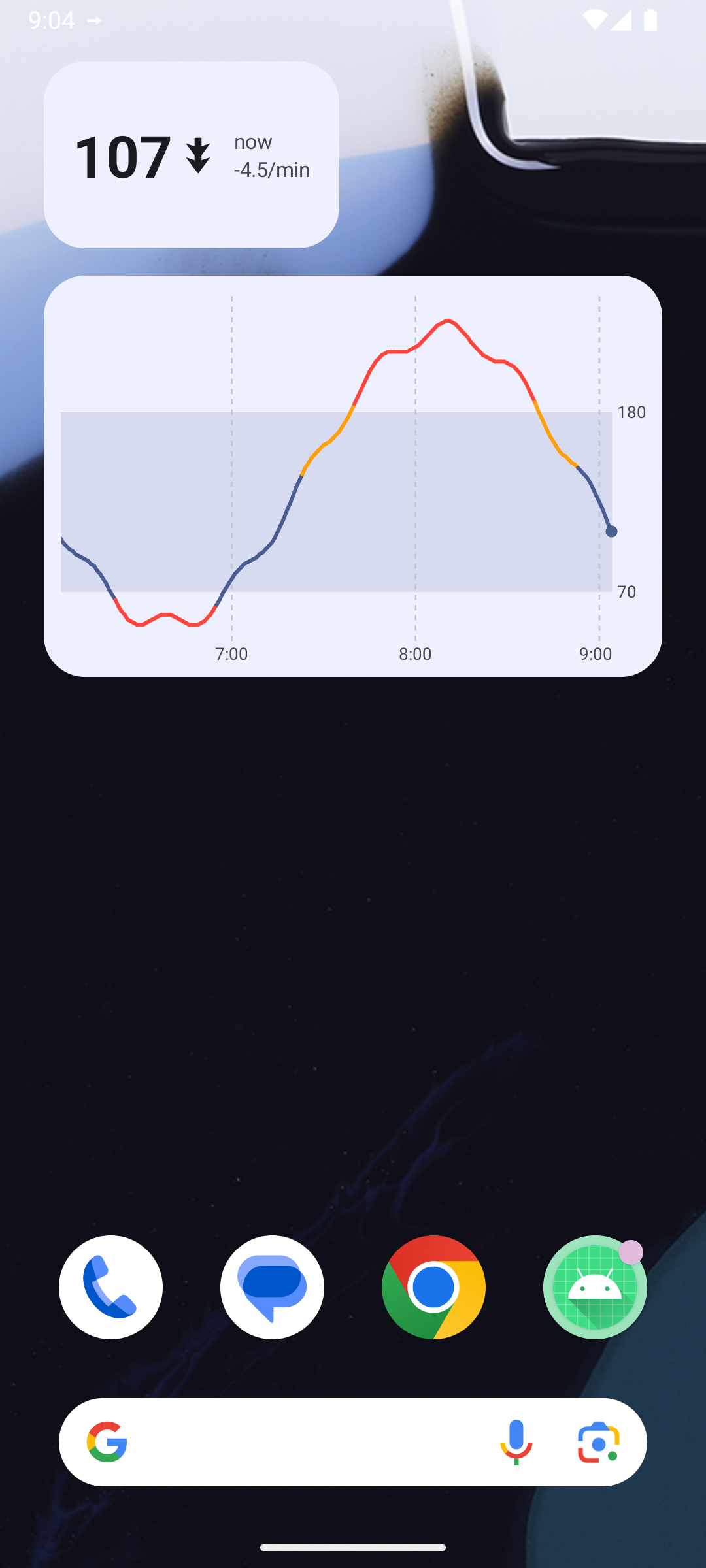
| Release (R8) build, in range (theme colour), falling fast |
How updates work
Section titled “How updates work”- The system’s own periodic update is ≥ 30 min, so
updatePeriodMillis="0"and the app pushes updates. LiveService(foreground service,specialUse) follows the source — Juggluco’s/x/liveSSE, or the synthetic sine (one reading per minute, on the minute) — and stores readings inGlucoseStore(last 8 h in memory + a ~10 KB CSV so a system-initiated re-render after process death still has the graph).- Every change goes through
WidgetUpdater.refresh(context, reason), which:- computes a key = (latest reading time, age in whole minutes, night mode, history size) and does nothing if it
hasn’t changed (
skippedSamecounter); - skips while the screen is off (
PowerManager.isInteractive;skippedScreenOffcounter). ASCREEN_ONreceiver in the service catches up with one render — the widget can show the old value for a fraction of a second when unlocking; - publishes a
Frame(history, now)StateFlowthat the widgets’ compositions collect, then callsupdateAll()only for widget classes that have instances.
- computes a key = (latest reading time, age in whole minutes, night mode, history size) and does nothing if it
hasn’t changed (
- A ticker in the service wakes at
latest.epoch + n·60 s + 1 s(the instants where “3 min ago” changes) only while the screen is on; coroutinedelaydoesn’t run during CPU suspend, so it adds no wake-ups. - Night-mode changes arrive through
Service.onConfigurationChanged→ re-render (the bitmap has baked colours). - Fallback:
RefreshWorker(WorkManager, every 15 min) pulls the last 30 entries and refreshes when the service isn’t running — background FGS starts from widget broadcasts (onEnabled/onUpdate) can be refused (ForegroundServiceStartNotAllowedExceptionwas seen from an adb broadcast); opening the app always starts it. - Stopping: when the last widget is removed (
onDisabled+ no ids left) the service and the worker stop.
Battery notes
Section titled “Battery notes”- One Glance refresh of the 3 widgets took 58–145 ms wall time on the (heavily loaded) emulator, i.e. at most ~1 render/min while the screen is on, zero while it’s off. The SSE connection itself is the remaining per-minute cost; in the showcase app it already exists for the status bar / Mac link, so widgets add only the renders.
- Glance runs each update through a short WorkManager-backed session (
GlanceAppWidget.update→ session worker); that’s heavier than buildingRemoteViewsby hand. If measurements show it matters,GlanceRemoteViews(compose toRemoteViewsdirectly, thenAppWidgetManager.updateAppWidget) avoids the session. - Measured on the emulator (release build, screen kept on, the 3 widgets visible, synthetic source = 1 reading/min,
10 min, 09:04:54–09:14:54): process CPU went from 86+88 to 305+250 ticks (utime+stime, 100 Hz) → 3.81 s of CPU in
600 s ≈ 0.6 % of one core, for 10 renders (11 ticker wake-ups skipped as unchanged, last render 45 ms wall).
That is ≈ 0.38 s CPU per minute-update covering: Glance session start (WorkManager), composing 3 widgets in all
their sizes (Responsive = 3 layouts, Exact = 2 orientations each), 4 graph bitmaps, the synthetic source and the
ticker. Emulator numbers are indicative only (arm64 guest on an M-series host); repeat on the phone in
investigation 11’s lab with
ps -o TIME//proc/<pid>/statand thescreenOffSkiptoggle (DebugReceiver --es cmd screenOffSkip --ez value false|true). - With the screen off the widgets cost nothing beyond receiving the reading (renders skipped, ticker cancelled). Not measured separately.
- Cheaper options if 0.4 s/min matters on the phone: render only the sizes actually placed (Exact everywhere), drop
the Glance session (
GlanceRemoteViews→AppWidgetManager.updateAppWidget), and reuse the graph bitmap between the portrait/landscape sizes. - Zero-service alternative (not built): Juggluco can send xDrip-style broadcasts to listed packages; a manifest receiver could then refresh the widgets without our own FGS. Needs a Juggluco setting change (not touched tonight).
API choices
Section titled “API choices”- Jetpack Glance 1.2.0 (stable; 1.3.0 is alpha) +
glance-material3. Compose-style Kotlin,GlanceThemegives Material 3 dynamic colours and widget background/corner radius tokens for free (appWidgetBackground(),system_app_widget_background_radius). - Value:
SizeMode.Responsive(48×48, 110×48, 110×110 dp). Graph / combined:SizeMode.Exact— with Responsive the bitmap is rendered for the breakpoint size and stretched to the real size, distorting the line and labels; Exact renders once per orientation at the real size (2 renders) and the hours adapt to the width. - Graph =
Bitmapdrawn withCanvas(GraphRenderer), shown withImage(ContentScale.FillBounds)at the exact dp size, pixels = dp × density (capped at 1400 px per side to stay well under the RemoteViews bitmap budget of screen × 1.5). Glance has no canvas/path primitives; a bitmap is the standard approach. - Arrow: Glance can’t rotate views, so 5°-step vector drawables tinted with
ColorFilter.tint(crisp at any size, no bitmap). - Previews:
providePreview()composes sample data (the synthetic curve) andsetWidgetPreviews()publishes it (Android 15+; on older launchers you’d add a staticpreviewLayout).previewSizeModegives the picker realistic sizes for the Exact widgets. - Widget-provider XML:
targetCellWidth/Height(2×1, 4×2, 4×3), resizable both ways,home_screen|keyguard, Glance’sglance_default_loading_layoutas the initial layout.
Not done
Section titled “Not done”- Real-data screenshot on the phone (and the Juggluco source untested end-to-end in this app; the code is the proven one from the status-bar spike).
- CPU/battery measurement on the phone (emulator only) and with the screen off.
- Screenshots of the 1×1 and 2×2 value layouts and of wider (5-column / tablet) graphs — the layouts exist; resizing through the launcher via adb wasn’t done in time.
- Accessibility pass (content descriptions exist for the arrow and graph), widget configuration screen (e.g. hours, units), mmol/L.
Integration notes for the showcase app (app.mauri.sukrara.poc)
Section titled “Integration notes for the showcase app (app.mauri.sukrara.poc)”Copy from poc/spikes/widgets-android/app/src/main/:
| File | What | Changes needed |
|---|---|---|
Widgets.kt |
3 GlanceAppWidgets + receivers + shared composables |
package; actionStartActivity<MainActivity> → Sukrara’s activity; receivers’ onEnabled/onUpdate should start Sukrara’s existing service instead of LiveService |
GraphRenderer.kt |
bitmap graph | none (uses Range) |
WidgetUpdater.kt |
dedupe + screen-off skip + updateAll |
replace GlucoseStore.load(c) with Sukrara’s history accessor |
Glucose.kt |
Reading, Trend.drawable, Range, ageText |
merge with Sukrara’s existing model (it already has Reading/Trend/Range from the status-bar spike) |
res/drawable/arrow_*.xml |
39 arrow vectors | same files as the status-bar spike’s sb_t*; reuse whichever Sukrara already has |
res/xml/widget_*.xml, strings.xml entries, manifest <receiver>s |
provider info | none |
(optional) RefreshWorker.kt |
15-min fallback | only if Sukrara’s FGS can be off while widgets exist |
Not needed: LiveService, Sources.kt, GlucoseStore.kt, DebugReceiver, MainActivity — Sukrara already has the
foreground service, the Juggluco/direct sources and a reading store.
What the widgets need from Sukrara’s data layer:
- History: the last ≥ 6 h of readings (time, mg/dL, rate or null), oldest first, readable synchronously from any thread and after process death (persisted — the system can ask for a render with no service running).
- A hook on every new reading: call
WidgetUpdater.refresh(context, "reading")from the service’s coroutine scope (it’s cheap when nothing changed and when the screen is off). - Screen-on + minute ticker + configuration change hooks in the service (copy the
screenreceiver,startTicker()andonConfigurationChangedfromLiveService), so age/stale and dark mode stay right. - Call
WidgetUpdater.publishPreviews(context)once after install/update (e.g. app start, guarded by a version pref — the system rate-limits it). - Dependencies:
androidx.glance:glance-appwidgetandglance-material31.2.0 (needs the Compose compiler plugin, which Sukrara already has); WorkManager comes transitively.
In Sukrara (follow-up, 2026-10-16)
Section titled “In Sukrara (follow-up, 2026-10-16)”- Integrated in Sukrara (10). The widgets now work in both roles. The wearer feeds them from
its source, and a follower from its own
follower.db(FollowerExtras: it loads the last 8 h on start, then adds every stored batch, and clears them on “Stop following”). Verified on an emulator following the real phone over Nostr (screenshot). - R8 trap: in Sukrara’s release build R8 merged
GraphWidgetintoCombinedWidget. Glance keys its bookkeeping by theGlanceAppWidgetclass name, so after a process restart the graph + value widget was drawn as the plain graph (before, after). An app with more than one Glance widget needs-keep,allowoptimization class * extends androidx.glance.appwidget.GlanceAppWidget { <init>(); }(and a keep for the receivers). - Review + cleanup (v0.10.4). Worth keeping in Sukrara: the code is small and self-contained, and both the
graph-only and the combined layout are in daily use on the user’s phone. The cost was duplication, now removed
(10): the widgets share
core/Glucose.kt(trend, range, staleness, age) and thesb_t*arrows with the status bar, andGlucoseStore’s CSV copy is replaced byRecentHistory, which reads the role’s ownowner.db/follower.db/ treatment store. The integration notes above describe the spike; they predate this. - Real size (v0.10.6). Pixel Launcher on the user’s Pixel 10 Pro reports 296×202 dp for a 4×2 widget it lays out at 244×149, so Exact mode’s bitmap was clipped. Graph widgets now measure the real size with a one-off probe (16 sized layouts; the launcher loads the image of the one it applies): 10.
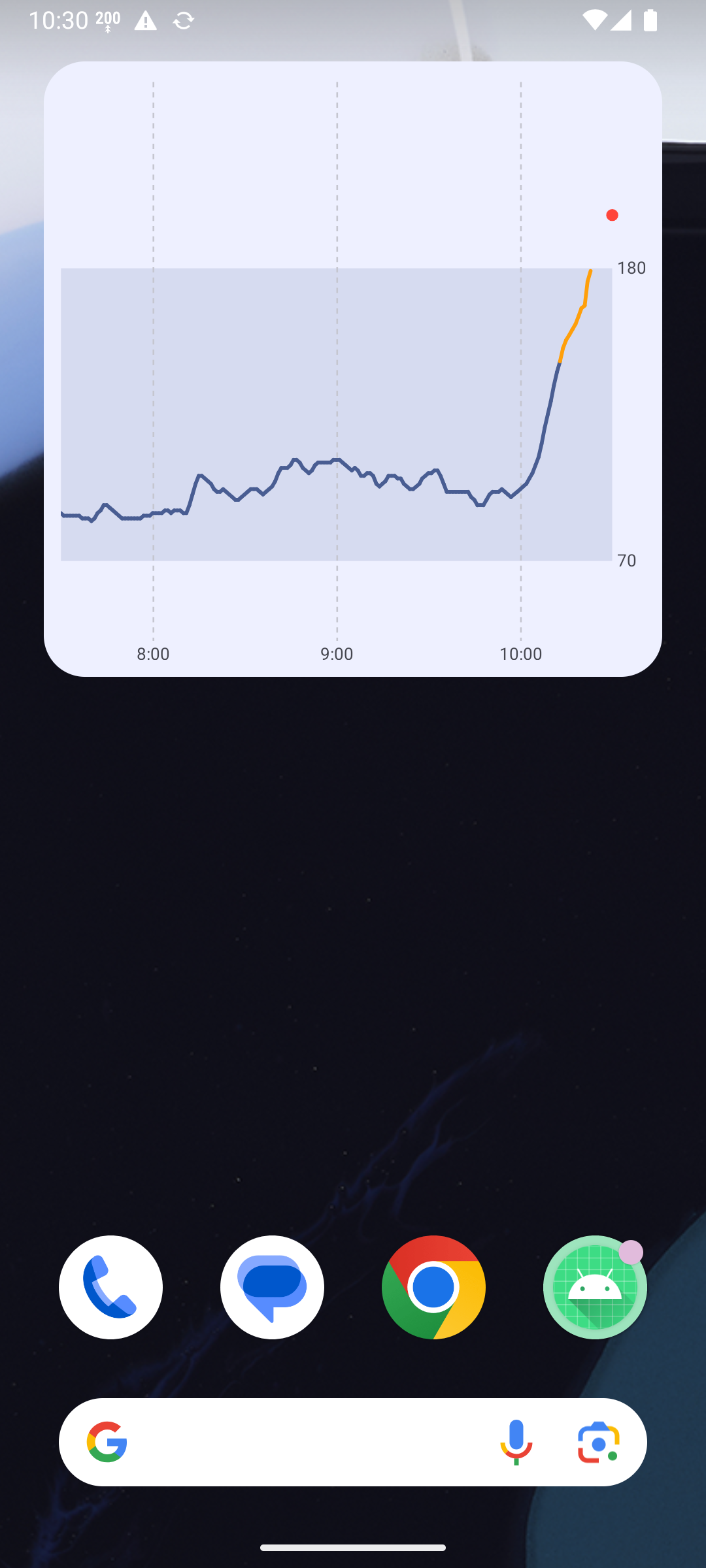
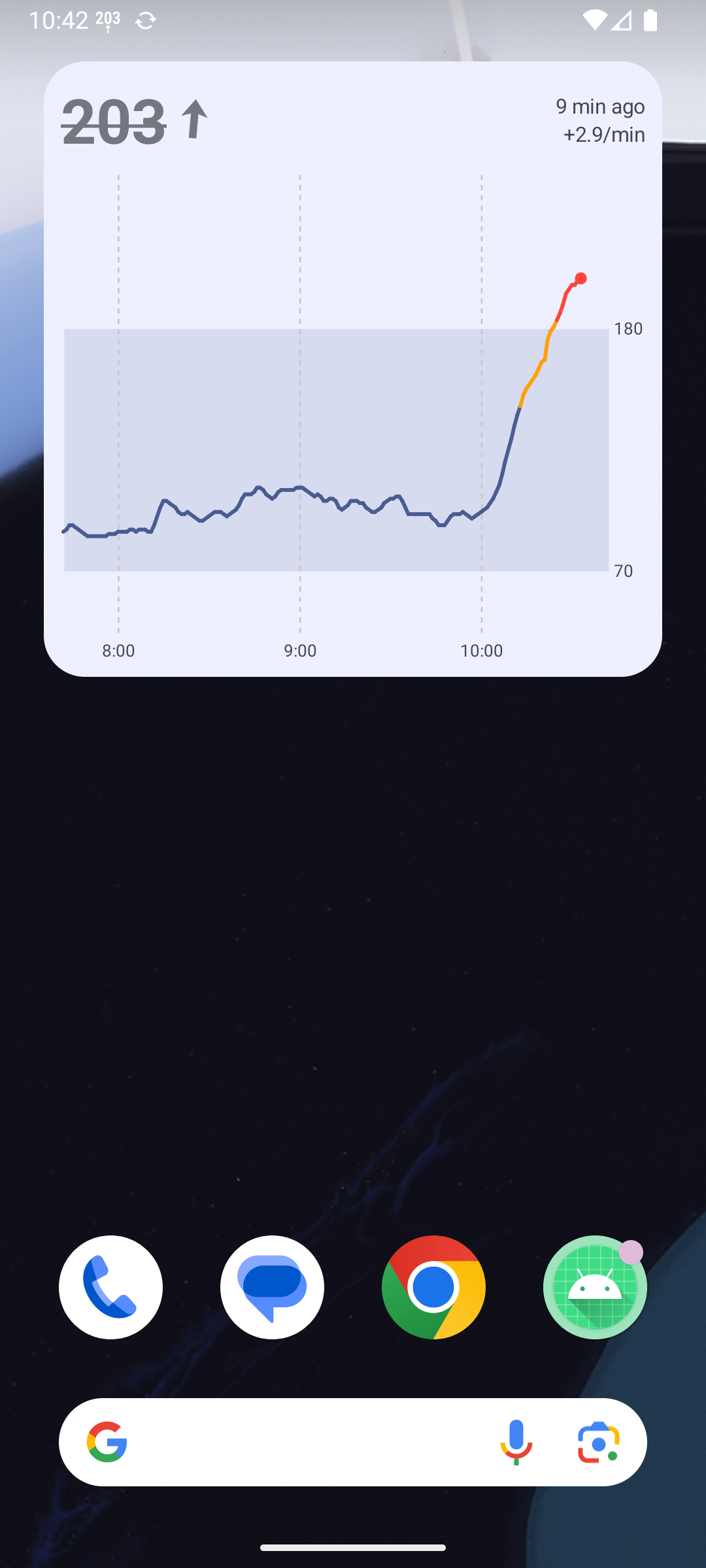
In Sukrara: the add-the-widget banner (2026-10-21)
Section titled “In Sukrara: the add-the-widget banner (2026-10-21)”The user: “the way this app is meant to be used is by adding a big widget to your launcher”. Official guidance read
first: pinning from the app (discoverability#pin),
promotion that “should never block or hinder the user’s primary actions”
(discovery-promotion),
AppWidgetManager (reference).
- Added: home card while no graph widget is placed (
getAppWidgetIdsper provider; tested on the emulator: the id disappears when the widget is removed, no stale ids), one Add widget pill →requestPinAppWidgetfor Glucose + graph with a success callback (WidgetPresence.PinnedReceiver) and a re-check on resume; a how-to line when the launcher can’t pin; dismissible for good (FEATURES). - Discarded: a live preview in the pin dialog (
EXTRA_APPWIDGET_PREVIEWvia GlancerequestPinGlanceAppWidget): one fixed-size RemoteViews that Pixel Launcher stretched into the 4×3 frame. Without it the dialog shows the generated picker preview (setWidgetPreview, Android 15+, “widget picker and pin app widget flow”), drawn at the right size. Counting the value-only or lock screen widget as “placed”: they aren’t the main surface. A Mac equivalent (WidgetCenter.getCurrentConfigurations): the menubar is the Mac’s main surface and macOS can’t place a widget for the user, so a banner could only say where to look.
In Sukrara: back to the PoC’s look (apps/android, #181, 2026-11-11)
Section titled “In Sukrara: back to the PoC’s look (apps/android, #181, 2026-11-11)”The owner: the new widgets were worse than the PoC’s (squashed card, stretched preview, no wallpaper colour, a “%”
in the rings, a “now” label). The PoC is the reference; side-by-side renders of both in the same scenarios
(the PoC’s GlucoseCard in a scratch copy of the frozen spike, the new renderer through renderWidget) showed the
rest of the card already matched.
- Added back: the size probe (
WidgetProbe,ProbeProvider, from the PoC’s v0.10.6 / v0.10.8). The new app had dropped it and drew for the launcher’s reported size, which Pixel Launcher gets wrong (296×202 for 244×149), soFillBoundssquashed the card. The measurement now lives with the placement in thewidgetsstate file (WidgetPlacements.measured), not in a separate preferences file; it is forgotten on resize and removal. - Added: the picture keeps its aspect ratio (
ContentScale.Fit) on the widget, in the picker and in the pin dialog. A measurement a few dp off, or a launcher that never answers the probe, leaves a sliver of background instead of a stretched card. The pin dialog keeps its generated preview (without it Pixel Launcher shows a blank card): Fit is what stops the stretch the PoC saw there. - Added back: dynamic colour (
widgetPalette): Glance’s widget background (system_accent2_50/_800) and the system’s on-surface colours for text and grid, as the PoC’sGlanceTheme+systemPalette; the value colours stay Sukrara’s. The card’s background colour is now the widget’s own (the PoC used surface_container there, a slightly different tone behind erased outlines). - Renderer, both platforms: the ring’s number without “%” and as heavy as in the PoC, no “now” beside a fresh value, and small slots no longer capped at two (the PoC’s 4×2 shows the last treatment, 7d and 1d).
- Kept although the PoC differs: the trend arrow snaps to the 45° bands (#4, one picture per word, as the text arrows and the alerts); the graph-only widget’s age pill over the chart (a safety decision, 2026-10-27); the range word under an out-of-range value (#26, WCAG 1.4.1).