
36 — One glucose notification: can it also ring the alerts?
Esta página aún no está disponible en tu idioma.
2026-11-14 · investigation report · follow-up of #195 · Android source (frameworks/base NotificationAttentionHelper,
NotificationManagerService, SystemUI HeadsUpCoordinator, DeskClock), the Android docs, the sources of xDrip+,
Juggluco and GlucoDataHandler · prototype on an Android 17 emulator (API 37.0)
(investigations/195-one-notification) · no real health data
The owner, 2026-11-14, about the Pixel 10 Pro (Android 17, rooted, release 5e669eb5):
“I’m very concerned about the 2 notifications issue. They basically show the same content duplicated. The permanent notification has several issues: it doesn’t show the trend, the Open Sukrara button is unnecessary, the second line shows just “mg/dL” which is nonsense, and most important: it is not showing any graph at all… (unlike the emulator). In my phone I have root and I don’t have the glucose status bar pill, and the notification looks very different, which is against the project rules to keep things consistent. Are you sure a permanent notification (or live activity, whatever it is) can’t be triggered to show multiple times during its existence? In Google Maps, I would expect it pops up every time I need indications, so there must be a way.”
#195 kept two notifications on Android on purpose (SPEC §1 “Showing an alert”, FEATURES What stays on screen). It argued that one notification has one channel, that an ongoing notification isn’t bridged to a watch, that it can’t be the swipe that answers a very low, and that Android’s guidance lists alerts as an inappropriate use of Live Updates. This report checks each of those claims against the platform, and asks whether one notification can carry the alerts safely.
Short answer
Section titled “Short answer”- Yes, one notification can ring as often as needed. The foreground-service notification is posted again with
the same id on the alert kind’s channel, without
setOnlyAlertOnce. It plays the channel’s sound at the channel’s volume, vibrates and shows heads-up, every time. It passes Do Not Disturb by the channel’s own override. It opens full screen over the lock screen whenever it comes from the silent channel. It stays a promoted Live Update, chip included. Afterwards it goes back to the silent channel, and the swipe still reaches the app. Measured on an Android 17 emulator (§4), and it is what the AOSP source says (§3). “One notification has one channel” is true at any given moment, but the channel can change with every post. - What one notification can’t do. It can’t reach a watch: Wear OS doesn’t bridge ongoing notifications, and
a foreground-service notification is always ongoing. Only Wear OS 7 may bridge a Live Update, and only if the
manufacturer configures it. Separately, Android’s Live Update guide names “alerts” as an inappropriate use; that is
guidance and is not enforced. Three more points are rules to follow rather than blockers:
- Each post after a ring must stay on the sounding channel while the sound plays; switching to the silent channel stops the sound.
- A swipe during a ring must be posted back on the silent channel, or it rings again.
- The full-screen intent fires on the switch from silent to alert, not on every re-ring.
- The phone (part 1). The phone was not reachable over adb during this session: adb listed no device and
macOS showed no Pixel on USB in four checks spread over the run. So the diagnosis below comes from the code at
5e669eb5, and the notification was reproduced on the emulator; the read-only checks to confirm it are listed. What it shows:- There is no graph because the phone shows the Live Update layout (Live Update chip on by default and granted by Android 17). Promotion forbids custom views, and the graph only exists in the chip-off custom card.
- The “mg/dL” line is MetricStyle’s metric label, which Sukrara sets to the unit.
- The trend is missing because the big value has none: only a tiny text arrow in the title and the small icon.
- Open Sukrara is added to every value state.
- The status-bar pill is off by default (Value in the status bar). It also needs the LSPosed module scoped to System UI and a System UI restart.
- Recommended, pending the owner’s decisions (end of §5):
- One notification on the phone. The glucose notification is the alert while one is up, and rings on that kind’s own channel.
- The card with the graph is the default layout everywhere. It is the renderer’s card, so it is the same on every Android version. The Live Update chip becomes an opt-in, and is redundant when the root value is in the bar.
- A separate copy of each alert only for people who choose Alerts on my watch.
1. The owner’s phone
Section titled “1. The owner’s phone”Not reached. adb devices listed only this session’s emulator at the start of the session and three more times
during it, and system_profiler SPUSBDataType showed no Pixel. No phone command was run. What follows comes from the
code at 5e669eb5 (LiveNotification, LiveNotificationContent) and its reproduction on the API 37 emulator with the
same notification. The read-only commands at the end of this section confirm it on the phone.
| What the owner sees | Cause (code at 5e669eb5) |
|---|---|
| No graph; “looks very different from the emulator” | Settings › Status bar › Live Update chip is on by default, and Android 17 grants promotion (canPostPromotedNotifications), so Layout.LIVE_UPDATE applies. A promoted notification may not have custom views or be colorized (Live Updates; Notification.hasPromotableCharacteristics, android17-release). The renderer’s card (surface notification: header row + chart) is drawn only in Layout.CARD, which is used when the chip is off or refused. The emulator pictures (Roborazzi NotificationCardShotsTest, API 36.0 images, which have no promotion) show that card. So two different notifications come out of one surface, depending on the Android version and a setting: the Live Update is the notification-text glyph surface, not the card. That is the “One graph everywhere” violation |
| Second line “mg/dL” | metricStyle() adds Metric(FixedText(value), label = unit). With a single metric, Android 17 lays MetricStyle out compactly: the title on the first line, the label on the second, and the value large at the end (reproduced: title 138 mg/dL ↗, line mg/dL, a big green 138). The slot metrics (GlucoseCard.slotTexts) were missing on the phone, so it had one metric. That happens when the Notification place shows no slots (notificationCardStyle), which was not confirmed on the phone |
| No trend | The big metric value is look.text alone. The only arrows are the small icon and a text ↗ at title size, with no colour, which the eye misses next to the large value |
| Open Sukrara button | LiveNotificationContent.value() adds OPEN_APP to every value. A promoted card draws actions full width, so it becomes a large button that repeats the tap (which already opens Add treatment, or the app) |
| No status-bar pill (root) | Value in the status bar is off by default (FEATURES “Root status bar”). Only someone who turns it on is asked for root. If it is on: KernelSU never prompts, so Sukrara must be allowed in its Superuser list (Allow root for Sukrara). The clock placements need the LSPosed module to be enabled with System UI in its scope, plus a System UI restart after every install whose HookCode.VERSION changed (home’s Restart System UI card). The slot: placements show with root alone |
Read-only checks for the phone, for the next session that has it connected:
P="adb -s 62240DLCH0005W"$P shell dumpsys notification --noredact | grep -B2 -A45 'pkg=app.mauri.sukrara.*id=1 ' # channel, flags (PROMOTED_ONGOING), style, actions$P shell appops get app.mauri.sukrara | grep -i promot # Live Updates allowed for Sukrara?# the settings (chip, Value in the status bar, placement): read on screen in Settings › Status bar (release build)$P logcat -d | grep -E "Sukrara\.(notify|systemui|root)|LSPosed|Xposed" | tail -100 # module loaded? hook errors?$P shell su -c 'ls /data/adb/lspd/; cat /data/adb/lspd/log/modules_*.log | tail -50' # only if su is allowed for the shell$P shell dumpsys statusbar | grep -i sukrara # our slots (root icons) present?2. What others do
Section titled “2. What others do”| App | One notification or two | How it gets attention |
|---|---|---|
| Google Maps navigation | One Live Update (ETA, next turn, progress, chip) (Android Authority) | Its voice is audio the app plays (Navigation SDK setAudioGuidanceSettings: mode, volume, vibration; Navigator.AudioGuidance), not the notification’s sound. The SDK’s foreground notification is shared under one id (background usage). Re-alerting by mistake on every update is a known bug: “pops into view” and vibrates every ~3 s (react-native-navigation-sdk #696), which shows that an update re-alerts |
| AOSP Clock: timers | Two ids on one channel: running timers Int.MAX_VALUE-2 (notify), expired Int.MAX_VALUE-3 (startForeground, full-screen intent) (NotificationModel.kt, TimerNotificationBuilder.kt) |
The app’s own klaxon (TimerKlaxon.start(), TimerModel.kt) |
| AOSP Clock: alarms | Firing alarm = the foreground notification Int.MAX_VALUE-7 on alarmNotification (HIGH), CATEGORY_ALARM, full screen, no sound of its own (AlarmNotifications.kt) |
The app’s klaxon |
| xDrip+ | Two: ongoing id 8811 (setOnlyAlertOnce, optional promoted chip on API 36) and the BG alert (Notifications.java) |
The app’s MediaPlayer; the alert notification is re-posted on every repeat (AlertPlayer.java). Since its alert channel went silent, alarms no longer reach the Pixel Watch (xDrip #4749) |
| Juggluco | Two by default (81431 ongoing, 81432 alarms); a legacy alertseparate=false puts alarms on the ongoing id, and JugglucoNG notes upstream forces separate at start (Notify.java, JugglucoNG #675) |
The app plays a looping Ringtone itself (channels have no sound: outside Android’s per-channel choices) |
| GlucoDataHandler | Two: alarms 801–807 on an alarm channel (setOnlyAlertOnce(false), CATEGORY_ALARM), permanent notifications separate (AlarmNotificationBase.kt) |
RingtoneManager with USAGE_ALARM; switches the DND filter itself |
| AAPS | Alert notification + an AlarmSoundService that plays the sound (AAPS #692) |
The app’s service |
| Dexcom G7, Libre 3 | Layout not public. Libre plays alarms itself with an in-app “Override Do Not Disturb” (Abbott safety info) | — |
Takeaway. Nobody found here rings from the ongoing notification by default. Those that come close (Juggluco, the Clock) play the sound themselves, which puts it outside Android’s per-channel choices, Do Not Disturb and the watch. Maps “pops up” with its voice, not its notification. Ringing the ongoing notification on the alert’s own channel, as below, keeps every per-kind channel choice and DND override, which the others give up.
3. Android facts (with source)
Section titled “3. Android facts (with source)”- An update without
FLAG_ONLY_ALERT_ONCEalerts again. InbuzzBeepBlinkLocked,shouldMuteNotificationLockedreturnsMUTE_REASON_SILENT_UPDATEonly forrecord.isUpdate && (flags & FLAG_ONLY_ALERT_ONCE)(NotificationAttentionHelper.java). In SystemUI,HeadsUpCoordinator.shouldHunAgainis!entry.hasInterrupted() || (flags & FLAG_ONLY_ALERT_ONCE) == 0, so the heads-up shows again (HeadsUpCoordinator.kt). - A sound still playing stops on an update whose channel has no sound (
if (wasBeep && !hasValidSound) clearSoundLocked(), same file). A muted update on a channel that has a sound does not stop it. - The channel is resolved on every post.
enqueueNotificationInternallooks up the post’schannelIdand does not compare it with the old record’s channel.postNotificationkeeps the foreground-service flag on an update (NotificationManagerService.java).NotificationRecord.updateNotificationChannelrecomputes the importance (NotificationRecord.java). - Live Update rules.
- The notification must request promotion, be ongoing, have a title, use the standard, BigText, Call, Progress or Metric style, have no custom views, not be colorized and not be a group summary.
- Its channel must be above
IMPORTANCE_MIN. - Only the system sets
FLAG_PROMOTED_ONGOING, and it clears it when the person revokes promotion. - The attention helper has no rule for promoted notifications, so promotion doesn’t stop a sound.
- The guide says, under “Inappropriate uses: Ads, promotions, chat messages, alerts, upcoming calendar events…”, and also “Don’t repost Live Updates that the user dismissed” (Live Updates).
- That is guidance; nothing in the source enforces it.
- The foreground notification can be dismissed on Android 14+ (except CallStyle, media and a few system cases),
but not on the lock screen or by Clear all
(Android 14 changes).
A full-screen intent or
CATEGORY_ALARMdoesn’t change that. - Full-screen intent. Android 14+ allows it only for calling and alarm apps (
canUseFullScreenIntent). When denied, Android removes the intent and the notification becomes a sticky heads-up (FLAG_FSI_REQUESTED_BUT_DENIED) (Android 14). SystemUI starts it fromonEntryAdded. In the prototype it also fired on an update that made a silent notification an alerting one, but not on an alert-to-alert re-ring (§4). - Do Not Disturb.
setBypassDndworks only with DND access and only on a channel the person hasn’t edited (PreferencesHelper.java). This is unchanged: Sukrara’sAlertChannels.setDndBypassalready handles it. - Watch.
- Wear OS bridging skips local-only, ongoing (
FLAG_ONGOING_EVENT) andFLAG_NO_CLEARnotifications (bridging). - Wear OS 7 may bridge Live Updates, depending on the manufacturer’s configuration, and doesn’t support MetricStyle (Live Updates on Wear).
- No official word on whether an update of a bridged notification buzzes the watch again.
- Wear OS bridging skips local-only, ongoing (
- Cooldown (Android 15+) exempts
CATEGORY_ALARM(MUTE_REASON_COOLDOWNin the attention helper). Every Sukrara ring already posts asCATEGORY_ALARM. - MetricStyle (API 37).
Metric(value, label[, semanticStyle]), up to 3 metrics.FixedText(value, unit)takes a unit of its own. Semantic colours apply only when promoted (MetricStyle, FixedText).
4. The prototype
Section titled “4. The prototype”dev.spike.onenotif (README in the investigation folder) runs a specialUse foreground service with three channels:
live: default importance, no sound or vibration; Sukrara’sglucose.live.alarm: HIGH, the alarm ringtone onUSAGE_ALARM, vibration, DND bypass granted.notif: HIGH, the notification sound.
Every post is setRequestPromotedOngoing(true) + setShortCriticalText. A ring is the same id on alarm, without
setOnlyAlertOnce, CATEGORY_ALARM, Mute… / Log carbs, and a full-screen intent. Emulator: API 37.0
(CE2A.260420.051.A3). Each step was observed through logcat (RingtonePlayer, heads-up), dumpsys notification --noredact (channel, flags, mSoundNotificationKey, mIntercept), dumpsys power and screenshots. The screenshots
were kept out of the repo and deleted.
| Step | Observed |
|---|---|
start (silent, promoted) |
ch=live, flags `ONGOING_EVENT |
ring (same id → alarm) |
RingtonePlayer: play …alarm_alert, mSoundNotificationKey and mVibrateNotificationKey = this notification, heads-up with Mute… / Log carbs; flags keep `FOREGROUND_SERVICE |
update on alarm with setOnlyAlertOnce (after the sound, and 1 s into it) |
silent; the sound playing kept playing |
ring again on alarm (alarm → alarm), screen on |
sound and heads-up again, on every re-ring tried |
quiet (→ live) 2 s into a ring |
RingtonePlayer: stop — switching to the silent channel stops the sound |
Screen off, locked, ring from live |
sound, and the full-screen activity started (AlarmActivity fsi=true, screen woke) |
Screen off, ring again while already on alarm |
sound, no full-screen intent, screen stayed asleep |
Screen off, quiet then ring 1 s later |
sound and the full-screen intent again |
| DND Priority (alarms allowed, the channel’s bypass on) | mIntercept=false, sound and heads-up. DND Total silence: intercepted, like any notification |
| Swipe in the shade while ringing | the delete intent arrives (the swipe = an answer); the re-post on alarm rang again (a new record is not an update, so onlyAlertOnce doesn’t apply) → a re-post after a swipe must be on the silent channel |
move (startForeground on the alert’s id, cancel the glucose id) |
works, but the alert then becomes a foreground notification: NO_CLEAR is added a moment later, so a watch wouldn’t get it either |
API 37 MetricStyle as in 5e669eb5 (one metric, label = unit, Open Sukrara) |
the owner’s card: title line, a line saying only mg/dL, a big green 138 with no arrow, one full-width Open Sukrara |
MetricStyle FixedText("138 ↗", "mg/dL"), label In range, + 2 slot metrics |
In range (mg/dL) over a big green 138 ↗, then 74%, 4.5u; ringing: Low (mg/dL) over a red 62 ↗. The chip stays ↑ 140 (setShortCriticalText), so it never shows two arrows |
Not covered: a real watch (no Wear emulator paired), the Pixel’s own System UI (it may differ from the emulator’s; the 0.14.x promoted card did), and an alarm sound longer than its file.
5. Proposal
Section titled “5. Proposal”5.1 The glucose notification is the card, on every Android
Section titled “5.1 The glucose notification is the card, on every Android”“One graph everywhere” asks for the renderer’s card wherever the value shows, and the owner’s first complaint is the missing graph. A Live Update can’t hold the graph (§3), and none of the promotable styles draws one (docs/19). The ProgressStyle band timeline is at most 10 segments and 4 points, so it isn’t the card. So:
- Default: the card (
Layout.CARD, surfacenotification): the renderer’s header row (value, arrow, late time, pill, slots) and its chart, the same on Android 16 and 17, emulator and phone. The status bar keeps the value without the chip: the number icon (default on), or the root value with the module. - Live Update chip: opt-in (Settings › Status bar, Live Update chip, off by default). It is for people without root who want the value pill and the lock-screen Live Update more than the chart. Its summary says so: “Shows the value as a chip; Android then hides the chart”. While the root value is in the bar, the row says the bar already shows it.
- While the chip is chosen, the Live Update says the same as the card’s header. MetricStyle on Android 17 is
FixedText("138 ↗", unit)(the face’s value and THE text arrow, the unit inside the value), with the range in words as its label (In range, Low, High, the late time when late; never the bare unit), then the slots. On Android 16 it is BigText, as today. The chip stays the arrow icon +setShortCriticalText. - Open Sukrara goes. The tap already opens Add treatment (Carbs during a low), or the app. The only actions are ones the tap doesn’t do: Replace sensor, Set up sensor, and the alert’s actions while one is up (5.2).
5.2 One notification that rings
Section titled “5.2 One notification that rings”While an alert is up, the glucose notification is the alert. There is no second notification on the phone.
- Silent (no alert). Today’s content on
glucose.live. - A ring (a rule fires: first alert, repeat, a worse kind; or Send a test alert). The same id is posted on the
kind’s own channel (
alert.<kind>/alert_alarm.<kind>, with the person’s sound, vibration, volume and DND choices), withoutsetOnlyAlertOnce, asCATEGORY_ALARM(orREMINDER, per the existingAlertCategoryrule).- The headline goes into the card’s pill and the title: Low glucose · Eat carbs.
- The alert’s actions are added: Mute…, Remind less, Log carbs.
- Alarm-level kinds add the full-screen intent.
UnlockedAlertSound,SoundGap,AlertRingOrderand the one-sound-per-second rule stay as they are.
- During the ring window (the existing 10 s; the sound’s length if longer), every update stays on the alert
channel with
setOnlyAlertOnce, so the sound keeps playing (§4). A Mute or a clear in that window switches to the silent channel, which stops the sound at once (§4); that is what Mute should do. - After the window, the notification goes back to
glucose.live, still showing the alert: headline, pill and actions, the live value. So the next ring is a switch from silent to alert again, which brings back the heads-up and the full-screen intent (§4). - Two groups at once (low + falling fast): the ring that is due takes the channel. The other is a line in the text (also falling fast) and rings through the same notification when its own turn comes.
- Swipe = the answer. Today’s delete intent reports it,
ack(#39, a very low answered) and seen. The re-post is always on the silent channel, without the alert part, until the next ring (§4: a re-post on the alert channel rings again). - The service is dead when an alert is due (the alert alarm ticks it). The runtime posts the same id with
nm.notify. It is a plain notification then, andstartForegroundwith the same id adopts it when the service is back. The fallback chain stays: if the merged post throws, the plain alert (today’sshowPlain, its own id), then the Monitoring problems notice. - Watch: Alerts on my watch (Settings › Alerts). Off by default; on by default when a bonded Bluetooth device is a wrist watch. When on, each ring is also posted as today’s separate alert, so the watch is bridged. Its value updates follow #195’s thresholds, so the watch doesn’t buzz every minute. This is the one case with two notifications on the phone, and it is the owner’s choice (decision 3). Not yet known: whether a copy that is silent on the phone still buzzes the watch. It needs a real watch. If it doesn’t, the copy rings and the merged notification takes that ring silently.
- Followers (Android). The same, fed by the protocol’s
fire/show/clear/answered(no protocol change). The follower’s glucose notification rings with the follower’s own sound choices. - Mac. Unchanged. It has no ongoing notification: the menu bar shows the value, and an alert is already the only notification. Its body stays the card’s face (#195).
How #195 maps onto it
| #195 behaviour | In one notification |
|---|---|
| The value is now’s, re-posted at 5 mg/dL / arrow / freshness steps | The glucose notification shows every reading anyway (PostGate). AlertLiveValue is kept only for the watch copy |
| Never in the 10 s after a ring | Posts in the window stay on the alert channel, muted (the sound keeps playing); none goes to the silent channel early |
Silent show between alerts (show) |
The alert part reappears on the silent channel |
| Seen = away until the next ring | Swipe or tap removes the alert part (the glucose card stays); the next ring brings it back |
| No data clears the level and rate alerts | The card’s No readings since 14:05 is the no-data alert’s content; it rings on alert.no_data |
| One slot per group | One notification; the second group is a line, its ring takes the channel |
States and exits
Section titled “States and exits”| State | What shows | Ways out (also with TalkBack, without a notification) |
|---|---|---|
| Glucose, no alert | The card (or the Live Update if chosen) | Settings › Status bar (layout, chip, number icon, lock screen) |
| Ringing (≤ 10 s, or the sound’s length) | Heads-up / full screen; the card with the headline and Mute…, Remind less, Log carbs | Mute / Mute all (sound stops at once), Log carbs, swipe (answer), the reading back in range (clear), the app’s pill and Active now |
| Alert up, silent | The card with the headline and actions | The same actions; swipe → seen; next ring |
| Seen | The card without the alert part; the pill still says it | The pill and Active now in the app; the next ring |
| Watch copy (opt-in) | The bridged alert on the watch, and its copy in the phone’s alert group | Alerts on my watch off; dismissing it on the watch = seen |
| Chip chosen, refused by Android | The card, and the Allow Live Updates row | As today |
- The Pixel’s System UI may differ from the emulator’s. Promotion while on a HIGH channel, the full-screen intent on a silent-to-alert update, and heads-up on a promoted re-ring must be checked on the phone with a debug build before shipping. The owner’s phone was not reachable this session.
- Google’s guidance against alerts on Live Updates. With the card as the default nothing is promoted, so it doesn’t apply. With the chip chosen it does, but nothing in the source enforces it. A future Android release could enforce it, by demoting or silencing promoted notifications. The scenario tests plus a QA check on each new Android release keep watch on it.
- A missed ring would be a regression. The alert scenarios (
notifications.txt) gain the presentation steps (“rang on channel X”, “back to silent”), and an instrumented test reads back the record’s channel andmSoundNotificationKey(asAlertLiveNotificationTestdoes today). - The channel choices people already made are kept: the alert channels and their ids don’t change.
Decisions for the owner
- Merge alerts into the glucose notification on Android: yes / no.
- The default layout: the card with the graph (chip opt-in), or the Live Update chip (no graph).
- Do you use a watch for alerts (Wear OS / Pixel Watch)? This decides whether Alerts on my watch is needed now.
- Remove Open Sukrara from the glucose notification: yes / no.
In Sukrara
Section titled “In Sukrara”Brought in (round 3, branch i36-one-notification; the owner’s decisions after §8: one notification, A by default and
B with the root value, a choice between them, Alerts on my watch, no Open Sukrara; details §9):
| Added | Where |
|---|---|
| The glucose notification is the alert: rings on the kind’s channel, the 10 s ring window, back to silent with the alert, Mute / clear / swipe silent at once, full screen only from silent, the swipe = answer + seen with a silent re-post, two groups as a line, the service-dead post | :monitor GlucoseAlertPresenter, LiveNotification (GlucoseAlertSink), GlucoseAlert, AlertActions, AlertActionReceiver (TIDY with GLUCOSE), OneNotificationTest |
Alerts on my watch (alerts.watch): the separate alerts as before, the glucose notification without them |
contracts/settings/settings.json, Settings › Alerts, AlertsModule |
The chip by default, the card whenever the root value is on; the illustrated picker; Card in the range colour (statusbar.colorize) |
LiveNotificationContent, MonitorModule, Settings › Status bar (NotificationStylePicker) |
| No unit, no Open Sukrara; Android 17 metric Now / the late time, the muted Time left | LiveNotificationContent, LiveNotification |
| Actions Treatment (both sides) · Remind less · Mute, no “…”, Unmute only when muted, compact chips, the lengths sheet in a Live Update | copy.json, both apps (Mac: NotificationIDs, AlertText), AlertActions, MuteAlertActivity |
| The card: value + slots as separate renderer parts, two rings; pills per surface and the contrast rule | NotificationCard, :core:graph + SukraraGraph (CardStyle.ground / rangeSaid, PillContrast), contracts/graph |
| SPEC §1 “Showing an alert” (one notification), §2 actions, §6; FEATURES, QA, README | docs |
Discarded, with the reason:
| Left out | Why |
|---|---|
| The sparkline / ProgressStyle strip in the Live Update (option C) | §9.1: MetricStyle drops the large icon; a thumbnail isn’t the graph; a new renderer surface |
| Action icons as the label | Android 16 / 17 draw none in these templates (measured); words carry the meaning |
| Change time on the muted notification | The owner: unmute and mute again |
| Scenario changes | Alert timing didn’t change: the rules and their scenarios are the same; the presentation is Android’s (OneNotificationTest) |
Left out (round 1, still)
| Left out | Why |
|---|---|
| Playing the alert sound from the app (Juggluco, the Clock) | It bypasses the person’s per-kind channel choices and Android’s DND rules, and doesn’t reach the watch |
Moving the foreground service to the alert’s id (move) |
It still isn’t bridged to a watch, it’s one more state to keep right, and it gains nothing over ringing the glucose notification |
| ProgressStyle or BigPicture “graph” in the Live Update | Not the card: 10 segments / 4 points, or not promotable (docs/19) |
FLAG_INSISTENT (a looping sound) |
It isn’t today’s behaviour; the repeat rules already re-ring |
8. The owner’s questions (round 2)
Section titled “8. The owner’s questions (round 2)”2026-11-14, second round. The phone was checked read-only over adb. The pictures come from the prototype’s mock
command on Android 17 (API 37.0) and Android 16 QPR2 (API 36.1) emulators, with synthetic values only. Option B uses
the renderer’s own card pictures (NotificationCard.renderNotificationArt). Research: the Android docs and the AOSP
source on android16-qpr1/qpr2-release and android17-release.
“‘Value in the status bar’: I would expect that by default a user sees the glucose in the status bar, probably with the chip, because the other requires root. If we merge notifications, what happens with the quick actions? I need to see some examples (images/screenshots) of how the proposal would look to decide. I’m worried about ‘Google’s guidance against alerts on Live Updates’: what do they suggest, having duplicate notifications? It doesn’t seem like a good alternative… But when I use root for the status bar number, I no longer have a Live Update? So it is a different thing?”
8.1 The phone, now (0.14.5, 14005, installed 17:19; Android 17 CP3A.261005.005)
Section titled “8.1 The phone, now (0.14.5, 14005, installed 17:19; Android 17 CP3A.261005.005)”| Checked | Found |
|---|---|
The glucose notification (dumpsys notification) |
id 1 on glucose.live in DecoratedCustomViewStyle, colorized, with both custom views (the card with the graph). Title 113 mg/dL →, subtext 1 follower, one action Open Sukrara. Not promoted (no PROMOTED_ONGOING): it is the card, not a Live Update |
| Settings › Status bar (on screen) | Live Update chip off, Number as notification icon on, Glucose on the lock screen on. With root: Value in the status bar on (Before the mobile signal), Colour by range on, Hide Sukrara’s notification icon on |
| Android’s Live updates switch for Sukrara | On (allowed). The app-op POST_PROMOTED_NOTIFICATIONS was last refused 1 d 17 h ago, which matches when the chip was turned off |
| Status bar | 111→ before the signal icons: the root value works. dumpsys statusbar lists both of Sukrara’s slots (sukrara_glucose, sukrara_glucose_trend) as visible |
| LSPosed (logcat) | Sukrara’s module is loaded in System UI (attached to KEYGUARD). The PoC’s module (app.mauri.sukrara.poc 0.11.52, installed 2026-10-25, suspended) is also still enabled with System UI in its scope. Its hook runs too (fit skip … not a slot: placement, 23 lines), so two Sukrara hooks share one System UI. The PoC’s module should be turned off in LSPosed, or the PoC uninstalled |
| System UI | Running since 16:39, before the 17:19 install. It logs Failed to open APK for three deleted Sukrara install paths, so it still holds the earlier APKs. That is what Restart System UI after an install is for |
So the round-1 diagnosis holds for the state the owner described, with the chip on: the Live Update, with no
graph and the mg/dL line. The phone has since been switched to chip off and root value on. That gives the card with
the graph and the value in the bar: option B below, plus root.
8.2 Chip, number icon and root value: three different things
Section titled “8.2 Chip, number icon and root value: three different things”| What it is | Root | Where it shows | Graph in the notification | |
|---|---|---|---|---|
| Live Update chip | Android’s own pill for a promoted notification (System UI chips/notification). It shows the small icon (Sukrara’s trend arrow) and setShortCriticalText (≤ 7 characters; 96 dp at most per the guide) |
no | Next to the clock, unlocked only (“Chips are never shown when locked”). Hidden while Sukrara is on screen and while the shade is open. One chip per app and 3 at most system-wide (MAX_VISIBLE_CHIPS); all shrink to icons when crowded. A tap shows the notification as a heads-up |
no: promotion forbids custom views and colorizing |
| Number as notification icon | The notification’s small icon drawn as the number with the arrow under it (ValueGlyphs.icon), tinted by the system |
no | Among the notification icons on the left, at the system’s icon size, which is tiny (see B). It moves into the overflow dot when many apps have icons | yes (the card) |
| Root value | Sukrara draws the value itself: either two status icons through root (slot: placements), or text by the clock or the signal with the LSPosed module |
yes | Always, including the lock screen’s status bar, coloured by range. Not a notification, so it doesn’t depend on the notification’s layout | yes (the card) |
So yes, they are different things. The chip is the notification, promoted. The root value is drawn next to it, whatever the notification is. The two can coexist, but then the value shows twice in the bar. With the root value on, the chip adds nothing and costs the graph. That is why the phone, with the chip off, now has the card and no Live Update.
The default. Agreed: everyone should see the value in the status bar by default, without root. The chip and the number icon both do that without root:
- The chip is readable: full-size digits and the arrow in a pill. It takes the graph out of the notification.
- The number icon keeps the graph, but it is small (the B pictures).
That trade-off is the decision.
8.3 Can a Live Update show the graph?
Section titled “8.3 Can a Live Update show the graph?”Not the card. In Notification.java (android17-release), hasPromotableCharacteristics() requires
hasPromotableStyle(), which allows no style, BigText, Call, Metric or Progress. It also requires
!containsCustomViews() && !isColorizedRequested(). Each way to show a graph, checked:
| Way | Verdict |
|---|---|
| BigPictureStyle | Not promotable (missing from hasPromotableStyle). Posting one gives a plain notification without the chip |
| MetricStyle (API 37) | Up to 3 metrics (value, label, unit; text, numbers, times, timers). No chart, and “this style doesn’t display the large icon” |
| ProgressStyle | At most 10 segments (MAX_PROGRESS_SEGMENT_LIMIT; more are merged into one) and 4 points. Colours are kept (adjusted for contrast), and it takes tracker, start and end icons. Prototyped as option C: the last 3 h as 10 segments of 18 min, coloured by range; a red point where the low began; the trend as the tracker. It reads as “in range, then low”, not as a curve. The AOD redraws it white on black |
| Large icon (a bitmap) | Shown in the promoted card in the shade and on the lock screen, but not with MetricStyle. The AOD keeps only a grayscale icon, tinted white. Prototyped as a 3 h sparkline (option C): about 48 dp, a trend shape rather than a readable graph |
So the most a Live Update can carry is option C: a 10-step range strip plus a thumbnail sparkline. The value is then
only title text, not big. Under “One graph everywhere”, the sparkline would also have to become a renderer surface (a
new CardPart).
8.4 Google’s guidance on alerts, and Maps
Section titled “8.4 Google’s guidance on alerts, and Maps”- The exact words (Live Updates):
- “Inappropriate uses: Ads, promotions, chat messages, alerts, upcoming calendar events, and quick access to app features.”
- The appropriate uses: “Active navigation, ongoing phone calls, active rideshare tracking, and active food delivery tracking.”
- “A key use case for Live Updates is monitoring, when the user gets significant benefit from glancing at the Live Update to keep an eye on the evolving state of the activity.”
- “If an activity occurs in the past, don’t use a Live Update. Instead, use a standard notification.”
- What they suggest instead, and why. For alerts, the guide gives no reason and names no alternative.
- The nearest is “use a standard notification” for something that has already happened.
- That is today’s design: the Live Update for the ongoing glucose, and the alert as a standard notification beside it. So yes, their implied alternative is two notifications (D).
- The rule reads as being against promoting a notification in order to alert: using the chip and the top of the shade to grab attention. It doesn’t read as being against an ongoing monitoring Live Update whose state turns urgent.
- The guide says nothing about sound, heads-up or
setOnlyAlertOnceon a Live Update.
- Not enforced.
isPromotable()checks only the characteristics and that the channel’s importance is above MIN.- The attention helper and System UI’s heads-up suppressors never look at promotion. A promoted notification on an alert channel rings like any other: measured in §4, and visible in these pictures.
- So the risks are policy, not behaviour. A future release could demote or quiet promoted rings, and the person can turn off Live Updates for Sukrara.
- The card (B) is not promoted, so the guidance doesn’t apply to it at all.
- Maps. Nothing found shows Maps’ Live Update popping up, sounding or vibrating at a turn.
- Every report describes the heads-up only after a tap on the chip
(Android Authority,
9to5Google). System UI has
exactly that path (
isShowingHeadsUpFromChipTap). - The turn prompts are Maps’ voice guidance, audio that Maps plays itself (round 1, §2).
- So Maps doesn’t do what we propose: it keeps its Live Update quiet. Ringing through the Live Update is allowed by the platform, but it goes beyond Google’s own example.
- Every report describes the heads-up only after a tap on the chip
(Android Authority,
9to5Google). System UI has
exactly that path (
8.5 Quick actions in the merged notification
Section titled “8.5 Quick actions in the merged notification”Android shows at most 3 actions.
Found in the prototype (Android 17): a promoted notification drops a direct-reply action. Today’s Mute… is a
RemoteInput that offers the lengths as chips. In the Live Update it disappeared: only Log carbs and Remind less
showed, although 3 actions were posted. In the card (B, not promoted) the chips show inline, as today. So in a Live
Update, Mute… has to be a plain button. It opens the lengths sheet over the lock screen, the way Log carbs opens
the treatment dialog.
| State | Buttons (≤ 3, in this order) | Tap on the notification |
|---|---|---|
| Normal (wearer) | None (Open Sukrara goes, since the tap already opens the app). Replace sensor once the sensor has ended; Set up sensor when not monitoring | Add treatment (quick dialog) |
| Alert ringing, low side (very low, low, falling fast) | Log carbs · Mute… · Remind less (Remind as usual while relaxed) | The quick dialog, Carbs focused |
| Alert ringing, high side (high, rising fast) | Mute… · Remind less (no log action: today’s addLogAction is carbs only) |
The app |
| Between rings (the alert still up, silent) | The same as while ringing | The same |
| Muted | Log carbs (low side) · Unmute · Change time. The countdown is a TimeDifference metric on Android 17 (A) or the card’s pill (B) |
The same |
| No data | Mute… · Remind less | The app (source / sensor) |
| Follower | Mute… · Remind less; Log carbs only with Can add entries (canLog, as today). No buttons while no alert is up |
The app |
| Swiped while an alert is up | Back to the normal buttons (seen), re-posted silently | — |
In B, the lock screen shows the card collapsed (the header row, no buttons) until it is expanded. In A and C the Live Update shows expanded, with its buttons. An alarm-level kind opens full screen in every option.
8.6 Pictures
Section titled “8.6 Pictures”Each picture shows three panels: the heads-up while ringing (otherwise the home screen’s status bar), the shade, and
the lock screen. They are Android 17 unless the file name says android36. Synthetic values: 138 → in range, then a
low falling to 62. Dark theme, like the owner’s phone.
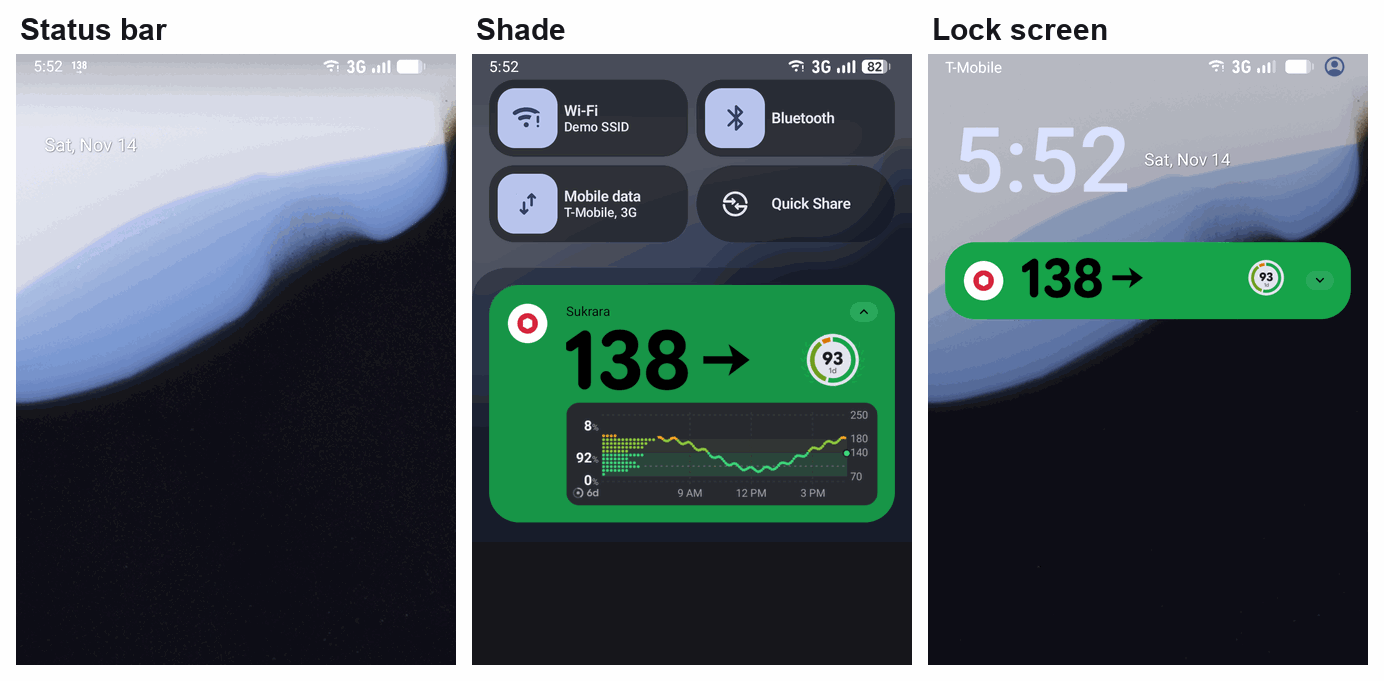
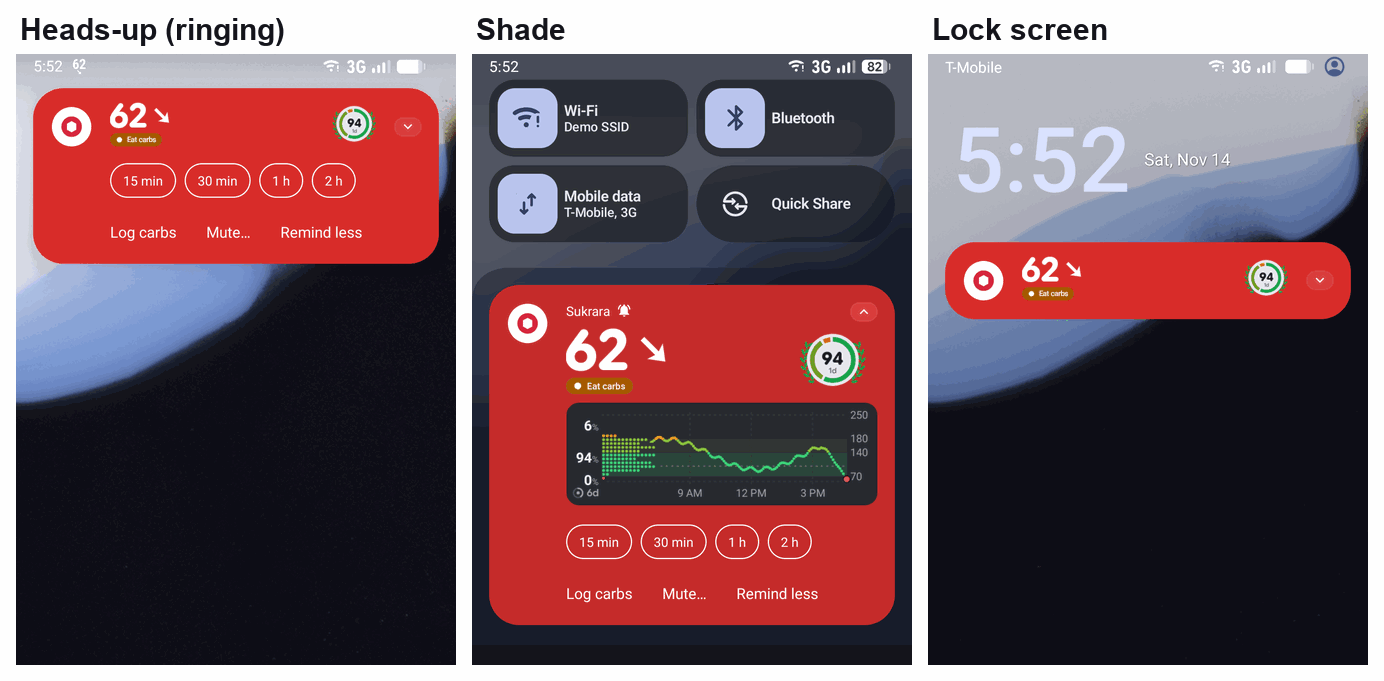
A. The chip by default (Live Update: MetricStyle on Android 17, BigText on 16). The bar shows → 138 / ↘ 62
in a pill. The card has no graph.
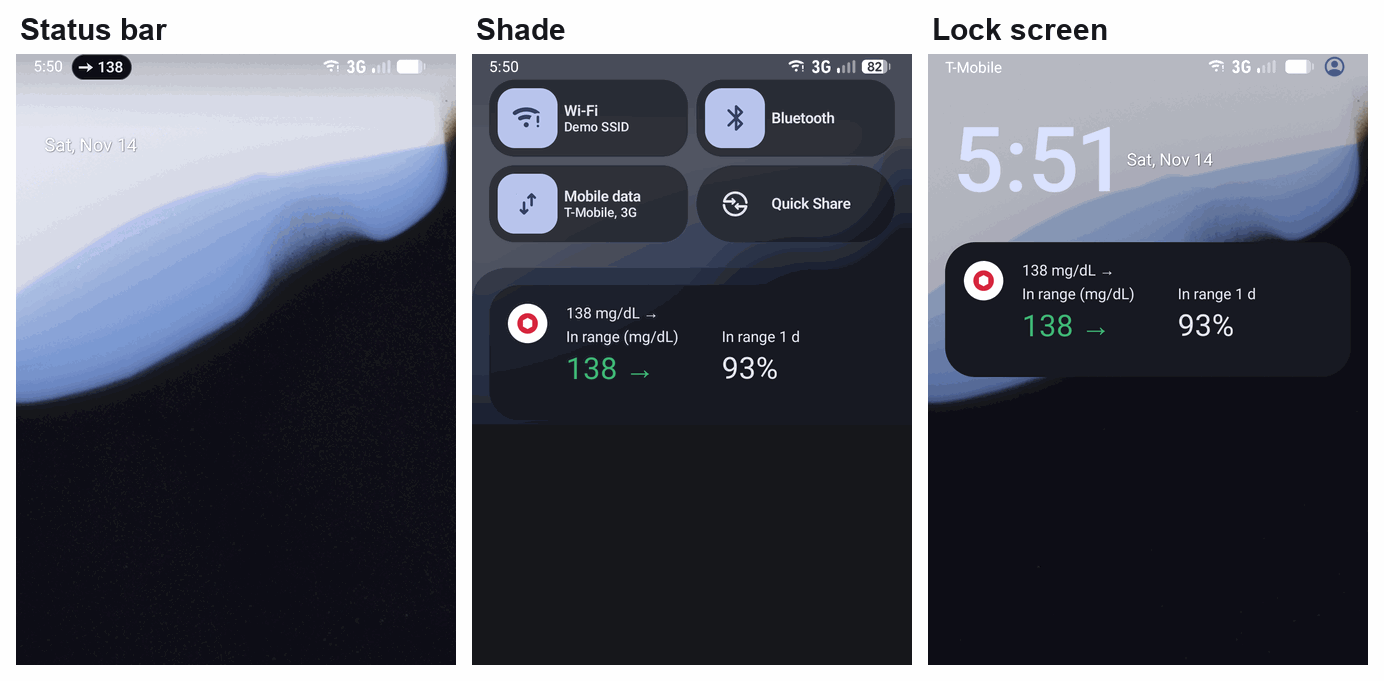
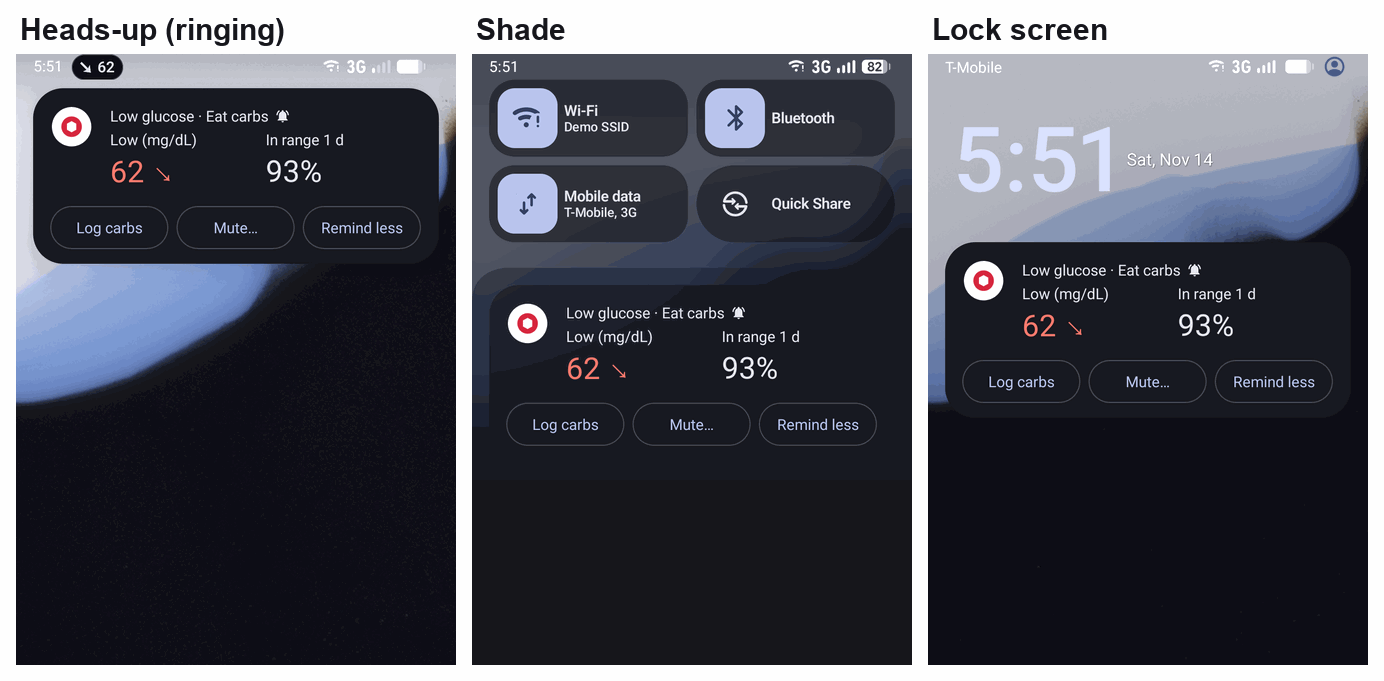
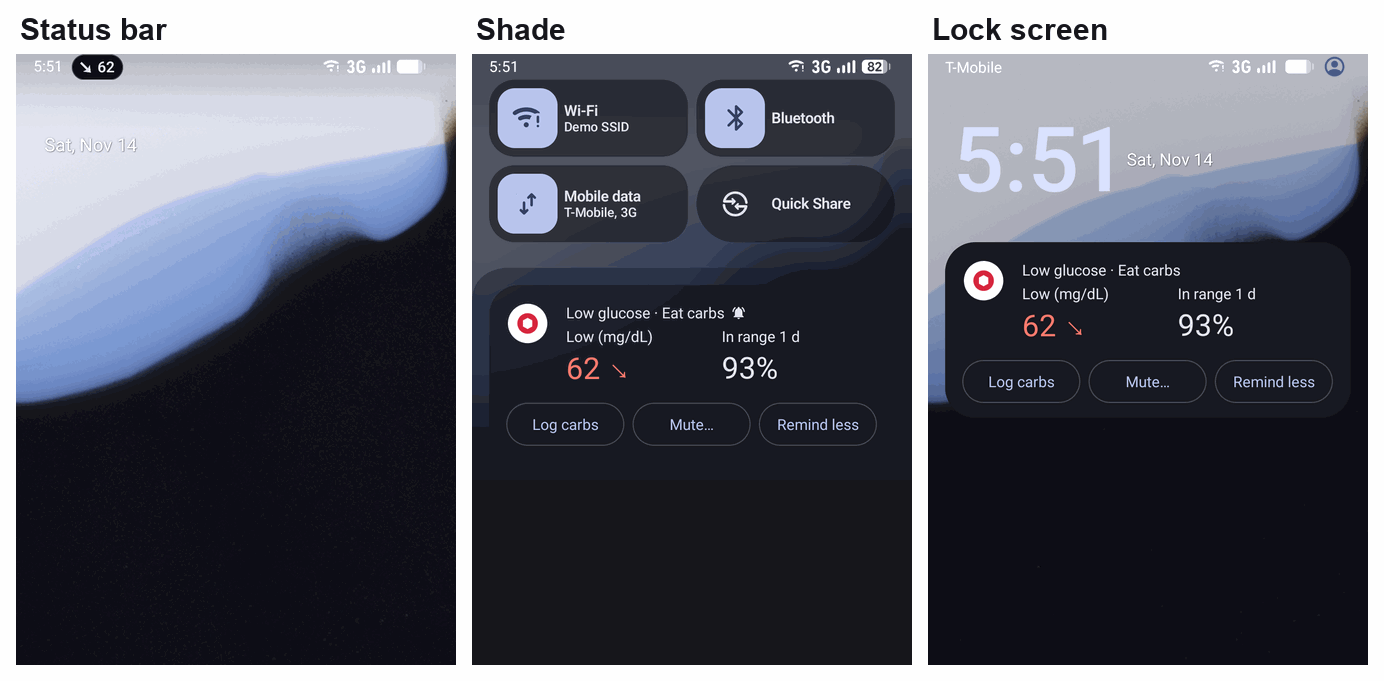
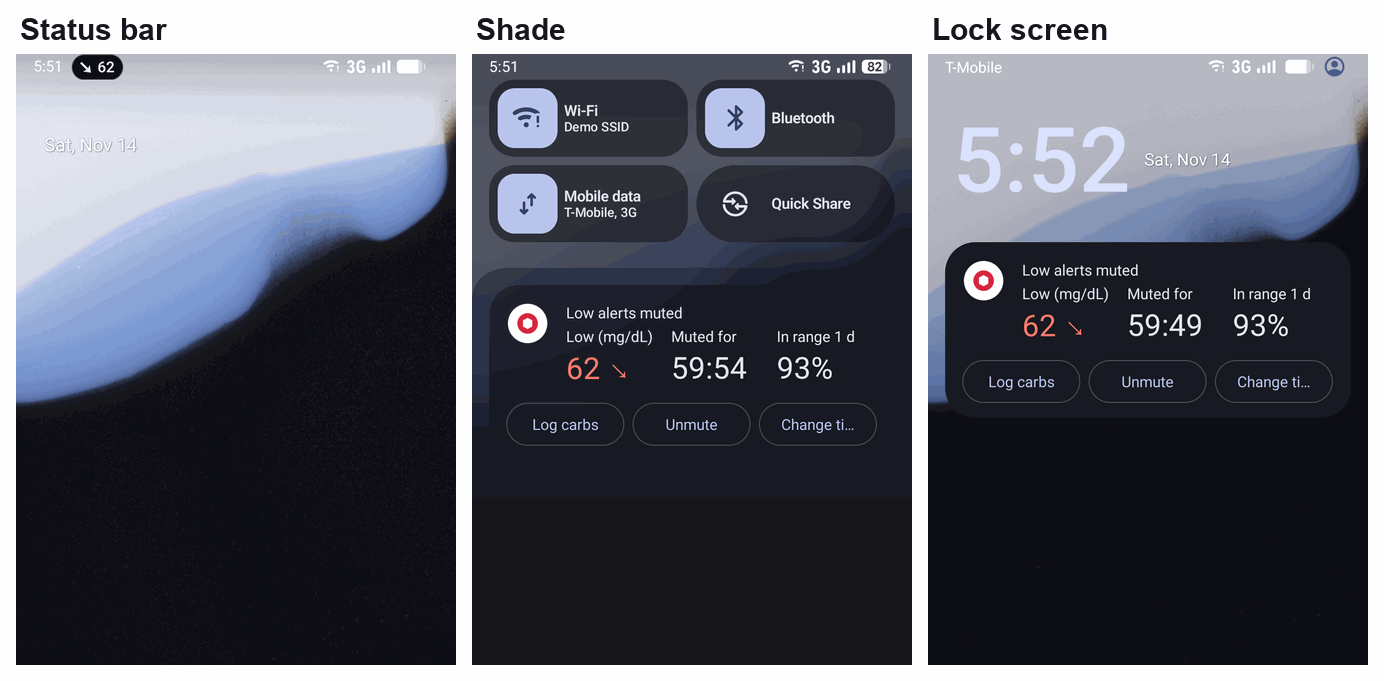
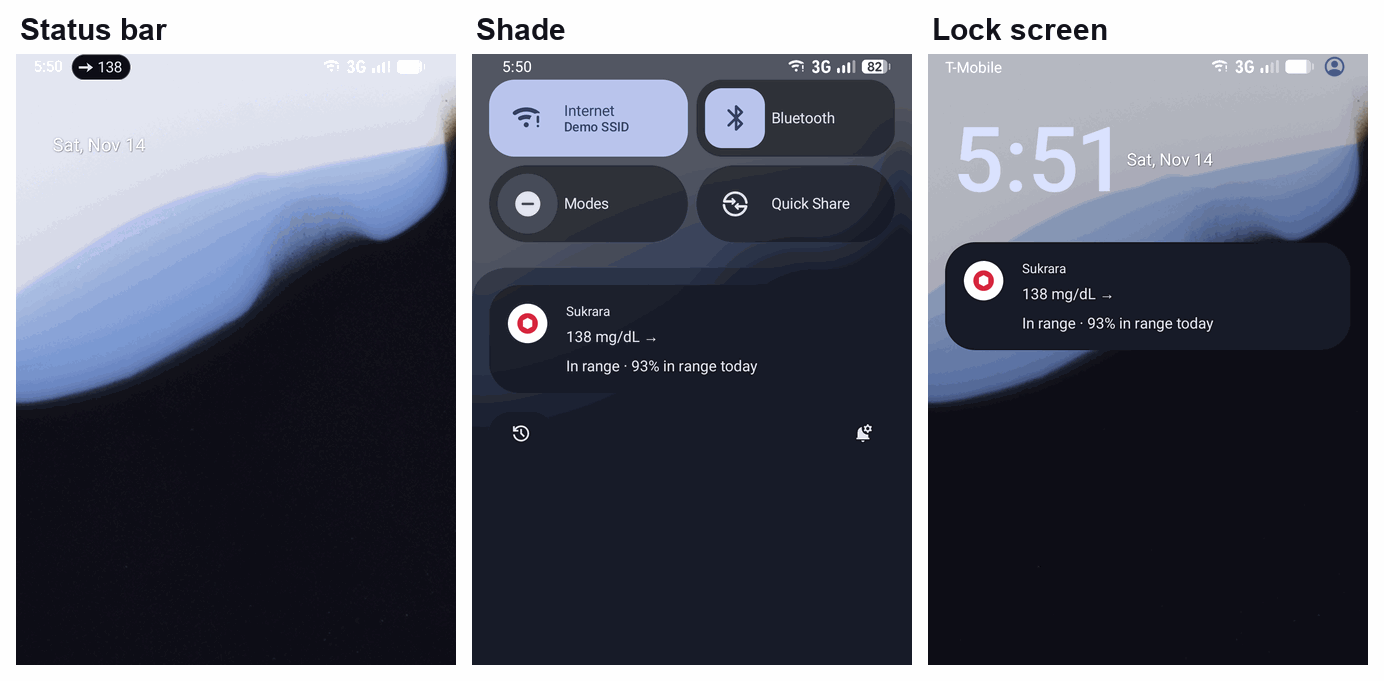
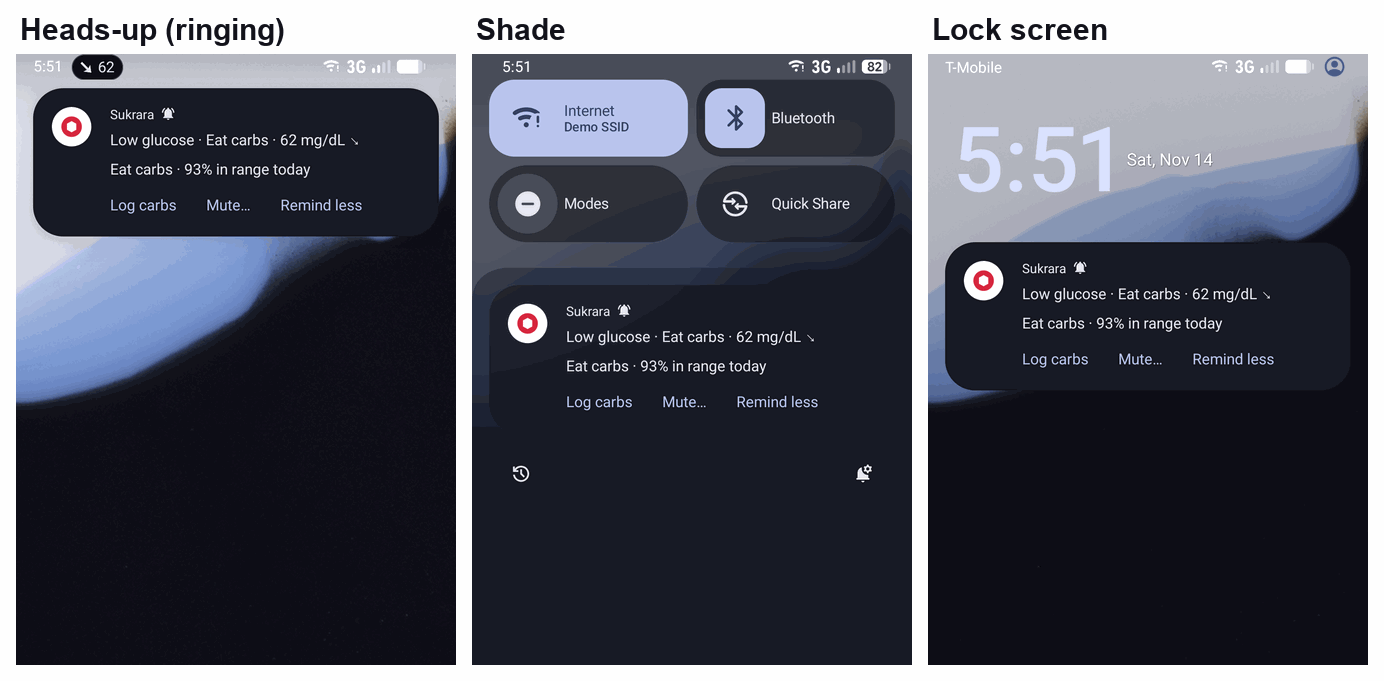
B. The card with the graph by default (the number icon in the bar). The renderer’s card in the range colour, with its pill (Eat carbs; 1h left · Low). The bar shows the small number icon.
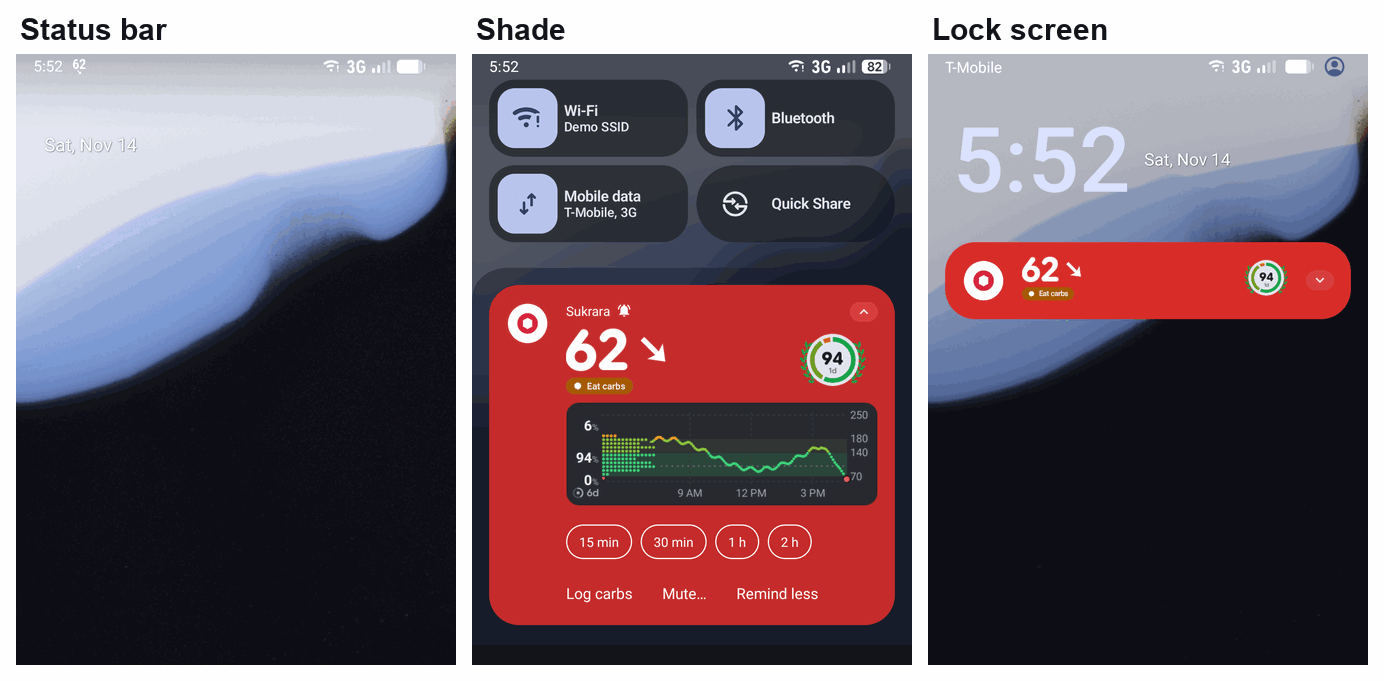
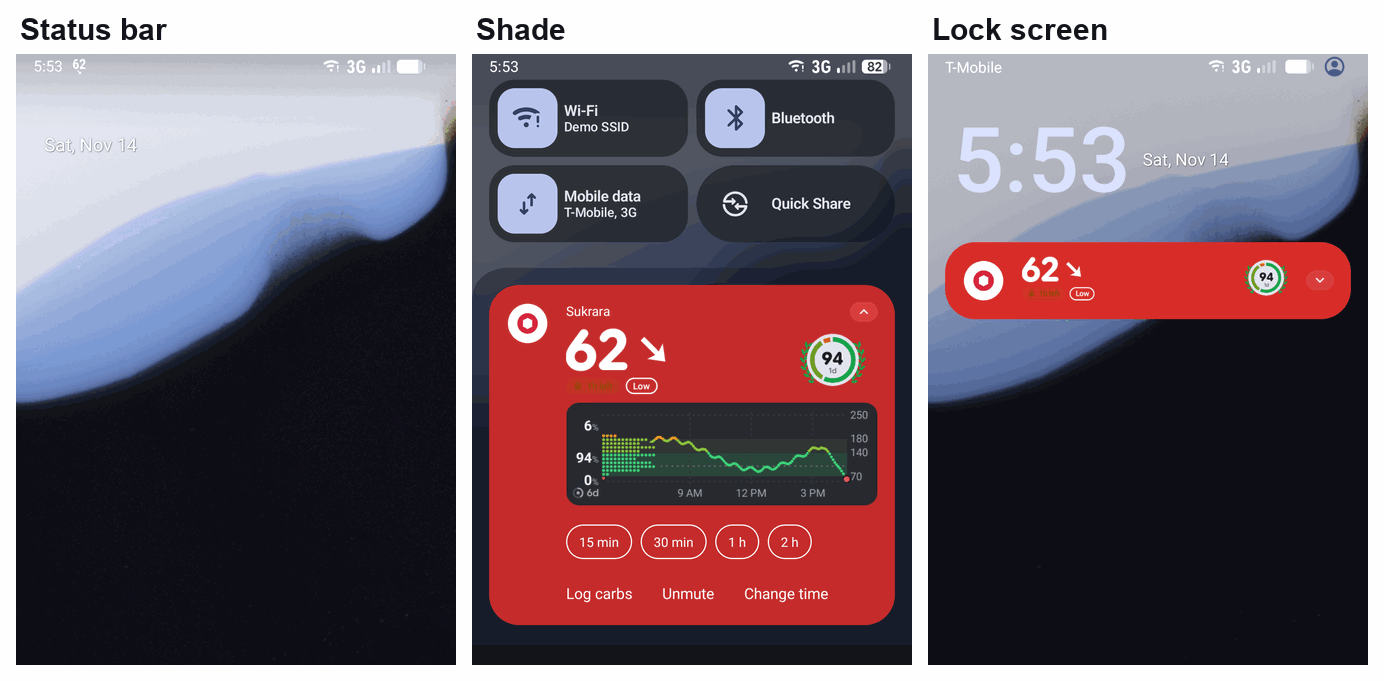
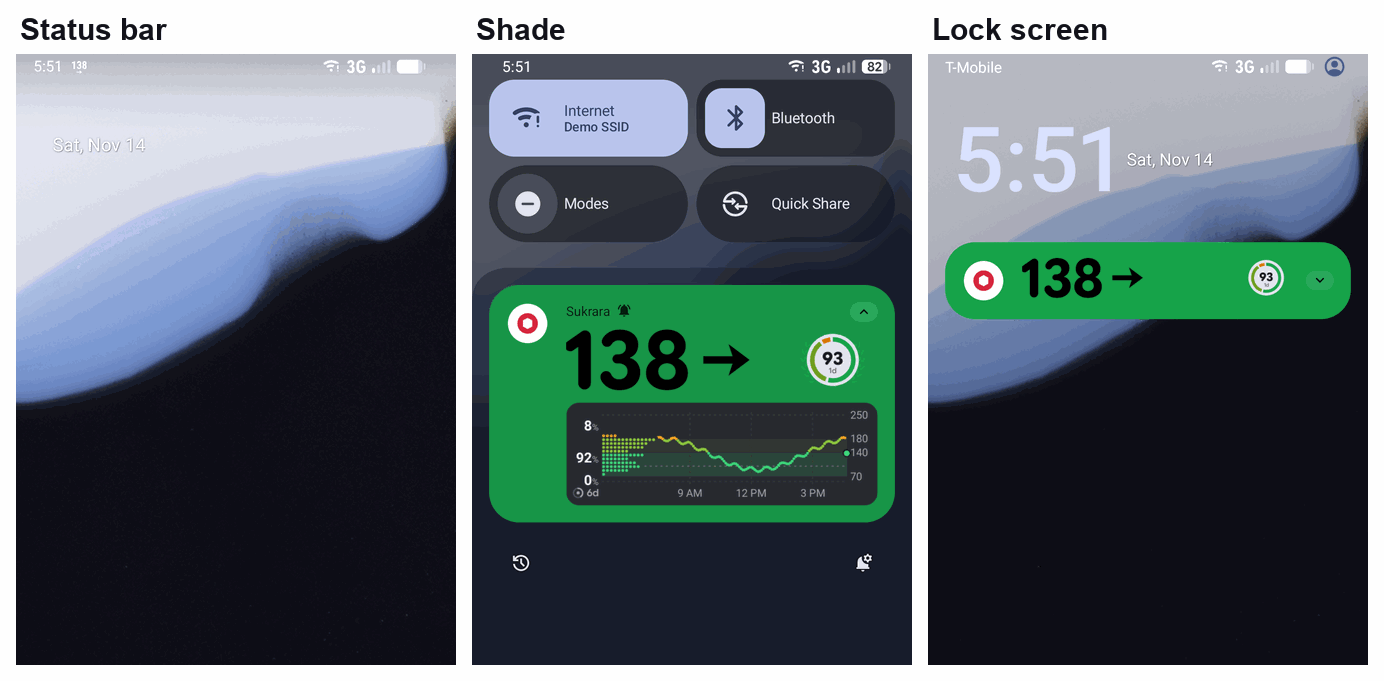
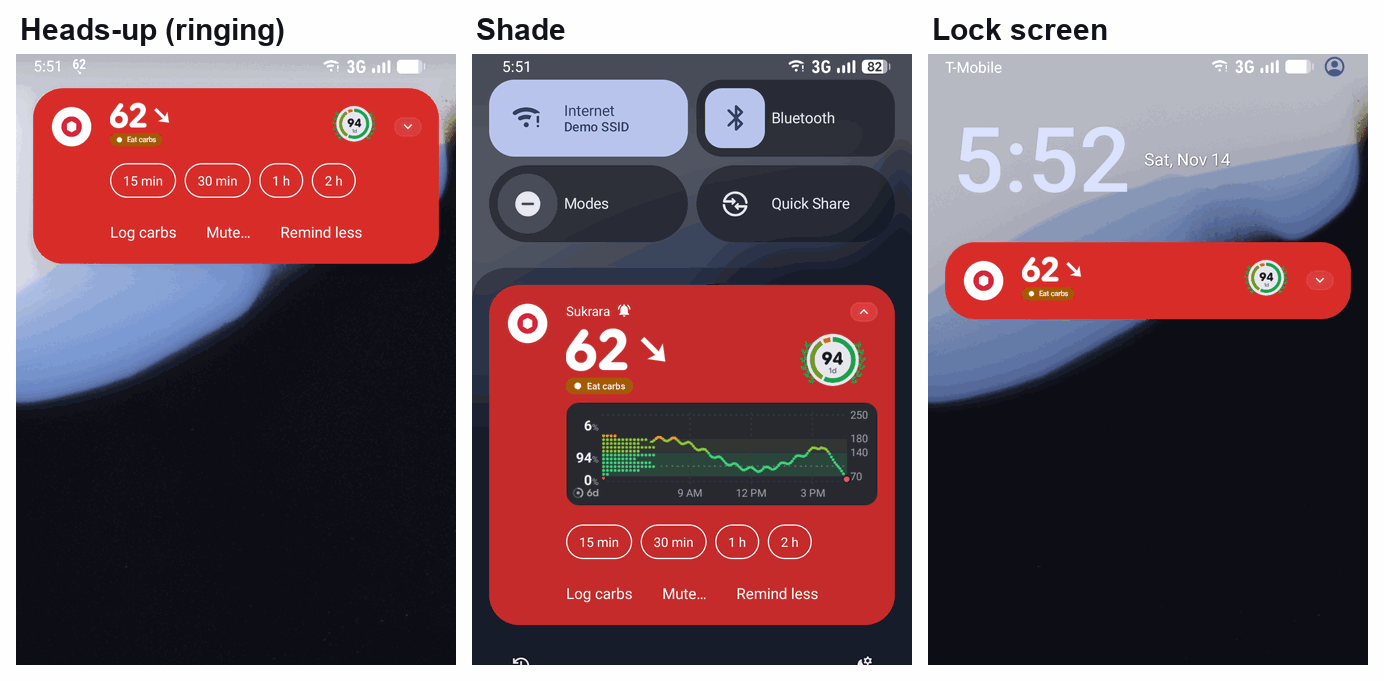
C. A “graph” inside the Live Update (a ProgressStyle range strip + a sparkline as the large icon).
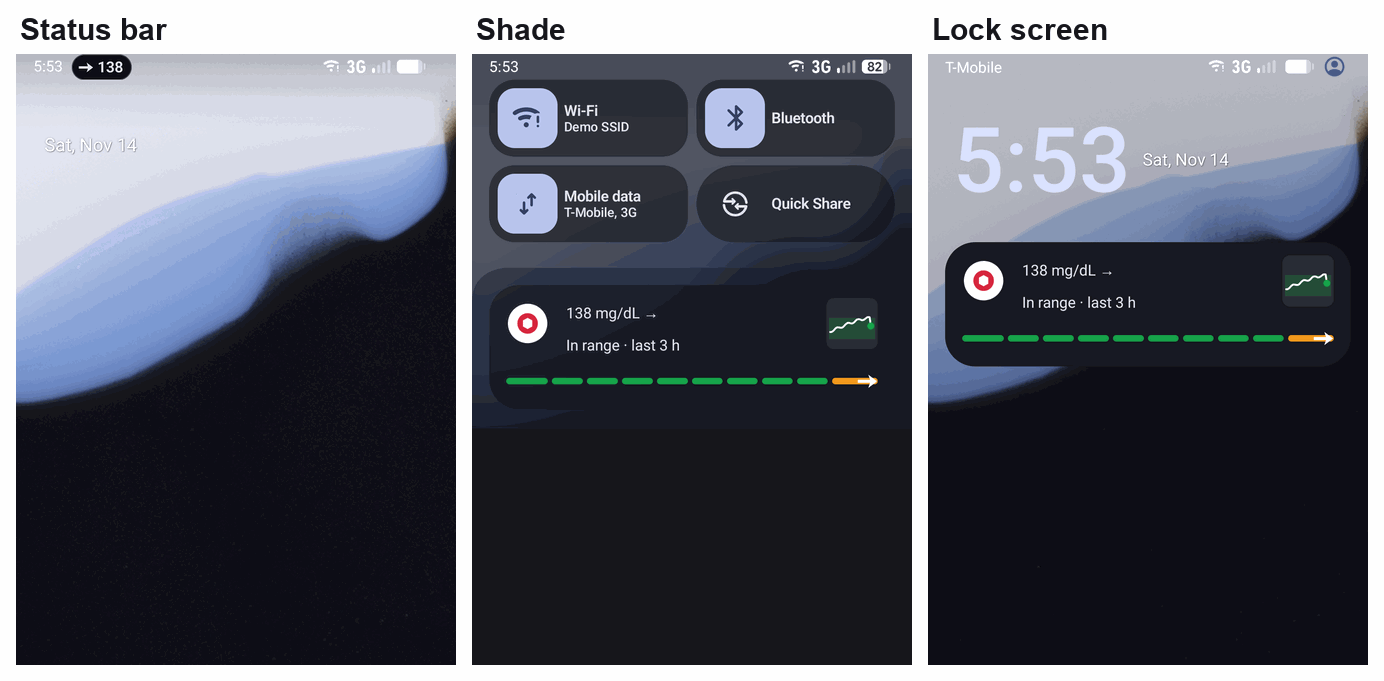
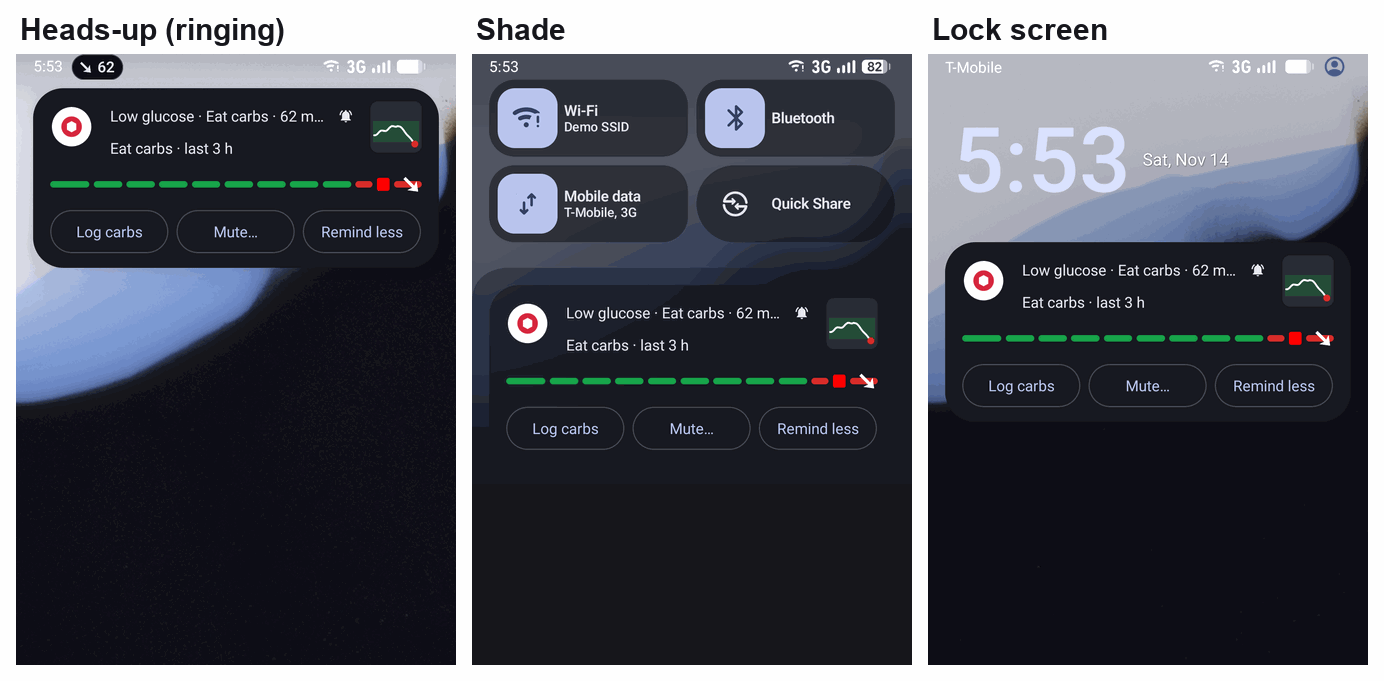
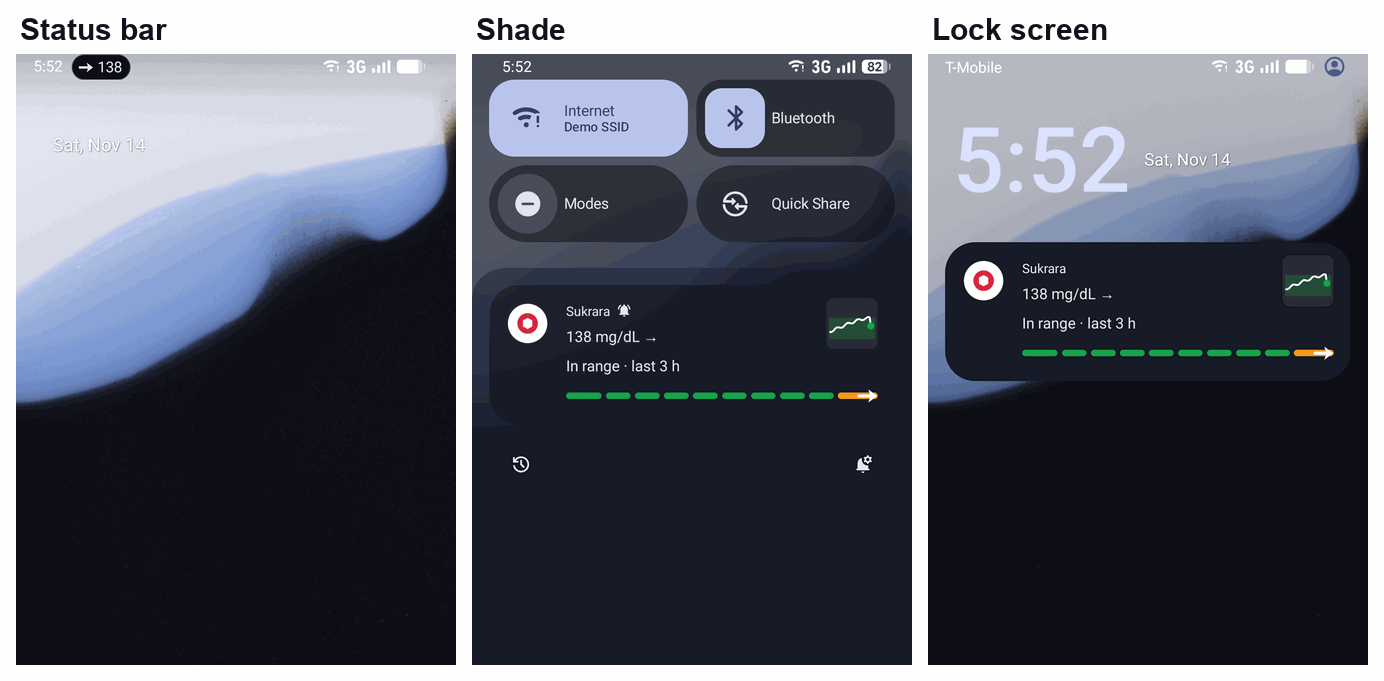
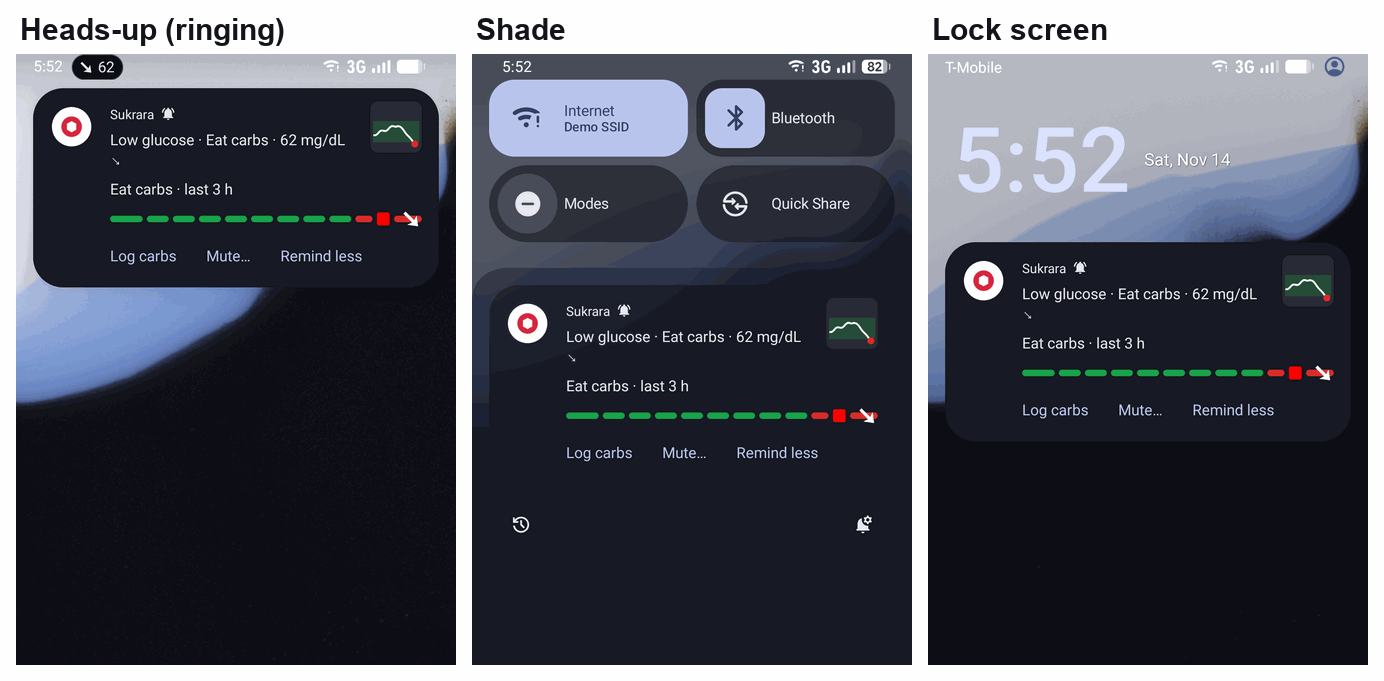
D. Today: 0.14.5’s default, the Live Update (with the mg/dL line and Open Sukrara) plus the alert as a
notification of its own.
- While ringing, the heads-up is the alert, not the card.
- The shade and the lock screen hold two Sukrara notifications that both say 62.
- On the Android 17 lock screen, the alert that was already seen even collapses to a dot under the Live Update.
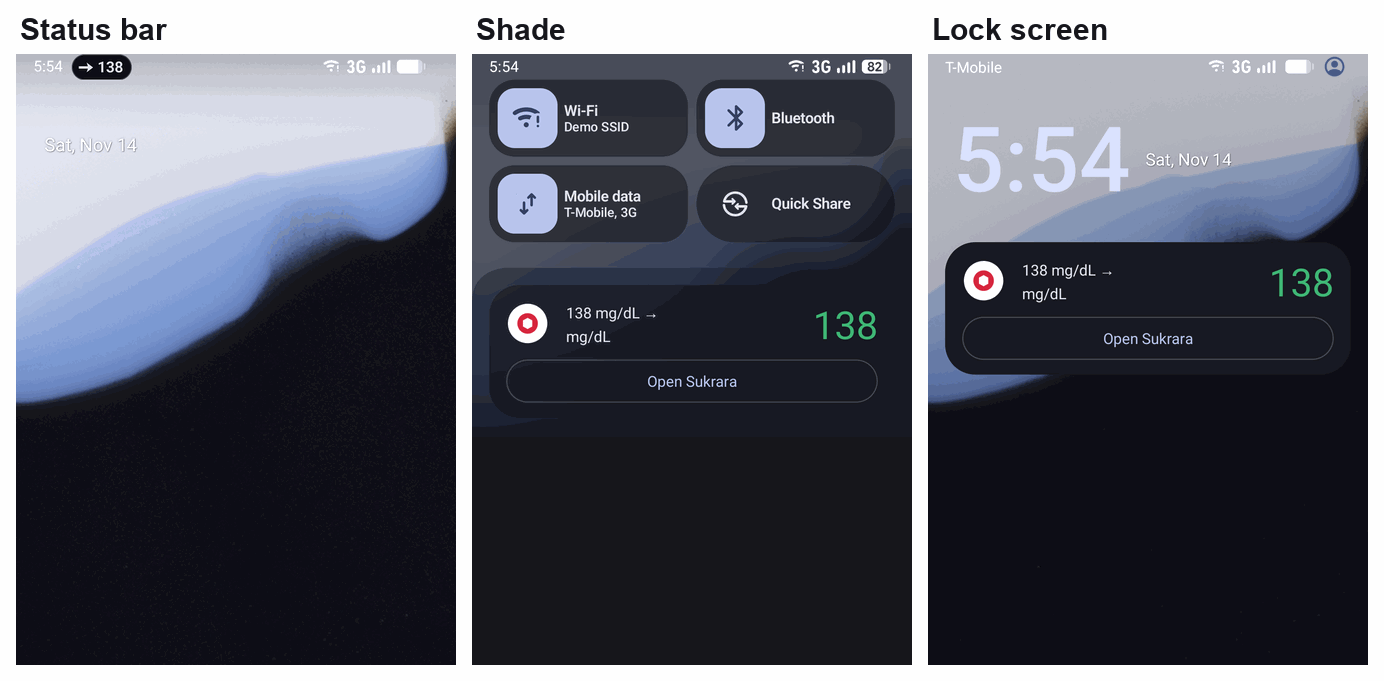
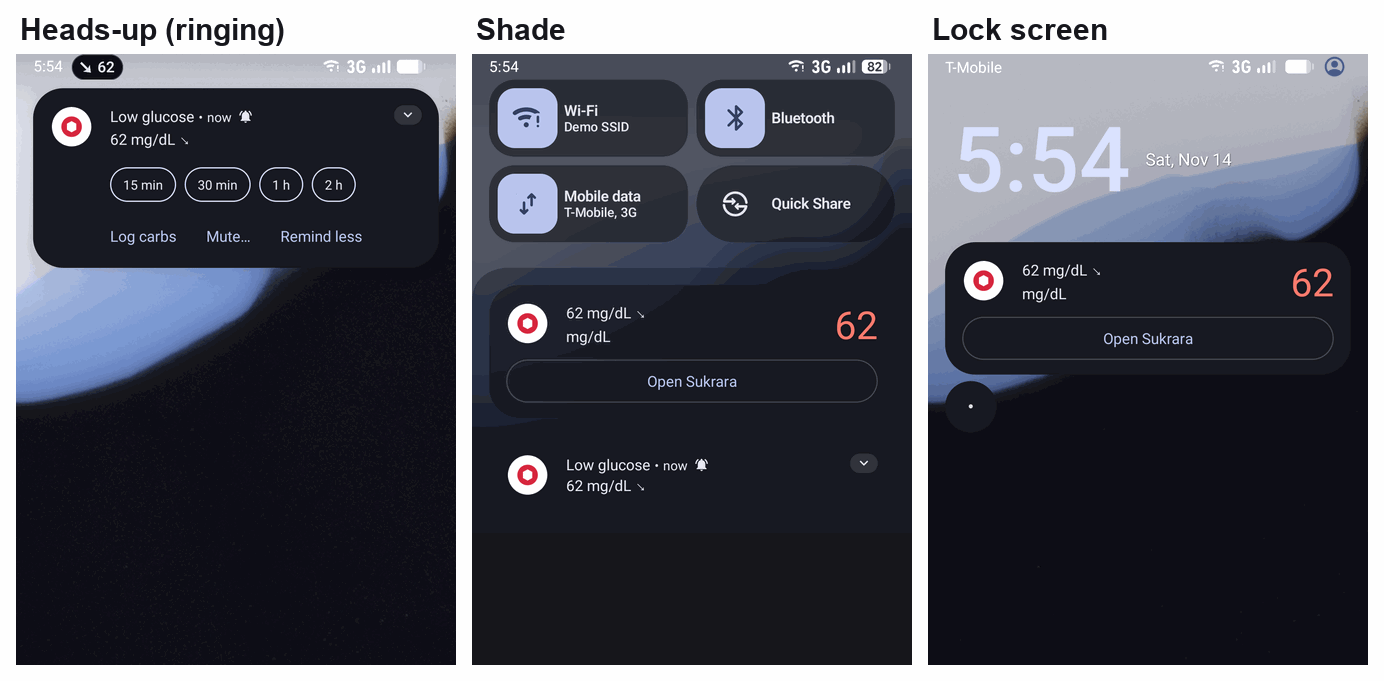
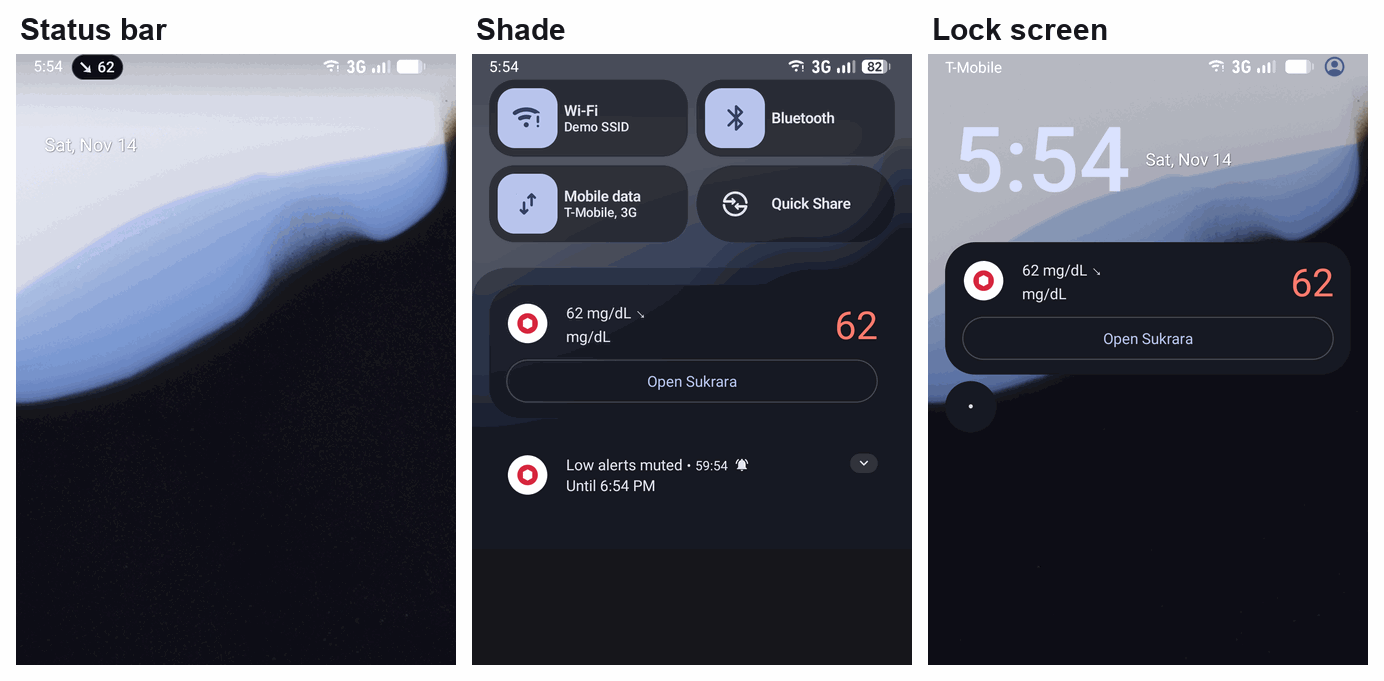
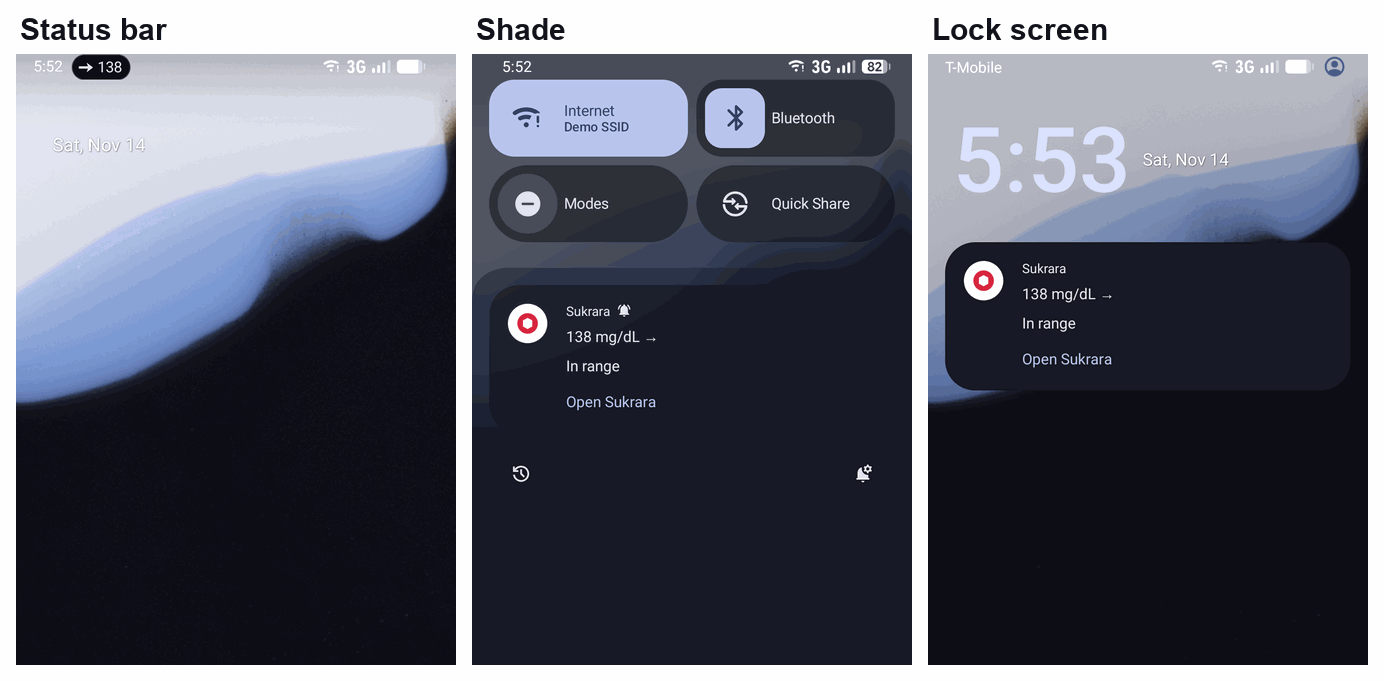
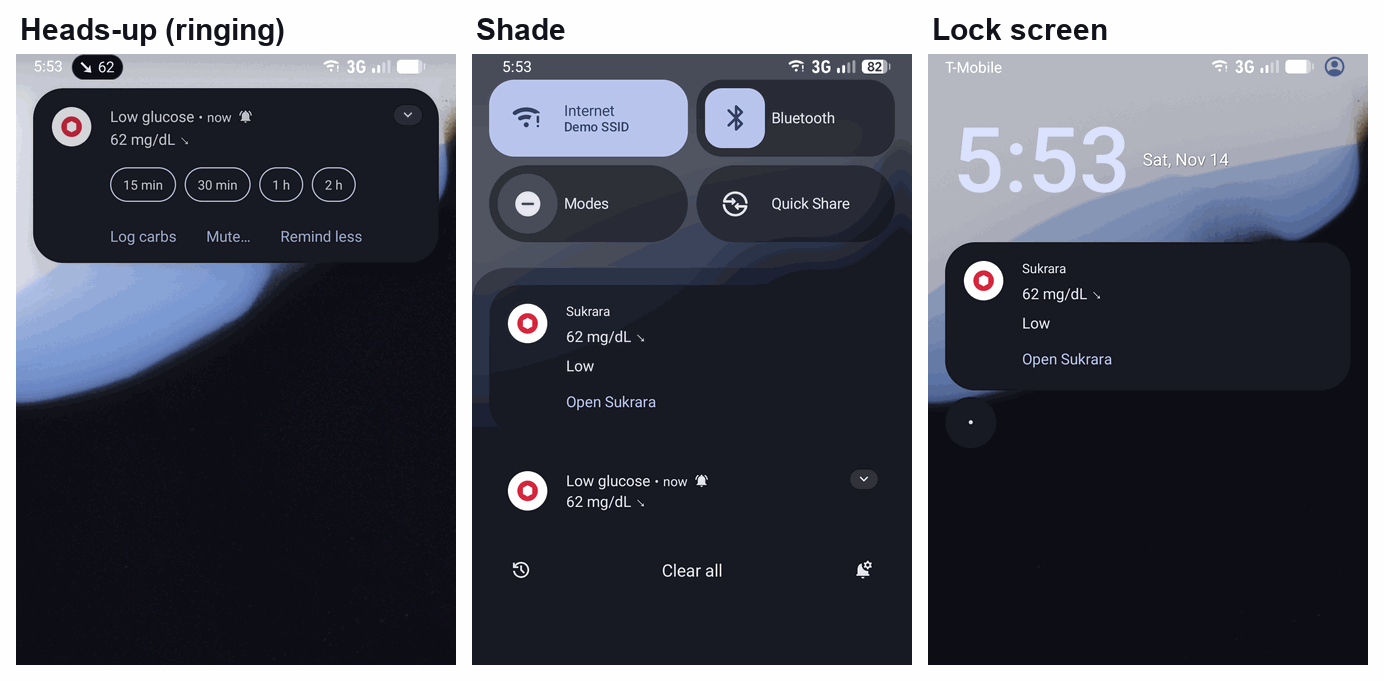
8.7 Comparison
Section titled “8.7 Comparison”| A. Chip (Live Update) | B. Card with graph | C. Live Update + strip/sparkline | D. Today (two) | |
|---|---|---|---|---|
| Value in the status bar without root | Readable pill + arrow (unlocked, and not while Sukrara is open) | Small number icon | Readable pill | Readable pill |
| Graph | No | The renderer’s card | 10-step range strip + 48 dp sparkline | No |
| The alert rings through it | Yes (same id, on the alert channel) | Yes | Yes | No: a separate notification |
| Duplicate notifications | No | No | No | Yes |
| Mute… lengths as inline chips | No (plain button → sheet) | Yes | No (plain button) | Yes (in the alert) |
| Lock screen | Expanded, with buttons | Collapsed header until expanded | Expanded, with buttons | The Live Update + the alert |
| Same look on Android 16 and 17 | No (BigText vs MetricStyle) | Yes (Sukrara draws it) | Nearly (ProgressStyle on both) | No |
| Watch | Wear OS 7 may bridge Live Updates (the manufacturer’s choice); otherwise Alerts on my watch | Never bridged (it’s ongoing): Alerts on my watch | As A | The alert is bridged today |
| Root needed | No | No | No | No |
| Google’s guidance | Off-guide while ringing (not enforced) | Doesn’t apply (not promoted) | Off-guide while ringing | Follows it |
8.8 Recommendation
Section titled “8.8 Recommendation”One notification in every case: A, B or C, never D.
- D’s duplicate shows in every ringing picture: two Sukrara entries say 62, the heads-up isn’t the card, and on the lock screen the alert can fold into a dot.
- Google’s alternative is exactly this duplicate. Its concern is Live Updates used to grab attention, not a monitoring Live Update that turns urgent.
- The platform rings the merged notification like any other (§4, and these pictures).
The default follows the status bar, as the owner expects:
- Without the root value: the chip (A) by default. It gives everyone a readable value in the bar without root, and that is what people glance at dozens of times a day. The notification is then the A card. On Android 17 that is the big value with its arrow, coloured by range, the range or the alert in words, the slot, and the muted countdown. Mute… becomes a plain button that opens the lengths sheet.
- With Value in the status bar (root) on: the card (B), automatically. The bar already shows the value, so the chip is redundant and only costs the graph. That is the owner’s phone today, but done by Sukrara instead of by hand. The Status bar page then says the chip is off because the bar already shows the value.
- A switch for people without root who prefer the graph: Graph in the notification. It means B: the chip off, and the number icon carries the value.
- C is left out.
- 10 segments of 18 min and a 48 dp thumbnail aren’t the graph.
- The sparkline would be a new renderer surface to maintain.
- MetricStyle can’t show it, and the AOD drops it.
- If the owner still wants a hint of history inside the Live Update, the ProgressStyle strip alone is the only cheap one (no new surface). It would replace MetricStyle’s big value, so it isn’t recommended.
This reverses round 1’s “card by default” for people without root. For them, the status bar matters more than the graph, which is one tap away in the app and on the widgets. The card stays wherever the bar already has the value. The rest of §5.2 is unchanged: ringing through the one notification, the ring window, going back to silent, the swipe, Alerts on my watch. The one addition is that Mute… is a plain button in the Live Update.
Decisions for the owner (round 2):
- One notification, A or B depending on the root value as above: yes / no.
- C’s range strip in the Live Update: no (recommended) / yes.
- A watch for alerts? (from round 1, still open)
Phone follow-ups (no code): turn off the PoC’s module in LSPosed (or uninstall PoC 0.11.52), then Restart System UI once.
9. Built (round 3): the one notification
Section titled “9. Built (round 3): the one notification”2026-11-14, after the owner approved one notification (A by default, B with the root value, a choice between them,
Alerts on my watch, no Open Sukrara) and reviewed the §8 pictures point by point. Emulators Android 17 (API 37.0) and
Android 16 QPR2 (API 36.1), the debug build’s synthetic sensor (SYNTHETIC, now with a 3-day backfill so the 1-day and
7-day rings show); real alerts from the runtime, except the Android 16 card’s ring (ALERTS --es kinds low, which now
goes through the same presenter). No real data.
9.1 What was decided where the owner left it open
Section titled “9.1 What was decided where the owner left it open”| Point | Decision | Why |
|---|---|---|
| The A metric label (“Low (mg/dL)”) | Now while fresh, the reading’s time once late (it also replaces the separate Reading metric, which frees a slot: two rings as words, in range 1d · in range 7d); the title says the range (In range, Low…) or the alert | The label can’t be empty (Metric(value, label) takes a label); the range is the title’s, the unit is obvious; Now / 14:05 says the one thing the big number can’t: how fresh it is |
| Units | None: the title 138 ↗, the metric 138 ↑, 62 ↓ · Low glucose · Eat carbs on Android 16 |
The owner’s call; the alert’s own body (watch mode, the plain fallback) keeps its unit (it’s read alone, on a watch) |
| Action icons | Every action carries one (Treatment add, Remind less snooze, Mute notifications off, Unmute notifications active) | Measured: Android 16 and 17 draw no action icon in the standard, promoted (Live Update) or decorated-custom templates (the v2 pictures: text buttons only). The icons show on Wear OS (watch mode’s separate alert) and cost nothing; the words must stand alone |
| Mute or Mute for | Mute (es Silenciar), no “…” anywhere (copy.json) | Android’s actions are short verbs that name the result (“Reply”, “Snooze”); Apple’s HIG: “a short, title-case name that clearly describes the result”. Mute for reads unfinished as a Live Update button (where it opens a sheet); the chips / the sheet / the direct reply’s label Mute for (e.g. 45 min, 1 h 30) give the length |
| Treatment in Spanish | Tratamiento | The app’s dialog is Añadir tratamiento; the button names the place it opens. On the high side it opens on Rapid insulin; the word advises no dose (SPEC §1 “Headline”) |
| Sparkline in A | Not added. Android 17 keeps MetricStyle (big value in the range’s colour, the slots); Android 16 BigText | MetricStyle draws no large icon (“this style doesn’t display the large icon”), so a sparkline means giving up the big coloured value on 17 for a 48 dp thumbnail the AOD draws grey (§8.3), and a new renderer surface (CardPart) to keep in step. The graph is B’s; the picker now makes that choice obvious |
| Mute in a Live Update | A plain button that opens the lengths sheet over the lock screen (MuteAlertActivity: 15m 30m 1h 2h, TalkBack “Mute for 30 min”) |
Android drops a direct reply from a promoted notification (§8.5) |
| Muted, A | The title Low alerts muted, a timer metric Time left (Android’s own countdown), Treatment · Unmute | The owner: Unmute only |
| B title | A TextView over the card with the alert’s title (Low glucose, Low alerts muted), and the heads-up while it rings shows title + header (no chart) | A decorated custom view shows the app name, not the title; the pill under the value already says Eat carbs |
| B sizes | The value drawn in a 48 dp box (40 collapsed) beside the slots at the header’s full height (64 / 48 dp) | The renderer’s own parts (CardPart.VALUE + CardPart.SLOTS): the value is smaller, the rings full size, two of them (the widget’s two); collapsed rings no longer shrink |
| B colour | The system’s notification colour by default (the value in its range colour, the theme’s palette); Card in the range colour (statusbar.colorize) for the old look |
The owner’s call |
| Pills per surface | Renderer rules in both apps (contracts/graph Pills per surface): a level alert’s title names the range, so the notification draws no separate range word (CardStyle.rangeSaid); on a colourised card every pill passes 3:1 against its ground and 4.5:1 for its words, else it turns black / white (CardStyle.ground, PillContrast, tested on every pill kind × palette × ground) |
The owner: the amber mute pill on red was illegible, Low beside Low glucose redundant |
| The setting | Settings › Status bar › Glucose notification: Chip and Graph side by side, each with a picture (chip + text notification / number icon + the card with ring and curve), one radio group; with the root value on, Graph and the chip disabled with its note | AOSP’s illustrated choices (System navigation: IllustrationPreference over SelectorWithWidgetPreference); here each choice has its own picture because the point is comparing them |
| Alerts on my watch | Settings › Alerts › Sounds, off by default; the summary suggests it when the Wear OS, Pixel Watch or Galaxy Wearable app is installed (<queries> for those three) |
Whether a watch is paired can’t be read without Bluetooth permission prompts; the companion app is the honest signal |
9.2 Pictures (v2)
Section titled “9.2 Pictures (v2)”Replaced by §10.3’s v3 pictures after the owner’s review; the Android 16 in-range pictures (nothing changed in them) stay:
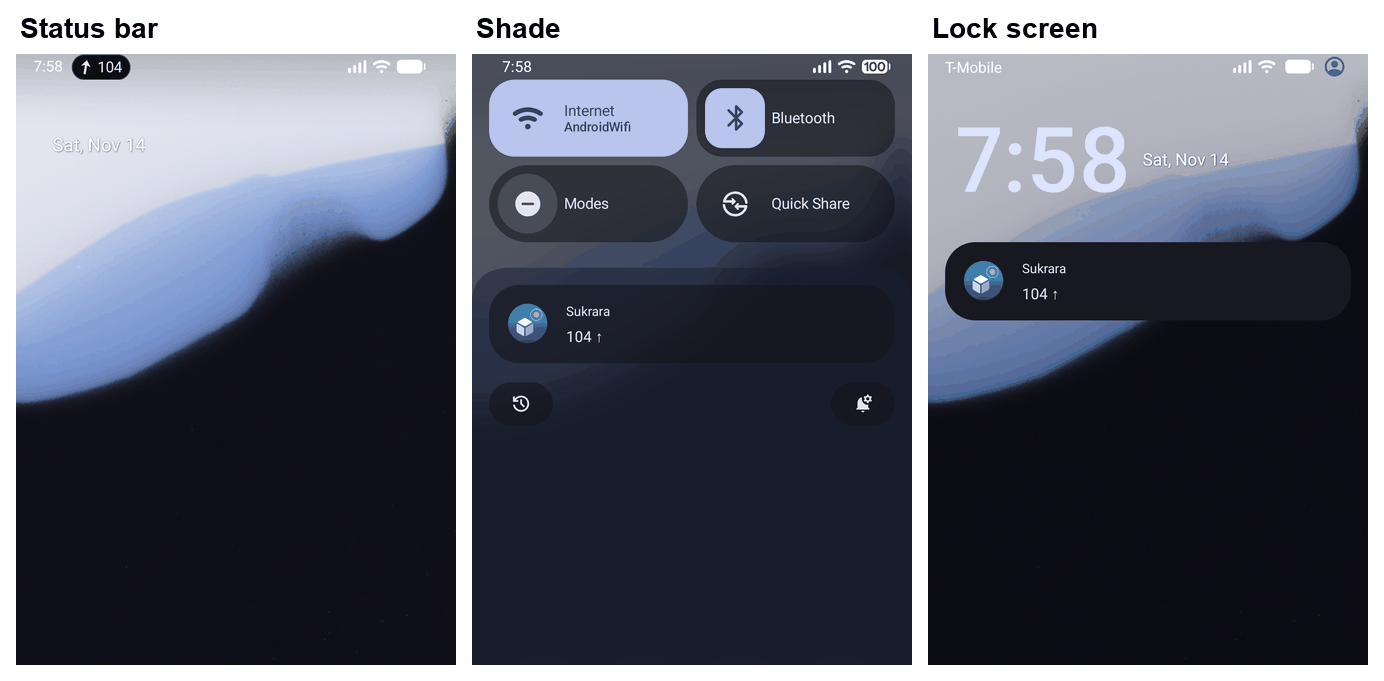
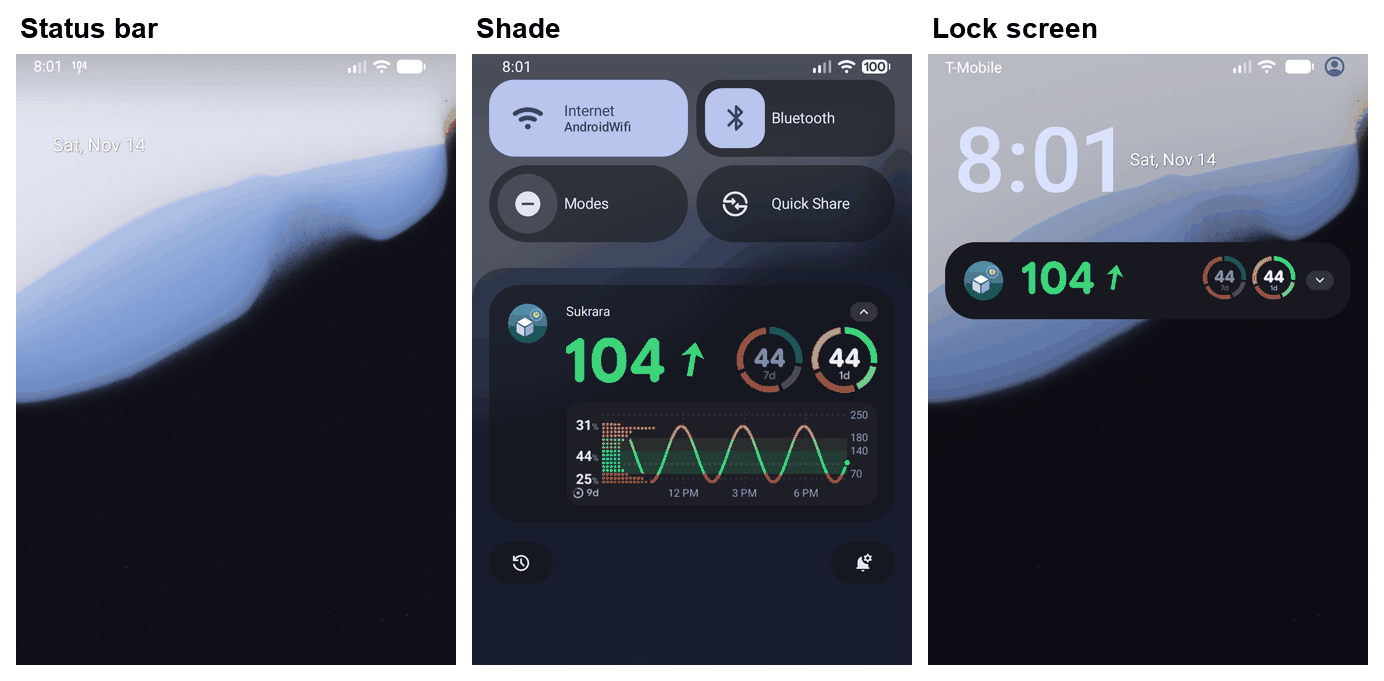
Found and fixed on the emulator: the card’s title TextView took a RemoteViews call (setImportantForAccessibility) that
System UI refuses, which crashed the foreground service (BadForegroundServiceNotificationException); it’s in the
layout now, and OneNotificationTest inflates every view of the card with an alert as System UI does.
9.3 Alert-safety review (2026-11-14)
Section titled “9.3 Alert-safety review (2026-11-14)”An independent read of the code and the emulators (Android 17 API 37.0, Android 16 QPR2 API 36.1; dumpsys notification, logcat -b events notification_alert), with what it changed:
| Found | What the person got | Now |
|---|---|---|
The full-screen intent rode on an update of the glucose notification. System UI starts one only in onEntryAdded (AOSP HeadsUpCoordinator); on Android 16 QPR2 a very low like an alarm with the screen off rang but never opened full screen (Android 17 did) |
A very low at night: sound only, no screen | An alarm-level ring that may open full screen is the alert’s own notification for the 10 s (added: full screen on both), the glucose notification shows it silently and carries it on (GlucoseAlertPresenter, OneNotificationTest) |
| Two rings on one reading: the runtime posts the one that must be heard first, the presenter put the newest in front | Falling fast as the title over Also: Very low glucose, the notification moved off the alarm channel (Android had muted the second ring: MUTE_REASON_RATE_LIMIT) |
The first stays in front on its channel, the second is a line |
| The glucose notification’s channel turned off: Android drops every post on it | A ring stayed as it rang: never updated, muted or cleared | The alerts are notifications of their own then (as Alerts on my watch), what is up moves there silently |
| The card without its pictures (screen off: nothing is drawn) titled only Low glucose | No value on the lock screen until the redraw | 62 ↓ · Low glucose · Eat carbs, as the text notification |
Checked and sound: the ring’s channel and flags (no only-alert-once on a ring; the 10 s posts MUTE_REASON_SILENT_UPDATE
and the sound plays on; glucose.live is IMPORTANCE_DEFAULT without sound, so the window’s end and a Mute stop it,
and the notification stays on the lock screen where silent ones are hidden); the heads-up of an update (System UI’s
shouldHunAgain: not only-alert-once); Android’s update rate limit (5 a second, an average: the gate allows one a
second plus a ring); the post lock (a post built before a ring never lands after it); the swipe of an older firing;
the muted note; watch mode; the plain stand-in; :core:alerts and the scenarios untouched; the debug ALERTS and the
3-day backfill only in src/debug. The Time left label of the muted metric is the code’s (§10.3 shows it).
Not covered: a real watch (watch mode’s buzz), the Pixel’s own System UI, Do Not Disturb and the full-screen intent
locked on a phone (QA.md Q5 lists them for the owner’s debug build), and the emulators had no audio (the ring is read
from dumpsys notification: the channel and the flags).
10. Round 3 feedback
Section titled “10. Round 3 feedback”2026-11-14, the owner on the v2 pictures. Each point: what changed and why, with the alternatives weighed. Emulators
Android 17 (API 37.0) and Android 16 QPR2 (API 36.1), the synthetic sensor, synthetic data only; rings from the
runtime, and from the debug ALERTS command (the same presenter) where a ring had to be shot on a settled service.
10.1 A, the chip / Live Update
Section titled “10.1 A, the chip / Live Update”| Point | Done | Why (alternatives) |
|---|---|---|
| “‘In range 7d’ should be dynamic and show what the 2nd ring would show” | It already was: the metrics are GlucoseCard.slotTexts over the card’s own style (notificationCardStyle), the configured slots in the card’s order (default TIR 1 d, TIR 7 d). SlotTextTest now pins it for other slot kinds too |
A second list of metrics would drift from the rings; the renderer’s own list can’t |
| “Some places uppercase, some all lowercase” | Every label in sentence case: the slot labels come out of the renderer as In range 1d, Avg 7d (Slots.text, SlotTextTest), the value’s label too |
Android’s writing guidelines: sentence case for labels and titles; the renderer’s word list stays lower case for sentences (TalkBack) and capitalises where it is a label |
| “‘Now’ as the description is nonsense” | The value’s label is the trend in words (Falling, Steady, Rising fast) while fresh; the rate (2.4/min) when a rate alert’s title already says the trend (Falling fast); the reading’s time once late (MetricLabelTest) |
Considered: no label (the API takes one: Metric(value, label)), the reading’s time always (it repeats the notification’s own time while fresh), the range (the title’s). The trend in words says what the arrow says for TalkBack and at a glance, never the title |
| “A better arrow asset, or text only?” | Text only, THE text arrows (TrendAngle). Picture v3-arrows-android37 |
A metric’s value is a CharSequence; a picture can’t travel in it (an ImageSpan isn’t parcelable), and a bold StyleSpan was dropped by System UI (tried on the emulator). In the system font, Supplemental Arrows-C (wide-headed, all 8 directions) is missing (tofu, sets 3–5); the Dingbats / Misc Symbols arrows (set 2) mix weights: a heavy ➡ beside light diagonals. The current set (set 1) is the only one with one weight and one centre line in every direction |
| “The mute time picker is ugly” | The app’s own Material 3 length dialog (NumberDialog): Mute lows · For 15 min … For 2 h · Custom… radio rows, the person’s first length selected, Cancel |
Compared: the chips sheet (wrapped 3 + 1, no selected state, nonstandard), a bottom sheet with a slider (imprecise), Android’s Do Not Disturb duration dialog (radio rows with − / + and Until you turn off), Clock’s snooze list. A radio list is the M3 “simple dialog” pattern and the one Mute alerts on home already uses (same component, same words), so the app has one way to pick a length |
| “‘Low alerts muted’ can be ‘Lows muted’” | Mute lines name the side short on both apps: Lows muted · 12 min left, Lows: remind every 30 min, TalkBack Lows: mute for 30 min (es Bajas silenciadas · quedan 12 min; Spanish side names are feminine plurals so silenciadas agrees: Bajas, Altas, Bajadas rápidas, Subidas rápidas, Alertas sin datos) | copy.json, MuteText / MuteCopy; the settings history (Lately) keeps its own sentences |
| “Don’t show the same info twice” | Checked every state: the muted Live Update says Lows muted · Time left 29m (the label no longer repeats the title); a level alert’s or a muted side’s title names the side, so the card draws no separate range word (rangeSaid for the muted note too); the title adds the pill’s words only when the headline doesn’t already say what to do (Low · eat more gets none) and, on the card, the mute’s time left where the value box only has room for the pill’s icon; the Live Update on 17 counts a mute down in its metric, not in the title |
The pill under the value and the title are in different views (collapsed vs expanded), never both saying it in one |
10.2 B, the card
Section titled “10.2 B, the card”| Point | Done | Why (alternatives) |
|---|---|---|
| The Status bar copy | The two choices say exactly what each puts where: Chip · Status bar: your glucose in a chip / Notification: basic; Graph · Status bar: the notification icon / Notification: complete, with the graph, the icon highlighted in its picture. Every summary adds something: Number as notification icon · Otherwise the trend arrow; Coloured background · Red when low, orange when high, green in range; Only with the graph where a row doesn’t apply to the chip; the footer says why it’s one or the other | “Notification icon” is Android’s own user-facing name (the status bar’s Notification icons); the developer docs’ “small icon” isn’t a user word |
| The value shrinks under a pill | The renderer keeps the value at ≥ 85 % of its size: the pill goes in a row right under the baseline, or beside the arrow where it fits whole (words, else its icon), the rings never change (contracts/graph “The value with a pill”, PillValueSizeTest / PillValueSizeTests, both apps) |
Compared: shrinking the rings (the owner: no), moving the pill above (it would sit between the title and the number), a fixed pill row (the v2 look) |
| “Just ‘Very low’ is enough” | Headlines without “glucose” on both apps: Very low, Low, High, Very high, Extremely high, Falling fast, Rising fast, No data (es Muy baja, Baja, Alta, Muy alta, Extremadamente alta, Bajada rápida, Subida rápida, Sin datos); context Low · eat more, High · still after insulin, Very low · no response; the test alert Test · Low; the locked-boot alarm No data · unlock your phone; the escalation settings’ quotes. Kept: “Open Sukrara to see your glucose.” (glucose is the object there), channel names | copy.json, SPEC §1, AlertCopy / AlertText; the scenario drivers write their own words, so no timeline changed |
| Red in dark, white in light | Confirmed: v2’s dark picture had Card in the range colour on, the light one off. Both themes already behave the same; the setting is now Coloured background and the picture v3-b-background-android37 shows it off and on in both themes. The card’s art is also redrawn when the pill’s state changes (its cache key missed it) |
— |
| “‘Alerts on my watch’ is a bad name” | Separate alert notifications (alerts.separate): Each alert is also its own notification, apart from the glucose one. Watches and other connected devices get only these; off: Alerts ring in the glucose notification. Watches and other connected devices don’t get it; the watch app suggestion stays a summary. The glucose channel turned off still falls back to it (3caad9a6) |
Android calls a notification that stands alone a separate notification (as opposed to a grouped or an ongoing one); the watch is one reason, not the feature |
10.3 Pictures (v3)
Section titled “10.3 Pictures (v3)”Android 17 unless named android36; dark theme unless said. They replace v2’s (the Android 16 normal states
v2-a-normal-android36 and v2-b-normal-android36 stay: nothing in them changed). On Android 16 the card is the same
renderer picture as on 17.
| Picture | What |
|---|---|
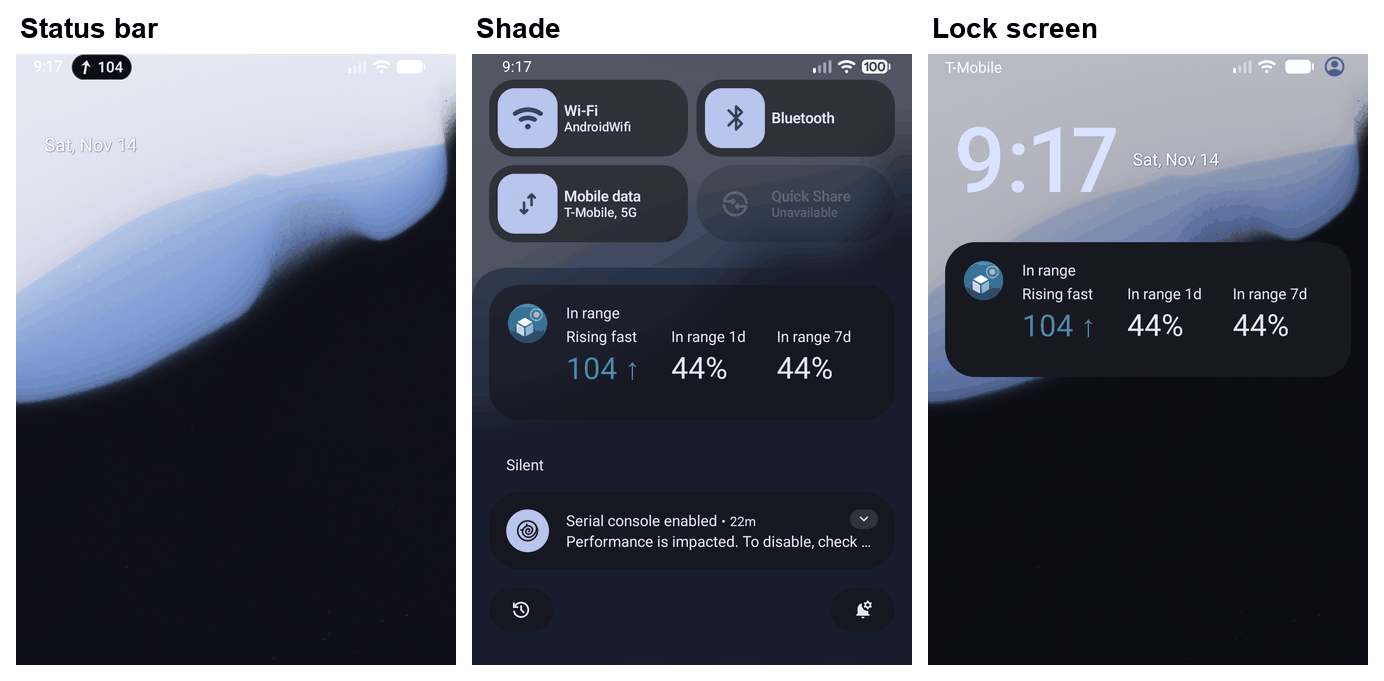 |
A in range: title In range, the value labelled Rising fast, In range 1d · In range 7d (the rings) |
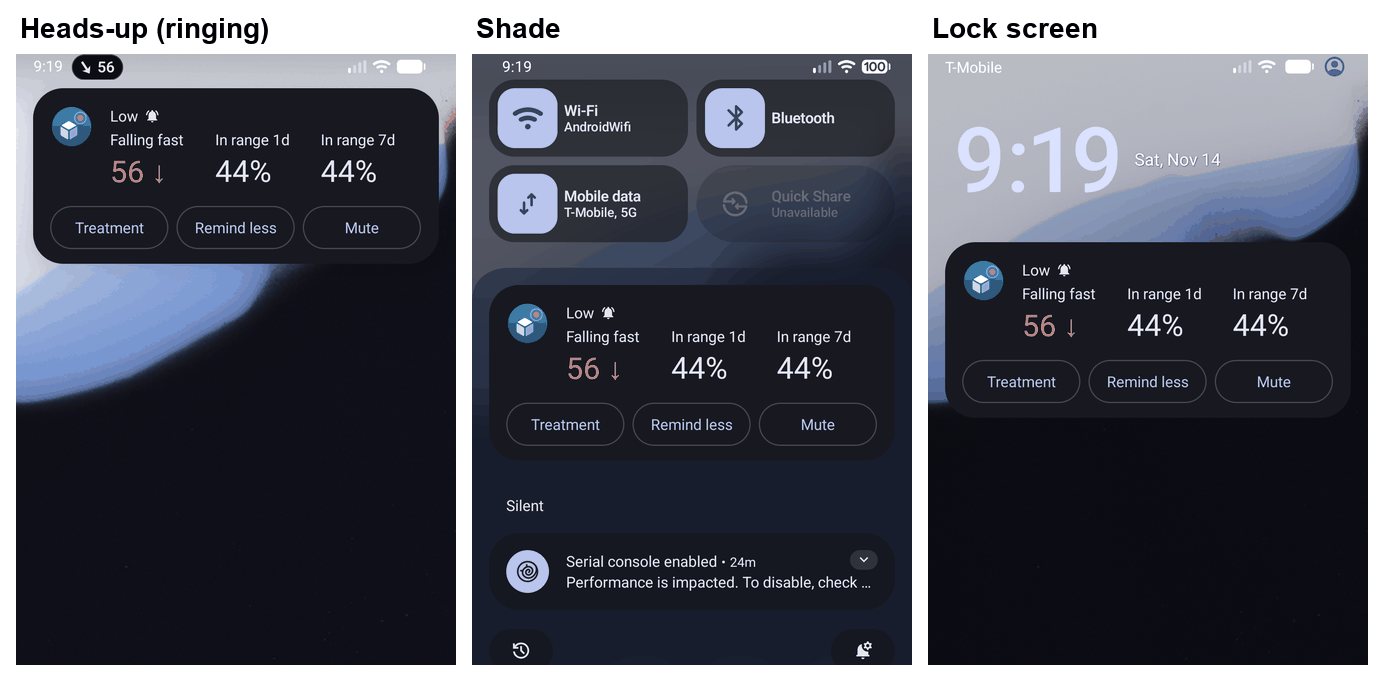 |
A, a low ringing: Low, Falling fast 56 ↓ (a muted side’s countdown would add Time left) |
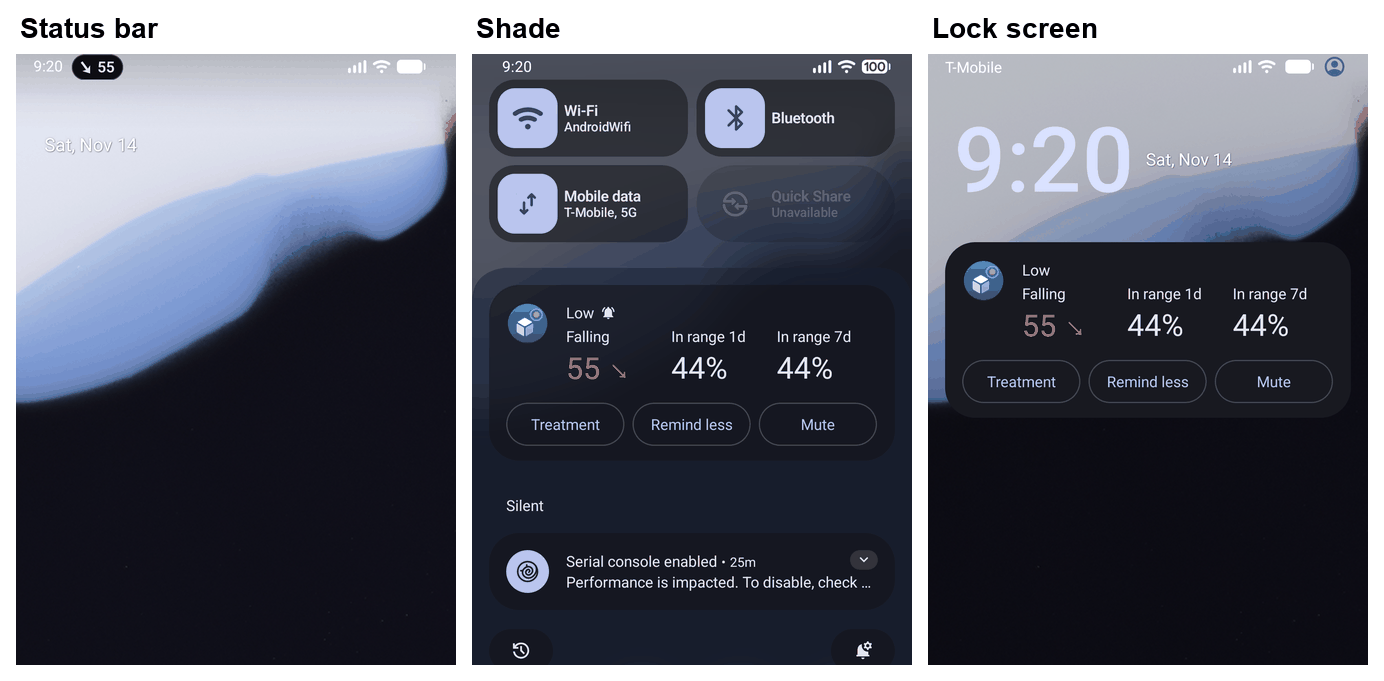 |
A between rings, back on the silent channel: Low, Falling |
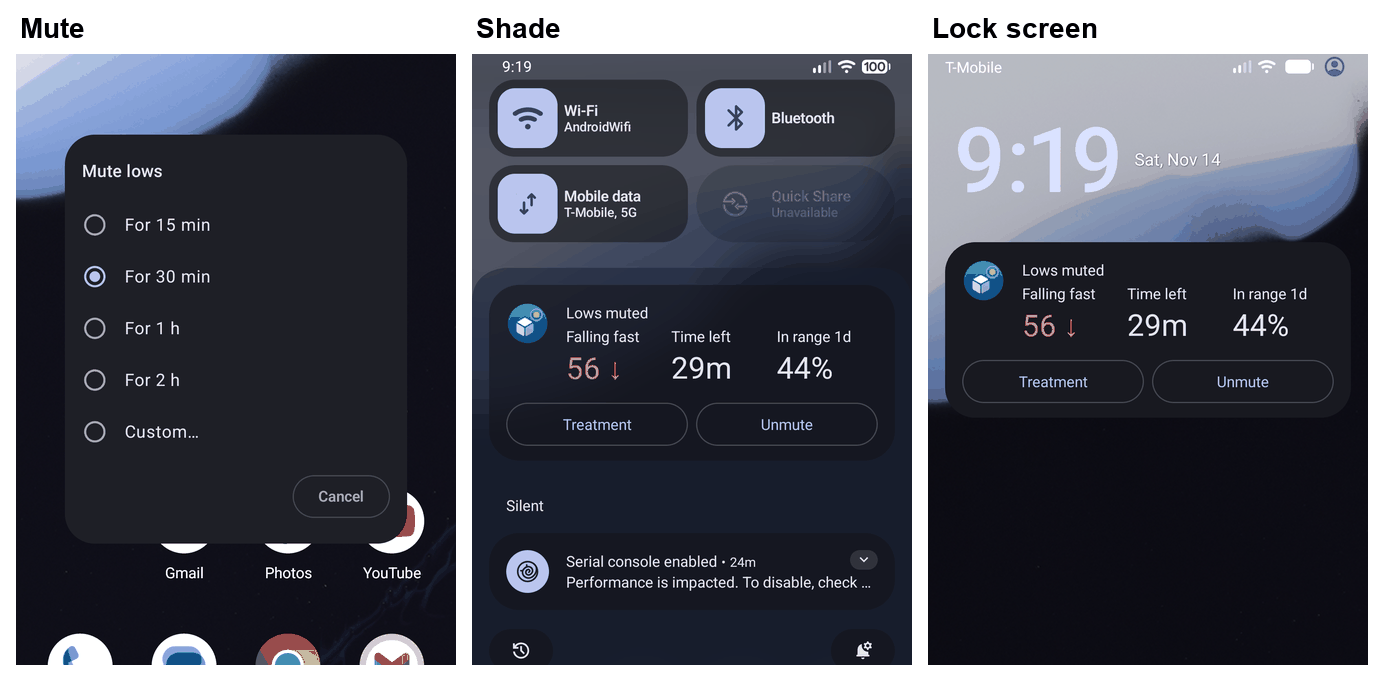 |
A, Mute: the length dialog, then Lows muted · Time left 29m, Treatment · Unmute |
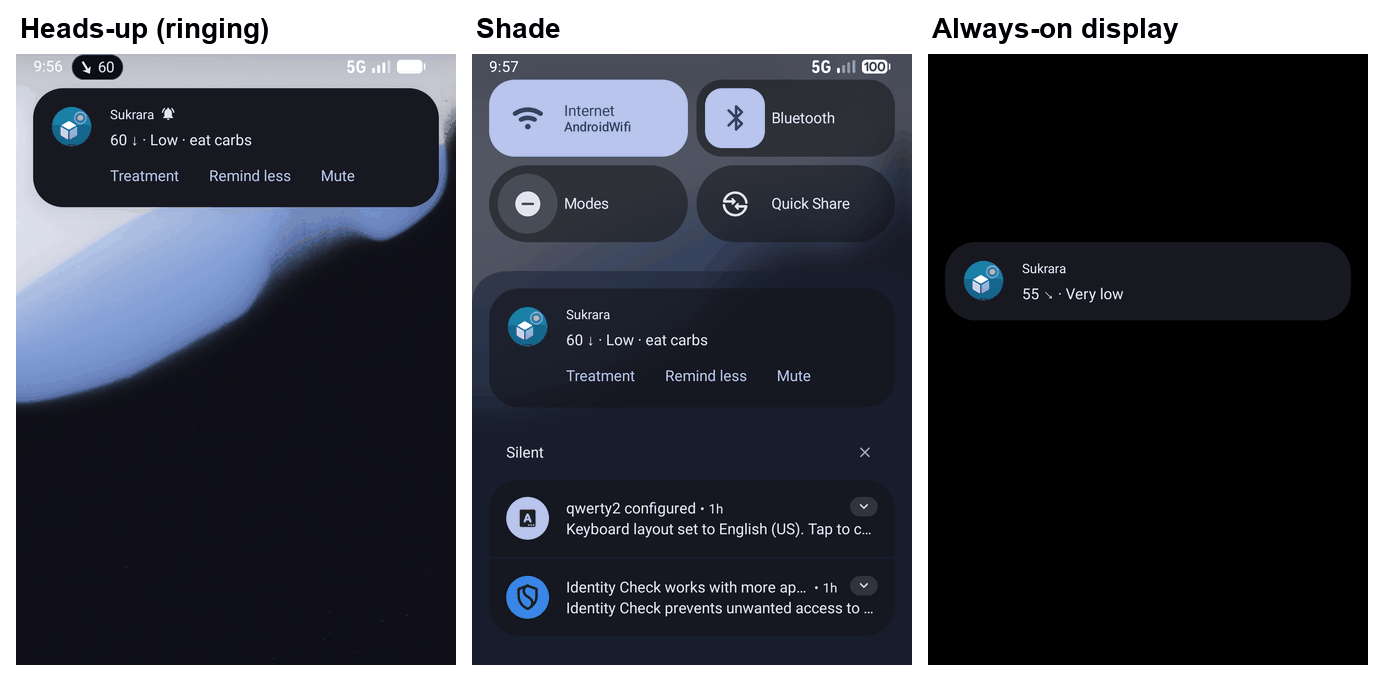 |
A on Android 16 ringing: 60 ↓ · Low · eat carbs; the always-on display |
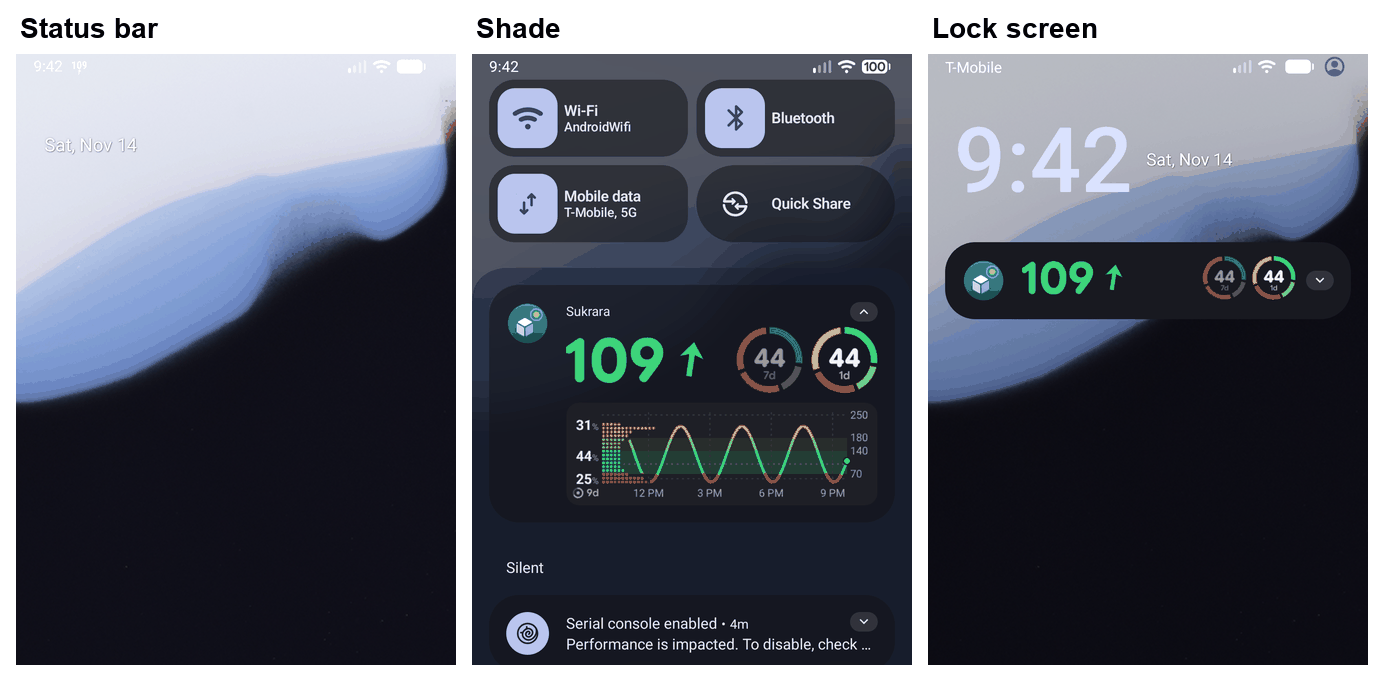 |
B in range: the value large, two rings, expanded and collapsed |
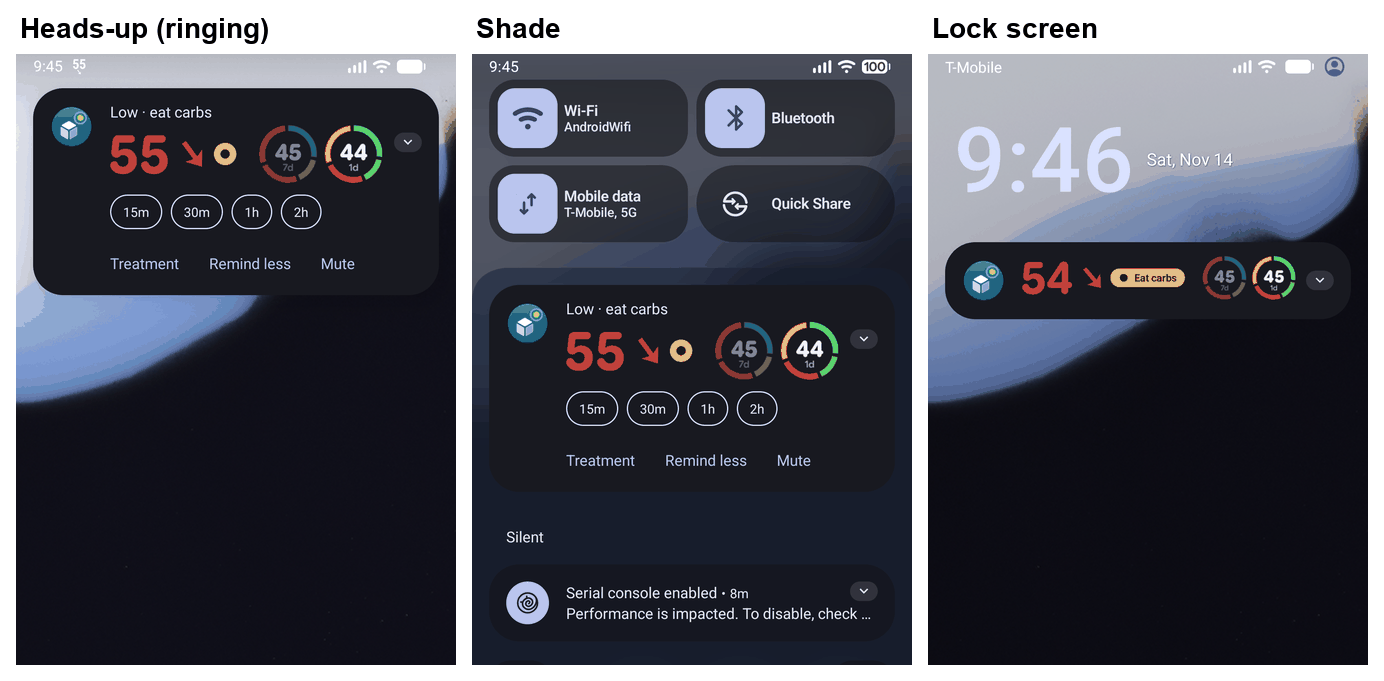 |
B, a low ringing: Low · eat carbs, the chips 15m 30m 1h 2h |
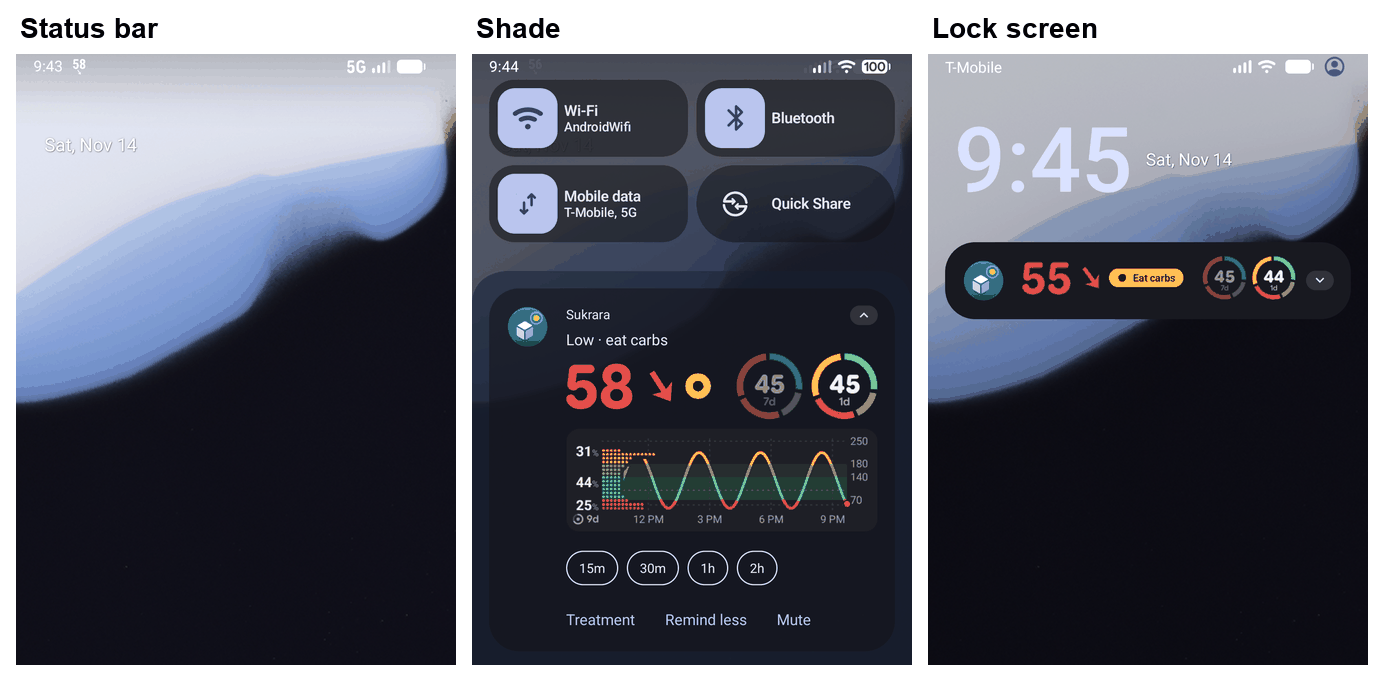 |
B between rings |
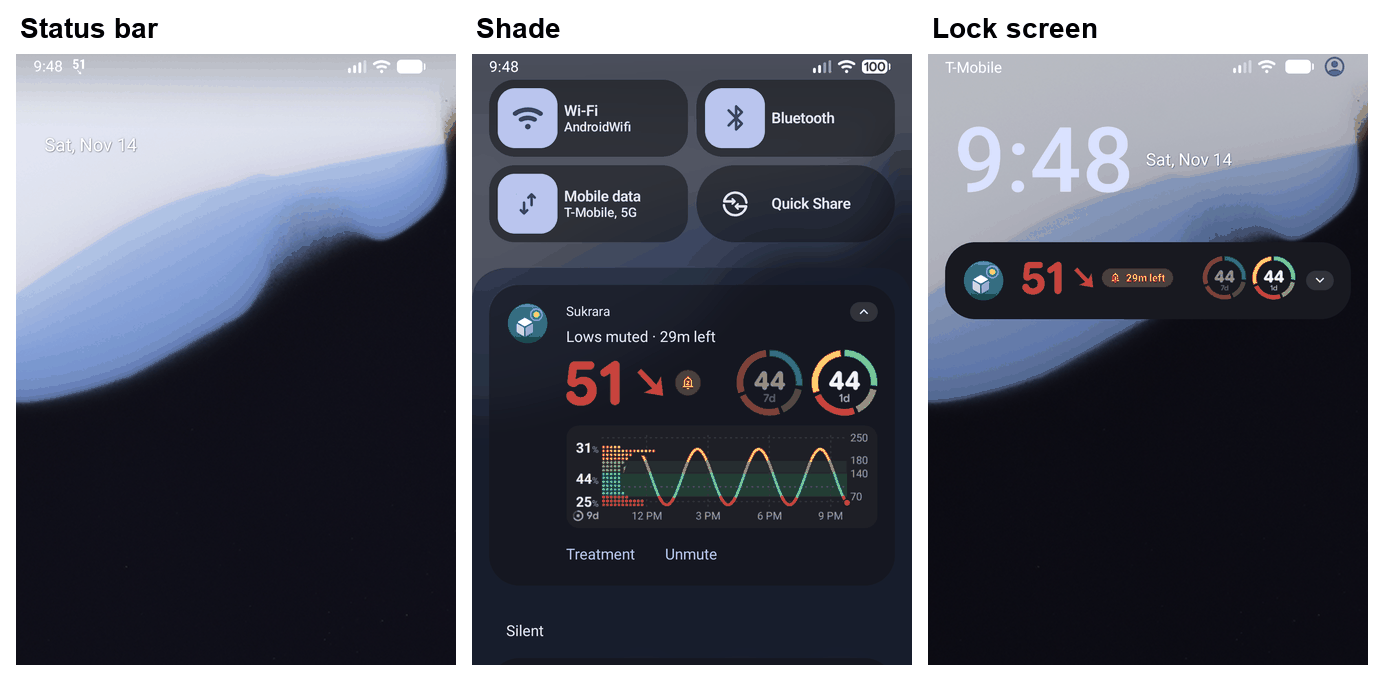 |
B muted: Lows muted · 29m left, no range word |
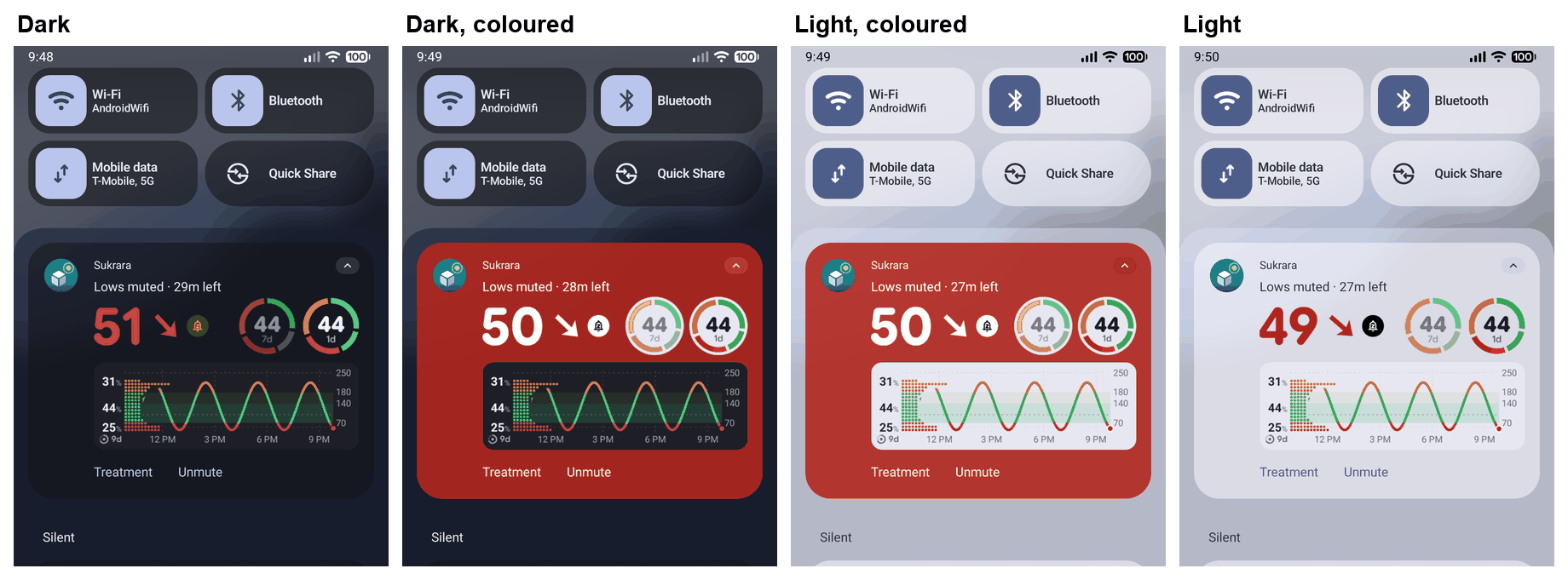 |
Coloured background off and on, dark and light |
| (Settings › Status bar) | Replaced by v4-settings-glucose-notification (§11) |
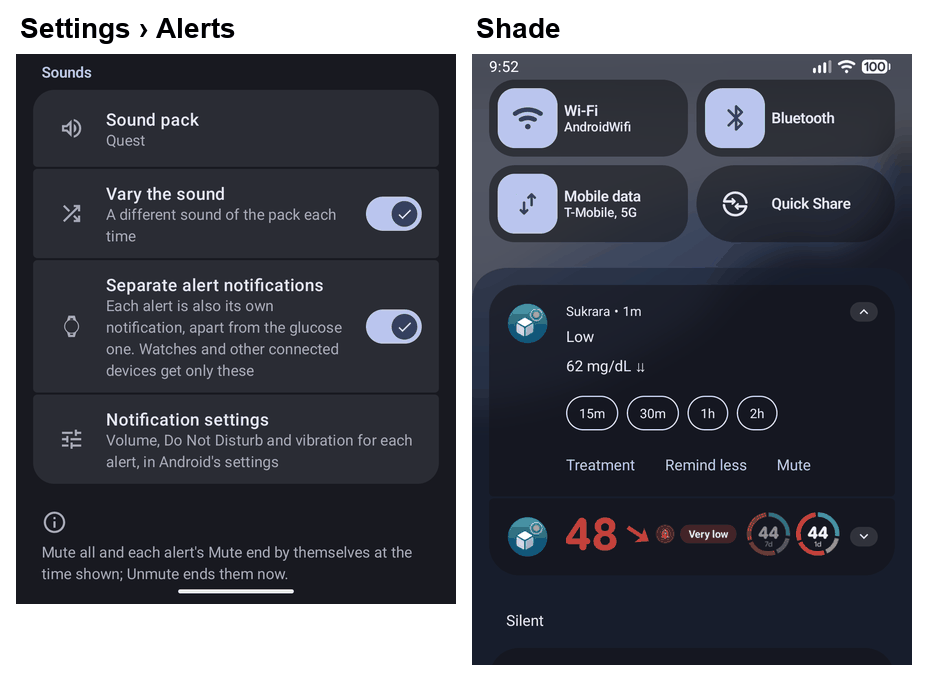 |
Separate alert notifications on: the alert of its own above the glucose card, which carries none |
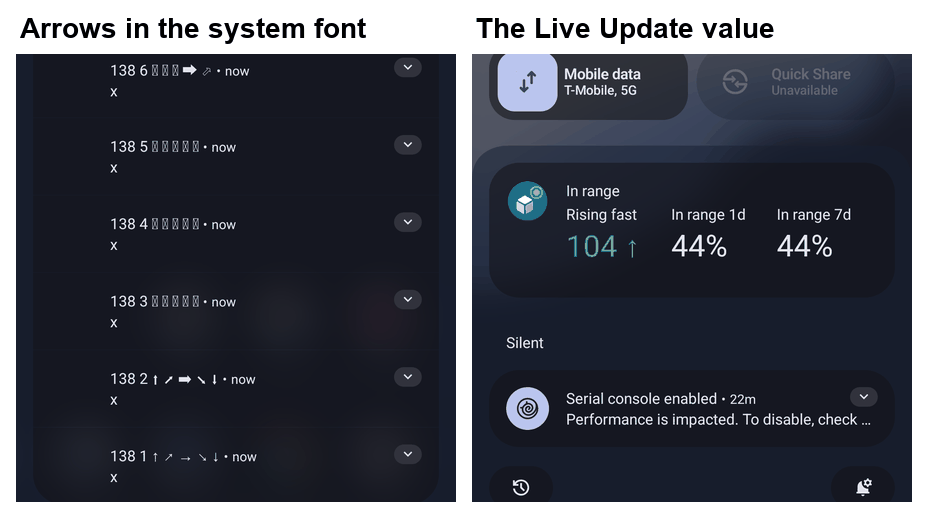 |
Arrow sets in the system font (1 = THE text arrows, 2 = Dingbats / Misc Symbols, 3–5 = Supplemental Arrows-C: not in the font) and the Live Update’s value |
Seen on the way: a ring that comes while the monitoring service starts (here a debug SYNTHETIC restart) is posted
first as the text notification (the foreground start never draws the card), then the service’s own post follows.
11. Round 4 feedback
Section titled “11. Round 4 feedback”2026-11-15, the owner on the v3 pictures. Each point: the alternatives weighed, the choice and why. Emulator Android 17
(API 37.0), the synthetic sensor, synthetic data only; the settings and setup pages also from the Robolectric galleries
(SettingsGallery, SharingScreenshotTest).
11.1 “The icon for Separate alert notifications is wrong; it should not be a watch”
Section titled “11.1 “The icon for Separate alert notifications is wrong; it should not be a watch””| Option | For | Against |
|---|---|---|
| Watch (was) | The main reason to turn it on | Names one use, not the feature (the owner) |
notifications_active (ringing bell) |
Alerts | Already the alerts’ own icon in Settings: two rows, one icon |
stacks / library_add (layers) |
“Separate” | Says nothing about notifications |
notification_add (bell with a plus) |
A notification of its own added beside the glucose one: what the switch does | — |
Chosen: Material Symbols notification_add
(ds_ic_notification_add; ds_ic_watch deleted). Picture v4-separate-alerts-icon-android37.
11.2 “No screenshot of the Live Update with different dynamic values, especially after treatments”
Section titled “11.2 “No screenshot of the Live Update with different dynamic values, especially after treatments””Taken on Android 17 with real entries from Add treatment (rapid 4 u, carbs 30 g, both). The metrics after the value
are the card’s own slots in the card’s priority (main ring, a recent treatment, the second ring: GlucoseCard.slotTexts),
so a treatment takes the second ring’s place, as on the card.
Found on the way and fixed: with both, the carbs were lost. The card draws running insulin and the carbs that ride
along it as one pair, but the text slot only wrote the insulin (4u). Now 4u · 30g (Slots.text, SlotTextTest
written first and failing). Kept as decided in #206: the time since it is the value (it is what changes) and the amount
its label. Considered: the amount as the value and Rapid · 12m ago as the label (a label that changes every minute
and needs a word per kind); a stopwatch metric (Metric.TimeDifference) counting up from the entry (live without a post,
but MetricStyle shows it as 12:04, a clock, for a time that matters in minutes).
The Live Update follows a new entry on the next reading (≤ 1 min with Libre 3), as the card does.
11.3 The settings cards: hierarchy, light-theme contrast, equal heights, simpler texts
Section titled “11.3 The settings cards: hierarchy, light-theme contrast, equal heights, simpler texts”Researched how Android does “choose how the system shows something”: AOSP Settings’ System navigation
(SystemNavigationGestureSettings: an IllustrationPreference
of the selected option over SelectorWithWidgetPreference
radio rows; a copy of the source),
Material 3 radio buttons (“listed vertically, one always
selected”) and lists (the whole row is the target). Other diabetes
apps don’t help here: Juggluco has one on/off Glucose notification (settings help),
GlucoDataHandler adds extra notifications only to get more status bar icons, and its users find an app icon where the
value should be “useless” (GDH #241); xDrip+ users can’t find
how to hide its status bar icon (xDrip #3485): the
choice must be findable and say what it changes.
| Option | Hierarchy | Equal heights | Light theme | Cost |
|---|---|---|---|---|
| Cards side by side (v3) | Picture, title, two-line summary per card, all equal weight | No: text wraps differently | The notification’s grey vanished in the selected card’s tint | — |
| Cards stacked, full width | Better | Still text-driven | Same tint problem | — |
| One picture of the selected choice + radio rows (System navigation) | Picture first (what you get), then one list of names | Yes: one-line title, one-line summary | The picture sits on the page, not in a tinted card: the notification on its own surface with an outline in both themes | Pictures compared by switching, not side by side |
| Dropdown | Compact | — | — | Hides the choices; no picture |
Chosen: the System navigation pattern, as one shared component (GlucoseNotificationChoice, :core:designsystem) for
the settings page and setup. The texts are names: the title is what the status bar shows (Chip, Notification
icon, Status bar text), the summary what the notification is (Basic notification, Notification with the
graph, … · Needs root); the group title Glucose in the status bar says what the names are of, so neither repeats
it. The picture draws the status bar (the glucose highlighted where it shows) and the notification (short and basic, or
with the graph and a ring); it fades through on a change (cut with reduced motion), TalkBack reads it as one sentence.
Under the choice only the chosen one’s own rows; then Notification (Coloured background, Glucose on the lock
screen). Picture v4-settings-glucose-notification (chip and notification icon light, status bar text dark).
11.4 Where the choice lives, the root option, setup’s steps
Section titled “11.4 Where the choice lives, the root option, setup’s steps”The page. Considered: keep it inside Status bar (the owner: someone looking for the notification won’t look there); split it over Status bar and a Notification page (the two halves of one choice on two pages); one page named for the thing people look for, Glucose notification (the overview row and search: Where your glucose shows in the status bar). Chosen: the last; Status bar is gone, its rows (root placement and colour, number icon, lock screen) are under the choice they belong to. The Lock screen page (the root lock-screen widget) stays its own.
The third option, Status bar text (root only). The root value in the status bar, Sukrara’s notification icon
hidden, the notification with the graph. One stored choice over the existing keys (NotificationStyleSettings:
statusbar.hook on + statusbar.hideNotifIcon on; otherwise statusbar.chip), so the hook, the module and the
settings schema didn’t change. Choosing it is the request for root (#178: never asked before), with root’s or the
module’s missing step as the shared card below it (AccessStepBanner, moved to :core:designsystem/root so setup
can show it). Every build has it (#142).
Setup. Two optional steps after Keep Sukrara up to date: Root, then Glucose notification.
Root: Is this phone rooted? with Yes, it’s rooted / It isn’t rooted / Later. “Automatic if possible”: when the
phone already shows signs of root (LSPosed answers, a su file, the module), the question is skipped and the check
runs by itself; otherwise only the person’s Yes asks, because asking su unprompted pops Magisk’s dialog (where it still has one)
on a phone whose owner didn’t expect it, and KernelSU hides su from every app not allowed in its manager (“su is
invisible to all applications by default”, KernelSU #1838), so a
silent probe can’t tell “not rooted” from “not allowed yet”. Magisk is going the same way: its interactive prompt is
being removed for granting apps ahead of time in its Superuser list (Magisk #10139),
which is why the card’s first instruction is to allow Sukrara there and come back. After Yes: the shared card (Allow root for Sukrara, Root
needed, … with Check again); root granted completes the step by itself. Glucose notification: the same component,
Status bar text already picked when Sukrara has root (once; the person can choose another), Continue only (the chip
is already an answer). Considered: one step with the root question inside the choice (the question would sit between
three options and hide the picture); the root check inside Permissions (an essential step for an optional feature).
Picture v4-setup-root-notification: the question, Yes on a phone without usable root, the choice without root, the
choice with root picked.
11.5 Pictures (v4)
Section titled “11.5 Pictures (v4)”| Picture | What |
|---|---|
| (Live Update after treatments) | Replaced by v5-a-treatments-android37 (§12: the kind before the amount) |
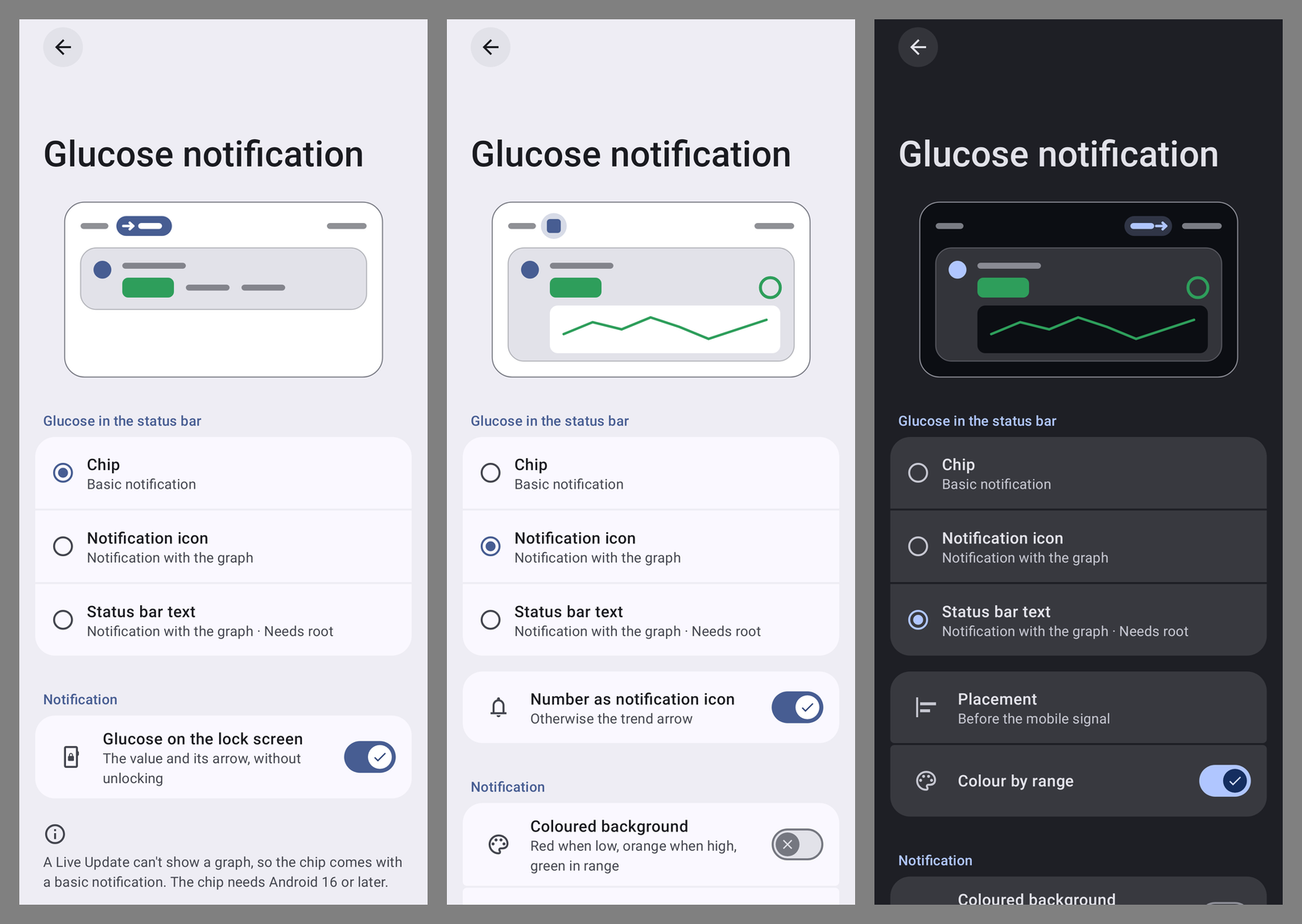 |
Settings › Glucose notification: chip (light), notification icon (light), status bar text with root (dark) |
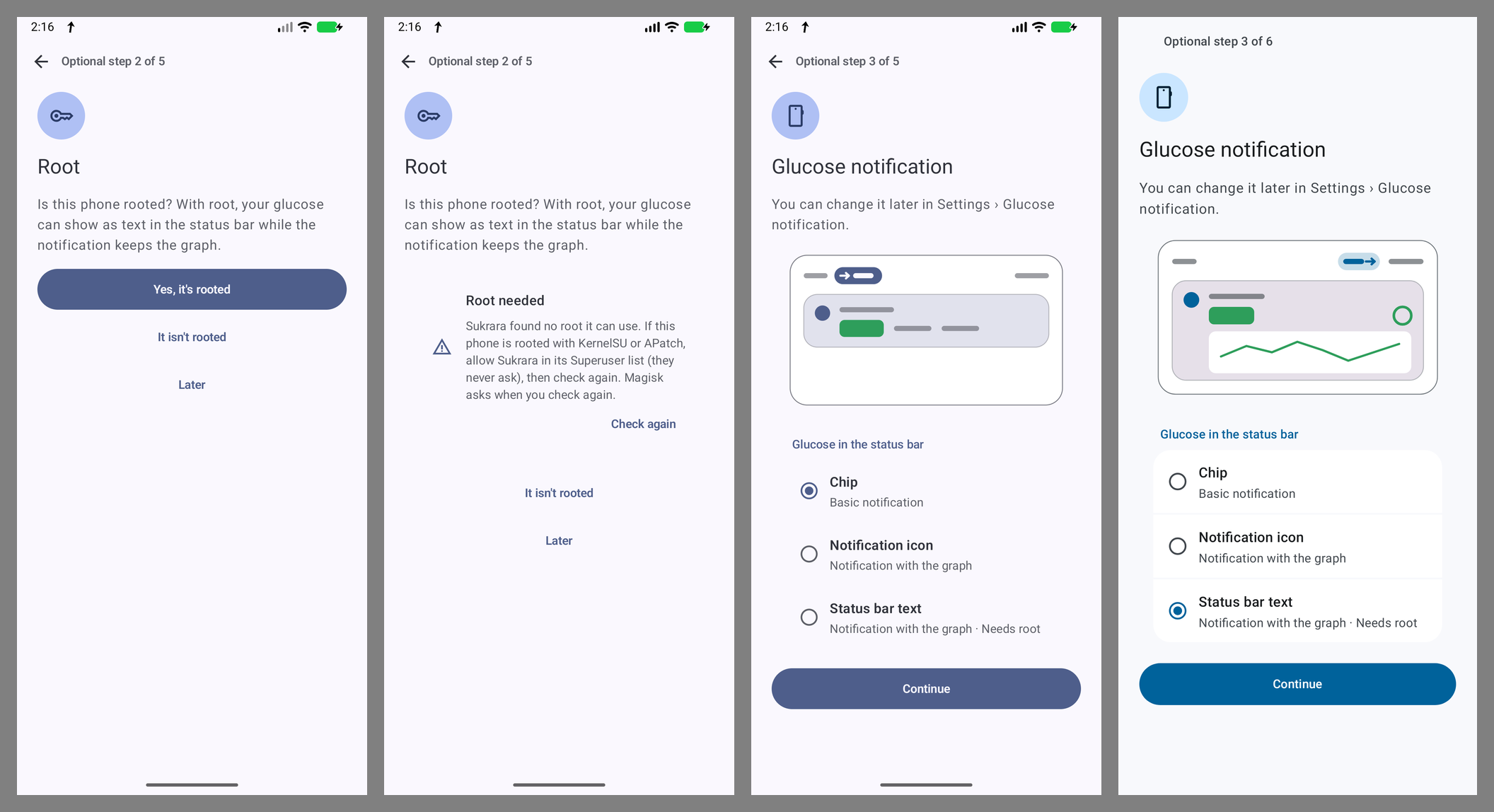 |
Setup: Root; after Yes on a phone without usable root; Glucose notification without root; with root granted, Status bar text picked |
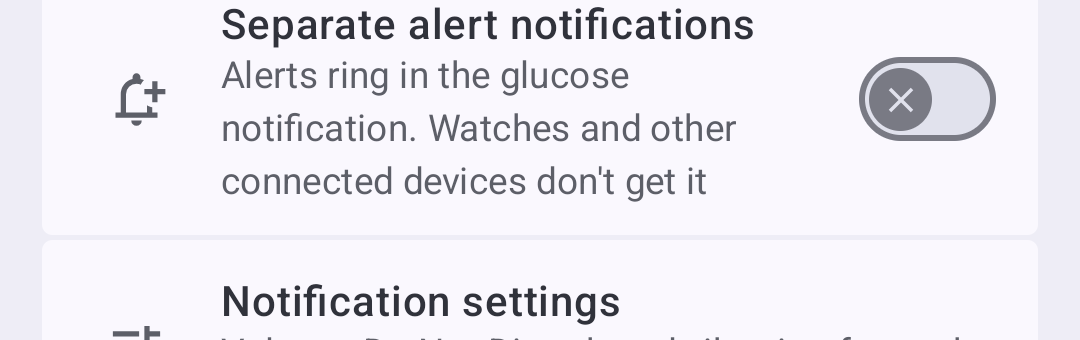 |
Settings › Alerts › Separate alert notifications with its new icon |
12. Round 5: which insulin
Section titled “12. Round 5: which insulin”2026-11-15, the owner on v4-a-treatments: “when the title is just insulin (“4u”) it is unclear what type of insulin
it is. I understand that when multiple insulins or carbs may be too long … it would ellipsis and be counter productive,
but we should try our best.“
Measured first (Android 17 emulator, 1080 px at 420 dpi, system font): with three metrics each label gets a third of the card, about 14 characters. Rapid 4u · 30g fits; Rapid 12.5u · 120g is cut to Rapid 12.5u ·… and the Spanish Rápida 12.5u · 120g to Rápida 12.5u…: the carbs are lost again.
| Option | Clear | Fits | Against |
|---|---|---|---|
| The kind before the amount, Rapid 4u, Carbs 30g, the pair Rapid 4u · 30g | Yes: the app’s own words (Add treatment’s Rapid, Carbs); grams are only ever carbs, so they need no word | Small pairs | A large pair is cut |
| Emoji (💉 4u, 🍞 30g) | Partly | Yes | Not the app’s icons (a metric is text only, no picture: §10), drawn differently on every phone, TalkBack reads “syringe” |
| Initials (R 4u) | No | Yes | A code to learn |
| Amount as the value, kind and age as the label (4u · Rapid · 12m ago) | Yes | Mostly | A label that changes every minute; reverses #206 and the ring |
| Cut the kind when long (12.5u · 120g) | No | Yes | The owner’s point again |
| Cut the carbs when long (Rapid 12.5u) | Half | Yes | Round 4’s lost carbs again |
| A pair that doesn’t fit: a metric each (Rapid 12.5u · 30m, Carbs 120g · 30m) | Yes | Yes | The 1-day ring gives way while both run (≤ 3 h; it moves little in that time and stays on home and the card) |
Chosen: the kind before the amount everywhere (slot_last_rapid Rapid / Rápida, the badge’s Carbs / Hidratos),
the pair in one label while it fits (≤ 14 characters, Slots.LABEL_MAX) and a metric each when it doesn’t
(GlucoseCard.slotTexts, the one place that turns the card’s slots into text; SlotTextTest written first). Only
Android’s Live Update writes these labels: the Mac has no text-only slot place.
| Picture | What |
|---|---|
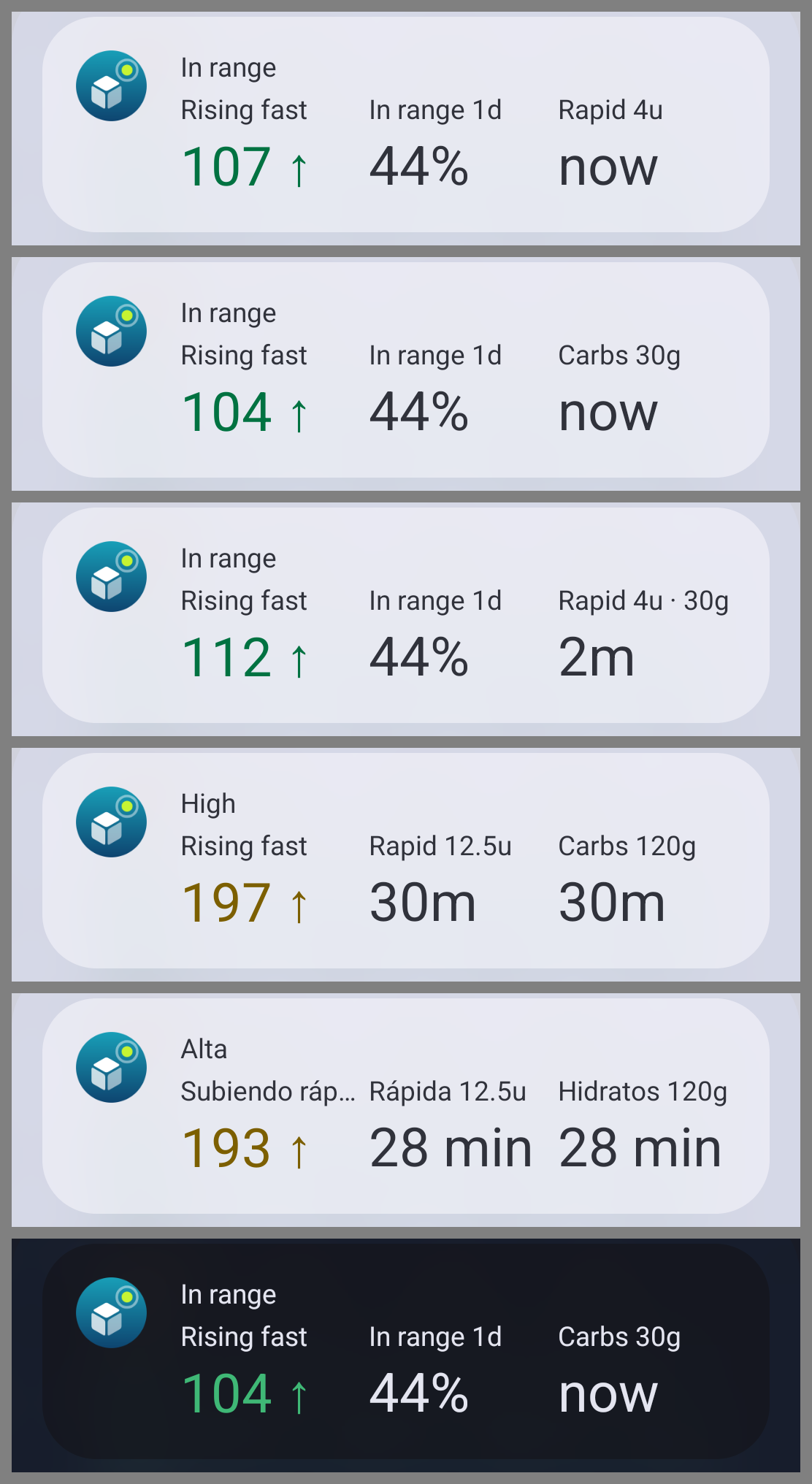 |
Live Update on 17: Rapid 4u; Carbs 30g; Rapid 4u · 30g; a large pair as a metric each, English and Spanish; carbs in the dark theme |
13. Round 6: Spanish words that fit, Spanish decimals
Section titled “13. Round 6: Spanish words that fit, Spanish decimals”2026-11-15: in the Spanish Live Update with three metrics the value’s label read Subiendo ráp…, and the amounts 12.5u instead of 12,5u.
Cut labels. System UI cuts a metric’s label to a third of the card. A character count (§12’s 14) was the wrong
measure: Bajando rápido has 14 characters like Rapid 4u · 30g and is wider. The fit is now a width in the card’s
text model (TextModel, the label layout’s): 8 em, from what the Android 17 emulator showed (Rapid 4u · 30g 7.94 and
Hidratos 120g 7.88 whole; Subiendo ráp…, Rapid 12.5u ·… at 8.17 with the ellipsis; Slots.fits). Every label a
metric can show is checked against it in English and Spanish (MetricLabelFitTest: every arrow, every metric and
period, large amounts, a note; MetricLabelTest: the countdown’s label), so a word that doesn’t fit fails a test.
| Option for the value’s label | Against |
|---|---|
| The sentence words (subiendo muy rápido) cut by System UI | The cut: the words stop meaning anything |
| The rate whenever the words don’t fit (3,1/min) | Read as a number beside the value; no words for TalkBack; nothing when there’s no rate |
| Two metrics when the label is long | Drops the ring or the treatment the person set |
Label words written to fit, per language (CardWords.trendLabel) |
A second word list (the sentence words stay what TalkBack says in a sentence) |
Chosen: label words. English keeps its words where they fit (Falling, Falling fast) and says Very fast fall / Very fast rise for the doubled arrow (Falling very fast: 9.2 em), No trend (Trend unknown: 8.5). Spanish takes the rate alerts’ own nouns, Bajada rápida / Subida rápida (the alert’s headline, so under a rate alert the label says the rate instead, which the Spanish words never matched before), Bajada brusca / Subida brusca for the doubled arrow, Bajando, Subiendo, Estable, Sin tendencia; the countdown Restante (Tiempo restante: 9.2).
Decimals. The treatment amount had its own formatter with a fixed point in eight places on Android and three on
the Mac (TreatmentMarks.number, the pens’ pages and sheets, Add treatment’s fields, the treatments window), beside
the glucose values that already followed the language. One AmountText per platform (:core:model, SukraraCore)
now writes every amount the person reads, in the card’s or the screen’s language: the card’s labels and rings, the Live
Update, home’s list, Add treatment’s fields and confirmations, the pen pages, the Mac’s treatments window. Also in the
language now: the GMI in its ring, the Mac’s ring and report shares, GMI and CV (they were “.” on the Mac), the Live
Update’s rate. Kept with a point: the wire formats (Nightscout, LibreView, exports) and the layout reports.
contracts/graph/labels pins 4,5u in its Spanish cases on both apps.
| Picture | What |
|---|---|
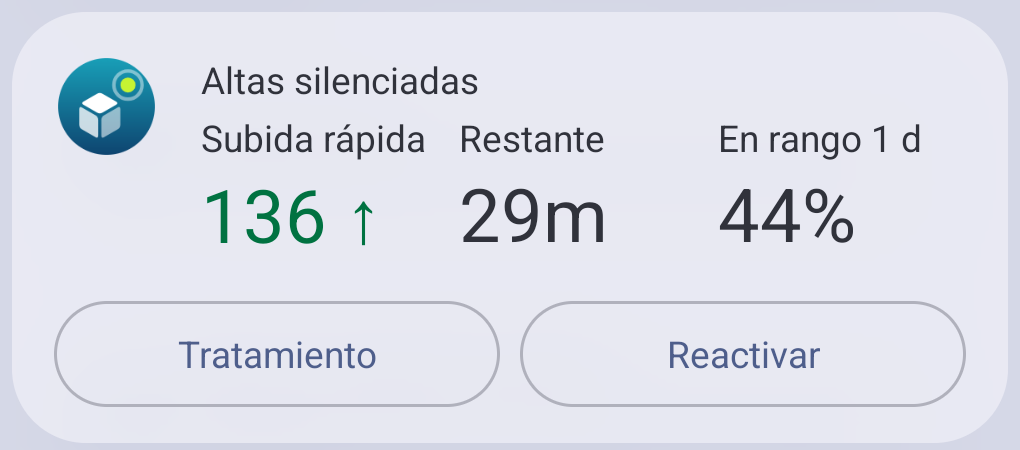 |
Live Update on 17 in Spanish with three metrics (a high muted, the synthetic sensor rising fast): Subida rápida · Restante · En rango 1 d, all whole |
14. Round 7: Status bar & notification, no notification, the arrow cut
Section titled “14. Round 7: Status bar & notification, no notification, the arrow cut”2026-11-15, the owner on the build (Pixel 10 Pro, Android 17.1 CP3A.261005.005, rooted, LSPosed): the section’s
name and icon, the root option’s style, the notification icon as a picker, the merge setting on the page, an option
with no notification and nothing in the bar (alerts must still work), the notification optional with root; and “In the
live update, the trend arrow is ellipsed on my phone”. Emulator Android 17.0, the synthetic sensor; the phone read only
(its System UI, framework and fonts were read from the device, nothing changed on it).
14.1 Name and icon
Section titled “14.1 Name and icon”| Option | For | Against |
|---|---|---|
| Glucose notification (was) | Short | Says half: the page is as much the status bar (the owner) |
| Status bar and permanent notification (the owner’s) | Says both | Long (37 characters, two lines as a title); “permanent” isn’t Android’s word (it says ongoing, and Android 14+ lets it be swiped) |
| Status bar | Android’s word | The notification half hides there (round 4: people looking for the notification don’t look there) |
| Status bar & notification | Both halves in Android’s own words and style (“Network & internet”, “Sound & vibration”); 25 characters; es Barra de estado y notificación (Android’s “y”) | — |
Icon: drawn for Sukrara (ds_ic_status_bar_notification, the owner’s pick from a picker, 2026-11-15): a screen open at
the bottom, the status bar as a line across its top and a notification card under it, on the Material Symbols grid. It
replaced Material Symbols top_panel_open
(a screen with its top bar and a panel pulled down from it, the status bar and the shade). Compared before:
smartphone (was: any phone setting), notifications (Alerts’ bell), notification_settings (a bell again),
app_badging (notification dots), toolbar (no shade), splitscreen_top (split screen). Setup’s step and its row in
Ready take the same name and icon.
14.2 What Android allows (sources)
Section titled “14.2 What Android allows (sources)”- An app can’t hide its own foreground-service notification.
NotificationManagerService.enqueueNotificationInternalraises an FGS notification on a MIN or NONE channel to LOW “unless the user had an opinion otherwise” (the person’s own MIN / off is kept) (android16-release). - The person can. Turning off the channel, its group or the app’s notifications drops every post silently
(
isRecordBlockedLocked) and cancels what showed, the FGS notification included (REASON_CHANNEL_BANNED).startForegroundstill succeeds (it throws only for a missing channel or icon:ServiceRecord.postNotification), the service keeps running, and Android 13+ lists the app under Active apps (“they still see notices related to these foreground services in the Task Manager”, notification permission). Measured here on Android 17.0: channel off → no Sukrara notification,MonitoringService isForeground=true, also after a force-stop and a fresh start; a low rang asalert.lowids 1000/1001. - Swiping it (Android 14+, behaviour changes) only hides it until the next post, and never on the lock screen: not a way to have none.
- Root without LSPosed can’t hide one app’s notification icon. The status bar’s icon list is System UI’s
(
NotificationIconsInteractor);icon_blacklistcovers system icon slots only;cmd notificationhas no importance command (NotificationShellCmd). A MIN channel shows no icon (SystemUI), and uid 0 could set it throughINotificationManager, but MIN also collapses the notification and drops it from the lock screen: not “the icon hidden”. So the icon picker is offered there too, and None needs the module. - Others. xDrip+ (“There is no way to eliminate the notification”, #1793; a night-low user who can’t hide it, #3485), Juggluco (always, “obliged by Android”, help), AAPS (enforced, source), GlucoDataHandler (swipe it and set the icon to the app’s, strings): none hides it in-app; they all point at Android’s switches.
14.3 The page
Section titled “14.3 The page”- Glucose in the status bar: Chip · Basic notification, Notification icon · Notification with the graph,
Status bar text · Notification with the graph, or none with a Root label at the row’s end, Nothing · No
notification. The label is a new shared component (
RowTag, a tonal pill in the label style; SPA’sRadio2got a trailing slot): Material 3 draws a status that isn’t an action as a small label, not a chip; it is read with the row. Considered: “· Needs root” in the summary (was: the owner said no), a key icon (an icon reads as the row’s, not a requirement), a disabled row (it is choosable: choosing it is the request). - What the icon shows (the notification icon and the root text): Value and trend, Value, Trend, Sukrara
icon, and with the text None (tagged Root); each row shows the newest reading drawn as that icon by the renderer’s
glyphs (
notification-icon-preview, no made-up value). Considered: one row opening a dialog (hides the pictures), a grid of icons (not the app’s radio pattern). Without the module, None says so and the icon stays the value: the glucose never leaves the bar because a hook isn’t loaded. - Nothing = the person turns off Glucose in Android. The page shows the one step left as a row (Turn off the glucose notification / Turn on the glucose notification when a choice needs it and Android has it off), opening the channel’s page, and reads Android’s state on return. The root text has the same as a Glucose notification row. The channel was called Glucose (always shown): now Glucose.
- Alerts in the notification: Alerts’ Separate alert notifications, here the other way round and worded for the
page (a second place). Without the notification it isn’t shown; the footer says every alert is a notification of its
own, which is forced:
canCarrynow checks the channel, its group and the app’s switch on every ring (it checked the channel only: a group turned off would have sent a ring into a dropped notification). Android’s block-state broadcasts move an alert that is up at once and post the notification again: found on the emulator, turned back on it only came back with the next reading (up to a minute; five with some sensors). - Stored:
statusbar.show(chip / icon / text / off) andstatusbar.notifIconreplacestatusbar.chip,statusbar.hook,statusbar.iconandstatusbar.hideNotifIcon(no migration).HookCode.VERSIONchanged: System UI needs one restart after the install.
| Choice | Status bar | Notification | Alerts | Edge cases |
|---|---|---|---|---|
| Chip | Live Update chip | Basic (Live Update) | In it, or separate | Live Updates refused → the card with What the icon shows’ icon and the Allow row; channel off → Turn on row, nothing in the bar |
| Notification icon | The chosen icon | Card with the graph | In it, or separate | Channel off → Turn on row; Sukrara icon = no glucose in the bar, the person’s choice |
| Status bar text (root) | Text / system icons | Card, or none (Android’s switch) | In it while shown, else separate | No root / root lost → the root card, the notification’s icon is still the value (None without the module too); no module → slot: icons only, None says it needs the module; notification off and root lost → only the app, widgets and lock-screen widget show the value (the page’s root card says why) |
| Nothing | Nothing | None once Android’s switch is off; until then the notification with Sukrara’s drop and the Turn off row | Separate, always | Reboot / locked boot: the service starts on the blocked channel (startForeground succeeds), alerts separate; followers the same on their phone; notifications revoked → every alert is dropped too: Alert reliability’s Notifications item already says so |
14.4 The arrow cut in the Live Update
Section titled “14.4 The arrow cut in the Live Update”Cause. The phone runs Android 17.1, whose framework draws a MetricStyle value in variable-display-small-emphasized
at 28 sp (Google Sans Flex, weight 500); 17.0, the emulator’s, used the -narrow family (read from the phone’s
framework-res.apk and the SDK’s 37.0 / 37.2 resources). Every metric gets a third of the row (“Each metric receives
equal horizontal space”, MetricStyle):
411 dp − 2 × 16 (shade) − 72 − 16 (content margins) − 2 × 4 = 94.5 dp, and the value ends in “…” (ellipsize end).
Measured with the phone’s own fonts (HarfBuzz, tnum): 138 ↗ 85 dp, but the steady 138 → 93.7 dp (the → falls back
to Roboto’s wide arrow) and 13,8 → 102.8 dp: the arrow is what’s cut. Not the chip: the framework takes
setShortCriticalText before the critical metric (Notification.getDefaultCompactContent, read from the phone).
Fix (MetricRoom, MetricRoomTest): the value is measured on the phone in the system’s own
NotificationExpandedMetricValue style (size, family and features read from the framework, the row from its dimens),
then written with a thin space if that fits, else the card’s slots give way (two metrics, half the row each, then one).
Considered: a smaller arrow as the unit (the unit goes to the label in the expanded view), the arrow in the label (14 sp,
lost at a glance), always two metrics (drops a ring for every value), a fixed width table (wrong on the next font).
| Picture | What |
|---|---|
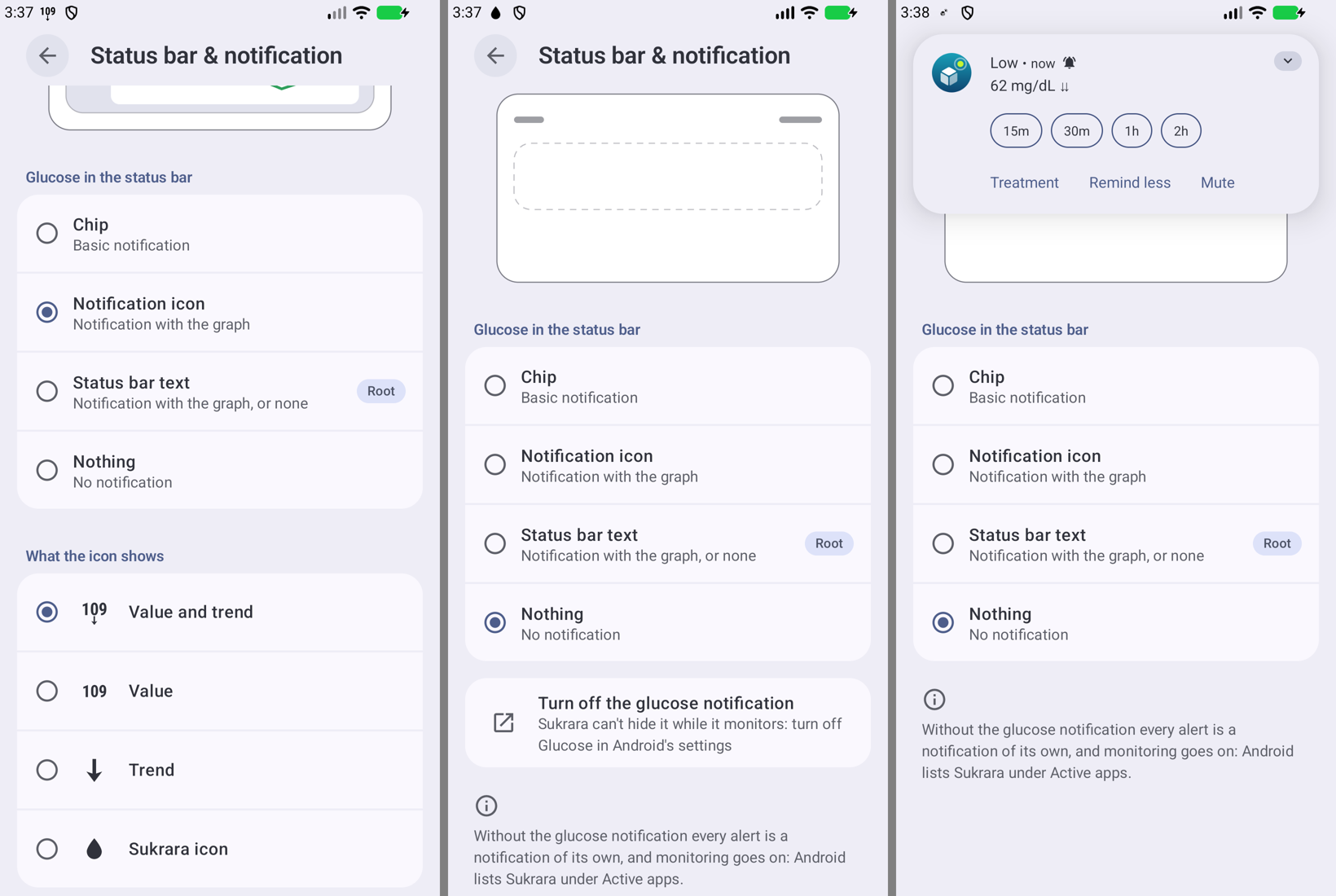 |
Android 17.0 emulator, synthetic sensor: Notification icon with What the icon shows (109 ↓ in the bar); Nothing with its step while Android still shows the drop; a low ringing as its own notification with the glucose notification off |
In Sukrara (round 7). Added: everything above. Left out: hiding the notification for the person through root
(INotificationManager as uid 0 to set the channel MIN or off: it changes the person’s own channel behind Android’s
settings, and MIN also takes the value off the lock screen); Nothing in setup (setup shouldn’t send the person out to
Android’s settings; Settings has it).