
13 — macOS widgets (desktop + Notification Center)
Esta página aún no está disponible en tu idioma.
2026-10-16 · investigation report · macOS 27.0.1 (26A434), Command Line Tools only (Swift 6.4, MacOSX27.sdk); Xcode installed later only to get a free Apple Development certificate · update: the widgets run (see Resolved)
WidgetKit widgets for the Mac (desktop and Notification Center) that show glucose:
- Current value: number, a trend arrow at a continuous angle, the reading’s age, colour by range, and a stale state.
- Graph: Swift Charts, last 3 h (more on bigger widgets), 70–180 target band.
- Graph + value combined.
The key question: can this be built and run with only the Command Line Tools, because installing Xcode needs the user’s Apple ID?
Result
Section titled “Result”| Question | Answer |
|---|---|
Compile a WidgetKit + Swift Charts extension with swiftc (CLT only) |
Yes. About 11 s (-Onone) |
Assemble .app + PlugIns/*.appex by hand, sign ad hoc, register |
Yes. pluginkit -m lists it and chronod sees it (“Added extensions”) |
| macOS loads it (widget gallery, desktop) | Yes, with a free Apple Development certificate + _NSExtensionMain entry point. Ad hoc, chronod drops it within 7 ms: “Extension is not entitled to run in the App Sandbox” |
| Can we get past that without an Apple-issued certificate? | No. Eight signing and install variants all fail the same way (table below). A free Apple ID personal team is enough |
| Widget views | Done, rendered to PNG with ImageRenderer from the same SwiftUI code (evidence) |
| Data sharing host → sandboxed widget | Ad hoc: localhost HTTP, a /Users/Shared file and the widget’s own container work, the App Group does not. With a Team ID the team-prefixed App Group works too (no provisioning profile) |
| Refresh cadence the system honours | Every reload, once a minute, for an hour: 68 host reloads → 62 getTimeline per placed widget (evidence) |
| Same widget inside Sukrara for Mac | Works with the user’s real readings via the App Group (below) |
So the CLI-only route stopped at one wall, signing, plus a hidden second one, the entry point (see Resolved). Everything else (compiler, SDK, Swift Charts, bundle layout, Info.plist, entitlements, registration) works without Xcode. To make it run you need an Apple-issued code-signing certificate with a Team ID:
- an “Apple Development” certificate (a free Apple ID personal team works, but you get it through Xcode’s account sign-in), or
- a paid Developer Program account. That one can make the certificate on developer.apple.com from a CSR, so even then Xcode is not required.
With such a certificate, ./build.sh install picks it up by itself (it also derives the Team ID and the App Group from it).
Resolved: the widgets run
Section titled “Resolved: the widgets run”After the user installed Xcode, signed in with a free Apple ID (Settings → Accounts, personal team) and created an Apple Development certificate (Manage Certificates → + → Apple Development), three things were needed. The widgets then appeared in Edit Widgets…, on the desktop, with live data from the App Group and HTTP.
- The WWDR G3 intermediate.
security find-identity -vlisted the new identity as not valid: the Mac only had the old WWDR intermediate (expired 2023). Importing Apple’sAppleWWDRCAG3.cer(apple.com/certificateauthority) into the login keychain made it valid. Xcode normally installs it. - Team-ID signature. With
TeamIdentifier=QWUV9H4A3Gchronod no longer says “not entitled”. It launches the extension and asks forgetAllDescriptors. That confirms the Team ID inference above. - Entry point
_NSExtensionMain. The launched extension then crashed withEXC_BREAKPOINTin_EXRunningExtension._shared(ExtensionFoundation), called fromWidgetBundle.main(), before any of our code ran. CodexBar’s widget binary imports_NSExtensionMainand starts there, which is how Xcode links extensions. Linking ours with-Xlinker -e -Xlinker _NSExtensionMainfixed it. The earlier claim that “no-e _NSExtensionMainis needed” was wrong: launched by hand, the binary only looked fine because the trap comes right after WidgetKit’s first log lines.
Then evidence/chronod-accepted.log shows
getAllDescriptors returning all three kinds and chronod precaching placeholders for every family. Once a widget
was placed, evidence/widget-gettimeline.log shows
getTimeline with every transport readable: appgroup-api=ok appgroup-path=ok own-container=ok users-shared=ok
and HTTP.
App Group. The group is <TEAMID>.dev.spike.glucosewidgets, written into both Info.plists (GlucoseAppGroup)
and entitlements by build.sh. The host must open it through containerURL(forSecurityApplicationGroupIdentifier:).
A hand-built ~/Library/Group Containers/… path still failed with 513 until the container had been created that
way. No provisioning profile is needed on macOS for a team-prefixed group.
Limits of the free route. The certificate lasts a year (here until 2027-10-16) and only this Mac trusts the
build. Widgets in a downloadable release zip need a Developer ID certificate (paid program) and
notarization. The same build.sh takes that identity via SIGN_ID. Without any certificate the build stays
ad hoc: it still builds, the widgets just don’t load.
Widgets (rendered with ImageRenderer)
Section titled “Widgets (rendered with ImageRenderer)”The same GlucoseWidgetView is used in the extension and in the renderer, with the container imitated (16 pt
margins, rounded background). Widget sizes are the macOS points: small 170×170, medium 364×170, large 364×382,
extra large 746×382.
| Combined, medium | 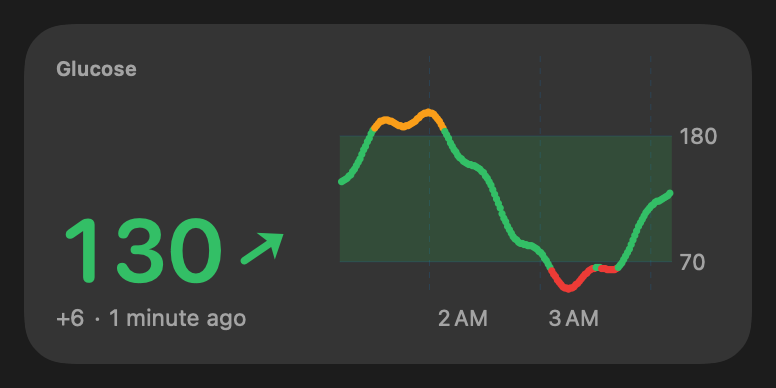 |
| Value small / Combined medium, low | 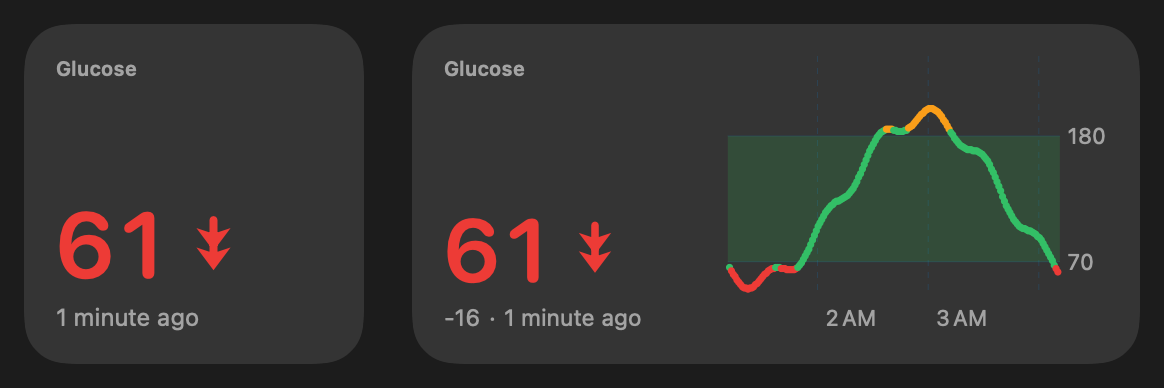 |
| Stale (> 5 min): strikethrough, grey, dot instead of the arrow | 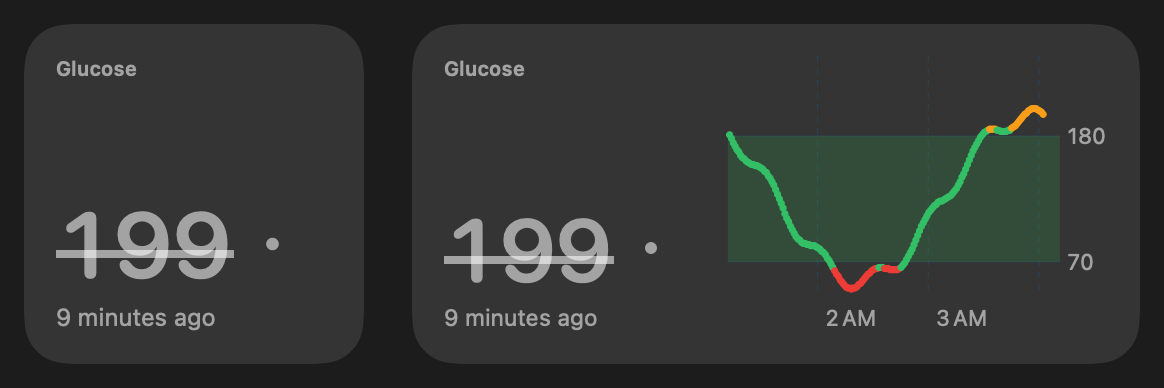 |
| Accented rendering mode (tinted desktop) | 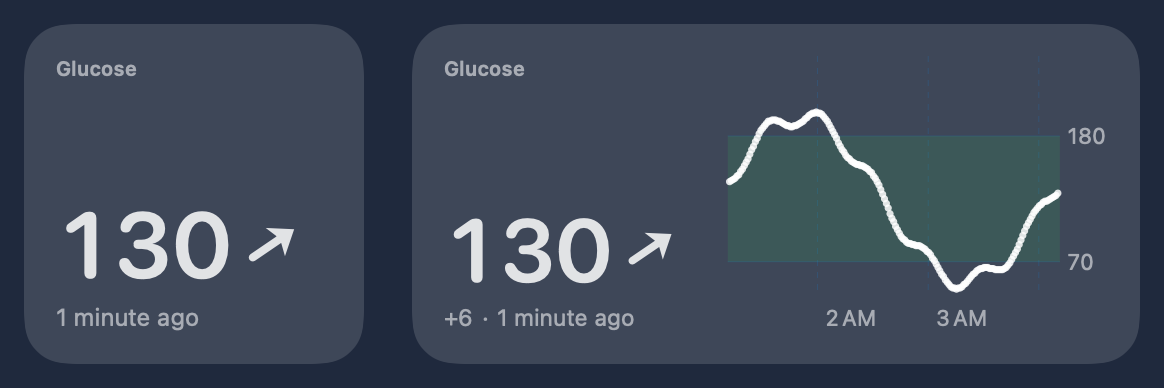 |
| Combined, large (6 h, time in range) | 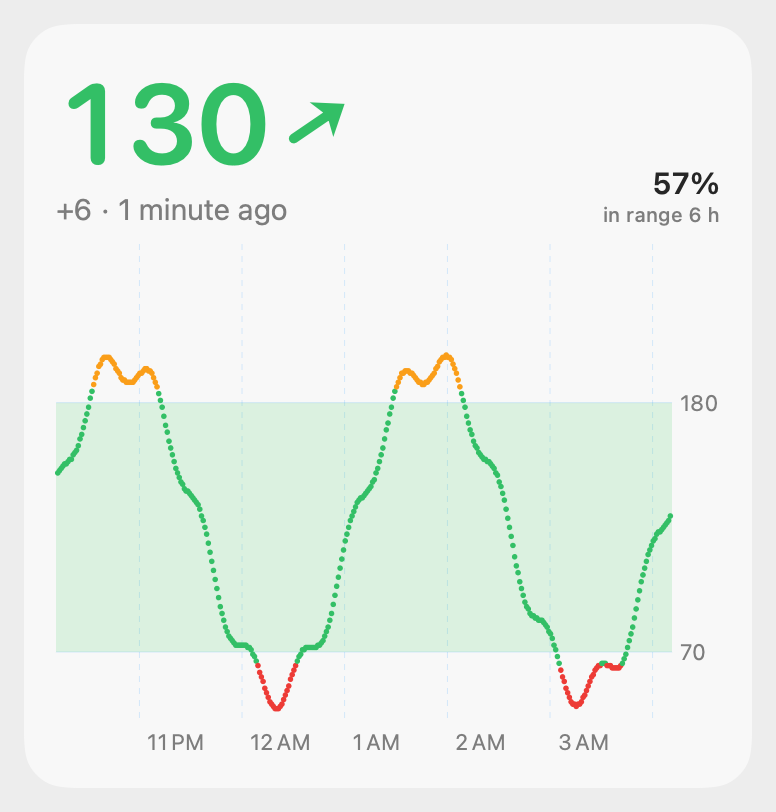 |
| Combined, extra large (12 h) | 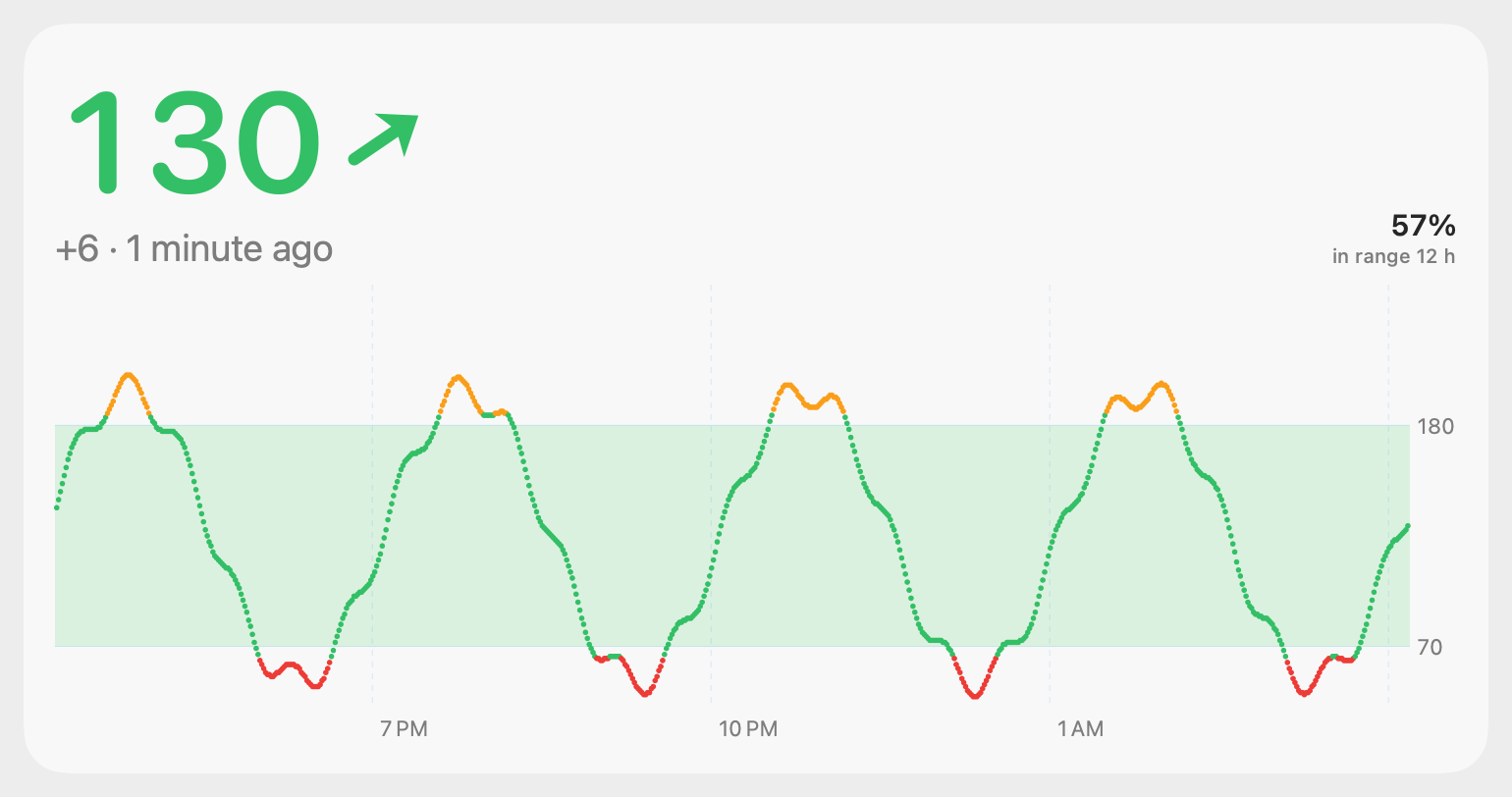 |
| Trend arrow, −4 … +4 mg/dL/min |  |
All families × light/dark: value-{small,medium}, graph-{small,medium,large,xl}, combined-{small,medium,large,xl}
-{light,dark}.png, plus state-{low,high,flat,stale,nodata}.png.
What the widgets do:
- Trend arrow: the same geometry and mapping as the menubar’s
TrendArrow: 0 mg/dL/min points right, ±3 mg/dL/min is vertical, linear in between, and a second chevron at ≥ 3. Here it is a SwiftUIShape, rotated. The rate comes from the source, or from a least-squares fit over the last 5 min. - Colour: red below 65, orange above 185, green between. The graph points use the same colours, over a 70–180 band.
- Age:
Text(.currentDate, format: .reference(to: reading, allowedFields: [.hour, .minute])), which renders “1 minute ago”. The system keeps it ticking, so it needs no timeline reloads. - Stale: the timeline adds a second entry at last reading + 5 min. It flips to stale on time even if the app never reloads.
- Graph window: 3 h (small/medium), 6 h (large), 12 h (extra large). The large layouts add % time in range.
- Native bits:
containerBackground(.fill.tertiary, for: .widget),widgetAccentable()on the value/arrow, a monochrome chart in accented/vibrant mode (text on filled shapes, like the status badge’s words, is knocked out with.destinationOutbecause the tinted modes keep only opacity / luminance;render treatmentswritesmac-badge-{accented,vibrant}-*.pngandmac-last-{accented,vibrant}-*.pngto check it), andwidgetURL(glucosewidgets://open?from=<kind>). The host app registers that URL scheme; tested withopen, and the host logsopened via URL glucosewidgets://open?from=combined. - Families: Value is small and medium. Graph and Combined are small, medium, large and extra large.
How it is built (no Xcode)
Section titled “How it is built (no Xcode)”poc/spikes/widgets-macos/build.sh:
swiftc -parse-as-library -application-extension Shared/*.swift Widget/GlucoseWidgets.swift -Xlinker -e -Xlinker _NSExtensionMain → GlucoseWidget.appex/Contents/MacOS/GlucoseWidgetswiftc Shared/GlucoseData.swift Host/main.swift → GlucoseWidgets.app/Contents/MacOS/GlucoseWidgetscp Info.plists; codesign --sign "Apple Development: …" --options runtime --entitlements … (appex first, then app; ad hoc if no identity)lsregister -f -R ~/Applications/GlucoseWidgets.app; pluginkit -a …/GlucoseWidget.appex- Entry point:
@main struct GlucoseWidgets: WidgetBundle, linked with-e _NSExtensionMain(Foundation sets up the extension, then runs the WidgetBundle). Originally built without it, which crashes once chronod launches the extension (see Resolved). - Extension Info.plist:
CFBundlePackageType = XPC!andNSExtension.NSExtensionPointIdentifier = com.apple.widgetkit-extension. It has the same keys as a shipping third-party widget built with Xcode (CodexBar), minus theDT*build-info keys. - Extension entitlements:
app-sandbox,network.client,application-groups(<TEAMID>.dev.spike.glucosewidgets), and a read-only temporary exception for/Users/Shared/GlucoseWidgets/. - Host: headless (
LSUIElement), not sandboxed. Once a minute it writes a synthetic 12 h history to every transport and callsWidgetCenter.shared.reloadAllTimelines().
What blocks it
Section titled “What blocks it”evidence/chronod-rejection.log:
chronod [com.apple.extensionkit:discovery] Extension is not entitled to run in the App Sandbox : <_EXExtensionIdentity: …>chronod [com.apple.chrono:extensions-verbose] Added extensions: [<WidgetExtension - identifier: dev.spike.GlucoseWidgets::dev.spike.GlucoseWidgets.widget, … isApple: false>]chronod [com.apple.chrono:descriptor] Requested to add extension, but purging instead because we shouldn't cache it: <WidgetExtension …> - isApple? falsechronod [com.apple.chrono:descriptor] Purging descriptors for extensions: [dev.spike.GlucoseWidgets::dev.spike.GlucoseWidgets.widget]chronod [com.apple.chrono:extensions] Ignoring restricted or unknown extension dev.spike.GlucoseWidgets ← every reloadAllTimelines()chronod never asks the extension for its widget descriptors, so nothing appears in the gallery and the extension process is never launched.
| Variant | Result |
|---|---|
| Ad hoc, hardened runtime, full entitlements | rejected |
Ad hoc, minimal entitlements (app-sandbox + network.client only) |
rejected |
| Ad hoc without hardened runtime | rejected |
| Self-signed code-signing certificate (temporary keychain) | rejected |
Self-signed, CN/OU styled Developer ID Application: … (SPIKE12345) |
rejected (codesign still sets TeamIdentifier=not set) |
Ad hoc + fake com.apple.developer.team-identifier / application-identifier entitlements |
rejected |
pluginkit -e use (explicitly elected, shows +) |
rejected |
Installed in /Applications instead of ~/Applications |
rejected (then removed again) |
Why. The in-process check passes. ExtensionFoundation’s own _EXExtensionIdentity, built from our
LaunchServices record, says hasSandboxEntitlement = true and app-sandbox = 1 (evidence/exid.txt,
Diag/exid.swift). So chronod is not reading a missing entitlement; it does not trust entitlements from this
signature. The one difference LaunchServices shows between our extension and the two working third-party widgets
on this Mac (CodexBar Y5PE65HELJ, BetterTouchTool DAFVSXZ82P) is teamIdentifier = nil. A Team ID only
comes from an Apple-issued certificate, so that is the requirement. (We can’t read chronod’s code, so the exact
check is inferred; every variant without a Team ID failed.)
Sukrara for Mac hosts the widgets (works)
Section titled “Sukrara for Mac hosts the widgets (works)”bundle.sh builds the same widget into Sukrara.app/Contents/PlugIns/SukraraWidget.appex. With the Team-ID
build in ~/Applications, the widgets show up under Sukrara in Edit Widgets…. Placed on the desktop
(small, medium, extra large), they read the user’s real readings from the App Group (via=appgroup-api, file age
0 s) and redraw every minute with each new reading.
A misleading log line. At install chronod logs, for every third-party widget extension:
Requested to add extension, but purging instead because we shouldn't cache it: <WidgetExtension …> - isApple? falseThis is not a rejection. chronod just doesn’t preload descriptors for non-Apple extensions. It fetches them
when a host asks, e.g. Reloading descriptors for reason: "host requested: NotificationCenter" when the user opens
the widget gallery. The spike’s 16:47 install happened to be fetched straight away. Later installs (Sukrara, test
bundles, an XcodeGen build in poc/spikes/widgets-macos/xcode/) only logged the purge, and that was read as a block
for an hour of experiments. Likewise Extension is not entitled to run in the App Sandbox and Ignoring restricted or unknown extension keep appearing for extensions that work. To check a widget, open Edit
Widgets… and look, or look for getTimeline in the widget’s log, not for chronod’s install messages.
Treatments and alerts (2026-10-18). The snapshot also carries the host’s alert settings (alerts) and the
numbers of the last-treatment slot’s fallback window, so the widgets draw the same mute lines, Eat carbs / Take
insulin badge and last-treatment slot as the menubar card and Android (16). Changing the alert
settings rewrites the snapshot.
Data sharing (host app → sandboxed widget)
Section titled “Data sharing (host app → sandboxed widget)”Tested with Probe/: the widget’s exact loader (Shared/Loader.swift) in a CLI. It is signed ad hoc with the
widget’s entitlements and runs inside the App Sandbox. With PROBE_ID=dev.spike.GlucoseWidgets.widget it runs as
the widget and gets the same container (evidence/probe-sandbox.txt).
| Transport | Ad hoc result | Notes |
|---|---|---|
App Group container (group.dev.spike.glucosewidgets) |
✗ | containerURL(forSecurityApplicationGroupIdentifier:) returns a path, but writes fail with 513 (EPERM) from both the unsandboxed host and the sandboxed widget. The directory then can’t be listed (“Operation not permitted”). Since macOS 15, group containers are protected and need a group the signing team is authorised for: TEAMID.… on macOS, or group.… with a provisioning profile |
Widget’s own container (~/Library/Containers/<widget-id>/Data/…), written by the host |
✓ | The unsandboxed host can write it and the widget reads it. It relies on the host not being sandboxed, and may hit “access data from other apps” prompts in future macOS |
/Users/Shared/GlucoseWidgets/glucose.json + temporary-exception.files.absolute-path.read-only |
✓ | Temporary-exception entitlements are honoured with ad hoc signing. Mac App Store review would reject them |
http://127.0.0.1:17591/glucose.json served by the host, widget has network.client |
✓ | Always fresh, and needs no file location or container. The widget gets nothing while the host isn’t running, so it falls back to the files |
Pick: localhost HTTP first, falling back to the newest file. The loader tries every source and uses the newest
written timestamp. In production, with a Team ID, this becomes a team-prefixed App Group (TEAMID.dev.…).
That is the standard way: no profile needed on macOS, and no server needed. CodexBar does exactly this
(Y5PE65HELJ.com.steipete.codexbar). Keep HTTP as the live path while the host app runs.
Refresh cadence
Section titled “Refresh cadence”-
Measured:
reloadAllTimelines()from the headless host, once a minute, reaches chronod in 1–3 ms every time (evidence/reload-delivery.log). Reload IPC works from an ad hoc, unsandboxedLSUIElementapp. -
Measured (Team ID, 2026-10-16 16:55–17:55): two widgets on the desktop (combined, small + extra large), host reloading once a minute. 68
reloadAllTimelines()→ 62getTimelineper widget: every minute’s reload was honoured, none skipped, with no sign of a budget in the first hour (the extras came from re-registrations and a chronod restart).evidence/refresh-1h.log. Apple’s budget is daily, so a full day may still throttle; the design below covers that. -
Design that doesn’t depend on the budget. Apple documents a daily budget of roughly 40–70 reloads for a frequently viewed widget, about one every 15–60 min, so a 1/min reload can’t be relied on. The widget is built so that a skipped reload never shows wrong information:
- The age text ticks by itself (
.reference(to:)), so “x min ago” is always correct. - A timeline entry at last reading + 5 min flips the widget to stale (strikethrough, grey, no arrow) on time.
- The policy is
.after(latest + 65 s)to ask for the next reading, and the host callsreloadAllTimelines()on every new reading.
Worst case, the widget shows an older value marked stale, never a wrong “fresh” one.
- The age text ticks by itself (
Integration notes
Section titled “Integration notes”-
GlucoseBar (menubar, now Sukrara for Mac,
app.mauri.sukrara.poc) becomes the widget’s host app:- Put
GlucoseWidget.appexinGlucoseBar.app/Contents/PlugIns/. The extension bundle id must be prefixed by the app’s (dev.spike.GlucoseBar.widget). - Make
GlucoseBarsign the appex first, then the app, with the same Team ID certificate. - On every new reading (it already merges Wi-Fi, BLE and Nostr), write a
GlucoseSnapshot(Shared/GlucoseData.swift: samples + rate) to the team App Group and callWidgetCenter.shared.reloadAllTimelines(). - Optionally serve the same JSON on 127.0.0.1 for instant freshness.
The widget code needs no changes beyond the group ID and bundle IDs.
- Put
-
Units/thresholds: the widget hard-codes mg/dL and 65/185 (
GlucoseRange). Put the user’s unit and thresholds in the snapshot so the menubar settings drive the widget. -
Showcase app (Sukrara): the views are plain SwiftUI and reuse straight away. The same
GlucoseWidgetViewcan also serve iOS widgets later (WidgetKit API is the same; sizes differ). -
Finishing the spike (done 2026-10-16):
./build.sh installwith the Apple Development identity in the keychain, then Edit Widgets… → “Glucose”. The group ID and bundle IDs come frombuild.sh; no code edits.
poc/spikes/widgets-macos/:
Shared/GlucoseData.swift: model, synthetic generator, thresholds, paths.Shared/GlucoseViews.swift: all widget SwiftUI/Charts views.Shared/Loader.swift: the transports.Shared/AlertRules.swift: the alert settings,AlertStatusandLastTreatment(shared with the menubar app; the badge, mute lines and last-treatment slot).Widget/:WidgetBundle, providers, Info.plist and entitlements.Host/: headless host app (synthetic data, HTTP, file publishing, reloads, URL scheme).Render/: the ImageRenderer CLI that writes the PNGs.Probe/: sandbox data-sharing probe.Diag/:exid.swift(ExtensionKit identity check) andchronolog.sh(chronod log filter).build.shmodes: (none),install,render,probe.
Uninstall: pkill -f GlucoseWidgets.app; lsregister -u ~/Applications/GlucoseWidgets.app; rm -rf ~/Applications/GlucoseWidgets.app /Users/Shared/GlucoseWidgets.