The features and exact behaviours of every Sukrara app. One line per behaviour, with the rule and the numbers; the
“why” stays in the investigation reports (docs/NN-*.md).
Rule: every change that adds or changes a behaviour updates this file in the same commit.
Complete flows (CLAUDE.md; user, 2026-10-21: “There’s no way to unmute!”): every feature section has a
States and exits paragraph: each state a user can enter, where it is visible, and how to change it and leave it
(undo, cancel, turn off, unmute, go back) on every platform and surface that shows it. tools/check/run.sh (check
states) fails on a section without one unless tools/check/allow.jsonstates_pending lists it with the reason.
Every change to the alert rules adds or updates a scenario in contracts/alerts/scenarios/*.txt; Android
AlertScenarioTest and the Mac ScenarioTests (AlertsTests) both run all of them and must pass (SPEC §7). Mac: the pure
SukraraAlerts engine runs them in AlertsTests (cd apps/macos && swift test --filter AlertsTests, one test case
per scenario from contracts/alerts/scenarios).
LO / HI (Android and Mac, SPEC §1): a sensor’s “below / above my range” reading (sgv < 40 / > 400) matches
every low / every high kind whatever the thresholds, so the most severe one turned on (very low, extremely high)
alerts at once instead of waiting for No glucose data; never a falling / rising trend through a LO / HI, and a LO / HI is
never “back in range by the margin” (a Mute / Remind less of that side holds). Alert texts say
LO · below 40 mg/dL / HI · above 400 mg/dL (es por debajo de 40 / por encima de 400), never 39 / 401, and
the Nightscout upload and the local endpoints send no direction or delta for one: it has no trend (scenarios
levels.txt).
Kinds and defaults (the user’s settings): very low ≤ 55 every 5 min (alarm volume), low < 70 every 5 min, high ≥ 180
every 15 min, very high ≥ 250 every 10 min, extremely high ≥ 300 every 5 min (alarm volume), falling/rising fast
2 mg/dL/min every 30 min (off), no data after 20 min every 60 min; other kinds at notification volume.
Low alerts strictly below its threshold, very low at or below its own, the highs at or above theirs (2026-11-12, the
owner: “the 70 is the threshold, but 70 itself is excluded from the interval -> (70, 55) is low [55,-Infinity) is
very low”; 0.14.3 had low at or below 69 for a day). At the defaults: very low ≤ 55, low 56–69, no alert 70–179,
high 180–249, very high 250–299, extremely high ≥ 300: the card’s ranges exactly, so every alert rings where the
card names its range (scenarios levels.txt). Mute / Remind less end once a reading is the margin into the range:
moved 10 mg/dL further out it would match no low (from 80 at low 70; with low off, from 66 at very low 55) or no
high (under 170 at high 180); the waits near a threshold likewise (scenarios actions.txt, persistence.txt).
“Very low” (id very_low) replaced “urgent low” everywhere (settings JSON, channels, sounds, events); no migration.
Level alerts: one at a time, the most severe wins; a worse kind of the same side alerts at once; getting better
(very low → low) doesn’t alert.
Rate alerts (falling/rising fast) run next to level alerts and judge THE trend (Trend arrow below) held for 5
min: from the readings the rate must be past the threshold at every reading of the last 5 min; From the sensor its
rate counts at once, as before (#204; SPEC §2 Fast alerts read the trend: on the owner’s readings, at 2.0 about 9.4
a day, as often as glucose really moves that fast for 5 min, a median 9 min after the move began; the sensor’s rate
gave 1.9 a day and missed 32 of 39 such moves). A reading without a held trend keeps an open falling / rising fast
episode (repeat due, a Mute not back by it); one without any trend (a LO / HI) also takes its notification away at
once, so a LO shows the very low alone, never a stale “falling 3 mg/dL/min” beside it (#127, like Dexcom G7: one or
the other); the first held reading still falling alerts at once if its repeat came due; no data runs on a timer and clears on the next reading. The Android timer is an elapsed-time alarm, so a clock change (TIME_SET) re-checks at once and plans it again (round 22: with the clock moved forward the old high stayed up and no “no data” came; a real gap alerts on time, scenario A high with no more readings…).
No first reading (#40, SPEC §1 “The source’s start”; scenarios other.txt): no data counts from the last reading
or from when the reading source started, whichever is newer. The source starts when Android’s wearer source runs (a
paired sensor connecting, Juggluco chosen), a follow is allowed by the wearer (Android and Mac), or the Mac reaches
Juggluco: from then on the app is monitoring (home no longer says Not monitoring: no sensor yet, it says No
readings from the sensor · No reading yet or the warm-up), and a source that never delivers a first reading rings
No glucose data · No reading yet 20 min later (after a new sensor’s warm-up and its 15 min grace). A new source
never rings at once because of an older one’s last reading. Removing the sensor, changing the role or stopping
following ends it.
Endings fence queued readings (#128, both apps): when a follow ends (declined, removed, the invite used), is
stopped (Stop following) or its nearby codes differ, a reading still on its way (a relay or Bluetooth one, stamped
before the ending) is stored but can’t arm No glucose data again (no hourly false alarm for a follow that’s over);
a join is never fenced (its backfill is stamped before it and must arm no data). The fence is saved (Android
MonitorRecord.armAfterEpochMs, Mac alert-state.json), so a restart can’t drop it; a forgotten sensor keeps its
fence (GlucoseHubTest, AlertControllerTests).
The clock (#41, SPEC §1 “The clock”; scenarios other.txt): a clock set back moves every alert time with it,
measured on the monotonic clock (Android elapsedRealtime, Mac CLOCK_MONOTONIC), so a repeat, a Mute, Mute all
and no data stay on real time to the second; a reading dated ahead counts as taken now. Both apps re-check at once
on the system’s clock-change notice.
Readings older than 15 min never alert; the alert clears when the reading gets that old.
Episodes: one per group and side; a brief exit (back in range for less than the repeat interval, at least 5 min)
clears the notification but keeps the episode, its repeat count and its treatments; no new “first” alert; out of
range again, the alert is back on screen at once without sound (#195, below).
Repeats count from the last alert of the episode; repeat 0 = once per episode.
No answer to a very low (#39, SPEC §4; scenarios escalation.txt; PROTOCOL-v2 “Alerts” esc / answered):
followers already get every very low at once; when nobody answers a very low on the wearer’s phone for 5 min (the
safest reasonable default: the very low’s own 5-min repeat and Libre’s re-alarm; Medtronic CareLink Connect texts a
care partner after 0–30 min, Nightscout’s Pushover retries urgent alarms every 2 min), the wearer’s phone sends it
escalated and every follower that takes escalations (Android and Mac, on by default) shows Very low · no
response (es Muy baja · sin respuesta, copy.jsonheadline_escalated) at alarm volume / Time
Sensitive, through its own Mute, Remind less and Mute all, once (its own quiet states apply to the escalated repeats
after it). An answer on the wearer’s phone: tapping or swiping the alert, opening the app, any of its buttons
(Mute, Remind less, Unmute, Treatment), Mute all or carbs logged after it fired; a Mute or Mute all set before it is no
answer (nobody heard it). A swipe or the app’s start that brings back a process Android had stopped is an answer too
(Android: the runtime reads its saved alerts first, AlertAnswerAfterRestartTest). Answered after the escalation: the followers’ alert turns plain again without sound. It
ends with the very low. Settings: the wearer’s Settings › Alerts › If a very low gets no answer › Tell my
followers (on) and After (5–30 min, the one number input); a follower’s (Android and Mac) When they don’t
answer a very low (on). Followers with their own rules (Settings fromThis device’s own) don’t get escalations
(their own very low runs). The rows show only where they act (Appendix G finding 9): Android shows the wearer’s
where this phone reads your glucose first-hand, the follower’s only while it follows with Their settings, neither
on any other source (someone else’s LibreLinkUp or Nightscout), and the settings search finds them only there
(EscalationRowsTest, SettingsSearchTest.linkRowsOnlyWhileLinked); its Settings from rows too, only while it
follows a Sukrara. Lately / the Mac log: Very low: no answer for 5 min, your followers were told, Very low
answered: your followers were told, only while sharing runs with at least one follower (one that left or was removed
doesn’t count: PROTOCOL-v2 “Leave”); otherwise Very low: no answer for 5 min, no follower to tell and Very low
answered; a follower’s Very low · no response (from the wearer), Very low answered on
the wearer’s phone. States and exits: waiting for an answer (no surface: the very low rings on both sides; out:
any answer above, the very low ending); escalated: the followers’ no response notification (out: the wearer
answers → plain, the very low ends → gone, the follower’s Mute on it, turning When they don’t answer a very low
off); on the wearer, its Lately line (out: answering, which tells the followers). The Android wearer’s phone now
really sends its alert events to the followers (relays and Bluetooth, OwnerEngine.publishAlert): the rules
decided them but the publisher was never connected, so followers in Wearer mode only had their own no data.
Night alerts (#38, SPEC §1 “Night alerts”; scenarios night.txt; Android Settings › Alerts › Night alerts
(es Alertas de noche) and each alert’s night page, Mac Settings › Alerts › Night Alerts with a Details… sheet per
alert): a second set of every alert’s rule (on, threshold, remind every, like an alarm) that applies every day
between Starts and Ends in the phone’s / Mac’s local time (22:00–07:00 by default; may cross midnight). Off by
default; very low is always on at night (no switch on its night page). The quiet rules, the waits near a threshold,
the notification buttons and the sounds are the same day and night. The rules switch at the window’s edges (the
timer wakes then): a high of 200 under a night high of 250 clears at 22:00, and at 07:00 the day rules alert again.
They are rules, so the wearer’s run for the followers uses them (a follower in Settings from: Wearer alerts as the
wearer’s phone does and shows them read-only) and the settings event mirrors them; like an alarm and no data’s night
rule stay each device’s. What others do: Dexcom G7 Alert Profiles (urgent low can’t be turned off, signal loss
shared), xDrip+ per-alert hours, LoopFollow day / night from 22:00. States and exits: night alerts on, day now:
the Alerts page row says 22:00–07:00; night alerts apply now: Android home under the card Night alerts until
7:00 (es Alertas de noche hasta las 7:00, copy.jsonnight) with Change (opens the night page), the
Alerts page row On now · until 7:00 and the night page’s strip with Turn off; Mac: the panel’s line with
Change… (Settings › Alerts) and the same line in Settings › Alerts › Night Alerts; out: its end time, turning
it off, or moving its hours.
Near a threshold (#37, SPEC §1 “Waiting before the first alert” / “Back by the margin”; scenarios
persistence.txt; Android Settings › Alerts › Near a threshold, Mac Settings › Alerts › Near a threshold, en + es):
Low alerts wait (Off, 5–15 min) and High alerts wait (Off, 15 min–4 h, for high and very high): an episode’s
first alert comes only once glucose has been out of range that long in a row; very low, extremely high, a LO and a HI
never wait (Dexcom G7 delays only its High alert, 15 min–4 h; LoopFollow’s persistent minutes default to 0).
Ignore bounces within (0–20 mg/dL, 0–1.1 mmol/L): a reading back over the threshold by less than this keeps the
episode (no new first alert, its treatments still count, a wait keeps counting) though the notification goes. All
three default to off / 0 (the behaviour before), are rules (the followers’ alerts use the wearer’s, a follower in
Settings from: Wearer shows them read-only) and are mirrored in the settings event. States and exits: while a
first alert waits there is no notification; the card’s value and its Eat carbs / Take insulin pill show the low
or high as always; it ends when glucose is back in range by the margin (the count starts again), with the alert at
the wait’s end, or by setting the wait to Off on that page.
Logging the answering treatment clears the alert; when its mute window ends and it still matches, it alerts at once
and the repeats count from there.
Carbs mute very low (on the wearer’s own phone only: #2, the followers, mirroring or with their own rules, and the
Mac keep alerting on a very low until it is really over, however the carbs were logged — the lock screen included;
scenario Carbs quiet a very low on the wearer’s phone only…), low and falling fast (default 15 min); rapid insulin mutes high, very high and rising fast
(default 60 min); no treatment mutes extremely high or no data (the user’s own Mute / Mute all do); window = t ≤ now < t + min; deleted treatments don’t count.
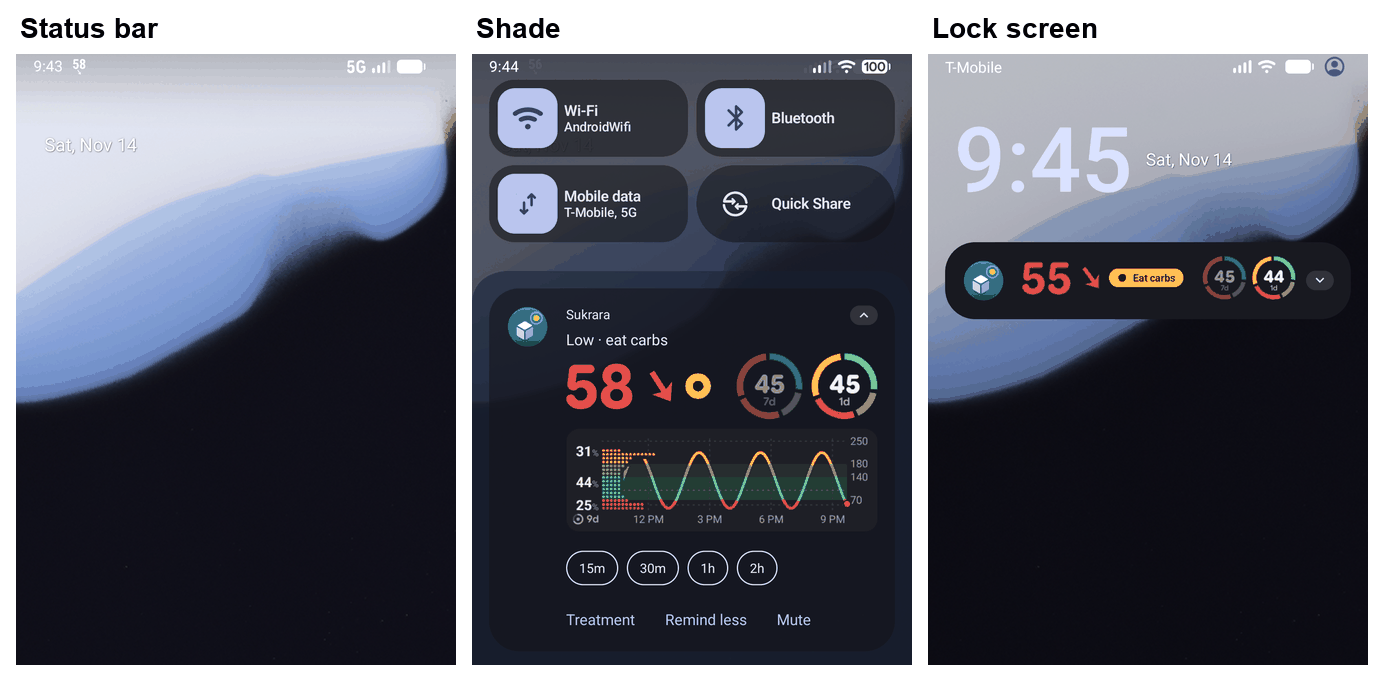
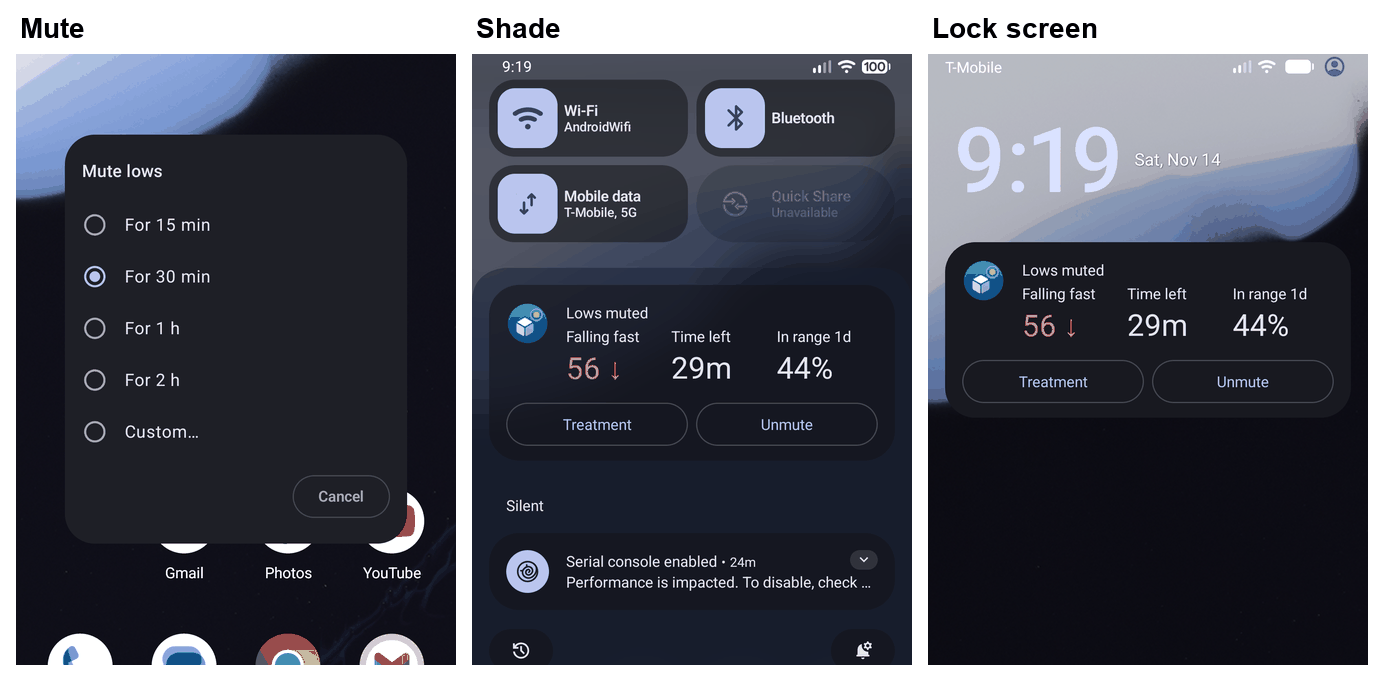
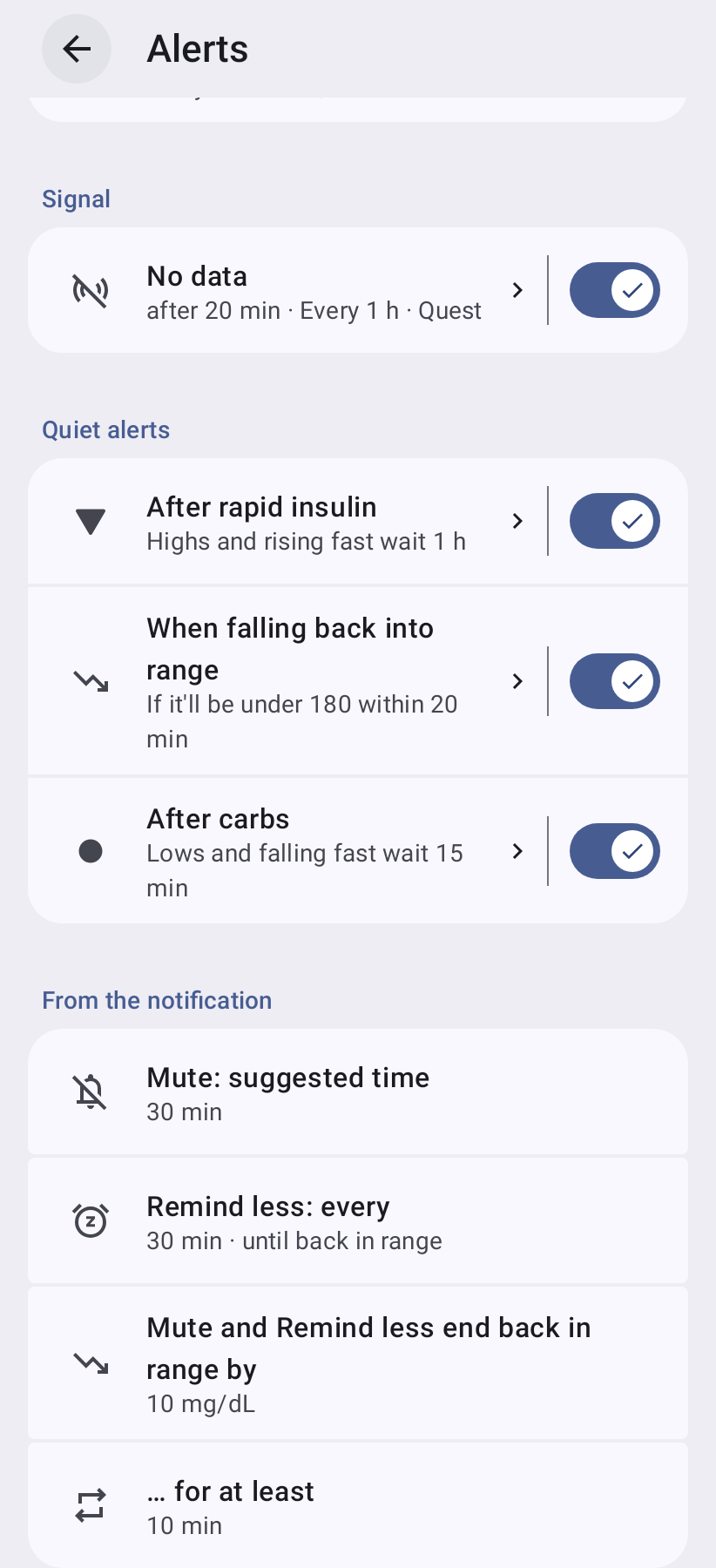
Notification actions (round f30, SPEC §2; the user 2026-10-21: “two kinds of buttons … Mute 30 min doesn’t conceptually belong there”; Android guidance: up to three actions that don’t duplicate the tap, developer.android.com/develop/ui/views/notifications/build-notification#Actions, choices via RemoteInput): every alert notification, every kind (very low and extremely high included), has Mute and Remind less (Mac Remind Less) on Android and Mac, and Treatment first (below; order Treatment · Remind less · Mute and no ellipsis on any action, the owner 2026-11-14: Treatment opens a dialog without one, so it meant nothing; Android actions are short verbs, Apple’s HIG “a short, title-case name that clearly describes the result”). Mute is one action whose choices are the lengths (Android direct reply: 15m / 30m / 1h / 2h in the card’s compact words and the setting’s own length among them; in a Live Update, which drops a direct reply, a plain button that opens the lengths dialog over the lock screen, MuteAlertActivity: Mute lows with For 15 min … For 2 h and Custom, the app’s own Material dialog as Mute alerts on home and Android’s Do Not Disturb duration dialog; shortest first, plus typing; TalkBack hears each chip as what it does, Low alerts: mute for 30 min / es Alertas de glucosa baja: silenciar durante 30 min, through a TtsSpan on the chip, whose text stays the reply (#103, AlertMuteChoicesTest); Mac text input, placeholder 30 min, 1 h, 2 h, empty = the setting); typed text goes through the shared duration parser (45, 1 h 30, 1:30, 2h; 1–720 min); anything else changes nothing and the notification comes back silently. Remind less (es Avisar menos; was Relax) repeats the side every max(repeatMin, relaxMin); it shows only when it would slow anything (no data, every 60 min, gets Mute… alone), and once relaxed the slot is Remind as usual (es Avisar como siempre); the interval is in the secondary text (Reminders every 30 min), never on the button. After Mute… Android replaces the alert with a silent Low muted until 10:42 with Unmute and Change…; macOS removes a notification once an action is used and posts a passive one with the same two. Since macOS removes it on every action, the Mac posts an alert that is still up again without sound after Remind Less / Remind as Usual (now with the other button; nothing ringing came back meanwhile) and after a Mute… / Change Time… reply that isn’t a length (unchanged; the muted note when the side is muted), for its own alerts and the wearer’s mirrored ones (AlertControllerTests). Scenarios: contracts/alerts/scenarios/actions.txt. Android: the rules are the pure :core:alerts module (AlertMachine: inputs → effects Fire / Clear / Back / Mirror / Schedule; persisted AlertState incl. the wearer’s shared run so a restart never re-rings followers; a restart alerts at once for whatever came due while the app was down; a follower’s Mute / Unmute act on their side only — a high’s Mute never hides a showing low; a clock set back keeps repeats, windows and mutes as far away as they were, and a reading dated in the future counts as taken now).
Treatment (the owner, 2026-11-14, on lows AND highs; was Log carbs, #194; the user 2026-11-14: “Low glucose notifications have too many options to mute, but none to log carbs (or carbs & insulin if user eats more than needed)”; SPEC §2). The person: a low wakes them at night or interrupts a meal out; what they need is sugar, and then not to be woken again for the next 15 minutes while it works. Until now the alert offered only ways to silence it, so the juice went unlogged (no record, the low kept repeating until it rose, a follower kept worrying and couldn’t tell it was treated, and a second “did I already eat?” is how lows get over-treated). A parent following a child sees the low, gives juice and has nowhere to say so. Other apps: Dexcom, LibreLink, Juggluco and xDrip+ alerts offer only snooze / dismiss (xDrip+ a long list of snoozes, the owner’s complaint exactly); logging is in the app, later or never. AAPS and Loop log carbs in the app or on a watch, not from a CGM alert (Loop’s missed meal notification opens carb entry: the right idea, for a different moment). Design: on very low, low and falling fast (the kinds carbs answer; falling fast because eating before the low is the point of that alert), and on the low side’s Low alerts muted notification (muting is often “I’m eating now”), a first button Log carbs (es Registrar hidratos; Mac Log Carbs… / Registrar hidratos…) opens the device’s Add treatment with Carbs focused: Android the quick treatment dialog over what is on screen (its line says Lows quiet for 15 min before Save, Rapid insulin is there for a meal that needs it, the snackbar’s Undo after), the Mac Add Treatment (Sukrara comes forward). It is first because it is the one that does something about the low; Mute… and Remind less keep their order after it. Nothing changes in the rules: the saved carbs quiet the side through muteAfterCarbs like any treatment (very low on the wearer’s own phone only: a follower’s very low still repeats, #2), a follower’s treatment goes to the wearer, whose rules then clear the alert everywhere. Opening it is an answer on the wearer’s phone (#39, like the other buttons; AlertHints.answered). The alert stays up meanwhile: Android doesn’t remove a notification for an action that opens a screen; macOS removes it, so the Mac posts it again silently (AlertControllerTestslogCarbsOpensAddTreatmentAndShowsTheAlertAgainSilently). Only where the device can add treatments now (the wearer’s phone after the first unlock, a follower phone or Mac with Can add treatments): elsewhere it could only open the app, which the tap already does (Android guidance: actions never duplicate the tap). Never on the highs: no Log insulin (a button on every high reads as “take insulin”, the alerts never advise more insulin, and pens log their doses themselves; the card’s Take insulin pill and the quick dialog stay one tap away), nor on no data, the plain fallback alert (built to never fail: Open Sukrara only) or the test alert. Android: an activity PendingIntent straight to the dialog (a notification action may not start an activity through a receiver), so from the lock screen Android asks for the unlock first, then the dialog opens unlocked; Mute… and Remind less still work without unlocking. The order and the rule: AlertNotificationShapeTest (Android), NotifierTests (Mac); words in copy.json (log_carbs), AlertCopyTest / AlertCopyTests. States and exits: Logging carbs from the alert under States and exits below; the dialog’s own (Cancel, back, tap outside, the lock-screen countdown and its kept draft) in Treatments.
Scope and end of Mute / Remind less (round f30; the user: “a high mute … then goes low, the low would be muted, and we don’t want that”): they act on one side (lows incl. very low; highs incl. extremely high; falling fast; rising fast; no data), never the other. They cover very low and extremely high too (the user’s decision; treatment mutes still never cover extremely high). They outlive the episode and end at their time (Mute) or once back in range by the margin: lows > low threshold + 10 mg/dL, highs < high threshold − 10 mg/dL (both more than 10 into the range: from 80 and up to 169 at the defaults), for 10 min in a row (notificationActions.backMgdl / backMin, settings rows Mute and Remind less end when back in range by / … for at least); crossing back out restarts the count, so oscillation at the edge stays quiet. History: Low back in range: mute and relax ended.
Mute all (round f30; the user: “a global mute button with a time option … Never is also an option”): Android home control Mute alerts (es Silenciar alertas), Mac dropdown Mute Alerts: 30 min · 1 h · 2 h · 4 h · 8 h · Until you turn it off (es Hasta que lo desactives, after AOSP Do Not Disturb; was Never) · Custom… (the one number input, 5 min–24 h, schema muteAll, whose special 0 is until_turned_off; was never). It quiets every kind, very low, extremely high and no data included, on that device only (the wearer still sends the followers’ alerts); alerts showing go. When it ends, at its time or with Unmute (also a minute after muting), whatever still matches alerts at once, however recent its last alert (history Alerts back on / Alerts unmuted; scenario Unmute (Mute all) right after muting); on a follower that mirrors the wearer, the wearer’s newest alert still up shows at once, on the follower’s own timer or the first input that comes before it (#41, scenario The follower’s Mute all ends at its time…). It survives a restart. When whose glucose the device watches changes it ends with every side mute (#6, both apps: a role change, following someone new, Stop following, the Mac moving between a wearer and Juggluco; the Mac logs Watching other readings: mutes and Mute all ended); a Settings from change keeps them (Android carries them between mirroring the wearer and its own rules; AlertMachineTest, AlertControllerTests).
Notification actions and Mute all are per device (user 2026-10-21: “if someone wants to mute, it shouldn’t mute the other”): only that device’s notifications, pill and history change; nothing is sent. The wearer runs its rules twice (its own notifications with its actions, the followers’ alert events without). On a follower mirroring the wearer (phone or Mac, AlertMirror on both) they drop the wearer’s alerts there (while relaxed a repeat shows only after relaxMin; a more severe kind always shows) and end by the same time and margin rules on the readings that device gets. With own rules they act on that device’s engine. Treatment mutes are shared data and quiet every device. Scenarios: devices.txt (mirror).
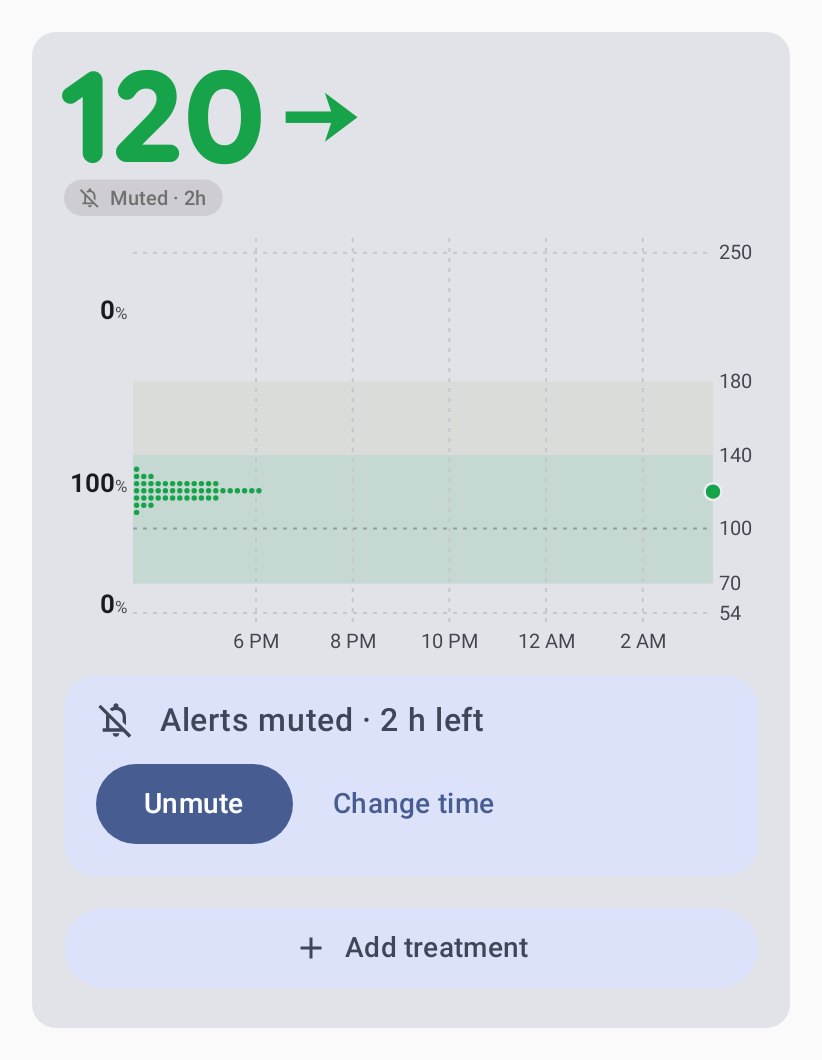
Badge (AlertStatus, both platforms, contracts/graph/status.json): a side’s Mute (or Mute all) out of range = the tonal pill with the bell and time left in the colour of what answers it (Muted when Mute all has no end); a treatment mute shows first. Mute all in range = the neutral muted pill with the “notifications off” bell, Muted · 1h 20m / Alerts muted (short Muted), on every card surface (app, widgets, glucose notification, Mac dropdown and widgets); the Mac menu bar puts a bell.slash before the value.
Durations (round f30; the user: “Showing 60 min and 120 min is long, 1 h and 2 h is better”): every duration in words goes through one formatter per platform (Android :core:modelDurations.kt, Mac SukraraCore/Durations.swift, cases contracts/settings/durations.json): 45 min, 1 h, 1 h 30 min; the card keeps its compact 1h 4m. tools/check rule durations fails on a duration written by hand.
Countdown and copy (round f31; the user, 2026-10-22: “muted alerts should show a countdown, and the Never option makes no sense … figure out the best copywriting”): every muted state counts down. Android’s muted notification uses a count-down chronometer (when = the mute’s end) titled Low alerts muted with Until 10:42; the pill, sheet, Active now and Mute-all line tick on each minute boundary; widgets and the lock screen re-render each minute while a mute runs. Mac rows, pill, Active now and menu-bar tooltip tick; Mac notifications say Until 10:42 (they can’t count down). The state lines come from one builder per platform (Android MuteText, Mac MuteCopy) and the notification’s own words (title, body in the person’s unit, actions, test alert) from Android AlertCopy / the Mac’s AlertText, all tested against contracts/alerts/copy.json in en and es on both platforms (#42: Android AlertCopyTest, Mac MuteCopyTests + AlertCopyTests; the same words on both: es Bajada rápida / Subida rápida, Avisar menos, Avisar como siempre, Cambiar duración; the Mac’s actions in title case, Change Time…): Low alerts muted · 12 min left, Low reminders every 30 min, Alerts muted · 1 h 12 min left, Alerts muted until you turn it off; choices For 30 min … For 8 h, Until you turn it off (AOSP DND’s Until you turn off / For 1 hour); buttons Unmute / Change time, Remind less / Remind as usual; pill Muted · 1h 12m / Muted. Mac uses title-style buttons and menu items (Change Time, Remind as Usual, Until You Turn It Off). Round f33: the quiets after a treatment say it the same way and count down to the rule’s end like a mute (Lows muted after carbs · 12 min left, High alerts muted after insulin · 1 h left; was Low quiet after carbs until 10:42), and the falling rule reads Highs muted while falling back into range; the badge’s screen-reader words (TalkBack on the widgets and the card, Mac VoiceOver) are the same line as the app’s rows, a comma for the · (contracts/graph/spoken). Spanish agrees with the time left: queda 1 h / queda 1 min, quedan 2 h / quedan 1 h 5 min (Android: plurals for the pill queda 1 h and Sensor: queda 1 d, _one / _other string pairs for the mute lines (MuteText); the quantity is the duration’s one number, Durations.*Quantity; StringsParityTest fails on a queda(n) %s in a plain string or in the wrong form). The Mac is English only (left doesn’t change).
States and exits (rounds f29, f30, f31; SPEC §2 “States and exits”; scenarios actions.txt, exits.txt, devices.txt; Android AlertMuteTest, AlertExitsTest, MuteAllGallery, QuietGallery read back the posted notifications; Mac NotifierTests, AlertControllerTests). Every way out acts on this device only and updates history, badge, widgets and ring at once.
Normal: the alert (Android: on the glucose notification; Treatment first where this device can add treatments, then Remind less, Mute), the Eat carbs / Take insulin pill. Out: the episode ends.
Logging carbs from the alert (#194): Android the quick treatment dialog over what is on screen, Carbs focused, its line Lows quiet for 15 min; Mac Add Treatment under the menu bar, Carbs focused. Out: Save (→ Quiet after carbs, below; Android the snackbar’s Undo, the Mac’s Treatments Undo / ⌘Z), Cancel / back / tap outside / Escape (nothing saved; the alert stays and repeats as before), and the dialog’s own lock-screen countdown and draft (Treatments › States and exits). TalkBack / VoiceOver read the button by its name.
Side muted (N left): Android the glucose notification’s silent Lows muted with its count-down and Unmute (es Reactivar; no Change time on the notification since #36: unmute and mute again); the tonal pill Nm left → sheet (Unmute, Change to 15 min / 30 min / 1 h / 2 h); Settings → Alerts → Active now. Mac: the passive notification with the same two, panel rows (Unmute, Change To), the pill’s menu, Settings › Alerts › Active now. Out: Unmute (still out of range → alerts at once), its end (alerts at once if it still matches), back by the margin; Change = a new end from now.
Quiet after carbs / rapid insulin: the tonal pill and ring; the line Lows muted after carbs · 12 min left (ticks; Android home chip, sheet, Active now; Mac panel row, Active now); sheet / panel / Active now Alert me anyway (this device only), which drops the quiet everywhere at once: the pill asks for the treatment again (Eat carbs), the sheet closes, and the mute line and ring of the entries logged up to then end at that moment, on the app card, the widgets, the glucose notification and the Mac (AlertUiState.lifted → TreatmentQuiet / CardAlertsMapping.muteEnd; a treatment logged later quiets again). On a mirroring follower the wearer’s phone decides (the sheet says Low alerts muted after a treatment. The wearer’s phone decides when they come back., Alert settings).
Muted and quiet after a treatment at once: the line, the sheet, Active now and the panel name the one whose end they count down to (#181): a 30 min Mute after carbs logged a minute earlier says Low alerts muted · 29 min left with Unmute / Change time, a 5 min Mute says … muted after carbs · 14 min left with Alert me anyway (both end the Mute and lift the treatment; AlertMachineTest, Mac EngineTests).
Quiet: falling back into range / Quiet: rising back into range (#193): Active now / panel Alert me anyway;
it ends by itself when the move stalls or the readings stop (what came due alerts at once).
Side relaxed: Android chip under the card Low reminders every 30 min (es Avisos de glucosa baja cada 30 min), the notification’s Remind as usual, sheet / Active now; Mac panel row, pill menu, Active now. Out: Remind as usual (an overdue repeat at once), back by the margin.
Muted + relaxed: both lines and both exits; the margin ends both.
All alerts muted (time / Never): Android under the card Alerts muted · 1 h 12 min left (counting down) / Alerts muted until you turn it off (es Alertas silenciadas · quedan 1 h 12 min / … hasta que lo desactives) and what it covers, Very low and no data included, on this phone only (es Incluidas muy baja y sin datos, solo en este teléfono; the Mac’s row: … on this Mac only), with Unmute (es Reactivar) and Change, the muted pill everywhere, Active now, TalkBack actions on the card (Alerts: Unmute, Alerts: Change time); Mac dropdown row with Unmute and Change Time, the menu bar’s bell.slash (tooltip and VoiceOver Alerts muted …), the pill’s menu, Settings › Alerts › Active now. Out: Unmute (what matches alerts at once), its end (never with Never), Change.
History lines (Android; the Mac logs them): Settings › Alerts › Lately lists the newest 5 of the last 24 h with their time (es Últimamente): Low · 66 mg/dL (an alert’s first ring, and a change of level inside it: low → Very low · 52 mg/dL; repeats aren’t lines; (from the wearer) when mirrored), Resumed High (no sound) (es Reanudada: Alto (sin sonido): an alert shown again silently after a restart), High cleared (the rules ended it, not a mute), Low alerts muted for 30 min, Low alerts unmuted, Low alerts: remind less / remind as usual, Low back in range: alerts as usual, All alerts muted for 2 h / … until you turn it off, Alerts unmuted, Alerts back on (es Las alertas vuelven a sonar: a timed Mute all ended by itself, before what it lets ring; noted once, also when it ended while the app wasn’t running: the record keeps the end it last saw). The runtime keeps the last 20 lines in the alert record (AlertNotes, saved with the rules’ state, so a restart keeps them; Start fresh clears them). The Mac’s event log (AlertLog, worded like MuteCopy) has a line for each: Low alerts muted for 30 min, Low alerts unmuted, Low reminders every 30 min, Low reminders as usual, All alerts muted for 2 h / … until you turn it off, Alerts unmuted, Alerts back on (while the app runs), Low back in range: alerts as usual, next to its posted / resumed silently / cleared lines. The group shows only while it has lines; it is read-only (the strips and pages above are the ways out).
Quiet while glucose heads back into range (#193; SPEC §2 muteFallingHigh, muteRisingLow, “Trend from the
readings”). The person: after a low they ate, the value is climbing 1–3 mg/dL a minute and the phone keeps ringing
every 5 min that they are low (the owner’s evening, 20:31 and 20:36: the 15/15 recheck at 20:26 was right, the two
after it only noise while the carbs visibly worked); the same after a correction for a high. Alarm fatigue is why
people turn alerts off (SPEC §1 “Waiting before the first alert”). The sensor’s own trend arrow can’t tell: it lagged
by about 8 minutes that evening (still “falling” at 20:31 while the readings rose). Dexcom and Libre repeat a low
regardless; xDrip+‘s “heading in the right direction” check is the closest idea. Design: two switches side by side,
Quiet highs falling back into range and Quiet lows rising back into range (es Silenciar glucosa alta que baja
hacia el rango / Silenciar glucosa baja que sube hacia el rango; Settings › Alerts › Quiet times on Android and Mac,
after the two quiets after a treatment), each on by default with its Back in range within minutes (20; es De vuelta
en rango en; the one number input). While the readings of the last 5 min show a clear move back toward range (at
least 4 readings without a gap, LO / HI or noisy step, still moving in the last two, a least-squares slope of at
least 0.5 mg/dL/min) and at that slope it is back in range within the minutes, an alert that comes due waits: never
dropped, it comes at once when the move stalls, the readings stop (2.5 min after the last) or it no longer gets
back in time, and it doesn’t restart the repeat count. Highs: high and very high, any alert of the side. Lows: any low
alert, the first too (a dip already rebounding); very low only on the wearer’s own phone and never its first alert or
the escalation from low (the followers’ run, every follower and the Mac keep alerting on very low, like the carbs
rule, #2). It never depends on treatments. Off: alerts as without it. A sensor reading every 5 min never has a trend
in 5 min, so nothing waits there. The readings it judges are kept with the alert state, so a restart or the alarm with
the app’s process gone judges the same. The rule, its numbers and why: SPEC §2; the cases: contracts/trend/clear.json
(Android TrendRateTest, Mac TrendRateTests; the rule lives in TrendRate beside THE trend, unchanged), scenarios trend.txt, other.txt and the owner’s evening in user.txt.
States and exits: Quiet: falling / rising back into range (below): the line Highs muted while falling back
into range / Lows muted while rising back into range (es … mientras baja / sube hacia el rango) in Active
now and the home sheet (Android) / the panel and Settings › Alerts › Active now (Mac; the card’s pill paused for the
minutes it needs); out: Alert me anyway (this device, the rest of the episode), the move stalling or the readings
stopping (the alert at once if one came due), back in range, or the switch off.
Headlines (never “glucose”: the owner, 2026-11-14, “it’s obvious it’s glucose”): “Very low”, “Low”, “High”, “Very high”,
“Extremely high”, “Falling fast”, “Rising fast”, “No data” (es “Muy baja”, “Baja”, “Alta”, “Muy alta”, “Extremadamente alta”,
“Bajada rápida”, “Subida rápida”, “Sin datos”); mute lines name the side short: “Lows muted · 12 min left”, “Lows: remind every
30 min” (es “Bajas silenciadas · quedan 12 min”); body the value and arrow only, “69 mg/dL ↘”.
Headlines acknowledge treatments logged in the episode (or within the mute length before it): lows “· eat more”
(1 carbs treatment) / “· eat more again” (2+); highs “· still high after insulin” / “· still high after more insulin”
(never advise more insulin). Counted even when the mute is off.
The wearer’s alert event carries tr (that count) so followers and the Mac show the same headline.
Notification body (Android + Mac): the value and arrow only (69 mg/dL ↘), the newest reading while the alert is up (#195, below); with no reading behind the alert (Android) No recent reading, never a made-up value; falling / rising fast add the rate (120 mg/dL ↓ · falling 2.4 mg/dL/min); no data: Last reading 14:05 · 120 mg/dL (es Última lectura 14:05 · 120 mg/dL; when, not how long: a time never goes out of date). No threshold, no source (“from the wearer’s phone”).
What stays on screen (#195, SPEC §1 “Showing an alert”; scenarios notifications.txt; the owner, 2026-11-14:
“after some minutes the glucose value is wrong, because it always fluctuates … when should the notification be
removed? … the live update notification, making it redundant … multiple notifications remove the previous one or they
stay on?”). The person: a low at night, a high during a meal out, a parent’s phone: the alert is what’s on the lock
screen and the watch, and a number left there for minutes is a wrong number someone may act on (eat again, worry
again); an alert that vanishes on one reading in range while the next is low again leaves nothing up until its repeat.
Others: Dexcom G6/G7, xDrip+ and AAPS keep the alert’s value from when it fired until it is acknowledged or snoozed (the
owner’s complaint exactly); Juggluco merges by playing the alarm itself with Off on its glucose notification
(outside Android’s channel and Do Not Disturb rules); companion apps that forward every update flood the watch
(JugglucoNG #645). Design:
The value is now’s. While an alert is up its body shows the newest reading, posted again without sound whenever
what it says changes, so it always matches the glucose notification and the card (the owner’s choice; a watch whose
bridge buzzes on updates may buzz with them): the value (any change; AlertLiveValue, one constant per platform),
the arrow, LO / HI, or the card’s freshness step (the reading’s time once late:
69 mg/dL ↘ · 14:05; struck through with the ring from 5 min on Android, the ring and the time on the Mac); never in
the 10 s after it rang (Android cuts a sound still playing on a silent update; it is posted when they end); the
phone and the Mac wake for those steps. The header’s age (Android) is the reading’s. The look is the card’s
(registered glyph surface alert-notification, GlucoseCard.face).
Between its alerts the alert stays up. Back in range (by the margin) it goes; out of range again within the
episode it is back at once without sound, and rings at its repeat; the same when a trend quiet (falling / rising
back into range, #193) ends while still out of range and no ring is due (repeat once included). A milder kind replaces a worse one silently
(very low → low, extremely high → very high); a worse one rings at once. Nothing before an episode’s first alert.
No data clears the level and rate alerts once its minutes pass (its own body has the last value and its time).
One slot per group (level, rate, no data): a newer alert of the group replaces the older; the groups stay side
by side (low + falling fast are two messages).
One notification on Android (docs/36; the owner, 2026-11-14: “they basically show the same content
duplicated”). The glucose notification IS the alert while one is up: each ring re-posts it on the kind’s channel
(sound, vibration, alarm volume, Do Not Disturb), the 10 s after it stay on that channel, then it is silent with the
alert still on it; a Mute, a clear or a swipe goes silent at once; the swipe is the answer and hides the alert until
the next ring (the notification comes back at once without it). An alarm-level ring that may open full screen is
the alert’s own notification for those 10 s (Android starts a full-screen intent only for a notification it adds:
Android 16 never for an update of the glucose notification, which is always there), the glucose notification shows
the alert silently and carries it on once that one goes (a Mute or a swipe takes it at once). Two groups: the ring
that is due in front, the other a line (Also: Falling fast); two rings on one reading keep the one that must be
heard in front, on its channel (the other would be muted by Android anyway). Separate alert notifications (Settings ›
Alerts, off by default; its icon Material Symbols notification_add, a notification of its own added: docs/36
§11; its summary suggests it when the Wear OS, Pixel Watch or Galaxy Wearable app is on the
phone; also on Settings › Status bar & notification as Alerts in the notification, the other way round): Wear OS
never bridges an ongoing notification, so each alert is then also a notification of its own (these rules, one slot
per group) and the glucose notification carries none. The same whenever Android doesn’t show the glucose
notification (its channel, its group or all of Sukrara’s notifications turned off: Nothing on that page; Android
drops every post on it): what is up moves there at once, silently. The plain
alert and Monitoring problems stay separate (the safety net). A ring is drawn as the card even with the screen
off (it wakes the screen: never text first and the card 10 s later, the owner 2026-11-15). Without the card’s
pictures (the screen off between rings, a drawing failure) the title says the value with the alert (62 ↓ · Low glucose · Eat carbs). Pictures: docs/36 §9.
The Mac has only the alert (the menu bar shows the value).
Mac: a post without sound is .passive (it replaces the list’s entry, never a second banner; willPresent lists it
only while Sukrara is in front); the alert categories carry .customDismissAction, so a dismissal or click is known.
A test build couldn’t be given notification rights on the development Mac (macOS refused a throwaway app with
Notifications are not allowed, and a debug Sukrara would share the installed app’s identity), so whether a silent
.active replacement shows its banner again wasn’t observed: .passive holds either way.
Followers (Android and Mac, Settings from: Wearer): the wearer’s silent show reaches them as the show state
(PROTOCOL-v2), shown without sound unless their own Mute / Mute all quiets the side; the value follows the
follower’s own readings.
States and exits: alert up, value current (Android the glucose notification carrying it; Treatment, Remind less,
Mute; out: back in range,
a treatment, a Mute, Mute all, a worse or milder kind replacing it, swipe / tap / dismiss); alert up, reading late or
stale (its time, then struck / the ring; out: the next reading, or gone at 15 min, no data after its minutes);
seen (swiped, tapped, dismissed, clicked) (saved with the alert state, so a restart doesn’t bring it back; a late
swipe of an older ring is ignored: each firing has its own delete intent; no notification; the card’s pill, home, Active now and the Mac panel show
the state and have Mute / Remind less; out: its next ring, a worse kind, the episode’s end); back in range within
the episode (nothing up; out: out of range again → shown silently, or the episode ends); no data (Last reading
14:05 · 120 mg/dL; out: the next reading). TalkBack / VoiceOver read the title and the value as shown. Tests:
Android AlertLiveValueTest, AlertLiveNotificationTest (the real runtime and notifier, read back from the shade),
AlertDismissalTest,
AlertMachineTest, AlertCopyTest; Mac AlertLiveValueTests, NotifierTests, AlertCopyTests; both
notifications.txt.
Android timer: exact alarm (USE_EXACT_ALARM) at the engine’s next check, so a mute end alerts on time between
readings; Mac: one-shot timer at the next check plus the 60 s tick.
Badge status (AlertStatus): None / Needed / Taken / Paused use the same thresholds and treatment windows as the engine.
Notification channels: two per kind. Android ids alert.<kind> (notification volume, USAGE_NOTIFICATION_EVENT, group Glucose alerts) and alert_alarm.<kind> (alarm volume, USAGE_ALARM, passes “Alarms” in Do Not Disturb; overrides Do Not Disturb only while the person lets Sukrara through (#184, below); group Glucose alarms (alarm volume)); the person sees them as Very low, Low, … under those two groups in System settings › Notifications. Ids never change (renaming resets the person’s choices), with one exception (#15, #184): Sukrara respects Do Not Disturb by default, so a new channel never overrides it and creating the channels again keeps each one’s override as it is (a choice made in Android’s own settings stays). The person’s Let Sukrara through / Don’t let Sukrara through (the checklist’s Do Not Disturb item) changes the alarm channels’ override: Android applies setBypassDnd only from an app with Do Not Disturb access, and on an existing channel only while the person hasn’t changed anything on it, so an untouched alarm channel takes it in place and one the person edited moves to alert_alarm.<kind>.2 (then .3, …) with everything they chose copied over (importance, sound, vibration, lights, lock screen, badge); its alerts post there and the old channel is deleted once no notification shows on it (AlertChannels.setDndBypass, AlarmChannelMoveTest). Turning it on needs the access (without it, the button opens Android’s access list, and the grant seen on the way back applies it); turning it off doesn’t (a new channel without the override needs nothing). A channel whose sound Sukrara can’t read (a file of the person’s own) stays as it is, and the button opens its page. Nothing else ever changes the override: a grant made in Android’s list on its own, a routine check or a restart leave it as it is. The override lets an alarm-level alert show, vibrate and open full screen through a mode that silences alarms, but Android mutes the alarm volume in such a mode, so its sound plays only where the mode lets alarms through (checked on an API 37 emulator: very low with Priority mode and alarms off is intercepted before the grant; after it, it shows and vibrates, STREAM_ALARM muted). (PoC: alert_n_<kind>, alert_a_<kind>.) Every alert that can ring posts as CATEGORY_ALARM so Android 15+ notification cooldown (per app: a second sounding notification within 60 s at 30 % volume, a third within 10 s muted; only alarms are exempt) never quietens one — Low and Falling fast fire in the same reading. A notification-volume alert keeps CATEGORY_REMINDER only while Do Not Disturb would treat the two differently (Alarms only, Priority without both alarms and reminders), so DND lets it through exactly as before (AlertCategory, AlertCategoryTest, AlertNotificationAttributesTest). Android also makes only one sound per app per second, so when one reading fires several alerts the one to hear is posted first (alarm level, then the most severe; the others show without sound; AlertRingOrderTest), while the phone is unlocked and Android’s Vibrate only when unlocked is on (the checklist’s test alert only vibrated, #183), Android only vibrates, so Sukrara plays the alert channel’s own sound itself, once, on the alert’s volume, only for a ringing post whose channel sounds and vibrates and only where Do Not Disturb lets the alert through; a Clear or Mute stops it (UnlockedAlertSound, UnlockedAlertSoundTest; also for Send a test alert, never for the checklist’s own unlocked test, which must show what Android does); and the app’s other notifications that would sound (sensor, status, requests, pens) wait 1.1 s and post only 1.1 s after the last alert sound, so a notice of the same moment (the sensor lost right before No data) never mutes the alert (SoundGap, SoundGapTest; the Monitoring stopped notice posts at once: Android is stopping the service); and an alert that comes less than 1.1 s after any info sound (that notice included) waits the rest of the gap, at most 1.1 s, instead of ringing muted (#130, AlertRingTurnTest). Debug builds: ALERTS --es kinds low,falling_fast --el gapMs 2000 posts made-up alerts through the notifier (docs/15 has the check).
Android runtime (:monitorAlertRuntime): one alert runtime per process owns the engine; the monitoring service feeds it (hub state, settings, treatments) and the exact alarm (AlertCheckReceiver; boot, app update, clock and time-zone change through BootReceiver) ticks it with the service dead, from the saved record (episodes, mutes, Mute all, the last reading, the sensor’s life, whether monitoring started): no data still alerts on time when Android killed the service, then the service is asked to restart. Both paths share the one runtime, so an alert never posts twice. Effects are applied before the state is saved (a crash in between rings again rather than resuming silently); each effect step (the alarm first, then notifications, followers, saving, publishing) is tried on its own, so a refused notification never leaves the exact alarm unarmed or the state unsaved; a failed step is written to logcat (Sukrara.alerts, a warning, kept in release builds) and the diagnostic log (the step and the exception’s class, no values) and listed in the hub’s alert state (failedSteps, each with its exception class) until it works again: the alert checklist reads it, so home shows Alerts may not ring · Android refused an alert step with Copy report (the failed steps, the missing items, the app and Android versions; nothing personal), and Settings › Alert reliability lists Alert delivery with Copy report while it lasts. An alert whose own notification can’t be shown is never silent (next bullet). Boot, app update, clock changes and a change of the exact-alarm permission check alerts (which arms the alert alarm again) and start the service once (BootReceiver, #44). The runtime reads only the hub’s reading, sensor, role and monitoring start (AlertFeed), never the alert state it publishes itself, and the alert settings change in one atomic edit, so two screens editing at once both land (#44). The alert check uses setExactAndAllowWhileIdle, not setAlarmClock (that would show an alarm icon and replace the person’s wake-up alarm as the phone’s “next alarm”); with exact alarms refused it falls back to an inexact while-idle alarm. No phantom alarm: before the source starts (or with no sensor / monitoring stopped) no data is off and nothing is scheduled; without a role nothing runs. Alerts are never bundled with other notifications: every alert and muted card is in Sukrara’s own Glucose alerts notification group with its summary (Android 16 force-groups ungrouped and sparse groups; 0.11.53), the summary never rings and goes with its last alert. Alarm-volume kinds (very low and extremely high by default) also open over the lock screen with a full-screen intent when Android allows it; whether an alert may not reach the person has one answer, the alert checklist (AndroidAlertReadiness, below under Home screen), which home, Settings › Alert reliability and setup all read. A swipe only removes that notification: the episode keeps its repeats, and it stays away until its next ring (#195).
Android alert delivery (:monitor): every alert channel’s sound is content://app.mauri.sukrara.alertsound/<kind> (AlertSoundProvider, exported read-only because System UI’s player opens it: any mode but r is refused): the file is picked at play time (the pack chosen in the app, a random variant) from a table of direct R.raw references (AlertSoundFiles, the contract’s files exactly; no look-up by name), with the sound settings the alerts module keeps cached, so System UI’s thread never waits on the settings store (#44), and a file that can’t be opened falls back to the system sound, never silence; a sound picked in the channel’s system settings wins. One vibration per kind (AlertHaptics, so the alert is recognisable in a pocket: lows fall and thud, highs rise, no data ticks away), composed from primitives, with an on/off waveform of the same rhythm where primitives aren’t supported. The notification’s actions follow the side’s state: an alert whose repeat isn’t faster than Remind less shows only Mute…; a relaxed side shows Remind as usual (with its “reminders every …” subtext). No per-side notification light colour (most phones have no LED).
When an alert can’t be shown (Android; 0.14.1: resource shrinking removed the strings the alert looks up by name, AlertNotifier.show threw on every alert and the failure only reached the diagnostic log, so highs and very highs fired with no notification at all). The runtime (AlertRuntime.post) tries, each step on its own: (1) the alert’s own notification; (2) if building or posting it throws, the plain alert (AlertNotifier.showPlain): the headline (High glucose), the value with its unit and the arrow (220 mg/dL ↗, 12.2 mmol/L ↗, < 40 mg/dL for a LO; none for no data), the followed person’s name on a follower, and Open Sukrara (button and tap), built only from resources the code names directly (R.string, no look-up by name, no format string) and plain values, on the alert’s own channel (its sound, vibration and Do Not Disturb behaviour), category and slot, full screen where the alert would be; no Mute / Remind actions (the app has them); (3) if that throws too, a notice on Monitoring problems (status): Sukrara couldn’t show an alert · Open Sukrara to see your glucose., in the alert’s slot (a later alert replaces it, the alert’s end removes it). A failure never stops what follows (the other alerts, the exact alarm, saving). The alert’s own notification is tried again on the next input: silently once a stand-in rang (no ringing every reading), as loud as it was meant to be when nothing could be shown. Every failed step goes to logcat and the diagnostic log and is listed (Show:level NotFoundException, Plain:level …, Problem:level …; the step and the exception’s class, never a value), so Settings › Alert reliability lists An alert couldn’t be shown first (Failed · what happened, Copy report) and home’s safety banner says An alert couldn’t be shown, so Sukrara showed it plain. It tries the full alert again. with Copy report. The names the alert texts still build at run time (headlines, contexts, values, mute and duration lines, every kind and side) are checked against the app’s merged resources in English and Spanish (AlertStringNamesTest); the kind names and headlines the stand-ins and the test alert use are direct references. AlertShowFallbackTest, AlertPlainNotificationTest (the real notifier with every look-up by name failing, as in 0.14.1), ReadinessFactsTest, ReliabilityPageTest, AlertsLogTest.
Mac: the alert text is built in code and can’t fail, but macOS can refuse the post (UNUserNotificationCenter.add’s error, which only reached the system log): Sukrara posts the same alert again plain (no actions, the default sound, the same urgency and place), writes the refusal to the event log, and the panel shows An alert couldn’t be shown with Copy Report (the steps and macOS’s error code, the app and macOS versions) until an alert of that group is posted; a refusal that comes back after the alert ended posts nothing (NotifierTests).
States and exits: an alert couldn’t be shown in full → the plain alert (or the Monitoring problems notice) is on screen with its sound; tap it or Open Sukrara (the app, its card and its Mute / Remind controls), swipe it away (the plain alert’s swipe counts as the alert’s: an answer to a very low), or it is replaced by the full alert as soon as that works, and goes when the alert ends. Listed as failed → Settings › Alert reliability’s first row and home’s safety banner (Mac: the panel row), each with Copy report (TalkBack / VoiceOver read the row and its action); it leaves by itself when an alert of that group shows normally again (the retry with the next reading, or the next alert), on Start fresh and on a restart.
One sound per alert: each channel rings only its Sukrara sound; the app restores its episodes after a restart (an
update kills it) and shows the alerts that were up again without sound; the next sound is the normal repeat
(Android + Mac: Mac UserDefaults alertEpisodes, restored at launch with the last stored reading; history/log line
“resumed High (no sound)”; scenario event restart, SPEC §7). Mac: the engine snapshot (open episodes, the sides’
Mute / Remind less, Mute all; format v 1) is stored apart from the settings (SPEC §3 JSON under the schema key
alerts); an unreadable or other-version snapshot starts fresh (alerts on, nothing muted), Mutes already over are
dropped and Mutes longer than the longest choice are cut to it; a clock set back never stalls the repeats.
Default sound pack: Quest, a different variant each time, no per-kind packs; followers mirror the wearer by default.
Amounts are written lowercase with no space before the unit everywhere (Android + Mac): 4.5u, 18u, 30g (dialog suffixes, lists, chart labels, the slot; also the Nightscout API’s long-acting note; the Mac’s treatment rows and amount field).
Short durations read now (< 1 min), 12m, 1h 5m (whole hours: 3h), only hours from 6 h (7h), days from 48 h (2d); time left rounds up (1m until it is over).
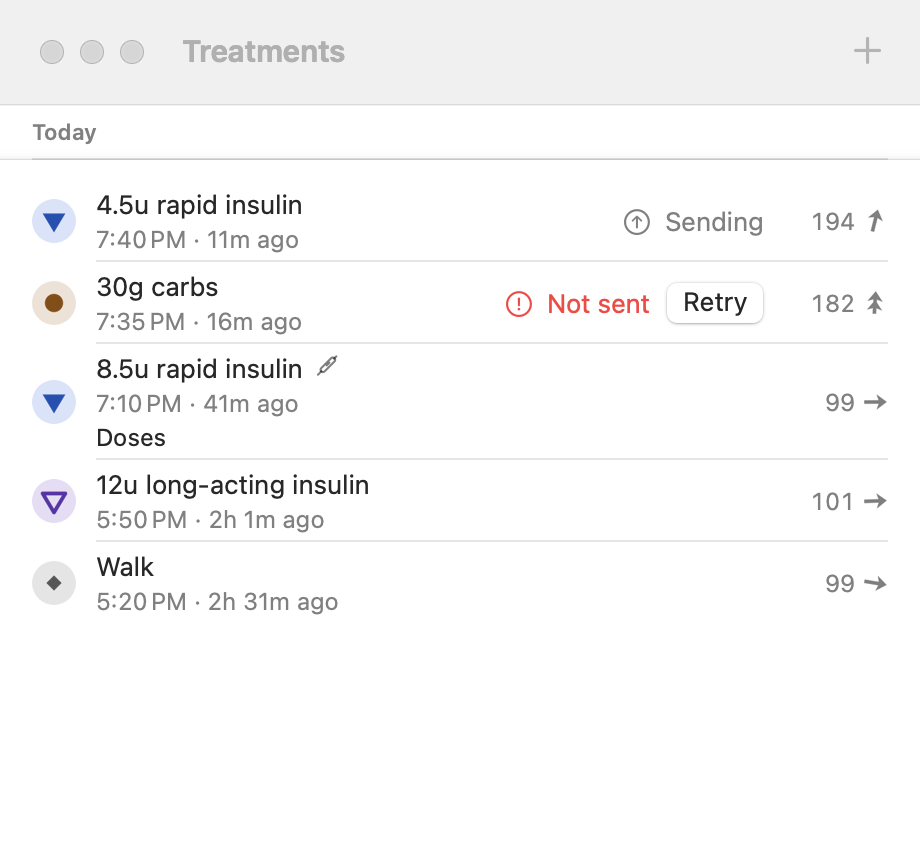
The home treatments list (wearer and follower; #207, design and sources in docs/37): newest first, each row two lines: a 36 dp badge with the kind’s chart marker (TreatmentMarks.marker: rapid ▼, long ▽, carbs ●, note ◆) in the kind’s tonal colours (TreatmentKindBadge, :core:graph, the dialog’s labels use the same marker), the amount as the card writes it and the kind (30g carbs, 4.5u rapid insulin; a note’s headline is its text) with a pen icon when an insulin pen logged it (TalkBack from the pen; on every role: a follower stores the treatment’s pen keys as received, TreatmentWire.penJson), then the time of day, the time since in the card’s short durations (12m, 3h, refreshed on home’s minute tick) and the note. At the end, the glucose then: the reading nearest the treatment’s time within ±5 min (GlucoseAt, the earlier on a tie; nothing when none is that close), written as the card writes it (LO / HI, the unit) with the card’s arrow for that reading’s own trend (THE trend, Reading.trend; the ring without one); TalkBack glucose then 142 milligrams per decilitre, rising. The LibreView mark only says something (Google Photos’ way): nothing once the treatment is in LibreView; ☁↑ Not in LibreView yet / LibreView has an older version: updating; ☁↑ Waiting for LibreView: the Libre app uploads now. It goes up once Sukrara reads your sensor and you take over. while LibreLinkUp is your source (#213: an expected pause, not the error mark); ☁̸ in the error colour LibreView upload stopped; a ☁✓ that pops in for 3 s when a treatment gets there while the list shows (UploadMark.shown, JUST_UPLOADED_MS); each mark opens the LibreView page. No Delete button and no long-press menu (#207 round 2; research and reasons in docs/37): a tap opens the treatment in the app’s bottom sheet (SukraraSheet: a typed treatment’s edit form, a pen treatment’s doses), whose Delete (with its icon) is the visible way to delete; a swipe towards the start past 40 % of the row deletes it at once (one direction only; the row slides over a strip with the delete icon that turns error-container and grows, with a gesture-threshold haptic, once letting go would delete; a delete the log refuses slides back after 1.5 s; SwipeToDelete, :core:designsystem); TalkBack has a Delete action on the row. Every delete goes through the treatment log (tombstone, LibreView / Tidepool retraction, the quiets from the log) and the snackbar names what went, Deleted: 4.5u rapid insulin (… It is removed from LibreView too. when LibreView had it and the upload isn’t held:
also after LibreView refused the last upload, since the delete is the change that sends again; LvEntryMarks.removesOnDelete), with Undo for 10 s (showUndo; longer with TalkBack or Time to take action), on home and on the Treatments page. A row this phone may not change has none of them (a pen’s row still opens its read-only sheet). Rows leave and come back with the list resizing; reduced motion snaps it all. A pen row is one button (TalkBack: show its doses) that opens the pen treatment sheet (:core:designsystempen/PenEntrySheet, the same sheet as Doses read): the amount and time, From the pen · 1.5u primed, each dose with Priming / Injected, the note (with the note marker; a field where this phone may change the treatment, #207: a pen treatment carries a note like any treatment; Save stores it through the treatment log, the pen keys kept, snackbar Treatment changed with Undo) and the treatment it replaced; Save corrects it (snackbar Treatment changed / Removed from your log with Undo; This treatment changed meanwhile. Nothing was saved. when a read or another phone changed it; Couldn’t undo when it changed after), Delete is home’s own delete (snackbar Undo), Done. On a follower (or a phone without pens) the doses are read only (their role in words) and only a writer’s own treatment has Delete. TreatmentRowTest, UploadMarkTest, TreatmentListTest; goldens TreatmentListGoldenTest (every state, light and dark). Mac: Treatments window rows (#207) start with the same marker badge, show the time of day and the same 12m / 3h under the amount (refreshed each minute while shown), mark a pen treatment with a small pen, end with the glucose then and its arrow, show the delivery only while it says something, and show Edit / Delete on hover (see Mac menu and windows).
See all → the Treatments page (Android, #207): the section header’s See all (shown whenever there is a treatment in the last 31 days; Nothing logged in the last 24 hours when only older ones exist) opens Treatments: the last 31 days (the treatments and readings home already holds for the chart) by day under sticky Today / Yesterday / Mon, Nov 10 headers, newest first, the same rows without the time since, Add treatment, and a footer: The last 31 days. Older treatments are in your export and in LibreView or Tidepool if you upload there. Empty: No treatments in the last 31 days. HomeViewModel with HISTORY_WINDOW, HomeViewModelTest. States and exits: Treatments page → back / the top bar’s arrow (home); a row → its edit dialog / pen sheet / menu / swipe as on home, Treatment deleted → Undo; Add treatment → the dialog.
Edit from the list (Android, #75; a sheet since #207): a row this phone may change (the wearer: every typed treatment; a writer: the ones it created) is one button (TalkBack edit) that opens the treatment form on that treatment in the app’s bottom sheet, with Delete at the action row’s start (snackbar Deleted: 30g carbs with Undo, 10 s) (NavTargets.EXTRA_TREATMENT_ID, TreatmentsModule.edit, EditAndRetryTest, EditDialogTest): Edit rapid insulin / Edit long insulin / Edit carbs / Edit note with only that kind’s amount (the kind never changes, contracts/treatments SPEC §1: to change it, delete the treatment and add it again) and its note, When? starting at its time (Now moves it to the moment of saving); Save stores a newer version (synced like any edit) and the snackbar says Changed: 5u rapid insulin with Undo (the version it replaced comes back as a newer one). A treatment deleted meanwhile or no longer this phone’s to change: This treatment can’t be changed any more. Pen rows keep their sheet. Mac: the Treatments window’s Edit… (a sheet: the amount or the note’s text, and When?) and Delete with Undo, for the treatments this Mac logged (EditTreatmentView).
Delivery on a writer’s phone (Android follower that may add treatments, #75; FollowerEngine.UNSENT_MS, TreatmentDelivery.Failed, FollowerEngineTest, HomeViewModelTest): a treatment it wrote shows Sending… under its row until a relay accepts it or the wearer’s phone echoes it (the echo of the same version counts too, so a Bluetooth-only link without relays delivers), then nothing; nothing took it within 2 minutes, or it couldn’t be sent at all (not connected, no longer allowed) → Not sent in the error colour with Retry (TalkBack: Retry sending 30g carbs), and it is still sent again on every connect. Retry sends the same version again now (TreatmentLog.retry) and the line goes back to Sending…; a late relay OK still delivers it. Mac: Sending / Sent / On the phone / Not sent + Retry (Mac menu and windows).
The treatment dialog (Android + Mac) focuses carbs instead of rapid insulin when the latest fresh reading is below an enabled low-side alert threshold (AlertStatus.level in Kind.LOW_SIDE); otherwise rapid.
In the app it is a bottom sheet (#207 round 2): opened from home (Add treatment, a card pill, a list row) the same form is the content of the app’s bottom sheet (SukraraSheet: drag handle, swipe down / back / a tap above it cancel), its buttons with icons (Delete on an edit, Cancel, Save). The sheet and the keyboard move as one (#181, as on iOS): the field that opens the keyboard waits for the sheet to start rising and the sheet keeps the keyboard’s final height from the keyboard’s first frame, so both come up together; a drag down takes the keyboard along under the finger (WindowInsetsController.controlWindowInsetsAnimation, the content keeping the keyboard’s height meanwhile) and it leaves with a dismissed sheet or comes back up with one that springs back, the same with reduced motion (direct manipulation; every SukraraSheet with a field gets it); from outside the app (notification, widget, tile, a low alert, the lock screen) it stays the floating dialog below. Goldens TreatmentDialogGoldenTest (treatment-sheet-edit).
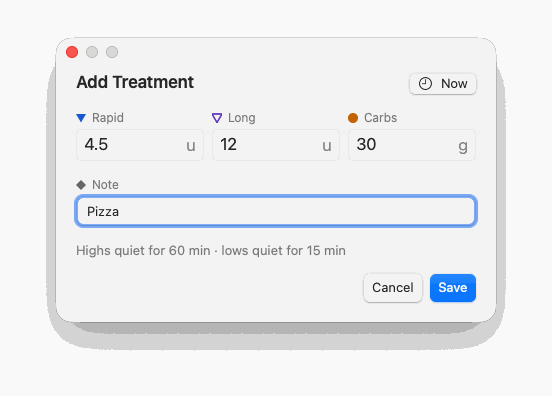
The treatment dialog on Android (home screen and QuickTreatmentActivity) is laid out as the PoC’s (#181): the title with the When chip at the end of its line (an M3 assist chip: Now, 16 min ago, Today 14:05, Yesterday 23:40, cross-fading when it changes; TalkBack When: Now; a tap opens When?), Rapid / Long / Carbs side by side (stacked from 1.3× text) with large digits, then the Note (wraps up to 3 lines, empty while empty: no example text, #181; the byte count from 80 of 100 bytes). Each label starts with the kind’s chart marker (TreatmentMarks.marker, its colour: rapid ▼, long ▽, carbs ●, note ◆) and always sits small on the field outline on one line, with the unit (u / g) shown throughout, so no field and not the dialog changes height when the focus moves, not even for a frame (TreatmentDialogHeightTest, every frame, en + es, 360 / 412 dp, 1.3× text). Carbs get the plain number pad, insulin the decimal one. The optional lines (kept draft, pen, quiet, limits) slide in and out with their own gap. The action row has Open Sukrara / Unlock at the start and Cancel, Save at the end (TreatmentDialogLayoutTest; goldens TreatmentDialogGoldenTest).
The treatment dialog’s time (Android + Mac): When? switches between a clock time and Minutes ago (Android, #181: M3 segmented button, then THE length wheel (LengthWheel, :core:designsystem: one scrolling column like iOS’s picker, minutes and hours in the same scroll: every minute to 1 h, every 5 min to 6 h, every 15 min to 23 h 45; 45 min, 1 h 5 min; the centred length in a tonal band, a snap after a fling, a light tick per length passed, a tap on a row scrolls it there; TalkBack: one adjustable control, Minutes ago, 16 minutes, swipe up / down for the next length; opens on 5 min) with THE length chips under it (LengthChips: 5m15m30m1h, Spanish 5 min1 h, TalkBack 5 minutes; a tap scrolls the wheel there); Mac: segmented control, the number field (stepper and ↑ ↓ in 5-min steps) with 5m / 15m / 30m / 1h buttons that fill it (VoiceOver 5 minutes); closing the popover with a click outside keeps a changed choice, as OK does). Typed minutes ago (the Mac) are 0–1439 (under a day, like the clock time; OK disabled when empty or 1440+, the field outlined red), 0 = now; the chip shows 16 min ago (es Hace 16 min) and the treatments get the time 16 min before the moment of saving, not of picking. The quiet line counts from that time. Cases in contracts/treatments/treatment-form.json (minutes, minute_filters); TreatmentTimeTest (also at 411 dp).
The treatment dialog’s form (Android + Mac, TreatmentForm, cases in contracts/treatments/treatment-form.json): insulin rounds to 0.1u (≤ 100u), carbs to whole grams (≤ 500g), , or . as decimal mark; 0, or 0 after rounding, is invalid; one invalid field blocks Save; a blank note adds nothing, a note is trimmed and clipped to 100 bytes.
Writer scope (investigation 24; Android + Mac; WriterScope): a follower allowed to add treatments (a writer) creates treatments and changes or deletes only the ones it created; the wearer changes any. The wearer’s phone refuses a writer’s change to the wearer’s own or another writer’s entry (logged treatment REJECTED: … may only change its own entries; no echo, so the writer’s copy stays not accepted yet). Followers apply the same rule: each entry’s creator is the key that signed its first accepted version; a writer’s copy that arrives after the wearer’s echo of it is ignored, not counted as rejected; the wearer’s own entry replaces a copy a writer forged first, whatever its version.
Lock-screen countdown (Android, round 52, 0.11.52; :feature:treatmentsQuickTreatmentActivity.kt, LockCountdown.kt, LockCountdownTest): while the quick dialog is over the keyguard (lock mode: KeyguardManager.isKeyguardLocked, checked on every resume, so a widget on the lock screen, the glucose notification, the Quick Settings tile and a pen notification’s Add treatment all count, swipe-only locks too) it closes by itself after Time to save (Settings → Lock screen, lockTreatmentTime, 10–120 s, default 10 s (the owner’s call, #181; was 20 s); raised to Android’s Time to take action and to at least 60 s with TalkBack). The time counts from the dialog’s first frame. Touches and typing never add time (in a pocket they type too). Cancel carries the countdown: a 24 dp ring that empties every frame with the seconds left inside it (the user asked to see the seconds count, 2026-10-25; the spec had a ring only), primary colour; it pulses once at 5 s, plus one light haptic tick if something was typed. The When? picker’s Cancel shows the same ring; timing out closes it with the dialog. Already logged by your pen? holds the countdown while it is open (below). Timeout: the dialog fades out (no haptic); entries that could be saved, each amount exactly as Save stores it, are kept as a draft (#100, below: toast Not saved yet: unlock and tap the notification to finish), anything else typed gets Not saved: the dialog closed on the lock screen. The screen going off closes it at once, no toast. Unlock takes Open Sukrara’s place at the start of the action row (the PoC’s lock version; no separate countdown line, the ring on Cancel says it; the two cross-fade): the countdown pauses for the unlock prompt; success keeps the same dialog with every input (amounts, note, When?, the focused field and its keyboard), the ring shrinks away and Open Sukrara comes back; a cancelled or failed prompt resumes with at least 5 s. Unlocking on the lock screen itself (fingerprint) ends lock mode the same way. When the action row doesn’t fit (Spanish at 320 dp) Unlock wraps to its own start-aligned line above Cancel / Save; no button is ellipsized. Remove animations: the ring steps once per second, no fill-in, no pulse (the tick stays). TalkBack: the digits are hidden; Cancel’s state is Closes in N seconds in 5 s steps, one polite Closes in 10 seconds, Unlock reads Unlock to keep editing. The home screen’s dialog never counts down.
States and exits: Treatment dialog (home Add treatment, a card pill, a widget, the glucose notification, an alert’s Treatment, the Quick Settings tile, a pen read’s Add treatment; Mac Add Treatment…) → Save, Cancel / back / tap outside / Escape (nothing saved, back where the user was). Edit dialog (Android: a row of home’s list) → Save (snackbar Changed: … → Undo brings the old version back) / Cancel / back / tap outside (unchanged). Sending… → leaves by itself once a relay or the wearer’s phone has it; Not sent → Retry (→ Sending…), or it leaves by itself once taken (it is sent again on every connect); deleting the entry also ends it. Android Save → the dialog leaves and a snackbar at the bottom says Saved: 4.5u rapid insulin · 30g carbs (a follower: Will be sent to the wearer: …) → Undo (those entries leave again, synced like a delete; Undone) or it goes by itself after 4 s (longer with TalkBack and Time to take action), back closes it; touches outside it reach the app behind. When? picker (the chip at the end of the title line) → OK, Now (back to now), Cancel (keeps the earlier choice). An invalid amount → the red limits line, Save disabled until it’s fixed or cleared. Already logged by your pen? (a dialog over the dimmed treatment dialog) → Cancel / back / tap outside (back to the form with the values, nothing saved) / Log anyway (saved). A pen held to the phone while the dialog is open (the wearer’s, reading On) → its dose is logged at once and fills Rapid / Long-acting and When with Undo under the fields (Insulin pens); a pen read’s Add treatment opens it at the injection’s time with the other insulin focused. A phone that can’t add entries → the app opens instead. Lock-screen countdown: Lock mode (the dialog over the keyguard, from a widget on the lock screen, the notification, the QS tile or a pen notification) → the countdown ring on Cancel → Save (saved without unlocking), Cancel / tap outside (nothing saved), Unlock (bouncer: success = the same dialog unlocked with everything kept, no countdown; cancel / failure = the countdown resumes with at least 5 s), timeout (closes; savable entries typed exactly are kept as a draft → the Treatment not saved notification → tap → the dialog filled with it, Kept at 14:05, not saved yet → Save (at the kept time) / Discard (the form empties, the notification goes) / Cancel (kept, offered again for 12 h from when it was kept, also whenever the dialog opens next); anything else typed: a toast), screen off (closes). Unlocked dialog → Open Sukrara (only when opened from outside the app: a notification, a widget, the tile; home’s button, its pills and its list never show it, the app is already behind; #181), Cancel, Save. Time to save → Settings → Lock screen → number dialog (Cancel; default 10 s among the presets 10 / 20 / 30 / 60, Custom… 10–120 s). TalkBack: Cancel’s state Closes in N seconds, one announcement at 10 s, at least 60 s.
Android (apps/android/feature/treatments): the quick dialog (QuickTreatmentActivity, opened by the glucose notification’s action intent, QuickTreatmentIntents.open for widgets and the Quick Settings tile Add treatment) with Rapid / Long / Carbs, Note (Carbs focused when the latest fresh reading is at or under the low threshold, alert on or off,
or when the card’s Eat carbs pill opened it), the When chip on the title line (When?: Time picker or Minutes ago with 5 / 15
/ 30 / 60 chips, resolved when saving; the chip then reads 16 min ago), the quiet line (Highs quiet for 44 min ·
lows quiet for 14 min: what the treatments quiet on this phone from the chosen time; none while alerts are off or a
follower mirrors the wearer’s alerts), the limits line, Open Sukrara, and the lock-screen countdown (the ring on Cancel, Unlock in Open Sukrara’s place; same rules, LockCountdownTest). Saves go through TreatmentLog (each version strictly newer, undo = a newer version, WriterScope) and the share layer’s TreatmentSync. After Save (#100, SavedSnackbar, QuickSaveTest, SavedAndDraftTest): the dialog fades and shrinks away with its scrim (180 ms; none with reduced motion), then an M3 snackbar slides up at the bottom with a check that pops in (spring), the treatments in words (EntryWords, home’s wording) and Undo (confirm haptic; a newer deleted version of each treatment that Save stored, nothing else; then Undone for 1.5 s); it is a polite live region and stays 4 s, raised by getRecommendedTimeoutMillis. Meanwhile the window covers only the snackbar (FLAG_NOT_TOUCH_MODAL), so the app behind takes every other touch. Lock-screen draft: when the countdown ends on treatments that could be saved and every amount is exactly what Save stores (insulin to 0.1 u, whole grams: 4.5, .5, 30; not .243 or 1.25, which only rounding makes a dose: a thumb on the number pad over the lock screen typed .243, and as a draft it filled every Add treatment for 12 h, the owner’s 0.14.5 report; such a form only gets the Not saved toast, and a draft kept by an earlier version with such an amount is no longer offered; QuickSaveTest, QuickTreatmentTest.theLockScreenCountdownKeepsOnlyADoseAsTyped), they are kept (typed state treatment-draft: the four fields and their time, “now” resolved to the moment it ended) and a silent notification on the Unsaved treatments channel (treatment.draft, info group, private on the lock screen) says Treatment not saved · 4.5u rapid insulin · 30g carbs. Tap to finish saving it.; a tap (or opening the dialog from anywhere, for 12 h) fills the form with it and says Kept at 14:05, not saved yet with Discard; Save or Discard drops it and its notification, which also times out after 12 h. Cancel carries the countdown ring (24 dp, seconds inside, empties every frame, fills in with the dialog, pulses once at 5 s with one SEGMENT_TICK haptic only if something was typed, shrinks and fades away after an unlock; reduced motion: steps once a second, no fill-in, no pulse; TalkBack: digits hidden, Cancel’s state Closes in N seconds in 5 s steps). The When? picker’s Cancel carries the same ring while the countdown runs behind it (Cancel closes the picker only). With 10 s left TalkBack hears Closes in 10 seconds once (a polite live region; not while the unlock prompt holds the time, never per second; LockCountdown.announceDue). The Quick Settings tile’s subtitle is the glucose as the card’s face shows it (surface quick-tile, TileSubtitleTest): 123 ↗, struck with the ring from 5 min (1̶2̶3̶ ○, a tile can’t draw a line), No reading since 00:32 from 20 min, Sensor ended, Warming up · 12 min, nothing before the first reading, Open Sukrara to set up when this phone can’t add treatments; redrawn each minute while the shade is open. Saving insulin near a pen treatment asks Already logged by your pen? (PenDuplicateDialog, see Insulin pens; Mac: TreatmentsModel.penDuplicate, Already logged by the pen?).
Two versions of one treatment merge the same on every device and in every store (Android’s database, the wearer’s log
and a follower’s copy; the Mac’s log; SPEC §1, cases in contracts/treatments/merge.json): the later u wins, and
on an equal u the greater origin (phone > mac > follower), whatever order they arrive in.
Every writer sends o: follower (the Mac too: it knows its own treatments by the delivery state it keeps for each one it sent). The Mac’s On the phone (accepted) comes from the wearer’s echo: a version signed by a wearer device with u ≥ the sent one, also when the relay returned the Mac’s own copy first (same version: the echo still counts; FollowerRuntimeTests). Mac following someone: Edit… and Delete (the row’s buttons, the context menu, Undo / ⌘Z) work only on treatments made on this Mac, while the wearer allows it to log; the wearer’s and other followers’ rows are read-only.
Two versions of the one app app.mauri.sukrara (team QWUV9H4A3G, the same App Group, keychain group and widget),
like Android’s two builds (docs/20-publishing.md › Mac App Store): the GitHub version (the dmg, GitHub releases,
the Homebrew cask; Developer ID, notarized; tools/release/mac-release.sh) and the App Store version (the Mac
App Store and TestFlight; tools/release/mac-appstore.sh, Bundle/bundle.sh --app-store). The same app: the
GitHub version is the Sukrara executable (with Sparkle), the App Store version the SukraraAppStore executable
(the same code without the updater); the Info.plist’s SukraraDistribution (github / appStore) tells the app
which one it is (Distribution, LaunchPlan; LaunchModeTests, verify-app.sh --app-store).
The App Store version leaves out only what the store replaces:
No updater: no Sparkle in the bundle, the binary or the Info.plist (bundle.sh and verify-app.sh --app-store refuse one), and the launch plan never allows it (ServicesPlan.all(for: .appStore)); the right-click
menu has no Check for Updates… item at all, About Sukrara says App Store version and Settings › General ›
Version shows 0.16.0 · App Store version
without the update button or switches. The store brings the updates (App Review 2.4.5 vii).
Sandboxed (App Review 2.4.5 i) with exactly what it uses: network client (relays, Juggluco’s web server),
Bluetooth (the wearer’s phone nearby), the camera (QR scanner), files the person picks (the report’s Export
CSV…), the App Group shared with the widget, and the provisioning profile’s Time Sensitive alarms,
data-protection keychain and universal links. Its readings, treatments, log and alert sounds are in its container
(~/Library/Containers/app.mauri.sukrara/Data/Library/…, the paths the GitHub version uses under the home
folder).
Everything else is the same: following, nearby, Juggluco on this network, alerts and their sounds, the widgets, open
at login (asked in setup, a switch in Settings; never by itself), read aloud and its shortcut, the report, both
languages.
Switching: one replaces the other in Applications. The follower key and trust state are in the shared keychain
group, so the follow continues; readings, treatments and settings stay with the version that stored them (the
App Store version’s are in its container), and the readings come back from the wearer’s history.
States and exits: the App Store version has no state of its own: About names the version; the updater’s states
(Checking, Up to date, Update available, Downloading, Ready to install, the error, Turned off, the panel’s
Sukrara 0.14.0 is available) don’t exist in it and no menu item, button or banner leads to them. Every other state and exit is the GitHub version’s,
reachable with VoiceOver the same way.
Why: the owner runs builds of next (tools/install.sh), signed like releases. They said 0.16.0 · GitHub
version while running something that wasn’t released, so one couldn’t tell whether the phone or the Mac had the
latest release. Now only a published release says its release wording; every other build says it is a development
build and of what.
Release builds (the release scripts at the release commit; Google Play and the App Store are always releases):
Android About 0.16.0 · GitHub version / 0.16.0 · Google Play version; Mac About Version 0.14.5 (14005) and
GitHub version / App Store version, Settings › General 0.16.0 · GitHub version / 0.16.0 · App Store version.
Development builds (tools/install.sh, CI, any local build): the same places say Development build · 0.14.5 +
23 commits · d744fd74 · 14 Nov (Spanish Versión de desarrollo · 0.14.5 + 23 cambios · d744fd74 · 14 nov): the last
release, the commits since it, the commit and its date (selectable on the Mac). The Mac About keeps Version 0.14.5
(14005) above it. Reports and issues (Copy report of the alert checklist, sensor feedback, the history import’s
issue, the Mac’s Copy Report) say 0.14.5 development build +23 d744fd74 2026-11-14.
Updates on a development build: it counts as its base release: the updater never offers that release or an
older one over it, and offers a newer release as usual (Android About’s Update, the daily check; Mac Sparkle).
How it’s built and checked: docs/DEVELOPMENT.md › Development and release builds. Tests: AppBuildTest,
VersionSummaryTest, ManifestTest, ReleasesTest (Android), AppBuildTests (Mac), BuildInfoTest.
States and exits: two states, fixed when the app is built: a release or a development build. Both show where the
version shows (Android Settings › About, the Mac’s About Sukrara and Settings › General), readable by TalkBack /
VoiceOver as plain text; nothing to change in the app. The way out of a development build is installing a release
(the GitHub release, Google Play, the App Store, or the updater once a newer release is out); tools/install.sh puts a
development build back.
Why: a follower Mac is often a parent’s or partner’s alarm on a desk, and with no backwards compatibility on the
wire an old follower stops receiving when the protocol changes. So the GitHub version (the dmg, GitHub releases, the
Homebrew cask) keeps itself current with Sparkle 2 (#91; docs/20-publishing.md › Sparkle: the update feed), and
an update is one click: Install and Relaunch. The App Store version has no updater (the store updates it).
The disk image (apps/macos/Bundle/dmg.sh): opening it shows the app, an arrow and the Applications folder on a
light window (Install Sukrara · Drag the icon onto the Applications folder). It has its own icons, not the app’s
(#181; assets/brand/sukrara/macos/dmg, drawn by icons.swift from the app icon’s glyph): the opened volume (Finder’s
sidebar, the desktop, the window’s title) is a Sukrara drive, the brand gradient and the cube glyph over a silver base
with a lime light; the .dmg file is a disk image page with that drive on it. The file’s icon lives in extended
attributes, so a downloaded .dmg shows the system’s disk image icon; the opened volume always shows its own.
The feed: https://sukrara.mauri.app/appcast.xml (website/public/appcast.xml on the website, SUFeedURL), checked
once a day while Check for updates automatically is on, and on every Check for Updates…. Each item is the
notarized dmg of a GitHub release, signed with Sukrara’s EdDSA key; Sparkle checks that signature against the
app’s SUPublicEDKey and the new app’s Developer ID signature before it installs, so a changed feed or download
installs nothing (tested: a feed item with another file’s signature → improperly signed, nothing installed). Every
release is a normal GitHub release and every install takes it (the feed’s items have no channel, like the cask and
Android’s check, which skip a GitHub prerelease, a release candidate).
Where: the right-click menu’s Check for Updates… (dimmed while the updater is busy); Settings › General ›
Software Update: the version, Check for Updates…, Check for updates automatically (on by default), Download and
install updates automatically (off by default: Sukrara asks first; dimmed while automatic checks are off; such an
update installs when Sukrara quits or the Mac restarts) and Last checked 2 hours ago / Not checked yet. Sparkle
keeps both switches (schema update.automaticChecks, update.automaticInstall, store system); its own window’s
checkbox is the same switch.
Never over what the person is doing (Sparkle’s gentle reminders, SparkleUpdater): an update a scheduled check
finds comes up in Sparkle’s window by itself only when Sparkle would show it in immediate focus (right after launch,
or after the Mac was idle). Otherwise the panel shows a row, Sukrara 0.14.0 is available (… is ready to install
once downloaded), with Later (hides it until the next check) and Install… (Sparkle’s window with the
update). No notification: those are for glucose.
Sparkle’s window: the notes (the release’s CHANGELOG section; Version History opens the GitHub release),
Install Update, Remind Me Later, Skip This Version; the download; Install and Relaunch (Sukrara quits the
normal way, closing the relay sockets and saving the alert state, then the new version opens). Standard AppKit
windows, in English or Spanish with the Mac.
Who never has one: the App Store version (no Sparkle in it at all), and dev, fixture, snapshot and test runs
(LaunchPlan never allows .updater, so Sparkle isn’t even created and nothing touches the network;
UpdatesTests, LaunchModeTests, the smoke test’s no-socket check).
States and exits: Turned off (automatic checks off): no check and no reminder by itself, Check for Updates…
still works → the switch back on. Checking (after Check for Updates…): Sparkle’s progress window → Cancel; the
menu item and the About button are dimmed meanwhile. Up to date: You’re up to date! → OK. Update available:
Sparkle’s window → Install Update, Remind Me Later (or closing it), Skip This Version (that version isn’t offered
by itself again; Check for Updates… still shows it); or the panel row → Later / Install…. Downloading: progress
→ Cancel (offered again at the next check). Ready to install: Install and Relaunch, or later (it installs when
Sukrara quits); the panel row says ready to install when a scheduled check downloaded it. Error (offline, the feed
or the download unreachable, a signature that doesn’t verify: nothing is installed): after Check for Updates…
Sparkle’s alert → OK; a scheduled check that fails stays quiet and tries again the next day. Every state is
reachable without a notification (the right-click menu, the panel, Settings › General) and read by VoiceOver (Sparkle’s
windows are standard AppKit; the row’s Install… has the hint Shows what’s new and installs it).
Why (#188): the phone is the wearer’s alarm and the followers’ source, and with no backwards compatibility on the
wire an old version can stop sharing when the protocol changes. Before, the GitHub version only looked for a release
while Settings › About was open and sent the person to the browser. Now it says when there is an update, or installs
it by itself, without the person having to remember. The Google Play version has none of this: Play updates it
(Google Play build).
Opt-in (the owner’s decision, 2026-11-13): one APK, signed with Sukrara’s key, serves GitHub, Obtainium and
later F-Droid, whose inclusion policy allows updates that bypass it only with the person’s consent (opt-in, declining
no harder than accepting, the person told it bypasses the store). So Check for updates automatically is off until
the person turns it on (the schema’s Android default, update.automaticChecksandroid.default with its reason; the
Mac’s Sparkle keeps checking by default: the Mac isn’t on F-Droid). So nobody misses updates, it is suggested twice:
setup’s Keep Sukrara up to date step (First-run setup (Android)) and the
Keep-Sukrara-up-to-date banner on home and the top of the Settings overview, both
saying what it does (once a day it asks GitHub; a notification tells; nothing installs without the person’s Update
unless automatic installs are on too), where updates come from (GitHub releases, outside any app store, checked
against Sukrara’s own key) and why (the phone is an alarm; an old version can stop sharing when the protocol
changes). An install from before this, which never stored the switch, starts with it off too (no backwards
compatibility): its banner asks.
The daily check (:updateUpdateCheckWorker, WorkManager, any network, first an hour after the app starts,
then once a day) while Check for updates automatically is on (off until turned on): the GitHub releases
(api.github.com/repos/mauriciabad/sukrara/releases, all of them: the newest that is neither a draft nor a
prerelease, a release candidate; every release is a normal one), plus About’s check each time the page opens. A newer release is announced once per
version in a notification: Sukrara 0.14.0 is available · Update to install it. Monitoring comes back by itself
right after. with Update and Release notes; tapping it opens Settings › About. Its own channel App
updates (low importance: no sound, no vibration, never on top of anything), in the Other group: never with the
alerts.
Update (the notification, About): downloads Sukrara-<version>.apk of the release (only from
github.com/mauriciabad/sukrara/releases/download/, https on every hop, never larger than GitHub lists), checks
that its SHA-256 is the one GitHub lists for that asset and that Android reads it as app.mauri.sukrara, newer
than the running version and signed with Sukrara’s release certificate alone (tools/release/android-cert.sha256,
built into the app; ApkCheck). A file that fails a check is deleted and nothing is installed. Then Android’s
PackageInstaller installs it: the first time Android asks to allow Install unknown apps for Sukrara (once), then
shows its own Do you want to update this app?. A release without an APK or without a listed SHA-256 can’t be
checked: Update opens its page instead.
Never over an alert: the download and the checks happen at once, but the install waits while an alert is up
(ringing, or shown and not answered) or a very low is on (answered or not), since installing stops Sukrara for a few
seconds (InstallGate, AlertHolds: the alert runtime’s saved state and the hub’s live alerts, a follower’s
mirrored ones too). It asks again 5 min later, then a little later each time (WorkManager’s backoff).
Monitoring comes back by itself: Android ends the old version; the new one’s first broadcast
(MY_PACKAGE_REPLACED) runs the alert check and starts monitoring, as after a reboot (BootReceiver;
PackageReplacedTest), and the updater deletes the downloaded file and its notification.
Install updates automatically (off by default; needs the daily check): the daily check downloads a newer
release on an unmetered network, checks it the same way, waits for the alerts the same way and installs it asking
Android not to prompt (USER_ACTION_NOT_REQUIRED with UPDATE_PACKAGES_WITHOUT_USER_ACTION, Android 12+). Android
still asks the first time (allow installs from Sukrara) and while another installer is Sukrara’s installer of record
(the browser, adb, Obtainium, a store): the first update Sukrara installs itself makes it the installer, and the
next ones go through without a tap (seen on the emulator: 0.13.1 asked after an adb install, 0.13.3 installed by
itself 15 s after the check). When Android asks, the notification says Android asks you to confirm this update.
Tap Install. After an automatic update the new version says Sukrara updated to 0.14.0 · Monitoring is back.
with Release notes.
Both switches are the Mac’s two rows (schema update.automaticChecks, update.automaticInstall, store settings
on Android; the daily check starts off on Android and on on the Mac: the schema’s per-platform default with its
reason); Settings search finds them and Check again. Strings in English and Spanish.
Who never has one: the Google Play version (:update isn’t in the play flavor: no worker, no receiver, no
REQUEST_INSTALL_PACKAGES; ManifestTest, verify-apk.sh --play). Debug builds read GitHub and trust only the
release key like a release build, unless the UPDATES debug command points them at a local test release
(tools/updates/serve.py, trusting the debug key; docs/QA.md Q25).
States and exits: Never answered (the daily check off, as installed): no check and no notification by itself;
About still checks when it opens → setup’s step or the banner (Turn on / Not now), or the switch in About (or
Settings search). Turned off (the daily check off on purpose): the same, and no suggestion → the switch back on (About,
or Settings search; Settings › Show closed tips shows the banner again). Checking: About’s row says Checking for updates…
→ it ends by itself. Up to date: About’s Up to date → Check again. Couldn’t check (offline, GitHub refused):
About → Check again, or Open the releases page; the daily check tries again later without a word. Available: the
notification (Update, Release notes, swipe it away: it isn’t announced again, About still shows it) and About’s
Update available: 0.14.0 (→ Update) with Release notes. Downloading (progress in the notification and on About)
→ Cancel (the release is offered again). Waiting (downloaded and checked; an alert is up or a very low is on):
Sukrara 0.14.0 is ready to install · It installs once no alert is showing → it installs by itself once quiet, or
Cancel. Android asks (its prompt, or Install unknown apps the first time): the notification and About’s
… is ready to install → Install (Android’s prompt again) or Cancel; Android’s own Cancel is a failure below.
Installing: About and the notification → the app restarts as the new version, monitoring on by itself. Failed (the
download stopped, the file isn’t the release’s, another key, Android refused or the person cancelled): The update to
0.14.0 didn’t install · why · Sukrara 0.13.0 keeps running; nothing changed. → Try again, Release notes, or
nothing (the next daily check offers it again). Automatic installs on / off: About’s switch (dimmed, Needs the
automatic check, while the daily check is off). Every state shows on Settings › About without the notification, and
TalkBack reads each row’s title and summary.
A click on the menubar number opens the glance panel (a borderless panel under the item, like MenuBarExtra(.window): the menu material, 14 pt corners, a shadow); a second click, Escape, a click outside or another app taking focus closes it. Opening it brings Sukrara to the front, because macOS sends trackpad gestures only to the app in front (the user, 2026-10-22: “I pinch on the trackpad and nothing happens”: the non-activating panel had the keyboard but never got a pinch); closing it gives the front back to the app that had it, so it still behaves like a menu: a second click, Escape or the right-click menu return to that app at once; a click outside returns to it unless the click went to another app or a Sukrara window (that one stays in front); a row that opens a Sukrara window (Add Treatment…, Treatments…, Glucose Report…, Settings…, Follow Someone…) leaves Sukrara in front with that window (checked by hand, QA.md Q6). The panel comes to the front with NSApp.activate(ignoringOtherApps:): the cooperative NSApp.activate() left it behind the app in front even on a click on its own status item, so pinches went to that app (#181, the owner 2026-11-14: “I cannot pinch to zoom”; PanelEventLoopTests.openingThePanelPutsSukraraInFront, with another app in front). The chart’s pinch, ⌘-scroll and two-finger scroll go through AppKit’s event dispatch to the panel chart’s monitor over its own area only (PanelEventLoopTests, offscreen, no status item). Right-click (or Control-click) opens a short menu: Treatments…, Glucose Report…, Settings… ⌘,, Quit Sukrara ⌘Q.
The panel, top to bottom: the glucose card in a recessed module (12 pt corners; black 18 % in dark mode, white 50 % in light mode, a separator outline with Increase Contrast); Add Treatment… ↩, Treatments…, Glucose Report… and Settings… ⌘, as menu-like rows (hover highlight). No source, follow or error lines (Settings › General / Following show them), no treatment list (Glucose Report › Treatments).
The card in the panel uses the shared palette without a background colour (no halo disc / marker hole) and a grid one step stronger (#4A4A4F dark, #C8C8CE light); with Increase Contrast secondary ink #D8D8DC / #3C3C40 and grid #7C7C82 / #8A8A90.
No data (#72; Android’s no-data reasons, NoDataReason decided once in AppModel.noDataReason): never a bare No readings yet. With nothing to draw the reason takes the card’s place: the no readings symbol, the reason in a line, why in a sentence and its way out as a button (NoDataText, en + es): Not monitoring: not following anyone yet (Open the invite link from the person you follow, or follow their phone nearby. No alerts ring until their first reading arrives.) → Follow Someone…; …waiting for the wearer to allow this Mac → Following Settings… (Cancel request); …the wearer declined / …the invite was used by another device / …the wearer stopped sharing (ask for a new invite) → Follow Someone…; a broken link (LinkProblem) → Following Settings… (the Keychain not giving the follower key: Not monitoring: can’t read the follower key from the Keychain. Retrying…; with the wearer’s readings stored the card stays, under Can’t read the follower key from the Keychain. Retrying; alerting on the last data. with the circling arrows, #109); following with no reading yet → Waiting for the first reading from the wearer (Nothing heard yet. Their phone may be off, offline or out of battery.); Juggluco looking / not found / unreachable / refusing the secret / not a home address / the Local Network permission denied → its line, why and Juggluco Settings… (Settings › Source). Once a shown value is hidden (20 min and more) the card stays (No reading since 9:50) and the reason goes under it: No readings from the wearer’s phone (Last reading 9:50. Their phone may be off, offline or out of battery.), or Juggluco’s. VoiceOver reads the reason and why as one element, then the button. Follow Someone… below is left out when the reason already offers a way out of the link; no Add Treatment… while following nobody.
Add Treatment… (the first menu-like row, the panel’s default button: Return chooses it, shown as ↩) closes the panel and opens the Add Treatment window, the Mac form of Android’s treatment dialog: an auxiliary window (HIG Windows) with the system frame and no title text, sized to its content before it is placed (#181: placed while a few points tall, it grew past the top of the screen) and kept whole 12 pt inside its screen (AppWindows.origin): opened from the panel, centred under the status item 6 pt below the menu bar; opened by a click elsewhere (a desktop widget, the Treatments window’s +), centred on the pointer; brought to the front; when it is already open, a card pill’s field choice (Eat carbs → Carbs, Take insulin → Rapid) moves the focus there and keeps what was typed (AddTreatmentFocus). Inside, as on Android: Add Treatment and the time chip (Now / 16 min ago / Today 14:05 / Yesterday 23:10; a popover When? with a segmented control Time / Minutes ago: an hour:minute field (a time later than now is yesterday, within the current minute is now) or a minutes number field with 5 / 15 / 30 / 60 min buttons; Now, Cancel, OK); Rapid u, Long u, Carbs g side by side, number fields (each with its chart marker; digits, . and ,, at most 5 characters; the stepper and ↑ ↓ step rapid by 0.5u, long by 1u, carbs by 5g within the limits), Note below (no placeholder, one line, at most 100 UTF-8 bytes, n / 100 from 80 bytes); the quiet line (Highs quiet for 60 min · lows quiet for 15 min, Settings › Alerts minutes, not while this Mac mirrors the wearer’s alerts or with alerts off); the limits line in red with a red outline on the bad field (Insulin: up to 100u · carbs: up to 500g); Cancel and Save at the regular size (disabled until something valid is filled). Focus starts in Rapid, in Carbs when the latest fresh reading is below an enabled low threshold; Tab walks Rapid → Long → Carbs → Note; Return saves (every filled field becomes its own treatment at the same time, in kind order rapid, long, carbs, note, each through the same path as before: v2 to the wearer as a writer, local when following no one); Escape or the close button cancels. When this Mac can’t log, the row stays in place dimmed (HIG Menus) with the reason on a second, smaller line under it, also its tooltip (TreatmentPaths.Blocked): Waiting for Marta to approve this Mac, Marta hasn’t turned on “Can add treatments” for this Mac, Marta stopped sharing with this Mac, Not following Marta: ask for a new invite (the wearer when the name is unknown). Settings › Source › Treatments logged here shows the same reason.
Glucose Report window (panel row or right-click): the report only (no treatments; they have their own window): 1 day / 7 days / 14 days / 30 days (reportDays, default 14), the report, Export CSV…. Position remembered (SukraraReport).
Treatments window (Treatments…, panel row or right-click; its own item like Android’s treatments list, apart from the report): the last 7 days grouped by day (Today, Yesterday, weekday date), each row (#207, docs/37-treatment-list.md) with the chart’s marker for its kind (rapid ▼ filled, long ▽ outlined, carbs ●, note ◆) in the kind’s tonal ink on a circle of its tonal tint, the colours of the card’s tinted pills (GlucoseCard.treatmentBadge, drawn by the chart’s own marker code; Add Treatment and Edit Treatment label their fields with the same badge), amount, note, the time of day and the time since (12m), and at its end the glucose then: the reading nearest the treatment’s time within ±5 min (the earlier on a tie, nothing when none is that close: TreatmentsModel.glucoseThen), its value as the card writes it (LO / HI, the unit setting: Freshness.valueText) and the card’s arrow for that reading’s own trend (Reading.trend, the ring without one; VoiceOver Glucose then 142 milligrams per decilitre, rising). The delivery of a treatment made on this Mac shows only while it says something: Sending, Not sent + Retry, and On the phone with a green check for 3 s after the phone accepts it while the window is open, then it fades out; a treatment that arrived shows nothing (TreatmentsModel.shown). Who logged it is the row’s tooltip, naming the wearer (Logged on this Mac, Logged on Marta’s phone, Read from the pen on Marta’s phone; the wearer’s phone before a name is known); on treatments made on this Mac, while it may log, a pencil and a trash button appear while the pointer is over the row, and the same Edit… / Delete are in the context menu, VoiceOver’s actions on the row, and Delete in a trackpad swipe. Edit… opens Edit Treatment over the window: the treatment’s amount with its unit (a note: its text) and When?, which shows the treatment’s own day and time until another is picked (the picker of Add Treatment; OK on the treatment’s own clock time keeps its day). The Add Treatment limits apply (red outline and limits line, Save off), Save is off while nothing changed or a note is empty; Return saves (.levelChange haptic), Escape cancels. A save sends the treatment as a newer version (same id, u strictly newer) and the row shows Sending again (Not sent + Retry when nothing took it); the bar at the bottom says Changed to 5.5u rapid insulin with Undo (⌘Z, 10 s), which sends the earlier values as a newer version still (a delete’s bar says Deleted …). Arriving treatments slide in (.snappy), the hover buttons and the delivery fade in and out with a spring (none of it moves with Reduce Motion). VoiceOver: a row’s lines are one element (who logged it as the hint, Edit… and Delete as its actions); the doses, Retry and the glucose then are elements of their own. Position remembered (SukraraTreatments); ⌘W closes.
Pen treatments on the Mac (investigation 29; the phone reads the NovoPen, the Mac shows what arrives, SPEC §1 pr / pen / pd): in the Treatments window one row per injection with its total as title (8.5u rapid insulin) and a small pen after it (the Android pen icon) whose tooltip and VoiceOver say From the pen · 1.5u primed (From the pen without priming); with more than one dose a disclosure triangle opens the doses the pen recorded, one line each with its units (1u primed in secondary ink for an air shot, 8u) and time; the row’s tooltip starts Read from the pen on Ana’s phone (no serial). Feel: a treatment that arrives while the window is open slides in (default spring), a changed total or priming re-counts (.numericText), the doses open with the same spring; with Reduce Motion none of it moves. VoiceOver reads a pen row’s lines as one sentence (8.5 units rapid insulin, from the pen, 1.5 units primed, 12:40, 47 min ago); the Doses disclosure is an element of its own (the row is a container, so it opens with VoiceOver) and each dose reads 12:37, 1 unit, primed. Add Treatment: saving a rapid (long) amount within 45 min of a pen treatment of that kind asks Already logged by the pen? · 8.5u rapid at 12:40 (an alert sheet on the window) with Cancel (default, Escape: the carbs and note of the same save are saved, the insulin stays in the form) and Log Anyway (saves everything). No dose correction on the Mac: marking doses priming / injected (SPEC §1) is the wearer’s, on the phone; the Mac only follows, and a follower may change only the treatments it made (writer scope), never the phone’s pen treatments; a correction made on the phone arrives like any edit. Chart marks, the slot, insulin quiet times, widgets, the CSV export and everything sent use a (the injected units) only; priming is never counted. The Mac rejects a treatment with a negative pr, a pen over 32 bytes or a malformed pd (OGS D§6.1; checked against contracts/protocol/ogs/ogs-draft1.jsontreatment_payloads, OgsVectorsTests). The Mac keeps the three keys through merge, storage, edits and deletes (PenEntriesTests). sukrara-snap windows <dir> renders the Treatments window with synthetic data, light and dark.
Settings window (⌘, from the app menu, the panel or the right-click menu), laid out after the HIG’s Settings page (#181): a noncustomizable preference toolbar in the unified title bar (the traffic lights in the same bar, no tab view or inner frame) with five panes, each an SF Symbol over its name: General (gearshape), Graph (chart.xyaxis.line), Rings (circle.circle), Alerts (bell.badge), Following (person.2); the active pane stays highlighted and each button’s tooltip says what the pane holds. The window’s title is the pane’s name; minimize and zoom are dimmed (it isn’t resizable: the window takes each pane’s height, keeping its top edge, with a short animation, none with Reduce Motion, and the pane’s grouped form scrolls); ⌘W or the close button closes it; it reopens on the last pane shown (schema settings.pane, Mac only) where it was. Each pane is one grouped form (.formStyle(.grouped)) filling the window: sections with headers, explanations as leading-aligned footers (formFooter), standard controls only; changes apply at once (SettingsWindowChrome, SettingsWindowTests).
About Sukrara (the app menu’s first item, the right-click menu, Settings › General › About Sukrara): a small window like the standard About panel (no title text, only the close button, centred each time it opens): the app icon (it settles in with a spring, not with Reduce Motion), Sukrara, Version 0.14.5 (14005) (selectable, for a bug report) and GitHub version / App Store version (a development build: Development build · 0.14.5 + 23 commits · d744fd74 · 14 Nov, Development and release builds); the reminder that Sukrara isn’t a medical device (values can be wrong, late or missing, alerts may not ring; check the sensor’s app or a meter and ask your doctor before a treatment decision: App Review 1.4.1); Website, Privacy Policy (App Review 5.1.1) and Source Code (each with its address as tooltip); Sukrara on other devices (Sukrara for Android, the website’s page, #179); the copyright and the licence (GNU GPL 3.0 or later). VoiceOver reads the reminder and the copyright as one element each; the links are buttons (AboutView).
One number input (NumberSettingRow, every number on the Mac; the format of each is the shared schema’s, contracts/settings/settings.json → SettingsSpec.swift, the same file Android’s dialogs use): a pop-up menu of the presets and special values (Off, Only once, None; the widgets’ own time shown lists Same as the menu bar (12 h) first, above a separator) and Custom… where custom values are allowed (the ellipsis character: it needs more input; SettingsPanesTests); Custom (or a stored value that is no preset) shows a number field + stepper (one click = the format’s nudge, Shift-click 10 ×) + the unit, with the range under it (Enter 1–48 h). Typed text that isn’t in range or on step turns that note red and is not applied; Return or leaving the field commits. Ranges: the six bands (very low 30–80, low 40–120, very good 80–250, high 100–300, very high 150–400, extremely high 200–450 mg/dL, kept in order), time shown 1–48 h, per-place time shown (Default or 1–48 h), ring periods 12 h or 1–90 days, sensor countdown 1–24 h, thresholds (very low 40–80, low 50–120, high 120–300, very high 150–400, extremely high 200–450 mg/dL, rates 0.5–5.0 mg/dL/min in 0.1 steps, no data 5–240 min), repeat (once or 1–240 min), quiet after insulin 10–360 min, falling back / after carbs 5–120 min, notification Mute… first length 1–720 min, Remind less (only presets slower than every enabled alert’s repeat; custom from that repeat + 1 to 120 min), the margin 0–50 mg/dL and 0–60 min, Mute all 5 min–24 h or until you turn it off; minute presets read as 1 h, 2 h. Vertical lines (Off, every 1/2/3/4/6/12 h) are a plain pop-up. Every stored value is loaded through its format (NumberSpec.coerce), so any value the settings accept persists (custom hours were dropped back to 12 h before) and nothing else gets in.
One pattern per kind of input on the Mac (#181, Controls.swift; ControlsTests keeps every other file off the raw controls): text in TextInput (no placeholder: its name is a visible label beside or above it and VoiceOver’s label; HIG Text fields), numbers in NumberField (field + stepper + unit, ↑ ↓ step: Add / Edit Treatment amounts, minutes ago, every Custom number setting; HIG Steppers), a dialog’s closing row in DialogButtons (Cancel = Escape, the action = Return, regular size: style, not size, marks the preferred choice; a Done-only sheet closes with Escape too; Follow takes no Return; HIG Buttons, Sheets), a warning or an error in Notice (the 2026-11-15 rule, Android’s NoticeCard: the tone’s symbol in its colour, orange triangle or red octagon, the words at full contrast beside it, an explanation in the secondary colour, its buttons under it; HIG Color: never colour alone: the panel’s notifications, blocked-feature and alert-not-shown warnings, Open at login, Following’s problem and ended follow, Alerts’ unreadable settings, the follow step’s failure, the report’s coverage, setup’s threshold order). Also: Customize in How You Appear is a disclosure (HIG Disclosure controls), one default button per window (Setup › Follow someone: the invite link’s Continue while the link is typed), Reset to Defaults is destructive like the graph’s Reset.
Settings from (General; schema follower.settingsFrom): Their settings (default; Marta’s settings while following) or This Mac’s own, for the mirrored settings: the six ranges, time shown (default), rings and numbers, each slot (kind, period, fainter), a ring’s centre, ring order, rewards on the rings, time in range and crown beside the graph, treatments on the graph, lines across the graph, vertical lines, last treatment position and fallback, sensor countdown, and per alert (except no data) on / threshold / repeat plus the three quiet rules. Their settings = the wearer’s latest settings event (PROTOCOL-v2 Settings; a key they didn’t send, or nothing received yet, or not following = Sukrara’s default); This Mac’s own = this Mac’s own values. In use says which in one sentence (Not following anyone, so Sukrara’s defaults are used., Waiting for Marta’s settings…). Choosing Their settings never overwrites this Mac’s own values: they come back with This Mac’s own. Always this Mac’s: sounds, the alerts main switch, no data, the notification’s actions, Mute all, each place’s own time shown and sensor time left, open at login. Only This Mac’s own shows the mirrored controls; elsewhere each pane starts with a read-only summary of what’s in use and Use my own settings / Change… (opens General). In This Mac’s own, Copy Their Settings… (when theirs arrived; confirmation) makes the wearer’s mirrored card settings and alert rules this Mac’s own. One merge for every reader (GraphConfig.load: menu bar card and panel, widgets; AlertSettings.inUse: the alert engine, the badge, the mute lines).
General, top to bottom: Settings (Settings from with In use and, in Custom, Copy Their Settings… / Reset to Defaults…); Read aloud (the read-glucose-aloud shortcut; the unit is in Readings and Juggluco in Following since #205); Startup (open at login, SMAppService.mainApp, with its approval / failure notes); Software Update (the GitHub version: Version with which one, 0.16.0 · GitHub version, and Check for Updates… (only when this run checks: not in an offline dev run), the two update switches and the last check; the App Store version: only Version, 0.16.0 · App Store version; a development build: Development build · 0.14.5 + 23 commits · …); then About Sukrara and Quit Sukrara.
Graph: Time shown: one row (docs/38): the menu bar panel’s value on the right with a chevron, and 6 h on widgets under the title only while the widgets have their own; it opens its page inside the pane (back button, ⌘[ / Esc): Menu bar (graphHours, read-only outside Custom) and Widgets (widgetHours, 0 = Same as the menu bar: its pop-up then shows just the value, grey and borderless; its menu Same as the menu bar (12 h), the presets, Custom…; footer Widgets follow the menu bar unless you choose their own.); Graph: time in range distribution, the crown beside the graph, vertical lines; Treatments on the graph: a checkbox per kind (rapid, long-acting, carbs, notes) and part it has (point, mute line, amount, time), Reset Treatments; the lines across the graph (each with a remove button, Add a line at with the line format, 40–400 mg/dL, up to 6); the six ranges, Reset Ranges; Sensor: sensor countdown (Custom only); Sensor time left: the same kind of row (On / Off on the right, Off on widgets under the title) opening its page: Menu bar (a switch) and Widgets (Same as the menu bar (On) / On / Off, quiet while it follows); Reset All Graph Settings… (Custom only, confirmation). Metrics: see Metrics beside the value. Following: the link with the wearer in words and its exits (Follow…, Cancel, Stop following…, Follow again…) and, while following, Reconnect Now (relays and Bluetooth at once). A change of System Settings › 24-hour time or the time zone redraws the card, the widgets and the Treatments window’s times at once.
Card data on the Mac: the wearer’s live treatments are the chart’s marks; each one’s mute line ends when its quiet rule does (rapid insulin: quiet after insulin, carbs: quiet after carbs; a rule turned off draws none); the last-treatment slot shows running insulin (with the carbs logged meanwhile), else the treatment quieting the current alert, else the newest rapid / carbs treatment still recent (insulin 4 h, carbs 3 min per gram, 30 min–3 h). The pill under the value: Eat carbs / Take insulin when needed; the treatment’s colour and time left (12m left) while it quiets the alert; paused with the minutes left while a high falls back into range, or while the side or all alerts are muted. The widgets get the same data. Every case of contracts/graph/status.json runs through the Mac’s own decision (StatusFixtureTests): the alert engine over the case’s reading, treatments, notification mutes and Mute all, then CardAlertsMapping (status, badge, slot), and the mirroring follower’s path (CardAlertsMapping.mirrored) must decide the same.
Alerts: main switch and state line; in Default / Wearer a summary of the quiet rules in use; one row per alert (name, one-line summary of what applies such as Off · Below 70 mg/dL · repeats every 5 min · Quest · like an alarm (very low Up to 55 mg/dL, highs From 180 mg/dL), Details…, and its switch in Custom; no data always has its switch); each quiet rule as a row like an alert’s (its name, For 15 min / Back in range within 20 min / Off, Details… and its switch, ToggleDetailsRow; read-only in words in Default / Wearer); its Details… sheet has the switch, the minutes (greyed while off) and what the rule does (Done / Esc), as System Settings › General › Sharing puts a service’s options behind its Info button (never rows that appear under a switch); in Default / Wearer every mirrored switch and number is written out at full contrast instead of a dimmed control (ReadOnlyValue: On — from Marta, Off — Sukrara’s default, 60 min; es Activado — de Marta), so on and off read apart in dark mode too (#106), and VoiceOver reads the alert’s name, its state and where it comes from; From the notification: Mute… first length, Remind less every, the margin (mg/dL and minutes); sound pack and Different sound each time (a random variant of 3, never the one this alert played last, like Android), Notification Settings… (System Settings › Notifications › Sukrara; installed app only). The sound pack row and an alert’s Sound row are buttons with the current choice that open a popover list with Android’s options and words: (Pack default (Quest), per alert only) Arcade (8-bit), Kart (racing), Quest (adventure), Soft (calm), System default, None; a checkmark on the chosen one and ▶︎ on every one that plays (the pack list plays the high alert’s sound; each ▶︎ press another variant than the last). Files: the 96 IMA4 CAFs (4 packs × 8 kinds × 3 variants, 1.5–4.6 s) in Sukrara.app/Contents/Resources; Sukrara copies the sounds the current settings can ring (each alert’s pack × 3 variants) to ~/Library/Sounds/app.mauri.sukrara.<pack>_<kind>_<n>.caf at launch and when the sound settings change, checks the copy again right before a notification names it (a failed copy rings the default sound, never silence), and removes its own copies the settings can no longer ring; other apps’ sounds are never touched. Naming the bundled file played Apple’s default sound (2026-10-21). SoundsTests check that only ringable copies are installed (prefixed, idempotent, other files left alone) and the pack choice; NotifierTests that a failed copy rings the default sound. Details… opens a sheet: in Custom (and always for no data) the alert’s switch and Alert when (threshold and Repeat: Only once / every n min); otherwise what applies, read-only; then sound (that list), Like an alarm and Send Test Alert (a real notification titled Test · with its sound; the wearer doesn’t get it, like Android’s Send a test alert); Done (Return).
Following: not following → a short explanation, Follow from QR Image… and Follow with Invite Link… (default button); following → the wearer’s avatar and state, where treatments logged here go, this Mac’s own picture and name (How you appear to Marta) with Edit…, Stop Following… with a confirmation sheet. Edit… opens a sheet like Android’s How you appear (Identity/IdentityEditor.swift): the 88 pt picture, Shuffle (a new random picture; each change pops in with a spring and a light haptic, a fade with Reduce Motion), Customize / Done (shape as a segmented control Cube · Drop · Dots · Rings · Letter, the 8 colours as circular swatches, Turn the Colours = 45° further and the next dots seed; while the picture is the grey initial no shape or colour shows as selected, and picking one starts a picture from it), Your name (at most 40 characters), the privacy note, The person you follow sees the change as soon as it reaches them., Cancel and Save (disabled while the name is blank). Save stores it and sends the wearer a profile gift wrap (relays + the phone over Bluetooth), exactly as the Android follower; the wearer’s phone applies it once this Mac is approved. Generated pictures only (no photo: PROTOCOL-v2 sends the numbers, never an image), drawn on the Mac by AvatarDrawing (the same geometry as Android’s: gradient, cube / drop / dots / rings / letter, the grey initial for no picture or a newer version; contracts/protocol/identity/avatar-v1.json, AvatarDrawingTests), in Following (the wearer’s), the nearby dialog and the How you appear row. The row shows while a follow exists (FollowerSnapshot.me, from the Keychain state); the runtime sends the update only once the wearer approved this Mac. Name and picture rules pinned by contracts/protocol/identity/profile-v1.json (Android ProfileFixtureTest, Mac ProfileFixtureTests; FollowerRuntimeTestsprofileGoesWithTheRequestAndUpdatesWhileFollowing). States and exits: Edit… → the sheet → Save (sent) or Cancel / Escape (nothing changes); Customize → Done.
Mac shell (built today): the status item shows the value in its range colour (red below the range, orange above, the menu bar’s ink in range; #8: each ink, the grey of a stale value too, is picked from the bar’s appearance as it draws, darker on a light bar and lighter on a dark one, so it reads at 4.5:1 or more on the bar plain, over a wallpaper or with Reduce Transparency, where the system red and orange were 3.6:1 and 2.2:1 on a light bar: MenubarInk, MenubarTitleTests, sukrara-snap shell scene menubar-inks; the number, the strike-through and the tooltip’s range word mean colour is never the only cue), the card’s own trend arrow at its band’s angle (GlucoseCard.trendImage; the hollow ring without a rate) and the slashed bell before it while Mute all or a side’s mute is on; 5–20 min old: struck through and grey; ≥ 20 min: the antenna-slash symbol alone; warming up: the grey time left (42m, Almost ready) with an hourglass after it, ticking each minute; sensor ended: the checkered flag, switched exactly at the end time. Its tooltip says Sukrara · reading at 14:05 / no reading since 14:05 / ready at 19:45 / Sensor ended — replace sensor, plus the Mute all countdown (it ticks down each minute on its own: the title’s timer also wakes at each minute of a timed Mute all, AppModel.nextWake); VoiceOver reads the card’s value sentence (or Glucose: no reading since 14:05) and the mute. A click opens the panel (an NSPopover), Escape or a second click closes it and gives the focus back to the app you were in; a row that opens a window keeps Sukrara in front. Right-click: Treatments…, Glucose Report…, Settings… ⌘,, Check for Updates… (GitHub version only), Quit. The panel says why nothing is shown (Not monitoring: not following anyone yet, Waiting for the first reading from the wearer, waiting for the wearer to allow this Mac, the wearer declined / stopped sharing); the card’s pill is pressable (Eat carbs / Take insulin open Add Treatment on Carbs / Rapid, a mute pill opens its ways out); under the card: Mute all with its countdown, Unmute and Change Time (the lengths, Until You Turn It Off, Custom… for a typed length such as 2 h 30 min, 5 min–24 h); each quiet side with its line and Unmute (its own Mute) or Alert Me Anyway (quiet after a treatment or while falling back), Remind Less / Remind as Usual, and Mute / Change Time with the mute lengths; Mute All Alerts with the same lengths and Custom…; at the end of that row (or of Mute all’s Unmute / Change Time) how the wearer’s readings come now: the Bluetooth mark (Material’s, SF Symbols has none) with Nearby, the globe with Internet, or the crossed network with Offline in red (LinkPath: Bluetooth while this Mac is connected to their phone, else the internet while a relay is connected, else offline; nothing before the relays have said; the tooltip and VoiceOver say it in words, Readings come over Bluetooth from their phone nearby; a click opens Settings › Source; FollowerRuntimeTests.theSnapshotSaysHowTheReadingsCome, sukrara-snap shell scenes panel-nearby, panel-offline, panel-muted-all-nearby); a warning with Open Notification Settings when notifications are off or banners / sounds are off (re-checked when Sukrara becomes active), and an update row; then menu-like rows (hover highlight, VoiceOver buttons): Add Treatment… ↩ (dimmed with the reason under it, in its tooltip and VoiceOver hint: Follow someone to add treatments., Waiting for Marta to approve this Mac, Marta hasn’t turned on “Can add treatments” for this Mac, The wearer stopped sharing with this Mac, Not following anyone: ask for a new invite), Treatments…, Glucose Report… and Settings… ⌘,; each closes the panel and opens its window. Add Treatment (placed under the menu bar at the top right): Rapid / Long / Carbs side by side with their chart markers and units, the Note with n / 100 from 80 bytes, the When? chip (Now, 15 min ago, Today 14:05; a popover with Time / Minutes ago, 5 / 15 / 30 / 60, Now, Cancel, OK; minutes ago are resolved when saving), the quiet line (Highs quiet for 1 h · lows quiet for 15 min; not while mirroring the wearer’s alerts or with alerts off), Cancel / Save; Carbs has the focus while the latest reading is below the range or a low alert is up. Treatments window: the last 7 days grouped Today / Yesterday / weekday, each row with its kind’s chart marker, amount, note, time of day and time since (refreshed each minute) and the glucose then, who logged it as tooltip and VoiceOver hint, the delivery only while it says something (Sending, Not sent with Retry, On the phone for 3 s), Edit / Delete on hover with a 10 s Undo (⌘Z). Glucose Report window: 1 / 7 / 14 / 30 days (remembered, reportDays), time in the five ranges as a stacked bar with each share and its consensus goal (✓ green when met, orange when not), average glucose, GMI, CV, the share of the period with sensor data (a warning under 70 %), and Export CSV…: a save panel with a Period pop-up (This sensor when its start is known, Last 7 / 14 / 30 days, All time) that starts on the report’s period and renames the file (sukrara-glucose-<from>-to-<to>.csv, from the period’s range alone: the CSV is built only on Save). Settings › Alerts: each alert’s summary (Up to 69 mg/dL · every 5 min · Quest · like an alarm) with its switch and Details… (threshold and repeat, read-only while the wearer’s rules apply; its own sound with ▶; Like an alarm; Send Test Alert: a real notification titled Test · … with that alert’s sound, its own identifier and no actions, so it mutes and logs nothing); From the notification (Mute’s first length, Remind less every, back in range by n mg/dL for n min); the sound pack with ▶ and Different sound each time; Notification Settings…; Active now with each quiet’s ways out. The main menu has Settings… ⌘, first in the app menu, so ⌘, works while any Sukrara window is key. Updates: the GitHub version updates itself with Sparkle (Check for Updates… in the right-click menu, the panel’s reminder row, Settings › General › About; see Updates (Mac, GitHub version)). Settings › General › Sukrara on Other Devices (#179): Sukrara for Android with Open Website, which opens the website’s page for the Android app, https://sukrara.mauri.app/android/ (website/src/content/docs/android.mdx), never a download (OtherDevice.all, OtherDevicesTests). Alerts: before the first reading (not following anyone, or the wearer hasn’t sent one yet) no no-data alert is armed; stopping following disarms it; the no-data timer is the engine’s own and is re-checked on wake from sleep and clock changes; open alerts and this Mac’s mutes, including those on the wearer’s mirrored alerts, survive a relaunch (alert-state.json; the alert that was up shows again silently). A Focus holds Sukrara’s alerts back by default, like any app’s (#184, as Android’s Do Not Disturb): alarms (and escalated alerts) post Time Sensitive only while the person lets Sukrara through (schema alerts.throughFocus, off by default) and Sukrara may (TimeSensitive): the build carries the entitlement, which only a provisioning profile grants (Bundle/bundle.sh embeds one when it finds it), and the person hasn’t turned Time Sensitive off for Sukrara; otherwise they are normal notifications that a Focus holds back (unless the person allows Sukrara in that Focus). A tap on an alert opens the panel; alert settings changed in Settings apply at once (rules and copied sounds). Dev and snapshot runs start no notifications, sounds, relays, Bluetooth, updater or login item.
Mac log: a small text log for bug reports at ~/Library/Logs/app.mauri.sukrara/sukrara.log (the App Store version: the same path inside its container, ~/Library/Containers/app.mauri.sukrara/Data/…), rotated (at most 2 files of 1 MB; the PoC’s log grew forever); no glucose values or keys in it.
The app installs a main menu (Settings… ⌘,, Close Window ⌘W, Quit ⌘Q, Edit: Undo, Redo, Cut, Copy, Paste, Select All) so the standard shortcuts work in its windows and dialogs, although a menubar-only app never shows it.
Mac launch guard (LaunchPlan, LaunchError; LaunchModeTests): the app takes no arguments (snapshots are sukrara-snap’s); any argument but the system’s -psn_… prints why and exits 2 without starting anything; a dev build (the swift build executable, or an app inside a git checkout such as build/Sukrara.app) starts the full app only with SUKRARA_DEV=1 (else exit 3), so it can’t share the installed app’s Keychain item, data files and settings by accident. Installed and downloaded copies start as before.
Mac following (runtime, FollowerRuntime): the follower key and trust state live in the login Keychain (service app.mauri.sukrara, account follower); readings (readings.csv, 31 days), treatments (treatments.json, with each treatment’s delivery sending → sent → accepted), the wearer’s sensor and mirrored settings in ~/Library/Application Support/app.mauri.sukrara/. The Mac starts empty: the owner follows once through the follow window. Joining: invite link / QR text (looked up on the relays for up to 25 s) or a phone nearby with Pair nearby open (Bluetooth; the Mac and the phone show the same 6-digit pairing code, and the Mac uses nothing of the wearer’s until the person clicks Same Code: PROTOCOL-v2 §Nearby pairing). When the wearer restores their identity on a new phone, the Mac takes the new key and keeps following with no action; late messages from the old phone are ignored. Stop following first tells the wearer (a leave sealed by the follower key, kept in leave-outbox.json until two relays have it by their OK answers, a relay told apart by its whole URL (port and path too: PROTOCOL-v2 “Relay answers”), sent again at launch, wake and network back; Bluetooth too when connected: PROTOCOL-v2 “Leave”, as on Android), then wipes the wearer’s readings, treatments, sensor and settings before the key, so two people’s data never mix (a crash in between is healed at the next start). Its confirmation says Their phone is told you stopped.; while no relay took it (offline), Settings › Source’s Not following anyone adds Marta hasn’t been told yet that you stopped following. Sukrara tells them once this Mac is online. until one does (Different code sends nothing). An unreadable Keychain (e.g. not unlocked yet at a login-item launch) keeps the history as the wearer’s and shows why (Not monitoring: Can’t read the follower key from the Keychain, also over the stored card); the Mac keeps alerting on the stored readings, so the no-data alarm fires if it doesn’t recover, and reads the Keychain again after 5 s doubling to 5 min and at every wake, network change or panel open. The relay watchdog drops a relay silent for 270 s and pings the ones silent for 150 s all at once, dropping any that doesn’t answer within 10 s; a ping still waiting then is cancelled, and a pong reported twice (the answer, then the dropped connection) counts once (WebSocketPingTests). The widget gets glucose.json in the App Group on every follower update, alert badge change and unit / card settings change (WidgetFeed, started with the follower services, never in a dev or snapshot run) and is reloaded only when its value (at most every 5 min), state, badge or settings change.
Mac following states and exits: Not following → Follow with Invite Link / QR / nearby; Looking up the invite → Cancel (it ends by itself after 25 s: This invite wasn’t found… when a relay answered without it, expired / doesn’t match the link for such an invite, Can’t connect over the internet. Check the internet connection and try again. when no relay answered at all; each leaves Not following with the link still there to try again); Who is inviting (the confirmation) → Follow / Cancel (Escape; nothing was sent); Waiting for the wearer → Cancel request (= Stop following); nearby: Asking Marta’s phone… → Cancel (ends the join), then the pairing code → Same Code (→ waiting for Marta’s Allow, Cancel) / Different Code (→ Not following with The codes didn’t match, so nothing was shared), in the follow window and Settings › General; Following → Stop following (warns when treatments written here aren’t sent yet); Declined / Invite used / Invite expired unanswered / Removed by the wearer / Broken (Keychain, damaged state) → Stop following, then follow again (link, QR or nearby: the follow window’s nearby search runs and lists phones offering Pair nearby while the ended follow is still listed, and joining one replaces it; #181, NearbyRuntimeTests.anEndedFollowStillListsPhonesOfferingPairing). Removed by the wearer also ends by itself when the wearer approves this same Mac again (a key delivery newer than the removal notice), also after a relaunch while the relays still replay the old notice; an older notice never removes it again (PROTOCOL-v2 Acceptance rules, contracts/protocol/sync/revoke-reapprove.json, Android and Mac).
States and exits (Settings): Settings from Their settings → the panes show what’s in use read-only (as words: On — from Marta) with Use my own settings and Change…; choose This Mac’s own in General to edit (nothing was overwritten). This Mac’s own → choose Their settings again; Copy Their Settings… and Reset All Graph Settings… ask first (Cancel leaves everything). Widgets with their own time shown or sensor time left → the setting’s row › Widgets › Same as the menu bar; the page’s back button, ⌘[ or Esc returns to Graph. Lines, ranges, treatments, ring order changed → their Reset buttons. Ring order dragged → drag back, Move Up / Move Down, Reset Order. A pane shown → another toolbar button (Tab / full keyboard access reaches them; VoiceOver reads each as a selected or unselected button with its name), or close the window (⌘W, the close button); closing keeps the last pane for next time, and Change… in a pane or a no-data reason’s way out switches the toolbar with it. About Sukrara open → ⌘W or its close button; its links open the browser and leave it as it was. Every row works with VoiceOver (the ring order rows read their place and offer Move Up / Move Down).
States and exits: No value, with its reason (panel) → the reason’s button (Follow Someone…, Following Settings…, Juggluco Settings…), or it leaves by itself with the first reading; a reason without a button (waiting for a reading) says what Sukrara is waiting for. A feature macOS blocks (panel row under the notifications warning; Blocked features) → Open Bluetooth Settings / Not Now, or Open Login Items / Turn Off; it goes by itself once allowed. Add Treatment… dimmed (this Mac can’t log) → the reason is on the row and its tooltip and in Settings › Source; it becomes available as soon as the wearer approves / allows treatments (nothing to undo here). Glucose Report → change the period, Export CSV… (Cancel in the save panel writes nothing), close (⌘W). Mute all from the panel → Unmute, Change Time, or Custom… → Mute / Cancel (Escape). A side quiet → Unmute / Alert Me Anyway, Remind as Usual, Change Time, also from the card’s pill and Settings › Alerts › Active now. Send Test Alert → the notification closes like any other; nothing to undo (it changed nothing). Panel open (Sukrara in front) → Escape, a second click or the right-click menu close it and return to the app you were in; a click outside closes it and leaves you where you clicked; a row’s window keeps Sukrara in front until you close or leave that window. Quiet alerts → the rows under the card (Alerts › States and exits). A pen treatment’s doses shown (Treatments window) → the disclosure triangle again (or ← / VoiceOver collapse) hides them; closing the window resets it. Already logged by the pen? (Add Treatment) → Cancel returns to the form with the insulin still typed (clear it or close the window), Log Anyway saves it. Edit Treatment (the row’s pencil on hover, Edit… in its context menu, VoiceOver: the row’s Edit… action) → Save (the bar’s Undo / ⌘Z takes it back for 10 s), Cancel / Escape (nothing changed); a change nothing took → Not sent + Retry. An edit or delete just made (the pencil / trash on hover, the context menu, VoiceOver’s actions, a swipe) → Undo / ⌘Z, or the bar goes after 10 s. Not sent (Treatments window) → Retry; On the phone → goes by itself after 3 s (nothing to do). About › Sukrara for Android, Website, Privacy Policy, Source Code → the page in the browser; the About window stays as it was (⌘W or its close button closes it).
Mac: on first launch a setup window walks Welcome → Do you have Sukrara on your phone? (two cards: Yes · Follow it, preselected and marked Recommended, skips the source; No · Read it here asks it; Nightscout as a source) → Source → Follow (or Connect Juggluco: its state, address and secret; or Connect Nightscout / Sign in to LibreLinkUp; each connect step’s title
with the service’s own icon, ServiceIcon) → Alerts → Notifications → Open at login → Done. The Mac doesn’t ask whose glucose (the owner, 2026-11-18): the cards’ words fit you following your own phone and a parent following a child’s (Follow the phone that reads the sensor, yours or your child’s: alerts, treatments and settings come with it). Source is the radio rows (Sukrara on a phone, Juggluco on this network, Nightscout, LibreLinkUp, each with what it brings); neither question has Skip (without them the Mac reads nothing; Appendix G finding 19); see Source. A Mac that finished setup before these two steps existed has them unfinished: the panel’s Finish Setup… asks them, and the Mac keeps reading what it reads (following someone → their Sukrara) until it’s answered (SetupFlowTests.aMacFromBeforeTheQuestionIsAskedItOnce). Welcome also says Sukrara isn’t a medical device (the same sentence as About Sukrara). Follow offers pasting or dropping an invite link (https://sukrara.mauri.app/join#… or sukrara:join#…; a link opened on this Mac fills it in), importing a QR code image (offline Core Image; failure text No Sukrara invite QR code found in that image.) and nearby pairing (the wearer’s picture from the offer, drawn by the avatar renderer, and Name for this Mac, Ask to follow / Not now; then the 6-digit pairing code, Same Code / Different Code, Cancel). Name for this Mac (the computer’s name until changed, at most 40 characters; a blank one sends the previous name) is the name the wearer sees: it goes with the request for a link, a QR image or nearby pairing. Text that isn’t an invite never reaches the relays. Continue (or Return in the field, a dropped link, an imported QR image, an opened link) looks the invite up, only reading (FollowerRuntime.lookUp: no key made, nothing sent), then shows who is inviting (InviteConfirmDialog): the picture from the invite, Follow Marta?, Marta invited you to see their glucose. Follow asks Marta to allow this Mac; nothing is shared until they do., the note This name and picture come from the invite. Follow only if you know who sent you this link., Name for this Mac, Cancel (Escape) and Follow (no Return shortcut, so a link another app opened never follows by a stray keypress); it springs in (a fade with Reduce Motion) with a trackpad tap. Follow makes the key and sends the request (FollowerRuntime.join(invite:); an invite that expired meanwhile says so); Cancel sends nothing and removes an opened link from the field (a pasted one stays). Not on the Mac: universal links (the https link opens in the browser, whose invite page offers Open in Sukrara: the sukrara: link, which lands on the same confirmation); they need the Associated Domains entitlement, which needs a provisioning profile. The Alerts step has Android’s rows: Very low, Low, High, Very high, Extremely high and No data, each the threshold in use (the wearer’s, the defaults or this Mac’s own; no data is always this Mac’s) in THE number input (NumberSettingRow) with one line under it: what sets the alert off, Up to 55, Below 70, From 180 (es Hasta, Por debajo de, Desde; the pop-up carries the unit), Off when that alert is off, none for no data (SetupView.thresholdLine, SetupThresholdLineTests). Above the rows only Nothing is saved until you confirm.; changes stay in the step until Confirm thresholds (never confirmed silently; disabled with Keep the order: very low below low, … while the levels are out of order). A changed level applies as this Mac’s own rule: while the levels come from the wearer or the defaults the step says so (These are Marta’s alerts, from their phone. Changing a level makes them this Mac’s own settings (Settings from: Custom).), and Confirm thresholds first makes the settings in use this Mac’s own (SettingsModel.useInUseAsOwn, as Copy the wearer’s settings does) and switches to Custom; a changed no data alone keeps Settings from as it is; nothing changed stores nothing (SetupAlertStepTests). The setup and Settings windows share one alert store. The Open at login step is done only once macOS has the login item on (SetupModel.openAtLogin, LoginItemTests): Open at login asks macOS; waiting for approval or refused, the step stays with the reason (Waiting for your approval… / Couldn’t change Open at login: ) and Open Login Items…; once it’s on (approved there, or already on) the step says Sukrara opens at login. and the button is Continue; a run that may not touch login items says Not available in this run with the button dimmed. Each step state is stored under setup.steps (SetupFlow, SetupFlowTests). Steps slide in with a spring (a fade with Reduce Motion).
Mac QR scanner (#172; QRScannerView, QRScanner, SystemCamera): Scan QR Code… in the Follow step (under the link field, beside Import a QR code image…; dimmed while this Mac follows or a join is under way) and in Settings › Source beside Follow… / Follow again… (it opens the Follow step with the scanner) reads the invite QR code on the wearer’s phone (Sukrara › Share › Invite) with the Mac’s camera: the built-in one, an iPhone as Continuity Camera (NSCameraUseContinuityCameraDeviceType; the scanner follows the camera macOS prefers, so an iPhone placed on its mount takes over) or an external one, with a camera picker when there are several (the pick becomes Sukrara’s preferred camera, which macOS remembers). The scanner takes the link form’s place: Scan the invite QR code, the live picture (mirrored like FaceTime, so the phone moves the way the hand does) with a frame to fit the code in that breathes while it looks (not with Reduce Motion) and Fit the QR code inside the frame under it, then Hold the wearer’s phone up to the camera with their invite QR code showing (Sukrara › Share › Invite). It’s read on this Mac: nothing is recorded or sent. Vision reads every QR code in the picture (about eight times a second, on the Mac); the first whose text is an invite link (the pasted link’s parser: QRImport.invite → InviteLink.parse, shared with Import a QR code image…) turns the frame green with a check, a trackpad tap and VoiceOver’s Invite read, turns the camera off and, after a beat, goes the way of a pasted link: Looking up the invite…, then who is inviting with Follow / Cancel (nothing is sent before Follow). Any other QR code turns the frame orange with That QR code isn’t a Sukrara invite (announced, a light tap) and the scan goes on; the warning goes 2 s after that code leaves the picture. The camera is on only while the scanner is on screen in a window that can be seen (minimized, hidden or covered by other windows: off until it shows again): Cancel (Escape), closing the window, another setup step, or a link pasted, dropped or opened turns it off. Before macOS has asked: why the camera is needed and Allow Camera (the system prompt, with NSCameraUsageDescription in English and Spanish); refused or restricted: Camera access is off for Sukrara. Turn it on in System Settings › Privacy & Security › Camera, then come back here. with Open System Settings… (back in Sukrara it checks again and starts by itself); no camera, or it couldn’t start: No camera found. Connect one, or use your iPhone as this Mac’s camera (Continuity Camera…), starting by itself when one connects; each of these with You can also paste the link or import a picture of the code. The camera is a launch service (Service.camera, LaunchModeTests): only the installed app may open it; a dev, fixture or snapshot run never does (a debug dev run reads a made-up feed, SyntheticCamera: a QR code that isn’t an invite after 1.5 s, then a synthetic invite; a release dev copy says This offline run doesn’t use the camera.). Release builds carry the hardened-runtime entitlement com.apple.security.device.camera (with or without a provisioning profile); bundle.sh and verify-app.sh refuse a build without it or without the usage description. Tests: QRScannerTests, FollowScanTests; renders: sukrara-snap windows → follow-scan-* (ask, denied, nocamera, offline, scanning with the camera picker, wrong, found) and settings-following-none.
Settings window (Mac): six panes, General, Source (where it comes from: the radio rows; then the person this Mac follows with Follow… / Stop following… / Reconnect Now, or Juggluco on this network: state, address, secret; the source chosen is the one read; another source picked while following asks Keep following? first: one person, one link below), Alerts, Readings, Graph and Metrics. General (Settings from (only while the source is another Sukrara; every other source runs this Mac’s own settings, Appendix G finding 13): ’s settings or This Mac’s own, with a sentence saying what’s in use; Following: wearer, last reading age, link state, Stop following… confirmed with “they have to send a new invite”; unit mg/dL / mmol/L (general.unit); Read glucose aloud with ⌃⇧⌘G (general.readAloudShortcut, “Read glucose aloud”); Open at login with every SMAppService state in words: on / off; Waiting for your approval… with Open Login Items… (the switch stays on so it can be turned off); not found = off (for the main app it means never registered); the switch always shows what macOS reports, and a change macOS refused or didn’t take adds Couldn’t change Open at login: / Move Sukrara to the Applications folder… with Open Login Items… (the switch tries again; a register() that throws while macOS still creates the item awaiting approval shows Waiting for your approval); re-read whenever Sukrara becomes active; a run that may not touch login items (dev / fixture / snapshot) shows the switch dimmed with Not available in this run; Software Update: the version + Check for Updates…) and Alerts (alerts on, per kind on / threshold / repeat, quiet times, sound pack, the six range bands). Every number uses NumberSettingRow over the generated SettingsSpec. In Settings from: Their settings the mirrored rows are read-only and never overwrite this Mac’s own values, which come back with This Mac’s own (SettingsModel.editable; test theirSettingsNeverOverwriteThisMacsOwnValues; Android does the same in Settings › Settings from). An unreadable stored alert value keeps the last one read and shows Alert settings couldn’t be read with Reset alert settings.
Treatments (Mac): Add treatment (Rapid, Long, Carbs, Note at once; minutes ago; the contracts/treatments/treatment-form.json rules; Carbs focused when opened while low; save gives a .levelChange haptic and a short spring, none with Reduce Motion). The Treatments window lists treatments newest first, each with its glucose then, and the delivery of this Mac’s treatments only while it says something (Sending, Not sent + Retry, On the phone for 3 s after the phone accepts it); only this Mac’s treatments can be edited (Edit Treatment) or deleted, either with a 10 s Undo bar (⌘Z). The phone’s and the pens’ treatments are read-only. Add Treatment’s focused field follows the glucose (Carbs while low, else Rapid), never the last kind logged: all kinds are side by side, and the daily long-acting dose would otherwise put the cursor in Long for the next meal.
Wiring (Mac): the setup window opens by itself only while the walk never started (setup.steps empty); the panel shows Finish Setup… while a step is skipped or not reached (it closes the panel and reopens the walk where it was left: the step on screen when the window closed, after a relaunch the first step not reached, never back at an earlier skipped step; once the walk is over, the first unfinished step: SetupFlow.reopen, SetupFlowTests) and, once setup is complete, Follow Someone… whenever this Mac follows nobody (after Stop following, a decline, a revoke, a used invite). Settings › General › Follow… opens the walk’s Follow step. Nearby pairing is searched only while a Follow step is on screen and not following. An invite link (sukrara:, or https://sukrara.mauri.app/join#… handed to the app or, in a build with a provisioning profile, clicked in Safari, Mail, Messages… as a universal link: Associated Domains applinks:sukrara.mauri.app and the site’s .well-known/apple-app-site-association, AppLink.universal; other https links are ignored, AppLink) opens the Follow step, looks the invite up and shows who is inviting with Follow / Cancel: it never follows by itself (only text that parses as an invite reaches the relays; This Mac already follows someone… when it does); sukrara://treatment/new opens Add treatment (or the Treatments window when the wearer hasn’t allowed this Mac to add) and sukrara://open the panel (AppLink, AppLinkTests); a link that launches Sukrara (the web invite too) arrives before the windows exist, so it waits and opens once launch is done, after the first-run setup window (LinkInbox). The right-click menu is Treatments…, Settings… ⌘,, Check for Updates… (opens the panel with the result), Quit Sukrara ⌘Q. In Settings from: Wearer while following, the alert rules this Mac runs take each kind’s on / threshold / repeat and the three quiet rules from the wearer’s settings event (what it didn’t send stays this Mac’s; the alerts switch, alarm, sounds and no data are always this Mac’s); a change in Settings or a new wearer event reaches the rules and the copied sounds at once, and the unit (general.unit) reaches the menu bar title and the panel’s card. After Follow the Follow step (and Settings › Source) shows the wearer’s picture, Waiting for to allow you, the match code as one quiet line (If Marta asks for a code: 4821, read digit by digit by VoiceOver: the wearer’s phone asks for it only when another device also tried the same link, otherwise it shows no code; Android’s words) and Cancel, which withdraws the request (the follower key goes). The step moves on by itself, over the follow’s open subscription, as soon as the wearer answers (#174): Allow → You follow Marta with their picture and a check, Their glucose shows in the menu bar now. (a spring, a fade with Reduce Motion, and a trackpad tap; setup’s Continue goes on); Deny, another device first or a removal → why, above the link field (Marta didn’t allow you. Ask them for a new link and paste it here., Another device used this invite from Marta first. …, Marta stopped sharing with you. Paste a new link to follow again.), and a new link pasted there replaces the follow that ended (as on Android; a follow that waits or runs is never replaced: This Mac already follows someone. Stop following in Settings › Source first…); an invite link while already following keeps the following state and says This Mac already follows someone…. The Treatments window says The wearer hasn’t allowed this Mac to add treatments under the list when adding isn’t allowed (Follow someone to see and add their treatments while following nobody). Time Sensitive (TimeSensitive, TimeSensitiveTests) comes from the build’s entitlement (read at launch, Entitlements.current) and System Settings › Notifications › Sukrara, re-read at launch, when Sukrara becomes active and when the panel opens. The setup’s notification step and Settings › Alerts show where Sukrara stands with a Focus (FocusStatus, FocusChoice; Android’s Do Not Disturb item, the same words): Sukrara doesn’t alert during a Focus (While a Focus (Do Not Disturb, Sleep…) is on, macOS holds Sukrara’s alerts back like any app’s, unless you allow Sukrara in it.) with Let Sukrara Through; Sukrara alerts during a Focus (Alerts that ring like an alarm are Time Sensitive: they come through every Focus that allows Time Sensitive notifications.) with Don’t Let Sukrara Through; let through but Time Sensitive turned off for Sukrara: Sukrara doesn’t alert during a Focus (Time Sensitive notifications are off for Sukrara, so a Focus still holds its alerts back…) with Open Notification Settings and Don’t Let Sukrara Through; a build without the entitlement: Sukrara doesn’t alert during a Focus (This build of Sukrara can’t send Time Sensitive alerts. To get its alerts during a Focus, allow Sukrara in that Focus.) with Open Focus Settings. The buttons give a trackpad tap. The panel says nothing about a Focus: never a fault, and macOS tells an app whether a Focus is on only through a Focus Status capability and its own permission prompt, which Sukrara doesn’t ask for. A run that posts no notifications (dev, snapshot) shows none of these. Relay and Bluetooth connection changes run one after another in the follower runtime (start, join, reconnect, unfollow, stop); triggers that arrive while a reconnect is queued join it. Quit (⌘Q, logout, restart) waits until the follower runtime and Juggluco have stopped (sockets closed, the runtime’s state saved), at most 2 s, and ends the daily update check. The runtime reads the wearer’s sensor and settings files once and then answers from memory, so the snapshot it publishes on every relay event reads no file. An unreadable alert state (alert-state.json) is copied aside as alert-state.json.corrupt-<unix s> before alerts start fresh (on, nothing muted). The panel’s Open Notification Settings opens Sukrara’s own page in System Settings › Notifications, like Settings › Alerts’ Notification Settings…, and the panel’s card is drawn at the screen’s own scale. The Mac reconnects on wake and when the network comes back (a change to connected, not the monitor’s first report); a clock change only re-checks the alerts. The app declares CFBundleLocalizations en + es, so the bundled app shows Spanish on a Spanish Mac. The card and its VoiceOver sentence use the user’s ranges and hours (GraphConfig.load, the wearer’s in Settings from: Wearer), redrawn on every settings change or wearer event. The windows’, panel’s, menu’s and menu bar title’s text is in English and Spanish (Localizable.xcstrings; LocalizationTests checks every key has both and the same placeholders), and so is the card’s VoiceOver sentence including the status pill’s (Come hidratos, Alertas de glucosa baja silenciadas tras los hidratos, quedan 10 min); the card’s drawn words follow too (the pill, the range word, a fresh value’s ahora: CardWords, CardWordsFixtureTests), as do the mute lines (MuteCopy). The follower key and Juggluco’s secret are in the data-protection keychain (Sukrara’s access group: no prompts, nothing another app can ask for) in a build with a provisioning profile, else in the login keychain (KeychainStore.secrets, KeychainChoiceTests); the first read in a profile build moves an item that is still in the login keychain: copied, read back and compared, and only then removed there; a copy that fails keeps it where it was and is tried again on the next read, and Stop following removes both copies (MovingSecretStore, MovingSecretStoreTests). When the Keychain won’t read the follower key (a login-item launch before the keychain unlocks, a refused prompt) the follower runtime retries and the alerts go on over the wearer’s stored readings, no data included: the panel shows Can’t read the follower key from the Keychain. Retrying; alerting on the last data. above the card (Not monitoring: can’t read the follower key from the Keychain. Retrying… with nothing stored), Add Treatment… is dimmed with Can’t add treatments until the follower key can be read, and Follow Someone… stays as the way out if it never reads again (AppModelFollowerTests). A Mac that was monitoring and stops without the person stopping it (the wearer stopped sharing, the follow broke) posts one passive notification, Sukrara stopped monitoring with the panel’s line and No glucose readings or alerts until it’s back. (no sound, no actions; a click opens the panel); it goes when monitoring is back, and Stop following posts none (NotifierTests). Review pictures: sukrara-snap shell|windows <dir> (append -es for Spanish) renders the menu bar title + panel states and every window state with synthetic data; its settings, and the tests’, live in memory (InMemorySettingsStore), never in a UserDefaults suite that would stay in ~/Library/Preferences (LeftoverSuitesTests: a run leaves no settings file, and only the app’s launch makes a suite).
Debug builds only: SUKRARA_DEV=1 SUKRARA_FIXTURE=1 starts the menu bar app offline following a made-up wearer Fixture with a seeded synthetic day (panel line Synthetic data (dev build)); no service starts and no socket opens. apps/macos/Bundle/smoke.sh [<executable>] starts a dev build (the bundle by default; FIXTURE=1 for the fixture run) with fresh data, checks the bundle’s resource bundle (es.lproj) and CFBundleLocalizations, that it stays up with the first-run setup window on screen and that lsof -i shows no socket, then stops it. bundle.sh copies the SwiftPM resource bundle (the String Catalog) into Contents/Resources and fails without it (a release Bundle.module traps when it’s missing). A release build refuses SUKRARA_FIXTURE on a dev copy and ignores it as the installed app.
States and exits: setup step (Back, Skip (none on Do you have Sukrara on your phone? and Source), the primary action; closing = Finish Setup… in the panel later, which reopens the walk on the same step) · alert step: change a value → Confirm thresholds (disabled with the order message while the levels are out of order) or Skip; a changed level makes Settings from This Mac’s own (back: Settings › General › Settings from) · Open at login waiting for approval or refused (Open Login Items…, Open at login again, Skip = Finish Setup… later) · setup done with skipped steps (Finish now / Done, Finish Setup… in the panel) · setup complete but following nobody (Follow Someone… in the panel) · following states: not following (Follow…; Marta hasn’t been told yet… while a leave waits for the internet: it goes by itself), looking up (Cancel), waiting for approval (Cancel withdraws the request; Allow, Deny and a used invite arrive by themselves), following (Stop following… → confirm / Cancel), declined / invite used / revoked / broken (Follow again…: a new link replaces the follow that ended) · who is inviting (Follow / Cancel, Escape) · follow error (shown under the field; edit and retry) · nearby offer (Ask to follow / Not now) · mirrored settings (Settings › General › Settings from: Their settings / This Mac’s own, any time, in both directions) · alert settings unreadable (Reset alert settings) · treatment not sent (Retry) · deleted treatment (Undo for 10 s / ⌘Z) · follower key unreadable (retried by itself, also on wake and when the network comes back; Follow Someone…) · Focus (setup’s notification step, Settings › Alerts; #184): Sukrara doesn’t alert during a Focus → Let Sukrara Through → Sukrara alerts during a Focus → Don’t Let Sukrara Through → back, at once; let through with Time Sensitive off for Sukrara → Open Notification Settings (turn it on; the statement follows once Sukrara is active again) or Don’t Let Sukrara Through; a build without a provisioning profile → Open Focus Settings (allow Sukrara in each Focus there; only a profile build changes the statement) · Sukrara stopped monitoring note (a click opens the panel with the reason’s exits; it goes when monitoring is back). Every control has a VoiceOver label; every window works with the keyboard (Return = primary, Escape = Cancel).
States and exits (QR scanner, Follow step and Settings › Source): Scan QR Code… → the scanner; every state has Cancel (Escape) back to the link form with the camera off, and so do closing the window or leaving the step. Not asked yet → Allow Camera (→ scanning, or → camera off when refused). Camera off for Sukrara → Open System Settings…, turn Sukrara on under Camera, come back (it starts by itself). No camera → connect one or bring the iPhone near (it starts by itself). Scanning → the invite (→ Invite read → Looking up the invite… with Cancel → who is inviting: Follow / Cancel), another QR code (the orange warning, which goes 2 s after that code leaves the picture), another camera in the picker, or a link pasted, dropped or opened (the scanner closes). Offline run → Cancel. VoiceOver: the picture is one element (Camera view for the QR code, its value the line under the frame) and each change is announced.
Android (apps/android/feature/sharingsetup/): a calm ordered journey from install to home, in two parts (#181:
start with the fewest steps, finish the rest now or later). The order is binding: the essentials (what must be set
before monitoring and alerts can be trusted) Welcome → Whose glucose → Source → Permissions → Sensor → Alert thresholds, then
The essentials are done, then the optional stepsKeep Sukrara up to date (GitHub version) → Root (root
features) → Status bar & notification → Your followers → Insulin pens (a phone with NFC) → Bring your history back → home
(another Sukrara as the source: Welcome → Whose glucose → Source → Follow someone → Permissions → Alert thresholds, then
Keep Sukrara up to date on the GitHub version, Root and Status bar & notification; someone else’s glucose from Juggluco:
no followers, pens or history steps). “Step N of M” counts the essentials, “Optional step N of M” the rest; both are announced by TalkBack; steps cross-fade with a spring (snaps with reduced
motion); setup done gives a confirm haptic. Progress is kept in the typed store setup (SetupMachine, pure;
SetupMachineTest): only what the person answered (each step done or skipped). Where setup is (a step reached with
Back, the step shown alone, the Finish-setup steps already shown) is screen state saved with the screen, so a rotation,
leaving with home / recents and a process death all resume exactly there (SetupViewModelTest, SetupFlowTest); the
source lives in its own store (source), so a damaged setup file never asks for it again or turns alerts off.
Welcome: what Sukrara does (shows your glucose or someone else’s, alerts you when you need it and shares yours
with the people you choose, as the Mac’s Welcome), the steps ahead, and the reminder that Sukrara isn’t a medical device (the same
sentence as Settings › About and the Mac’s Welcome; Play’s health-app policy; SetupFlowTest); Start.
Whose glucose and Source: the two questions of Source
(two big illustrated choices, then the sources for that person). Continue on Source stores both and starts
monitoring; another Sukrara goes on to Follow someone (Following (Android)), Juggluco to
Connect Juggluco (the Sensor step’s place). The old confirmation (“One role per install. Changing it later means
reinstalling Sukrara.”) is gone: it was wrong, and the person step now says You can change it any time in Settings ›
Source.
Permissions: THE alert checklist (graph.alerts.readiness, the monitor’s AndroidAlertReadiness: the same
instance home’s reliability row and Settings › Alert reliability read) with the same names as Settings (one string
set, :core:designsystemds_req_*): Notifications, Full-screen alerts, Alarms and reminders, No battery
restrictions, Alert sound, Do Not Disturb (not a requirement: a moon instead of a tick, the statement Sukrara doesn’t alert in Do Not Disturb / Sukrara alerts in Do Not Disturb and one button, Let Sukrara through / Don’t let Sukrara through, as in Settings), Sound while the phone is unlocked (no Allow: Test the sound, then I heard it / It only vibrated, as in Settings), Bluetooth (wearer only: its Allow asks Nearby devices for the sensor and for Bluetooth sharing in one dialog,
docs/40). A follower’s phone also lists Nearby devices (Readings over Bluetooth when you’re near them and the
internet is down): optional, not counted for Continue. Each missing item has Allow: runtime permissions are asked
in context the first time, then the matching system page opens. Re-read on every resume. Under the checklist, Send a test alert
(The real alert, marked as a test. Try it with a mode such as Bedtime on to hear what it lets through.; Send) posts Settings’ real test alert for the
alert that matters most (TestAlert.kind: the first alert that is on and rings like an alarm, else the first that is
on; hidden while none is on) and then says Sent: check your notifications. It goes away by itself in 2 min. (TalkBack
hears it; it can be sent again). Continue anyway / Later.
The essentials are done (SetupStep.Ready, between the parts): the optional steps still open listed by title
with their icons, The rest is optional. Set it up now, or later from Settings., Set up the rest (walks them)
and Later (home; they wait on Settings’ Finish setup row). Never “done” over an essential left for later: then
Some essentials are left for later with Still to do: Allow what alerts need · Connect your sensor. Home’s Finish
setup banner brings you back to them.
Keep Sukrara up to date (optional, the GitHub version only: the Google Play build has no updater, so no step;
SetupStep.Updates, SetupFacts.updates null): first of the optional steps (an old version can stop sharing). The update icon in a tonal circle,
Keep Sukrara up to date · “Sukrara is your alarm, and the way phones share glucose changes from time to time: an old
version can stop sharing or following until it’s updated.”, three lines with quiet icons: Once a day, Sukrara asks
GitHub whether there’s a new version. · A quiet notification tells you. Nothing installs until you tap Update,
unless you also turn on automatic installs in Settings › About. · Updates come straight from Sukrara’s GitHub
releases, outside any app store, so no store checks them. Sukrara installs only a file signed with its own key.,
then Off until you turn it on. You can change it any time in Settings › About. and two equal buttons side by side
(the same tonal style and width: declining is no harder than accepting), Turn on (toggle-on haptic) and Not now
(toggle-off haptic; the switch stays off and the suggestion is closed, so home’s banner doesn’t ask again). Both go
on to the next optional step. Reached again with Back it shows the answer: On: Sukrara checks for updates once a day… with
Keep it on / Turn off. Done also when it was answered elsewhere first (the switch on, or the banner closed) and,
for an install that finished setup before the step existed (a later step answered), passed: the banner asks there
instead. Open, it is on Settings’ Finish setup row like every optional step (home’s updates banner is its other
way in).
Root (optional, both builds: SetupStep.Root; docs/36
§11): a key in a tonal circle, Root · Is this phone rooted? With root, your glucose can show as text in the status
bar while the notification keeps the graph., Yes, it’s rooted (asks for root at once: the root manager’s
prompt), It isn’t rooted (final) and Later. Signs of root (LSPosed, a su file, the module) answer the question:
the check runs by itself. Then root’s missing step with its fix and Check again, the same card as Settings
(AccessStepBanner: Allow root for Sukrara, Root needed, Root refused, No answer from root), until Sukrara
has root: the step is done by itself (a confirm haptic) and the walk goes on. Done too when root was granted
elsewhere; passed for an install that finished setup before it existed.
Status bar & notification (optional, every build and role: SetupStep.Notification; once Glucose notification): You can change it later in
Settings › Status bar & notification. over THE choice (GlucoseNotificationChoice, the settings page’s), stored as it is
made; with root granted Status bar text is already picked (once; the person may choose another), with the module’s
missing step under it. Continue only: the chip is already an answer, so no Later. Passed for an install that
finished setup before it existed.
Sensor: Set up sensor opens the new-sensor flow (Libre 3 start / takeover with the LibreView receiver ID: the
app’s one LibreView account, signed in here once for everything, or Juggluco). Until a reading arrives it says “Not monitoring: no sensor yet. No alert can ring until a reading
arrives.”; the step completes only with a live reading this phone got first-hand (its sensor or Juggluco, ≤ 15 min
old): “Reading received. Sukrara is monitoring.” With Juggluco as the source it is Connect Juggluco: In Juggluco,
turn on its web server (Settings › Web server)…, Waiting for the first reading from Juggluco…, Open Juggluco (when
installed) and Later, then the same Reading received with Continue.
Alert thresholds: Settings › Review alert thresholds’ own rows (AlertThresholdRows, passed in by the app)
under Nothing is saved until you confirm. — from the settings the alert runtime reads, each editable with the
number dialog, which offers only values that keep the levels in order (very low < low < high < very high < extremely
high). Nothing is saved until Confirm thresholds; Later leaves them unconfirmed (never silently defaulted).
Insulin pens (optional; the wearer’s phone with NFC, SetupStep.Pens, SetupFacts.pens): what a smart pen
does here (With a smart insulin pen such as NovoPen 6 or NovoPen Echo Plus, hold it to the back of the phone after
you inject: Sukrara logs the dose.), Read my pens (reading On), I don’t use a smart pen (final; reading stays
Ask (Off · asks when you tap a pen), so a pen bought later still asks) and Later. Done too once reading is answered anywhere
(Settings › Insulin pens, a pen tap’s card); reached again it says Pens are read… with Continue.
Your followers (optional): Restore from your recovery code (ncryptsec + password or nsec, typed as hidden text, never
saved state) or Start fresh. The warning “Your followers move to this phone: the phone that shared until now stops
reaching them. Do this once this phone has your sensor.” is always shown, then a numbered checklist that ticks
itself: 1 Sensor running in Sukrara (another source: Readings arriving from Nightscout / LibreLinkUp / Juggluco,
ticked only by a live reading from it), 2 Paste your recovery code. Restore is enabled only when this phone has a
live reading from its own sensor (RestoreGate, re-checked just before restoring; RestoreGateTest). Start fresh
is confirmed: “Your followers (and your Mac) will need a new invite. To use your old identity again later, restore
it in Settings › Sharing › Backup › Replace this identity.”
Bring your history back (wearer, last): Import history (below) offered once: Bring it back opens it (in setup’s
place: Back from Import history goes home), Start empty skips; neither comes back on the Finish-setup card. Offered
on its own at launch when it is a wearer’s only step left (setup finished before it existed, or an update replaced
the database): once per launch (not again after a rotation or a restored process), never over setup itself and never
while the walk stopped at an earlier step (home’s banner resumes the walk, which offers it last).
Finish setup in Settings (the optional part, SetupMachine.extrasLeft, the overview’s first row as stock
Settings’ Finish setting up): while optional steps are open, Finish setup with their titles (Your followers ·
Insulin pens · Bring your history back); a tap walks them (SetupMachine.continueExtras: those put off with Later
included; Not now and Start empty are answers and stay answered), then back to Settings. While it names Keep
Sukrara up to date, the overview’s own updates suggestion doesn’t show (the same question once). Gone once each is
answered or done elsewhere.
Finish setup (home’s banner, essentials only, SetupMachine.card: home stays about glucose): a walk left before its end (Back on the step after the source,
or the app closed half-way) comes first: Next: <that step’s title> (Let alerts reach you, Connect your sensor,
Check your alerts) and Continue resumes the walk exactly there, then
on to its end (a follower’s unanswered join step is left to home’s own no-data reason, which opens it). Once the walk
is over it names the first skipped essential that still matters — Allow what alerts need, Alerts not confirmed,
Connect your sensor, in that order; its action walks every skipped step in that order,
each alone (done or Later → the next one, then home; Later and Back keep the step on the card). A step shown
alone stays recorded as it was until it is answered, so leaving it any way never drops it from the card. Items drop
out by themselves when the checklist is complete, a reading arrives or the thresholds are confirmed (also in Settings ›
Alerts: alerts.thresholdsConfirmedAt). Without a stored source (a first launch, or an install updated from before
the question) setup opens on top of home; once answered setup never opens by itself (only Bring your history back
as above): the banner, Settings › Source’s two rows, Settings › Sharing’s Set up sharing and join links are its
entries.
States and exits: every step → Back (Source → Whose glucose; Follow someone → Source; never back into either
once stored: Settings › Source changes them) and its primary action; Permissions,
Sensor and Alerts → Skip / Later (→ home’s Finish setup banner → reopens each skipped essential → completes or
Later / Back again). The essentials done → The essentials are done → Set up the rest (the optional steps; Back →
this screen) / Later (home; Settings’ Finish setup row → the optional steps still open → each answered, Later
(stays on the row) or Back → Settings). Insulin pens → Read my pens (reading on; Settings › Insulin pens turns it
off) / I don’t use a smart pen / Later. Followers → Later (stays on Settings’ row) or an answer. Permissions’ Send a test alert → the test notification (tap, swipe or 2 min) and the card’s
Sent line; Send again any time; nothing to undo (it changes nothing). Permissions’ Do Not Disturb and Sound while
the phone is unlocked → as on Settings › Alert reliability (below), the same controls; neither blocks Continue
except an unanswered unlocked test (Continue anyway / Later stay). Updates (GitHub version) → Turn on / Not now (both → the next optional step; Back → it again with the answer: Keep it on / Turn
off); the switch stays in Settings › About either way. Whose glucose and Source → see Source. Sensor waiting → Set up sensor (the new-sensor flow, its own Cancel) / Later; Connect Juggluco waiting → Open Juggluco / Later;
reading received → Continue. Alerts → edit (number dialog Cancel / OK) → Confirm thresholds, disabled with the
order message while stored levels are out of order. Followers → restore disabled (no reading yet: the note says so) / restoring (“Looking for your backup on the relays…”) / restore error (inline,
the code stays, fix and retry; never drops into Start fresh: needs password, wrong password, not a code, relays
unreachable, no backup, unreadable, another phone still sharing) / restored (followers count) → home; Start fresh → confirm
/ Cancel; identity unreadable → note + restore; another app sharing as you → the conflict content (below) / Later.
History → Bring it back (Import history) / Start empty / Back (on its own: = Start empty).
System back on the first step leaves setup (home shows “Not monitoring: setup incomplete” with Set up); once the
source is stored, Back on the step after it leaves setup too, with nothing lost: home’s Finish setup banner (Next:
, Continue, Later for a day) resumes the walk at that step. Sub-screens return to the step that opened
them: Set up sensor (the new-sensor flow: its Back, Cancel or Done), Export CSV first (Back → the same
dialog). Settings › Sharing’s Set up sharing → Your followers alone → restored / started fresh → Settings ›
Sharing; Back there changes nothing. Leaving with home or recents, a rotation or a process death → the same step on
return.
Source: whose glucose and where it comes from (both apps)
docs/44 “Person × Source” (#213, step 0): what was the wearer / follower role is two answers, both changeable in
Settings, no reinstall. Whose glucose (source.person: Yours / Someone else’s) × Source (source.kind:
what the device reads), as THE contract says (contracts/sources/sources.json: what each source declares and the
behaviour each pair gets; Android SourceSpec, Mac SourceSpec; SourcesContractTest, SourcesTests). Sources today:
Android Sukrara reads your sensor (yours), Juggluco on this phone (either), Sukrara on your other phone /
Their Sukrara (another Sukrara’s stream), Nightscout (either, “Nightscout as a source”); Mac (no person: below) Sukrara
on a phone, Juggluco on this network, Nightscout and LibreLinkUp. What it keys: your glucose read
first-hand (the sensor, Juggluco, your Nightscout: owner) shares with Sukrara followers,
uploads, reads pens, keeps sensor reminders, offers Import history and alerts as the wearer; a Sukrara stream
(stream) runs the follower engine, Settings from, escalation and the writer scope; someone else’s glucose names
them on the card and widgets (Ana’s glucose) and shares or uploads nothing (Tidepool only as the opt-in it was). The
alert engine’s role follows from the pair (yours first-hand → as the wearer; a stream with Settings from: Wearer →
mirrors the wearer; every other → this device’s own rules): today’s wearers and followers alert exactly as before
(AlertSide, the alert scenarios unchanged).
Whose glucose will Sukrara show? (setup’s step after Welcome; Settings › Source › Whose glucose): two big cards,
each an illustration drawn in the app’s colours (light and dark, the same drawing on both apps; Yours: you, the sensor
on your arm sending its signal to the phone in your hand; Someone else’s: a small person with a sensor and their own
phone, reaching your phone in two dotted arches, through the cloud above and over Bluetooth below; a tinted circle
behind your phone, stronger on the picked card), the answer and one line (You wear the sensor. / A child, a
partner or a friend.), a radio button each (TalkBack: radio button, selected). Picking one lifts its card (tonal
fill, a stronger outline, a shadow, the app’s spring) and its art plays once, with a tick: the sensor pulses, the
waves go out (Yours) or a dot travels each arch (Someone else’s), and the line on your phone scrolls on as if time
passed, landing on the same shape; reduced motion: it changes at once, the art stays still; the press ripple stays
inside the card’s corners. Someone else’s art is in violet (Android) / purple (Mac), never a low’s red or pink. Under them, in setup, You can change it any time in Settings › Source.Continue (nothing
stored yet) → the source.
Where does your (their) glucose come from? The sources for that person in SPA’s radio rows (every choice in
Settings looks the same), grouped by what the person feels (On this phone · works offline, From another Sukrara ·
internet or Bluetooth nearby: either is enough, said once in the title, not again in its rows),
each with its icon (the app’s or service’s own: Juggluco’s, Nightscout’s owl, LibreLinkUp’s, and Sukrara’s own app
icon for Their Sukrara / Sukrara on your phone; the sensor’s as a symbol; Mac: the same in its radio rows,
SourceIcon) and what it brings (Live every minute · no other app: the group’s title
says works offline, the rows don’t repeat it), the sensor marked Recommended. Preselected with what the device
reads, else the usual one (your sensor; their Sukrara). Continue stores both at once the first time; a change says
what changes first (Switch to “Juggluco on this phone”? with what happens, in the words of whose glucose it is
(their Nightscout site, their glucose from LibreLinkUp); from a paired sensor also that Sukrara stops connecting
to it and its pairing stays (Android: only when a sensor is paired); to your sensor from LibreLinkUp that Sukrara
takes it from the Libre app, whose alarms and LibreLinkUp sharing stop; to a follow already allowed that it shows
again (no request to accept); and The history on this phone stays., Switch / Cancel; SourceChangeTextTest).
Android: that history is one history the new source continues: a source change for the same person fences it at its
last reading (history.json), so the new source’s backfill fills gaps but never replaces what the previous one read
(ReadingRank.plan with the fence, contracts/sources/link.json fence, LinkContractTest, AppSourcesTest; Appendix G
finding 5);
a change of whose glucose with history on the device asks Delete the earlier history? (Readings and backfill).
Android: a change of whose glucose also lets go of what was the other person’s (#213, docs/44 Appendix G finding 4,
SourceRecord.forAnotherPerson): LibreLinkUp’s pick (picked again by the rule for the new person: the account
itself for yours, else the only one; several → the list) and the Nightscout site, which the Connect step only offers
(The site read before: check it’s yours / theirs, its saved token kept for it; nothing is read until Connect).
Then: another Sukrara not joined yet → Follow someone; a change of whose glucose, or a sensor, Juggluco or site
with no reading of its own yet (another source’s last reading proves nothing: Nightscout → Juggluco asks to connect
Juggluco) → its connect step (Connect Juggluco says Juggluco isn’t installed on this phone. until it is); else
done. Android: the new-sensor flow opened while someone else’s glucose shows (Settings › Sensor’s Pair new sensor,
home, a notification) opens this step confirming your own sensor first (Delete the earlier history? when there is
history), then the sensor step; a pairing never changes whose glucose by itself (Appendix G finding 11).
One person, one link (Android; contracts/sources/link.json, docs/44 Appendix G, the owner 2026-11-18): the phone
either follows a Sukrara (Their Sukrara / Sukrara on your other phone) or reads one other source, never both.
Every path that picks another source while it follows (Settings › Source’s Where it comes from, Whose glucose →
its source, setup’s source step, Pair new sensor while following) asks first, Keep following Ana? (your other
phone / this Sukrara with no name yet): Ana’s Sukrara already sends this phone the glucose it reads, from whichever
source it uses, with treatments, pen doses, alerts and settings. Reading LibreLinkUp here instead means this phone
stops following it. (the picked source’s name: LibreLinkUp, Nightscout, Juggluco, your sensor), Keep
following (filled, the default; Back and a tap outside too: nothing changes) / Stop following → the leave
questions (a follow that ended goes straight to them). They are one SPA dialog, never a chain: Stop following Ana?,
Ana’s phone is told. To follow again you need a new invite link or Pair nearby. (an ended follow: only how to follow
again), then only what Link.leave asks: Settings on this phone (only while Their settings was in use and theirs
aren’t the defaults: both answers would give the same settings) Keep Ana’s settings (Alerts, ranges and the graph
stay as they are now, as this phone’s own., preselected) / Sukrara’s defaults; The history this phone received
(only when it received some) Keep it (The next source continues it: for when it reads the same person.,
preselected) / Delete it (Deletes 4 days of glucose and 12 treatments, from 3 Oct 2026 to 10 Nov 2026.); or, when
whose glucose changes with it, Delete the earlier history? with Export CSV first. Cancel / Stop following (in
the error colour, a confirm haptic). Leaving (AppLink.leave, AppLinkTest): the settings (theirs copied as this
phone’s own, or the mirrored rows at their defaults; Settings from back to Their settings for a future link), the
link left through one call (the engine’s unfollow, which tells the wearer’s phone), then the history: kept (the fence
at its last reading; the wearer’s entries stay read-only and are never uploaded or shared by the next source; this
phone’s own entries that never reached the wearer, Sending… / Not sent, become its own) or deleted; then the
picked source’s own step (sign in, site, Connect Juggluco, the sensor). A live follow kept behind another source by
an earlier version (link.json behind) is asked about at start, never left unasked (a leave is final: it takes a
new invite): Settings › Source opens (once per launch; the question stays there until answered) with the same Keep
following Ana?, the source in use as the one picked: Keep following (the default; Back, a tap outside and Cancel
in the leave questions too) makes the link the source again, the other source’s account kept (Also saved on this
phone); Stop following → Stop following Ana? (no settings or history question: the settings weren’t in use and
the history lies among the source’s readings, so it is kept) → left, the wearer’s phone told, the source in use
staying (AppGraph.followFoundBehind, AppLink.behindFacts / leaveBehind, FollowBehindDialogs, AppLinkTest).
One that ended has no one to keep following: left at start with no question, the history and the settings as they
are.
One person, one link (Mac; LinkRules over link.json, LinkContractTests, AppModelLinkTests): the same
model. Picking another source while following (Settings › Source’s rows, setup’s source step opened from Settings)
asks Keep following Ana? (this Sukrara with no name yet) as an alert: Ana’s Sukrara already sends this Mac the
glucose it reads, from whichever source it uses, with treatments, pen doses, alerts and settings. Reading LibreLinkUp
here instead means this Mac stops following it., Keep Following (Return and Escape: nothing changes) /
Stop Following… (destructive) → the leave questions, a sheet (a short task with choices; a follow that ended
goes straight to it): Stop following Ana?, Ana’s phone is told. To follow again you need a new invite link, or
their phone nearby., then only what LinkRules.leave asks, as radio groups with what each answer keeps: Settings
on this MacKeep Ana’s settings / Sukrara’s defaults; The history this Mac receivedKeep it / Delete it
(Deletes the glucose and treatments received since 3 Oct 2026.); Cancel (Escape) / Stop Following
(destructive, never the default button; DialogButtons(destructive:)). Settings › Source’s Stop following… (also
on a follow that ended) opens the same sheet. Leaving (LeaveLinkModel.confirm): the settings (theirs copied as this
Mac’s own, the defaults, or its own as they were: This Mac’s own from then on; another Sukrara picked later starts
with Their settings again), the link left through one function, AppModel.leaveLink(keepHistory:) (the
runtime’s unfollow, which tells the wearer’s phone; Ana hasn’t been told yet… shows on Settings › Source until it
went), the history kept (moved to kept/<identity>/, KeptHistory) or deleted, then the picked source (its own
rows: sign in, site, Juggluco) or, from Stop following… alone, no source: the panel’s Not monitoring: no
source with Pick a Source… (Settings › Source, every source offered, Sukrara on a phone first). A join (an
invite link opened, a phone nearby) makes another Sukrara the source first. A live follow kept behind another source
by an earlier version (the owner’s Mac: LibreLinkUp as the source and the phone followed) is asked about at launch,
never left unasked (a leave is final: it takes a new invite): Settings › Source opens with the same Keep following
Ana? (Reading LibreLinkUp here instead means this Mac stops following it.): Keep Following (default; also
Cancel in the leave sheet) makes the link the source again, the other source’s account kept (Also saved on this
Mac); Stop Following… → the leave sheet, the source in use staying. One that ended (removed, declined, the invite
used or expired, broken) has no one to keep following: it is left at start, its history kept apart, the settings
untouched. While another source is in use nothing of the link counts: no relays or Bluetooth (the follow is left),
no Settings from (every pane editable; schema value kept for a link), no escalation switch, no wearer name, path
badge or Bluetooth warning, no mirrored alerts, the source’s own sensor and no-data reasons (Not monitoring: no
Nightscout site yet · Connect Nightscout…), and the source’s own treatment log: Juggluco on the network has one
now (juggluco/treatments.json), as LibreLinkUp and Nightscout (Appendix G findings 1, 8, 9, 13, 14).
Settings › Source (Android: the overview’s row right after Alerts, its summary Yours · sensor / Ana ·
Sukrara, its icon the input arrow, the drop being Readings’; the Mac: Settings › Source pane): Whose glucose and
Where it comes from (each opens the step above on its own, without the walk’s step counter; Whose glucose goes on
to the source, where Back returns to the cards; Back from the cards changes nothing), Last reading (Just now /
2 minutes ago / None yet, cross-fading as it changes; no live region, so TalkBack never speaks the minutes ticking by), then the source’s own rows: the sensor → Settings › Sensor (it
keeps the physical sensor: pairing, life, LibreView; its Glucose from row leads here); Juggluco → its state
(not installed, not answering: why, the rows under it being the way out; refused), Open Juggluco and the API secret; another Sukrara → the follow (who, waiting with its code,
the last reading, adding treatments, the relays, Bluetooth, Reconnect (Android: the relays and Bluetooth try again
now), Stop following) and Settings from; Android while it follows, Where it comes from still lists every source,
behind Keep following?. Android Also saved on this phone (Appendix G finding 12): what the phone keeps for a
source it doesn’t read now, each removable without reconnecting it: Sign out of LibreLinkUp (the account’s email;
Sign out of LibreLinkUp? · the account and whom it follows stay in LibreLinkUp) and Forget Nightscout site (its
address; the address and token go, the site stays); hidden when there is none; the settings search finds both. Mac
Also saved on this Mac (Settings › Source’s last group, AlsoSavedRows): the LibreLinkUp account (its email,
Sign Out…: Sukrara forgets this account’s sign-in on this Mac…, the person it read kept as a kept history), the
Nightscout site (its host, Forget…: the
address and token go, the site’s glucose and treatments stay as a kept history, NightscoutSource.forget), Juggluco’s
address and API secret (Forget…), each only while that source isn’t the one in use, then every kept history not
shown (the person’s name or the source’s, Sukrara on a phone · kept 18 Nov 2026, Delete…: Delete Ana’s
history? · This can’t be undone.); one pattern for all: a button with an ellipsis, a confirmation (Sign Out;
Forget and Delete destructive; Cancel), a tap of haptic when done; hidden when empty. The foot: Changing
whose glucose deletes the history on this phone (Sukrara asks first). Changing the source keeps it.; See also the
sensor and Import history for your own glucose. Settings › Sharing on any other source says sharing is for your own
glucose read on this device, with a row to Source. The name of whose glucose (Someone else’s · Leo Example, the
overview’s summary, alerts, the glucose notification, widgets’ descriptions) comes from the source in use only: the
stream’s wearer, LibreLinkUp’s person; none from a source that gives none (Android GlucoseState.name; a follow
kept behind another source lends it neither its name nor its You no longer follow this person: Appendix G findings
3 and 15). An invite opened on a phone that can’t follow says what that phone does (This phone shares its own
readings / shows someone else’s glucose / follows your other Sukrara). Mac: the radio rows are on the pane itself (a pick
applies at once), the follow’s rows or Juggluco’s under them; Changing the source keeps the person this Mac
follows… only while it follows someone.
An install from before the question (an update; also a damaged source.json with its backup): the device keeps
reading what it is set up to read (inferredSource: following another Sukrara → their Sukrara; else what this phone
read itself last, the newer of its sensor’s and Juggluco’s readings (a Juggluco reader keeps the pairing from before
its switch, maybe ended: the pairing alone would leave its live readings unread; a sensor reader whose ended sensor
was forgotten isn’t a Juggluco reader because Juggluco is installed); else a sensor paired → your sensor (also before
the first unlock, when the history can’t be read); Juggluco installed after setup began → Juggluco; else whose its
history is, historyOwner: any reading this phone took from a sensor or imported → your sensor, one relayed by another
Sukrara → their Sukrara, readings only from an online source (Nightscout, LibreLinkUp: either person’s) → nothing
guessed, setup asks; so the first answer never adopts one person’s history for the other; Mac: following → their
Sukrara), so monitoring and alerts never stop for the answer; a source known only after the first unlock (a follow,
the history) starts monitoring at that unlock (the boot broadcast waits for the unlocked part and reads the source
itself), not when the app is next opened. Setup opens once more on Whose
glucose, preselected; Back leaves it and home’s Finish setup banner (Next: Whose glucose will Sukrara show?) and
Settings › Source’s Sukrara asks once more… with Answer (Mac: Answer…, setup’s two steps) bring it back.
Answering the same deletes nothing; answering the other person asks Delete the earlier history? first.
Stored once on the device (Android source.json + source-backup.json, device-protected, the role’s resilience:
a damaged copy is reported and the other one answers; Mac sourceKind); never mirrored, never in a settings file.
The Mac doesn’t ask whose glucose (the owner, 2026-11-18: “it is pointless to ask that in mac”; schema
source.person is Android’s only): the Mac never uploads, shares or rings sensor reminders, so the answer only
changed words. Its source is keyed by kind alone (SourceSpec(kind:), sources.jsonmacKeying: no Mac source owns
anyone’s glucose; a stream runs Settings from, every other source this Mac’s own settings; SourcesTests). The
card says glucose; a name comes from the source (the stream’s wearer, LibreLinkUp’s connection). Setup’s
Whose glucose step and Settings › Source’s cards are gone; the source rows speak of the glucose (Sukrara on a
phone: The phone that reads the sensor shares it here, with alerts, treatments and settings; Nightscout:
Glucose and treatments from a site · about 2 min late · nothing arrives while the site is down; LibreLinkUp: The
Libre app shares with a LibreLinkUp account · about 1 min late · nothing arrives while Abbott’s LibreView is down,
maintenance included · may stop working any day: each says what it depends on).
LibreLinkUp reads every connection, the account’s own included: one → it; several → the person picks
(connections.jsonmac; a sign-in of the same account keeps the person it reads while still shared).
The Mac keeps each identity’s history apart (Appendix G findings 5 and 16): the follow by the wearer’s key,
LibreLinkUp by patient, Nightscout by site, Juggluco on the network as one. The source holds the identity it reads;
every other one is kept under kept/<source>-<identity>/ (KeptHistory): a follow left with Keep it, the
LibreLinkUp person or Nightscout site read before, a site forgotten. Reading a kept identity again takes it back
(following the same person again with a new invite too). Continues: leaving a link with Keep it (the leave
sheet’s The next source continues it: for when it reads the same person.) marks the kept follow; the next identity
this Mac reads continues it (kept.jsoncontinuedBy), so the panel’s chart, the rings, the report and the CSV export
count over the kept readings and then the new source’s, merged by the fence (LinkRules.continuing: the new source’s
backfill fills gaps and never replaces a kept reading), and the kept treatments show as marks and export lines
(never alert quiets). An ended follow left at start behind another source (no question asked) is kept but continues
nothing: that source may read someone else. Kept histories not shown are listed in Settings › Source (Also saved on
this Mac).
States and exits: Whose glucose → pick (either card, any time) → Continue → Source; Back → Welcome (setup) or
Settings › Source unchanged. Source → pick → Continue → stored (first time) / Switch to …? → Switch / Cancel /
Delete the earlier history? → Export CSV first (back to the dialog) / Delete and continue / Cancel (nothing
changes); Back → Whose glucose (also when opened from Settings › Source’s Whose glucose). Android, following: another
source picked → Keep following Ana? → Keep following / Back / outside (nothing changes) or Stop following → the
leave questions (an ended follow: at once) → Cancel (nothing changes) / Export CSV first (back to them) / Stop
following → the picked source stored → its own step. Mac, following: another source picked → Keep following Ana? →
Keep Following (Return / Escape: nothing changes) or Stop Following… → the leave sheet (an ended follow: at once;
also Settings › Source’s Stop following…) → Cancel (Escape: nothing changes) / Stop Following → the picked
source’s rows, or no source → the panel’s Pick a Source… → Settings › Source → any source (Sukrara on a phone →
Follow…: the way back to following). Both apps, a live follow found behind another source at start → Settings ›
Source opens with Keep following Ana? → Keep following (Android also Back / outside / Cancel in the leave
questions; Mac also Cancel in the leave sheet: the link is the source again) or Stop following → the leave questions →
Stop following (the source in use stays); the app closed before an answer → asked again at the next launch. After it: Follow someone (Back → Source), Connect Juggluco / Set up sensor
(Later → home’s Finish setup), or home / Settings › Source. Unanswered (an update) → setup at Whose glucose /
home’s banner / Settings › Source’s Answer (Mac Answer… / Finish Setup…; neither question has Skip on either
app); monitoring runs meanwhile. Juggluco not installed → its connect step says so, Later / Back. Stream ended → Join with a new link / Stop
following → setup’s first question. Juggluco unreachable → Open Juggluco; refused → Change API secret. Android
Also saved on this phone: Sign out of LibreLinkUp / Forget Nightscout site → their confirmation (Cancel /
Sign out / Forget) → the row goes (the group with its last row); picking that source again asks to sign in or
connect. Mac Also saved on this Mac: Sign Out… / Forget… / Delete… → the confirmation (Cancel / Escape:
nothing changes; Sign Out / Forget / Delete) → the row goes (the group with its last row); the source picked again
asks to sign in or connect; a forgotten site’s history is listed until deleted, and comes back if that site is
connected again. Everything
reachable from Settings › Source without a notification; TalkBack / VoiceOver read every card, row and state.
docs/44 step 1 (#213): a Nightscout site (yours, or someone else’s: a parent reading a child’s) as the Source, on
Android and on a Mac without Sukrara on the phone. source.kindnightscout (group Online · needs internet, about 2
min late, backfills; contracts/sources/sources.json); its readings are nightscout, ranked online by the rank rule
(below a sensor, a phone app and the network; above another Sukrara and imported history).
Reading the site (Android :integrationsnightscout/site, Mac SukraraShare/Nightscout): GET /api/v1/entries/sgv.json, 24 h back at the first call and after a gap, then only what’s new, asked again right after
the next reading should be there (one cadence after the newest + 45 s; every 30 s while it’s overdue, every minute
once it’s 5 min overdue; failures back off 30 s → 5 min, a 429’s Retry-After is honoured, a refused token waits 30
min or a new token: contracts/sources/nightscout/poll.json). Glucose entries only (no calibrations, finger sticks);
the rate from the site’s 5-minute delta; LO / HI as 39 / 401; this install’s own upload is never read back (by its
device name), another Sukrara’s is (entries.json). https only, plain http only to the device itself (a local test
site); redirects never followed; the access token is exchanged for a JWT (refreshed), an API secret goes as its
SHA-1, never in a URL or a log. No socket.io push in this step: the timed ask gets within seconds of the uploader.
Its health, in words (contracts/sources/health.json, the same on home, Settings › Source and the Connect step):
Live · last reading 2 min ago, Late · last reading 9 min ago (readings in gaps), Nothing new from Nightscout: its
last reading was 40 min ago. Check the app that uploads to it. (the site answers, nothing reaches it; also no
glucose yet), No internet. Sukrara catches up when you’re back., No answer from ns.example.org. Check the
address., Nightscout refused the token. Sign in again., Nightscout asked Sukrara to wait., Sensor warming up ·
ready at 19:13 (the site’s sensor in its warm-up, its Sensor Start + the default 60 min, whatever the newest
reading’s age: that one is the old sensor’s; past it Sensor almost ready · waiting for the first reading; home shows
the card’s warm-up, health.jsonwarmingUp). Home shows it as the
no-data reason once the value hides (No readings from Nightscout + the line + Sign in again / Source); the
no-data alert counts from the reading’s time as for any source (a reading that arrives 16 min late never alerts:
contracts/alerts/scenarios/online.txt). An online source needs no Bluetooth (never Bluetooth is off).
Connect (setup’s step after the source; Settings › Source’s Site / Sign in again open it on its own): the
title with Nightscout’s owl before it (both apps; on the Mac its fields then show no icons), Site
address (Settings › Source: the owl on the Site / Site address row, the Mac’s token row a key so titles line up) and Access token or API secret (one field: a name-0123456789abcdef token is tried as a token, anything
else as the API secret, then the other way), help In Nightscout › Admin tools › Subjects: a token with the careportal
role reads glucose and sends treatments; readable only reads. A pasted https://site/?token=… fills the token.
Connect reads the newest entry first (a progress bar, the button says Connecting…); nothing is saved unless the
site answers. Each problem under its field (Not a web address, Use https://: the token would travel unprotected,
No Nightscout at this address, Nightscout refused this token or secret) or as a notice (No answer from the site,
No internet), with a reject haptic; connected → Connected to ns.example.org with the health line (Waiting for the
first reading… → Reading received. Sukrara is monitoring., a confirm haptic, TalkBack hears it once; received only
for a reading that is now’s, live or late), Continue (connected is enough: with no reading yet, or a sensor warming
up, the health line says why and the step goes on), Change site. Editing a saved site keeps its token when the field is left empty (Saved. Leave it empty to keep
it.); Keep this site goes back. No glucose value shows in setup (a value is a card surface). Mac: the same
(NightscoutRows.swift), Return presses Connect until the site answers.
Treatments both ways (source.nightscoutTreatments, on; contracts/sources/nightscout/treatments.json): the
site’s last 24 h are read after each glucose read; another app’s boluses, carbs, notes and long-acting doses arrive
here read-only (from Nightscout, change it there; no edit, no swipe), a meal bolus as two entries; the loop’s own
insulin (SMB, temp basals) and other events (profile switches, site and sensor changes) are not treatments the person
gave. This device’s entries go to the site by identifier (as the Nightscout upload writes them), edits and deletes
follow; one edited or deleted on the site comes back here. Nothing is copied twice (a site entry’s id is derived from
its own). A token that can only read (careportal missing): glucose and the site’s entries keep coming, This token can
only read: your treatments stay on this phone; turning the switch off and on, or a new token, tries again. Off:
Only glucose comes from the site.
Sensor life from the site (contracts/sources/nightscout/sensor-life.json): the site’s newest Sensor Start or
Sensor Change (asked at the first call and every 30 min, whatever Treatments both ways says; a deleted one or one
ahead of now doesn’t count) starts the sensor; the site doesn’t say how long it lasts, so the defaults apply (1 h
warm-up; the length is the person’s Lasts, 15 days unless changed: Sensor start and length). From it, for your glucose, everything a sensor
Sukrara reads has: the card’s warm-up and time left, Sensor ended (no data stays quiet once it ends; readings that
still come alert as usual), the sensor reminders and countdown, the glucose notification’s Live Update, Sensor end
in calendar, and followers see its life; someone else’s site shows it on their card only (reminders are the
wearer’s). No sensor event on the site: the life isn’t known (no countdown, no reminders, never Sensor ended)
until you set its start on Settings › Sensor (a manual start; the site’s newer Sensor Start wins).
Nothing goes back where it came from (contracts/sources/outputs.json): the Nightscout upload to the same site
pauses (Your source: glucose never goes back to it; treatments go both ways in Settings › Source), to another site
it sends the readings and treatments; LibreView gets nothing from the site (it takes the sensor Sukrara reads);
Tidepool’s Glucose and treatments from Nightscout is off (your site may send them to Tidepool itself, and twice
would count double); Health Connect, Sukrara followers (your glucose) and Sukrara Aura get it; app broadcasts don’t
(they carry a Libre 3’s reading). Someone else’s site: nothing is shared or uploaded. A Mac on its own uploads nothing.
Bring back 90 days from Nightscout: setup’s Bring your history back for your own site (From a file or Tidepool
instead, Start empty stay), and Settings › Source’s Bring back 90 days (Bringing back readings since …); the
site’s readings, never twice.
Settings › Source › Nightscout (Android NightscoutSourceRows, Mac NightscoutRows): Site (the host; opens
Connect), the status (Sign in again / Try again where the person can act, else the line), Treatments both ways,
Open Nightscout (the site in the browser, never the token), Bring back 90 days (yours). The token is never shown.
The Mac without Sukrara on the phone: setup’s first question Do you have Sukrara on your phone? (two cards,
Yes preselected and Recommended): Yes · Follow it → Follow someone; No · Read it here → the
sources (Juggluco on this network, Nightscout, LibreLinkUp) → Connect → alerts. A Mac set up before the
question isn’t asked it. The Mac keeps its own treatment log with a Nightscout source (nightscout/state.json): Add Treatment, edit,
delete and undo work on it, the site’s arrive read-only; the panel shows a Nightscout path badge and each state as
its no-data reason. Reading another site asks first when this Mac’s entries haven’t reached the old one (Read another
site?), then starts with that site’s own history: the earlier site’s readings and log are kept apart on this Mac
(kept/, per site) and come back when it is read again (two people’s data never mix, none is lost).
States and exits: Source → Nightscout → Continue → Connect. Connect: typing → Connect → connecting (Back
leaves, nothing saved) → refused / not https / not a Nightscout / no answer / no internet (the reason; fix and
Connect again; Later → home’s Finish setup) → connected → Continue (or Change site → the form; Keep this
site back). Live / Late: nothing to do. Nothing new / no glucose yet: Open Nightscout, the uploader is the place to
look; clears with the next reading. No internet / asked to wait: clear by themselves. No answer: Try again / Site.
Signed out: Sign in again (home, Settings › Source; Connect with the address filled). Treatments both ways: on / off
any time; read-only → a new token or off and on. A site entry: read-only here, changed on the site. Bring back 90 days:
runs once, its row says so. Upload to the same site: paused with its reason; a different site resumes it. Leaving
Nightscout: Settings › Source › Where it comes from (the site and token stay for coming back). Mac: Do you have
Sukrara on your phone? → either card → Back → Welcome; Settings › Source changes it later. TalkBack / VoiceOver read
every field, problem and state; the status lines are live regions.
docs/44 step 2 (#213): LibreLinkUp, Abbott’s follower service that the Libre app uploads to each minute, as the
Source, on Android and on a Mac without Sukrara on the phone: your own glucose (a LibreLinkUp account that follows yourself: in the Libre app, Menu › Connected apps ›
LibreLinkUp, invite your own email) while the Libre app keeps the sensor, or someone else’s (a parent’s own account
following a child). source.kindlibreLinkUp (group Online · needs internet, about 10 s late, backfills about
12 h); its live readings are librelinkup (ranked online), the graph’s 5-minute points librelinkup-graph (ranked
onlineHistory: they only fill gaps between live readings, contracts/sources/dedup.json). Its description says it
says nothing arrives while Abbott’s LibreView is down, maintenance included (LibreView’s maintenance stops LibreLinkUp
too: the owner, 2026-11-18) and may stop working any day (Abbott can change or end the API; decision 3); Nightscout’s
says the same of its site (nothing arrives while your site is down), as on the Mac.
Reading LibreLinkUp (Android :core:dataLibreLinkUp + :integrationslibrelinkup/; Mac
SukraraCore/LibreLinkUp + SukraraShare/LibreLinkUp; contracts/sources/librelinkup): the login the LibreView sign-in uses too (POST /llu/auth/login, headers
product: llu.android, version: 4.17.0; the region’s host after a redirect; a 403 naming a newer version sends that
one from then on (kept with the account through a new sign-in and a restart; a newer built-in version wins; a
minimum that isn’t a version never reaches a header) and asks once more, never in a loop, at the login and on a
call (poll.jsonversions); status 4 = new terms, never accepted for the person), then GET /llu/connections/<patient>/graph with
the token and the account’s id (SHA-256), timed to each reading: 8 s after the next one is due (the newest live
reading + 1 min, on the sensor’s own minute, a missed reading included), never sooner than 45 s after the last answer
(one call a reading, as the fixed minute it replaced: 60 an hour); a reading found a minute late (LibreLinkUp had it
after the call) adds 5 s (at most 40), ten in a row found in time take 1 s back (poll.jsontimed, margins,
LluPoll.timed / LluPoll.timing on both apps; the owner’s test 2026-11-18 had a reading on the phone 26 s after the
sensor (worst 45), on the Mac 12 s (worst 17), with LibreLinkUp having it within 4 s): the live reading with its arrow as the sensor’s rate, the
graph’s points the first time and after a gap. Times from FactoryTimestamp (UTC). The token is kept with the
account and reused until 5 min before it expires (a restart signs in again only then: each login counts towards
LibreLinkUp’s lockout); a token that stops working early signs in again once. Failures back off 1 → 10 min; a 429
waits at least 10 min (or its Retry-After / lockout) and nothing (the network back, Try again) calls before then;
a refused password is never retried by itself (the wait after each outcome: poll.jsonafter, LluPoll.next on
both apps). Whom the account follows is read again every 30 min, and at once when LibreLinkUp refuses the person’s
graph (they may have stopped sharing). A sign-in or Try again asks for the graph once. https only, redirects never followed; the password and token live only in the
Keystore (source.libreLinkUpSecret), apart from THE LibreView account.
Its health, in words (contracts/sources/health.json, with LibreLinkUp’s own states; home’s no-data reason
No readings from LibreLinkUp, Settings › Source, the Connect step): Live · last reading 1 min ago, Late,
Nothing new from LibreLinkUp: its last reading was 40 min ago. Open the Libre app: it may have stopped uploading.,
No internet…, No answer from LibreLinkUp. Sukrara tries again by itself., LibreLinkUp refused the password. Sign
in again., LibreLinkUp asked Sukrara to wait…, LibreLinkUp needs you: open the LibreLinkUp app, sign in and accept
the new terms., No one shares glucose with this account now. In the Libre app: Menu › Connected apps › LibreLinkUp,
invite this email., LibreLinkUp stopped answering Sukrara: Abbott changed it. An update of Sukrara may bring it
back., Sensor warming up · ready at 19:13 (the sensor LibreLinkUp says, sn / a + the default 60 min, in its
warm-up: whatever the newest reading’s age, which is the old sensor’s; past it Sensor almost ready · waiting for the
first reading; health.jsonwarmingUp, the owner’s test 2026-11-18). The no-data alert counts from the reading’s time (scenarios librelinkup.txt: a minute cadence 1–3 min late,
a reading 9 min late, readings out of order).
LibreView maintenance (docs/45 “In Sukrara: LibreView’s maintenance”; health.jsonmaintenance,
contracts/sources/librelinkup/status.json): Abbott’s region answers HTTP 911 (or status 911) during its
maintenance windows, before any sign-in; that is an expected wait, never an error (no error colour, no Try
again, nothing about the account changed). Sukrara asks gently (the backoff, at most 5 min apart; 30 s after the
window’s end when known) and leaves it at the first normal answer. Its end comes from Abbott’s public status page
(status.freestyle.abbott, no key, nothing of the person’s sent): the login’s region (eu, eu2 = UK & Ireland,
us, de…) matched to the page’s LibreLinkUp Mobile App / LibreView Web App windows; fetched only while
LibreLinkUp is a signed-in source (at once on entering maintenance, every 10 min in it, else every 6 h); none known,
or past its planned end: no time is said. Every surface says it: Settings › Source and Connect LibreView
maintenance until 23:00. LibreLinkUp sends no glucose until then; readings come back by themselves. (a clock mark);
home’s reason / the Mac panel LibreView maintenance until 23:00 · Abbott is servicing LibreView, so LibreLinkUp
sends no glucose. It comes back by itself when that ends. To get glucose meanwhile, change the source. with a quiet
Change source (Mac Change Source…) and, on Android only where MoveRules allow it (your glucose from the Libre
app, a Libre 3 / 3 Plus by LibreLinkUp’s pt, no loop or pump app installed: AAPS, CamAPS FX, Omnipod 5, Tandem,
MiniMed Mobile), Read the sensor in Sukrara; the glucose notification’s line LibreView maintenance until 23:00;
the card on every surface (widgets, lock screen, notification card, the Mac panel and widgets) LibreView
maintenance / until 23:00 in the value’s place once it has no value (the graph-only pill the same; TalkBack /
VoiceOver Glucose: no reading since 22:04, LibreView maintenance until 23:00); the Mac widgets LibreView
maintenance · Until 23:00. The no-data alert rings on time (no scenario changed) and says why: No data ·
LibreView maintenance, Until 23:00 · last reading 22:04 · 72 mg/dL (copy.jsonwhy: maintenance). Ahead of
a window for the account’s region: Settings › Source Next maintenance · LibreView maintenance today, 22:00–23:00:
LibreLinkUp sends no glucose then (tomorrow, Thu 3 Dec) as soon as Abbott lists it; the same quiet line under
the card (home, the Mac panel) from 12 h before (a tap opens Settings › Source); one silent notification an hour
before, once a window (LibreView maintenance at 22:00 · No glucose from LibreLinkUp from 22:00 to 23:00. Readings
come back by themselves after.; Android channel LibreView maintenance). The source’s description says it too:
nothing arrives while Abbott’s LibreView is down, maintenance included. Followers get no reason over the link
(they see the wearer’s phone quiet, as for any gap).
Connect (setup’s step after the source; Settings › Source’s Account / Sign in again open it alone): the
title with LibreLinkUp’s app icon before it (both apps), and that icon on Settings › Source’s Account row (Mac:
also Email while signed out; Password a key, Person and Sensor their symbols, so titles line up); for your
glucose with a LibreView account already in Sukrara, Your LibreView account + Sign in as alex@example.com (one tap,
its saved password copied into the source’s own account; refused, the form with that email filled in and the refusal
under the password) and Use another account; else Email and Password
(Sign in, a progress bar, Signing in…). Nothing is saved unless LibreLinkUp accepts it. Problems: LibreLinkUp
refused this email or password (under the field), new terms, too many attempts (Sukrara doesn’t retry by itself, so
your account isn’t locked longer), no answer, no internet, stopped, each with a reject haptic. Signed in: the account
that follows itself is picked for your glucose (else the only person); for someone else’s, the only person besides
the account; several → Whose glucose? (radio rows, Continue); no one → Signed in as … with the invite
instructions, Try again (no password), Change account. Connected → Signed in as …, Reading Alex Example’s
glucose. and the health (Waiting for the first reading from LibreLinkUp… → Reading received, confirm haptic; or
Sensor warming up · ready at 19:13), Continue (connected is enough: a sensor warming up or an old reading says so
in the health and the step goes on), Change account. A note says LibreLinkUp is Abbott’s and may change or stop.
Bring your history back, source-aware: Your last 12 hours came with LibreLinkUp. For more, bring back 90 days
from LibreView, where the Libre app uploads. → Import history (its LibreView download); Start empty.
Sensor life from LibreLinkUp: the sensor’s serial and start (sn, a; a new serial is a new sensor) with the
default warm-up and the person’s Lasts (LibreLinkUp doesn’t say the length: 14 days for a Libre 3 / 2, 15 for a 3
Plus / 2 Plus, 15 unless changed; Sensor start and length):
the card’s warm-up and time left, Sensor ended, reminders, Sensor end in calendar, followers. Settings › Source
shows Sensor · Started … · lasts 15 days · serial, a row that opens Settings › Sensor.
Nothing duplicated or looped (contracts/sources/outputs.json row librelinkup, docs/44 “Data” rules 2, 3, 6):
LibreView takes one uploading device and one session per Libre app identity (docs/45),
so while LibreLinkUp is your source the LibreView upload sends your treatments only, as the identity the Libre app
doesn’t use (beside the Libre 3 app: as FreeStyle LibreLink), never glucose and never a sign-in on the Libre
app’s identity (LibreView upload “Beside the Libre app”). When LibreLinkUp doesn’t say which
Libre app uploads (or it’s one not tested), nothing goes at all (Paused: LibreLinkUp doesn’t say which Libre app
uploads your glucose… What you log here waits: once Sukrara reads your sensor, tap Take over and it goes up from
here.; home’s rows Waiting for LibreView…, not the error mark), and at Take over every treatment logged meanwhile
goes up (its own time and kind, a pen dose’s injected units; edits and deletes as usual; the last 30 days, 100 per
upload, the rest at once after). Glucose goes up from the takeover on: the Libre app sent what came before, so the sensor’s backfill
would count twice (Send earlier glucose offers it, with that warning). Tidepool’s Glucose from
LibreLinkUp is on (If your Tidepool account links LibreView (US), turn this off: it would count twice). Nightscout
upload, Health Connect, Sukrara followers (your glucose) and Sukrara Aura get it; app broadcasts don’t (no sensor
label for internet readings). LibreLinkUp brings no treatments: those logged in Sukrara stay on the phone and go
where they always went; those logged in the Libre app are in LibreView, and reach Sukrara only through
Import history’s LibreView file (a dose and its note as two treatments, as LibreView keeps them;
never sent back to LibreView). Someone else’s glucose: nothing shared or uploaded.
Settings › Source › LibreLinkUp (LibreLinkUpSourceRows): Account (the email; Connect), Person (their name;
a pick, Whose glucose?, when the account follows several people), the status with its one exit (Sign in again, Try again, Pick
again; asked to wait: the line alone), Sensor; another person than the one whose readings this phone holds
(Android, Appendix G finding 6; the Mac’s confirmation) is read only after Read Leo Example’s glucose? (Ana
Example’s readings on this phone and the treatments logged here are deleted: two people’s glucose never mix., Read
Leo Example’s glucose / Cancel; ReadAnotherPersonDialog), on the Person row, setup’s list and when a sign-in or
Try again would read someone else (Cancel keeps the person read). Reading another person deletes the earlier
one’s readings and treatments first and starts monitoring over (LluSourceState.held; an answer for the earlier
person still on its way is dropped). Mac: Read Leo Example’s glucose? (This Mac then shows Leo Example’s glucose
and alerts on it instead of Ana Example’s. Ana Example’s readings and treatments stay here, apart, and come back if Ana
Example is read again., Read Leo Example’s Glucose (default) / Cancel): it still asks, because the alerts change
person, but deletes nothing: each person’s readings and log are kept per patient (kept/, KeptHistory; Appendix G
finding 5). For your glucose The Libre app has the sensor: LibreView (The Libre app uploads your glucose there. With Share with apps › LibreView on, Sukrara sends only your treatments, as a second device.) and Read
the sensor in Sukrara (the takeover); Sign out of LibreLinkUp (confirmed: Sukrara gets no glucose until you sign
in again or choose another source. The readings already here stay.).
The move: taking the sensor over (docs/44 “The move”, at any point of a sensor’s life): Read the sensor in
Sukrara opens the new-sensor flow; with LibreLinkUp as your source its gate Take the sensor from the Libre app
says, before the tap, that from then on the Libre app gets no readings and rings no alarms and LibreLinkUp gets
nothing until Sukrara uploads to LibreView, to force-stop the Libre app first (Open the Libre app’s info, where the
Libre app is installed on this phone), and the
way back (scan the sensor with the Libre app, any day of its life); Take over / Cancel. The tap takes the
running Libre 3 over with the LibreView account’s receiver ID (ReceiverIds.forTakeover; no account → Sign in to
LibreView first; another account’s sensor → Another app has this sensor, the source stays LibreLinkUp). Once
paired, the source becomes your sensor by itself; its backfill replaces LibreLinkUp’s readings of the same
measurements (the rank rule: one reading per measurement, no jump in the graph); the sensor’s life is the sensor’s own
(its activation time in the takeover answer; LibreLinkUp’s start if the answer lacks one). LibreView’s upload then
finds the Libre app uploading and offers Take over (the person chooses). The way back: Settings › Source ›
Where it comes from → LibreLinkUp (Sukrara stops reading the sensor and reads LibreLinkUp. To give the sensor
back to the Libre app, scan it there…); the account stays saved.
The Mac without Sukrara on the phone (docs/44 decisions 7 and 9): No · Read it online (LibreLinkUp or
Nightscout on this Mac, and your treatments here: no phone app needed) → whose glucose → LibreLinkUp (Online ·
needs internet) → Sign in to LibreLinkUp: the account’s text for yours or someone else’s (a parent signs in with
their own LibreLinkUp account, the one the child’s Libre app invited), Email and Password (AutoFill: .username
/ .password, so the Passwords app or a password manager fills them), Sign In (Return; Signing In… with a
spinner); a refused password under the field with a reject tap, the other problems as a notice (new terms, too many
attempts, no answer, no internet, stopped); several people → Whose glucose? (radio rows, Choose); no one →
Signed in as … with the invite instructions, Try Again (no password), Change Account; connected → Signed in
as …, Reading Ana Example’s glucose., Waiting for the first reading from LibreLinkUp… → Reading received (a
check that pops in, a trackpad tap, VoiceOver hears it; only for a reading that is now’s: the old sensor’s before a
warm-up shows the status line, Sensor warming up · ready at 19:13) → Continue. A note says LibreLinkUp is Abbott’s and may
change or stop. The account (email, password, token, region, a raised version) lives only in the Keychain
(source.libreLinkUpSecret), whom it reads in source.libreLinkUpPatient; the same client rules as Android (the
token kept until 5 min before it ends, a refused password never retried, terms never accepted, a version asked for
on any call sent from then on, a 429 waits at least 10 min and nothing calls before then, whom the account follows
read at once when the person’s graph is refused, one graph call per sign-in or pick). The live readings and the graph’s points are stored apart (librelinkup/readings.csv,
librelinkup/graph/readings.csv, 31 days) and merged by the rank rule (a graph point only where no live reading is
within 2 min). This Mac keeps its own treatment log (librelinkup/state.json): Add Treatment, edit, delete
and undo; LibreLinkUp takes none and the Mac uploads nothing. Settings › Source › LibreLinkUp: the status with its
exit (Sign In Again, Try Again), Account (the email, Change Account…; the form while signed out, Keep This
Account back), Person (whom LibreLinkUp reads, apart from the pane’s Whose glucose: a menu when the account
follows several people; another person while this Mac holds
someone’s readings or log asks first: Read Leo’s glucose? … two people’s glucose never mix), Sensor (Started
Nov 14, 4:53 PM · 0D00ABC123), Sign Out of LibreLinkUp… (confirmed; the readings and the log stay). The panel: a
LibreLinkUp path badge and each state as the no-data reason (Not signed in to LibreLinkUp · Sign In…,
LibreLinkUp refused the password · Sign In Again…, Nothing new from LibreLinkUp, LibreLinkUp needs you, No
one shares glucose with this account now, The person picked stopped sharing glucose (Others still share with
this account: pick again.), LibreLinkUp stopped answering Sukrara: the last four open Settings › Source; asked to
wait, no Try Again), the widgets the same in short. No LibreView rows and no takeover on the Mac (it uploads nothing, it has no
NFC).
States and exits: Source → LibreLinkUp → Continue → Connect. Connect: Sign in as … / the form → signing in
(Back leaves, nothing saved) → refused / new terms / too many attempts / no answer / no internet / stopped (the reason;
fix and sign in again; Later → home’s Finish setup) → several people → pick → Continue · no one shares → Try
again / Change account / Later → connected → Continue (or Change account → the form, Sign in as … only for another LibreView account; Keep this
account back).
Live / Late: nothing to do. Warming up: nothing to do, clears with the new sensor’s first reading. Nothing new: the
Libre app is the place to look; clears with the next reading. No internet /
no answer: clear by themselves; Try again. Asked to wait: clears by itself, no Try again (nothing calls LibreLinkUp
before the time it gave; a sign-in does). Signed out: Sign in again. New terms: accept in
LibreLinkUp, Try again. Not shared: Pick again (The person picked stopped sharing…, at once when LibreLinkUp refuses their graph) or invite
and Try again. Stopped: Try again; Where it comes
from to leave. LibreView maintenance: nothing to fix, it ends by itself at the first normal answer (its end said when
Abbott’s status page gives it); the ways out are waiting, Change source (home, the Mac panel) / Where it comes from
(Settings › Source), and on Android where MoveRules allow it Read the sensor in Sukrara (the takeover below); a
sign-in during it says LibreView is down for maintenance… (a neutral notice) and nothing is saved. A window ahead:
its line leaves when the window begins (the maintenance state says it then) or when Abbott no longer lists it; the
heads-up notification goes by itself at the window’s end, a tap opens the app, its channel (Android LibreView
maintenance, macOS’s notification settings) turns it off. Sign out: confirmed; Account signs in again. LibreView upload: treatments only, beside the Libre app,
while LibreLinkUp is the source (paused with its reason when LibreLinkUp doesn’t say which app); after the takeover
Take over. Takeover: Read the sensor in Sukrara → Take the sensor
from the Libre app → Take over / Open the Libre app’s info / Cancel → the tap (the usual new-sensor states) →
the source switches by itself; back: Where it comes from → LibreLinkUp, then scan the sensor with the Libre app.
TalkBack reads every field, problem and state; the status lines are live regions. Mac: No · Read it online → whose
glucose → LibreLinkUp → Sign in to LibreLinkUp → Sign In (Back leaves, nothing saved; Skip → Finish
Setup…) → refused (under the field) / a notice → fix and Sign In again · several → Choose (Change Account back
to the form) · no one → Try Again / Change Account · the one picked stopped sharing → Pick Again (the one
left: Read …’s glucose?; several: the choice) / Change Account · connected → Reading received → Continue
(Change Account → the form, Keep This Account back). Settings › Source: Sign In Again (the form, the email
kept) / Try Again / Pick Again (The person picked stopped sharing glucose with this account.); asked to wait:
none, it clears by itself (nothing calls LibreLinkUp before the time it gave; a sign-in does); Change Account… →
the form → Sign In or Keep This Account; Person → another person (asked first when this Mac holds someone’s readings or log: Cancel
keeps them); Sign Out of LibreLinkUp… → Sign Out / Cancel → signed out (the form; the panel says Not signed in
to LibreLinkUp · Sign In…). Leaving: Where it comes from (the account and the log stay for coming back). The
panel’s reasons open Settings › Source. VoiceOver reads every field, problem and state; the status line is announced
when it changes.
Join (setup, after choosing another Sukrara as the source): the Follow someone step takes the wearer’s invite link (pasted, or filled
in when the link was opened on this phone, or read from their QR code) and an optional name the wearer sees.
Scan QR code opens the back camera inline (CameraX frames decoded on the phone by zxing-cpp: nothing recorded or
sent; only a Sukrara invite link is taken, any other QR code is ignored); the first invite read fills the link with a
confirm haptic and Invite read. Add your name if you like and tap Join. (spoken by TalkBack). From a picture reads
it from a screenshot through the photo picker (no storage permission); a picture without one says so. The camera is
asked for only on Scan QR code: refused once → why it’s needed with Allow camera / Cancel; refused for good →
Open settings / Cancel (back from settings with it allowed, scanning starts); no camera → says so with Cancel. Join looks up the invite on the
default relays (AUTH as the invite key, up to ~25 s while the wearer’s phone may still be publishing it) and opens it,
only reading (FollowerEngine.lookUp: no key made, nothing saved or sent); then it shows who is inviting (the name
and picture in the invite): her picture, Follow Ana?, Ana invited you to see their glucose. Follow asks Ana to
allow this phone; nothing is shared until they do., the note This name and picture come from the invite. Follow only
if you know who sent you this link. (another app could open a link it made up), the name field, Follow / Cancel
(Back = Cancel), with a tick and one TalkBack announcement. An invite link opened on this phone is looked up by itself
(once per opening), so it lands on that confirmation; Cancel removes an opened link from the field (a pasted one
stays). Errors say what to do (not a Sukrara invite link, not found — ask for a new link, expired — also when
it expired before Follow —, doesn’t match its link, no internet, already follows someone, couldn’t save the
key). Follow (FollowerEngine.join): a new follower key goes to the
SecureStore, any previous follow’s readings and treatments are wiped, the alert state and “monitoring since” are reset,
monitoring starts and sends the access request (gift wrap to the identity, 7 d; again on every connect while it waits).
The step then shows Waiting for Ana to allow you with her picture and the match code as one quiet line, If Ana asks
for a code: 4821 (TalkBack reads it digit by digit; her phone asks for it only when another device also tried the same
link, otherwise it shows no code; the Mac’s words too); Continue goes on to permissions and alerts. Her Allow
arrives by itself over the open subscription: the card turns into You follow Ana with a confirm haptic (#174), a
Deny or another device first into why, with the link field for a new one. Back on the join step returns to the source step.
The stream (:shareFollowerEngine, connected exactly while the monitoring service runs it as the reading
source: Source Sukrara, your glucose or someone else’s): subscriptions as the Mac follower (inbox; once approved: roster, hour chunks with a 13 h – 7 d
backfill, live + alert events, mirrored settings, treatments), every event judged by StreamFollower (the acceptance
rules of PROTOCOL-v2, pinned by the sync fixtures: only the wearer’s identity and roster devices are believed).
Readings go to the hub tagged by the way they came (relay over the internet, nearby over Bluetooth: one reading
per measurement either way, the rank rule; home, widgets, the live notification and alerts follow them), the wearer’s sensor to the hub’s
sensor state, treatments to the treatment log, alert events and the mirrored alert settings to the follower’s own
alert runtime (its mute stays on this phone). A missed rotation sends a rekey request (≤ 1 per epoch per 5 min); after
the chunk backfill, missing hours of the last 12 are asked for (≤ 1 per 30 min, only while the stream is live). A
roster or key with other relays reconnects there. The record (key, read keys, roster, marks) is saved when what it
trusts changes, else every 5 min.
No data: the follower’s no_data alarm is the same alarm-driven runtime as the wearer’s (it runs with the service
dead and restarts it), armed by the first reading that arrives; a follow that ends (declined, invite used, removed)
disarms it, so nothing rings for a stream that won’t come. A follower key the Keystore can’t open now is never treated
as “not following”: the service keeps running the source, retries 5 s doubling to 5 min, and the stored readings keep
alerting.
Treatments: a follower the wearer lets add treatments writes in the treatment log as its follower key; each treatment is
pending (home: Sending…) until a relay accepts it or the wearer’s phone echoes it (resent on every connect), then
delivered; nothing within 2 min → Not sent with Retry (see Treatments). It edits and deletes its own treatments
from home’s list.
Notifications (info channel Requests): Invite already used, Ana didn’t allow you, You no longer follow Ana,
Invite expired; a tap opens the app.
An invite that expires unanswered (#181): the wearer’s phone can’t allow a request on an expired invite (24 h; a
nearby offer: 10 min), so the follower stops waiting at the invite’s expiry, which it read from the invite when it
joined: the follow ends as expired (Android FollowStatus.Expired, Mac LinkStatus.inviteExpired; local, nothing
on the wire), the request isn’t sent again, Invite expired · The invite from Ana expired before they allowed you.
Ask them for a new link…, and the page offers Join with a new link. A phone or Mac that was off past the expiry
ends it as soon as it connects (FollowerEngineTest, Mac FollowerRuntimeTests.anUnansweredInviteEndsAtItsExpiry).
Mac: the panel’s Not monitoring: the invite expired before the wearer answered with Follow Someone…, Settings ›
Following and the follow window say the same with Follow again…; the widget The invite expired before the wearer
answered.
Following rows (Settings › Source with another Sukrara as the source; Settings › Sharing then says sharing is
for your own glucose and leads to Source): picture and name, Waiting for Ana to allow you with If Ana
asks for a code: 4821, You follow Ana or, once it ended, Not following Ana (changes by itself, read by TalkBack, a confirm haptic on Allow), when the last reading arrived, whether this phone may add treatments, the relay connection, and
Stop following (the leave questions above, in Source: the settings and the history this phone keeps; then the key
goes, the wearer’s phone is told, the alert state resets and the phone has no source: setup opens on Whose glucose,
which it keeps, so a history kept for one person is never adopted for the other; Their Sukrara on the source step is
the way back). A follow that ended says why with Join with a new link. A Settings from row under them.
Leaving tells the wearer (PROTOCOL-v2 “Leave”, both apps): Stop following while approved or while the request
waits seals a leave with the follower key before the key goes. Only that signed wrap (encrypted to the wearer, no
key) stays on the phone, in the leave outbox. It goes at once to the wearer’s phone over Bluetooth when connected,
and to every relay of the stream. It goes again at each start, when the network comes back and from a WorkManager
job that waits for a network (also with the app closed, after a restart), until two relays keep it or a year passed
(a relay keeps it when it answers OK true, with or without duplicate:, or OK falseduplicate:; a relay that
wants AUTH gets a throwaway key’s and the leave again; a debug build’s test relay stands in for the stream’s relays:
PROTOCOL-v2 “Relay answers”). If no relay or the wearer’s phone took it within the first attempt (offline), the notification Ana hasn’t been told
yet · Sukrara tells them you stopped following once this phone is online. Keep Sukrara installed until then. shows
until one does (it goes by itself), and the app says it where the person lands: every setup step and Settings ›
Source show Ana hasn’t been told yet that you stopped following. Sukrara tells them once this phone is online. (the
Mac’s words under Not following anyone) until then. Nothing is sent for a follow that already ended or for Different code. To
follow again: a new invite or Pair nearby, as the first time (a new follower key; the wearer allows it again).
Invite links opened on a phone with no source or a stream that follows no one open setup’s join step with the link
and its confirmation (who is inviting, Follow / Cancel; never a join by itself);
on any other source (or one already following) they open This phone shares its own readings with Copy link.
Bluetooth: the Following page’s Bluetooth: line and its exits (see Sharing over Bluetooth).
Settings from (Settings › Settings from, only with another Sukrara as the source): see Settings. The wearer’s last settings are
also kept in a plain file (wearer_settings.json, not secret), so a Keystore that can’t open the follower record at
start still runs the wearer’s thresholds, not this phone’s own; stopping following forgets them.
States and exits: Source step → Sukrara on your other phone / Their Sukrara → join step (Back → source step). Join step: typing (Join, Back),
scanning (Cancel, or an invite read → the link filled), camera explained (Allow camera / Cancel), camera off
(Open settings / Cancel), no camera (Cancel), picture without an invite (the note; pick again or paste),
looking up (spinner, the fields locked), who is inviting (Follow / Cancel / Back → the form, nothing sent), failed
(the reason; edit the link to clear it, Join again), waiting (the match code line,
Continue; Allow / Deny / a used invite arrive by themselves; the invite’s expiry ends it by itself). Following page: waiting (code, Stop following), following (Stop following), ended — declined / invite
used / expired unanswered / removed (Join with a new link → join step, Stop following), key unreadable (Stop following), damaged (Stop
following). Stop following → the leave questions (Cancel / Stop following) → setup’s first question (Back → home’s
Finish setup); the wearer is told by itself (Ana hasn’t been told yet while offline: the notification, tap opens the
app, and the same line on every setup step and Settings › Source; it goes once a relay takes the leave; nothing to do
or undo). Notifications → tap opens
the app (Settings › Source shows the same state). Invite link on another source → Copy link or Back.
Wearer phone (:sensorSourceManager, the hub’s one ReadingSource): readings come only from the Libre 3 (one live value a minute plus its 5-minute historic point, 24 h backfill on every connection) or Juggluco (history of 1600 entries at start, 180 after a reconnect, then its live stream; backoff 5 s → 60 s; entries marked device: Sukrara are refused so the app never re-reads its own values as fresh). Nothing is invented, repeated as new or extrapolated; values outside 39–501 mg/dL are dropped. Plain http:// is allowed only to this phone (127.0.0.1 / localhost: Juggluco); every other connection is https / wss (network_security_config). The source is source.kind (Settings › Source: the sensor read directly, or Juggluco); a switch, a new pairing, Try again or Bluetooth coming back fully closes the old source before the new one starts.
Android user-facing errors are sentences in the app’s language (one mapper, :core:designsystemerrors/UserErrors → Trouble, en + es; UserErrorsTest), never an exception’s class, an HTTP code or a socket address: the home panel’s and the source page’s source line (Can’t reach Juggluco. Open it and check that its web server is on., Juggluco stopped sending readings. Reconnecting…, Bluetooth is off, No sensor paired, The sensor has ended. Pair a new one., This sensor isn’t supported, Lost the sensor. Reconnecting…, the Nearby devices permission, else Can’t get readings from the sensor. Retrying…), and the failures of LibreView / Tidepool sign-in, the Nightscout test, the Nightscout / Tidepool / LibreView upload status lines ( Trying again soon.), the status-bar page’s root / LSPosed actions, settings export / import, CSV export, invite lookup and password-manager restore (failures by kind, each with its next step: no internet / can’t find the server / can’t connect / didn’t answer in time / secure connection failed / sign-in expired or wrong password or secret / the service has a problem / the service didn’t accept the data / the address doesn’t work; our own and LSPosed’s short messages as written; else Something went wrong. Try again.). The technical text stays in the log. The home panel shows the newest of the engine’s and the source’s reading and takes the current time again when the app comes back to the front (round 22: it once showed a 3-min-old value).
Android: the phone keeps one person’s readings, the current one’s (docs/44). A change of whose glucose deletes every reading and treatment (they were the previous person’s), only after the person confirms it (AppSources.loss, compared with what the phone runs on): Continue on the source step opens Delete the earlier history?, saying in plain words what goes and when (You chose “Yours”. This deletes what this phone kept from before: 4 days of glucose and 12 treatments, from Oct 3, 2026 to Nov 10, 2026. It can’t be undone.; the glucose said as time, as Export says it), with Export CSV first (Export data opened on Everything on this phone, so the file holds exactly what will go; Back returns to the same dialog), Delete and continue (error colour, confirm haptic) and Cancel (also Back / a tap outside: nothing deleted, the source unchanged) (HistoryLossDialog, HistoryLossDialogTest, SetupViewModelTest, AppSourcesTest; #125). A source change for the same person keeps the history: one continuous graph. A reading still on its way from the previous source after a change is dropped by the hub (its id belongs to another source). Whether a change also fences queued readings out of arming no data is the owner’s decision (#128): not changed here.
One reading per measurement (THE rank rule, contracts/sources/dedup.json, both apps): readings of two sources within 2 minutes (either way) are the same measurement and the higher rank wins (sensor > phone app > network > online > another Sukrara > imported): a lower stored one goes when the higher arrives, a lower incoming one is dropped, equal ranks keep the first (relay and nearby carry the same reading); one source never merges with itself (a sensor reads every minute). Android: every store goes through ReadingRank.plan in one Room transaction (ReadingDao.upsertRanked; SourcesContractTest, SukraraDatabaseTest).
Android: imported history (Import history) is stored under its own sources and is part of your history (a change of
whose glucose deletes it with the rest). It ranks lowest: a reading this phone gets, a backfill included, removes the
imported readings within 2 minutes of it.
An update that changes the database version starts with an empty history (no migrations); setup then offers
Bring your history back.
Mac user-facing words never use protocol terms (v2, relay, roster, writer, epoch, BLE): the data source reads Internet or Internet · Bluetooth: connected to <phone>, Bluetooth · <phone> or Wi-Fi · Juggluco; the follow state Following Ana; logs stay technical (LocalizationTests.noProtocolTermsInWhatPeopleRead checks the catalog).
Mac: every backfilled reading (v2 hour chunks over relays or Bluetooth, the BLE backlog, v1 Nostr, Juggluco’s Wi-Fi history) goes into the 31-day readings store as it arrives, whatever its age; only the live 3 h working window is trimmed (a chunk older than 3 h before the newest reading used to be dropped, which left gaps in the graph after every launch, wake or reconnect).
Mac follower (protocol v2): the chunk subscription starts 1 h before the newest stored reading, at least 13 h and at most 7 days back (the chunks’ expiry); recomputed on every reconnect (wake, manual reconnect).
Mac follower: 90 s after the chunk subscription starts (and again 90 s later) it checks the last 12 whole hours of the store; hours still empty while the stream is fresh (newest reading ≤ 15 min old) send one history request (since = the first empty hour) to the wearer over relays and Bluetooth, at most every 30 min (PROTOCOL-v2 “Missing history”, as Android’s follower).
Treatment marks on every chart (Android + Mac: app, widgets, notification, lock screen, menubar panel, report window, Mac widgets) are labelled with the amount and the time since it (4.5u 12m), under the markers: in the time axis’ row (an hour label that touches a treatment label is not drawn) and, when needed and the chart is ≥ 90 dp tall, a second row 11 dp under it (the plot shrinks by that row only then). Labels are never drawn over the glucose line.
Treatments on the graph (the user, 2026-10-21: “I don’t care about the carbs amount and time label (and also line)”): per kind, what every chart draws: the point (marker), the mute line, the amount label and the time label, each on its own; only the parts a kind has (long-acting: no mute line, it mutes nothing; notes: the point only). Defaults: rapid and long-acting everything, carbs the point only, notes their point. One setting for every graph (Android app panel, notification, every widget, lock screen; Mac dropdown and widgets): global, not per place or widget (no comparable per-widget option exists for the marks). Schema graph.marks (rapid:point+line+amount+time,long:point+amount+time,carbs:point,note:point), mirrored: a follower in Settings from: Wearer draws the wearer’s choice. Android: Settings › Graph › Treatments on the graph (a page with a group per kind and a switch per part, the live panel on top); Mac: Settings › Graph › Treatments on the graph (a row per kind, a checkbox per part). A treatment with nothing shown is left out; the marker lane under the plot is there only when a point or a mute line is drawn. Labels: a treatment takes part in a label only when its amount or time label shows; a shared label holds only the amounts that show, and its time shows once, since the newest member whose time label shows (4u · 40g 1h 4m → carbs time only: 4u 1h 3m; nobody’s time: 4u · 40g; a label of times only: 25m); the placing (rows, sliding, dropping the time, collisions with the hour labels and the sensor badge) works on what shows. Pinned by contracts/graph/labels (cases with marks) and the cross-surface rule marks (layout/rules.json: what each treatment shows is the same on every surface and both platforms; settings variants marks-all, marks-mixed).
Treatment labels: treatments ≤ 3 min apart (a meal, chained) or whose marker is < 9 dp from the group’s first marker share one label, amounts in kind order (insulin, long-acting, carbs) joined by · plus the time since the newest (4.5u · 45g 1h 35m); notes get a marker only. Newest group first, each takes the first free place of: row 1 with its time, row 2 with its time, row 1 without, row 2 without; else no label (markers stay). A label may slide sideways while its marker stays ≥ 3 dp inside it; labels keep 4 dp apart and stay inside the chart’s width.
Treatment labels are laid out with a fixed per-character width model (TextModel, same table on both platforms), so Android (Roboto) and the Mac (SF Pro) make the same decisions. The side columns are not: the % column and the values on the right are each their widest label as drawn plus 3 dp on each side (layout/rules.json gaps). Pinned by contracts/graph/labels/ (Android GraphFixtureTest.labels, Mac LabelFixtureTests).
The chart’s words follow the system font size (#70; Android): the hour and value labels, the % column, the treatment labels (and their rows) and the sensor badge grow with the phone’s font size up to 1.3× (at 2× they crowded the plot out; never smaller than their own size). The app panel takes Compose’s font scale, the widgets and the notification the configuration’s (GlucoseCard.draw(fontScale), GlucoseGraph.textScale); the plot’s geometry stays (marker spacing, the gap between labels, the 90 dp second-row threshold), so bigger labels may take the second row or leave a group with only its markers. The label layout is checked at the larger size (labels fixtures with fontScale, both platforms) and every layout rule runs again at 2× (CardLayoutTest.largeFontFollowsTheSameRules). The value and the rings already scale with their box. The Mac draws at 1× (macOS has no system text size for an app’s own drawing); its renderer takes the same scale for the shared cases.
Every treatment label has a 3 dp halo: its outline is erased from the chart (the chart is drawn in its own layer; DST_OUT / .destinationOut), so it reads over anything on any background (card, transparent widget, lock screen, notification colour, Mac material, tinted Mac widget).
From each rapid / carbs mark a 2 dp line in its colour runs along the treatment lane to where its alert mute ends (AlertStatus.muteUntil: rapid + insulin mute, carbs + carbs mute); insulin’s line sits 1.5 dp above the lane centre, carbs’ 1.5 dp below. Ended: a vertical tick at the end. Still running: the line reaches the chart’s right edge with a chevron. Long-acting, notes and kinds whose mute is off get no line.
Where each mute ends comes from the rules the alert engine runs, never a copy: on Android the alert runtime publishes its treatment quiet windows (quiet after rapid insulin / after carbs, on and minutes; on a follower mirroring the wearer, the wearer’s) with its state (AlertUiState.treatmentQuiet), and every card builds its mute rule from them in one place (muteRuleOf: cardModelOf for the widgets, lock screen and notification, panelModel for the app panel), so the mute lines, the last-treatment ring and the insulin + carbs pair end exactly when the engine’s quiet does; the Mac does the same from its engine’s settings (CardAlertsMapping). Changing those rules redraws the widgets and the notification. No engine running (setup not done) or both rules off: no mute lines, the slot shows its entry on the empty track. Tests: CardMuteRuleTest, PanelModelTest, AlertTreatmentQuietTest, WidgetUpdaterTest; status.json’s last cases run through the same rule (GraphFixtureTest.status).
The card’s big numbers are rounded on both platforms: the Mac uses SF Pro Rounded (value bold, ring / slot numbers heavy without a “%” (the PoC’s look, the owner in #181), their window labels semibold); Android uses Google Sans Flex with its roundness axis at full (ROND 100, opsz 18, weights 600 / 700 / 800, SIL OFL 1.1, bundled in :core:graphsrc/main/assets/fonts/ with OFL.txt) for the same texts, with proportional figures for the value (like the Mac): app panel (rolling digits), widgets, lock screen and the notification’s value (drawn as a picture, since RemoteViews text can’t use an app font). The face is loaded at app start (App.onCreate → RoundedFont.init), so the app panel never falls back to the system sans. A slot’s number is lighter than the value (600 / semibold against the value’s 700 / bold) and a time-in-range ring writes its % after the number (45 % of its size; 59%), so a ring’s 59 beside 112 never reads as a second glucose value (#70; TirRing.SLOT_WEIGHT / slotWeight).
Status badge under the value (app panel, value/combined widgets, lock screen value; Mac dropdown and value/combined widgets) from AlertStatus (Mac: CardAlertsMapping.status, from the Mac alert engine’s state): None → nothing; Needed → filled pill in the colour of what to log with its marker: Eat carbs (low side), Take insulin (high side, extremely high included); Taken → the same pill tonal (colour at ~24 % dark / 18 % light, text in the colour) with the “notifications paused” bell and the time left of the mute (9m left). A mute that has already ended shows no pill (never 0m left) until the next status arrives. The card’s screen-reader sentence says the pill’s words only where the pill is drawn (a value shows and the place has the badge on). Android: the alert runtime maps its status to the renderer’s CardStatus (None / Needed / Taken / Paused / Muted); the renderer has no alert logic of its own.
An old value (from 5 min, struck through) is always grey: no surface colour (a widget’s ink, the app panel’s colour animation) can paint it in a range colour.
Trend arrow (#4, #204; TrendAngle on both platforms, cases contracts/trend/bands.json): one word per band, Nightscout’s direction bands with hysteresis 0.2: → steady under ±1, ↗ / ↘ rising / falling from 1, ↑ / ↓ rising / falling fast from 2, ⇈ / ⇊ rising / falling very fast from 3 once held 2 min (es subiendo / bajando, … rápido, … muy rápido). The drawn arrow turns continuously with the trend’s rate (within 30° of the text arrow beside it), on every card, widget, notification icon, Live Update chip, Mac menu bar and dropdown; the root status-bar icon draws the band (one drawable per band, sb_t_flat … sb_t_up2). The text arrow of alert and notification titles, the spoken word (TalkBack, VoiceOver) and the Nightscout upload’s and the local Nightscout / xDrip web endpoints’ direction are the band’s. The home card turns the arrow with a ~300 ms spring between readings (none with reduced motion). The one exception is the xDrip+ broadcast to apps on the phone, which keeps xDrip+’s own rule (doubled from 3.5) on the trend’s rate because the apps reading it expect it. Where the trend comes from and the setting: Trend arrow below.
Range in words, never by colour alone (#26, WCAG 1.4.1: low red and very high orange look alike to protan / deutan eyes; the Libre 3 app writes Low Glucose / High Glucose under its reading, the Dexcom G7 app says it by colour alone between 40 and 400): an out-of-range value says its range under it on every card (app panel, widgets, notification card, lock screen; Mac dropdown and widgets): Very low, Low, High, Very high, Extremely high (es Muy baja, Baja, Alta, Muy alta, Extremadamente alta; the Mac card in English like its other words), the word in the card’s ink on a pill tinted with the value’s colour (4.5:1 on every tint, PillContrastTest / ContrastTests; outlined in the value’s ink on the notification’s range colour), easing with the value’s colour on the app panel. In the pill’s row after the pill (the pill drops to its short words or its icon to keep room for it), else beside the arrow, else left out for room (the screen reader still says it). Not shown when the value is struck (grey), LO / HI (the text says it) or Eat carbs / Take insulin already says the side; a mute pill (45m left, Muted) says what was done, so the word shows beside it. Text places: the glucose notification’s title 62 mg/dL ↘ · Low (es · Baja), the root status bar’s TalkBack text (Glucose 62, low), the Mac status item’s tooltip (Sukrara · Low · reading at 9:05) and every screen-reader sentence (…, low, …). Fixtures contracts/graph/range; on every surface layout/rules.jsonstatus (value.range, scene covered).
Ranges at their limits (#181, the owner: “the ranges are ≥ for high ranges and ≤ for low ranges”; 2026-11-12: “the 70 is the threshold, but 70 itself is excluded from the interval -> (70, 55) is low [55,-Infinity) is very low”; Android and Mac, Bands.of, fixtures contracts/graph/range/bands.json): the low limit is the first value in range (low is strictly below it), every other limit the first value of the range beyond it (very low at or below it, high, very high and extremely high at or above theirs). The default limits are very low 55 and low 70 (0.14.3 had 69 for a day): very low ≤ 55, low 56–69, in range 70–179 (very good 70–140, up to and including its own limit), high 180–249, very high ≥ 250, extremely high’s colour from 300. One decision for every place that colours or names a value: the value and the chart line on every card, the range word, the screen-reader sentence, the root status bar and System UI text, the glucose notification’s colour and Live Update style, the widget tap (Carbs focused at the low limit), the Mac menu bar, time in range (rings, % column, slots, crown, report) and the report’s and ring order’s spans (Low 56–69, High 180–249, Very high ≥ 250). Settings › Readings names the limits that way: Very low up to, Low below, Very good up to, High from, Very high from, Extremely high from (es hasta / por debajo de / desde); the chart’s line and label at the low limit read 70. Time in range is 70–179: it matches LibreView’s and the consensus report’s (70–180 inclusive) at 70 again, but not at 180, which Sukrara counts as high, so it can read a little lower when readings sit on 180. The alerts follow the same limits (SPEC §1): their thresholds default to the same numbers (very low 55, low 70, high 180, very high 250, extremely high 300) and compare the same way (low below, very low at or below, highs at or above), so at 69 the card says Low and the low alert rings, at 70 neither, and at 55 both say very low. An alert’s threshold reads Below 70 mg/dL for low and At or below 55 mg/dL for very low (es Por debajo de / Hasta; Mac summaries Below 70 / Up to 55). The alert thresholds are their own settings, not the ranges: a person who moves one moves the other by hand.
The values a limit makes count (2026-11-12, Android and Mac, en + es): under every range limit (Settings › Readings on Android and on the Mac) and every level alert’s threshold (an alert’s page and its night page, and the number dialog of the threshold review and setup’s alert step on Android; an alert’s Details… and its night rule on the Mac) a line says exactly which values that number makes count, in the person’s unit as the app writes values: Very low: up to 55 mg/dL, Low: 56–69 mg/dL and In range: 70–179 mg/dL (under the low and high limits), Very good: 70–140, High: 180–249, Very high: 250–299, Extremely high: from 300 (es Bajo: 56–69 mg/dL, Muy bajo: hasta 55, desde 300; mmol/L Low: 3.1–3.8 mmol/L). For alerts the kinds turned on bound each other (very high off: High: 180–299). It follows the number as it changes: Android’s number dialog says it under the typed value (and under each preset), the Mac’s row under the field as it is typed or stepped. No inclusive / exclusive switch: the number decides (RangeSpans, Android RangeSpansTest, Mac RangeSpansTests).
The pill is an action (round f33, the user: “tapping Eat carbs does nothing”; Android :feature:homePillAction.kt, Mac PillAction in Panel.swift, the same decision): Eat carbs opens Add treatment with Carbs focused (Android: the number pad up), Take insulin with Rapid focused; a side’s mute pill (45m left, Muted) opens its ways out (the sheet / the menu); Mute all’s pill opens Mute all’s lengths (Android) or its menu (Mac). Only where this device may add treatments (the wearer, a writer follower, a Mac that can log); elsewhere Eat carbs stays a label (the follower home says why it can’t add treatments). Android app panel: the renderer still draws the pill; a button node sits on it (PillButton: Button role, the pill’s words as its description, click label Add treatment / Show alert options, capsule ripple, a touch target of at least 48 dp). Mac dropdown: a click on the pill, and VoiceOver sees it as a button (PillAccessibilityElement: label Eat carbs, help Add Treatment, VO-Space presses it). Cancel closes the dialog with nothing saved, back on home (Android) or with the dropdown closed (Mac). Home-screen widgets, the lock screen widget and the glucose notification are pictures with one tap target: their tap already opens the quick Add treatment dialog, which focuses Carbs while the reading is low (the Eat carbs state) and Rapid otherwise, so the pill’s field is the one asked for there too. Mac widgets are pictures too; their click asks for quick Add treatment (sukrara://treatment/new, see Mac widgets). Tests: Android PillGallery (Eat carbs → carbs, Take insulin → rapid, the asked field takes the focus, Cancel, a muted pill → its sheet, a follower that can’t add has no action, every pill status has an action), Mac AddTreatmentAvailabilityTests (PillAction.of: the same table) and aPillAsksTheOpenWindowToMoveTheFocus.
The badge needs the value box to keep ≥ 26 dp of number after a row of 14–24 dp; otherwise it becomes an icon-only circle beside the arrow when there is room, else it is left out. A late reading’s time sits after the badge on its row.
Widgets redraw when the alert settings change (badge, mute lines and slot depend on them; Mac: the host writes its alert settings into the widget snapshot); the Android widget’s description for screen readers includes the badge’s words.
A treatment’s mute ending between two readings never leaves the widgets on its last minute while the alert sounds: Android widgets redraw when an alert fires or clears (the wearer’s own engine, and a follower mirroring the wearer’s alert events); Mac widgets get a timeline entry at each mute end, so the ring empties and the badge turns from Taken to Needed on time (also when the Mac mirrors the wearer).
Mac widgets in tinted rendering (desktop not focused: accented / vibrant, where the system keeps opacity or luminance and drops the hue) knock text out of filled shapes: the Needed pill is solid with its words and marker cut out (transparent); Taken stays a faint pill under solid words; the last-treatment slot gets a faint track under a solid mute arc, and the gap around the latest dot is cut out of the lines. The card is one ink there, the system’s primary for the material (light or dark by the wallpaper): the value, rings and curve strong, the grid and band faint (TintedWidgetTests). Full-colour rendering is unchanged. Mac-only: Android widgets have no tinted mode.
Last-treatment slot beside the value (Android + Mac; on by default, its own switch; Next to the value = leftmost, or At the right end): kind marker, the time since it as the main number in the middle (the card’s short duration: 12m, 1h 5m, now) and the amount under it, smaller, in the kind’s colour (#206, the owner: “the time since it was done is more important than the amount”), inside a ring in the kind’s colour for the share of the alert mute left (shrinking towards 12 o’clock); empty grey track once the mute is over or when the kind’s mute is off. Both lines shrink to fit the ring, the time always the larger, at every size and font scale (the slot’s text follows its ring, not the system font; layout/rules.jsonlastSlot, CardLayoutTest + LayoutTests). TalkBack / VoiceOver say the time first: 12 min ago, rapid insulin 4.5 units (contracts/graph/spoken slots.json); the notification’s metrics show it the same way (12m over 4.5u).
Insulin and carbs together (the user, 2026-10-21): while rapid insulin’s mute runs, the newest carbs still inside their keep time (3 min per gram, 30 min–3 h) ride along in the same slot (LastTreatment.Info.carbs, fixtures status.jsonlast.with): two concentric rings, the outer one (0.16 × the radius) the insulin’s mute left, the inner one (0.13 ×, 0.05 × apart) the carbs’ mute left, each in its kind’s colour over a grey track, and inside the insulin’s time as the main number over the two amounts in their colours on one line (40m over 8u 5g, #206); no markers (the colours and units say which is which). Only on slots at least 40 dp across (radius ≥ 20 dp: every card size, the app panel, the lock screen, the notification strip without a laurel); a smaller slot shows the insulin alone (the priority below). Same on the Mac (LastSlot.drawPair).
The slot shows rapid insulin while its mute runs (carbs logged on top of it show only once that mute is over, or in the inner ring above), else the treatment that mutes the current alert, else the newest rapid insulin (kept 4 h) or carbs (kept 3 min per gram, 30 min–3 h: 15 g → 45 min, 60 g → 3 h); a meal logged at the same minute shows the insulin. Long-acting insulin and notes never show.
Without a recent treatment the slot shows No recent treatment’s metric (default: time in range, 30 days, dimmed 55 %; any kind and period, or off), only where the slot’s data covers ≥ 25 % of its window.
Slot priority when room is short: main ring, recent treatment, second ring, fallback, third ring. Slots are sized from the height of the box they sit in (≤ 84 dp) and never squeezed; beside the value they take at most 55 % of the row (the number shrinks to fit the rest) and as many fit as there is room for, small ones too (the PoC’s widgets, which the owner asked to keep in #181; the two-slot cap of #71 is gone), in a box of their own (lock screen, notification) as many as fit whole, laurels included (≤ 4). The app panel is the same card (its header is 76 dp tall: 73 dp slots, two beside the value on a phone), so it follows the same rule as the widgets and the Mac.
Settings last (on / off), lastPlace (NEAR_VALUE / END, kept while off) and lastElse (TIR:2592000:1:1, the last field = on): Android in the graph settings JSON, Mac in UserDefaults keys of the same names and spellings, set in Settings › Metrics (Last treatment, No recent treatment; docs/39).
Time shares next to a goal (Android report card rows and its coverage note and footer, the time-in-range rings’ number on the card, widgets, lock screen and notification slots, the Live Update metric; Mac report rows and coverage line, the rings in the dropdown and widgets) use one rule (ShareText, fixtures contracts/graph/share): whole percent from 10 %, one decimal under 10 % (4.2 %, 0.6 %), and more decimals (up to two) whenever whole-number rounding would put the number on the other side of its goal than the value: 5.2 % very high reads 5.2 % against < 5 % (not 5 %), 70.2 % in range 70.2, 24.6 % above range 24.6 %, 69.7 % coverage 69.7 % against the 70 % the report needs, 0.96 % very low 0.96 %. A value that is on the same side as its rounding stays whole (69.8 % in range → 70, not > 70, missed). A non-zero share that rounds to nothing is <0.1 %, none at all 0 (never 0.0: a figure with a decimal beside the value reads as a reading); one that isn’t all never reads 100 (that number is the crown’s): 99.6 % is 99.6, 99.96 % 99.96, closer than that >99.9. Goals: very high < 5 %, above range < 25 %, in range > 70 %, below range < 4 %, very low < 1 %, coverage ≥ 70 %; the very-good (tight) ring has no goal. Decimal separator from the locale on Android (5,2 in Spanish), . on the Mac. A ring’s number with more than three characters (70.2, <0.1) is drawn at 70 % size, and any number with its % (100%) is shrunk to fit inside the ring.
Time-in-range marks (the user, 2026-10-19; TirMark, fixtures contracts/graph/mark; Android and Mac, every surface that draws a ring: app panel, widgets, lock screen, notification slots, Mac dropdown and widgets): only when the ring’s window has ≥ 70 % data. Crown when no reading in the window was outside the ring’s range (in range: nothing below or above; very good: nothing outside 71–140): a crown in the text colour (white in dark, black in light; 0.74 × the ring’s radius wide) set into 12 o’clock like a cap (its base at 0.72 × the radius inside the ring, its top above it; a faded ring fades it as one layer, no darker rim), cut out of the ring and of the countdown ring with a margin; a crowned ring wears the flowered laurel too. Laurel from 90 % as the ring shows it, with a flower on each branch tip from 95 % (94.6 → 95 counts), one per shown percentage (Bloom, picked by the user on the flower options page): 95 lavender (a violet bud spike growing from the stem’s end, tangent to it), 96 forget-me-not, 97 daisy, 98 cherry blossom, 99 and the crowned 100 golden rosette (99.6 counts as 99). Where two flowered laurels meet, one shared piece replaces their inner tip flowers, the flower of the ring that isn’t faded, or of the higher number when both are faded or neither is: two lavender spikes (one per branch, each in its ring’s fade), a dome of five forget-me-nots, a double daisy among small daisies, a branch of three blossoms, or an award rosette with ribbon tails, on two leaves where it has them (by the share alone: lows don’t take the mark away, the user 2026-10-19): two green branches of six leaf pairs up the ring’s sides (from 45° below to 30° above the middle), clear of the ring (leaves 0.27 × its radius long, at 1.17 × and 1.35 ×). Laurels move the slots apart (Slots.extraGap): 0.22 × the radius more gap next to a laurel (a 0.5 × gap), and a laurelled ring at the card’s edge keeps 0.3 × the radius from it (Slots.edgeInset; the app panel’s value fits in what is left). One laurel’s branch then clears the neighbour; between two laurelled rings the facing stems (on circles of 1.25 × the radius) touch in the middle of the gap, so the two wreaths meet there, both still circles, and those sides leave out the outer leaves that would cross into the other branch. Rings keep their size: a mark overflows the slot; laurels are drawn for all slots before any ring, so what is next to them (the next ring, the value) covers them; home-screen widgets (Android, Mac) draw the card inset in a picture that covers their margin (Android 10 dp, Mac 15 pt of the 16), so overflow at the card’s edge shows in the margin; every Mac surface leaves the same room around the card (GlucoseCard.overflowRoom, 12 pt; the renderer keeps all its ink inside it), the dropdown’s card too, so the flowers, laurel and crown and the value’s first digit at the card’s edge are never cut (#181); faded rings fade their mark. The share of time in range is exactly 1 when nothing is below or above (TimeInRange.inRange). Static: the mark stays for as long as the window qualifies, no animation. Settings (both on by default; Android Graph settings, Settings › Metrics › Time-in-range rings (rewards; Mac: the Metrics pane) and › Graph (crown); ringMarks, columnCrown in the graph settings JSON and UserDefaults): Rewards on the rings (laurel, flowers, crown; off also drops the extra gaps) and Crown at 100 % beside the chart (es Premios en los anillos, Corona al 100 %). Tinted Mac widgets draw it white, the flowers with their details cut out or half see-through (centres, petal edges, stamens, every other lavender bud) so they don’t read as one solid shape. The glucose notification’s slot strip has no room around it: when a slot wears a laurel, its rings are drawn at the strip’s height / 3 so laurel, crown and flowers fit.
The % column beside the chart is exactly as wide as its widest label as drawn (number + %, measured with the drawing font: Roboto on Android, SF Pro on the Mac) plus 3 dp on each side, on every surface and size (the user, 2026-10-21: “it should depend on the longest text width”; layout/rules.json gaps, CardLayoutTest + Mac LayoutTests); labels are right-aligned 3 dp before the distribution; its in-range 100 wears the same green crown (0.62 × the number’s width, 1.5 dp above its caps) when the chart’s window qualifies (TirMark.column, same rule), only where it clears the label above; the three numbers (largest remainder) give 100 to in range only when below and above are both nothing (0.4 % low → 1 / 99 / 0).
Scrolling the chart through time (the user, 2026-10-21): the Android app panel and the Mac dropdown (the only cards that can scroll: widgets, the notification, the lock screen and the Mac widgets are pictures the system shows, so they always end at now). Android: a horizontal drag or fling with the platform’s own scroll physics and stretch overscroll (Modifier.scrollable + rememberScrollableState with the system’s stretch overscroll; default fling decay; TalkBack: Show earlier, Show later, Zoom in, Zoom out and Back to now custom actions on the card); Mac: two-finger horizontal swipes with the system’s own momentum (the scroll events’ momentumPhase, what NSScrollView follows) or a mouse wheel (10 pt per line), the content following the fingers 1:1 in points; a trackpad gesture’s axis is decided by its first movement and a mostly vertical one is left alone (Mac ChartScrollTests cover the scroll and zoom rules; the gestures are checked by hand). The window moves through the stored history (the wearer’s 31 days, a follower’s received history; the Mac’s 31-day store, all of it handed to the dropdown’s card), from the first reading at the left edge to now; it stays on the same hours while new readings arrive, and the Mac dropdown opens at now again. The renderer draws the window it is given (ChartView), so everything on the chart is about the visible window (contracts/graph/layout/scenes.jsonscroll, drawn by the panel’s and the dropdown’s own code: Android PanelScrollTest through PanelCard with a ChartScroll, Mac PanelScrollTests through PanelView‘s ChartScroll and ChartEase; Android ChartScrollPerfTest keeps a frame over the whole 31-day store as cheap as one over the hours it shows): the line, the distribution and the % column (time in range of that window), the y range, the hour labels, the treatment marks; the slots and the value stay about now. The y range is the window’s own (the 54 / 250 rules included) and eases there (critically damped, no bounce), and so does the plot’s bottom when the treatment lane comes or goes, so nothing jumps; only the newest reading gets the big dot. Away from now a Now pill (the action pill, neutral colour, Material arrow_forward / SF arrow.right; Ahora in Spanish) shows at the plot’s top right; a tap / click on it scrolls back to now (Android: the spatial spring through the scroll state; screen readers get it as a custom action). Pinned by layout/scenes.jsonscroll (CardLayoutTest scrolledWindowShowsOnlyItsData; Mac ChartScrollTests): a scrolled chart equals the chart of the visible data alone, its y range is the visible readings’, the pill shows only when scrolled, a tap on it goes back to now, a drag scrolls into the past. Cost per scrolled frame over 31 days of 1-minute readings: ~3 ms on the JVM (ChartScrollPerfTest, sorted history cut by binary search), ~2.7 ms for the whole Mac card (release).
Zooming the chart’s time axis (the user, 2026-10-21: “zoom in and out the x axis with pinch gesture”; “24h max limit is too low. vertical lines and axis labels should adapt”): the same two cards. Android: two fingers zoom the x axis only, anchored at their centroid so the moment under the fingers stays put, and move it with their centroid (Compose multi-touch calculateZoom / calculateCentroid / calculatePan); one finger stays the scroll’s (drag, fling). Only fingers down in two events in a row count, so a finger landing or lifting never jumps; once one lifts the window’s length is frozen, the remaining finger pans the chart 1:1 and, lifted, flings it with the scroll’s fling (the user, 2026-10-21: “release only one finger, it suddenly changes the scale”; CardLayoutTest lifts one finger, then the other). Mac: a trackpad pinch or ⌘-scroll, anchored at the cursor; the dropdown’s window hands pinches (and a two-finger double tap: the place’s window ↔ 3 h) to its card wherever they land on it; opening the dropdown brings Sukrara to the front, without which macOS sent it no pinches at all (the user, 2026-10-22: “I pinch on the trackpad and nothing happens”; Mac menu and windows; checked by hand, QA.md Q2). From 2 h up to the whole history (at most 31 days, the stores’ keep); a window that reaches now keeps following now. The renderer draws the zoomed window like a scrolled one (ChartView span): line, distribution, %, y range, treatments. The vertical lines and their labels pick their step for the zoom: 1, 2, 3, 4, 6, 12 h, then 1, 2, 3 days and a week (Mondays), fixed to the calendar so they don’t shift while scrolling, the day steps labelled with dates (17 Oct). Far out (more than 6 readings per dp) the line is drawn as 1 dp columns from each column’s lowest to highest reading, split and coloured by band, instead of tens of thousands of dots. Past 24 h of window (zoomed out, or a place set longer) the treatment labels (amounts, times) are left out on every surface (the user, 2026-10-21: “when I zoom out a lot, the treatment labels become irrelevant”; layout/rules.jsontreatmentLabelsmaxHours 24, checked on both platforms); points and mute lines still follow the mark settings, and on a scrolling card the second label row and the marker lane ease away with the plot instead of jumping. The Now pill shows while zoomed and returns to now and the place’s “time shown”; leaving home (Android) or closing the dropdown (Mac) resets the zoom too, while a rotation or another configuration change (theme, font size, window size) keeps the scrolled and zoomed window to the second (Android rememberChartScroll, asked at save time; HomeA11yTest, ChartScrollTest). Android reads the scroll, the zoom and the value’s motion in the draw block (the actions through derivedStateOf), so their frames redraw the card without recomposing it. Pinned by layout/scenes.jsonscroll cases with span (a zoomed chart equals a place set to that time shown, on both platforms), the pinch / magnify / ⌘-scroll / Now tests (CardLayoutTest, Mac ChartScrollTests and PanelEventLoopTests) and the 31-day frame timing (~6 ms JVM; Mac PanelFrameTests: a month of one-minute readings, 4.5 ms a scroll step in a release build, was 15.8 ms). The Mac panel’s card is its own view (PanelCard), so a scroll step redraws the card alone, and draws it once per step (GlucoseCard.picture: the bitmap with its plot, Now pill and status pill rects); the rings come from the slots counted once over the month (CardData.metrics takes SlotNumbers counted over the same readings at the same moment) and the month’s trends are worked out off the main thread (#181, the owner 2026-11-14: “the scroll in the graph is choppy (low fps)”).
The distribution’s outline is erased (DST_OUT / .destinationOut) 3 dp around its dots (was 1.6), so the lines behind stop further from them (the user, 2026-10-21: “more outline so it masks out more of the content behind”); one value for every surface and both platforms: layout/rules.jsondistribution (pitch 3.6, dot 1.35, cut 3), checked against the renderers’ constants and against every drawn distribution (the erased box is the dots’ box plus cut).
States and exits: scrolled into the past (Android panel, Mac dropdown) → the Now pill (tap / click; Android also a TalkBack action) eases back to now; the Mac dropdown opens at now again. A muted level alert → the tonal pill opens its ways out (Alerts › States and exits). Eat carbs / Take insulin (where this device can add treatments) → the pill opens Add treatment with Carbs / Rapid focused; Cancel, back or Escape closes it with nothing saved, back where the user was (TalkBack / VoiceOver: a button). Sensor ended → the Replace sensor pill opens the new-sensor flow (wearer).
What sits beside the value on every card (app panel, notification, widgets, lock screen; Mac panel and widgets): once
“Rings” (docs/39, the owner: “they dont have to be rings”). Schema graph.slots (each metric KIND:windowS:dimmed:on),
graph.last, graph.lastPlace, graph.lastElse, graph.ringRange, graph.ringMarks, graph.ringOrder; all
mirrored (a follower in Settings from: Wearer shows the wearer’s, read-only).
Main, second and third metric, each on or off (no count: any of the three can be off; the first one on is the
main one: the right end, full strength, the sensor’s countdown ring around it in its last hours). Each shows Time in
range (a ring), GMI, Average glucose or Variability (CV) over its period (12 h – 90 days; a GMI 7 – 90 days:
an estimated A1c needs weeks, so a GMI chosen over a shorter period starts at 14 days), and the second and third
can be Dimmed. Defaults: 1-day and 7-day time in range on, a 14-day GMI as the third, off.
Last treatment (its own switch; Next to the value or At the right end, kept while it’s off) and No recent
treatment (the metric its place shows meanwhile, with its own switch; greyed with Needs the last treatment on
while the last treatment is off).
Time-in-range rings: Number in the ring (In range or Very good, each with the values it counts), Rewards
(laurel from 90 %, flowers from 95 %, crown at 100 %), Colour order (drag; Reset).
A metric shows once its period has data for a quarter of it; as many as fit, in the card’s priority (main, last
treatment, second, no recent treatment, third). One home-screen widget can show fewer: Metrics in its own settings
(Home screen widgets). A metric that’s on but hidden for want of readings says why in Settings › Metrics, never on
the card (it stays glanceable): its row’s summary adds Needs more readings: 12 h of the last 7 days, 42 h needed
(the renderer’s 25 %; hours up to three days, then days; Android MetricNeed, MetricNeedTest; the Mac’s rows and
the read-only summary outside This Mac’s own too, MetricNeed, SettingsWindowTests; docs/44 Appendix G
§4 Q3). States and exits: the line goes by itself once the readings cover a quarter of the period; the row’s switch
hides the metric, its page (Mac Details…) picks a shorter period.
Android: Settings › Metrics (ds_ic_speed): the live card on top; the three metrics (each row’s icon the card’s
three places, the same size, with its own filled: MetricIconsTest), then the last treatment and No recent treatment, each a two-target row (the switch shows or hides it, the row opens its page; summary
Time in range · 1 day or Off); Time-in-range rings (summary In range (70–179 mg/dL) · rewards); Reset
metrics while anything differs. A metric’s page: the live card, its main switch (Show the main metric…), Shows
as radio rows (each with what it is and its goal: Estimated A1c · goal under 7 %, Goal under 154 mg/dL,
CV: how much glucose swings · goal 36 % or less), Period (the one number input with the kind’s choices),
Dimmed (not the main one); greyed under the switch while off. Last treatment‘s page: its main switch and
Where (two radio rows). The rings’ page: Number in the ring (radio rows), Rewards, Colour order (drag, its own
Reset), See also Readings.
Mac: the Metrics pane: the same rows, each a switch with Details… (a sheet: the switch, Shows as a radio
group with the chosen kind’s line, Period, Dimmed; the last treatment’s: the switch and Where), then
Time-in-range rings (Number in the ring with Ranges…, Rewards), Colour order and Reset Metrics…
(confirmation). Outside Custom the pane shows what’s in use, read-only.
States and exits: a metric off → its row’s switch or its page’s main switch (Mac: the switch or Details…’s);
the last treatment off → the same, and No recent treatment comes back from greyed; changed from the defaults →
Reset metrics (Android, a confirmation) / Reset Metrics… (Mac, a confirmation), the colour order alone with its
Reset; a follower mirroring the wearer → every value read-only with Settings from above (Android: the pages open,
the switches show the value; Mac: the summary), out through Settings from (Custom). Every row and page with
TalkBack / VoiceOver: a row is the setting’s name and value, its switch a switch; Back (Android) or Done / Escape (Mac)
leaves a page or sheet.
Every place that shows the card or its value is registered once (contracts/graph/surfaces/surfaces.json; Android CardSurface, Mac CardSurface): Android home widgets (value, graph, combined; their settings preview is the widget’s own picture), app panel, glucose notification (chart and slots; its text, icons, chip and Live Update), the new-sensor flow’s Sensor ready page (the first reading, value only), SystemUI hook text, root status-bar icons, Quick Settings tile, the widgets’ and lock screen’s screen-reader words, Read glucose aloud’s words; Mac menubar dropdown and title, widgets of every kind and family.
Card pixels come only from GlucoseCard (Android) / GlucoseCard in the SukraraGraph library (Mac, apps/macos/Sources/SukraraGraph): a surface chooses its size, its place’s settings and the part (CardPart: whole card, value + slots, value, slots, chart), nothing else. The app panel is drawn by the card too (header + chart); its motion is paint only (the number rolls digit by digit, the arrow turns, the colour fades). Text and icon places take the value, the trend mark and the freshness steps from GlucoseCard.face (the card’s Freshness.look with the sensor’s state), so a warming-up sensor shows its time left in the SystemUI text (42m), Warming up on the Quick Settings tile and in the screen-reader words, and no root status-bar icons until the first reading (they exist only as numbers). The trend as text is one mapping per platform: the glucose notification’s title and the Mac menu bar write the face’s arrowText (the ring when the value is struck, as the card), the alert notification text (Android) and alert titles (Mac) write TrendAngle.text of the reading the alert fired on (TrendAngle.symbol: Nightscout’s ±1 / 2 / 3 mg/dL/min bands; ○ without a trend), pinned with the drawn arrow’s angle by contracts/graph/trend (Android TrendFixtureTest + LiveNotificationContentTest, Mac TrendFixtureTests + MenubarTitleTests; the Android alert text calls TrendAngle.text directly and has no test of its own). The drawn arrow still turns continuously, so between about −1 and −0.3 it already tilts down while the text says →.
Guards: tools/check (card-surface, card-api, card-text) and the cross-surface tests (Android CardLayoutTest + FreshnessFixtureTest, Mac GraphTests in apps/macos: LayoutTests + the fixture suites, swift test) render every registered surface through its real code with the scenes of contracts/graph/layout and fail when two surfaces lay out the same input differently, or Android and the Mac disagree (layout/expect.json). Both platforms draw every registered card surface with its entry path’s style (Android widgetCardStyle, notificationCardStyle, sensorReadyCardStyle, GraphConfig.appPanelStyle; Mac CardSurface.style) at its sizes and parts, check that each draws its value (or says why not: no_value) and that every time it draws follows the phone’s / Mac’s 24-hour setting, and ask every glyph surface’s value from GlucoseCard.face as the surface does (#83). expect.json is exactly Android’s shared answers: CardLayoutTest fails on an answer that changed, is new or that no surface renders any more (-Dlayout.write=true rewrites it for review), and the Mac fails on any answer of its own that differs or isn’t there. A card without a chart colours its value and counts its slots in the user’s ranges and unit: CardStyle.bands (and on Android unit) have no default, so every place passes its own.
Mac: the slots’ 7 / 14 / 30-day numbers are counted once per new reading over the source’s whole stored history (SlotNumbers in CardData.slots, loaded when monitoring starts) and every surface looks them up: the menu bar, the panel and the widgets (in their snapshot) show the same rings, and they don’t change when the panel opens. A window the drawn readings cover (24 h) is counted from them. The Glucose Report and its CSV export use the same stored history. Android: MetricsCache over the stored days. What each app counts over differs: Android’s stored days are the phone’s one history, whatever source each reading came from; the Mac’s are the source’s own store (each source keeps its own until the stores merge, docs/44), so a source that has only just started (LibreLinkUp’s 12 h, a new Nightscout site) shows only the metrics whose period it covers by a quarter, also when the follow kept beside it has weeks of the same person (2026-11-18). Over the same readings both apps decide the same: layout scene new-source (a day of readings: the 1-day ring only).
Mac: every surface reaches the card through four entry points over one input (CardData: readings, treatments, sensor, the alert decision, now): GlucoseCard.image / draw (the menubar card, the widgets), face (the menu bar title) and accessibilityLabel (VoiceOver: the spoken sentence below, English or Spanish by the system language; the menu bar title says the glucose sentence only). Each takes the unit explicitly: every number is written in mg/dL or mmol/L by the setting (never the region; see Glucose unit). A surface’s style is decided in one place (CardSurface.style), so the tests render exactly what the surfaces show. The badge, the last-treatment slot and the mute lines come from the alert engine’s decision (CardAlerts), never re-derived by the renderer; a mute that has run out by the time a picture is drawn (an old widget snapshot) shows no badge rather than “0m left”. The widget gets the whole input as a versioned WidgetSnapshot in the App Group; another version reads as none (the widget’s own empty state, never a guessed value).
Spoken sentence (#25): TalkBack and VoiceOver hear one sentence for the glucose state on every surface, built once per platform by the renderer (Android :core:graphA11y, Mac SukraraGraphA11y) from the decisions the card draws, and pinned word for word in English and Spanish by contracts/graph/spoken (card.json, slots.json; Android SpokenFixtureTest, Mac SpokenFixtureTests). Most important first, the unit said once, no symbol read as punctuation (no arrow, · or <; Android accessibility and Apple’s VoiceOver guidance: a short label, the key fact first): the value with its unit (112 milligrams per decilitre, 6.2 millimoles per litre; Below 40 … / Above 400 … for LO / HI, Below 2.2 millimoles per litre in mmol/L), old reading when struck (then no trend), the trend in words, the range in words (the card’s range word: very low … extremely high, in range inside it; not for LO / HI), the age (just now, 2 min ago); without a value Glucose: no readings yet, Glucose: no reading since 9:50, Sensor warming up, 40 min left, Sensor almost ready, waiting for the first reading or Sensor ended. Replace sensor. Then what the status pill shows, where it is drawn: Eat carbs, Take insulin, Low alerts muted after carbs, 10 min left, High alerts muted, 1 h left, Alerts muted until you turn it off (es agrees with the time left: queda 1 h). Then each slot the card shows (86% in range over 1 day, GMI 6.7% over 14 days, Average 141 over 1 day, Variability 37% over 1 day, Rapid insulin 4.5 units, 12 min ago), the sensor’s time left where the card shows it (hour row or countdown ring: Sensor ends in 13 days), and the chart summary (Last 12 hours: 82% in range, 3% below, 15% above). A card without a value (the graph widget) says its data’s age as its pill does (Glucose: last reading 9:50, …, old reading from 5 min, no reading since from 20 min). Surfaces: Android home panel, home widgets, the notification card, the Quick Settings tile (its state: the glucose sentence; the subtitle stays 123 ↗), the home pill’s words; Mac menu bar title (glucose sentence only), dropdown card, widgets. In System UI (#159) the root status-bar icons and the LSPosed System UI text say it too, in the person’s language, without the age and the pill’s words (the status bar shows neither): System UI can’t load the app’s translations, so the app builds the words (SystemUiWords) and System UI only reads a language-neutral mark before them, by which the module recognises our icons: Sukrara: 112 milligrams per decilitre, falling, in range on the number, Sukrara, falling on the trend beside it (old reading when struck, trend unknown on the ring), Sukrara. Glucose: no reading since 9:50 / Sukrara. Sensor ended. Replace sensor on a single icon; the module’s text says the sentence for the face it shows (the app sends it for the face now and the ones it reaches without a new state: struck, no reading since, a warm-up’s next minutes), and a short English line (Glucose 120, high) only for a face the app sent none for. Said on demand: Read glucose aloud (its own section). Not included: the text-only notification’s title and text are what TalkBack reads there. The sentence has no state of its own: it follows the card’s (value, struck, LO / HI, no readings, warming up, ended, each alert and mute), whose exits are in their sections.
Why (#159): the value, its trend and how old it is without looking at a screen: cooking, driving to the side of the road, in the dark, with low vision, or with a screen reader that would otherwise have to find the value first. What is said is THE spoken sentence (“Spoken sentence”), in Sukrara’s language, with the age and what the status pill shows (112 milligrams per decilitre, falling, in range, 2 min ago. Eat carbs); without a value its reason (Glucose: no reading since 9:50, Sensor ended. Replace sensor).
Android: the app shortcut Read glucose aloud (:monitorreadaloud/ReadAloud, surface read-aloud): in the launcher’s long-press menu on the Sukrara icon, as an action on the icon for TalkBack (its Actions menu), and pinnable to the home screen as its own one-tap icon (a speaker on the app icon’s ground); published at start and renamed when the language changes. It opens nothing (a no-screen, non-exported activity), says the sentence with the phone’s text-to-speech voice in Sukrara’s language on the accessibility stream (TalkBack’s volume) and lets the voice go when done. Not on the Quick Settings tile: its long-press is the platform’s way to the tile’s settings and System UI owns its TalkBack actions; the tile’s state already says the sentence when TalkBack reaches it. No text-to-speech voice for the language: a toast says so and where to add one (Settings › Accessibility › Text-to-speech output).
Mac: Read Glucose Aloud, first in the status item’s right-click menu, the status item’s VoiceOver action (VO-Command-Space on the value) and the system-wide keys ⌃⇧⌘G from any app (GlobalShortcut, Carbon RegisterEventHotKey: no Accessibility permission; not ⌃⌥⌘G, which is VoiceOver’s VO-Command-G). It says what VoiceOver says for the menu bar value (MenubarTitle.accessibilityLabel: the sentence, then the mute or why the Mac isn’t monitoring): with VoiceOver on, in VoiceOver’s own voice (an announcement), else with the system voice in the Mac’s language (ReadAloud). Settings › General › Read glucose aloud with ⌃⇧⌘G (general.readAloudShortcut, Mac only, on by default) turns the keys off when another app needs them; the menu item shows the keys only while they’re on. Only the real app takes the keys (never a snapshot, synthetic or offline dev run).
Tests: Android ReadAloudTest (the sentence in English, Spanish and mmol/L, start / stop, the shortcut), Mac ReadAloudTests (who says it, the language, the menu item and its keys, the setting).
States and exits: Speaking (a few seconds): ends by itself; asking again stops it at once (Android: the shortcut again; Mac: the menu item, ⌃⇧⌘G or the VoiceOver action again; with VoiceOver, Control stops VoiceOver’s speech as always); volume keys lower it. No voice for the language (Android): the toast says so and where to add one; nothing else changes. Shortcut keys off (Mac): Settings › General switch back on; the right-click menu item and the VoiceOver action keep working meanwhile. Keys taken by another app (Mac): the switch shows on but the system gives the keys to that app; turn it off, Read Glucose Aloud stays in the menu. The Android shortcut is the launcher’s: unpin it or ignore it; nothing in Sukrara changes. All of it reachable with TalkBack / VoiceOver (the icon’s actions, the menu, the status item’s action).
Where glucose is heading, worked out from the readings (#204; the math and its numbers: docs/34; the
cases: contracts/trend). Before, every arrow was the sensor’s own rate, which lags
about 7 min and reads a third of how fast glucose moves: on 2026-11-14 it said → through a rise of 1 mg/dL a minute.
One trend, one place (Android and Mac): TrendRate (Android :core:model, Mac SukraraCore) works out each
reading’s trend at its own time from the readings at or before it: a least-squares slope weighted toward the newest
readings (exp(−age / τ), the last 5τ, at least 2 readings over 3 min, a LO / HI or a gap over 12.5 min starts over),
else the reading’s own rate from the sensor, else no trend (the ring). It runs at one place per platform (Android
TrendReadings, the readings repository every reader goes through; Mac AppModel), so a late or backfilled reading
corrects itself and the ones after it, and a change of the setting turns every arrow at once. The sensor’s own rate
(sensorRate) is still stored, sent on the wire (followers work the trend out from the readings they have, with the
wearer’s setting) and written to LibreView, Tidepool and the CSV (device records). A repo check (trend) fails on
any other place that reads it, writes a trend or writes an arrow itself.
The setting Trend arrow (glucose.trend, mirrored from the wearer): Quick (τ 2 min: turns soonest, moves
more), Balanced (τ 3 min, the default: about 4 min behind, steady), Smooth (τ 5 min: the calmest, about 6 min
behind), From the sensor (the sensor’s own trend, as before). Android: Settings › Readings › Trend arrow (a row
under the glucose unit; also on the Falling fast / Rising fast pages, the same setting, as Trend from in a Trend arrow group of its own whose footer says it is Readings’ choice and that every arrow and spoken trend follow it); Mac: Settings › Readings › Trend arrow (also Trend from in those alerts’ Details…). The page shows a live
preview on top: the newest value and its arrow under the choice in use, turning with a short spring when the choice
changes (none with Reduce Motion), and in words where the trend came from (“From the readings: +1.2 mg/dL/min · the
sensor says → +0.8 mg/dL/min”, “Too few readings: the sensor’s rate, …”, “No trend yet: too few readings.”); Android
also puts beside each choice the arrow it would show now. Footer: every arrow, spoken trend and the Falling fast /
Rising fast alerts use it. Search (Android) finds it by arrow, trend, direction, rate, delay, smoothing.
The arrow: drawn turning continuously with the rate (flat at 0, straight up / down from ±3 mg/dL/min, so 0.4 and
0.9 look different), with a ~300 ms spring between readings on the Android home card and the settings preview (none
with reduced motion; the Mac’s menu bar, dropdown and widgets are pictures and jump). The text arrow, the spoken word
and the Nightscout direction follow its band, Nightscout’s ±1 / 2 / 3 with hysteresis 0.2 (→ to ↗ at 1.2, back
below 0.8), so a value that hovers at an edge doesn’t flip words. The drawn arrow stays within 30° of the text arrow
beside it. Doubled (⇈ / ⇊, “rising / falling very fast”) only once the rate was at least 3 at every reading of
the last 2 min (3 readings of a 1-min sensor), left with the 0.2: on the owner’s readings that takes a third of the doubled
arrows away (11.4 → 7.5 a day, half of those with no fast move behind them), for 2 min more delay. Places that can’t
turn an arrow draw the band (root status bar icons).
Every place shows the same arrow: the card on every surface (app panel, widgets, notification card, lock screen,
sensor ready; Mac dropdown and widgets), the glucose notification’s title, chip and icon, an alert’s text, the root
status bar’s icons and System UI text, the quick tile, Read glucose aloud and every screen-reader sentence, the Mac
menu bar, the Nightscout upload’s and the local Nightscout / xDrip+ endpoints’ direction and delta (none without
a trend: never a made-up 0 that reads as flat on a watch), and the xDrip+ broadcast’s slope (with xDrip+’s own names,
doubled from 3.5, for the apps that read it). Android TrendEverywhereTest and Mac TrendEverywhereTests run the
owner’s rise through the one place and check every one of them: ↗ from the readings, → from the sensor.
The fast alerts judge the trend held for 5 min (SPEC §2 Fast alerts read the trend; scenarios rate.txt).
States and exits: Balanced (default), Quick, Smooth or From the sensor: chosen on the Trend arrow page on
both apps (Android Settings › Readings › Trend arrow, also the Falling fast / Rising fast pages; Mac Settings › Readings › Trend arrow, also those alerts’ Details…), changed there at any time;
every arrow follows at once, the fast alerts from the next reading. Too few readings (a new sensor, after a gap or a
LO / HI): the arrow is the sensor’s own rate until there are 3 min of readings; the preview says so (“Too few readings:
the sensor’s rate”); it ends by itself. No trend (no rate from the readings or the sensor, a LO / HI, a struck
value): the hollow ring wherever an arrow goes, and the preview says why; it ends with the next readings. A follower
mirroring the wearer (Settings from: Wearer): the wearer’s choice, read-only on the page with the note that opens
Settings from (leave with Custom); a wearer’s change reaches it with the settings publish (3 s). TalkBack /
VoiceOver read the preview as one sentence (the value, the trend in words, where it came from) and the choices as radio
buttons.
One setting per device (general.unit, not mirrored: a follower reads in their own unit): Android Settings → Ranges → Glucose unit, Mac Settings → General → Unit. Values are stored, sent, alerted on, synced and uploaded in mg/dL; mmol/L is only how numbers are shown and typed, so switching never changes a threshold or a range.
One conversion and one format per platform (Android :core:modelGlucoseUnit, Mac SukraraCoreGlucoseUnit), pinned by contracts/settings/units.json (Android UnitsFixtureTest, Mac GlucoseUnitTests): 18.0182 mg/dL per mmol/L (glucose’s molar mass, the WHO / IFCC factor; xDrip+’s, the CSV export’s), rounded half away from zero; mmol/L values with one decimal always written (5.0), rates (mg/dL/min → mmol/L/min) with two; the language’s decimal separator (7,8 in Spanish); LO / HI stay words, their bounds written in the unit (below 2.2 mmol/L, above 22.2 mmol/L). AndroidAPS and many charts use 18 (100 mg/dL is 5.6 there, 5.5 here; never more than 0.1 apart). Health Connect gets its own factor (18) so it shows the stored mg/dL back.
Everywhere a person reads a glucose number, both apps: the card’s value and the average slot, the chart’s range labels (the lines stay where the mg/dL values are), the spoken sentence, the glucose notification’s title and Live Update chip / MetricStyle unit, alert texts (value, LO / HI bound, the fast alerts’ rate), the Quick Settings tile, widgets and their screen-reader words, the System UI text, the Mac menu bar and setup’s Alerts step, the glucose report (ranges, average and its goal), the CSV export, Lately’s alert lines and every settings number: ranges, alert thresholds, rates, lines across the graph and the back-in-range margin. The root status bar’s system icons are drawables of the mg/dL numbers: in mmol/L the System UI module writes the value as text in their place.
Settings: each glucose number setting has a mmol/L variant in the schema (settings.jsonmmol: its own range, 0.1 steps (0.01 mmol/L/min for rates), stepper click and presets such as 3.0 / 3.9 / 10.0 / 13.9); what is picked or typed is stored on the mg/dL step (3.9 → 70, 10.0 → 180), and every value of the variant comes back unchanged (gen.py, UnitsFixtureTest, GlucoseUnitTests). The same NumberDialog / NumberSettingRow follow the screen’s unit (Android LocalGlucoseUnit, Mac glucoseUnit environment value); a stored value that isn’t one of the variant’s presets (140 shows as 7.8, the preset is 141) still reads as that preset.
Layout: the mmol settings variant of contracts/graph/layout/scenes.json renders every registered surface on both platforms (rule value by unit).
States and exits: mg/dL (the default) and mmol/L: change it on the Ranges page (Android, its own row with a two-choice dialog that Back or Cancel leaves as it was) or in Settings › General (Mac, a pop-up), at any time, in both directions; every surface follows on its next draw. TalkBack / VoiceOver read the row’s value (mg/dL, mmol/L) and say every number with its unit in words.
One decision per platform (the user, 2026-10-21): Freshness.look (Android graph/Freshness.kt, Mac SukraraGraph/Freshness.swift) turns the latest reading’s age into what every surface shows: Android app panel, home widgets of every kind, glucose notification (title, small icon, card, Live Update chip and card), root status-bar icons, LSPosed SystemUI text, Quick Settings tile, widget descriptions for screen readers; Mac menubar title, dropdown and widgets. Steps: up to 90 s the value alone, no time and no now (the PoC’s look: the owner in #181 found the now pointless); from 91 s the reading’s time instead; from 5 min struck through and grey (no range colour) with the “no trend” ring; from 20 min no value: No reading since 00:32 and the “no readings” icon; from 3 h no chart. The reading’s time is the clock time while it is today’s and at most 12 h old, the day with it from 12 h or on another day (No reading since Tue 7:14 AM: a bare clock time a day later reads as today’s), the date after 6 days (12 Oct); every surface redraws at those two ages too (Freshness.nextChangeAt), so a widget last drawn in the morning never says since 7:14 AM the next day (#105). Shared cases in contracts/graph/freshness (steps, times, cases; Android FreshnessFixtureTest, Mac FreshnessFixtureTests); tools/checkfreshness-surface fails a listed surface that formats a value itself or judges the age on its own.
A card without a value (the Glucose graph widgets on Android and Mac) shows its data’s age with the same steps,
so a chart never looks current when it isn’t (graph_only in contracts/graph/freshness; Freshness.AgeMark on
both): the reading’s time on a pill over the chart’s top at every age, fresh too (a launcher or WidgetKit can
stop redrawing a widget; one drawn while fresh must still say when its data is from), and VoiceOver says it
(“last reading 9:50”); from 5 min the chart dimmed (40 %, grey) with the time; from 20 min the “no readings” icon
before the time; from 3 h no chart (the value’s face, No reading since). The pill’s text shrinks to fit a narrow
chart (down to 60 %) and the pill never grows past the chart. Once the sensor has ended the pill says so instead: the
checkered flag and Sensor ended (the value’s place’s words), never the last reading’s time, which looked like a gap
in the readings; VoiceOver says Sensor ended. Replace sensor. A new sensor warming up likewise says so in the pill,
never the previous sensor’s last reading time: its disc filling and Warming up · 40m (Almost ready past the
warm-up’s end, until the first reading), the time left always labelled and at the pill’s size, never a figure that
could pass for a value (#27); VoiceOver says Warming up (layout rule age: graph.age is the same on every
graph-only surface and both platforms, scene ended → ended, warmup → warmup). Tests: Android
FreshnessFixtureTest + GraphOnlyAgeTest (every case, fresh time, ended, warm-up, pill inside the chart at
40–332 dp), Mac FreshnessFixtureTests.graphOnly + anEndedSensorIsNeverAGap + aWarmingUpSensorIsNeverAGap +
agePillStaysInsideTheChart.
“No readings” icon: Material Symbols sensors_off (:monitorres/drawable/monitor_ic_no_readings.xml); Mac SF Symbol antenna.radiowaves.left.and.right.slash (a template image in the menubar). Status bar: the icon alone in the trend slot (number slot removed) / in the hook’s text; notification small icon; the card and the app panel draw it before No reading since. Menubar: the symbol alone, tooltip Sukrara · no reading since 00:32.
“No trend” (no trend from the readings nor the sensor, or the value is struck through): a hollow ring in the arrow’s place, the arrow’s size (radius 0.24, stroke 0.11 of its box; text ○), everywhere an arrow goes (card, app panel, widgets, notification, chip icon, status bar sb_t_none / grey sb_t_none_s, SystemUI text, tile, alert notification body, Mac menubar and dropdown). Not a dot (read as a speck) nor ? (doubts the number); a circle has no direction, so it can’t be read as steady (→).
Root status bar slot icons: SystemUI spaces the number and the trend icons like its own status icons (5.7 dp on the user’s Pixel, root path), so the drawables add no padding between them (0.11.34–0.11.37 added 1.5 dp: 7.2 dp, “too separated”); SlotDrawablesTest keeps the visible gap at 5.0–6.5 dp (SystemUI’s share 5.74 dp, measured) for root alone; with the LSPosed module the pair sits at the card’s own gap, about 3 dp (Root status bar (system icons) below). They are two slots (glucose, glucose_trend); how a full status bar keeps them together: Root status bar (system icons) below.
Struck through where a line can’t be drawn: the root status bar uses per-value struck drawables at half strength (sb_s40…sb_s400, sb_slo, sb_shi; SystemUI tints them, so they read grey; tools/android/gen-slot-drawables.swift derives them); the chip and the tile strike each character (U+0336); the notification card turns grey instead of its range colour; screen readers say “123 (old)” (es “123 (antiguo)”).
Redraws without a reading: Android arms one non-waking exact alarm (FreshnessTicker, RTC) at the latest reading’s next step, re-planned on every reading and at each step, which redraws the notification, the status bar and the widgets (the screen-on render catches up while the screen is off; the SystemUI text also re-checks every 30 s); the Mac menubar re-arms a timer at each step and the Mac widgets get a timeline entry per step.
A sensor past its end that keeps sending (#3; the owner’s choice: whether a reading is valid is the sensor’s own call): a Dexcom G7 in its 12 h grace period, an Aidex worn a day past its profile, a sensor kept on through Juggluco past its estimated end. While its readings arrive (fresh or late, up to 5 min) every surface shows the value as usual, and the card adds the pill Ended · Replace sensor (es Terminado · Cambiar sensor; short Ended, or the icon) where the status pill goes: the same sensor pill as Replace sensor. An alert’s pill (Eat carbs, a mute) takes that place while it is up, since that’s the action that matters now; the ended pill comes back once it is gone. The alerts act on these readings as on any other (scenario A sensor past its end that keeps sending in contracts/alerts/scenarios/other.txt), so a low at 3 a.m. alerts with its number on the card, never a card with no number beside a Low 62 alert. The glucose notification keeps the value in its title and says Sensor ended · Replace sensor under it (the wearer also gets the Replace sensor action); the Mac menu bar keeps the value with the tooltip Sensor ended — replace sensor; TalkBack / VoiceOver say the value sentence, then Sensor ended. Replace sensor; a graph-only card says Sensor ended over its chart. Once the readings stop (from 5 min, when the value would be struck through) the card switches to Sensor ended with Replace sensor (Sensor life). Pinned by contracts/graph/freshness (ended), contracts/graph/sensor/life.json (pill), contracts/graph/spoken/card.json and the layout scene ended-sending on every registered surface of both apps.
States and exits: Fresh (≤ 90 s, the value with now) → late (the reading’s time) → struck through and grey (from 5 min) → no readings (from 20 min, the icon and No reading since) → no chart (from 3 h); each leaves by itself with the next reading, on every surface at once, and the no-data alert speaks up from 20 min (its ways out: Alerts › States and exits). A sensor past its end that keeps sending → the value with Ended · Replace sensor (the pill opens the New sensor screen on the wearer’s phone; the notification’s Replace sensor action too); it leaves for Sensor ended once the readings stop, and for the new sensor’s warm-up once one is paired. Nothing here blocks: every state is a picture of the data, read by TalkBack / VoiceOver in the card’s sentence.
Android reads two sources (:sensor, SensorProfile): FreeStyle Libre 3 / 3 Plus directly (NFC start / takeover, then Bluetooth; 60 min warm-up and 15 d life when the patch info doesn’t say; a sensor’s own patch info wins) and Juggluco’s local web server (Juggluco owns the sensor, so Sukrara reads what Juggluco reads: FreeStyle Libre 2 / 2 Plus / 3 / 3 Plus, Sibionics GS1, Dexcom G7 / ONE+, Accu-Chek SmartGuide, CareSens Air, Aidex X; Juggluco’s README), plus five families never tested on a real sensor (SensorProfile.verified = false; decoding pinned by open-source recorded frames in contracts/sensor/traces): Dexcom G7 / ONE+ and G7 15 Day / Stelo (read along with the Dexcom app on a G7 this phone is bonded with, writing nothing to the sensor; 30 min warm-up, 10 / 15 d), Dexcom G6 / ONE (keys from the typed 6-character transmitter id; needs a session started by the Dexcom app or receiver; 2 h, 10 d), Accu-Chek SmartGuide (the standard Bluetooth CGM Service, bonded with the cap’s PIN in Android’s dialog; 60 min, 14 d) and Aidex X / LinX / GlucoRx (keys from the typed 10-character serial; 60 min, 15 d). These are found by short filtered scans (ble/SensorScanner: 30 s on, 60 s off, by service UUID or exact name, never unfiltered; Nearby devices covers it, no location), the found address is kept and later connections go straight to it over the same GattLink (indications, reads, write-without-response, a bond that waits 2 min for the PIN). After 10 empty scans the status says not found (check the id) and scanning goes on. Value rules (brand/BrandDriver): only the sensor’s own number in its range (Dexcom and SmartGuide 40–400 mg/dL); below / above it the reading is the flagged LO / HI (Reading.lo / Reading.hi, stored and shared as 39 / 401 like Nightscout and xDrip+, no rate): the card says LO / HI in the range colour and the alerts treat it as beyond every threshold (see Alerts). The same for every family: Libre 3 (the capped word’s range flags, below → LO and above → HI, when the numbers don’t contradict them, and otherwise uncapped and capped value both below 40 → LO, above 400 → HI; a data-quality error, too hot / too cold included, a flag the numbers contradict or the no-range code is no value; a HI keeps the sensor’s number for LibreView; contracts/sensor/traces/libre3.txt, #132), Dexcom, SmartGuide (−∞ with its below range warning → LO, +∞ with above range → HI; NaN or a contradiction → no value), Aidex X. A field that isn’t a measurement is no value, never a LO / HI: Dexcom 1–12 (old special codes) and the all-ones 0xFFF, Aidex outside 18–800 (Juggluco); stored backfill records keep only in-range numbers; timed by the sensor’s own clock (G6 by the transmitter clock from its time reply, Aidex by a start that is kept once known); a value from the future is dropped, one older than 3 min is history, and the same value again after a restart is history (never the current value the alerts read). A wrong id / refused authentication / failed PIN closes the link (Pair the sensor again) and is kept with the pairing (Pairing.failed): a restart, reboot or Bluetooth toggle never retries it in the background (no PIN dialog out of nowhere), only a new pairing does. Before a new pairing ever reached its sensor, the first device that refuses the id (G6: it advertises only “Dexcom” + the id’s last two characters) or the PIN (SmartGuide: every one advertises “AC-…”) may be another person’s sensor that the scan found first (#133): it is skipped (Pairing.strangers, never picked again for this pairing; a new pairing starts without them, since a corrected id may be for that very device) and the scan runs once more (one 30 s window); a second refusal, or no other sensor in that window, fails the pairing as above. An Aidex X advertisement only ever adds a reading: one heard between two polls with a warm-up flag, no value or a status byte never seen with a value (no public map of it: Juggluco leaves it a TODO) leaves the link’s state as the polled record set it (no flicker). A Dexcom G7 that is already past its wear when this pairing first sees it (an old sensor still bonded, ended or in its grace period) is never adopted and never ends the new pairing: its address joins the pairing’s skip list (Pairing.skipAddresses, at most 8; a new G7 pairing after an ended one also skips the ended sensor) and the scan goes on; Dexcom states other than ok give no value (calibration, temporary issue, sensor error); a Dexcom end state ends the sensor for good; a SmartGuide “session stopped” is confirmed with a status read and shown as no session, never as the end (its end is start + 14 d).
The Libre 3 source (sensor/libre3/Libre3Driver over sensor/ble/GattLink): connect by the address from the NFC tap with autoConnect (no scanning), one GATT operation at a time. Protocol ported byte for byte from the PoC (handshake, fresh pairing after a scan, resume with the saved authorization, every notification subscribed, 120 s glucose wait after authorizing, 24 h backfill, warm-up wait), pinned by Libre3DriverTest. Reliability: every GATT operation and the service discovery time out after 10 s; a dropped or failed link is closed at once and a new connection is made after 1 s, doubling to 30 s while it keeps failing, back to 1 s once the sensor sends data; Bluetooth off closes everything with no retries (state Bluetooth is off), Bluetooth on reconnects at once with a new connection; callbacks of a closed connection are ignored; a revoked Nearby devices permission stops the link with a state that asks for it. No reading for 10 min on a running sensor (not warming up, not ended) restarts the link (SourceManager watchdog). After 3 authorization rejections in a row (the sensor’s PIN / key changed: another app took it over) it stops reconnecting and says another app has the sensor (Try again / scan it again).
NFC commands to the Libre 3 (sensor/libre3/Libre3Nfc) are retried up to 10 times within 5 s on a transient error or an answer with the error flag (Juggluco’s wholenfccmd); a lost tag (phone moved away) aborts at once and the scan screen asks to try again.
The owner knows the current sensor’s start, end and warm-up end (core/SensorLife, persisted): the direct source gives serial, start, end = start + the wear length from the NFC patch info (LE16 at +6, minutes; Libre 3 Plus 21600 = 15 d; the profile’s 15 d when unknown or for a pairing saved before this field) and warm-up end = start + the patch info’s warm-up (byte 13 × 5 min; the profile’s 60 min default).
Juggluco source, API secret (optional; schema source.jugglucoSecret, the Keystore SecureStore juggluco, never in a settings file): when set, every request (history, sgv.json, the /x/live stream) carries api-secret: sha1hex(secret) as Juggluco and Nightscout clients expect (the Mac sends the same); it is read again at every connection. Juggluco answering 401 / 403 is JugglucoStatus.Refused: no readings, retried with the usual backoff, and Settings › Sensor says Juggluco refuses the secret. The secret authenticates Sukrara to Juggluco, not Juggluco to Sukrara: another app holding the port can still answer.
Juggluco source: the start comes from Juggluco’s sgv.json?count=1&sensor=Y (sensor_status"dd-mm-yy HH:MM (…)", the phone’s local time; serial = the entry’s _id before #), read with every history fetch and again when the SSE sensorId changes; end = start + the person’s Lasts (source.jugglucoWear, 15 d unless changed on Settings › Sensor; a change reconnects so the end moves at once), warm-up 60 min (Juggluco publishes neither length). A new sensor started in Juggluco shows no warm-up countdown here: Juggluco’s web server names a sensor only with its first reading (sensor_status rides on the newest sgv.json entry, /x/live sends only glucose events), so Sukrara learns of it once its warm-up is over (#140).
Sensor badge (the time left) on every card: Android app panel, every widget kind and size, lock screen, the glucose notification’s chart; Mac dropdown and every widget. One decision for all of them (the user, 2026-10-21: the move had reached only some surfaces): GlucoseCard.sensorSpot (Android) / GlucoseCard.sensorSpot (Mac), from the whole card’s style, also where a surface draws the value and the chart in boxes of their own (CardPart: the app panel, the lock screen). In the chart whenever the card shows a chart with hour labels (with or without the % column: narrow charts, side off, graph-only widgets, the notification): at the start of the hour labels’ row, at the chart’s left edge under the % column and the distribution (10 dp tall, centred on the labels’ x-height, GlucoseGraph.sensorTop); it is drawn last, over the time row, with its outline erased 2 dp around it (DST_OUT / .destinationOut) from whatever passes under it: hour and treatment labels are laid out as if it weren’t there, so it never pushes a label to the second row, drops its time or makes the chart jump while scrolling (the user, 2026-10-22; layout/rules.jsonbadge: every render with and without the badge has the same labels, second row, plot and hour labels; scene live has a labelled treatment right under it). An hour label the badge’s erased outline would cut into is left out, as a treatment label leaves one out (#71: 8d covered 9 AM and left a stray M on the small graph widget); the others stay where they are. Nowhere else: a card without such a chart (value widgets; a chart with the time labels off) shows just the number and its trend (the user, 2026-10-21: “It should not be there at all if we just show the number”; beside the arrow, top right, it turned 120 ○ into 120°). Also nowhere when the place’s setting hides it, nothing is known, or the sensor warms up / has ended (the value’s place shows those states). Fixtures: contracts/graph/place (Android GraphFixtureTest.place, Mac PlaceFixtureTests); every surface draws it through the one card renderer and the cross-surface tests check it lands in the same place on all of them (below, One card on every surface). The badge: a small Libre sensor disc (circle + centre dot) whose outline is an arc depleting clockwise from 12 o’clock with the share of the sensor’s life left (faint full track under it), then the time left: ≥ 24 h → whole days 13d, ≥ 1 h → hours 20h, else minutes 45m (floor), in the secondary text colour. Ended: the header turns into the ended text instead (below); 0m in the very-low colour is the label’s rule (fixtures). Screen readers (app): Sensor: 13d left / Sensor ended.
Setting Sensor time left (#209, docs/38): the app’s (graph.sensorTime, on; Mac: the menu bar panel’s), and the places that can differ (graph.sensorTime.place: Same as the app / On / Off; Android Notification and Widgets = home widgets and lock screen, keys placeSensorTimeNotification, placeSensorTimeWidgets; Mac widgets, placeSensorTimeWidget), each device’s own whatever Settings from says. Android: Sensor end (its home, in its own On the graph group: the page is about the sensor’s end, so the group says where the time left shows) and Graph show the same two-part row (the switch = the app’s; the text opens the Sensor time left page; summary Off on widgets); a home widget’s own settings add one more level (sensor, Same as in Settings). Mac: Settings › Graph › Sensor time left opens its page. es Tiempo restante del sensor. Off leaves the badge out of that place’s cards; the warm-up, Sensor ended and the countdown ring stay.
Countdown ring: in the sensor’s last countdownHours (1–24, default 8; Android: SensorLife.setCountdownHours, shared with the end-countdown notification; Mac: Settings → Graph → Sensor countdown, UserDefaults countdownHours), a ring over the main slot (the first ring; else the only slot) drains clockwise from 12 o’clock, full at N h left, empty at the end; same size as the slot ring (on its stroke’s centre line), ink 0.3 × the ring’s stroke on a background halo 0.62 × (black / white where the background is transparent, cut out in tinted Mac widgets), round caps. Also on the glucose notification’s slots and the lock screen’s slots. No ring when no slot is drawn.
Warm-up (a new sensor, no reading since its start, until 15 min past the warm-up’s end): the card’s value place says it in words, never as a figure that could pass for a value (#27): the sensor disc filling up, then Warming up · 42m (es Calentando · 42 min; minutes rounded up, from 60 of them hours, 1h, one rounding on every surface so 59:15 left never shows 60m on one and 1h on another) in the secondary colour at the size of Sensor ended (at most 20 dp, never the number’s size; a box too narrow for one line puts the time left on its own line under Warming up, at the same size), and Ready at 19:45 under it (es Listo a las 19:45) when there is room (layout/rules.jsonwarmup, every surface and size on both platforms); the ring over the main ring fills 0 → 1 over the warm-up (the opposite of the countdown). The first reading ends it. From the warm-up’s end until the first reading no countdown is shown (never 0m or a negative time): the words say Almost ready (es Casi listo) with Waiting for the first reading (es Esperando la primera lectura) under it, the ring full; same on the app’s value card, widgets, the New sensor screen, the notification title and the Mac. Notification title Ready at 19:45 / Almost ready; Mac menubar title 42m / Almost ready with an hourglass after it (secondary colour, ticks every minute; never a bare figure) with the tooltip Sukrara · Ready at 19:45 / Sukrara · Waiting for the first reading. Screen readers (app): Warming up. Ready at 19:45 / Almost ready. Waiting for the first reading; the empty chart beside it still says Warming up.
Ended sensor: once SensorLife says it has ended and its readings have stopped (a sensor past its end that keeps sending shows its value with the Ended · Replace sensor pill until then: Freshness), the value header says Sensor ended in the secondary text colour (a state, not an error; no time), after the checkered flag (the status bar’s glyph, so users connect the two) with the action pill Replace sensor under it (where the source’s new sensor is started in another app, the pill names it: Replace in Libre app with LibreLinkUp, Replace in Juggluco, Replace in its app with a Nightscout site; Ended · Replace in … beside a value; contracts/graph/sensor renew; home’s pill and reason then open Settings › Source, the reason saying Apply a new one and start it in the Libre app): the same pill as Eat carbs (StatusBadge, kind sensor: neutral note colour, the sensor-disc marker; full words, short Sensor, or icon only as room allows; a box too short for the pill’s row gets the icon-only pill beside the words). No value, arrow or badge (the last value stays greyed in the chart). Everywhere: app card (pill opens the New sensor screen on the wearer’s phone), every widget size (on the wearer’s phone the widget tap opens the New sensor screen while ended), lock screen, chart placeholder, widget screen-reader text (Sensor ended. Replace sensor), Mac dropdown and widgets (pill only, no tap: the Mac follows). Ongoing notification: title Sensor ended, the checkered-flag small icon, no chip, and on the wearer’s phone the action Replace sensor (and tap) opening the New sensor screen.
Ended sensor in the status bar: a checkered flag from each platform’s icon set (Android: Material Symbols sports_score, :monitorres/drawable/monitor_ic_sensor_ended.xml = SensorLife.FLAG_PATH; Mac: SF Symbol flag.checkered) instead of a stale value: the notification icon, the root system-icon slots (flag in the trend slot, number slot removed) and the LSPosed SystemUI text (no number, the flag drawn in the text colour; it switches by itself at the end, sensorEnd in the hook broadcast). The wearer’s and the follower’s notification and status bar re-render as soon as the sensor info changes. Mac menubar: the SF Symbol flag.checkered as a template image (follows light / dark), no text, tooltip Sensor ended — replace sensor; a timer switches it at the end. The flag also marks the sensor-end settings: Android Settings → Sensor end (its row icon) and the Mac’s Settings → Graph → Sensor countdown.
no_data alerts stay quiet while the sensor has ended or warms up (Android and Mac, wearer and followers); a running one clears; a warm-up that brings no reading alerts 15 min after its end (scenarios in contracts/alerts/scenarios/other.txt). The warm-up ends for the alerts at the first reading they get: on Android a sensor shown running a moment before that reading reaches the alert runtime keeps its warm-up there (AlertRuntime.windowAfter; it rang No glucose data for a moment at a new Libre 3’s first reading behind LibreLinkUp, 2026-11-18).
One warm-up rule for the card and the alerts (#87): the 15-min grace, the 60-min default warm-up and the 15-day default wear live in one place per platform (Android :core:modelSensorTiming, Mac SukraraCoreSensorTiming); the card’s badge, the alert engine’s quiet no_data and the sensor source all decide warming up with it, so the badge never says Warming up while the alerts say No data, or the reverse. Both apps check the numbers and the cases in contracts/sensor/life.json.
Followers and the Mac get the sensor from the live events’ ss/se/sw (PROTOCOL-v2 “Sensor life”): every reading’s live event carries it, and the wearer’s phone publishes a reading-less live event (relays and Bluetooth) when the sensor changes (the first one it knows after starting, a new sensor, one that ended early, none any more) and every 5 min while it warms up, so a follower sees a new sensor warming up and a sensor end before any reading (PublishReadings, cases in contracts/protocol/sync/sensor-life.json); the newest by created_at wins, one without se clears it. Mac: kept in UserDefaults (sensorStart, sensorEnd, sensorWarmupEnd) and in the widget snapshot (sensor).
Debug builds: SYNTHETIC --ei endsInMin N makes the synthetic sensor end N minutes from now, --ei warmupMin W makes it a new sensor warming up for W more minutes (the debug commands: Sensor reminders and countdowns).
Libre 3, ended sensor (sensor/libre3/PatchState; seen on the owner’s Libre 3 Plus: state=5 currentLifeCount=21635, then no glucose and a reconnect every 2 min for ever): the BLE patch state ≥ 5 (5 expired, 6 terminated, 7 error, 8 error terminated) or a life count ≥ the wear length marks the sensor ended (its end moves to now if earlier). States 6–8 stop at once; an expired sensor (5, or past its wear length) keeps the session for one glucose wait (120 s, a possible grace period) and then stops for good: no reconnects (the saved pairing’s ended flag) until a new sensor is scanned. Out-of-range values (outside 39–501 mg/dL) are dropped and never stop the 120 s glucose wait, so a stream of them ends in a reconnect, never in silence.
States and exits (sensor source, SensorStatus / hub SensorState): No sensor yet (not monitoring, no data alarm) → scan a sensor. Libre 3 core missing (a debug build without Juggluco only; release builds can’t be made without it) → install a release build or use Juggluco. Pairing unreadable (secure storage lost, e.g. after a restore) and Unsupported sensor → scan the sensor again (a takeover gives a fresh pairing). Connecting / waiting for the sensor / reconnecting → leaves by itself (backoff, watchdog); the no-data alert covers a long gap. Bluetooth is off → turn Bluetooth on (reconnects at once). Nearby devices permission missing → grant it, then Try again. Warming up → leaves with the first reading. Ended, still sending (past its end, readings arriving) → its value with Ended · Replace sensor; scan a new sensor (the pill, the notification’s action) or wait for it to stop. Ended → scan a new sensor. Another app has the sensor → Try again, or stop it in the other app and scan the sensor (take over). Juggluco unreachable → open Juggluco and turn its web server on, or switch the source back to the Libre 3. Juggluco refuses the API secret → type the secret set in Juggluco (Settings › Sensor › Change API secret), or remove it there and here.
Sensor start and length when the source doesn’t say (both apps)
docs/44 decision 10. Some sources say a sensor’s start but not how long it lasts (LibreLinkUp, Juggluco), or say the
start only when one is logged (a Nightscout site’s Sensor Start); later Dexcom Share and an official app’s
notification say neither. THE rule (contracts/sources/sensor-life.json, run by SensorLivesContractTest and
the Mac’s SensorLivesTests; sources.jsonlife / wear per source; Android :core:modelSensorLives): the
source’s start unless it’s ahead of now; a manual start only where the source may not say one (lifemaybeStart / none), for your glucose, never ahead of now; the newer of the two wins, the source’s on a tie (a new
sensor from the source replaces yours; a start you set after the site’s last Sensor Start is a sensor the site
doesn’t know yet); the length is the source’s wear setting (source.libreLinkUpWear: 14 / 15 days, default 15;
source.nightscoutWear, source.jugglucoWear: 10 / 14 / 15 days or 1–30, default 15; one per source, remembered
across sensors and source changes); the warm-up is the default 60 min (the first reading ends it). From that life:
the card’s warm-up and time left, Sensor ended (no data stays quiet; readings that still come alert), the sensor
reminders and countdowns, Sensor end in calendar and followers (Android), the card and the alert rules’ sensor
window (Mac). A new manual start is a new sensor (manual-<start>: its reminders start again). Default 15 days for
LibreLinkUp (the QA review): a wrong 14 marks a working Libre 3 Plus ended on its last day and keeps no data quiet
then; a wrong 15 shows a Libre 3 a day too long.
Android, Settings › Sensor for these sources (also opened by Settings › Source’s LibreLinkUp Sensor row, its
See also, home’s Sensor ended reason with a site’s sensor, and Sensor ended’s Replace sensor / the ended
widget’s tap while the source is online): Glucose from names the source; Status from THE sensor state (Warming
up · first reading at …, Running, Ended, Start not known); Started (Mon 16 Nov, 09:12 · from Nightscout,
… · set by you, Not known: a row that opens the start dialog where you may set it, else plain); Lasts (THE
number input: LibreLinkUp’s two choices with FreeStyle Libre 3 or Libre 2 / Libre 3 Plus or Libre 2 Plus under
them, the others 10 / 14 / 15 days with the sensors that last that long, or Custom 1–30 days); Ends with the
time left; the footer Nightscout doesn’t say how long a sensor lasts. Too short a length ends it early, and then a
gap in readings doesn’t ring. A Nightscout site has no Pair new sensor, This phone or LibreView rows.
Start dialog (When did this sensor start?, the reminder dialog’s pattern): the day as radio rows (Today,
Yesterday, then dates back to the first day a sensor of this length could still be running), Time (THE time
picker), then live: Ends Thu 26 Nov, 09:12, or in the error colour Later than now / A sensor started then ended
on 3 Nov (Save disabled: a start that has already ended would keep no data quiet); Remove (a start you set),
Cancel, Save (confirm haptic). Notices: Nightscout doesn’t say when this sensor started. Set it to get reminders
before it ends. · Set start; ended: This sensor has ended. Applied a new one? Set when it started. · Set start,
or for a source that says the start Start a new one in its app: Sukrara gets it from LibreLinkUp. Stored in the
source file (store state: libreLinkUpWear, nightscoutWear, jugglucoWear, manualStart), not in the
settings export; a source or person change clears the manual start (SourceRecord.with). Juggluco’s length is read
at each connection (a change reconnects). Tests: SourceRecordLifeTest, StartPickTest, NightscoutSourceTest,
LibreLinkUpSourceTest, SensorSettingsBridgeTest.
Mac: Settings › Source › Sensor after the source’s rows (Juggluco on the network, Nightscout, LibreLinkUp; SensorLifeRows): Started (· from Nightscout / · set by you / Not known; for a Nightscout site Set Start…, then Change… and Remove Start: an inline compact date-and-time picker bounded from the earliest start still running to now, with the end live under it, Later than now / This sensor would have ended on … in red and Save off until it’s valid, Cancel on Escape, Save on Return), Lasts (NumberSettingRow: LibreLinkUp’s 14 / 15-day pop-up, the others 10 / 14 / 15 days or Custom), Ends (or Ended), the footer Nightscout doesn’t say how long a sensor lasts. It replaces LibreLinkUp’s Sensor row. The rule (SukraraCoreSensorLives, AppModel sourceSensor) applies to whatever the Mac reads (the Mac doesn’t ask whose glucose; it rings no sensor reminders): the card’s warm-up, time left and Sensor ended, and the alert rules’ sensor window; a change applies at once. UserDefaults libreLinkUpWear, nightscoutWear, jugglucoWear (minutes), sensorManualStart (epoch s, 0 = none); another source (SourceSpec.store) or another Nightscout site clears the manual start. Tests: SensorLivesTests, AppModelSensorLifeTests, SourcesTests, SettingsSchemaTests.
States and exits: Start not known (a site without a Sensor Start, your glucose) → Set start (notice or
Started) → the dialog → Save (Warming up / Running) or Cancel (unchanged). Set by you → Started → the
dialog → change and Save, Remove (Start not known again) or Cancel; the site’s newer Sensor Start replaces
it by itself; a source or person change clears it. From the source (LibreLinkUp, Juggluco, a site’s Sensor Start)
→ read only (a new sensor comes from the source). Lasts → the number dialog → a choice (applies at once) or
Cancel. Ended (manual) → Set start for the new one, or Remove; ended (from the source) → start a new one in
its app. Someone else’s glucose (Android): Started read only, Lasts editable (their card’s end). Mac: the same
section on Settings › Source (Set Start… → the picker → Save / Cancel; Change…; Remove Start; Lasts’s
pop-up), whatever the Mac reads. Back leaves the page; TalkBack and VoiceOver read each row and the picker’s line
once when it changes.
Wearer only (:feature:sensornewsensor/NewSensorScreen.kt; rules in NewSensorMachine.kt, tests NewSensorMachineTest; docs/21).
Android: one full screen with one page per step (:feature:sensornewsensor/: the pure NewSensorMachine, NewSensorPage = each step’s title, one line and buttons, NewSensorScreen; tests NewSensorMachineTest, NewSensorPageTest, NewSensorViewModelTest, screenshots SensorGallery). It opens on Which sensor? (a radio list, FreeStyle Libre 3 / 3 Plus preselected; every other family tagged Untested in the error container colour, read by TalkBack as “untested with real sensors”), Continue. An untested family first shows Untested with real sensors in red: never tested with a real , it may not connect, readings may be wrong or missing, keep the official app or a meter at hand and check every value; Continue anyway stays disabled for 10 s with the count in its label (Continue anyway (7)), Cancel goes back to the list. Then the family’s gates (Nearby devices incl. scanning → Bluetooth on → notifications) and its setup: Set up Dexcom G6 / ONE with the transmitter ID field (6 letters and digits, upper-cased, dashes and spaces dropped), Aidex X’s 10-character serial, the Dexcom G7’s Pair the sensor in the Dexcom app first and keep it running, SmartGuide’s Have the cap at hand: type the PIN when Android asks; Pair (enabled once the id is valid) saves the pairing, makes reading the sensor directly the source and starts monitoring. Connecting over Bluetooth… then says where it is (Looking for the sensor, hasn’t shown up yet: check the ID, type the PIN, waiting for the Dexcom app, no session running: start it in the Dexcom app or receiver); The sensor isn’t answering yet comes after 10 min (2 for a Libre 3). Pairing didn’t work (the ID isn’t this sensor’s / refused / Android’s pairing didn’t finish) → Try again (back to the setup) or Close. Warm-up and Sensor ready as for the Libre 3. A step bar over every page: Sensor · Scan · Pair · Readings (Set up instead of Scan for a family found by a Bluetooth scan; reached stages filled with a short fill animation, the current label in the primary colour; with the largest fonts only the current label, under the bar; TalkBack: “Step 2 of 4: Scan”; NewSensorProgress, test NewSensorProgressTest). The tap page draws the back of a phone with the sensor on this phone’s NFC antenna (NfcAntennaInfo, else the upper middle) and rings pulsing out from it (still with reduced motion); Nothing happens? opens the tips (move slowly, take off a thick or metal case, keep the screen on and unlocked), and they open by themselves after 10 s without a tap. Reading the sensor… shows the sensor in a spinner. Connecting over Bluetooth… ticks off three steps from the link (Connecting over Bluetooth → Pairing securely → Starting readings; TalkBack reads each as done / in progress / not yet); after 45 s Taking longer than usual? says what usually holds it up (another app holding a Libre 3: force-stop LibreLink or Juggluco; a scanned family: keep the phone close, a sensor paired with another phone can’t pair here). The warm-up countdown sits in a ring that fills over the hour; Sensor ready shows a big check. Haptics: a light tick when a tag answers, CONFIRM on a successful tap and on Sensor ready, REJECT when the tap read something unusable. The screen stays on from the first page until the warm-up (or until the flow ends). No debug stages or Glucose source page (the untested-sensor card is on home, below). Ways in: home’s Pair sensor, and Sukrara’s own intents for NavTargets.ACTION_SENSOR_SETUP (the Sensor ended notification’s Pair new sensor, the glucose notification, a widget, a sensor tap) open NewSensorKey in the app’s navigation. Those intents target the non-exported trampoline SensorSetupActivity, which signs the request for MainActivity with a token made for the process (SensorSetupGate); another app’s intent with the action only opens the app; NFC reader mode stays on for the whole flow (tags are taken only on the tap page), so the system never grabs the sensor’s tag. Before anything is sent to a sensor the screen checks, in order and again every time it comes back to the front: this build can read a Libre 3 → NFC exists → NFC on → signed in to LibreView (the account receiver ID: no tap is even read without it) → an official Libre app installed (OfficialApps, Close the Libre app first, Continue) → Nearby devices allowed → Bluetooth on → notifications allowed (Not now goes on) → Hold your phone to the sensor (NFC reader mode, NFC-V only, on only while a tap is accepted and the screen is in front). The tap (PairOutcome from :sensor) runs to its end in the app’s scope even if the screen closes (a read that fails with an error ends as The tap didn’t finish); success vibrates (CONFIRM), makes the Libre 3 the glucose source (Juggluco may have been it) and starts monitoring at once, as does Use Juggluco instead. Then Connecting over Bluetooth… (2 min until The sensor isn’t answering yet), Sensor warming up with Ready in 52 min big (the one duration formatter; TalkBack: “Ready in 52 minutes”), Sensor ready (vibrates). Only the sensor this tap paired moves the steps on (serial checked; sensor ended, which names no sensor, only after this one was seen warming up). Bluetooth off / Allow nearby devices go back to Connecting by themselves when the link returns. Each step’s title is a heading in a polite live region; pages cross-fade (snap with reduced motion); buttons are full width so the largest font wraps. Use Juggluco instead makes Juggluco on this phone the source (source.kind, the person kept). LibreView sign-in: the app’s one LibreView account screen (libreview/LibreViewSignInScreen), asked only while there is no account. No “Sensor ready” notification: the page says it, home shows the warm-up.
States and exits: Checking → Cancel. Which sensor? → Continue or Cancel. Untested with real sensors → Continue anyway (after 10 s) or Cancel (back to the list). Set up → Pair (a valid id) or Cancel. Pairing didn’t work → Try again (the setup) or Close. Libre 3 core missing / No NFC → Use Juggluco instead or Cancel. NFC off → Open NFC settings (re-checked on return) or Cancel. Sign in to LibreView → the sign-in screen (Back / back gesture returns, re-checked) or Cancel. Libre app installed → Continue or Cancel. Allow nearby devices → Allow, Open app settings or Cancel. Bluetooth off → Open Bluetooth settings or Cancel. Allow notifications → Allow, Not now or Cancel. Hold your phone to the sensor → tap, or Cancel. Reading the sensor… → no button for those seconds (stopping could lose a started sensor’s pairing; back does nothing), it always ends in a result. The tap didn’t finish / This sensor has ended → Try again (or just tap again), Use Juggluco instead, Done. Libre 1 and 2 sensors aren’t read here / This isn’t a Libre 3 (a Lingo, an unknown Libre) → Use Juggluco instead, Done. That wasn’t a sensor (a card or another NFC tag) → Try again (or just tap the sensor), Done. Another app has this sensor → Try again, Done; nothing changed on the sensor. After a successful tap leaving never aborts: Connecting / Bluetooth off / Allow nearby devices / Not answering / Warming up → Close (Sukrara keeps going in the background), plus Open Bluetooth settings / Allow / Try again. Waiting for the Dexcom app → Look for another sensor (the bonded G7 found may be an old one the Dexcom app no longer authenticates) or Close. Is this your sensor? (#133) → Use it, Look for another sensor or Close (the question has no timeout; closing leaves the pairing asking, and Pair new sensor asks again). Sensor ready / Juggluco is now the source → Done; changing the source back: Settings › Sensor. Back gesture = the page’s exit everywhere.
Ways in: home Pair a sensor / Pair new sensor under the glucose card (NewSensorDue: filled while the direct source says no sensor (Pair a sensor), sensor ended or unsupported sensor, or SensorLife says the sensor has ended; tonal in its last 24 h; hidden otherwise), the card’s Replace sensor pill, the ended / reminder notification actions and widget taps (MainActivity.sensorIntent), Settings → Glucose source → Pair new sensor, Glucose source → This phone (from Juggluco) → Pair a sensor, and tapping a sensor while Sukrara doesn’t listen (SensorTapActivity, protected by DISPATCH_NFC_MESSAGE as Android 17 requires, forwards the tag to MainActivity: the tap’s EXTRA_TAG is read at once, no second tap; owner role only).
The right Dexcom G7 (#133; untested on a real sensor): the G7 driver reads the first bonded G7 the scan finds, so a sensor pulled early but still bonded could be picked. Before this pairing knows its sensor’s start (no reading taken yet), a G7 that reports ended or failed is the wrong device: skipped for this pairing and the scan goes on (LoopKit’s G7SensorKit rescans too), never marking the new pairing ended for good with no no-data alert. One whose session started more than an hour (plus 30 s of drift) before the pairing is asked about on the connecting page: Is this your sensor? Found a Dexcom sensor started Mon 14:05. Is it the one you’re wearing? with Use it (its start becomes the pairing’s; a first Sukrara setup on day 4 of a G7 or Pair sensor again on the same sensor stay one tap) and Look for another sensor (skipped, scan again); nothing from it is shown or alerted on until then. Waiting for the Dexcom app also offers Look for another sensor (the Dexcom app may have moved to the new sensor, so the old one never authenticates). Tests: G7DriverTest, SourceManagerTest, NewSensorMachineTest, NewSensorViewModelTest.
Brand step first: Which sensor are you starting?, a radio list of every family (NewSensorFlow.choices), FreeStyle Libre 3 / 3 Plus first and preselected; every other family carries the Untested tag (red: error container, with the Material Symbols science flask; the same tag in Settings → Glucose source). Continue (an untested family asks first, below). NFC reader mode is already on here, so tapping a Libre 3 skips straight to its scan. Back from a later step (before pairing) returns to this list. The Libre 3 then gets exactly the NFC flow below; the others get their setup: Open the Dexcom app (Sukrara reads along, sends nothing; keep it installed and running), Enter the transmitter ID (G6 / ONE, 6 characters), Enter the sensor’s serial number (Aidex X, 10 characters), Have the PIN ready (SmartGuide: Android asks for the cap’s 6-digit PIN), then Pair (enabled once a typed id is valid) and Choose another sensor.
Untested confirmation (every family but the Libre 3, on Continue of the brand step; NewSensorFlow.onContinue): an AlertDialog in red (the error colour roles for the warning icon, the title Untested sensor and the accept button; the user’s ask, the one exception to “red only for errors”) · support for is untested, readings may be wrong or missing, keep using the official app or a meter before treatment decisions, the feedback banner stays until it’s verified. Continue anyway is disabled for 10 s with the count in its label (Continue anyway (10) … (1); UntestedConfirm); Cancel is always enabled, the tonal (emphasised) button, and what back / a tap outside do: it stays on the brand step. Every opening starts the wait again. Continue anyway opens the family’s setup. Pair then saves the sensor (SensorPairing.forBrand), clears its ended flag, forgets the old sensor’s dates and starts the direct source on it; the pairing and readings steps follow as for the Libre 3 (named by the typed id or the family). A failed status → Couldn’t pair the sensor with the reason, Try again (back to the setup) and Choose another sensor; slow pairing → Open the Dexcom app and keep it running / Keep the phone near the sensor.
One full screen: close button, title New sensor, a step bar Sensor · Scan · Pair · Readings (Set up instead of Scan for a family without NFC; done and current steps filled, the current label in the primary colour; screen readers: “Step 2 of 4: Scan”), an illustration, a title and one line, the stage’s action at the bottom. The screen stays on until the warm-up or the first reading.
Scan — waiting: the back of a phone with the sensor on this phone’s NFC antenna spot (NfcAntennaInfo; else the upper middle) and rings pulsing out from it; Hold your phone to the sensor · Touch the sensor with the back of your phone, where the circle is, and keep still until it vibrates. No button: Nothing happens? (and after 10 s by itself) opens the tips. Cards: Bluetooth off (Turn on Bluetooth: the system’s request dialog), no LibreView receiver ID known (Starting a new sensor? · Sign in, optional), Juggluco is the source (force-stop it first). A note says what a scan does (a new sensor starts and warms up for an hour; a running one moves to Sukrara and the other app stops getting readings and alarms). NFC reader mode only while this screen is in front and waiting (off during the sign-in and after a successful tap).
Scan — reading: indeterminate wavy ring around the sensor disc, Reading the sensor… · Keep your phone still. Result: success vibrates (CONFIRM) and saves the pairing (source switches to direct, or the source restarts); failure vibrates REJECT and shows Couldn’t read the sensor (the only red: error container) with Try again; This sensor has ended (flag, neutral) with Scan another sensor; Libre 1/2 (Glucose source + Scan another sensor); not a Libre 3 (Not supported, Try again). A sensor that needs the LibreView account (new, or started by another app under another account) → Sign in to LibreView (email, password, nothing sent to the sensor) → Now hold your phone to the sensor again.
Pair: Bluetooth in an indeterminate wavy ring, Pairing with your sensor · Sensor . You can put the phone down: this takes up to a minute., then three ticked steps from the direct source’s status: Connecting over Bluetooth (connecting, discovering services, waiting for sensor, reconnecting), Pairing securely (pairing with the sensor, authorizing), Starting readings (authorized, subscribing; or live without a reading yet). After 45 s without finishing: Taking longer than usual? (another app may hold the sensor: force-stop LibreLink or Juggluco). waiting for Bluetooth → Bluetooth is off (step Pair) with Turn on Bluetooth.
Readings: a started sensor (or one taken over during its warm-up) → Sensor warming up: the minutes left (rounded up) in the rounded face inside a determinate wavy ring that fills over the warm-up, Readings start at 21:08. You can close this screen: Sukrara tells you when the sensor is ready., Done. The first reading after the tap (a started sensor: newer than the tap; one taken over: from the tap’s minute, 90 s slack) → Sensor ready (the check) with the first reading drawn by the card renderer (#135, the registered sensor-ready surface, value part: the number and arrow in the range colour, LO / HI, the person’s unit; TalkBack reads the value and its trend), Glucose readings are coming in., Done. The reading shown is the newest one stamped after the flow opened (3 min slack for a sensor’s clock), never the previous sensor’s last value; without one yet the page shows the check alone.
NFC missing → This phone can’t scan sensors; NFC off → NFC is off with Turn on NFC (system NFC settings), re-checked on resume.
Settings → Glucose source, one page (:feature:settingssensor/SensorSettingsPage.kt, 0.11.28; was a Source choice “Libre 3 directly” / Juggluco plus a nested Sensor page). Laid out like AOSP’s device details (bluetooth_device_details_fragment.xml: header, action button, categories): a header card with the current sensor (family name, the red Untested tag when unverified, serial, Started …, Ends …, Now: ; No sensor yet · Pair your sensor to start reading it here; under Juggluco: Juggluco · Now: …) and Pair a sensor / Pair new sensor (the New sensor screen; from Juggluco it asks first). Group Read glucose from: an inline radio choice (SPA RadioPreferences) This phone (Sukrara reads the sensor itself: FreeStyle Libre 3 / 3 Plus, or an untested Dexcom, Accu-Chek or Aidex sensor; with a sensor: Reads your Dexcom G7 / ONE+) or Juggluco (its web server; Juggluco keeps the sensor and its alarms). Choosing This phone from Juggluco asks Read the sensor directly? → Pair a sensor. Group Sensor (this phone only): Open Sukrara when you scan a sensor (on Android 16+ when the user blocked Sukrara’s tag intents: Blocked in Android settings. Tap to allow → ACTION_CHANGE_TAG_INTENT_PREFERENCE), Forget this sensor. Footer: only one app can read a sensor at a time. The Settings overview’s row says This phone · Dexcom G7 / ONE+ · live / Juggluco · …. Search finds every row, Pair new sensor included.
Only one app can own a sensor. A sensor started with the LibreView account’s receiver ID (by Sukrara, Abbott’s apps or Juggluco on the same account) is taken over with one tap; one started with another app’s private ID can’t be (the flow says so). After a takeover the other app’s Bluetooth session stops working (new PIN); if the other app takes the sensor back, Sukrara says another app has the sensor after 3 refused connections instead of retrying for ever. Verified from code and docs/02; device test pending.
No debug command forces a stage: SensorGallery (JVM screenshots: light and dark, font 1× and 2×, a few in Spanish) renders the steps, and the emulator shows the ones a real tap or the synthetic source reaches.
Android (:feature:home: HomeScreen, HomeViewModel, NoDataReason, banners/HomeBanners, HomeCard = the
registered app-panel card surface; tests NoDataReasonTest, BannerSlotTest, HomeViewModelTest, HomeGallery).
Glucose first: the card (value, arrow, slots, chart through the one renderer) with the sensor’s time left under it
in the card’s spoken words (Sensor ends in 13 days, … in 4 h 59 min in the last day, partial minutes up;
Sensor ended 2 h ago once the end has passed and the sensor still reports; es El sensor termina en …; in the
sensor’s last day, the wearer gets a tonal Pair new sensor button there). In a new sensor’s first 12 hours (from its
start, derived from its end like every surface: EarlyReadings, EarlyReadingsTest; any role) a note above that line
says New sensor: readings can be less accurate until 21:40. If one doesn’t match how you feel, check with a meter.
(es Sensor nuevo: …); it slides away by itself at the 12 h mark. The chart shows the App place’s Time shown
(Settings › Graph; the 12 h default: the whole night on waking, as the Libre 3 app’s home graph; #95: one default
everywhere, and the person’s setting is respected on the main screen too; someone who always wants 6 h sets App = 6 h). The page scrolls under the top bar, which is see-through while the page is at its top and takes its own
colour once anything has scrolled under it, so the card’s number may overflow the card’s top edge and is never cut
there (the owner, 2026-11-15: “the glucose value is croped on top … it should simply overflow”).
A double tap on the chart switches to 3 h around the tapped moment for the close look before a bolus, and from
3 h back to the place’s window (the Mac’s two-finger double tap, the same rule: ChartScroll.closeLook,
ChartEase.smartZoom), easing there like the way back to now (at once with reduced motion) with a light haptic tick;
TalkBack offers it as Show 3 hours (es Ver 3 horas) while it would change the window. The chart scrolls through the
stored 31 days (drag, fling, stretch at the ends) and two fingers zoom its time axis from 2 h to 31 days; the y range
and the plot’s bottom ease to the visible window; the renderer’s Now pill (tap, or TalkBack Back to now) returns.
TalkBack (#74, HomeA11yTest): the card is one node with the renderer’s sentence and custom actions
for the history without the drag (Show earlier while older readings are left, Show later once moved, Zoom out /
Zoom in while a step changes the window (hidden at the whole history / 2 h), Back to now) besides
the alert ones; over the drawn number a polite live region says each new reading once as it came in (A11y.reading:
112 milligrams per decilitre, falling, in range, no age or alert, so the minute’s tick says nothing; silent while the
card shows no value). Remove animations (animator duration scale 0) is observed: turned on or off while home is open,
motion stops or comes back at once (rememberReducedMotion).
The history is :monitorGlucoseHistory: the stored days before the live 24 h window, read once an hour, joined with
the hub’s live readings (so a new reading never re-reads the month); the 7 / 14 / 30-day slots on home and on the
widgets count it (each window once per reading, MetricsCache). The pill under the value is a button: Eat carbs /
Take insulin open Add treatment with Carbs / Rapid focused; a side’s quiet (45m left, Muted) and Mute all’s pill
open the quiet sheet; Replace sensor opens the new-sensor flow (wearer). Under the card, one chip per quiet state the
pill doesn’t show (the other side, a fast-change alert, Low reminders every 30 min), counting down; a chip opens its
side’s sheet. The quiet sheet lists Mute all’s state (Unmute, Change time) while it is on, then each quiet state
of the side with its line counting down and its ways out (Unmute / Alert me anyway, Remind as usual, and for a
mute Change to THE length chips 15m30m1h2h (#181; Spanish 15 min, TalkBack 15 minutes)), and Alert settings; it closes once its last state is left. While a pen
dose waits to be named, the pen’s question card (the wearer’s phone with pens, Insulin pens). Then at
most one non-glucose banner; the Mute alerts control (anyone with a role): an outlined Mute alerts button that
opens the lengths (For 30 min … For 8 h, Until you turn it off, Custom: the one number input, schema muteAll),
and while Mute all is on its tonal state (Alerts muted · 1 h 12 min left, counting down) with Unmute and
Change time; the last 24 h of treatments (Treatments: the list, See all, the Treatments page; delete → Deleted: 4.5u rapid insulin snackbar with Undo for as long as it shows: 10 s, longer with TalkBack or
Android’s Time to take action, the offer ending only with the snackbar; the
delete and Undo go through the treatment log like the Treatments screen: a tombstone version so sync carries it, Undo a newer version; a follower can delete only the treatments it added — on the wearer’s rows the delete does nothing and no Undo shows); Add treatment (floating pill, opens chunk
19’s quick dialog). Follower: the header says Following and, from the same decision as the card’s reason, Last heard just now / Last heard 2 minutes ago (never “0 minutes”), Not hearing from since 1:24 AM (error colour; the date too after 12 h) or No longer following, after the mark for how the readings come now: Bluetooth (connected to their phone), the globe (the internet) or the crossed globe in the error colour (no relay and no Bluetooth), the Mac panel’s Nearby / Internet / Offline (LinkPath; TalkBack reads it first, Nearby over Bluetooth, Last heard just now). TalkBack reads the
card as one sentence (112 milligrams per decilitre, falling, in range, 2 minutes ago, Old reading: … when struck)
plus the chart summary (Chart of the last 6 hours: 80% in range); the alert states’ ways out are custom actions on
the card (Low alerts: Unmute, … : Alert me anyway, … : Remind as usual, Unmute alerts, Change how long alerts
are muted, and Mute alerts while nothing is muted, which opens the lengths). Haptics only on the
person’s actions (dismiss, delete, undo, unmute, a quiet’s way out); passive updates never vibrate or bounce; reduced motion snaps.
No data reasons (never a bare “—”; the first match wins; a reason is given only when the card itself hides the
number, or when every new reading is being dropped: the phone’s clock). The card always stays, with its chart (the renderer draws No reading since … + sensors_off, the warm-up
countdown or Sensor ended + Replace sensor), and the reason sits under it, compact: title, one explanation, the
action, no icon. Only when there is nothing to draw (not set up, no sensor yet, core missing) a full-width reason takes
the card’s place. Reasons: Sukrara isn’t set up yet → Set up; Phone clock is behind (wearer and follower, #50: the
newest reading came stamped more than 5 min ahead of this phone’s time, so it and the next ones are dropped; the
explanation says by how much, e.g. 12 min, and that alerts may say there is no data; shown under the card even while
the last value is still on screen, after Sensor ended) → Date & time settings (Android’s page); it leaves with the
next reading the phone accepts; Not monitoring: no sensor yet before the first reading ever, and on
the wearer after Forget this sensor (under the card, which keeps the older readings; never No readings from the
sensor, which says it reconnects) (no “no data” alarm is armed in this state; follower: not following anyone yet
→ Join) → Pair sensor; This build
can’t read Libre 3 sensors (no action); Sensor ended → Pair new sensor (a source whose new sensor starts in another
app: Apply a new one and start it in the Libre app / in Juggluco / in the app that uploads to Nightscout → Source);
Juggluco as the source (never the sensor’s Keep the phone near the sensor): Juggluco isn’t installed (install it or
choose another source; re-checked on every resume), No readings from Juggluco with why (doesn’t answer: turn on its
web server; refuses Sukrara: the API secret; else Last reading 12 min ago. Check that Juggluco is reading the
sensor) → Source; Sensor warming up (first reading at …);
You no longer follow this person → Join with a new invite; Monitoring stopped → Resume monitoring; Bluetooth is
off → Turn on Bluetooth; wearer, when the sensor needs the person (#48, hub SensorState.ActionNeeded, never “it
reconnects on its own”): Sensor used by another app (the official app or Juggluco took it over and keeps refusing
Sukrara; close that app, then scan the sensor) → Take over sensor (the new-sensor flow, whose tap takes it over), Scan
the sensor again (the saved pairing can’t be used; the sensor keeps running) → Scan sensor, Pair the sensor again (a
scanned family refused the pairing: wrong ID or PIN) → Pair sensor again (Settings › Sensor says the same: Used by
another app, Needs a new scan of the sensor, Needs pairing again, each with Pair new sensor); follower No
readings from the wearer’s phone (last heard …); wearer No readings from the sensor (last reading …) → Sensor
details. Turn on Bluetooth and Date & time settings open the phone’s Settings app on a phone without Android’s page for
them; when a home action can open nothing at all (those pages, the treatment window), a short message says This phone
can’t open that screen instead of the tap doing nothing (OpenScreenTest). The Nearby devices permission and the LibreView sign-in keep No readings from the sensor: the alert checklist
and Settings › Sensor ask for them.
One banner slot, by priority: (0) Monitoring stopped (Android stopped the service; shown even while the last value is on screen) → Resume monitoring; (1) Alerts may not ring + the alert checklist’s first problem (AlertReadiness,
the same items and order as setup’s permission step) → Fix; (2) Some saved data was damaged
(DataModule.corruption) → Review; (3) Finish setup (next step) → Continue; (4) Not backed up; (5) Add the glucose
widget; (6) Share with your clinic. 0–2 are safety banners: error-container colours with a filled action at the start (clear of the floating button), drawn right under the card so they’re on screen without scrolling, and Add treatment turns icon-only while one shows or the page is scrolled; tips use the neutral container. 0–2 can’t be dismissed; Finish setup’s close = later (back after 24 h until
done); 4–6 close for good (typed state home-banners). A banner whose input isn’t known on this build yet is never
shown. Not shown: tips, the quiet all-green reliability row, the clinic report card.
The alert checklist (Android, :monitorAndroidAlertReadiness, ONE instance AlertsModule.readiness for home’s
banner, Settings › Alert reliability and the setup step; THE one answer to “may an alert not reach the person?”; it judges the rules the alert runtime runs, so on a follower the mirrored rows Settings from chooses (the wearer’s or the defaults) over this phone’s own, AlertMirror.inUse, AndroidAlertReadinessTest): every alert was shown (a Show / Plain / Problem step in its failedSteps: An alert couldn’t be shown, first in the order) and the runtime’s other last steps worked (Alert delivery; both Copy report, not in setup); notifications on; full-screen alerts while a kind rings like an
alarm; exact alarms; battery exemption and not Restricted; the alert channels in use not blocked or below sound (Alert sound); Sound while the phone is unlocked answered (#183: Android’s Notification cooldown › Vibrate only when unlocked drops every notification sound, alarms included, while the phone is unlocked, and Android hides it from apps, so the person answers from what they hear instead of reading Android’s settings: Test the sound posts the real test alert of the first alert that is on whose channel sounds and vibrates (alarm level first; a channel without vibration sounds either way), with Sukrara’s own unlocked sound off so it shows Android’s behaviour, then What did the test alert do?I heard it (Android plays it; Sukrara adds nothing) or It only vibrated (Sukrara plays the alert sound itself while the phone is unlocked; Open Android’s setting to turn the switch off instead, then test again), schema alerts.unlockedSound (heard / vibrated); the answers show once a test went out (or an answer exists, to change it); the test waits, with the reason, while it couldn’t show Android’s behaviour: no alert on, a Do Not Disturb mode on, the phone on vibrate or silent or the test alert’s volume at 0; home’s banner for it opens Settings › Alert reliability; were Android ever to tell the app, its answer wins and nothing is asked); Bluetooth on and allowed for the wearer’s own sensor (Nearby devices: connecting and scanning, the families found by a
scan need both; setup asks for both in one dialog, as the new-sensor flow; not Juggluco, not followers). Re-read on every resume, on a settings / role / source change and, while a screen shows it, on
Bluetooth, Do Not Disturb, Do Not Disturb access, ringer-mode, blocked-channel and exact-alarm broadcasts. Fix opens the Android screen for the item (the
channel’s own page for a silenced channel).
Do Not Disturb is the person’s choice, never a fault (#184, the owner’s decision 2026-11-11: “By default respect the user decision to mute notifications, including focus and do not disturb. But also allow them to get notifications from Sukrara anyway.”). The checklist’s Do Not Disturb item is never missing (no banner, no Missing, no red): it says where Sukrara stands, Sukrara doesn’t alert in Do Not Disturb (the default: while a mode is on, Android holds Sukrara’s alerts back like any app’s; the alerts that ring like an alarm still ring if the mode allows alarms) or Sukrara alerts in Do Not Disturb (the alerts that ring like an alarm override every mode: they show and vibrate, and ring if the mode allows alarms), with one button, Let Sukrara through / Don’t let Sukrara through, through Android’s own exception (the alarm channels’ override after Do Not Disturb access; see Alerts › Notification channels). The statement is what Android holds, not a stored setting: every alarm channel of the alerts that are on overrides (DndHold.through), so a choice made in Android’s own settings shows as it is. While a mode on now keeps some or all of the alerts in use from making a sound (DndHold.held: total silence; Alarms only for the notification-volume ones; Priority without alarms for the alarm-level ones, override or not, as Android mutes the alarm volume; Priority without reminders for the notification-volume ones that don’t override), the item adds Do Not Disturb is on now: [some of] Sukrara’s alerts make no sound until it ends. and home shows Do Not Disturb is on: [some] alerts make no sound under the card, in the neutral colours, with Change (Settings › Alert reliability). No sound path of Sukrara’s own goes around a mode (the unlocked sound plays only where Do Not Disturb lets the alert through).
Source kept safe (Android): whose glucose and the source are stored twice (source.json, source-backup.json); a damaged
copy is reported in the Some saved data was damaged banner and the other copy keeps the phone monitoring (never back to
setup with the service silently stopped); the copies are brought back in line at start.
Glucose report card (Android, ReportCard, at the bottom of home for wearer and follower once any reading is
stored; tests ReportCardTest, HistoryGallery.reportCard): the clinic report’s numbers over home’s stored 31 days
(GlucoseMetrics, time-weighted like the rings, re-counted every 5 minutes): a 1 d / 7 d / 14 d / 30 d segmented
picker (the card’s compact lengths since #181: 1d7d14d30d, Spanish 1 d; TalkBack 14 days; opens on 14 days; a view control, not a setting — schema report.days is the Mac’s remembered window; a tick
haptic on change), the stacked bar of the six bands beside time very high / high / above range, in range / very good,
low / very low / below range, each with its share (ShareText) and, where the international consensus sets one, its
goal as a chip (green with a check when met, orange when not); average glucose (< 154 mg/dL), GMI in % and mmol/mol
(< 7 % / < 53 mmol/mol) and CV (≤ 36 %); a note when readings cover less than 70 % of the period, and the coverage in
the footer. No readings in the period → No readings in the last day. Choose a longer period. TalkBack reads each
row as one line with its goal and goal met / goal not met; the bar animates to new shares (snaps with reduced
motion). Ranges and the average are in the glucose unit, like the chart’s range labels.
Damaged data screen (from the banner’s Review; back arrow in the top bar): each damaged file as what it means for
the person: settings → Your settings were reset to the defaults. Check your alert levels and mutes. with Open alert
settings (opens Settings › Alerts); readings / treatments may be
missing; a key or sign-in may need redoing; other saved data started again (the store’s kind is typed in :core:data,
kept copies found at the next start keep it). Copy report (store kind and name, the error’s class name and the kept
file’s name; never an error message, which can quote the damaged readings or keys), Got it (acknowledges it; the banner leaves when none is left), Back. No exception or
file names on screen.
States and exits: value → scroll/zoom the chart → Now (tap or TalkBack Back to now); close look (double
tap or TalkBack Show 3 hours: 3 h) → double tap again, Now or Back to now (the place’s window); quiet sheet (the
pill or a chip) → Unmute / Alert me anyway / Remind as usual / Change to a length, Mute all’s Unmute /
Change time, Alert settings, or back / swipe down / tap outside (nothing changes); a quiet chip → its sheet (it
leaves when the quiet ends); sensor’s
last day → Pair new sensor (or keep the sensor; it leaves when the new one runs); new sensor’s first 12 h → the
early-readings note (information only: it leaves by itself at 12 h, nothing to change); no data → the reason’s action (or wait: warming up,
core missing explains why); sensor used by another app / scan the sensor again / pair the sensor again → the
reason’s action opens the new-sensor flow (Cancel there leaves everything as it was); the reason leaves with the next
reading; phone clock is behind → Date & time settings (set the time to automatic; back returns home), the reason
leaves with the next accepted reading; banner → its action, or close (non-safety), safety banners leave when fixed (Alerts may not ring for a failed alert step → Copy report; it leaves when the step works again, tried with every reading; An alert category is silenced in Android’s settings. → Fix opens that channel’s page; Check once that alerts make a sound while the phone is unlocked → Fix opens Settings › Alert reliability, where Test the sound and the answer settle it); Do Not Disturb is on: alerts make no sound (a mode on now, #184; neutral, never a banner) → Change opens Settings › Alert reliability, whose Do Not Disturb item lets Sukrara through (Let Sukrara through → Android’s Do Not Disturb access list the first time → turn Sukrara on → back: Sukrara alerts in Do Not Disturb) or not (Don’t let Sukrara through, at once); the line goes when the mode ends or lets the alerts through; not muted → Mute alerts
(button or TalkBack action) → a length or Cancel; muted → Unmute or Change time (button, sheet and TalkBack action),
or its end; treatment deleted → Undo (while the snackbar shows; TalkBack: its action) or let it go; a treatment row → tap (its sheet: edit form or pen doses → Save, Delete, Cancel / swipe down / back), swipe towards the start (let go before the threshold: it slides back; past it: deleted, Undo for 10 s), TalkBack Delete; See all → the Treatments page (back returns home); damaged data → Review → Got it /
Back; not set up → the reason panel’s Set up; invite links open setup over home (Back returns home). Glucose report → another period (the picker), or scroll past it; nothing to undo (it changes nothing).
Android (:feature:homeSensorFeedback.kt / UntestedSensorCard, fed by HomeDeps.untestedSensor from the sensor source’s detail; test SensorFeedbackTest): as below, the card under the card’s reason row, the issue’s sensor field is the family’s brand name (Dexcom G7 / ONE+); Send feedback ticks and opens the browser. No debug command to force a family.
Wearer only. While the direct source runs with a sensor whose profile isn’t verified, home shows a permanent card directly under the glucose panel: a flask icon, support is untested. Tell us how it works. and Send feedback: the shared notice (NoticeCard, Info). Not dismissible, not red (surface container). The pill opens a pre-filled GitHub issue (.github/ISSUE_TEMPLATE/sensor-feedback.yml, label sensor-feedback): title Sensor feedback: , fields sensor model, Sukrara version, Android version (16 (API 36)), phone model — no glucose values, serials or anything personal. Followers and the Mac never show it (it is about the wearer’s own sensor). Setting the family’s SensorProfile.verified to true removes it. No debug command forces a family: on the emulator, pairing an untested family through the New sensor flow shows it (no sensor needed).
States and exits: shown (an unverified sensor profile on the direct source) → Send feedback opens the issue form and the card stays; it leaves when the source or sensor changes or the profile is verified. No close button by design (it asks for feedback the project needs).
Android, wearer only: home’s banner place (BannerKind.ShareWithClinic, the lowest-priority info banner: never above
a safety, setup or data banner) and the top of the Settings overview. While neither LibreView nor Tidepool is signed
in and on (IntegrationsModule.clinicUploadSet / clinicSet, ClinicSetTest; a follower’s phone feeds null, so it
never shows there), a card with the cloud-upload symbol says Share your data with your clinic · “Upload your readings
and treatments to LibreView or Tidepool so your care team sees them.” with two pills side by side, LibreView and
Tidepool, each with the service’s own app icon (BannerChoice → ServiceIcon, 32 dp as AOSP Settings draws app
icons, as in the PoC), opening
Settings → Share with apps → LibreView or Tidepool, and a close button. Not red. Either upload signed in and on hides it.
Close hides it on both places (the home-banners memory); the snackbar’s Undo and Settings › Show closed tips bring it back (Closed tips).
Mac: none.
States and exits: shown (neither upload set up) → LibreView or Tidepool opens that page (Back returns); it
leaves once either is signed in and on. Closed → stays closed (restoring closed tips: issue); both stay reachable in
Settings → Share with apps. Follower → never shown. Before the app knows whether both are signed in (start-up) → not
shown.
Android, wearer only (docs/04): home’s
banner place (BannerKind.ClinicUploadBehind, below the safety, taps and blocked-feature banners, above the tips).
While the LibreView upload is on with Glucose and the phone’s newest reading from its own sensor is more than 2 h
(or two Upload every) newer than the newest glucose LibreView accepted (or than the moment glucose was switched on),
whatever the reason (LibreViewQueue.behind, LibreViewUploader.glucoseBehind): a card with the crossed-out cloud
of the treatment list’s “upload stopped” mark says LibreView isn’t getting your glucose · “Nothing since 11:00.”
(the time within 12 h, else date and time; no clinic assumed: not everyone has one) with Fix (opens Settings › Share with apps › LibreView,
which says why) and a close button. Not shown when the only problem is that the phone has no internet (it goes up by
itself once back; the page still says it). Mac: none (the Mac doesn’t upload).
States and exits: shown → Fix opens the LibreView page (Back returns): there the person turns Glucose or the
upload off, signs in again or takes over, or waits for the retry; the banner leaves by itself once glucose reaches
LibreView, glucose or the upload is off, or the account is signed out. Closed → hidden for this stall only (a new
stall, from a later time, shows again); Undo and Settings › Show closed tips bring it back. Follower → never shown.
Android (apps/android/widgets, Glance; tests WidgetUpdaterTest, WidgetTapTest, WidgetSettingsStoreTest,
WidgetManifestTest, Roborazzi WidgetShotsTest: high, low, no readings, metrics off and Spanish too, light and dark).
They look like the PoC’s, by contract (#181): contracts/graph/widgets/poc.json holds what the PoC’s own renderer
drew for 728 widget cards (both platforms’ widget sizes × every layout scene × default, no rings, three rings): value,
time, trend, slots, each ring’s centre text (the number alone, no “%”), chart window, % column and the boxes of the
number, slots and plot; Android (CardLayoutTest.widgetsLookLikeThePoc) matches every field and box within 2 dp, the Mac
(LayoutTests.widgetsLookLikeThePoc) every field. What departs on purpose is listed there with its reason. Three widgets, each a registered card surface drawn only by the
renderer at the placement’s real size: Glance composes for the size the launcher reports (SizeMode.Exact →
LocalSize), and Pixel Launcher reports a wrong one (296×202 dp for a 4×2 it lays out at 244×149, so the card came out
squashed: the owner in #181), so, as in the PoC, WidgetProbe measures the size the launcher really lays the widget
out at (16 tiny probe layouts whose images name their size; the exported ProbeProvider sees which one the launcher
loads; two rounds, ≈ 4 %), once per placement and orientation, when it’s placed or resized and while the screen is on
(the widget is blank for about a second; stored with the placement in the widgets state file as measured), and the
picture is shown at its own aspect ratio (ContentScale.Fit), so a size a few dp off leaves a sliver of background,
never a stretched card: Glucose (value, trend, rings / last treatment), Glucose graph (the chart alone) and Glucose and graph
(value + slots + chart). Sizes: Glucose is placed at 2×1 and resizes down to one cell, where the renderer keeps
the value and its arrow and drops the rings (surfaces.json widget-value 48×48 in CardLayoutTest; WidgetShotsTestoneCell); Glucose and graph is placed at 4×3; Glucose graph at 4×2. Their style is widgetCardStyle (:core:graph), the same one CardLayoutTest renders. The
phone’s dynamic colours (#181, as in the PoC): the background is Glance’s widget background (system_accent2_50 light,
system_accent2_800 dark, the wallpaper’s tint) and the text and grid the system’s on-surface colours (widgetPalette);
the values keep Sukrara’s range colours. The system corner radius, the widget fills its cell. Freshness as on every surface: the number is
struck through and greyed from 5 min and replaced by no readings since … from 20 min; the graph goes after 3 h.
Glucose graph has no value, so the renderer marks its age on the chart (contracts/graph/freshness graph_only, same
rule on the Mac): the reading’s time on a pill over the chart’s top at every age (a widget the launcher stops
redrawing still says when its data is from; the pill never grows past the chart), the chart dimmed to 40 % from 5 min,
the no readings icon before the time from 20 min, the value’s face instead of the chart from 3 h (GraphOnlyAgeTest).
All three draw with the person’s graph settings (ranges, time shown, metrics, distribution…: GraphSettings.config, the
one GraphConfig source home’s panel draws from too; GraphSettingsTest).
Followers see the followed person’s data and TalkBack starts with their name (Ana: 112 milligrams per decilitre…).
TalkBack reads the renderer’s value sentence plus, with a chart, its summary.
Tap: with a value on the widget, quick Add treatment (Carbs focused while a low alert fires or the value is
under the low band; QuickTreatmentIntents.open, source Widget); the wearer’s ended sensor opens the new-sensor
flow (WidgetTap.NewSensor: the step that fixes it, rather than Settings › Sensor, which only says Ended and
offers the same Pair new sensor); without a value otherwise (no reading, 20 min+, warming up, a follower’s wearer’s
ended sensor, setup not done) the app opens. An ended sensor says Sensor ended with Replace sensor on every
card also when the source sent no dates (SensorState.Ended: cardSensor ends it at now, as the app panel does),
never the last value or its age (WidgetTapTest). The widgets declare home_screen|keyguard, so a device that hosts
lock-screen widgets (tablets’ hub) offers them there too.
Per placement (Widget settings, shown when placed, after the app’s Add widget and from the launcher’s
Reconfigure): time shown (the one number input, schema placeHours: Same as in Settings (12 h), 3 / 6 / 12 / 24 h or
Custom… 1–48 h), distribution beside the graph, Metrics (at most this many things beside the value, in the card’s order: None, Up to 1–3; a closed list of plain choices; None hides the last treatment too) and Number in time-in-range rings (In range / Very good, Settings’ words),
sensor time left; each Same as in Settings by default, its dialog’s first choice Same as in Settings (6 h) with
the value in use (docs/38: the same rows and dialogs as Settings’ places); a stored value outside its format reads
as the nearest valid one.
Stored per appWidgetId in the typed state file widgets (schema widget.overrides), forgotten when the widget is
removed (inside Glance’s own deletion work, CardWidget.onDelete; WidgetDeleteTest). The settings screen previews the widget with the change.
Updates (battery): no periodic update (updatePeriodMillis 0) and no polling. WidgetUpdater redraws each
placed widget (one update per id) only when its picture would change: a new reading, a freshness step (monitor’s
non-waking FreshnessTicker alarm), the sensor, Mute all, treatments, settings, the theme (a switch between light
and dark redraws them and the notification’s card at once: App.onConfigurationChanged → onThemeChanged; a
widget whose app process is gone keeps its palette until its next redraw, at the latest its next freshness step) or
the follower’s name. Nothing is drawn while the screen is off; one redraw catches up when it comes on. Pictures are sized to the
cell and capped at 1400 px on the long side (RemoteViews memory).
Never fresh-looking with the app gone (#98): the launcher keeps a widget’s picture after the app’s process dies,
and the monitor’s ticker is armed only while its service posts, so a value could look current for up to the 15-min
health check. Every picture now plans its own redraw at its reading’s next freshness step (time shown at 90 s,
struck through at 5 min, no reading since at 20 min, graph gone at 3 h): the widgets’ own non-waking alarm
(WidgetRedrawAlarm, RTC, exact when allowed, else within a minute; only while a widget is placed), whose
private receiver (WidgetRedrawReceiver) starts the process if needed and redraws from the reading’s age at that
moment, also with the screen off (the process may be gone again by the time it comes on). A sleeping phone delivers
it as it wakes. WidgetUpdaterTest, WidgetManifestTest.
Picker preview (WidgetPreview.kt): on Android 15+ the picker shows each widget drawn by the renderer over a
sample day (previewFrame: in range, 120 and rising, source widget-preview; never the person’s readings, and
only in the picker and the pin dialog), composed at two sizes per widget (CardWidget.providePreview,
previewSizeMode) and shown at the picture’s own aspect ratio wherever the picker or the pin dialog lays it out
(ContentScale.Fit: they stretched it before, #181), handed to the system when the widgets start (setWidgetPreviews; rate-limited by the
system, a refused call keeps the previous preview). Older launchers show the static layout (previewLayout).
The lock-screen widget around the fingerprint icon (root + the LSPosed module) lives here too, a card surface of its
own, redrawn with these (Lock screen widget).
States and exits: Placed → touch & hold → Reconfigure (Widget settings: Save, Cancel / back leaves it as
it was, Reset puts every row back to Default) or Remove (its settings are forgotten). Just placed (from the
launcher’s picker or home’s Add widget) → Widget settings opens; back keeps the app’s settings. Stale (5 min+, struck through; the graph widget dimmed with
the reading’s time), no readings (20 min+), sensor ended (the graph widget’s pill: the flag and Sensor ended)
and warming up (the graph widget’s pill: the disc and Warming up · 40m) show on the widget itself; the tap opens the app where the reason and its fix are. Follower → the same exits.
Android, the GitHub version, both roles: home’s banner place (BannerKind.TurnOnUpdates, right after Finish setup
and before the other tips: an old version can stop sharing, and one tap answers it for good) and the top of the
Settings overview (before Share your data with your clinic). While Check for updates automatically is off and the
suggestion was never answered (UpdateSuggestion, app module; UpdateSuggestionTest, BannerSlotTest), a card with
the update symbol says Keep Sukrara up to date · “Sukrara can ask GitHub for a new version once a day and tell you.
Updates come from GitHub, outside any app store, and nothing installs without your OK. An old version can stop
sharing.” with two equal pills side by side, Turn on and Not now (no close button: Not now is the close).
Turn on sets the switch (toggle-on haptic) and the card leaves with a snackbar Sukrara checks for updates once a day.
Settings › About changes it.Not now closes it like every tip: the snackbar Tip closed… with Undo. Not red.
Every install that never turned the check on sees it, existing ones included (the switch was on by default before
2026-11-13; it starts off now), after Finish setup in the one banner place (a walk not yet past its step asks
there itself; once Finish setup is put off with Later, this banner may take the place, and either answer counts). The Google Play version never shows it (no updater: HomeEnvironment.updateChecksOff and the overview’s flow
stay null / false). Mac: none (Sparkle checks by default).
What brings it back: only the person: the snackbar’s Undo, or Settings › Show closed tips while the check is
still off. Answering anywhere answers it everywhere: setup’s Not now, the banner’s Not now (on home or Settings), or
turning the switch off in Settings › About (a deliberate off is never asked about again) close it; turning the check on
anywhere hides it. Turning the check off later doesn’t bring it back.
States and exits: shown (off, unanswered) → Turn on (on; the banner leaves; About’s switch turns it off again)
or Not now (closed; Undo in the snackbar). Closed → stays closed; Settings › Show closed tips shows it again
while the check is off; the switch stays in Settings › About. On → not shown. Google Play version, or before the
setting is read → not shown. TalkBack reads the card (title, text) and each pill as a button; the snackbar’s Undo
is focusable.
Android, wearer and follower homes (:widgetsWidgetPresence feeds home’s widgetPlaced and widgetPinnable on every resume and the pin callback; :feature:homeBannerKind.AddWidget; tests BannerSlotTest, HomeTextTestwidgetBanner*, gallery widget-banner, widget-banner-manual). Sukrara is meant to be used through the big home-screen widget, so while no graph widget is placed (AppWidgetManager.getAppWidgetIds of Glucose + graph or Glucose graph is empty; the value widget and the lock screen widget don’t count) home shows a card under the glucose panel: the widgets icon, Put your glucose on the home screen (es Pon tu glucosa en la pantalla de inicio), a close button and the pill Add widget (es Añadir widget). The pill asks the launcher to place Glucose + graph (requestPinAppWidget; the launcher’s own dialog, with the widget’s preview in the request: EXTRA_APPWIDGET_PREVIEW = Glance composeForPreview of the picker’s providePreview, one layout per preview size: without it Pixel Launcher shows a blank card with the app icon). When the launcher can’t pin (isRequestPinAppWidgetSupported false, or it refused a request in this run of the app) the card has no button and says Touch & hold the home screen, then tap Widgets › Sukrara. (es Mantén pulsada la pantalla de inicio y toca Widgets › Sukrara.); a refusal switches it at once. Checked again whenever home resumes and on the pin’s success callback, so the card leaves as soon as the widget is placed; the same callback (it carries the new widget’s id) opens that widget’s Widget settings over the app, as placing it from the picker does. Not red, not before setup. Close hides it for good on this phone (home-bannersBannerMemory, not in the settings export: widgets are per launcher; Settings → Show closed tips brings it back); placing a widget is not a dismissal, so removing it later (or a launcher reset) brings the card back. No debug command: on the emulator, remove the graph widgets to see it. Mac: none (the menubar is its main surface; macOS has no API to place a widget).
States and exits: shown (no graph widget placed) → Add widget (the launcher’s dialog: Add places it and opens its Widget settings, whose Cancel / back keeps the app’s settings; the dialog’s cancel leaves the card as it was), or, when the launcher can’t pin, the touch-and-hold hint with × as the way out; it leaves when a widget is placed and comes back when none is. Closed (on this phone) → Undo in the snackbar right after, or later Settings → Show closed tips (Closed tips); placing a widget from the launcher still works.
Android (apps/android/monitorsystemui/SystemAccess, SystemUiTest): Settings › Status bar & notification shows the restart as its access card, and so does Settings → Lock screen while the lock-screen widget is on (Lock screen widget: without root asked yet, its Restart asks for it); home shows the same need as its one banner (BannerKind.RestartSystemUi, after the taps-blocked banner) while the module needs a restart and root wasn’t refused: Restart System UI · Sukrara’s System UI module is on but not loaded yet… (or …still runs the previous Sukrara module…), shown only with root confirmed, as on the Status bar page; Restart runs the same root restart (once at a time; a failure: a toast Couldn’t restart System UI: ), × closes it for that state and this build (the version code; a new build or the other state shows it again). Which code System UI runs comes from the module itself: its hello (when System UI starts, and when the app first sends its state) carries HookCode.VERSION, a fingerprint of the systemui package that HookCodeTest keeps in step with the code; an install with the same System UI code asks for nothing. Decision (SystemAccess.decide): the hello’s code = this build’s → fine; another code → Sukrara was updated: System UI still runs the previous module…; no hello: LSPosed (libxposed service, advisory) says the module is missing (LSPosed module off), System UI isn’t in scope (System UI not in scope + Add System UI, LSPosed’s own prompt) or it is in scope but not loaded (Restart System UI). The action is always the root restart of System UI, never a reboot: su -c 'kill $(pidof com.android.systemui)' (not am crash, which counts towards rescue mode), waiting up to 30 s for the root prompt; a failure shows Couldn’t do it: in the error colour; then it follows LSPosed for up to 20 s. Until root works the card shows root’s step instead (Asking for root, Allow root for Sukrara, Root needed, Root refused, No answer from root: Root for Sukrara). Module steps show only while Status bar text is chosen. Mac: none.
States and exits: root’s cards → allow Sukrara in the root manager, then come back (the page asks again while root isn’t granted) or Check again (Root status bar’s States and exits); LSPosed module off → enable the module in LSPosed (the card leaves on resume); System UI not in scope → Add System UI; Restart System UI → the button (One moment… while it runs) → the card leaves when System UI says hello with this code; failed → the reason in the error colour, the button again. Another choice than Status bar text hides the module steps. All in Settings, reachable with TalkBack (the card is a polite live region). Home card → Restart (it leaves when System UI says hello with this code) or × (back with the next build, or Settings › Status bar & notification keeps the card).
docs/40. A feature that is on (or on by default) and in use, but the system blocks it, so it silently does nothing.
This is the checklist next to the alert checklist for everything that isn’t an alert. Each item counts only while it
costs the person something, and is read only on the role that has it. Android: core/modelBlockedFeature,
app/AppFeatureChecks.kt (FeatureChecksTest), home’s BannerKind.FeatureBlocked (BannerSlotTest, HomeGalleryfeature-blocked). Mac: Panel/BlockedFeatures.swift (BlockedFeaturesTests, snapshot panel-bluetooth-blocked).
Android items, in order:
Bluetooth sharing is blocked: wearer, Bluetooth sharing on, someone follows (or Pair nearby is open), Nearby
devices doesn’t cover advertising.
Bluetooth is blocked: follower, following, Nearby devices not allowed; Bluetooth is the internet’s backup.
Health Connect is blocked: on, its permission removed in Health Connect.
Home Wi-Fi access is blocked: the Nightscout API’s home Wi-Fi option is on, Android 17’s local network access
refused.
Android surfaces:
Home shows the first item as one banner, after the NFC taps banner and before the tips: the title, what allowing
gives back, Allow and Turn off. Allow asks the system’s permission dialog the first time, then opens the
app’s settings page (Health Connect: its own page). Turn off is the feature’s own switch, as on its page.
Bluetooth is blocked has no switch, so it has the close button instead (that feature only, remembered as a closed
tip).
The Settings overview’s Sharing / Share with apps row says the first of its items in the warning colour; the
page has the fix row.
Everything is read again on resume and after the permission answer.
Mac items:
Bluetooth is blocked: following, macOS Bluetooth not allowed. Open Bluetooth Settings (Privacy & Security ›
Bluetooth) / Not Now (until the next launch). Settings › Source’s Bluetooth line gets the same Open
Bluetooth Settings.
Open at login is waiting for you: Open at login is on but waits in Login Items, so nothing would start after a
restart. Open Login Items / Turn Off.
The panel shows the first one under the notifications warning.
Not here: the alert checklist’s items (home’s safety banner), the NFC taps (their own banner), the Mac’s Juggluco
local-network and Keychain states (the panel’s no-data reason), the camera (asked when used).
States and exits: Nothing blocked → no banner, rows as usual. Blocked → home’s banner (Mac: the panel row) and
the Settings row in the warning colour, reachable without a notification; Allow → the system dialog or screen →
back in the app it is read again (allowed → the banner and the warning go by themselves; still refused → it stays,
the next Allow opens the settings screen); Turn off → the feature’s switch goes off and the banner goes (turn it
on again on its page). A feature without a switch → its close (Android: a closed tip, Show closed tips brings it
back; Mac: Not Now, back at the next launch); its page keeps the fix row. TalkBack / VoiceOver read the title, the
text and each button.
Android, both roles (:feature:homebanners/HomeBanners.ktBannerMemory, typed state home-banners; tests
BannerSlotTest). Home’s info tips (Keep Sukrara up to date, Back up your account, Put your glucose on the home screen, Share your data
with your clinic, Finish setup’s Later) and the Settings overview’s Keep Sukrara up to date and Share your data
with your clinic banners close into one memory (turning the update check off in About closes its tip too). Every close shows a snackbar Tip closed. Settings › Show closed tips brings it back. with Undo (es
Consejo cerrado…, Deshacer), over home or the settings overview wherever it was closed; Undo puts the tip back at
once. The Settings overview (wearer and follower, above About) shows Show closed tips with 2 tips closed while any
tip is closed (Finish setup’s Later doesn’t count: it comes back after a day by itself); it is an action row (no
chevron: nothing opens; TalkBack button), and a tap brings every closed tip back with a confirming haptic (snackbar
Closed tips will show again where they apply) and the row goes away. A tip that comes back shows only
where its own conditions hold (no clinic upload set up, no widget placed, …). Safety banners can’t be closed. A safety
banner’s action is always on screen without scrolling (#73): while one shows, the card gives up height for it (300 dp
down to 200 dp, easing with the spatial spring; reduced motion: at once) and takes it back when the banner goes; its
banner ends above the floating button, so its actions at its end (every notice’s place) are never under it; where even
the smallest card leaves it over the button (a small phone at the largest font) its buttons stop short of the button and
wrap (SafetyBannerFitTest: 360 × 640 dp at 2× font). Mac: none (the dropdown has no closable tips).
States and exits: Tip shown → its close button (TalkBack Dismiss; the updates tip: Not now) closes it. Just closed → the snackbar’s
Undo (a TalkBack-focusable button) brings it back; the snackbar leaves by itself or with its close button. Closed →
Settings → Show closed tips brings every closed tip back; nothing closed → the row isn’t shown.
Android: the Libre 3 receiver-ID rules below are in :sensor; the other sensors’ scan is not included (see Not included). A Libre 1 / 2 tag (TI chip) shows Libre 1 and 2 sensors aren’t read here (nothing sent; start and read it with Juggluco) with Use Juggluco instead; another Libre-made sensor (a Lingo, unreadable patch info) This isn’t a Libre 3; any other tag (a card, an NFC sticker) That wasn’t a sensor with Try again (PairOutcome.NotASensor).
The New sensor screen’s NFC tap checks the chip first (UID maker byte): only 0x7A (Abbott, Libre 3 / 3 Plus) gets Libre 3 commands. 0x07 (Texas Instruments: Libre 1 / 2 / 2 Plus) gets no command at all and shows Libre 2 sensors aren’t supported — start it with Juggluco, then pick Juggluco as the glucose source — with a Glucose source button; any other tag → Not supported / “not a FreeStyle Libre 3”.
Receiver ID (sensor/pairing/ReceiverIds, ReceiverIdPolicyTest): a Libre 3 is bound for its whole life to the receiver ID it was started with; a takeover (A8) works only with that ID, a wrong one is refused (B1) and changes nothing. Starting a never-started sensor (patch state 1, A0) uses only the LibreView account’s receiver ID (from the app’s LibreView account: LibreLinkUp login, read-only; the receiver ID in receiver-ids, none while there is no account), so Juggluco or Abbott’s apps on the same account can take it over later; without it nothing is sent and the flow asks for the sign-in. A takeover tries the account’s ID, then Sukrara’s own (a random ID made once; it can’t succeed in practice because Sukrara never starts a sensor with it); without the account ID nothing is sent either. Sign-out forgets the account’s ID; Sukrara’s own ID and the paired sensor stay. Every successful tap replaces the saved pairing (the sensor gives a new PIN) and the next Bluetooth connection pairs afresh.
Settings → Export data (wearer and follower; Mac: Glucose Report › Report › Export CSV…): readings and treatments of a period as one CSV in LibreView’s “Glucose Data” layout (the file Tidepool Uploader’s LibreView import reads) plus four columns at the end: Time (ISO 8601) with the offset, Trend (mg/dL/min), Entered By, Primed Insulin (units) (a pen treatment’s priming, 0.0 when it had none, empty for typed treatments; the insulin column holds only the injected units).
Line 1 Glucose Data,Generated on,<UTC> UTC,Generated by,Sukrara, line 2 the 23 column names, then one row per entry oldest first (readings before treatments at the same time), CRLF line ends, UTF-8, RFC 4180 quoting; a note that starts with = + - @ (or tab / CR) gets a leading ' so spreadsheets show it as text.
Readings: Record Type 0, Historic Glucose mg/dL whole numbers (Historic Glucose mmol/L one decimal through GlucoseUnit, ‘.’ in every language, when the glucose unit is mmol/L on either app), at most one row per 5 minutes (a reading ≥ 280 s after the last row), trend one decimal when the reading has one. Treatments: rapid → type 4 + Rapid-Acting Insulin (units), long → type 4 + Long-Acting Insulin (units) (one decimal), carbs → type 5 + Carbohydrates (grams) (whole), note → type 6; the note text in Notes; deleted treatments skipped.
Device is Sukrara; Serial Number is the current sensor’s serial for rows inside its wear time, else empty (followers and the Mac don’t know serials). Device Timestamp is local yyyy-MM-dd HH:mm (year first, no offset); the ISO column keeps the repeated hour apart when the clocks go back.
No person’s name anywhere: the file is sukrara-glucose-<first day>-to-<last day>.csv, Generated by is Sukrara, Entered By is the device kind (phone, mac, follower).
Android (:integrationsGlucoseCsv, Exporter, ExportPage; GlucoseCsvTest over contracts/export): Settings → Share with apps → Export data (both roles), and setup’s Export CSV first before a role change deletes the history (opens on Everything on this phone). Period: This sensor (only when a sensor is known), Last 7 / 14 / 30 days, Everything on this phone (from the oldest reading or live treatment) (default 14 days, not saved); the page shows how much glucose and how many treatments the file will have (18 hours of glucose · 12 treatments, “Counting…” until then): glucose as time, the 5-minute stretches that hold a reading (glucoseMinutes), so it agrees with the delete-history dialog whatever the source’s cadence (a count said 5,276 there and 225 rows here). Save file opens the system file picker (create document, text/csv); Share writes the file to cache/export/ (emptied before every share and at app start) and opens the share sheet with a read grant for that one file. Only data already on the phone: the wearer’s readings and treatment log, a follower’s received readings and treatments (the page says it is the followed person’s data, not theirs). In the glucose unit (general.unit), as on the Mac.
Mac: the same periods as Android (GlucoseCsv.Period, in the order of the schema’s exportPeriod options): This sensor (only when the wearer’s sensor start is known, SensorStore; until its end), Last 7 / 14 / 30 days, All time (from the oldest reading or treatment the Mac holds: its 31-day readings store and its treatment log), as a Period pop-up in the save panel’s accessory view (HIG File management: an accessory view with options in the Save dialog); it starts on the report’s period (14 days when the report shows 1 day) and the file name follows the period. ReportTests.csvPeriods checks the periods.
States and exits: choosing a period → the period dialog (Cancel keeps the old one). Counting → the buttons are disabled until the counts show. Saving → the system file picker (its Cancel writes nothing); “File saved” or “Couldn’t write the file”. Sharing → the share sheet (Back cancels; the cached copy is deleted on the next share or app start). Back leaves the page; nothing is kept.
The new apps are a fresh start (the owner, 2026-11-10: “a new app and a fresh start that simply has the same and more
features”): no database, file or setting of an earlier version is read (a database of another version is replaced by
an empty one, docs/ARCHITECTURE.md). The history comes back from where it already is, never twice.
Android, wearer only (:integrationshistory/: HistoryImporter, HistoryCsv, TidepoolHistory, ImportPage;
the shared rules HistoryImport in :core:model, stored by RoomHistoryImport in one transaction per week).
Settings → Share with apps → Files → Import history (its summary says what is running or how the last import
ended), and setup’s last step Bring your history back (below). A follower has nothing to import: their history is
the wearer’s, shared from the wearer’s phone (the page says so; setup doesn’t offer it). The Mac follows, so it has
no import either.
What comes back: the last 90 days (what the phone keeps), readings up to 15 minutes ago (newer ones are the
sensor’s: an imported reading never alerts, the alert rules ignore readings older than 15 minutes, and never shows as
the current value), insulin (rapid / long), carbs and notes.
From Tidepool (signed in on the Tidepool page; Sign in to Tidepool first opens it): Tidepool’s data API, one
request per week (GET /data/{userId}, types cbg, bolus, insulin, food, wizard) and one for the notes
(GET /message/notes/{userId}), one second apart; a 429 / 503 waits for Tidepool’s Retry-After (30 s without one,
at most 2 min) and tries again, three times. Readings come back in mg/dL (Tidepool’s factor 18.01559, so what Sukrara
sent comes back unchanged); a bolus (delivered normal + extended) or an injection is insulin (long / intermediate
acting → long), food and a bolus calculator’s carbs (grams) are carbs, a datum’s notes are the treatment’s note, a
Tidepool note (not a reply) is a note. A treatment Sukrara sent (origin.idsukrara-tr-<id>) comes back with its
own id. Not read: finger-sticks, basal and other pump records (Sukrara has no record for them).
From LibreView: LibreView has no API that gives an app the account’s history (its app API only uploads;
glucoseHistory gives report summaries, not readings; LibreLinkUp gives a follower 12 hours), and its Download
glucose data file is behind a captcha. The LibreView row explains the three steps (open LibreView and sign in, as
the app’s LibreView account’s email when there is one: “sign in as ana@example.com”; Glucose History › Download
glucose data, choose the file here) with Open LibreView (the browser) and Choose the file.
From a file (Choose a file, the system picker): a file in LibreView’s “Glucose Data” layout (contracts/export):
Sukrara’s own export, the earlier app’s Export data (All time) or LibreView’s file, read by column position (so its
translated headers work), the unit from the glucose column’s header (mmol/L with . or ,), the time from Sukrara’s
Time (ISO 8601) column or else Device Timestamp in the phone’s time zone, in whatever layout the LibreView
account’s language and country wrote it (FileDates, issue #176: a US account’s 11-10-2026 9:15 PM was refused):
the date’s numbers day, month or year first, separated by -/. or spaces, two- or four-digit years; one- or
two-digit hours, a 24-hour clock or AM / PM as languages write it (PM, pm, p. m., μ.μ., 午後, before or after
the time), seconds optional, 21.15 and 21 h 15 too. Which number is the day: the order every row fits; when
several do (no day above 12), the one that keeps the rows in order (oldest or newest first), then the one whose dates
aren’t in the future and end nearest now (the file was just downloaded), then day first. In the hour a clock change
repeats, the second pass gets the later offset (per device, in the file’s direction), so that hour isn’t folded onto
the first. A row without a time is left out. A file a spreadsheet saved again (; or tab separated, UTF-16) is read
too. Historic and scan glucose are readings (LO / HI as the flags); rapid insulin (or meal + correction + user
change), long insulin, carbs in grams and notes are treatments (Entered By kept as their origin). Finger-sticks,
ketones, food in servings and non-numeric amounts are counted as left out. A pen’s priming isn’t read (the pen
rebuilds its record at its next read, docs/29). Anything else: “This isn’t a glucose file…”. Dates that still can’t
be read say which and what to do: “Sukrara can’t read the dates in this file (the first one it couldn’t read:
“…”), so nothing was added. Download the file again from LibreView and choose it here as it is (a spreadsheet app
can change its dates), or choose a Sukrara export of the earlier app. If it still fails, tap Report the problem…“,
with Choose another file, Report the problem (a new GitHub issue with the dates’ layout only, digits as 0, the
app and Android versions: never a time or a value) and OK; the log says the layout the same way.
Never twice (one import path for all three, HistoryImport, property-tested): a reading within 2 minutes of a
stored one (any source) or of one kept earlier in the same import is the same measurement and stays out, so the same
reading uploaded by two devices, a scan next to a historic reading or a second import adds nothing; the phone’s own
sensor always wins (a sensor reading, a backfill included, removes the imported copies within 2 minutes when it
arrives later). A treatment with a stored id is that treatment; otherwise the same kind within 2 minutes with the same amount
(insulin ±0.05 U, carbs ±0.5 g: a file’s rounding) or note text is the same treatment (the Nightscout linking rule), a
deleted one included (it stays deleted). Running an import again changes nothing.
Marked and kept local: imported readings have their own sources (import-libreview, import-tidepool,
import-file), imported treatments their origin (importedFrom, kept through an edit). They show on the graph, in
reports and the export, and reach followers like the rest (treatments of the last 30 days). They are never uploaded to
LibreView, Tidepool, Nightscout or Health Connect: those have them already or got them from the same place, and a
second copy (new ids, new record numbers) would count twice.
Progress: the page shows the running import in a card above the sources: Importing from Tidepool… (or
…LibreView’s file…, …the file…), a progress bar by week (it slides; snaps with reduced motion), “Added N readings
and M treatments” counting up, read by TalkBack as it changes, and Stop. It runs in the app’s scope: leaving the page
or locking the phone doesn’t stop it. At the end: Imported from … with what was added, what was already here, what
was older than 90 days or from the last 15 minutes, what Sukrara doesn’t keep (a confirm haptic), and OK.
Bring your history back (setup’s last step, wearer): “Sukrara starts with an empty history…”; Bring it back
records the step and opens Import history; Start empty skips it. Offered once: either answer is final and it
isn’t on the Finish-setup card. A wearer who finished setup before the step existed, or whose database an update
replaced (empty), gets that one step on its own at the next launch (once per launch until answered; Back counts as
Start empty).
States and exits: no import yet → a source row (Tidepool when signed in, Choose a file, the LibreView steps
dialog: Open LibreView / Choose the file / Cancel); Tidepool signed out → Sign in to Tidepool first (the
Tidepool page, Back returns). Picking a file → the system picker (its Back imports nothing). Importing → the
progress card with Stop (sources disabled meanwhile); leaving the page keeps it running and the Share with apps row
says Importing…. Stopped → “What was added stays. Importing again adds only what is missing.” + OK. Imported
→ the counts + OK (back to the sources; importing again adds only what is missing). Couldn’t import → the reason
(not a glucose file, couldn’t open it, not signed in to Tidepool: Sign in to Tidepool, network: the plain-words
reason) + OK; dates it can’t read → the first such date and what to do, Choose another file (the picker),
Report the problem (the browser; Back returns) or OK. Setup’s step → Bring it back / Start empty / Back (= Start empty). A follower → the
note only. Every state shows on the page and in the Share with apps row, reachable with TalkBack and without a
notification. Back leaves the page.
How the app’s screens come and go (#169: the PoC’s motion, docs/10-showcase.md “Motion and back”). One host draws
every screen of the back stack (:core:designsystemmotion/ScreenHost, every number in ScreenMoves); the app
names each route’s kind in one place (:appscreenMotion). Tests: ScreenMovesTest, ScreenHostTest
(:core:designsystem), ScreenMotionTest (:app).
Pages (every screen opened from another one, Back returns there): home → Settings and every settings page
(alerts and each alert, ranges, graph, pens and a pen, Settings › Sensor, about, advanced, log…), Sharing,
Following, Share, How you appear, Backup, Replace this identity, Share with apps and each of its pages (LibreView,
Tidepool, Nightscout upload and API, Send glucose to apps, Health Connect, Export, Import), Data problems, New
sensor, LibreView sign-in, an invite link’s where it works page; also when a notification or a link opens them on
top of what’s shown. They move like the Settings app’s pages on Android 16/17 (system activities): open: both
pages slide 96 dp to the start in 450 ms (fast-out-extra-slow-in), the new page on top fades in over 83 ms after
50 ms; back (system Back, the page’s back button, Done): the reverse, the closing page fades out over 83 ms
after 35 ms.
Predictive back on a page: holding the back gesture shrinks the page to 90 % with the screen’s corner radius,
its end edge 8 dp from the screen’s, following the finger up and down; the page under it waits 96 dp to the start
at the same scale under a black scrim (20 % light theme, 80 % dark). Releasing finishes the back in 450 ms from
there (the page leaves 96 dp to the end, gone by 20 % of the way); letting go early springs it back. On home (no
page under it) Back is the system’s back-to-home.
Setup (first run over home, a single step from Settings › Sharing or Following, the history step once per
launch, an invite link’s join step) has no parent/child relation to what’s under it: it fades through both
ways (the old screen fades out in 90 ms, then setup fades in and grows from 92 % in 210 ms, emphasized
decelerate), like the PoC’s onboarding; its steps move on M3’s shared axis X (forward slides in from the end, Back
from the start, 30 dp with a fade through; reduced motion: the fade only). Mac: a step comes in from the trailing
edge (Back: the leading one) and fades in while the one left fades out; Reduce Motion: a cross-fade.
A screen with its own Back handles it first, without a gesture preview: setup (Back = the previous step), the
new-sensor flow (Back = its Cancel; on a finished step Back closes the page like any page, predictive back
included), settings search (Back clears it), Replace this identity’s restore step (PageBackHandler).
Dialogs and sheets (choices, numbers, the access request, treatments, home’s quiet sheet) keep Material 3’s own
motion and predictive back; the quick treatment window, the system share sheet and system settings are other
windows with the system’s motion.
A page is composed once per visit: it keeps its composition while it starts or stops moving (no empty chart or
re-laid-out rows for a frame), and its lifecycle is resumed only at rest on top (STARTED while it moves or the
gesture is held).
Reduced motion (Remove animations): nothing moves: screens change at once and the back gesture shows no
preview (Back acts when released).
States and exits: At rest (one screen) → open a page (its row or button, home’s actions, a notification, a
link) or Back. Opening / closing (two screens moving) → Back during an open sends the half-open page back out; a
new page during a move takes over; nothing to wait for. Back gesture held → release to go back, or move the finger
back / let go before the threshold to stay (the page springs back); the gesture can’t trap anyone: the page’s back
button and system Back (TalkBack’s Back action, three-button navigation) do the same without it. Reduced motion
→ the same states without movement; turning Remove animations off or on applies at once. Mac: no screen stack
(windows and the menu bar panel keep the system’s motion).
Followers’ Settings from (round f28; schema follower.settingsFrom, Android WearerSettings, Mac WearerSettings): Their settings (default) or This device’s own (#213 decision 7: no Default, it differed little from the own settings reset to the defaults). It decides the settings marked "mirror": true in contracts/settings/settings.json: the six graph ranges, time shown (default), rings beside the value (count, slots, centre count, order, rewards), time in range beside the graph, crown at 100 %, lines across the graph, vertical lines, last-treatment place and fallback, the sensor countdown hours, each alert’s on / threshold / remind every (not No data) and the three quiet rules. Their settings = the wearer’s own values from its settings event (PROTOCOL-v2 “Settings”; the defaults until the first one arrives; newest u wins); This device’s own = this device’s own. Everything else stays per device in every mode: sounds, like an alarm, the notification’s Mute / Remind less, Mute all, No data, the alerts main switch, time shown and sensor time left per place. The alert source follows it: Their settings mirrors the wearer’s alert events, This device’s own runs the rules on this device (SPEC §3 source). Android: FollowerSettingsRepository (:core:data) is what the cards, the notification and the sensor-end reminders read (a mirrored graph row resolves per choice; everything else and every write is this phone’s own), FollowerSettingsBridge (:app) feeds the alert runtime (AlertMirror.effective: only the mirrored alert rows, never no data) and keeps alerts.source on the choice; the wearer’s phone always reads its own. Copy their settings / Reset to default overwrite only the mirrored fields of this phone’s own. Tests: FollowerSettingsTest, FollowerSettingsBridgeTest, FollowerEngineTest, Mac IntegrationTests.wearerValuesReplaceOnlyMirroredFields.
The wearer’s phone publishes its mirrored settings (PROTOCOL-v2 “Settings”: kind 30078, d = H("cgm2:settings:"+sid), encrypted to the group key) 3 s after a change of one of them, at every start, on a new epoch and weekly, over relays and Bluetooth (backlog key settings); followers and the Mac accept it only from a roster device under a known epoch.
Number settings take every value the schema’s number format allows (presets, specials, custom values in range on step; NumberSpec); a stored or received value out of spec comes back as the nearest valid one (Android GraphConfig, AlertSettings, FeatureState, SensorLife: SettingsSchemaTest).
The whole app’s look (#181: the owner missed the PoC’s): Material 3 Expressive (MaterialExpressiveTheme, its spring motion scheme) in the device’s dynamic colours, the wallpaper’s tint on the background in light and dark alike (no near-black override any more; Sukrara’s own palettes only where dynamic colour is off), and the type scale on the device’s own fonts as the Settings app uses them (sukraraTypography: config_headlineFontFamily for display, headline and title styles, the round Google Sans face on a Pixel; config_bodyFontFamily for body and labels; the system sans elsewhere). Android only; the Mac keeps the system’s look.
Settings pages are drawn by the stock Settings app’s own components, AOSP SettingsLib SPA (android17-release, vendored as settingslib-spa; #168: the owner told them apart by the switches): SettingsTheme (the device’s dynamic colours and Settings typography, light and dark), SettingsScaffold, Category, Preference / SwitchPreference / TwoTargetSwitchPreference / MainSwitchPreference / CheckboxPreference / RadioPreferences’ radio rows, Footer, SettingsBanner, TopIntroPreference’s text, CategoryButton and the SettingsDialog of ListPreference. Every page of :feature:settings, Sharing (followers, backup, profile, Share with someone), Share with apps (each service’s page), Sensor and a widget’s settings goes through the one row layer (:core:designsystemrows/). The glucose card on the Ranges and Graph pages keeps the app’s theme (the one renderer). A search result opens its page at its row, which flashes (SPA’s HighlightBox; see Settings search below).
Main switches (MainSwitchPreference, title only; a line under the pill says what the state means or why it can’t be used): Glucose alerts (off: All alerts are off: nothing will alert you), each alert’s Use the … alert, Use night alerts and each alert’s night rule (very low: Always on at night), Upload to LibreView / Tidepool / Nightscout (Sign in first, Add a site first, a follower’s note).
Inline choices are radio rows in a group (setup’s Source, Settings from); check boxes are options, not features (Play with vibration).
Read-only rows (a follower’s mirrored settings) show the value at full contrast and can’t be changed; TalkBack reads them as disabled (switches: “switch, on, disabled”), as SPA’s restricted rows do.
A page opens with the large title (36 dp) expanded; scrolling collapses it into the 22 dp title of the top bar; the round tonal back button stays.
Groups are 20 dp rounded cards (4 dp inner corners) 16 dp from the screen edges, 2 dp between rows, surfaceBright on a surfaceContainer page; group titles in primary. Margins and title are there from a page’s first frame (#181: SPA added them a frame late, so a page flashed its groups full width); an empty group takes no space.
An action row whose title doesn’t say what a tap does names it for TalkBack (“double tap to copy”): a secret on Nightscout on this phone (copy), Import history‘s Tidepool and file rows (import), Send glucose to apps’ changed app (Allow again) and uninstalled app (remove) (#181; SettingsRowsTest).
Rows: 72 dp min height, centred vertically, title 16 sp medium (500), summary 14 sp onSurfaceVariant, icons 24 dp in a 40 dp box tinted onSurfaceVariant; plain rows show no chevron.
A row that both toggles and opens something (two targets) shows › then a 1 × 40 dp line, then the switch; switches show a check (on) / close (off) thumb icon.
Overview category icons: the 24 dp glyph in the hue’s tone 30 on the device’s 40 dp icon shape (the launcher’s adaptive icon mask, as AOSP’s homepage icons) in tone 90 (dark theme: 80), AOSP homepage colours (Android CategoryIcon in :core:designsystem, decorative: the row’s title says what it is).
Rows have icons so a page can be scanned by them (2026-10-21; the number and slider cards excepted, and the Can add treatments switch in a follower’s sheet, the invite and the approve dialog: user: no icon), and an icon never repeats on a page (the owner, 2026-11-15: “icons are to make items easy to tell apart and read faster”): rows of one kind under a group title (a list of pens, a page of numbers) go without, and two rows that would share one get different ones (RowIconRes on each row icon; PenShotsTest checks every pen screen). The icons: Material Symbols Outlined (Android :core:designsystemds_ic_*, shared by every feature), the services’ own icons, and custom icons for diabetes things drawn on the Material Symbols grid (960 units = 24 dp, 80-unit strokes, ds_ic_dia_*): the sensor sending (ds_ic_dia_sensor, the owner’s pick 2026-11-15: the sensor disc with two signal arcs; every sensor icon at icon size: Settings’ Sensor row and its search results, the sensor page’s Sensor row (the family; Glucose from above it has the glucose drop, so no icon repeats) and its state strips, Sensor end’s Current sensor; the card’s own small disc, 10–21 dp, stays the plain disc on every surface: the time-left badge, the warm-up and the Replace sensor pill, the arcs would blur there and the disc’s ring is the gauge), rapid insulin (the graph’s filled triangle, Quiet after insulin), carbs (the graph’s dot), a range (two lines with the trace between: TIR counts), and one per level alert, the reading as a dot below one / two lines (Low, Very low) or above one / two / three lines (High, Very high, Extremely high); fast falls / rises use Material’s double arrows, no data the no-readings icon. The status bar chip has its own (ic_glyph_chip, a capsule with the value). Sharing’s rows as the PoC’s (#181): Backup (backup; in the error colour while not backed up), Share with someone (share), Pair nearby (Bluetooth searching), and on Backup Save to password manager (key), Recovery code (history edu), the relays (hub), Replace this identity (restart); Backup’s intro is the page intro every page has (TopIntroPreference text; SharingRowsTest).
Adding to a list is a button under the list, not a row of it: SettingsLib’s SectionButtonPreference drawn by SPA’s CategoryButton (medium button, surfaceBright, + icon; Add reminder). A list’s hidden rest is a pill with its count (SettingsLib NumberButtonPreference, as BannerMessagePreferenceGroup folds dismissed items: 2 Removed), and See less folds it again.
Page intros are plain body-large text (TopIntroPreference), no illustration.
Choice dialogs are SPA ListPreference dialogs: choosing saves and closes; Cancel (SettingsAlertDialog’s outlined button) leaves it as it was. A number’s Custom… adds the filled OK. Dialogs with a choice among other fields are SettingsDialogs with the same radio rows (#181): a sensor reminder (days before, its time, Remove / Cancel / Save; ReminderDialogTest) and the Nightscout site (address, Access token / API secret, the token or secret, Test / Cancel / Save).
One notice (the owner, 2026-11-15: the LibreView banner’s close “has a tiny x icon … it doesn’t look like warnings that are similar are using a shared component”): every banner, warning, tip, state with exits and in-flow note on Android is :core:designsystem‘s NoticeCard (SPA’s banner shape: 28 dp corners, the 24 dp icon top-aligned with the first line, the title as a TalkBack heading, the text in onSurfaceVariant, the buttons at the end with the main one last, as Material’s banner and SPA’s SettingsBanner). Its close is Material’s standard icon button in the top-end corner (24 dp close icon, 48 dp target; Android’s Safety Center issue cards; was SPA’s 24 dp circle with an 8 dp glyph on tips and a full-size button on safety cards), the same on every notice (NoticeCardTest). The tone sets the colours and the main action’s weight, nothing else: Info (tips, states, notes: the accent colour, text buttons), Warning (the person has to act, nothing has failed: icon and text buttons in the error colour: LibreView isn’t getting your glucose, Bluetooth sharing is blocked, Sensor taps are blocked, a root / LSPosed step, a backup that failed again, Settings › Sensor’s states that stop readings), Error (alerts or readings may not work, data or the identity at risk: the error container and a filled error button: home’s safety banners, sharing’s failures, What your followers lose). The neutral container is one step off its page: surfaceContainerHigh on home and in flows, surface on a settings page. They all use it: home’s banners, Mute alerts is on (home and the quiet sheet, as Settings › Alerts’ strip: Change time · Unmute), the untested-sensor card, the pen question; Settings’ tips, states (#181: no strip of its own: Mute all, an alert’s quiet side, night alerts on now, Settings › Sensor’s states), Sensor taps are blocked, the root / LSPosed step; sharing’s notes and errors (setup, join, follow, restore, replace, backup’s result with the check when saved, the approve dialog’s caution). No other file draws one (NoticeCardTest.noOtherNoticeCards: no SPA banner parts, no hand-made error containers). Mac: Notice (below).
A row shows a changed value at once (switch, summary), without reopening the page (SettingsGroupTest).
One settings schema (round f28, the user 2026-10-21: settings must not diverge across platforms): contracts/settings/settings.json lists every setting of both apps (store and key per platform, or the one platform with the reason), the number formats, the option lists (the alert kinds among them) and what a follower mirrors from the wearer (mirror; mirrorExcept: the kinds of a per-kind row it never takes, no data, so the wearer’s phone doesn’t send them and a follower ignores them if sent: Android SettingsMirror, Mac WearerSettings); tools/settings/gen.py generates SettingsSpec.kt / SettingsSpec.swift from it. tools/check rule settings fails on a stale generated file, an entry on one platform without a reason, a stored key without an entry (or an entry whose key isn’t stored), a mirrorExcept outside a mirrored per-kind row, alert kinds that aren’t SPEC §1’s, or a number input that doesn’t take its spec; SettingsSchemaTest (Android) and SettingsSchemaTests (Mac: every UserDefaults key belongs to one typed setting and vice versa, with the schema’s default and format; every alert-settings field the schema names is written; every option list is the Mac’s, in order; secrets only in the Keychain; what a follower takes) test the models against it.
One number input for every number setting on both platforms (schema numbers: presets, special values, range, step, unit): the special values (Off, Once, None, Same as the app (12 h), Every reading) and presets as choices, then Custom… (es Personalizado…, the ellipsis character because it asks for more input, like the Mac’s; only where the schema allows custom values; StringsParityTest) with a number field: unit as its suffix, “From 1 to 48 h” under it, the same text as the error while the value isn’t in range on the step; OK (Android: also the keyboard’s Done) saves only a valid value and closes (ThresholdDialogSaveTest). A custom value shows as Custom… selected with its value and round-trips through settings export / import. Closed lists (rings 0–3, vertical lines Off / 1 / 2 / 3 / 4 / 6 / 12 h) are plain choices. Android: the dialog (NumberDialog); Mac: a pop-up of the same choices plus Custom…, which shows a field with a stepper and the unit. No sliders: the range limits are typed exactly.
Number formats (stored units; custom range): ranges very low 30–80 (presets 50 / 54 / 55 / 60), low 40–120 (65 / 70 / 75 / 80), very good 80–250 (120 / 140 / 160), high 100–300 (160 / 180 / 200), very high 150–400 (220 / 250 / 300), extremely high 200–450 (300 / 350 / 400) mg/dL, kept in order by Bands.sane; graph time 1–48 h (3 / 6 / 12 / 24), per place the same or Default; ring and fallback periods 12 h / 1 / 3 / 7 / 14 / 30 days or 1–90 days; lines 40–400 mg/dL, up to 6; sensor countdown 1–24 h (2 / 4 / 8 / 12 / 24); thresholds very low 40–80, low 50–120, high 120–300, very high 150–400, extremely high 200–450 mg/dL (five presets each), rates 0.5–5.0 mg/dL/min in 0.1 steps (1 / 1.5 / 2 / 2.5 / 3), no data 5–240 min; remind Once / 5 / 10 / 15 / 30 / 60 / 120 or 1–240 min; quiet after insulin 10–360 min, falling 5–120, carbs 5–120; notification Mute 1–720 min, Remind less 5–120 min (only slower than every level alert’s repeat), the margin 0–50 mg/dL / 0–60 min (10 / 10), Mute all 5–1440 min or until you turn it off (For 30 min / 1 h / 2 h / 4 h / 8 h / Until you turn it off); upload interval over the internet Every reading / 5 / 15 / 30 / 60 or 1–240 min; LibreView upload every 5 / 15 / 60 or 1–240 min. Values outside a format are brought back into it when the settings load.
Settings from (followers, Android and Mac; schema follower.settingsFrom): Their settings (default) or This device’s own (Android This phone’s own, Mac This Mac’s own), for what a follower mirrors ("mirror": true: the six ranges, the graph’s default time, lines, vertical lines, rings (count, kind, period, fainter, centre count, order, rewards), time in range and crown beside the graph, last treatment (place, fallback), sensor countdown hours, each alert’s on / threshold / remind except no data, and the three quiet rules). The wearer’s phone sends those as its settings event (PROTOCOL-v2 Settings; Android: whenever one of them changes, 3 s after the last change, nothing for any other setting; the same content again on start, a new epoch and weekly). Only in This device’s own are they shown and changed; there Copy their settings and Reset to defaults (each after a confirmation) start Custom from either. Always the follower’s own: per-place times, sensor time per place, sounds, Like an alarm / volume, the notification’s Mute / Remind less, Mute all, no data, the alerts main switch. Android: Settings › Settings from (on the overview of a follower, summary Ana’s settings / This phone’s own): the two choices as radio rows; Their settings says when their settings last changed or Waiting for their settings (the defaults apply meanwhile); This phone’s own adds Copy Ana’s settings (only once theirs arrived) and Reset to default, each confirmed (Replace / Cancel) and acknowledged with a snackbar. Alerts (and Fine-tuning), Readings (and Trend arrow), Graph (and Treatments on the graph), Metrics (and its pages), an alert’s page and Sensor end’s countdown and night of a follower on Their settings show the values in use and start with In use: Ana’s settings (Read only here. To change them, choose This phone’s own), which opens Settings from; the mirrored rows are read-only (shown at full contrast, TalkBack “disabled”; no section Reset, Reset all, line removal, ring-order dragging or threshold review), this phone’s own rows stay editable (alerts main switch, Mute all, no data, Like an alarm, sounds, notification actions, time and sensor time per place). Mac: the same choice in General; in This Mac’s ownCopy Their Settings… and Reset to Defaults… beside it, each confirmed (Copy Settings / Reset to Defaults, Cancel; the reset says what goes back: ranges, graph, rings, lines, last treatment, sensor countdown, alert rules and quiet rules, and what stays: sounds, the no-data alert, Mute all and the notification’s buttons; MirroringExitTests). Wearer mode waits for the wearer’s settings with the defaults (says so).
Ring order (Android + Mac; the user 2026-10-21: the first version fought the page’s scroll and looked wrong on the Mac): rows show the segment’s colour and name, no position number. States: idle → dragging → dropped (saved, the row settles with a spring) or cancelled (the order before the drag comes back, nothing saved). Android (ReorderList): pick up at once on touch-down on the trailing drag handle (the handle owns the touch, so the page never scrolls from it) or by a long press on the row (a swipe before that scrolls the page and never reorders); the held row lifts (8 dp elevation, 2 % larger, dragged state layer), follows the finger, and the other rows slide out of its way live (animateItem); the page auto-scrolls near its top / bottom edge; haptics on pick-up, each slot change and the drop; TalkBack actions Move up / Move down / Move to top / Move to bottom. Mac (RingOrderList): the system’s reorderable list (a SwiftUI List with onMove, gap feedback as in the Finder sidebar): the drag image is the row itself, the source row leaves a gap and the others slide apart where it will land; Escape or a drop outside flies it back; Move Up / Move Down in each row’s context menu and for VoiceOver. Reset beside the heading (Android) / Reset Order (Mac). Tests: ReorderDragTest (handle drag reorders without scrolling, a swipe on a row scrolls without reordering, long press then drag, a drop in place saves nothing), Mac CardSettingsTests (ring order stored and read back; Move Up / Down checked by hand, QA.md Q18).
Alerts page: Mute all’s strip while it is on (Unmute, Change time), Active now while any side is quiet (each muted, after-treatment, falling-back or reminding-less side with its line counting down and its ways out: Unmute / Alert me anyway, Remind as usual, Change to 15 min / 30 min / 1 h / 2 h for a mute; the same rows as home’s quiet sheet), main switch, then one two-target row per alert (switch = on/off, row = the alert’s page), one two-target row per quiet rule (summary For 1 h / Back in range within 20 min / Off; row = the rule’s page), sounds.
Each alert has its own page: main switch “Use the alert” (the kind in the sentence, lower case; es Usar la alerta de glucosa baja, … sin datos, as the turn-off questions), Alert when (threshold, remind), Sound (sound, volume), Test (play sound, Play with vibration, send a test alert, notification category). Followers not in Custom (Settings from) see threshold and reminders read-only (“Set by the wearer’s app” / “Sukrara’s default”).
Settings › Sensor (Android; the overview’s Sensor row, home’s no readings action and the new-sensor flow’s “change it in Settings › Sensor”): Current sensor (Glucose from: the active source in words, The sensor, read by this phone or Juggluco on this phone; Sensor: the paired family’s brand name, · untested while Sukrara’s support for it was never confirmed on a real sensor; status in words, serial number, started, ends with the time left; from the source’s sensorInfo, Libre 3 pairing or Juggluco’s sensor) and Pair new sensor (opens the new-sensor flow); where the glucose comes from is chosen in Source (Glucose from and See also lead there, and Juggluco’s API secret is there: Set / Not set, never shown, a dialog with a hidden field never kept in saved state, Save enabled once something is typed, Remove while one is saved, Cancel; saving reconnects to Juggluco at once); after a change the monitoring service picks its source again (MonitorModule.sourceChanges): Juggluco or a saved pairing → monitoring (re)starts and the status shows it connecting; reading the sensor directly with nothing paired → the service and its notification stop and monitoring is reset like Forget this sensor (no No data alarm; home: No sensor yet with Pair sensor); LibreView account: Signed in as with the email (or Sign in to LibreView again when LibreView refused the saved password), opening the app’s one LibreView account screen (where Sign out is), and the receiver ID; without an account, Sign in to LibreView (the same screen); This phone (reading the sensor directly only): Open Sukrara when you scan a sensor (off by default; the switch is the NFC tap activity’s enabled state, so it can’t disagree with Android; a Libre tap while Sukrara isn’t in front opens the new-sensor flow, whose reader mode reads the sensor still at the phone, but only when no sensor is being read (no pairing, or it ended or failed): with a working sensor the tap just opens the app, so resting the phone on the sensor never re-pairs it; turned off whenever Juggluco is the source or the phone isn’t the wearer, by any path; only on a phone with NFC) and Forget this sensor (only with a saved pairing; asks first: the pairing is deleted, the source stops (No sensor yet), then “monitoring since” is reset so no No data alarm follows and the service stops (nothing left to read); alerts showing stay as they are; readings stay). The page reads the sensor through a seam (SensorSettingsSensors; SensorSettingsBridgeTest). States and exits: Monitoring stopped (a pairing or Juggluco is set up but the service isn’t running: Android stopped it, or it hasn’t started; the source isn’t read, so the page never says No sensor yet then) → Resume (starts monitoring). No sensor yet (direct, nothing paired) → Pair new sensor. Ended → Pair new sensor. Sign in needed → Sign in to LibreView. Another app has the sensor → stop it there, Pair new sensor. Pairing unreadable / Nearby devices missing → Pair new sensor (the flow asks for the permission). Bluetooth off → Open Bluetooth settings. Connecting / warming up / Looking for the sensor → leave by themselves (the status never says Working until readings arrive). Looking for the sensor after the scan found older sensors of the family and skipped them (ended, still bonded and advertising nearby; counted since the last reading) → An older Dexcom G7 / ONE+ nearby has ended: Sukrara skips it and looks for your new one with Pair new sensor. Connected without a value → the reason: asks for a calibration (do it in the Dexcom app or receiver), a temporary sensor issue (values come back by themselves), no value, waiting for the next one; the sensor reports an error → Pair new sensor (if it lasts, replace the sensor). Juggluco not answering → Open Juggluco (turn its web server on) or choose Libre 3 directly. Juggluco refuses the API secret → Change API secret (the dialog: Save, Remove, Cancel). API secret dialog → Save, Remove or Cancel (nothing changes). Libre 3 core missing → Use Juggluco (asks first). Source change dialog → confirm or Cancel (nothing changes). Sign-out dialog → Sign out or Cancel. Open on scan on but Android blocks Sukrara’s tag intents (Android 16+, the one check core/dataTagIntents the pens use too) → the card Sensor taps are blocked · Allow on top of the page (the pens page’s card), the row becomes a warning row (warning icon, Blocked · tap to allow in the error colour) that opens Android’s tag-intent screen (Sukrara’s App info when there is none), its switch still turns it off; home’s banner says the same with Turn off; all of it goes on return once allowed. Forget dialog → Forget (→ No sensor yet → Pair new sensor) or Cancel. Back / back gesture leaves the page. Mac: no sensor page (the Mac never reads a sensor).
Where settings live (Android, :core:data): one Preferences DataStore file per schema store (datastore/<store>.preferences_pb, e.g. graph, alerts, sharing), keys exactly the schema’s; settings are declared by schema id (SchemaSettings.number("graph.hours")), so store and key are never typed by hand; number values read back snapped to their format; an unknown enum value reads as the default. A damaged settings file is copied aside (<file>.corrupt-<epochMs>) and reported on the home screen with Copy report; its settings then read as defaults (never silently). Nothing is in cloud backup or device transfer.
Every ▶ (sound pack list, an alert’s sound list, Play sound) also plays that alert’s vibration (AlertHaptics, alarm or notification usage) unless “Play with vibration” is unticked; the check box is a per-phone UI preference, on by default, and only affects previews. When the person chose the alert’s sound in its channel’s Android settings, the alert (and every ▶ of its sound dialog) plays that sound whatever the pack, so the dialog says Android plays the sound chosen in its settings (es Android reproduce el sonido elegido en sus ajustes; #131, SoundDialogTest).
Settings sections (#205, docs/35 §7; the same sections on both apps, the schema’s section): Alerts (each alert, Night alerts, Fine-tuning) · Readings (Lecturas: the glucose unit, the six ranges, the Trend arrow; once “Ranges”) · Graph (the chart only: time shown, lines, beside the graph, treatments on the graph) · Metrics (Métricas; once “Rings”, docs/39: the main, second and third metric, the last treatment and what shows without a recent one, the time-in-range rings’ number, rewards and colour order) · Sensor end (reminders, THE night, countdowns, the sensor’s time left per place, calendar) · the data pages Sharing, Share with apps, Backup and Import and export (Importar y exportar: Export data, Import history, the settings file, out of Share with apps and Advanced: one-off files aren’t live sharing, and the settings file isn’t advanced). Android overview, in groups (as AOSP Settings’ homepage, top_level_settings.xml): [Alerts · Alert reliability] [Settings from (follower) · Readings · Graph · Metrics] [Status bar & notification · Lock screen] [Sensor · Sensor end · Insulin pens] [Sharing · Share with apps · Backup (wearer) · Import and export] [Show closed tips · Advanced · About]; icons: Readings a drop (ds_ic_water_drop, the Mac’s drop), Metrics ds_ic_speed, Sensor end a chequered flag (ds_ic_sports_score, the finish). Mac panes: General · Following · Alerts · Readings · Graph · Metrics (schema settings.pane; an unknown stored pane opens General): General = Settings from, the read-aloud shortcut, open at login, updates, About / Quit; Following = the follow link and Juggluco on this network (both answer “where this Mac gets glucose”); Readings = the unit (this Mac’s own), the six ranges and the Trend arrow with its live preview; Graph keeps the sensor countdown / time left (the Mac has no sensor page). Setting ids, stores and wire keys are unchanged, except the night (below).
No global advanced mode (AAPS #5464, xDrip+ #1006): the rarely touched rows are one named subpage at the end of their section, Alerts › Fine-tuning (Ajuste fino): waiting near a threshold and the margin (alerts.persistence.*, mirrored: read-only outside Custom) and the notification buttons’ lengths (alerts.actions.*, each device’s own), with Reset fine-tuning (asks first; a follower in Wearer / Default keeps the mirrored waits). Mac: a Fine-tuning… sheet (Done or Esc closes it). Search finds every row there.
Second places (docs/35 §7: a setting editable where people expect it, the same setting and store, never a copy; AOSP shows one preference key on two screens the same way): the Trend arrow (glucose.trend) in Readings › Trend arrow and on the Falling fast / Rising fast pages (they alert on that trend) as Trend from in a Trend arrow group (Mac: section) of its own, its footer The same choice as Readings › Trend arrow: every arrow and spoken trend follow it too.; THE night (alerts.night.from / to) in Alerts › Night alerts and as Bedtime / Wake-up time in Sensor end (the sensor reminders’ quiet night: the evening reminder and Sensor ended again wait for it); the sensor’s time left per place (graph.sensorTime.place) in Sensor end (its home, under On the graph) and Graph. A second place has words for where it is (the owner, 2026-11-15: Graph’s Sensor time left row reused in Sensor end under After the end read as something about the end): its own title, or a group that says what it is there; Bedtime / Wake-up time are the night’s own words in Sensor end. Android SameWordsTest fails when a row title is on two kinds of settings page in the same group (one alert’s page and another’s are one kind; the night alerts’ own threshold, reminder and alert rows are listed as different settings the page names); the Mac’s reused check (tools/check) fails when a control’s label is written in two settings / setup files without an allow.jsonreused_ok entry saying the words each place has.
Row icons tell rows apart (the owner, 2026-11-15: “it is pointless to have the same icon repeated so many times. icons are to make items easy to tell apart and read faster”): no settings page shows a row icon twice; a list of things of one kind (sensor reminders, the relays, pens) has no icons. Alert reliability gives each item its own icon (notifications, full screen, exact alarms, battery, alert sound, Bluetooth …) and says its state in words, a missing item in the error colour. Android SettingsIndexTest.noPageRepeatsARowIcon and the settings / integrations / Tidepool / pens galleries fail on a repeated icon (Metrics too: the three metrics show where each sits, docs/39). Mac settings rows have no row icons (macOS forms). A Ranges row atop Graph (the target range in use, in Readings) opens Readings (Mac: Edit in Readings…).
Links between pages (See also at a page’s foot, each row titled and iconed as the page’s overview row; AOSP: a Preference that opens another screen, SettingsLib SPA SettingsEntryBuilder.createLinkFrom): Alerts ↔ Alert reliability, Alerts → Readings and Readings → Alerts (the ranges colour, the thresholds alert: kept apart, as LibreLink does), Metrics › Time-in-range rings → Readings (a ring counts with the ranges; Mac Ranges…), Sensor ↔ Sensor end (Sensor end keeps its own overview row and Sensor links to it), Sensor end → Night alerts and Night alerts → Sensor end (wearer), and the four data pages each link the other three (Backup only on the wearer’s phone). Mac: Alert Levels… in Readings, Ranges… in Alerts and Rings.
A switch with its own options (owner 2026-11-14: “stock Settings uses another component, not showing / hiding an
option under it”): no row appears or disappears under a switch. A feature with its own options is a two-target row
(SPA TwoTargetSwitchPreference, AOSP PrimarySwitchPreference: Display › Night Light and Adaptive brightness,
Modes’ schedules) whose page has the main switch at the top (SPA MainSwitchPreference) and its options under it,
greyed while off (Google’s settings guide, Dependency: “Use a parent switch on a subscreen … Disabling the parent
switch disables the dependent controls”); the row’s summary says what is set, never the title again. Android: the
quiet rules (Alerts › Quiet highs after insulin …: main switch Use this quiet time / Usar este silencio, How
long or Back in range within, what the rule does; QuietRulePage, QuietRulePageTest; search finds the length
on the rule’s page), Over Bluetooth nearby (Sharing) and the Nightscout API’s own page (its switch is the main
switch, Also on this Wi-Fi greyed while off). Mac: the quiet rules’ Details… sheet. Kept as they are: a dependent
row greyed under its switch on the same page (the escalation’s After, Followers’ Upload interval, Lock screen,
Sensor end, Glucose notification, Graph’s crown, About’s updates: Google’s inline Dependency pattern, nothing appears), a fix
row that shows only while something outside the app blocks the feature (Turn on Bluetooth, Allow on this Wi-Fi,
the live-update permission), and nothing else (Metrics’ rows that came and went with the ring count and the last treatment’s place are gone, docs/39). States and exits: each rule
page and Over Bluetooth nearby → Back; the row’s switch and the page’s main switch are the same setting (either
turns it off); a follower on Their settings sees the quiet rules read-only (no switch, the page’s Settings from
note opens Settings from).
A setting the app sets, that a place can change (#209, docs/38; owner 2026-11-15: “I
approve the component design”): the app’s own value is the shared one (Mac: the menu bar panel’s); only the
notification and widgets can differ (Mac: the widgets). Android: the setting is one row whose summary names only what
differs, built by placeSummary (:core:designsystemPlaceSummary.kt, unit tested; Mac PlaceSettings.swift): nothing differs → 12 h; one place → 12 h · 3 h
in the notification; more, or that line doesn’t fit the row (measured with the row’s width and text style) → one
line per value, each saying where (12 h in the app / 3 h in the notification / 6 h on widgets; places with the
same value share a line; a line that still wraps keeps its last two words together); a switch row leaves out the app’s value (Off on widgets); a place set to the app’s value
isn’t listed. The row opens the setting’s page: the live card, the app’s values as a radio list (App; Custom…
opens the number dialog) or its main switch, then Notification and widgets: each place its own value or Same as the
app, opening the list dialog whose first choice is Same as the app (12 h); footer A widget can also have its own:
touch and hold it, then Widget settings. (es Igual que la app, Notificación y widgets). Mac: the row shows the
menu bar’s value with a chevron and the widgets’ line under the title, and opens its page inside the pane (back
button, ⌘[ / Esc): Menu bar, then Widgets, whose pop-up shows just the value, grey and borderless, while it
follows (Same as the menu bar (12 h) in its menu). Used by Time shown (Graph) and Sensor time left (Sensor
end and Graph), and by a home widget’s own settings (Same as in Settings). The places are each device’s own: a
follower on Their settings sees the app’s time shown read-only (greyed radios; the sensor time left is each
device’s own) and still edits the places. Search finds the rows and
each place on the page (keywords notification, widgets, per place). States and exits: nothing differs →
the row says the app’s value → its page → a place → a value: the summary then names it; a place back on Same as
the app (Same as the menu bar) leaves the summary; a place set to the app’s value isn’t in the summary but its row
shows the value; Back (Android) / the back button, ⌘[ or Esc (Mac) leaves the page; Reset all (Android) / Reset
All Graph Settings… (Mac) puts the app’s value and every place back; a widget’s own value → touch and hold it ›
Widget settings › Same as in Settings.
THE night (#205, owner 2026-11-14): one time range, the night alerts’ window (alerts.night.from / to, default 22:00–07:00, mirrored): Android’s sensor reminders take their quiet night from it (SensorEndConfig.withNight; equal times = no night: no evening reminder, Sensor ended again at any hour); the old nightStart / nightEnd of sensor.reminders are gone (no migration: a stored night there is ignored). Tests SensorEndPlanTest, SecondPlacesTest.
Search keeps the old names (muscle memory): Ranges, mmol, target range find Readings; Rings, stats, GMI, CV find Metrics; Export, settings file, Advanced find Import and export; advanced, margin find Fine-tuning. A result opens its page through its parents (Readings › Trend arrow, Alerts › Fine-tuning) with its row flashed. SchemaSearchTest: every schema setting with an Android row is found on a page of its schema section, and every second place is found there too. SecondPlacesTest: the second places write the one setting, the links open the right pages, the data pages link the other three.
Android settings pages (:feature:settings): Overview (the wearer’s profile: their picture (AvatarImage, the grey initial until one is chosen) and name, or Add your name, opening the profile page; Alerts, Alert reliability, Readings, Graph, Metrics, Status bar & notification, Lock screen, Sensor, Sensor end, Insulin pens, Sharing, Share with apps; Backup (Backed up / Not backed up / nothing to back up before sharing / Your sharing identity can’t be read · restore it from your recovery code / Paused · another app is sharing as you; the wearer only) and Import and export; Show closed tips, Advanced, About; a Mute all strip with Unmute / Change time while everything is muted), Alerts (main switch, Mute all, one row per alert with its threshold sentence, Review alert thresholds, the quiet rules (each a two-target row opening its page), sound pack, vary the sound, a shortcut to Android’s notification settings, Fine-tuning, See also Alert reliability and Readings), each alert’s page (use it, threshold, remind every, like an alarm, its own sound or the pack’s, notification settings; its side’s quiet state on top with its exit), Readings (the glucose unit, mg/dL or mmol/L, with what it changes; Trend arrow; the six ranges, Very low up to … Extremely high from (a limit belongs to the range beyond it: Ranges at their limits), each kept between its neighbours: the number input refuses a value that would cross one), Graph (a Ranges row, time shown, lines, vertical lines, time in range beside the graph, crown, treatments on the graph, the sensor’s time left per place), Metrics (docs/39: a two-target row per metric and the last treatment, each opening its page; the time-in-range rings’ page), Alert reliability (the same checklist as home’s row and the setup: notifications, full-screen alerts, alarms and reminders, battery restrictions, alert sound, Do Not Disturb (no OK / Missing: Sukrara doesn’t alert in Do Not Disturb / Sukrara alerts in Do Not Disturb, what it means, what a mode on now holds back, and Let Sukrara through / Don’t let Sukrara through), sound while the phone is unlocked (Test the sound, then I heard it / It only vibrated, changeable any time; Open Android’s setting after It only vibrated), Bluetooth; every item an SPA row (#181: no cards of its own): On · … with a check, or Missing · … with the error icon and colour, the row opening the Android screen (TalkBack “double tap to fix”; a failed alert step’s row copies the report), Do Not Disturb and the unlocked sound as rows with their controls; SPA’s status banner (StatusBannerPreference, green check) Everything alerts need is on while all is, one card in the rows’ colour in both themes (ReliabilityBannerTest; the dark theme had shown a lighter rectangle inside it, #181); re-checked on return; ReliabilityPageTest; then Check it now › Send a test alert: the real test alert of the alert that matters most, as in setup, The real very low alert, marked as a test. Try it with Do Not Disturb on., disabled with No alert is on: turn one on in Alerts to test it) and About (the overview’s row says 0.16.0 · updates and links (es 0.16.0 · actualizaciones y enlaces; Google Play: 0.16.0 · links, es 0.16.0 · enlaces), or Update available: 0.14.6 once the updater found one, the version written as the page’s own row writes it (0.16.0 · GitHub version): the owner, 2026-11-15, “a description, like updates, and links”, then “only 1 line”; every variant in both languages fits one line of a 411 dp phone at the default font size with 15 % of the line to spare for a phone’s wider font (AboutSummaryTest). The page: version, with which one it is: 0.12.0 · GitHub version / 0.12.0 · Google Play version (Distribution, from the app’s flavor), or on a development build Development build · 0.14.5 + 23 commits · d744fd74 · 14 Nov (Development and release builds); About the versions (Google Play and GitHub: the same app, updated differently · opens the website) opens https://sukrara.mauri.app/android/#versions on both versions (#142: the website says what differs and where to get each; no disabled rows, nothing to unlock elsewhere); the GitHub version’s update (checked on every page open: the newest release newer than the installed one, never a draft or a release candidate; Update, Release notes, Check again, offline -> Check again and the releases page) and its Updates switches (Updates (Android, GitHub version)); Sukrara on other devices (#179): Sukrara for Mac opens the website’s page for the Mac app, https://sukrara.mauri.app/mac/ (what it does, requirements, how to get it: website/src/content/docs/mac.mdx), never a download, on every build and whatever the update check says (OTHER_DEVICES); Report a problem -> the project’s issues; source code; Privacy policy -> sukrara.mauri.app/privacy; below them the reminder that Sukrara isn’t a medical device (Sukrara isn’t a medical device: values can be wrong, late or missing, and alerts may not ring. Check your sensor’s app or a meter, and ask your doctor, before you decide on a treatment., the Mac’s sentence; Play’s health-app policy), found by search; a note that this app is separate from Sukrara Showcase; the Google Play build has no update check: Google Play build). Values are mg/dL only. Every number uses the one NumberDialog with the schema’s format. Tests: SettingsPagesTest, UpdateCheckTest, AboutLinksTest (each About link opens its URL), AlertThresholdReviewTest; screenshots SettingsGallery.
Settings › Import and export (Android; the file part in advanced/ImportExportScreen): Files (:integrations’ rows: Import history on the wearer’s phone with its state, Export data), then Settings file: Export settings (Android’s file picker, sukrara-settings-<date>.json), Import settings (any JSON file; N settings imported, or That isn’t a Sukrara settings file: nothing changed), Reset all settings (asks first). The file is driven by THE schema (SettingsTransfer in :core:data): every Android setting is carried unless SettingsTransfer.KEPT names it with the reason (the glucose source, sharing over the internet / Bluetooth, the connected apps and accounts, the calendar, Health Connect, widgets placed, the pens read, closed tips); identity, followers, the sensor pairing and passwords are not settings and never in it. Import applies each value through the same checks as reading it (numbers snap to their format, unknown enums read as the default, the alert settings must pass their codec or are skipped) and keeps what the file doesn’t have; a new alert settings value (import or reset) clears thresholds confirmed and opens Review alert thresholds right away. A file over 1 MB isn’t read. Import and reset finish even if the page is left meanwhile; See also Sharing, Share with apps and Backup. Settings › Advanced: Relays: each relay with Connected / Connecting… / Not connected · and Reconnect now (relays that dropped connect at once; N of M relays connected); Not sharing / following over the internet when there are none. Diagnostics: Log (the diagnostic log, newest first, the last 300 lines, selectable; nothing personal by the log’s own rule) and the sharing identity (short npub and key generation; a follower: this phone’s key). Statistics (counts only, nothing personal): the wearer’s Sent to your followers (live readings and hours of history handed to the relays / nearby followers: OwnerEngine.sent), a follower’s Readings on this phone (stored readings and events refused: bad signature, unknown device or key; FollowerEngine.refused) and the Glucose notification’s updates and those skipped as nothing new (PostGate.counts); all since Sukrara started except the stored readings, as the footer says. Tests: SettingsTransferTest, AdvancedPageTest, SentCountsTest, PostGateTest. States and exits: export / import → the system picker (back cancels, nothing changes) → a snackbar with the result; reset dialog → Reset (then the threshold review: Confirm thresholds or Cancel) or Cancel; an import that changed the alert settings → the threshold review; log page → Back.
Settings search (Android, :feature:settingssearch/; the PoC’s, #181): the search pill under the overview’s title (Material 3 Expressive’s contained SearchBar) opens the full-screen search (ExpandedFullScreenContainedSearchBar) with its back arrow, as stock Settings has it. It finds any row of any settings page (Sensor, Share with apps, Alert reliability’s checklist, Night alerts and each alert’s night rule included; Sharing, Backup, Profile, Export and the services’ own pages by the rows that open them; Share with apps’ rows are listed by the app, AppsSearch, as their strings are :integrations‘, and AppsSearchTest checks them against the page), in English or Spanish; case and accents don’t matter (vibracion finds Vibración). Ranked as stock Settings’ search (SettingsIntelligence’s base ranks 1 / 3 / 7 / 9): a word that starts the title’s first word, another title word, a part of the summary or a keyword (other words for a row, never shown: the pen models on Insulin pens, timer on the lock screen’s Time to save), a word of where the row is (its page or its group: quiet finds the rows of Quiet times); every word typed must match, a result ranks as its worst word, shallower rows first. Each result is an SPA row with its section’s icon (the overview’s), the title, the summary and where it is in the accent colour (Alerts › Low › Alert when). A page is one result (the row that opens it: Night alerts once, not twice). A result closes the search and opens its page through the pages above it, as the menus do (Starts opens Alerts, then Night alerts; Back walks up them), scrolled to its row, which flashes in SPA’s highlight colour as in stock Settings’ search (SPA’s HighlightBox on every row, group title, section button, footer and free row such as Do Not Disturb’s; SettingsHighlight: a result asks for its row by title and the first row with it on a page opened within 10 s takes it); a result that is a page itself opens it at its top. Only rows this phone shows: Insulin pens on a phone that reads pens, Your profile and Backup on the wearer’s, Settings from on a follower’s; Check again only in the GitHub build (Google Play build); the With root rows in a build that has root (both today); No settings match “…” otherwise. Recent searches: a query that opened a result (or was searched) is remembered on this phone (schema settings.searchRecent, the last 5, newest first, one per query whatever its case or accents; not in the settings file); the empty search lists them under Recent searches (history icon; tap = search it again) with Clear. Every search starts empty. The index is one declarative list next to the pages (SettingsIndex, the pages’ own string resources): SettingsIndexTest renders every page of :feature:settings (wearer and follower, the states that show optional rows) and fails on a row the index doesn’t have, an entry its page doesn’t show, an entry in the wrong group, or a result whose page doesn’t flash its row; SettingsSearchTest checks ranking, one result per page, groups, keywords, roles, alert rows, the menus’ path and no format placeholder in en or es; SearchOpensNightAlertsTest opens Night alerts from the search through the real pages while the night alerts apply and a quiet side shows, with resources that find nothing by name (the owner’s crash on 0.13–0.14.1 release builds: the mute and night lines’ strings were found by name and resource shrinking had removed them; AlertWords finds them by the ids written in code now, AlertWordsTest, AlertCopyTest).
Review alert thresholds (AlertThresholdReview): the five level thresholds and no data as a draft; tapping a row changes the draft only; Confirm thresholds saves them onto the stored alert settings and stores when (schema alerts.thresholdsConfirmedAt, Android only); Cancel / back saves nothing. Only the first of Confirm thresholds and Cancel counts: a double tap saves once and leaves the page once. Until confirmed, home’s Finish-setup card asks for it; setup’s alert step shows the same rows (AlertThresholdRows) with its own Confirm thresholds / Later. Each row is the alert’s name and only what sets it off, the comparison the engine makes, without the glucose unit (every number on the page is in the person’s unit): Very low · At or below 55, Low · Below 70, High / Very high / Extremely high · At or above 180 / 250 / 300, No data · After 20 min; an alert that is off reads Off (es Hasta 55, Por debajo de 70, A partir de 180, Tras 20 min, Desactivada). No range spans on the rows (they repeated the name and the number, and called the values between the alerts In range, the Ranges page’s word, which the alert thresholds don’t set); the number dialog still says the values a typed number covers. Above the rows only Nothing is saved until you confirm. (es No se guarda nada hasta que confirmes.): every other setting saves at once, and Back leaves this page without saving (AlertThresholdRowsTest).
Turning off all alerts, the Very low or No data alert, or their Like an alarm, asks first and says what changes; turning them on is immediate. Level thresholds stay in order (very low < low < high < very high < extremely high): the number input refuses a value that would cross a neighbour and offers only presets that fit (settings and the review). The update check treats -rcN as older than the release and compares rc numbers. About opens only the project’s own release pages: a release page outside https://github.com/mauriciabad/sukrara/releases/ (or one that could leave it: dot segments, encoded dots, backslashes, spaces) becomes the releases page (UpdateEndpoint.isReleasePage, ReleasesTest).
States and exits (settings pages): Search: the pill opens the full-screen search → the back arrow or Back closes it (empty again); typing → results (a result closes the search and opens its page through the pages above it, Back walks up them to the overview); the × clears the query; no match → No settings match with the same exits; empty with recent searches → their list (tap = that search; Clear forgets them all). Mute all on -> the strip on Overview and Alerts with Unmute (ends it now) and Change time; Until you turn it off is an explicit choice and shows the same strip. A side muted / quiet after carbs or insulin / falling back / reminding less -> the strip on that alert’s page with Unmute, Alert me anyway or Remind as usual. Alerts off (main switch) -> the row says so (Overview too) and turning it on again is one tap. An alert off -> its row says Off; its page turns it back on. Reliability item missing -> Fix; back on the page the check updates (an alert that couldn’t be shown -> An alert couldn’t be shown (Failed), a failed alert step -> Alert delivery (Failed), each with Copy report, listed only while it lasts). Sound while the phone is unlocked not answered -> Test the sound (the test alert; off with its reason while a mode is on, the phone on vibrate / silent or no alert is on, and back on once that changes) -> I heard it / It only vibrated; answered -> the chosen answer stays selected, the other is one tap away and Test the sound tests again (It only vibrated says Sukrara plays the alert sound itself while unlocked and offers Open Android’s setting: Android’s cooldown page, back returns). Do Not Disturb (never missing) -> Let Sukrara through (Android’s Do Not Disturb access list the first time: allow → back → Sukrara alerts in Do Not Disturb; not allowed → back → unchanged, tap again any time) / Don’t let Sukrara through (at once); a mode on now that keeps alerts quiet -> its line on the item and on home (Change), gone when the mode ends; TalkBack hears the statement change. Threshold review -> Confirm thresholds or Cancel (nothing saved). Update check offline -> link to the releases page; up to date -> Check again. About’s Sukrara on other devices, Report a problem, Source code, Privacy policy -> the page in the browser; Back returns to About. Every dialog has Cancel. Graph (Android: Settings › Readings / Graph / Metrics (and its pages) / Treatments on the graph, the app’s own panel on top as a live preview): a section that differs from its defaults -> its Reset icon beside the title (TalkBack Reset ) puts it back at once; Reset graph settings asks first (Reset / Cancel) and keeps the ranges and metrics; Reset metrics (Metrics) likewise; Readings -> Reset ranges. Fine-tuning -> Reset fine-tuning asks first. A See also row -> its page (Back returns). The fast alerts’ Trend arrow row -> the four choices (choosing saves and closes, Cancel leaves it). Sensor end’s Bedtime / Wake-up time -> the time picker, which changes THE night (Night alerts shows the same); outside Custom read-only under the In use note. A line -> its chip’s × removes it; six lines -> Add a line is unavailable and says to remove one. A slot / last-treatment fallback -> Nothing or another kind; the ring order -> drag by the handle or a long press (a cancelled drag puts the order back), TalkBack Move up / down / to top / to bottom, the Reset icon. A place (the Time shown / Sensor time left page): Same as the app (…) is its dialog’s first choice. An alert’s two-target row: the switch turns it on or off (very low and no data ask first), the row opens its page. A sound dialog (an alert’s Sound, the Sound pack): ▶ beside every option that plays (not None, none while Android silences the channel; a sound the person chose in the channel’s settings is what every ▶ plays, as the alert would) plays it once on the volume the alert rings on, sound only (the pack list plays the low alert’s sound); closing the dialog stops it, choosing saves and closes. An alert’s Try it: Play sound plays once (leaving the page stops it), Play with vibration off plays sound only; Send a test alert (also on Alert reliability and in setup’s permissions step, for the alert that matters most) posts the real notification on its channel titled Test · … (A test, not a reading. Your real alert sounds like this.) with no reading and no actions, in its own slot (never replaces a real alert) -> tap it, swipe it away, or it goes by itself after 2 min; with alerts off the row is disabled and says so; Notification channel opens Android’s page for that channel (back returns). Lock screen -> Time to save number dialog (Cancel).
States and exits: Settings from Their settings / This device’s own (follower phone and Mac) → switch any time on the same row (Android: Settings › Settings from, radio rows; TalkBack reads them as one radio group); This device’s own keeps this device’s values and offers Copy their settings (disabled with Nothing received from their phone yet until theirs arrive) and Reset to default (Mac Copy Their Settings… / Reset to Defaults…; each with a confirmation: Android Replace / Cancel, Mac Copy Settings / Reset to Defaults / Cancel); Their settings shows what’s in use read-only (Mac with Change…; Android with the In use note on Alerts, Fine-tuning, an alert’s page, Readings, Trend arrow, Graph, Metrics and Sensor end that opens Settings from: choose This phone’s own there to edit, nothing was overwritten). Their settings waiting for the first ones → the page says so, the defaults apply, choose This phone’s own to leave. Back leaves the page. A number’s Custom value → the presets again from the same input.
Android, both builds (apps/android/monitorsystemui/; Settings › Status bar & notification › Status bar text; the Google Play build too since 2026-11-11): Status bar text (off by default; only someone who turns it on is asked for root) with a slot: placement (Placement: With the system icons = leftmost, After the VPN icon / Bluetooth icon, Before the mobile signal (the default: left of the more permanent mobile / Wi-Fi / battery), After the mobile signal / Wi-Fi icon) shows the reading as Android system icons, set by the root slot daemon (SlotDaemon, run with su through app_process, IStatusBarService.setIcon): two slots of its own, sukrara_glucose (the number, sb_n… / struck sb_s… / sb_lo / sb_hi) and sukrara_glucose_trend (the arrow every 5°, double from ±3, the ring, sb_t…); no readings / sensor ended = one icon in the trend slot (number slot removed); warming up = none. What they show is GlucoseCard.face for status-icons (SlotIcons, SystemUiTest). SystemUI draws and tints them; with the LSPosed module they get the range colour (out of range only; struck values keep SystemUI’s tint), through a colour filter of their own handed to SystemUI’s drawing: SystemUI’s filter is never changed, so no other icon can take Sukrara’s colour even if SystemUI shares one filter between icons (#118, TintFilter). Their TalkBack text is the spoken sentence in the person’s language after a mark the module recognises them by (Sukrara: 120 milligrams per decilitre, rising, high, Sukrara, rising; “Spoken sentence”), never matching another app’s icons. The daemon never leaves a stale value: it clears its slots when it starts, when the app lets go or dies (EOF), when it crashes, and after 10 min without a word from the app (the app pings every minute and sends every reading and freshness step); it accepts only its own slots. The app talks to it on one background thread with timeouts (30 s for the root prompt, 5 s per reply), newest state only. A failed start (root refused, no answer) is retried after 5 min, doubling to 30 min (at once after a settings change or a System UI hello). The value never vanishes from the bar: while a slot: placement’s icons aren’t on screen (no root, the daemon failed) the module draws the text after the clock instead, and Sukrara’s notification icon is hidden only while the value shows (text or icons). Status bar text can always be chosen: choosing it is the request for root, and another choice leaves it whatever root says.
Root for Sukrara (#178; systemui/SystemAccess, RootCheckTest, GlucoseNotificationPageTest): root is what su -c id -u answers, and Sukrara asks only on the person’s action (choosing Status bar text, setup’s Yes, it’s rooted, Check again, Restart System UI) or while the value they turned on runs: when the app starts, and whenever the Status bar page comes back while root isn’t granted yet (the person returns from the root manager). Someone who never turned the value on is never asked; granted root isn’t asked again on the page (Magisk toasts every grant). The request waits up to 30 s (Magisk’s prompt). Its answers: granted (uid 0) → the value shows; missing (su can’t even start: no root, or KernelSU / APatch, which never prompt and hide su from the apps they haven’t allowed) → Allow root for Sukrara when the phone shows root without asking (LSPosed answered, System UI runs the module, or a su file in /system/bin, /system/xbin, /sbin, /debug_ramdisk or /su/bin): open your root manager, allow Sukrara in its Superuser list and come back; else Root needed (KernelSU / APatch: allow Sukrara first; Magisk asks on Check again); refused (su ran and said no: Magisk’s Deny, Sukrara set to deny) → Root refused; no answer within 30 s → No answer from root. Each with Check again. While asking: Asking for root with a progress bar; a status bar already showing keeps showing during a re-check. Root that starts working confirms with a haptic. Root managers aren’t looked up by package: they rename and hide themselves (the owner’s KernelSU manager has a random package name, Hide My Applist hides the rest), and the request answers for every one of them. Until 0.12.0 the switch stayed disabled behind Checking root… until root was confirmed, while root was only asked once it was on, so no phone ever got past it.
The LSPosed module (SystemUiHook, libxposed API 102, META-INF/xposed, scope System UI) draws the value as text after / before the clock or left of the system icons (the clock’s font, tint and fading; range colour when on; the card’s arrow or ring; struck at half strength from 5 min; the “no readings” icon from 20 min; the flag once ended; a warm-up’s time left), keeps our icons ordered, coloured and first in line, and hides Sukrara’s notification icon (Hide Sukrara’s notification icon, on by default; the app re-posts its notification after the module’s hello so it applies at once). It re-renders every 30 s by itself. It is fed by a broadcast only the app can send (signature permission + the sender’s identity checked) with every value clamped. Safety: the whole entry and every hook catch everything (PROTECTIVE hooks; a failing piece turns itself off), at most 40 log lines a minute, kill switch adb shell setprop debug.sukrara.systemui_off 1 (or settings put global sukrara_systemui_off 1) then restart System UI. The hooks are lambdas implementing libxposed’s Hooker; R8 keeps their intercept only because the app gives it the libxposed API as a library (compileOnly in :app): 0.12.0’s release shipped them empty, so every hook failed with AbstractMethodError and System UI showed none of the module’s work. tools/release/verify-apk.sh fails a GitHub-build APK with an empty hook class; the R8 rules are part of HookCode.VERSION, so the fixed build asks for a System UI restart.
mmol/L: the system icons are drawables of the mg/dL numbers (sb_n40 … sb_n400), so with the glucose unit in mmol/L the app shows no icons and the module writes the value as text in their place (HookState.unit, the same text placement as without root).
Glucose wins the space (LSPosed module, 2026-10-22). Android 17 lays the icons out right to left and turns the first one that doesn’t fit, and everything left of it, into one overflow dot; ours are external icons, so they were the leftmost and the number went first, leaving a lone arrow when vibrate / hotspot icons appeared. The module hooks SystemUI’s EllipsizingRow measurement (hook/SystemUiHook.hookIconFit, logic in hook/IconFit, IconFitTest): SystemUI’s own fit runs with our icons first in line, then the shown icons go back to their on-screen order. Other icons fold into SystemUI’s dot (from the left, in SystemUI’s order) before ours; number and arrow are one unit: both shown, or both inside the one dot (never one without the other) when even the pair alone doesn’t fit. The placement only decides where they sit. Our icons are recognised by their TalkBack text (RootStatusBar.isOurDescription). If SystemUI’s code doesn’t match, the hook logs icon fit … failed and SystemUI’s own behaviour stays.
Before the mobile signal (slot:<mobile): right before the mobile icon; with mobile hidden (no SIM, Wi-Fi only), where it would be: after the last shown icon ranked before mobile in config_statusBarIcons (IconFit.insertBefore). On the user’s Pixel that order is … speakerphone … vpn, bluetooth … mute, volume (vibrate), zen … hotspot, stacked_mobile, mobile, wifi, airplane, battery, so the pair lands after vibrate and never between mobile and Wi-Fi. Same on the lock screen status bar (the same icon list).
Without the module (root only, or the module not in System UI’s scope / not loaded, per SystemAccess): every slot: placement still shows the icons, as plain system icons first among them (SystemUI’s own position, no priority, gap or order fixes); the Settings rows say so (Before the mobile signal needs the LSPosed module. For now, it shows first among the system icons.) and those placements stay selectable in the dialog with that line under them. The clock / left-of-icons placements show nothing without it, so they stay disabled with Needs the Sukrara LSPosed module. No root: the switch stays available (turning it on asks), the other rows say Unavailable until Sukrara has root while it is on (Unavailable while the value is off while off) and the card says what root needs (Root for Sukrara above).
“After X” while X is hidden (Bluetooth off, no VPN): SystemUI’s list only has the shown icons, so ours go where X would be, by the platform’s slot order (config_statusBarIcons): after the last shown icon that comes no later than X (IconFit.insertAfter). Before, they jumped to the far left.
Number and arrow at the card’s gap (LSPosed module, 2026-10-22; the user: “closer, less spacing”). SystemUI puts its 6 dp icon spacing between our two slots (5.74 dp measured). The module brings the trend to the card’s own number → arrow gap, so every surface reads alike: the renderer’s geometry (ValueGlyphsMARK_GAP 0.08, MARK_BOX 0.62, ARROW_IN_BOX 1.05 of the text size, the arrow’s outline) with the card’s font, ink to ink, averaged over the digits and the 5° angles = 0.27 of the digits’ height (IconFit.CARD_GAP_OF_DIGIT, recomputed by IconFitTest); at the status bar’s 13 sp icons (digits 28 px at 420 dpi) that is 8 px ≈ 3 dp instead of 16 px. How: the measure hook makes the row that many px narrower and SystemUI’s own placement block (hooked) moves the trend and everything after it left by as much, so the gaps to the neighbours and the dot stay SystemUI’s; each icon is still placed once by SystemUI. Those px go to the other icons (2026-10-22; the user saw the dot where vibrate would fit): SystemUI’s fit is offered the row’s width plus the pull (its own measure Constraints, widened through Compose’s Constraints.copy), so an icon that fits once the pair is closer shows instead of the dot. Ours are fitted first, so either both fit, side by side, and the pull takes the px back (the row ends within the real width), or they fold into the dot together and nothing else fits either (IconFit.pulledRow, a 20,000-row check in IconFitTest). Only when the number sits right before the trend in SystemUI’s order (the order hook) and the gap hook is in place; SystemUI’s fitting rules are otherwise unchanged. The trend slot’s TalkBack text starts *Sukrara, * (the number’s *Sukrara: *), which is how the module tells them apart. Only left-to-right layouts, only when number and trend are shown side by side; anything unexpected → SystemUI’s spacing (icon fit … failed). Root alone keeps SystemUI’s spacing (nothing can move a system icon without the module).
After a System UI restart (2026-10-22; the user: the arrow showed on the left, then jumped). system_server hands System UI our two icons back in hash order, trend first. With the module, the order hook always shows number then trend (IconFit.arrange), with every placement including the plain one and before the app’s state arrives, so the pair is right from the first frame. The slot daemon’s own fix (re-adding both icons 8–13 s after it sees a new System UI) was that visible jump and a remove / add blink, so it is skipped when the module said hello in that System UI with its order hook in place (the app sends order module to the daemon; keyed by System UI’s pid, so a restart without the module re-adds again).
Root without the module: after a System UI restart the arrow can show left of the number until the daemon re-adds them (8–13 s). The placement is always leftmost and SystemUI fits the row on its own, so a crowded row can still drop the number and keep the arrow. Not fixed with one combined icon per (value, trend): the Compose status bar ignores the icon level, so that needs 14,883 drawables (363 values × 40 marks + struck), measured +6.4 MB on the release APK.
Not done: hiding the mobile network type (LTE / 5G) or the signal bars to make room. SystemUI hides the type only when mobile data isn’t the active connection; hiding it while on mobile data drops real information without any sign, whereas the overflow dot is the platform’s own “more icons” signal.
States and exits: Root for Sukrara: never asked (another choice) → choose Status bar text (Settings › Status bar & notification, or setup’s Root step), which asks. Asking for root → answer the root manager’s prompt (or wait: no answer in 30 s is its own state), or choose another one. Allow root for Sukrara / Root needed / Root refused / No answer from root → allow Sukrara in the root manager and come back to the page (it asks again by itself) or Check again; or choose another one (the card and the root rows go). Granted → the value shows (and the module’s steps follow). All on Settings › Status bar & notification, read by TalkBack (the card is a polite live region; the radio row says the choice). Shown (value pair, or the single no-readings / ended icon): turn it off in Settings › Status bar & notification → Status bar text, or move it with Placement. Folded into the overflow dot (the row is too narrow even for the pair, or other icons win without the module): the value stays in the glucose notification and the app; the dot is SystemUI’s own and goes away as soon as there’s room (an icon leaves, or another placement). After a hidden icon: shown where that icon would be; it moves next to it when the icon appears. Just after a System UI restart: with the module, number then trend at once; without it, swapped until the daemon re-adds them (seconds, by itself). Module missing or failed: a slot: placement shows first among the system icons, SystemUI’s own fit; the Status bar text and Placement rows name the placement and say it needs the LSPosed module and shows first for now; Settings › Status bar & notification says what’s missing and home’s Restart System UI card reloads the module; leave it by enabling the module (then the placement applies by itself) or by choosing With the system icons. A clock placement without the module shows nothing: its rows say it needs the module and the dialog offers the system-icon placements (selectable) to leave it. All of it reachable with TalkBack (Settings rows; the icons read “Sukrara: 120 milligrams per decilitre, rising, high”, “Sukrara, rising”, in the person’s language). The closer gap is not a state: it follows the module (on with it, SystemUI’s spacing without it).
Two builds of the one app app.mauri.sukrara, signed with the same key (docs/20-publishing.md › Flavors): the
GitHub build (full flavor: GitHub releases, Obtainium) and the Google Play build (play flavor, an app
bundle from tools/release/play-bundle.sh). The website and About call them the GitHub version and the Google
Play version. The owner’s decision of 2026-11-11 (#142): the Play build has every feature of the GitHub build,
root and the LSPosed module included, and leaves out only what Play itself replaces (app/src/play: Store;
ManifestTest, SettingsSearchTest, AboutLinksTest, verify-apk.sh --play):
No updater: About shows 0.12.0 · Google Play version, About the versions (the website’s
explanation), Sukrara on other devices, Report a problem, Source code and Privacy policy; no Checking for
updates… / Up to date / Update available row, no Updates switches, no Check again in search, no setup step
Keep Sukrara up to date and no Keep Sukrara up to date banner, no update
notification, no download or install and no REQUEST_INSTALL_PACKAGES (:update is a full-flavor dependency
only, Updates (Android, GitHub version)); nothing contacts the GitHub API.
Play brings the updates (its policy forbids an app updating itself). No disabled row and no “install the other
version to unlock” anywhere.
Everything else is the same: root and the System UI module (Settings › Status bar & notification › Status bar text, home’s
Restart-System-UI card, META-INF/xposed, so LSPosed offers it as a module),
USE_EXACT_ALARM (the alert and health checks ring on time from install; Play’s exact-alarm declaration says
why), every language in every install (no language splits in the bundle, so Sukrara’s own language setting always
has its strings), arm64 only, the Libre 3 core, the same permissions and components (tools/check/allow.jsonplay_permissions is empty).
Same package and key: one build installs over the other and keeps the data.
Play approved the Play build with all of this, root, the System UI module and USE_EXACT_ALARM included (0.14.5,
2026-11-16).
States and exits: the Google Play version has no state of its own: About names the version and About the versions
opens the website (Back returns to About); the updater’s states (Updates (Android, GitHub version))
don’t exist in it, and no row, card, notification, banner or search result leads to them. Root, the System UI
module and their cards have the same states and exits as in the GitHub build (Root status bar,
Restart-System-UI card). All reachable with TalkBack (About’s rows read title and summary).
Android (:monitor, LiveNotification = registered surface notification-text; content decided by the pure
LiveNotificationContent from the hub state and the card’s face rule, tests LiveNotificationContentTest).
One ongoing notification on channel glucose.live (default importance so it shows on the lock screen also with the
phone’s Hide silent notifications on, yet no sound, no vibration and no badge; the old low-importance glucose
channel is deleted, #94: a channel’s importance can’t be raised), which is also the monitoring service’s foreground
notification. Title 138 ↗ (7.7 ↗ in mmol/L: no unit anywhere, the owner 2026-11-14: “they’re obvious”; 64 ↘ · Low
out of range; value struck through from 5 min, the “no trend” ring instead of an arrow); text
Reading at 14:05 once the reading is late; No readings since 14:05 from 20 min (no value, the no-readings icon).
Small icon = the renderer’s trend arrow (ValueGlyphs.trendIcon), the ring, no-readings, sensor-ended or Sukrara’s drop.
Live Update chip (Settings › Status bar & notification: Chip, the default without the root value;
Android 16 QPR2+ / 17, canPostPromotedNotifications): promoted ongoing, BigText style, never
colorized, no custom view; chip = the arrow icon (the renderer’s) + setShortCriticalText("138"): no text arrow beside the icon, so the chip
never shows two arrows that disagree (text-only places use THE text arrow TrendAngle.symbol, the same band as the icon). From 5 min the chip shows the
reading’s time instead of a number (the chip can’t strike text through, and a bare old number reads as current);
from 20 min the chip is the icon only. Fallback when Live Updates are off for Sukrara (system setting) or the
person demoted it: the same notification unpromoted (title, text, arrow icon in the shade; no chip).
States: Waiting for glucose…; Not monitoring: no sensor yet with Set up sensor (followers: the tap opens the app) before
the first reading or while setup isn’t done; Sensor ended (wearer: tap / Replace sensor → sensor setup); Sensor
warming up · ready at 14:05; Bluetooth is off: turn it on to get readings under the value on a wearer.
Sub text on a wearer with followers, in every state: 2 followers (active ones), then · 1 nearby while follower
devices are connected over Bluetooth (SharingLine, from the owner engine’s followers and named Bluetooth links).
None without followers (no “0 followers” on the lock screen) and none on a follower phone. In either role, while the
Nightscout API listens on the home Wi-Fi the line also says Nightscout API on Wi-Fi (alone on a follower or a wearer
without followers), so the person sees from the lock screen that devices on the network can read
(LiveNotificationContentTest).
Tap → quick Add treatment (NavTargets.ACTION_QUICK_TREATMENT, Carbs focused while a low-side alert fires; an
answer to the alert it carries, #39). No Open Sukrara button (the owner, 2026-11-14: the tap already opens; only
Replace sensor / Set up sensor stay). Until the quick-treatment dialog is in the build the tap opens the app.
Swiped away (Android 14+ lets the person dismiss a foreground notification): it is posted again (delete intent); with
an alert up the swipe is the alert’s answer and seen (below).
It is the alert too (docs/36, Alerts › What stays on screen): one Sukrara notification on the phone.
While an alert is up it carries its title (Low · eat carbs in the Live Update, Low over the card),
its buttons Treatment · Remind less · Mute and its swipe; each ring re-posts it on the kind’s channel
(GlucoseAlertPresenter, LiveNotification as GlucoseAlertSink), the 10 s after a ring stay there, then it is
silent again with the alert. Separate alert notifications (Settings › Alerts) adds the separate alerts and takes the alert
off it.
One post path (PostGate): the same content is never posted twice; at most one post per second, the first change
after a quiet second at once, a burst folded into its latest content; monotonic clock.
Freshness ticker: one exact non-waking alarm at the latest reading’s next freshness step (90 s, 5 min, 20 min,
3 h, then 12 h and 6 days when the reading’s time gains the day and the date; none when nothing will change) redraws the notification without a new reading; the widgets can listen to the same ticks.
The card with the graph (Settings › Status bar & notification: Notification icon or Status bar text, automatically while the
root value is in the bar, or Live Updates refused by Android): drawn by the renderer (registered card surface
notification, NotificationCard, notificationCardStyle): the card’s value (CardPart.VALUE in a 48 dp box: the
owner found the old full-height value too large) and two slots beside it (CardPart.SLOTS at the header’s full 64 dp,
two rings where the column allows, as on the widget; the collapsed 48 dp row keeps full-size rings) collapsed, the
header + the chart (the Notification place’s window) expanded; while an alert is up its title above them and as the
heads-up. On the system’s notification colour by default (the value in its range colour); Coloured background
(statusbar.colorize, off by default) colorizes it in the range colour (grey once struck through), the renderer’s pill
rule keeping every pill legible on it (CardStyle.ground, PillContrast). First in the shade in every state
(with a value or without, an alert up or not): System UI’s first section holds only a promoted Live Update, a
colorized foreground service or a call (AOSP ColorizedFgsCoordinator), anything else sorts by time under newer
notifications (the owner, 2026-11-15: it had sunk to the bottom since Coloured background became optional). So
whatever isn’t a promoted Live Update is colorized: in the range colour, or in the ground System UI gives the other
notifications where it shows now, so it looks uncoloured (ShadeColor, the owner 2026-11-15: “slightly different”
from the others). On a Pixel (SystemUIGoogle 17.1, read from the phone): unlocked with blur, the see-through
system_surface_effect_1 of the wallpaper’s palette; on the lock screen or without blur, system_surface_container;
a System UI without effect colours (AOSP), system_surface_container_high. It is posted again on unlock, screen on
and when blur turns on or off; on the system’s ground the chart has no panel of its own (it would show as a box)
(LiveNotificationBuildTest, OneNotificationTest, ShadeColorTest, NotificationCardShotsTest). A level alert’s title names the range, so
the card draws no separate range word then (CardStyle.rangeSaid, contracts/graph Pills per surface). The slots count the stored days and the live window (CardFrame.slots, the 31-day history), so
the 7–30-day rings match home and the widgets. Roborazzi goldens NotificationCardShotsTest (light / dark × fresh,
struck, status pill). Small icon = What the icon shows: the number with the arrow under it (ValueGlyphs.icon,
struck at half strength), the number alone (trend = false), the arrow, or Sukrara’s drop (ds_ic_status_sukrara). Pictures are drawn at most at 2× density, cached (header per minute, chart
per 5 min / reading), never drawn while the screen is off (an out-of-date card posts as text and screen on redraws
it) except for an alert’s ring, which wakes the screen and is the card from its first frame; a drawing failure posts the same notification as text, and the foreground start never draws.
Android 17 Live Update card: MetricStyle, titled with the range in words (In range, Low, …) or the alert;
the face’s value and arrow without a unit (101 ↑, styled danger / caution / safe by the person’s low and high bands;
plain once struck through; THE text arrow in bold: a metric is text only, and the system font has no heavier arrow set
in all eight directions), labelled with the trend while fresh, in words written to fit a third of the card in every
language (CardWords.trendLabel: Falling, Falling fast, Very fast fall; es Bajando, Bajada rápida, Bajada
brusca, the rate alert’s own headline word; the rate, 2.4/min, when a rate alert’s title already says the trend)
and the reading’s time once late (never Now, the unit, the range or the title’s words: the owner, 2026-11-14);
labels in sentence case; while a side is muted its countdown (Time left, es Restante, a timer metric); then the card’s slots as
words up to three metrics (GlucoseCard.slotTexts, the notification card’s choice and order: 74% · in range 1d,
after a treatment the time since it labelled with the kind and the amount, 12m · Rapid 4u / Carbs 30g (es Rápida, Hidratos), and with the carbs riding along running insulin Rapid 4u · 30g (grams are only ever carbs); a pair whose label would be cut (wider than a third of the card, Slots.fits: Rapid 12.5u · 120g, most Spanish pairs) gets a metric each, Rapid 12.5u and Carbs 120g, the 1-day ring giving way while they run (docs/36 §11, §12)), only while the value is a reading. Every label a metric can show, in English and Spanish, is checked against the width measured on Android 17 (MetricLabelFitTest: every arrow, metric and period, large amounts, a note), so a word is designed to fit, never cut by System UI (docs/36 §13). The value itself is measured too, on the phone, in
the system’s own NotificationExpandedMetricValue style (Android 17.1 draws it wider than 17.0: Google Sans Flex on a
Pixel, where 138 → needs 94 of a third’s 94.5 dp and lost its arrow): it closes up to a thin space, then the slots
give way (two metrics, then one) until it fits whole (MetricRoom, MetricRoomTest; docs/36 §14).
Settings › Status bar & notification (docs/36 §11, §14; once Glucose notification, before that Status bar;
the overview’s icon ds_ic_status_bar_notification, drawn for Sukrara (the owner’s pick, 2026-11-15): a screen open at the bottom with the status bar as a line across its top and a notification card under it, also on its search results and setup’s step; es Barra de estado y
notificación): one choice, the same component as setup’s (GlucoseNotificationChoice, :core:designsystem): a
picture of the chosen one (the status bar and the notification it gives, what shows the glucose highlighted; fades
through on a change, cut with reduced motion; read as one sentence by TalkBack), then Glucose in the status bar with
radio rows of the same height: Chip · Basic notification (default), Notification icon · Notification with
the graph, Status bar text · Notification with the graph, or none with a Root label at the row’s end
(RowTag, THE label for what an option needs; root features only), Nothing · No notification (Settings only:
setup doesn’t send the person out to Android’s settings). After AOSP Settings’ System navigation
(IllustrationPreference over SelectorWithWidgetPreference rows). Stored as one key, statusbar.show (chip, icon,
text, off), through NotificationStyleSettings (the page, setup, the monitor and the root status bar read it there).
Under it only the chosen one’s rows:
the chip: Allow Live Updates for Sukrara while Android refuses it (Android’s per-app setting, re-read on return);
the notification icon and the status bar text: What the icon shows (statusbar.notifIcon), one radio row per
icon with its picture, the newest reading drawn as that icon by the renderer’s glyphs (glyph surface
notification-icon-preview; no picture without a reading, never a made-up value): Value and trend (default),
Value, Trend, Sukrara icon (the drop), and with the status bar text None (tagged Root: the LSPosed module
hides it while its own value shows; root alone can’t hide one app’s notification icon, so without the module the
row says Needs the Sukrara LSPosed module: until then, the value and trend and the icon stays the value). Choosing
the status bar text turns a value icon into None (the bar shows the value already); leaving it turns None back
into Value and trend;
the status bar text: root’s or the module’s missing step (the shared card), Placement, Colour by range, and in
Notification the row Glucose notification (On / Off: alerts are notifications of their own), which opens
Android’s page for the glucose channel: the notification is optional with the text;
Nothing, or a choice that needs the notification while Android has it off: the one step left in Android’s
settings as its own row, Turn off the glucose notification (Sukrara can’t hide it while it monitors: turn off
Glucose in Android’s settings) or Turn on the glucose notification (It’s off in Android’s settings, so the status
bar shows no glucose); it opens the channel’s page (Android’s app notification page while all of Sukrara’s are off)
and leaves on return once Android says so.
Then, while Android shows the notification, Notification: Coloured background (not with the chip: a Live Update is
never colorized), Glucose on the lock screen (#94, default on: the night glance and the hurry before a meal, driving,
are when unlocking gets in the way; the notification is public, so the lock screen shows the value, its arrow and the
chip. Off, for a phone lying on a desk at school or work: private, and the lock screen shows only Sukrara ·
Monitoring until the phone is unlocked; its summary says which. Android’s lock-screen choice Don’t show any
notifications still hides it; QA checks a real phone with Hide silent notifications on / off, sensitive content off
and the always-on display) and Alerts in the notification (the second place of Alerts › Separate alert
notifications, worded for this page and the other way round: on = They ring here. Watches don’t get them, off =
Each alert is a notification of its own). Footer: A Live Update can’t show a graph, so the chip comes with a basic
notification.; without the notification: Without the glucose notification every alert is a notification of its own,
and monitoring goes on: Android lists Sukrara under Active apps.GlucoseNotificationPageTest,
NotificationStyleSettingsTest.
No glucose notification (Nothing, or the status bar text with the notification off; docs/36 §14): Android shows
a foreground service’s notification whatever the app asks (a channel the app makes MIN or NONE is raised to LOW on the
service’s next post), so the person turns it off: the glucose.live channel (Glucose, once Glucose (always
shown)), its group or all of Sukrara’s notifications. Android then drops every post on it and removes what showed;
monitoring goes on (the service starts and runs after a reboot or a locked boot too; Android lists Sukrara under
Active apps), and every alert is a notification of its own on its own channel: the presenter checks the channel, its
group and the app’s switch on every ring (LiveNotification.canCarry), whatever Alerts in the notification says.
Android’s broadcasts for those switches (NOTIFICATION_CHANNEL_BLOCK_STATE_CHANGED, the group’s, the app’s) move an
alert that is up to the side that can carry it at once and post the glucose notification again, so turning it back on
shows it within seconds, not at the next reading.
Nothing else of Sukrara’s changes: the widgets, the lock-screen widget, the root status bar and the app show the value.
States and exits: Chip ↔ Notification icon ↔ Status bar text ↔ Nothing → Settings › Status bar &
notification (setup’s Glucose notification step: the first three) (or Android’s per-app Live Updates setting, or
demote it from the chip → the card); back in the same places (Allow Live Updates row when Android refuses it).
Status bar text without root → its card (allow root, Check again) or another choice; None without the module →
the row says the icon stays the value, the module’s card says what’s missing, or another icon. Nothing (or the text
with the notification off) while Android still shows it → Turn off the glucose notification → Android’s switch →
back: the row leaves; leave it by choosing another (then Turn on the glucose notification until Android shows it
again) or, with the text, the Glucose notification row. A choice that needs the notification while Android has it off
(the person turned the channel off there, or revoked notifications) → Turn on the glucose notification. Root lost
or the module off later with the text and no notification → the page’s root card; the value shows in the widgets and
the app meanwhile. Coloured background, What the icon shows, Alerts in the notification → the same page (and
Separate alert notifications in Settings › Alerts). An alert up on it → its buttons, the swipe (seen until the next
ring), the reading back in range. Notification swiped away → it comes back (it is the monitoring service’s; Nothing
is how to hide it). Value on the lock screen (default) ↔ Monitoring only → Glucose on the lock screen, either
way at any time (TalkBack reads the switch and its summary); the next post follows it. Not monitoring → Set up
sensor (notification action, home) → sensor setup; leaves on the first reading. Sensor ended → Replace sensor.
Bluetooth off → turn Bluetooth on (Quick Settings) → readings resume on their own. TalkBack reads the title (value,
arrow; the alert’s title while one is up) and the text; the card reads its one sentence after the alert’s title; the
Root label is read with its row.
One connectedDevice foreground service for both roles hosts the role’s one reading source; START_STICKY.
Started from: opening the app, boot, app update, time / time-zone change, the health check (an exact wake-up
every 15 min on the monotonic clock that restarts the service when there is something to monitor), the alert check, and the Resume notice. Nothing starts when setup isn’t done or nothing is set up to monitor. Every
start is logged with its outcome (Sukrara.monitor: start (PackageReplaced): Started, … NotNeeded (Nothing)).
Nothing set up to read (MonitorStarter, Readiness.Nothing: your sensor with no pairing, i.e. forgotten or
chosen in Source before one is paired; Nightscout with no site; a stream not following anyone) is Not monitoring: a
start (or the service, at the change) that finds it resets monitoring as Forget this sensor does, so home says Not
monitoring: no sensor yet with Pair sensor (never it reconnects on its own) and no “no data” alarm waits for a
reading that can’t come. Juggluco, Nightscout and a stream before the first unlock only wait (AfterUnlock):
monitoring stays armed. (Seen on the owner’s phone, 2026-11-18: Juggluco armed monitoring, then the sensor was chosen
with no pairing; nothing ran and home said it reconnects on its own.)
Monitoring starts at the first reading of the current source (remembered across restarts). Before that every
surface says Not monitoring: no sensor yet and no “no data” alarm can be armed. Only removing the
sensor, choosing a source with nothing to read (above) or changing whose glucose go back to Not monitoring.
Readings: LO / HI kept (never dropped) and stored as the flags at the one way in (Android hub GlucoseRange.normalise,
Mac follower GlucoseRange.normalised): any number below 40 from any source (sensor, Juggluco, relay, Nearby) is
stored as 39 and any above 400 as 401, without a rate, so the follower’s card shows LO / HI and the graph, uploads
and the CSV export (39 / 401, never “LO” / “HI”: Tidepool’s LibreView import refuses a non-numeric cell) all agree;
0, negatives and values above 1000 are dropped as malformed; a reading stamped more than 5 min ahead of the phone’s clock is dropped
(it would look fresh for too long); the gap then shows and alarms as no data, and the hub says the phone’s clock is
behind (GlucoseState.clockBehind, #50: home’s Phone clock is behind) until it accepts a reading at least as new
(older backfill doesn’t clear it). The hub keeps the last 24 h for every surface.
Bluetooth off → the wearer sees Bluetooth is off; on → the source reconnects with a fresh connection.
Monitoring stopped: when Android refuses to start the service (background start not allowed, permission) the
hub says Stopped and a notification on status says Monitoring stopped · No glucose readings or alerts until it
runs again. Tap to resume. with Resume.
States and exits: Running → (Android kills it) → START_STICKY / the health check bring it back within 15 min.
Stopped → tap the notice or Resume (starts it; a notification tap is an allowed start), or open the app; the
notice goes away once it runs. The in-app banner for Stopped / Not monitoring (visible without notifications) is the
home screen’s. Not monitoring → Set up sensor / finish setup → first reading.
After a restart the wearer’s phone reading its own sensor monitors before the first unlock too; a follower’s
phone and Juggluco as the source wait for it: see Before the first unlock.
After a restart (an overnight OS update, a crash, the phone’s own restart after days locked) a phone with a screen
lock keeps the app’s credential-encrypted storage locked until the person unlocks it once.
The wearer reading their own sensor monitors before the first unlock (#160), exactly as after an unlock: the
sensor link (a Libre 3 or another sensor read directly; the debug build’s made-up sensor), the glucose notification
on the lock screen (its value as Settings › Status bar & notification › Glucose on the lock screen says), every alert with its sound, alarm,
re-alerts and buttons (Mute, Remind less, the swipe: the same on the lock screen as after an unlock), the
no-data check, the sensor-end reminders. What it
needs is kept in device-protected storage: the sensor pairing, the source (whose glucose and where from), the alert settings and the alert
runtime’s record, when monitoring started, the unit, the graph and status-bar settings, the sensor
reminders’ memory, and the last 3 h of readings (recent-readings.json) plus every reading taken before the
unlock (locked-readings.csv). At the locked boot monitoring starts as after any restart (alert check, health check,
service) and the lock screen says so: Monitoring before unlock · Your phone restarted. Sukrara reads your sensor
and alerts you as usual. Followers, uploads and the app wait until you unlock it. (status, public, silent).
What waits for the unlock (credential-encrypted: the sharing identity, the history, treatments, uploads and their
accounts): followers (nothing is sent to them; their own No data rings if the restart outlasts it; at the unlock
they get the readings they missed as hour chunks, then live ones again), alert events to followers (escalations
included), uploads, Health Connect, broadcasts, the local servers, the app’s screens and widgets, the root status bar
and the lock-screen widget. Treatments are locked away too: no dose or carbs mutes an alert before the unlock, so an
alert a treatment would have muted can ring (never the other way round), and the card shows no treatments.
At the unlock the readings taken before it go into the history (each once: the history keeps one reading per time
and source; no gap), the notice goes, and the same service, sensor link and alerts go on; sharing, uploads and the
rest start.
A follower’s phone, Juggluco as the source, or no sensor paired don’t monitor before the first unlock (the
follower’s identity stays credential-encrypted; Juggluco doesn’t run before the unlock either). For them, from a small
device-protected plan (locked-boot.json: whether monitoring had started, the last reading’s time, No data’s
minutes / re-alert / sound, whether any alert that is on rings as an alarm, Mute all’s end and the sensor’s life;
never a glucose value), which the alert runtime rewrites with every save:
at the locked boot, if a source is set and monitoring had started: a lock-screen notice on status, public and
silent, Unlock to resume monitoring · Your phone restarted. Sukrara can’t read your sensor or alert you until
you unlock it.;
when No data would have rung (the last reading + its minutes; later while the sensor warms up or Mute all is
on; never once the sensor has ended or with Mute all until turned back on, No data off or alerts off), the
notice rings as an alarm: No glucose data · unlock your phone · No readings since 3:10. Sukrara can’t read
your sensor or alert you until you unlock your phone., on No data’s channel at alarm volume when any alert that
is on rings as an alarm (very low by default: every alert waits for the unlock), else at notification volume;
No data’s sound pack; again every No data re-alert interval (0 = once). A restart long after the last reading
rings at once.
Nothing shows on a phone without a screen lock (Android unlocks it by itself) or when nothing was set up to monitor.
No full-screen alarm before the unlock (the app’s screens open only after it: the notification’s tap asks for the
unlock first).
States and exits: Monitoring before unlock (the notice and the glucose notification on the lock screen; alerts
ring and are answered there as always) → unlock: the notice goes at once, monitoring goes on; swipe the notice away
(monitoring goes on). If Android refuses to start the service, Monitoring stopped shows instead (its tap asks for the
unlock) and the alert check’s alarm rings no data and tries again. Waiting for the first unlock (a phone that doesn’t
monitor then) → unlock (or tap the notice, which asks for the unlock and opens the app): the notice and its alarm go
at once and monitoring starts as after any restart (alert check, service). Ringing → swipe it away (it comes back at
the next re-alert) or unlock. Turning No data off (Settings › Alerts) before a restart leaves only the silent
notice. TalkBack reads the notices and alerts on the lock screen like any notification.
Android, both builds (#66, investigation 17; apps/android/monitorsystemui/LockWidgetHost + SystemUiHook,
apps/android/widgetsLockWidget.kt; tests LockWidgetHostTest, LockWidgetTest, LockScreenPageTest,
LockWidgetSettingsTest, CardLayoutTest, Roborazzi WidgetShotsTest.lockWidget). With root and Sukrara’s LSPosed
module in System UI, the empty lower part of the Pixel lock screen (below the notifications, around the fingerprint
icon, above the shortcuts) shows the glucose card: the value and its arrow left of the fingerprint icon, the slots
(time in range, last treatment…) right of it, the chart below.
Drawn by the app, hosted by System UI. The module binds the app’s keyguard-only widget
(LockWidgetReceiver; hide_from_picker, so no launcher or lock-screen hub offers it) with System UI’s own
AppWidgetHost (System UI holds BIND_APPWIDGET: no prompt) and adds its view as the first child of
SceneWindowRootView, under every lock-screen layer: the fingerprint icon, the shortcuts, the indication text and
the notifications draw over it. The picture is a registered card surface (lock-widget, drawn only by the renderer
through renderLockWidget, in three boxes from lockWidgetBoxes), with the home widgets’ Glucose and graph
style (lockWidgetCardStyle: the Widgets place’s hours, rings, slots, sensor time), freshness steps and palette, on
a transparent background. It redraws with the home widgets (WidgetUpdater: a new reading, a freshness step, the
settings, the theme; one catch-up redraw when the screen comes on; nothing while it’s off) and by the widgets’
redraw alarm while it’s hosted. The system doesn’t list a widget System UI bound to the app, so the app keeps its
ids (WidgetPlacements.lock) from the bind and from the options the module sends on every System UI start and
whenever the app’s process asks (LockWidgetLink.STAMP); an id the system no longer knows is forgotten.
Place (LockGeometry): from the fingerprint sensor’s top (AuthController.mUdfpsBounds; without an
under-display sensor, System UI’s lock icon above lock_icon_margin_bottom) down to 8 dp above the shortcuts
(keyguard_affordance_vertical_offset + keyguard_affordance_fixed_height), 16 dp from the sides; no widget with
less than 80 dp. The icon’s spot reaches the widget in its options (sukrara.lockHoleLeft/Right/Bottom, dp, 6 dp of
gap on each side; centred until they arrive). The reported size has the default widget padding added back, so the
picture is never stretched (docs/17: a 100 dp square came out 9 % taller before).
When it shows (sceneAlpha, read on every frame System UI draws): on the idle lock screen; it fades with the
shade pull-down, the bouncer and the unlock; hidden in the shade, on the bouncer, unlocked, while the screen is off
(the always-on display) and while it’s off in Settings.
Room for it: while it shows, the notification shelf (the pill with the overflow icons) has to fit above the
fingerprint icon (System UI lets it hang beside the icon, where the value is): the module hooks
NotificationStackSizeCalculator.computeMaxKeyguardNotifications and takes the shelf’s extra space off; at worst one
more notification goes into the shelf.
Touches (LockTouches): the lock screen keeps every gesture (swipe up to unlock, pull down, long press to
customise, the fingerprint). The widget only gets copies of taps that start on it, outside the fingerprint’s column
(the icon ± 24 dp, top to bottom of the widget); a move beyond the touch slop, a press held past the long-press
time or a second finger cancels the copy. Its view refuses the window’s own dispatch (a finger on the sensor once
opened the dialog in the PoC).
Tap: what a tap on a home widget does (WidgetTap): with a value on screen, Add treatment over the lock screen
without unlocking (Carbs first while low; the lock-screen countdown, Unlock in Open Sukrara’s place:
Treatments); the wearer’s ended sensor: the new-sensor flow, and without a value (no reading yet,
nothing for 20 min, warming up, setup not done): the app; both of these ask to unlock first. Anyone holding the
locked phone can add a treatment; the footer says so and the switch turns it off.
Background (Settings › Lock screen › Background, lock.background): None (on the wallpaper, like the clock),
Shadow (a soft shadow around every number and line, drawn by the widget: dark, or a white glow on the light
look), Dim (Material’s gradient scrim over the bottom of the screen, from 64 dp above the widget), Card (a
rounded card like the notifications: the dark surface or the home widgets’ light background at 88 %), Frosted
glass (default: System UI’s own background blur of the wallpaper, tinted black 35 % / the light background 60 %;
the card where cross-window blur is off). Card and frosted glass keep the content 12 dp off their edge.
Appearance (lock.appearance): Automatic (default: the system’s dark theme, like the lock screen’s
notifications), Light, Dark: the home widgets’ palettes. A dark-theme switch re-tints the module’s background at
once (its view’s onConfigurationChanged) and redraws the picture (the app’s theme change).
TalkBack (glyph surface lock-description): the card’s sentence (A11y.card; a follower’s widget starts with
the wearer’s name), then Add treatment when that is what a tap does.
Settings › Lock screen (:feature:settingslock/LockScreenPage.kt): group With root with Lock screen
widget (lock.widget, on by default as in the PoC: it does nothing without the module), Background and
Appearance (SPA list dialogs with a line under each choice; Unavailable while the widget is off while off), a
footer on what it needs and who can add treatments; then Add treatment over the lock screen › Time to save
(lock.treatmentTime). The overview’s Lock screen row reads Widget around the
fingerprint, time to save a treatment. Search finds the three rows.
The module’s state (SystemAccess): the switch’s line says Your glucose and graph around the fingerprint icon.
Tap it to add a treatment without unlocking while the module runs, On. Shows once the Sukrara LSPosed module runs
in System UI otherwise. While it’s on, the page shows the module’s step that it can fix as the same card as
Settings › Status bar & notification: System UI not in scope (Add System UI, LSPosed’s prompt) or Restart System UI (also
after an update that changed System UI’s code); no card without LSPosed or the module (most phones). The widget
needs no root of its own; only the restart asks for it. Back on the page asks LSPosed again, never su.
What the app sends (StateGate): the widget’s settings ride on the module’s state broadcast, only while the
module may run (LSPosed has it in System UI’s scope, or it said hello) and only when they change: a phone without
LSPosed gets no broadcasts for a widget that is on by default. Turning it off sends one last state: the module
removes the view and lets go of the widget (the app forgets the id and stops drawing it).
Safety as for the status-bar module: every hook PROTECTIVE and every entry caught; the kill switch
(debug.sukrara.systemui_off / sukrara_systemui_off) turns it off with the rest. Other lock screens (no
SceneWindowRootView, other OEMs’ System UI): the hooks log and do nothing.
Without root: the home widgets declare home_screen|keyguard, so a device that hosts lock-screen widgets (a tablet
hub) offers them (Home screen widgets); the glucose notification shows on the lock screen
(Live notification); a tap on it opens the treatment dialog over the lock screen.
States and exits: Off → Settings › Lock screen › Lock screen widget on (TalkBack: a switch with its line).
On, no module (no root / LSPosed, the module off, the first seconds after the app starts) → nothing on the lock
screen; the switch’s line says what it waits for; turn it off the same way. On, System UI not in scope → Add System
UI on the card (LSPosed’s prompt; the card leaves on approval) or turn it off. On, System UI needs a restart →
Restart System UI on the card (root’s prompt if not granted yet; One moment…; the card leaves when System UI says
hello with this code; a failure says why under it) or turn it off. Shown (idle lock screen) → it fades away with the
shade, the bouncer and the unlock and comes back with the lock screen; the fingerprint and every gesture work through
it; a tap opens Add treatment over the lock screen (Cancel, the countdown, Unlock) or, without a value, asks to
unlock and opens the app. Stale (5 min+, struck), no readings (20 min+), sensor ended, warming up → the card’s
own faces, the tap goes to the app where the reason and its fix are. Look → Background / Appearance dialogs
(Cancel or back keeps it). Turn it off: Settings › Lock screen › the switch (the module removes it at once), or
disable the module in LSPosed (gone after the next System UI restart), or the kill switch.
Three desktop / Notification Center widgets in Sukrara.app/Contents/PlugIns/SukraraWidget.appex (bundle
app.mauri.sukrara.widget): Glucose (app.mauri.sukrara.widget.value: value, trend, badge, rings; small,
medium), Glucose graph (….graph: the chart with time in range beside it; small to extra large), Glucose +
graph (….combined: the whole card; small to extra large). Names in English or Spanish by the system language.
Each draws the card of its registered surface (widget-value, widget-graph, widget-combined) through the one
renderer (GlucoseCard.widgetImage), with the app’s graph settings, unit and the alert decision from the snapshot.
Light and dark follow the system. The card sits on its own opaque background (GlucoseCard.widgetBackground: the
card’s colour, also the widget’s container background), the picture reaching over the system’s margins to the
widget’s edges. So the dimmed desktop (an app in front, Dim widgets on desktopAutomatically) keeps it legible:
macOS doesn’t ask the widget for a tinted mode there, it draws the full-colour widget greyscale by luminance with
every opacity lifted (DimmedDesktop, measured on macOS 27, #189); a see-through background came out as a light
card under the dark theme’s light inks (value washed out, the dark grid strongest); on its own dark card the value,
arrow and ring numbers stay light on dark and the grid and band stay faint, as in Apple’s widgets
(before, after,
light). The image is marked desaturated for accented rendering (never one
solid silhouette). When the system does ask for accented / vibrant rendering, the widget shows the renderer’s tinted
card as a mask (GlucoseCard.tintedMask: white, each pixel’s brightness × opacity) filled with the system’s primary
ink (template image).
Data: only glucose.json in the App Group QWUV9H4A3G.app.mauri.sukrara (the group from the appex’s Info.plist
SukraraAppGroup), written by the app (WidgetFeed). No network, no other file, no log file. An unreadable file or
another format version shows Open Sukrara (no number). The gallery shows the real snapshot, or Open Sukrara:
never a sample value. With no reading to draw, the widget says the app’s no-data reason instead of the card’s No readings yet (the snapshot carries NoDataReason, format 2): the no readings symbol, the reason and where to go (Not following anyone yet · Open Sukrara to follow with an invite; No readings from the wearer yet · Their phone may be off or offline; es Aún no sigues a nadie · Abre Sukrara para seguir con una invitación), VoiceOver Glucose: no data. Not following anyone yet. Open Sukrara to follow with an invite.; a click opens the panel, which has the action.
Honest age without the app: the timeline (WidgetTimeline) has an entry at each freshness step of the latest
reading (time shown from 91 s, struck through from 5 min — Glucose graph shows the reading’s time at every age and dims
the chart from 5 min —, no value from 20 min, no chart from 3 h), at every mute’s
end with a tick each minute of its last 15 min and every 5 min of the 45 before (the badge counts down; at most
100 entries, 24 h), and at the sensor’s warm-up end and end; WidgetKit
asks again only after the last one. The app reloads the widgets only when the shown value or state changes, at most
once every 5 min for a new value; a state change (no data, alert, mute) reloads at once (WidgetReloadPolicy).
VoiceOver: the card’s sentence and chart summary (GlucoseCard.accessibilityLabel; Glucose graph starts with
the data’s age: Glucose: last reading 9:50 AM, …, old reading, Glucose: no reading since 9:50 AM), or
Glucose: no data. Open Sukrara.
A click asks for quick Add treatment (sukrara://treatment/new: Add treatment, or the Treatments window when the
wearer hasn’t allowed this Mac to add); with no data, the app (sukrara://open: the menu bar panel, which says why
there’s no value and offers Finish Setup… / Follow Someone…).
The value stays visible on a locked or privacy-redacted desktop (no privacySensitive), like the menu bar: the point
is a glance.
States and exits: showing a value → ages by itself to struck through / No reading since / no chart; a new
reading from the app brings the value back. Open Sukrara (no snapshot) → open the app (tap) and set up or follow;
the app’s first write replaces it. A no-data reason (no reading yet) → the click opens the panel with the reason’s way out (Follow Someone…, Following Settings…, Juggluco Settings…); the first reading replaces it. Muted badge → counts down and leaves at the mute’s end; the ways out are in the
app (Alerts › States and exits). Add treatment (tap) → Cancel / Escape closes it with nothing saved. A widget is
removed or resized from the desktop’s Edit Widgets (system). No widget state blocks anything.
Sukrara Aura is a watch face for Garmin watches with a round 390 × 390 AMOLED screen (Descent Mk3 / Mk3i 43 mm, Venu 3S, Venu 4 41 mm, vívoactive 6, Forerunner 570 42 mm, epix Pro (Gen 2) 42 mm, MARQ (Gen 2) and MARQ Aviator, Approach S70 42 mm). It shows what Sukrara on the phone
shows, each reading within seconds through Garmin Connect with nothing to set up, and an old value never looks
current; its dial is the aura of your glucose. The phone’s Settings › Share with apps › Garmin says what each watch has.
On the watch. A Connect IQ watch face, apps/garmin, drawn to the binding design
contracts/watchface/aura/SPEC.md (registered surface garmin-aura). The phone
decides the value, the trend, the bands, the pill and the sensor’s state; the watch only counts the time, so the reading
ages by itself from its own time with the phone away.
Rows, centred and as large as fit: the date along the top, one top field (steps by default), the time, the value
with the recent hours as a sparkline (setting Trend: or Sukrara’s arrow), and a chip row with the reading’s time
once it is late (from 90 s) and the pill.
The numbers step down a size when the chip row holds something. Time and value use the font’s own figures and
kerning (no fixed cells, no footed 1); only the minutes’ last digit is tabular, so the time never jitters by the
minute, and its size follows the hour (a narrower time is drawn bigger, up to about 1.27 × the value).
Sparkline (setting Trend, the default): up to the last 3 hours, as far back as the room beside the value
allows (a shorter value shows more time on the same time scale, never a stretch), the value and the box one group
centred on the row with 24 px kept past now for the trend ray (it never reaches the rail). After a steep rise or drop
the box ends where the visible line starts (in steps of 20, 30, 45, 60, 90, 120, 180 min, so it changes only now and
then) instead of tracing the faint edge of the fade band. On a
fixed scale (0.6 px per mg/dL, never rescaled: a slope always
means the same speed), the newest minutes widest. It frames the person’s range (both dotted limits and a quiet green
band) whenever the hour fits with it, and otherwise pans to the hour with the newest reading inside; what runs past
the box fades out above or below it instead of being cut. A missed reading breaks the line.
The value’s looks: in range green (very good / good; Green in range off: white); out of range its band’s colour;
very low and LO white on a red block; old (5–20 min) struck through and grey with a hollow ring for the arrow; from
20 min no number at all: “No reading since” and the time (the weekday from 12 h or another day, the date after 6
days). LO / HI never as a figure, no arrow (a ring).
The two sides (settings Left side / Right side, the bezel’s screws, 7:30–10:30 and 1:30–4:30): each shows
the watch battery, the sensor’s days, the glucose rail or nothing; by default the battery on the left and the glucose
rail on the right. The same on both sides is allowed (each side is its own setting, as the bottom fields).
Glucose rail: Kovatchev’s risk scale with the person’s limits as notches, the band, the out-of-range zone, a
bead at the value (hollow when old, none without a value) with the last 30 minutes as a fading trail; LO / HI
pinned at the ends with a chevron. On the left it is the right one mirrored (up is still higher); the aura’s focus
follows the bead to its side (the centre with a rail on both sides).
Battery: 10 segments filling from the bottom (amber under 2 days, red under 1) and its label above the value’s
row (days, percent or both on one line, 9d · 86%; right-aligned on the right).
Sensor days: a segment per day of the sensor’s life, from Sukrara’s start and end (15 for a Libre 3 Plus, 11
for a G7 with its grace), lit for the days left; label 9d, hours on the last day (14h); amber in Sukrara’s
sensor countdown. In the warm-up it is a progress bar (the minutes to ready); ended: unlit, no label (the pill
says it); no dates from the phone: --; not monitoring: none.
With a battery and a sensor label both on screen, each gets its mark (a battery icon, the sensor disc) on its
rail’s side, so the two “9d” can’t be confused; alone, a label has no mark.
The labels sit above the value’s row, under the time, so they never meet the value or a message and never narrow
the row.
Pill (Sukrara’s status, only with a current value): Carbs / Insulin when needed (filled); a quiet after a
treatment or a muted side as the side’s tonal pill with the time left in Sukrara’s compact format (1h 20m, 6h;
Muted with no end); Mute all in range as a grey pill; Ended (the sensor ended but still sends) and Sensor
(replace it). A quiet or mute that runs out on the watch’s clock leaves no pill until the phone says what follows.
Messages instead of a value: warm-up (a filling disc, “Ready at 10:54” / “Almost ready”), sensor ended (the flag
Ended, pill Sensor), nothing paired (“No readings”, no rail).
Fields: top (weather, steps, sunset, Body Battery, altitude, notifications, time in range, second time zone,
floors, heart rate, none) and two along the bottom (the same + last treatment: ▼ 4.5u ● 45g 35m; by default time in
range and the last treatment). Automatic: the
sensor’s countdown (Sukrara’s, the last 8 h by default) replaces the first bottom field with its hours left, unless a
sensor rail is on a side (it already counts down, in amber); the phone out of reach with “No phone” (which wins in
the countdown too). Too
long for the arc: the least important field goes. A value the watch doesn’t have shows -- (time in range before a
quarter of the day, or after the phone’s midnight); no treatment in 24 h leaves that field out.
Modes: always-on (the watch’s display setting): outlined time, value, pill and messages in a dimmer palette,
no fields and no side element (no glucose rail, battery or sensor rail; in private, the time and what private shows:
the pill, a message, the value when a needed pill unmasks it); very low’s red block dimmed so no state lights more than
about 7 % of the screen (Garmin blanks a face over 10 %); the whole face moves up to 2 px a minute against burn-in.
A wrist raise or a button always wakes it to the full face, whatever the display mode said before; the face
reports its screen events and the mode it drew to the phone (docs/43 “The screen”, logcat only). Night (while
the watch is in Do Not Disturb, which its Sleep Mode turns on at the scheduled sleep): the night palette and the
dial dimmed to 65 % (calm, no seconds sweep), everything else as awake.
Private (setting): the value row stays empty and the bead alone says where you are (with no glucose rail on
either side, the pill, the sweep and the dial’s colour); touch and hold the face
shows the value for 5 s with a shrinking neon line under it. A needed pill (Carbs / Insulin) shows the value
anyway; the reading’s time, quiet / mute pills and messages always show.
Settings: on the watch (hold MENU on the face › Watch face › Customize) and in the Connect IQ app (once the face
is in the store): Dial, Halo, Trend (arrow / sparkline), Seconds sweep, Green in range, Top field, Bottom field 1 and
2, Left side, Right side, Battery label, Private, Second time zone (a city). All in contracts/settings/settings.json (garmin.aura.*).
Words in English and Spanish (the watch’s language). Readings come from the phone (below).
The aura (setting Dial; at night in the night palette at 65 %, none in always-on): the dial gathers at your level, spreads the
further out of range you are, fades heading back to the ideal and strengthens heading away: grain (dots, the
default), contours, waterline, lasers, glow, map (decorative, never reacts) or black. Grey and still
(dashed) when the reading is old. Halo (outline, the default / box / none) keeps every dial line off the text, so
no line reads as the strike-through that means “old”.
Seconds sweep (setting, awake only): a faint tail near the rim in the bead’s colour, its leading edge the second
hand; it steps once a second.
Motion: on a new reading in the seconds after a wrist raise or a button, the bead and its trail glide to their
new places and the arrow turns (0.9 s, a slight overshoot); a reading that comes while the screen is dim, or with the
face back from a menu or a notification, is simply drawn in place.
From the phone (docs/43).
Sukrara Aura (the Garmin watch face, contracts/watchface/aura) shows what this phone’s card and glucose
notification show: the phone builds one payload from THE glucose state (the hub: THE trend with its doubling, the
alert runtime’s pill, the sensor with its life’s start and end from the sensor screen’s dates (the sensor rail), the
last treatment, today’s time in range, the person’s unit and limits), with
absolute times so the watch keeps every age and countdown right between messages (:integrationsgarmin/AuraPayload; format and fixtures contracts/watchface/payload, version 3; tests AuraPayloadFixtureTest).
Two ways, nothing to set up (garmin/AuraLink, on by default whenever Garmin Connect is installed; schema
apps.garmin, the one switch for Sukrara’s own Garmin apps: the face now, its data field and app when they come):
pushed through Garmin Connect’s Connect IQ service to every connected watch with the face on
each change (a new reading, a status, a treatment, a setting), within seconds; a message Garmin Connect fails or
never confirms is sent again after 15 s, 30 s, 60 s, then every 2 min until a newer one replaces it; a watch that
reconnects gets the current one at once (checked every minute). The face also fetches the same payload every
5 min from http://127.0.0.1:17582/sukrara/aura (Garmin Connect’s web proxy; the bounded LocalHttpServer,
loopback only), so a lost message or Garmin Connect’s messaging bug costs at most 5 min. The fetch port opens only
while a watch is known to have the face (Garmin Connect says Sukrara Aura is installed on it, or a push reached it;
checked when the watch connects and every 30 min) and closes when the switch goes off, Garmin Connect goes or the face
is gone: on a phone without the face nothing listens. A watch Garmin Connect doesn’t answer about still gets pushes.
Sukrara talks to Garmin Connect itself (garmin/ConnectIq, MonkeyC: no Garmin library, so the APK stays free
software). One message per change: a reading that changes the payload in steps (the hub, then today’s readings) is
sent once it settles (3 s). Each watch remembers the time of the reading its last delivered message carried. Tests:
AuraLinkTest, GarminStatusTest.
The face reports back with every fetch: its last 10 deliveries (push or fetch, the watch’s time, which payload,
which reading) and the reading it draws since when. While one watch has the face, its line says the newer of the
reading Garmin Connect delivered and the one the face says it keeps (the fetch doesn’t say which watch asked); logcat
Sukrara.Aura has each push (when it was built, for which reading, Garmin Connect’s answer) and each report, times
only. So an agent or the person can see what the watch got without looking at it.
Settings › Share with apps › Watches › Garmin (Garmin Connect’s icon; settings search “watch”, “watch face”,
“data field”, “Connect IQ”, “Sukrara Aura”), its line saying what the link does now (“Descent Mk3i 43mm has the 14:21
reading”; the watch’s name is Garmin Connect’s, never a fixed model), in the error colour when something outside the
app stops it. It opens the Garmin page (garmin/GarminPage), built like a stock device page:
the main switch Send to Sukrara on your watch (SPA MainSwitchPreference), with a note under it only when the
whole link is stopped (off, no Garmin Connect, Garmin Connect not answering);
the actions as stock action buttons (SPA ActionButtons, App info’s and Bluetooth device details’ pattern, the
designsystem’s ActionButtonsRow): Send now (sends the current payload to every watch again, a confirming
haptic) and Open Garmin Connect; without Garmin Connect, Get Garmin Connect (its store page);
Watches: every watch Garmin Connect knows, by its own name, one line each, one time on it, a clock time to
compare with the phone’s: “Connected · has the 14:21 reading”, “Not connected · has the 13:52 reading”,
“Connected · Sukrara Aura isn’t on it”, “… · Garmin Connect loses messages, so it updates every 5 minutes”,
“… · Garmin Connect doesn’t confirm messages, trying again”, “… · the last message didn’t arrive, trying again”,
“Connected · waiting for a reading”; “No watch · Pair your watch in Garmin Connect” when it knows none. A list of
things of one kind: no icons;
Sukrara on your watch: Sukrara Aura “Watch face · in use, asked this phone at 14:23” (its fetch within 11 min:
it is the face in use), “… · not in use (it asks this phone every 5 minutes while it’s the watch face)”, “… · not
installed”, “… · another app uses port 17582, so only Garmin Connect’s messages reach it”. Sukrara’s data field
and app join this group;
Other watch faces and data fields: the xDrip+ server row (its own page, below);
a footer: Garmin Connect must run in the background; while a watch has the face any app on this phone can read
what the face reads.
On the watch (apps/garmin/source/link): the face’s background wakes on each push and fetches every 5 min; the face
keeps the newest payload (by when the phone built it; a burst of queued ones never puts an older one back) in
storage, so after a restart it shows the last reading at once, aging. Every draw works the inputs out from the
payload and the watch clock: with the phone out of reach the reading ages from its own time (late → struck → No
reading since), a quiet or mute that ran out shows no pill, the warm-up and the sensor’s end count down by
themselves; a watch clock behind the phone’s never makes a reading look younger. Garmin’s own No phone field says
the phone is away (contracts/watchface/aura/SPEC.md §6.10). Tests: LinkTest (apps/garmin/tools/link-test.sh).
Debug builds: GARMIN_SIM --ez on true sends to the Connect IQ simulator instead of Garmin Connect (adb forward
tcp:7381, simulator › Connection › Start; the fetch through adb forward tcp:17582).
States and exits: on the watch: value (fresh → late → old → no reading since → long gap) → leaves by itself
with the next reading; nothing to do on the watch. Warm-up / Sensor ended / No readings (nothing paired) → leave when Sukrara’s
sensor state changes on the phone. Pill → counts down and leaves at the quiet’s or mute’s end; mute and unmute are on
the phone (Alerts › States and exits). No phone field → leaves when the phone is back in reach. Side elements → Customize › Left side / Right side
(battery, sensor days, glucose rail, nothing); the sensor rail’s states (days left → countdown → ended; warm-up as a
progress bar; -- without dates) follow the sensor on the phone, and the automatic sensor ending field leaves when a
sensor rail is chosen (and comes back when it isn’t). Private → on and
off in Customize › Private (or the Connect IQ app); revealed (touch and hold) → hides by itself after 5 s.
Always-on → the watch’s display settings; night → the watch’s Do Not Disturb or Sleep Mode (hold LIGHT; hold MENU ›
System › Sleep Mode › Schedule). Any setting → Customize (Back leaves a list without changing it). The face itself → choose another face on the watch (hold MENU ›
Watch face). Garmin has no screen reader for watch faces: what the face says is on the phone’s card too.
On the phone: the Garmin row’s line on Share with apps, in priority order (en / es): off (“Off”; the page’s
note “Your watch gets no readings from this phone”; out: the main switch); no Garmin Connect (“Needs Garmin Connect
on this phone”; out: Get Garmin Connect, or the switch); Garmin Connect not answering (“… isn’t answering · open
it”, error colour; out: Open Garmin Connect; the watch groups hide until it answers); no watch (“No watch in Garmin
Connect”; the page’s “No watch · Pair your watch in Garmin Connect”; out: Open Garmin Connect); the face on no
watch (“Sukrara Aura isn’t on your watch”, error colour; each watch’s line says so and the face’s row says “not
installed”; out: install the face, or the switch); watch away (“Descent Mk3i 43mm isn’t connected”; its line “Not
connected · has the 13:52 reading”; out: bring it near, Bluetooth, Open Garmin Connect; it resumes by itself on
reconnect); sent (“Descent Mk3i 43mm has the 14:21 reading”); messages lost, the face fetching (“Updates every 5
minutes · Garmin Connect loses messages”; out: Open Garmin Connect, restart the watch; it keeps working meanwhile);
messages lost, nothing fetched (“Messages don’t reach Descent Mk3i 43mm · open Garmin Connect”, error colour; out:
those, Send now); waiting (“Waiting for the next reading”). The face’s own states are on its row: in use, not in
use (out: pick it as the watch face on the watch), not installed, port taken (out: stop the other app). Back
leaves the page. On the watch the face never shows an old value as current: every state there ages by itself and
Garmin’s No phone shows the link is down. Every row is a plain TalkBack row with its text; each action button reads
as a button named by its label.
Wearer only (sensorend/; rules in SensorEndPlan, tests SensorEndPlanTest); followers get none of these. Settings → Sensor end.
Android (:monitorsensorend/: SensorEndPlan pure rules on virtual time, SensorEndNotifier,
AndroidSensorEndPresenter; page :feature:settingssensorend/SensorEndPage; settings sensor.reminders JSON +
sensor.countdownHours; tests SensorEndPlanTest, SensorEndNotifierTest). Differences from the description
below: reminders and Sensor ended use channel sensor; both countdowns and Sensor ready (silent) use
sensor.countdowns; every one of them is in Sukrara’s info group (g:app.mauri.sukrara.INFO, with its summary),
the countdowns too (#156: with the glucose notification, the one ungrouped notification, they went into Android’s
automatic bundle; a group child can still be a Live Update); the sensor’s start is derived from its end (15 d) or ready time (60 min); a sensor is a new one
when the source names another one (its serial: Libre 3 / Juggluco; the debug synthetic source makes a new one per
SYNTHETIC), so one replaced on its first day gets its own warm-up countdown, Sensor ready and reminders; a
source without a serial falls back to a start and an end that both move by more than a day. Swiping a countdown away goes to AlertCheckReceiver (kept away for that
sensor). States and exits: each reminder (tap opens the app, swipe); countdowns (swipe = gone for this sensor, or
the switches on the page); Sensor ended and its repeats (Replace sensor → new-sensor flow; a new sensor clears
it and stops them; Remind again · Off on the page; Forget this sensor); turning a switch off removes what it
shows on the next re-plan.
Reminders: a list of (days before the end day 0–3, time of day), at most 6; default 1 day before at 09:00 and on the end day at 09:00. Each fires in the phone’s time zone on (end day − days) at its time, only if that is after the sensor’s start and before its end (a sensor ending at 07:30 skips “end day 09:00”). Text: Sensor ends today / tomorrow / on Wednesday at 14:30 (≥ 7 days: the date) · Have a new sensor ready. One notification slot: the later reminder replaces the earlier one.
Reminders that passed before Sukrara knew them (new sensor, edited list) never fire; one missed while the phone was off fires late if the sensor hasn’t ended (of several, only the latest).
The page lists the reminders, then Add reminder as a button under the list (the same dialog, empty; hidden at 6), then the first-unlock switch in its own group.
First unlock (switch Remind at first unlock, default on; 0.11.19): a reminder set for the morning (after 05:00, before 12:00) shows at the first unlock (ACTION_USER_PRESENT, registered at runtime by the wearer service; it can’t be in the manifest) of its day from 05:00, if that comes before its time; otherwise at its time (the exact alarm stays as the fallback). The evening reminder below works the same way. An unlock counts only if it brings a reminder forward (SensorEndPlan.unlockWanted; other unlocks do nothing) and only if it is newer than the last reminder / the last settings change. The slot is remembered (PlanMemory.lastReminder = its time), so a later unlock, the fallback alarm or a restart never shows it twice; no alarm is left at its time.
Night-time end (group Night: switch Remind the evening before, default on; Bedtime 23:00, Wake-up time 07:00, editable with the time picker; Android doesn’t share its Bedtime schedule with other apps, so the window is Sukrara’s own): if the end falls in the night window (bedtime inclusive, wake-up exclusive; it may wrap midnight), one more reminder at bedtime − 2 h (21:00) the evening before that night (for an end at 03:10 on Wednesday: Tuesday 21:00), or at the first unlock from bedtime − 4 h (19:00) if earlier: Sensor ends tonight at 3:10 · Change it before bed. A night-time end means a gap in readings and a no-data alert during sleep. Same channel as the other reminders; not an alarm, not a Live Update (Live Update guide: “Inappropriate uses: … upcoming calendar events”).
Last day, take the spare: a reminder shown on the end day for an end later that day outside the night window says Sensor ends today at 7:08 pm (the phone’s 12/24 h format) · Take your spare sensor with you; an end inside the night window keeps Have a new sensor ready. (the evening reminder covers it). Wording per the notification design guide (developer.android.com/design/ui/mobile/guides/home-screen/notifications): when it ends in the title, what to do in a short text that doesn’t repeat it.
End countdown (default on): an ongoing ProgressStyle notification from end − Countdown starts (SensorLife.countdownHours, 1–24 h, default 8, shared with the card’s countdown ring) to the end: Sensor ends at 14:30 · Have a new sensor ready to replace it., the bar = time gone in the window (it fills toward the end like a journey’s ProgressStyle bar and the warm-up’s, #140; a plain bar, no tracker icon at its tip), a chronometer counting down to the end, no action buttons. Silent channel, refreshed every 15 min (non-waking). It takes the place of a reminder shown before its window (that one is removed when the countdown starts; one that comes during the window stays). It goes by itself at the end (setTimeoutAfter), so its timer never runs below zero however late the end’s alarm is (#140); that timeout sends the swipe’s delete intent, which at the end isn’t taken for a swipe.
It is promoted (Live Update chip with the timer) only while the glucose chip is off: the status bar shows one chip and the countdown would take it from the glucose value for hours. With the glucose chip on it stays in the shade and lock screen. On Android 16 without QPR2 (API 36.0, no promoted notifications) both countdowns are plain ongoing notifications (the promotion calls are tried, never required; SensorEndNotifyTest posts both on Robolectric’s 36.0).
Warm-up countdown (default on): from a new sensor’s start to the warm-up’s end (SensorInfo.warmupEndEpoch, 60 min), always promoted: Sensor warming up · Readings at 19:45, the bar fills up (SensorLife.warmupFraction), the chip counts down; refreshed every 5 min. A countdown never goes below zero: at the warm-up’s end (exact alarm) it becomes Almost ready · Waiting for the first reading, bar full, no timer, until the first reading; it gives up 15 min after the warm-up end without a reading (SensorTiming.WARMUP_GRACE_S). The first reading cancels it (in any state) and posts its own Sensor ready · Readings have started. The first 12 hours can be less accurate. (sound, gone after 10 min; the new-sensor flow’s Sensor ready page says the same, and home shows the early-readings note until the 12 h mark, see Home screen), only if the warm-up countdown was shown and within 1 h of that reading. The first reading’s time is remembered per sensor, so a restart (an app update) doesn’t bring the countdown back; every re-plan without a warm-up cancels a leftover one. The end countdown likewise stops at the end (exact alarm) and hands over to Sensor ended.
No Hide button on either countdown (0.11.20: the user wants no Hide button on any notification). The way out: swipe it away (since Android 14 an ongoing notification is dismissible except while the phone is locked and on Clear all, developer.android.com/about/versions/14/behavior-changes-all; a Live Update can be “temporarily dismiss[ed] or demote[d] … to a standard notification”, developer.android.com/develop/ui/views/notifications/live-update), which keeps it away for that sensor through the delete intent (the guide: “Don’t repost Live Updates that the user dismissed. Use setDeleteIntent to detect dismissed updates”), the warm-up one then also skipping Sensor ready; or turn it off: Settings → Sensor end → End countdown / Warm-up countdown, the system’s Sensor countdowns channel, or Live Updates for Sukrara in the system settings (ACTION_MANAGE_APP_PROMOTED_NOTIFICATIONS).
At the end (or when the sensor reports it ended early, end moved to now): Sensor ended with the action Replace sensor (tap or action: the New sensor screen; the card’s wording) once, on the reminders channel, at most 12 h after the end; a new sensor clears it. Remind again (#140; the user: “every 2h or so (configurable) it reminds me to apply a new sensor”): it comes again (same notification, with its sound) every Remind again hours from the last one (group After the end on the page, the one number input: Off, Every hour, Every 2 hours (default), Every 4 hours or custom 1–12 h; a field of the sensor.reminders JSON, its format the schema number endedRepeatHours), never in the night window (one due then comes at the wake-up time), at most 3 days after the end, until a new sensor (or Off, or Forget this sensor). The night window’s Bedtime / Wake-up time stay editable while either the evening reminder or Remind again uses them.
Channels: Sensor reminders (default importance, sound) for reminders / ended; Sensor countdown (sensor.countdowns: default importance so it shows on the lock screen also when it isn’t promoted, the normal case with the glucose chip on, and with the phone’s “hide silent notifications” option; no sound, no vibration) for both countdowns and Sensor ready. It replaced the low-importance sensor.countdown, which the lock screen hid as silent; Android can’t raise an existing channel’s importance, so the old one is deleted (Channels.DELETED; ChannelsTest, ChannelsCreateTest, #148). Not the alert channels.
Scheduling: two AlarmManager alarms, re-planned on every alarm, new sensor or end change, settings change, boot, app update, clock and time-zone change. The next event (reminders, window start, warm-up end, warm-up give-up, the end, Sensor ended again) is always its own setExactAndAllowWhileIdle alarm (Sukrara already holds USE_EXACT_ALARM for alerts; 10-min window if exact alarms are unavailable); a progress refresh before it is a second, non-waking setWindow alarm (it waits while the phone sleeps: #140, a countdown left to a held-back tick ran its timer below zero). The first reading re-plans at once (while the warm-up may be up), and a failing re-plan doesn’t stop that watch.
Announced once (#102): what was shown for a sensor (each reminder slot, Sensor ended, Sensor ready, the
warm-up, a swiped countdown) is saved (typed DataStore sensor_end) before it is posted, so a process killed
while posting loses at most that post and never rings it twice; while the hub knows no sensor (forgotten, or not read
yet after a restart, an app update or before the first unlock) every notice goes and nothing is planned, but that
memory stays, so the same sensor coming back never announces a step again (a new sensor starts fresh; a follower,
Start fresh or leaving the role forgets it). Tests SensorEndNotifierTest (a restart, a swipe through a restart,
a post killed half way).
Settings export / import / reset include the reminders, the first-unlock and evening switches, the night window, both countdown switches, the countdown hours and Remind again.
Debug commands (Android debug builds only, app/src/debugDebugReceiver / DebugFakes / DebugRelays, adb only: adb shell am broadcast -n app.mauri.sukrara/.debug.DebugReceiver -a app.mauri.sukrara.debug.<NAME> …): SYNTHETIC --ez on true|false [--ez frozen true] [--ei cycle M] [--ei endsInMin N] [--ei warmupMin W] (the synthetic source replaces the sensor: a 3-hour curve between 45 and 215 mg/dL, cycle puts now at minute M of it, 135 = the lowest point; a sensor ending in N minutes; a new sensor warming up for W minutes), ALERTS [--es kinds low,falling_fast] [--el gapMs 0] [--ez reminder true] (made-up alerts through the real notifier, outside the alert runtime), PEN_READ, PEN_TAGS and PEN_JUGGLUCO (Insulin pens), RELAYS --es urls ws://10.0.2.2:7447|public|off (where the debug build’s relays go; nothing chosen = no relay: docs/DEVELOPMENT.md), UPDATES --es server http://10.0.2.2:8765/|off [--es cert <sha256>] (the updater reads a local test release, tools/updates/serve.py, and trusts the debug key: Updates (Android, GitHub version)), LIBRELINKUP --es server http://127.0.0.1:8766|off (LibreLinkUp, the LibreView sign-in and the LibreView upload go to the local fake tools/librelinkup-probe/fake.py, synthetic: LibreLinkUp as a source). Nothing else: the reminders, the end countdown and Sensor ended follow the synthetic sensor’s end. tools/check rule debug-docs fails on a command or extra in docs/FEATURES.md, docs/QA.md or docs/DEVELOPMENT.md that DebugFakes doesn’t have. The release app never shows a glucose value, an alert, a treatment or a sensor state that isn’t real: the src/debug source set isn’t in a release build (tools/check rule debug; verify-apk.sh fails an APK whose manifest or R8 mapping names DebugReceiver, DebugFakes, DebugRelays or Synthetic*). The Mac’s: sukrara-snap card|windows|shell <dir> (-es for Spanish) and SUKRARA_DEV=1 SUKRARA_FIXTURE=1 (Mac menu and windows).
States and exits (wearer; followers get none of these): Reminder shown (days before, the evening before a
night-time end, the last day) → tap opens the app, swipe removes it; the next one replaces it; turning its switch off
or removing it from the list on Settings › Sensor end takes it down on the next re-plan. End countdown / Warm-up
countdown → swipe it away (gone for this sensor; the warm-up one then also skips Sensor ready), its switch on the
page, the Sensor countdowns channel or Live Updates in Android’s settings; it ends by itself at the end / the first
reading (warm-up: Almost ready until the first reading or 15 min later). Sensor ready → tap opens the app, swipe,
or it goes by itself after 10 min; its early-readings line needs nothing (home’s note leaves by itself at 12 h).
Sensor ended and its repeats → Replace sensor (the new-sensor flow; a new sensor clears it and stops them), swipe,
Remind again · Off on the page, or Forget this sensor (Settings › Sensor). Settings › Sensor end: each reminder
row opens its dialog (Cancel keeps it, Remove deletes it), Add reminder (hidden at 6), the switches and the night
window’s time pickers (Cancel keeps the old time), Remind again (the number input, Cancel); in Settings from:
Their settings (a follower) the page shows the values read-only with the In use note. Back leaves the page.
TalkBack reads every reminder and countdown as plain notification text.
Android permissions and <queries> (#36): only what a shipped feature uses, each declared by the module whose code uses it with the reason in its manifest (:monitor the monitoring service, notifications, exact / full-screen alarms, battery exemption, calendar; :share / :sensor Bluetooth; :feature:sharing the camera; :integrations uploads, the local network, Health Connect and the broadcast receivers’ formats; :pen NFC and Juggluco). Not declared: Health Connect’s controller packages (the platform API needs none), xDrip+ by package (found through the broadcast formats), and androidx.biometric’s USE_BIOMETRIC / USE_FINGERPRINT (removed: the system’s Credential Manager sheet asks for the screen lock). The merged list is tools/check/allow.jsonpermissions / queries: ManifestTest and verify-apk.sh fail on any difference.
Android (monitor/sensorend/SensorCalendar.kt writes, app/AppSensorCalendar.kt keeps it in line, Settings ›
Sensor end › Calendar group feature/settings/sensorend/SensorCalendarGroup.kt; SensorCalendarPlanTest). The
Sensor ends in … / Sensor ended notifications stay the reminder; the event is for planning a change around the day.
Setting Sensor end in calendar (sensorCalendar.on; wearer only, off by default; hidden on a follower). Turning
it on asks for READ_CALENDAR + WRITE_CALENDAR; refused → stays off with Off · needs access to your calendar;
refused for good → Off · access blocked, tap to allow in Android’s settings and the next tap opens Sukrara’s page
in Android’s settings; coming back re-reads it. A permission revoked later turns the setting off (on the page’s
return; the writer writes nothing without it).
Summary: On · or Off · an event when each sensor ends.
Where (sensorCalendar.calendarId, Calendar row, enabled while on): Sukrara’s own calendar by default
(ACCOUNT_TYPE_LOCAL, account “Sukrara”, brand colour, read-only for the person, created when needed and found by
account, never twice; it never syncs, so it stays on this phone), or any writable calendar on the phone (e.g. the
person’s Google calendar, syncs to your other devices), written as a normal app so the account syncs the events and
their deletions; their ids are kept in files/state/sensor-calendar.json. Changing the choice removes the events from
the old place and writes the current sensor’s event in the new one. A picked calendar that is gone (or its account)
→ back to Sukrara’s own.
Show in Google Calendar row (on, own calendar, Google Calendar installed): Google Calendar → Settings → Manage
accounts → Sukrara; tapping it opens Google Calendar. Google Calendar hides a non-Google account’s calendars until
the person turns the account on there, and no other app can.
One event per sensor: Sensor ends, Sensor , started . Sukrara keeps this event up to date., 30
minutes from the sensor’s end (calendar apps draw a block with its title), free, no reminder of its own, one accepted
organizer attendee for the calendar’s owner (no RSVP in Google Calendar). Keyed by serial, so restarts update it. A
future event follows the end; once its time has passed it stays put. Past sensors’ events stay (a history); a
replaced or forgotten sensor’s event still ahead is removed. A picked calendar that is gone: the events are removed
from it and go to Sukrara’s own (a calendar only hidden in a calendar app keeps them).
Turning it off deletes Sukrara’s calendar with its events, or Sukrara’s events in the picked calendar.
Only the wearer’s phone writes; followers never do. A phone that stops being the wearer removes what it wrote and
turns the setting off (the group is hidden on a follower).
States and exits: Off → switch on → Android’s permission dialog → Allow (on, the event appears) / Don’t
allow (off, says why; switch again to ask again) / refused for good (switch opens Android’s app page; back → switch
again). On → switch off (events removed). Calendar → dialog with Sukrara’s own calendar and every writable one →
pick (events move) / Cancel. Show in Google Calendar → Google Calendar (back returns). Permission revoked in
Android → off on return. TalkBack reads the switch with its summary and the calendar dialog as radio buttons.
The wearer’s phone shares readings, alerts and the stream’s roster with approved followers over Nostr relays
(contracts/protocol/PROTOCOL-v2.md; apps/android/share).
Identity: one sharing identity (key I) per wearer, created on first use (setup’s Start fresh: the person’s name
and picture first, a name is needed) or restored from the password manager or a recovery code (the ncryptsec /
nsec of Recovery code). Kept encrypted with the Android Keystore (sukrara.identity.owner), never in backups or
logs.
How you appear (home’s top bar: the picture, the name or Add your name, N followers and, while any of their
devices is connected over Bluetooth, the Bluetooth mark with how many: 2 followers · ᛒ 1; always one whole line:
where the words don’t fit (large font, Spanish, a narrow window) the people icon takes their place, 👥 2 · ᛒ 1,
and smaller still it is drawn smaller, never wrapped or cut (FirstThatFits, HeaderFitTest); TalkBack: 2
followers, 1 nearby over Bluetooth; Settings › Sharing’s
first row): name (≤ 40 characters, trimmed, blank keeps the previous) and a generated picture (Shuffle;
Customize: shape chips Cube / Drop / Dots / Rings / Letter, eight colour swatches named for TalkBack, Turn the
colours). Pictures are drawn by THE avatar renderer (core/designsystemAvatarDrawing + AvatarImage, v1 of
PROTOCOL-v2 §Profiles; a newer version or none draws the grey initial). Save sends the roster at once (and the
backup); followers see it the next time their app connects. During Another app is sharing as you Save is refused
with a note and the edit stays.
Backup (home’s Not backed up card, Settings › Sharing › Backup): Save to password manager works in one tap
(Credential Manager password Sukrara · npub1…, the plain identity: no recovery code is needed for it; the system’s
sheet asks; the row says Waiting for your password manager… meanwhile and ignores more taps; after a save it reads
Save to password manager again · Saved ), Recovery code (a password of ≥ 12 characters → the code in a
secure dialog — no screenshots, hidden in Recents — Copy and close copies it marked sensitive), Follower list on
relays (when the encrypted owner backup last went out). How the save ended shows in a card under the rows, with its
way on as buttons right there (backup/BackupViewModel, PasswordManager): Saved to your password manager. On a
new phone, choose Restore from password manager when Sukrara sets up. (confirm haptic); Not saved: you closed the
password manager.; No password manager can save it (none on this phone takes passwords from apps: Android’s
no create options, no provider, unsupported) → Open settings (Android’s Passwords & passkeys page, where one
is turned on; coming back asks the password manager again by itself) or Make a recovery code instead (the dialog,
right there); Your password manager didn’t save it (any other error) → Try again, Open settings or Make a
recovery code instead, and when an earlier save exists, Nothing changed: the copy it saved on stays there
unless you deleted it. These two vibrate REJECT and are red only while the identity exists nowhere else. An
interrupted call is asked once more by itself; a save again with a password manager that already has the entry
updates or adds it (the password manager decides). A code copied from the card’s way says Recovery code copied.
Paste it now somewhere you keep important things, away from its password. Each save writes one line to the
diagnostic log: how it ended and the system’s error type and number (password manager: none takes passwords (TYPE_NO_CREATE_OPTIONS)), never the secret or the error’s message. The phone counts as backed up once the password
manager took it or a code was copied (a restore counts too); until then home shows Not backed up (dismissable,
back after a while). Last, Replace this identity (see below). Tests: PasswordManagerTest, BackupViewModelTest,
BackupScreenTest, the backup-* gallery scenes.
Replace this identity (Backup’s last row; backup/ReplaceIdentity.kt): a working identity replaced without
reinstalling. The page first says what followers lose, by name (Your glucose stops reaching Dad and Marta right
away., Their Sukrara says you stopped sharing, not that no data arrives. Each one needs a new invite from you to
follow you again., Requests waiting for you and unused invites stop working.; No one follows this identity
now. when so), and, while the identity exists nowhere else, This identity isn’t backed up: once replaced, it’s
gone for good. with Back up first (back to Backup). Then two ways: Restore another identity (the setup restore form: the same
gate — this phone’s own sensor live —, the password manager or a pasted code; Replace with this identity) or
Start fresh (a new identity with how the wearer appears now). Each is confirmed in a dialog that names the followers
again and repeats the backup warning; its button (Replace / Start fresh) is armed only by I understand they must
be invited again. The engine replaces only when asked (OwnerEngine.createIdentity / restore with
replaceExisting), never over an unreadable identity, and a code for the identity already in use changes nothing
(That code is for the identity this phone already shares as.). Before the identity goes, its followers are told
(#161; PROTOCOL-v2 “Replace the identity”): a restore first makes sure the other identity’s backup can be read, then
every active follower gets the removed notice from the old identity (as when a follower is removed) and the page
shows Telling your followers… (why: So their Sukrara says you stopped sharing instead of warning that no data
arrives.; a bar that fills and 1 of 3 told as relays take each notice) with Cancel. Once a relay took every
notice, or after 15 s (at once with Over the internet off), the identity is replaced and the old one publishes
nothing more; a notice no relay took yet goes out again with the new identity’s events until one does. Cancel (or
the app closing before the replace) keeps the identity and sends each follower told the key again, so they keep
following: the page says Cancelled. Nothing changed: your followers keep getting your glucose. On each follower
(Android and Mac) the notice is the usual removed: Ana stopped sharing with you (Android’s notification and
home; Mac: The wearer stopped sharing with this Mac) with Follow / a new invite as the way on, and no No data
alarm. Leaving the page doesn’t stop a replace that started (coming back shows Telling your followers… while it
lasts). Done: Started fresh. No one follows this phone yet: invite your followers again. with Invite someone (the
share screen) and Done, or Replaced. N followers of the restored identity follow this phone now. with Done.
Setup’s Start fresh confirmation says the old identity can be restored later there. Tests: OwnerEngineTest,
ReplaceIdentityTest (contracts/protocol/sync/replace-identity.json, whose follower steps every app replays),
ReplaceIdentityViewModelTest, Mac AppModelFollowerTests, the replace-* gallery scenes.
Restore (switching phones): Restore from password manager (only once the restore gate is open: the secret is
never fetched before; an ncryptsec fills the code field and asks for its password; a saved password that isn’t
an nsec / ncryptsec is never used, it says so) or the pasted code → the newest
owner backup on the relays →
followers, invites, writers and profile come back; this phone gets a new device key and a new epoch, every follower
gets the new read key before the new roster, so existing followers (Mac included) keep following without doing
anything.
Invite → single-use link (https://sukrara.mauri.app/join#…, 24 h, a label for who it’s for, and Let them
add treatments, off: whoever joins with it starts with Can add treatments; docs/40); the first phone to use it
claims it, later ones get invite used and the request shows how many others tried. The choice stays on this phone
(not in the backup, not on the wire).
Approve / Deny a request; Remove a follower → revoked notice + new epoch, so it can’t read anything new.
A follower stops following (PROTOCOL-v2 “Leave”): its leave reaches the inbox like any request (relays or
Bluetooth, handled once; the relays keep it a year, so a phone that was off for days still gets it). An approved
follower is marked left at the time it left (not when this phone heard), out of the writers and Nearby devices, and the
epoch rotates as for Remove (keys to the others, the last 24 h again; no notice to the one that left). The
notification Ana stopped following you · They no longer see your glucose or get your alerts. (channel Access
requests); Settings › Sharing moves them under Past followers with Left , and the follower count, the
backup and the escalation note (no follower to tell when nobody follows) follow. A request that waits is withdrawn
(it and its notification go; the invite stays used). A leave is final for that follower key: a later request from it
is ignored; coming back takes a new invite.
Writers (followers allowed to add treatments) are named in the roster. The approve dialog shows over whatever
screen is open (not over setup or sensor pairing): the follower’s picture and name (control / direction characters
removed), Your invite for over the wearer’s label (whole, up to two lines; Your invite without one, Pair nearby
for a nearby request), the Name matches / Different name hint and Sent 10:02 · asked 10:05 under it (they wrap,
never cutting the label; #173), Let Ana add treatments set as the invite was made (off for Pair nearby),
Later / Deny / Allow. Allow sends the choice in the same roster; Allow from the notification applies the
invite’s. While Bluetooth sharing is on, an in-app Allow asks Nearby devices if it doesn’t cover advertising yet
(docs/40: usually no dialog, the group is already allowed for the sensor). An ordinary link shows no code: it works once and the
wearer’s Allow is the check (PROTOCOL-v2 “Invite link / QR”). Allow is armed 600 ms after the dialog appears and
works once per tap. When other devices also tried the same link the wearer types the code shown on the follower’s
screen (Code on their screen; the follower’s phone or Mac shows it all along as If Ana asks for a code: 4821;
the engine refuses Allow without it). An Allow that didn’t happen
says why in a dialog over the app (Couldn’t give access: the invite expired or was used — send a new one; or
sharing is paused while another app shares as you).
Readings: live event per new reading (< 10 min old), hour chunks of the last 25 h (current hour at most every
5 min), all of the last 24 h again on start, approval and rotation. Alerts go out at once.
How readings travel (Settings › Sharing, a group with Over the internet, Upload interval and Over Bluetooth
nearby; RelayPolicy): Over the internet (globe icon, on by default, schema sharing.nostr; Encrypted,
through Nostr relays). Off: the relays close and nothing more is published to them (readings, alerts, roster,
treatments, settings, invites); Bluetooth followers still get every event; its summary says Off. Followers who only
use the internet see no new readings. Control events wait (pendingControl), and turning it on again connects and
sends what the relays missed: the waiting control events, the last 24 h of chunks, the treatment log and settings,
roster / backup when due (not again over Bluetooth). Upload interval (schema sharing.nostrInterval, the one
number input: Every reading (default) / 5 / 15 / 30 min / 1 h or 1–240 min; disabled with Sharing over the
internet is off while it’s off): with an interval no live events go to the relays and the current hour’s chunk goes
out at most every N min (earlier hours at once); alerts still go at once; Bluetooth followers stay live. Share with
someone while internet sharing is off says an invite link and its request travel over the internet, offers Turn on
sharing over the internet (or Pair nearby) and doesn’t create a link. The interval is in the settings export; the
switch isn’t (who receives the data).
Access request notification (channel Access requests, Sukrara’s info group): Ana wants to see your glucose ·
Asked with your invite for Ana · 14:02 with Deny and Allow (Allow only on an unlocked phone); a tap opens
the app. When another device also tried the same invite there are no actions: open the app and type the code their
screen shows. The
notification goes as soon as the request is answered anywhere (notification or app) or sharing pauses (another app
sharing as you). An Allow that didn’t happen (invite expired, request no longer waiting, sharing paused or not
running on this phone) is replaced by Couldn’t give access (open Sukrara to send a new invite). Sharing runs only
while the phone is the wearer. Allow / Deny answer through the sharing that runs and never start or stop it, so
a tap can’t turn the wearer’s sharing on or off: when the tap starts the app (Android had stopped it), the answer
waits a few seconds for the app to load and sharing to start, then goes through it and the notification leaves
(#167: the answer used to start sharing itself and stop it when done, which could leave it off until the next
restart; NotificationAnswerTest).
Names someone else chose (a follower’s, the wearer’s) are trimmed when typed, when received and when shown
(control and direction-changing characters dropped too; Profile.shownName on both apps,
contracts/protocol/identity/profile-v1.jsonreceived / shown); one that is empty reads Someone (Alguien) in
the access request (notification, dialog, followers list) and the person who invited you / the wearer where the
sentence names the wearer, never “?” or nothing.
Treatments (PROTOCOL-v2 §Treatments): every change of the phone’s treatment log (add, edit, delete, undo) goes
to followers at once, signed by this phone’s device key; the whole log of the last 30 days (deleted treatments too)
again on start, on a new epoch (restore, removing a follower), when a follower is approved, and weekly. Can add
treatments (writer scope) for an active follower: the roster names it; its treatments are merged into the log only for
a new treatment or one it created (never the wearer’s or another writer’s), then echoed to every follower.
Mirrored settings (PROTOCOL-v2 §Settings): exactly the schema’s mirror settings (ranges, graph, per-alert
on / threshold / repeat except no data, the three quiet rules) go to followers 3 s after a change, only when one of
them changed (sounds, notification actions, Mute all and the alerts main switch never leave the phone); the same
version again on start, a new epoch and weekly. Nothing is sent until the settings layer provides them.
Relays: wss://nos.lol, wss://relay.primal.net, wss://nostr.mom, wss://relay.snort.social; reconnect
2 s doubling to 5 min (random 50–100 %), at once when the network comes back; per-relay status, never an error
thrown at the person. Roster and backup are refreshed every 6 days. A relay that sends a message over 1 MiB, or
more messages than the phone can handle (4096 waiting), loses its socket (status message too big / too many
messages) and is retried with the same backoff (Android; the Mac’s URLSession caps messages at 1 MiB). On both
apps an event a relay sends for a subscription that isn’t open, or that doesn’t match it, is dropped unread; a relay
that sends more than 2000 events at once or 20 a second after that loses its socket (too many events) the same
way; a follower remembers at most 5000 seen events (the least recently seen forgotten first). The wearer’s phone
handles each gift wrap to its identity (request, profile update, rekey, history request, leave) once, across relays,
Bluetooth and restarts: it remembers the ones it handled for 14 days (a wrap lives 7 days on the relays; a leave a
year, and handling it again changes nothing), and marks
one only once its handling is saved, so one whose handling failed is handled when the relays send it again (the next
connect or start). A follower’s older profile update never replaces a newer one, whatever order they come in
(#78: the list used to empty at every start, so old requests got their key or revoked notice again and an older
rename could come back; InboxReplayTest, DataModuleTest). Relay lists from a
roster, key delivery, backup, invite or nearby pairing keep at most 8 wss:// relays with a public host (no
localhost, .local / .lan names or private addresses; contracts/protocol/relays/relay-lists.json); a debug
build’s local test relay comes from the RELAYS debug command, never from a list. Readings (live or in an hour
chunk) more than 5 min in the future are refused.
Screens (feature/sharingshare/, followers/, conflict/; Settings › Sharing = SharingScreen
under the settings page’s title and Back (system / predictive back too): no identity → Set up sharing (setup’s
followers step alone; done or Back → Settings › Sharing, Back also leaves Restore your followers on home’s
Finish setup card), sharing → Followers, conflict → the conflict screen): Share with someone (a settings page
like the others: SPA’s scaffold with its title and round back button, its background and text in the light or dark
theme (#170: the dark theme drew black text on a dark window); a label only
the wearer sees, Create invite → the QR springs in with a confirm haptic, the link as selectable text, Send link /
Copy, “works once, until ”, They’ll see, Invite someone else; then it follows its invite by itself
(#174, InviteWatch over the engine’s state, a fade through each step, none with reduced motion; the title is a
TalkBack live region): Dad asked to follow you with their picture and Review request (the approve dialog shows
over it; Review brings back one put off with Later), Dad follows you now (their picture springs in with a check
and a confirm haptic; Done → Settings › Sharing, where they’re listed, and Invite someone else), You didn’t
allow Dad, Dad stopped following you / You removed Dad (allowed, then they left or were removed while the
screen is open: what happened, never a denial) or This invite expired (nobody used it by its expiry; each with
Invite someone else and Done));
Settings › Sharing (your row → How you
appear, Backup, Share with someone, Waiting for you requests → the approve dialog, followers with their
pictures and Following since ; one who can add treatments carries the Can add treatments mark (edit note)
on their picture, read as words by TalkBack; one paired nearby has the Bluetooth mark at the row’s end (connected now:
Bluetooth-connected in the primary colour; out of range: plain Bluetooth, dimmed; none while Bluetooth sharing is
off; TalkBack: Nearby over Bluetooth / Paired over Bluetooth, not nearby) → THE app sheet (#207): picture, name,
since, the nearby device’s state (the same mark with Connected / Disconnected),
a Can add treatments switch — a refused change snaps back and says why — then Remove (person icon) confirmed
“They stop seeing your data. To follow again they need a new invite.” and Done; removed followers and those who left folded under an N Past followers pill (SettingsLib’s NumberButtonPreference) → their
group with the date, See less);
Another app is sharing as you screen (what
happened, whether followers still receive readings, I turned it off. Retry,
Close; it blocks only the sharing area — readings and alerts keep running).
Another app sharing as you: a newer roster / backup signed by this identity from another device (the
old phone still running after a restore) blocks roster, backup, rotation and follower changes instead of
republishing back and forth; readings and alerts continue. The retry first reads the other app’s newest roster and
backup from the relays; when the other app moved its followers to an epoch this phone doesn’t hold, it rotates above
the other app’s newest (read from its backup, or 100 past the newest known when that can’t be read), so followers
take this phone’s readings again (PROTOCOL-v2 “Two apps as one identity”).
States and exits: No identity → Share with followers (create) or Restore from recovery code. Restore
errors → Needs password (type it), Wrong password / Not a recovery code (edit and retry), Relays unreachable
(retry when online), No backup found (check the code; nothing changed), Backup unreadable; none of them changes
anything. Identity unreadable (blocking; the file is never replaced silently) → Retry (when the Keystore was busy)
or Restore from recovery code. Sharing → invite, approve / deny, remove, allow / stop a follower adding treatments,
How you appear (Save / Cancel / Back; leaving drops an unsaved edit), Backup (each row can be repeated; Save to
password manager: the system’s sheet → save, or close it (Not saved…, the row tries again); no password manager →
Open settings (Back from Android’s page asks again) or Make a recovery code instead; failed → Try again / Open
settings / Make a recovery code instead; saved → Save to password manager again; turning the phone while the sheet
is open keeps the answer; Back leaves at any point and the card goes with the page; closing the
recovery dialog while the code is being made drops it; a code not copied isn’t a backup), Replace this identity (the
choice → Cancel / Back, Back up first; the restore form → Back (to the choice), its errors inline with the code
kept; each confirmation → Cancel / Back / a tap outside, its button armed only by the checkbox; Telling your
followers… → Cancel (the identity stays, they follow again: Cancelled. Nothing changed… on the step it came from)
or Back (leaves; the replace goes on and the page shows it again when reopened); working → Back leaves, the replace
finishes; done → Invite someone / Done). Followers of a replaced identity: the same as a removed follower (Ana stopped sharing
with you → follow again with a new invite; no No data alarm). Not backed up → Backup
or dismiss. Share with someone with an invite shown → Send link / Copy / Invite someone else / Back; it moves
on by itself: asked (Review request), allowed (Done → Settings › Sharing / Invite someone else), denied, allowed
and then left or removed, or expired (Invite someone else / Done); Back leaves at any step (the invite stays valid until used or expired).
Request waiting → the approve dialog over the app (Later or Back hides that request until the app
process restarts; Settings › Sharing’s request row and the share screen’s Review request show it again),
notification Allow (needs unlock) / Deny; both leave once answered, also when the tap started the app, and the
follower’s screen moves on by itself; neither changes whether sharing runs. Past followers pill → expand / See
less (Removed / Left , a fact: invite them again with Share with someone). Ana stopped following
you → tap opens the app (Settings › Sharing shows the same). Over the internet off → its switch (on again sends
what the relays missed), or Share with someone’s Turn on sharing over the internet; Upload interval → its dialog
(Every reading goes back to live; Cancel / Back keeps it); every row is a switch or button TalkBack reads with its
summary. Another app is sharing as you (home + Settings › Sharing; says whether followers
still get readings) → turn off sharing in the other app or uninstall it, then I turned it off — retry (republishes once,
past the other app’s event; blocks again if it’s still running) or Help.
Wearer (Android, Settings › Sharing): Over Bluetooth nearby in the How readings travel group (Bluetooth icon,
on by default; schema sharing.bleFollowers), a two-target row (the switch turns it on or off, the row opens its page
Over Bluetooth nearby: the main switch Share over Bluetooth nearby (es Compartir por Bluetooth cerca) with the
line under it, the fix row, Pair nearby and Nearby devices; NearbyPage, NearbyPageTest; the row is a warning
row while Bluetooth is off or the permission is missing). Its line says what holds: 2 devices connected nearby, On · no
follower device nearby, On once someone follows you (the phone advertises only while it has a follower, B§3),
Bluetooth is off (row Turn on Bluetooth → Android’s Bluetooth settings), Needs the Nearby devices permission
(row Allow Nearby devices → the permission dialog for Bluetooth advertise + connect), This phone can’t share over
Bluetooth, or off: Off. Followers get readings over the internet. (Off. Followers get no new readings. while
sharing over the internet is off too). The page looks again on resume and after the permission answer.
When Nearby devices is asked (docs/40; on by default, Android grants only the permissions an app asks for):
setup’s Bluetooth row asks scan, connect and advertise in one dialog; turning the switch on and an in-app Allow of
a follower ask advertise + connect right then if they are missing (usually no dialog: the group is already allowed).
Still missing while someone follows → the blocked feature Bluetooth sharing is blocked on home and Settings
(Allow / Turn off; see Blocked features).
While the switch is on, the page’s Nearby devices lists the follower devices connected now (Connected, oldest link first;
Bea · phone / Sam · Mac, their picture), then the followers paired nearby that aren’t connected (Disconnected,
by name), like Android’s saved devices (NearbyDevices.rows, NearbyDevicesTest). Paired nearby = approved from
Pair nearby, or a follower whose device has connected over Bluetooth with its identity proof (RememberNearby:
a follower invited by link who came into range once is listed from then on, out of range too). Which followers are
paired nearby is kept on this phone only (OwnerState.nearbyPaired, never in the owner backup) and cleared by
Remove. The followers list marks them and the follower’s sheet says Connected / Disconnected with the same mark. A connection is named only by the identity proof in its HELLO
(poc/spec/ogs-ble.md B§5/B§6): the follower signs a kind-21080 event with content H("cgm2:ble-id:"+sid+":"+nonce+":"+dev)
with its follower key, and the wearer’s phone checks it against each active follower and device type
(HelloProof.identify; vector ble.hello_id). An unnamed link is not listed (no made-up name); a replayed HELLO
names nothing. A row opens the follower’s sheet; Remove there also drops that follower’s Bluetooth links
(OwnerEngine.forget), and a device that connects again is neither named nor trusted.
The wearer’s phone (AndroidNearbyServer, protocol in NearbyServerCore) advertises the Sukrara service connectable
with no name (no scan response), opens a new GATT server after Bluetooth comes back, and stops with a visible state
when the permission is revoked (never a crash). It pushes every event it publishes except the owner backup and the
invite wrap, which stay on the relays; live and alert pushes go ahead of a long backlog. Events a follower device writes
are trusted only by their signatures: gift wraps to the identity are verified before they count as seen (requests,
rekeys, history requests), a writer’s treatment goes through the writer rules and is forwarded to the other devices.
Follower (Android, AndroidNearbyCentral + NearbyLink; Mac NearbyCentral): while following, Bluetooth runs
beside the relays; copies are one reading (deduplicated by event id, one reading source). The Following page says
Bluetooth: connected to their phone only once the phone’s INFO proved it’s this wearer’s; otherwise looking for
their phone, Bluetooth is off (Turn on Bluetooth), Needs the Nearby devices permission (Allow Nearby devices:
scan + connect, neverForLocation) or not connected (monitoring stopped).
HELLO carries a fresh random nonce; the phone’s INFO answers m = H("cgm2:ble:"+sid+":"+nonce). A follower writes
nothing to a phone (requests, rekeys, history requests, treatments) until its INFO proves our stream. Once the
follower knows the stream id, m is checked first: only m over one of its last 4 nonces proves it (a pairing i
never does) and an i naming another identity still makes it another wearer’s; before that, the pairing i = our
wearer’s identity does. One text for both apps: PROTOCOL-v2 “Bluetooth link”, cases in
contracts/protocol/ble/link-rules.json. Another wearer’s phone is
avoided for 10 minutes (that phone only, by its current Bluetooth address / Mac peripheral id: never the one connected
since; a phone that rotates its address sooner can be tried again) and the scan goes on; while not following yet, a
phone with nothing to pair with is left for 5 s (Android Find phones nearby, the Mac). A pending request:
receive only.
After a new key the follower sends HELLO again with its proof. Treatments still pending go to the phone as soon as it
proved it’s the wearer’s; one counts as delivered on a relay’s OK or the wearer’s echo (a bare write response doesn’t).
Reliability (Android follower): scan by service UUID (starts spaced: at most 4 per 30 s; restarted every 25 min), one
connection at a time with a 25 s connect timeout (that phone skipped 60 s), MTU 517, a 10 s timeout on every GATT
step, HELLO again after 3 min without data, link dropped after 5 min, rescan after 3 s doubling to 1 min while
connections fail, a new BluetoothGatt per connection.
Frame sizes: every frame fits one ATT write / notification at the link’s MTU (Android central: the negotiated MTU;
Mac: CoreBluetooth’s write-without-response length + 3), so a Mac at the default MTU 23 needs no long write; the
wearer’s phone still accepts a long (Prepare/Execute) write as one frame (contracts/protocol/ble/default-mtu.json);
parts it holds for a device that never sends the Execute Write are dropped 30 s after the last one, like a reassembly
buffer.
Limits: reassembly drops a message idle for 30 s or over 256 KiB, at most 16 open at once (Android and Mac). The
wearer’s phone takes at most 8 follower devices at once (a connection counts only once it writes to the service), checks
each write before answering (a malformed frame, a long write out of offset order or over 512 bytes, or more than
256 KiB a minute → error and disconnect;
more than 30 messages a minute → dropped), sends one backlog per device per 5 s (a sooner HELLO is answered when due),
and never re-sends an expired event from its backlog.
Pair nearby (Android wearer, Settings › Sharing › Over Bluetooth nearby; greyed while Bluetooth sharing is off
or blocked, an open pairing keeps its switch): a switch that opens
a single-use invite for 10 minutes (OwnerEngine.openNearbyPairing; no link and no invite wrap on the relays, the
backup records the token). While open the phone advertises even with no follower and its INFO carries i, relays
and pair (token, expiry, the wearer’s profile and c, the commitment to a fresh pairing nonce; PROTOCOL-v2
§Nearby pairing); the summary counts down (Open · closes in 9:41). It closes at the first request with it (one that
carries the follower’s nonce n; one without claims nothing), after 10 minutes, with the switch (Stop), when Over
Bluetooth nearby is turned off or when sharing stops or the app restarts; each drops the unclaimed invite (a restore
keeps an invite nearby). The request that claims it gets the wearer’s nonce at once (pair, over the relays and
Bluetooth), so both phones show the same 6-digit pairing code (021 472; a numeric comparison as in Bluetooth LE
Secure Connections pairing: a phone in the middle can’t make the two codes match). The approve dialog says anyone in
Bluetooth range can ask and shows the code big (Allow only if their screen shows this same code; TalkBack reads it
digit by digit); its notification has no Allow (Open Sukrara and check that their phone shows the same code).
Vectors: contracts/protocol/ble/nearby-pairing.json (NearbyPairingVectorsTest, Mac NearbyPairingVectorsTests).
Find phones nearby (Android follower, setup’s join step, under the link field): looks over Bluetooth while the list
shows (FollowerEngine.findNearby): each phone found is connected in turn, sent a HELLO without a proof, its INFO
read and the phone left for 5 s, offering or not (nothing else is written: with no identity every phone is
“unknown”, B§6), so a wearer who opens Pair nearby while the list shows appears within about 10 s. Phones with an
open pair that carries a commitment c and expires within the next 10 minutes plus 2 minutes of clock skew are
listed with the wearer’s picture and name (by invite; an offer claiming to last longer is ignored, so a fake one
can’t stay listed); one that stops offering leaves the list at its next read, one that doesn’t answer 12 s after the
next connection to it starts leaves then, and one not even reached for a minute (out of range) leaves too. Scans
share the app’s scan-start budget with the follow link (Android allows 5 starts per 30 s); a read the budget holds
back never takes an offer from under the person’s finger, as the 12 s count from the connection, not the last
answer. A follow that ended never asks again over Bluetooth. A tap joins with that offer
(no relay lookup) as the name typed above, with a fresh pairing nonce n made then; the follow’s own Bluetooth link
then sends the request to the phone whose INFO names that identity, and to the relays. The name and picture prove
nothing: the join step (and the Following page) shows Asking Ana’s phone…, then the 6-digit code with Does Ana’s
phone show this code? and Same code / Different code (a tick when it arrives; TalkBack reads it digit by digit).
A wearer’s nonce that doesn’t open the offer’s commitment is refused (not the phone that made the offer). Nothing of
the wearer’s is used before Same code: a key that arrives first is held (kept in the follower record) and used on
Same code, so a phone posing as the wearer that approves at once still shows only a code nobody confirms. Different
code ends the join (the follower key goes, nothing is sent) and says The codes didn’t match, so nothing was shared.
The Mac follower does the same from its follow window and Settings › General (Same Code / Different Code,
Cancel; the code counts in with a spring, not with Reduce Motion, a trackpad tap marks its arrival, VoiceOver reads
it digit by digit).
Mac follower: gift wraps (access request, rekey, history request) carry an absolute expiration (7 d; history 1 d); a key
delivery naming another stream id is rejected; a chunk whose c/d tags don’t match its hour is rejected; a rekey
request goes out only for an unknown key on an event from the wearer’s identity or device.
States and exits: wearer switch on/off (the row’s switch on Sharing, or the page’s main switch); the page
Over Bluetooth nearby → Back; Bluetooth off → Turn on Bluetooth (Android settings,
back returns and the page looks again); permission missing → Allow Nearby devices (allow → serving; deny → the row
stays, and its next tap opens the app’s Android settings page); the same state on home’s Bluetooth sharing is blocked banner and
the Sharing row in Settings → Allow / Turn off; no follower yet → serves once someone follows; unsupported → nothing to do, sharing goes on over the internet. A
device in Nearby devicesConnected / Disconnected (and its mark in the followers list) → it moves between the two
by itself as it comes into or out of range, stays paired nearby until Remove; Bluetooth sharing off hides the marks; its row opens its follower sheet (Done, Remove → confirm → removed, disconnected and no longer listed;
Pair nearby pairs it again from scratch). Follower:
the Bluetooth line follows the link by itself; Bluetooth off → Turn on Bluetooth; permission missing → Allow Nearby
devices; Stop following ends Bluetooth with the relays. Pair nearby open → its switch (Stop), or it closes by
itself (first request, 10 minutes); the request it brings → the approve dialog with the pairing code (Later, Deny,
Allow once their phone shows the same code). Find phones nearby → Stop looking, a phone (asks to follow →
Asking Ana’s phone… → the code with Same code (→ waiting for Ana’s Allow, then following) / Different code (→ the
join ends with the reason, back to the link and the list); Continue leaves the join step meanwhile and the Following
page shows the same card; Stop following ends it in every state), Bluetooth off / permission missing → the same fix
rows; leaving the join step stops looking. Every state works with TalkBack (rows are buttons with text, the code is read
digit by digit).
Settings → Share with apps (both roles; :integrationsAppsPage): the overview row’s summary names what is on
(“Nightscout upload · xDrip+ server”), or “Nightscout, Garmin watches, a file for your clinic” while nothing is.
App icons (#181, as in the PoC; :core:designsystemicons/AppIcons: ServiceIcon, PackageIcon): every row
that stands for another app or service shows that app’s own icon, the way AOSP Settings draws app icons (the app’s
unbadged icon with the launcher shadow under the device’s icon shape, the work-profile badge, 32 dp in the row’s
icon place, loaded off the main thread; a failed load leaves the place empty): LibreView, Tidepool, Nightscout
upload, Garmin (Garmin Connect’s), xDrip+ server, Health Connect and Nightscout API on this phone here;
each app that reads the xDrip+ server on its page; each app on Send glucose to apps (an uninstalled one: Android’s default app icon); Tidepool and LibreView
on Import history; Juggluco in Settings › Sensor’s Reading source; the clinic banner’s pills. Juggluco, xDrip+ and Health Connect show the installed app’s icon (manifest
<queries>), else Sukrara’s copy of it; Nightscout, LibreView and Tidepool always Sukrara’s copy; Garmin and the xDrip+ server’s readers the installed
app’s icon only (no copy: Garmin allows its marks only with its written permission), Android’s default one without it (sources and
licences: docs/10-showcase.md “Service and app icons”). The other rows of these groups keep a symbol (Send glucose to
apps, Import history, Export data), so titles line up. Tests: AppIconsTest, ServiceRowsTest,
ServiceIconRowsTest. LibreLinkUp (the source’s Account row, its row in Where it comes from, the setup step’s
title) shows the LibreLinkUp app’s own icon (installed: <queries>org.nativescript.LibreLinkUp; else Sukrara’s
copy), not LibreView’s: LibreLinkUp is the account the person signs in with. Setup’s connect steps (Juggluco,
Nightscout, LibreLinkUp, and Follow someone for another Sukrara) put the service’s icon before the title
(StepHeader, ConnectStepIconTest). Another Sukrara (Where it comes from’s Their Sukrara / Sukrara on your
phone, setup’s and Settings › Source’s) is Sukrara’s own launcher icon, read from this app (Service.Sukrara, no
bundled copy), through the same loader and at the same size as the others. The drop stays where it means glucose
or the app’s status glyph (the status-bar icon, the notification icon picker, the widget’s face).
Service icons on the Mac (SukraraAppWindows/ServiceIcon.swift: AppService, ServiceIcon, ServiceLabel,
SourceIcon; the art in Resources/ServiceIcons): Juggluco, Nightscout and LibreLinkUp with the same marks as
Android, masked as macOS draws app icons (the icon grid’s rounded square, continuous corners, the soft shadow), the
same in light and dark, growing with the text size: 32 pt on Where it comes from’s rows (setup and Settings ›
Source) and before setup’s connect step titles, 20 pt on Settings › Source’s Site address, Account / Email and
Juggluco’s Address rows (their neighbours a symbol so titles line up). Another Sukrara (Their Sukrara /
Sukrara on your phone, setup’s Follow someone title) is Sukrara’s own app icon, the running app’s
(NSApplication.applicationIconImage, already on the icon grid, so drawn whole, no copy); a run that isn’t the
bundle (swift run, sukrara-snap, the tests), which macOS gives a generic icon, takes the brand’s AppIcon.icns
from its checkout at launch (BrandIcon, BrandIconTests). Not on
the Mac (Android only): xDrip+, Health Connect, Tidepool, LibreView, Garmin. The panel’s Nightscout /
LibreLinkUp badge keeps the globe (it says the path, in the text’s colour) and the no-data reasons their symbols
(Android draws no icon there). Test ServiceIconTests; renders sukrara-snap windows → settings-source-*,
setup-source-*, setup-connect-*.
Nightscout group (wearer only): Nightscout upload with its status line (Nightscout upload).
xDrip+ server (Apps on this phone group, last; also Other watch faces and data fields on the Garmin page,
where a person with another Garmin face looks; localserver/XdripPage): a row with its line (“Off”, “On · read by
Garmin Connect”, “Another app uses port 17580” in the error colour, “Juggluco answers instead, as the reading
source”) that opens its page: the main switch Use xDrip+ server (SPA MainSwitchPreference), off by default
(schema apps.xdrip), with what it does under it (“Listening on 127.0.0.1:17580 · last asked at 14:22” / “not asked
yet”); Apps that read it: Garmin Connect and Connect IQ when installed (manifest <queries>), each with its own
icon and no switch (the server is one switch for every app that reads it; which app asked can’t be known on
loopback, so it lists the apps that can), “None on this phone · Garmin watches read it through Garmin Connect”
otherwise; a footer: any app on this phone can read the last 24 h of glucose from it while it is on. On, it listens
on 127.0.0.1:17580 only (LocalHttpServer: loopback, 4 workers + 8 queued, 8 KiB request head, 5 s per
connection, GET / HEAD only, only for the host 127.0.0.1 / localhost and without CORS headers so a web page can’t
read it; anything more is closed, never a new thread; a failing request can’t stop the app). Port taken by another
app → “Another app uses port 17580 · turn its server off, then this one off and on” (no retry loop). While Juggluco
is the sensor source the port is Juggluco’s: the server stays down and the page says “Juggluco is the reading
source, so Juggluco’s own server answers” (our Juggluco source refuses entries that say device: Sukrara, so it can
never read its own answers).
Answers are Juggluco’s server byte for byte (XdripEndpoint, LocalHttpServerTest): /sgv.json,
/api/v1/entries[/sgv].json, /api/v1/entries (count (floats cut at the dot), interval with 10 % slack,
brief_mode, sensor → sensor_status “dd-mm-yy HH:MM (Xd Yh)”), /pebble, /status.json; readings from the
phone’s store, newest first, ≥ 270 s apart by default, _id<serial>#<minute>, deviceSukrara, 5-minute
delta and direction from THE trend (Trend arrow; none and NONE without one, never a 0 that reads flat). “Last asked” lives in memory
only: no request log.
Apps on this phone group: Nightscout API on this phone (both roles; :integrationslocalserver/NightscoutApi,
NightscoutApiServer, NightscoutApiPage; tests NightscoutApiTest, NightscoutApiPageTest). The page’s main
switch is Share with apps on this phone (es Compartir con las apps de este móvil; SPA MainSwitchPreference), with
a Status row while on; Also on this Wi-Fi stays on the page, greyed while the API is off (Turn on sharing with
apps on this phone first; turning it off always works). Off by default (schema apps.nightscout);
on, it listens on 127.0.0.1:17581 only (the same bounded LocalHttpServer and host rule as the xDrip+ server).
Every data route needs the API secret: 128 random bits as 32 hex digits, made when the API is first switched on,
kept Keystore-encrypted in the secure store (nightscout-api) and kept when the API is switched off. Accepted as
api-secret: <SHA-1 of it> or the secret itself (xDrip+, Home Assistant), ?token= (watch faces, Nightguard,
LoopFollow) or Authorization: Bearer, compared in constant time; no ?secret=. Only api/v1/status answers
without it, with server facts only (no name, no thresholds, no glucose). Routes: api/v1/entries[/sgv|/current]
(count up to 10 080, find[date|dateString][$gt|$gte|$lt|$lte], sgv only; each entry’s _id is its second in hex
then 64 bits of its source and millisecond, so two sources’ readings in one second never share one), api/v1/treatments
(not deleted, the last 30 days, the upload’s mapping; enteredBy and device say Sukrara, or Sukrara (following)
on a follower’s phone, as its readings do), api/v1/verifyauth, api/v2/properties (bgnow, delta, direction only:
no insulin / carbs on board or pump data), devicestatus / profile / food → [], api/v3/* → 404 so clients
fall back to v1. Readings of the last 7 days, newest first; each entry’s device says where it came from:
Sukrara · FreeStyle Libre 3, Sukrara · Juggluco, Sukrara · Dexcom G7 (untested) (and the other untested
families), Sukrara (following) for a followed person’s readings; a reading from any other source, or another role’s
(a wearer never serves readings left from following someone, and the other way round), is never served. The stores
are read only while the API is on; a secure-store failure shows The API secret can’t be read instead of a crash.
LO / HI go out as 39 / 401 with direction NONE; direction, trend and delta are THE trend’s (Trend arrow),
none without one. The page: the switch with
“On · http://127.0.0.1:17581 · last asked 2 min ago”, Show API secret (screenshots blocked while it shows; the
secret is an action row: a tap copies it, marked sensitive for the clipboard preview, with a confirming haptic and
“Copied · it leaves the clipboard in a minute”: SecretClipboard clears it 60 s later unless something else was
copied since (SecretClipboardTest); the xDrip+ address http://<secret>@127.0.0.1:17581 and the token address),
Hide API secret, New secret (confirmed: apps on this phone using the old one stop reading), and a footer that
says only apps on this phone can reach it and that it isn’t a source for a closed loop. Requests are never logged.
On your home Wi-Fi (inside the API page while it is on; LanPolicy, LanWatcher; tests LanPolicyTest,
NightscoutApiTest): Also on this Wi-Fi, off by default (schema apps.nightscoutLan). Turning it on asks first
with the plain warning (any device on this Wi-Fi can read glucose, doses and notes with the secret; not encrypted, so
someone on the same Wi-Fi can see the secret), then Android 17’s local network access (Nearby devices). On, a second
listener binds only the phone’s private IPv4 Wi-Fi address (RFC 1918, prefix 8–30; never 0.0.0.0, a public, VPN or
hotspot address) on port 17581, drops callers outside that subnet without an answer, and answers only a Host header
that is exactly that address; same routes and bounds, plus a write deadline (a caller that stops reading is cut off),
but its own secret: the Wi-Fi secret (secure store nightscout-api-lan, made the first time the option is turned
on, kept when it is turned off) travels unencrypted on the Wi-Fi, so it never opens the phone apps’ listener and the
phone apps’ secret never works on the Wi-Fi; New Wi-Fi secret (confirmed, in this group whenever one exists)
replaces it alone (NightscoutApiTest). With the secrets shown, the page lists the Wi-Fi secret (tap to copy, as
above) and the Wi-Fi address with it. It is pinned to the Wi-Fi the phone is on when it is turned on (or Allow on this Wi-Fi is tapped); away
from a qualifying Wi-Fi turning it on is refused (“Not turned on: it works only while the phone is on a home Wi-Fi with
a password”) and nothing is pinned, so it never opens on a network joined later. A lost pin pauses it until Allow on this Wi-Fi. Android hides the Wi-Fi’s name without location permission
(never asked), so “the same Wi-Fi” is a fingerprint of subnet, gateway, DHCP server and DNS domain, which tells most
networks apart but not two look-alike routers. Open, WEP, OWE or unknown-security Wi-Fi is refused (a café’s WPA2
password still passes: the warning says it works wherever you turn it on). The Wi-Fi is watched (one ConnectivityManager
callback) only while the option is on; a new address on the same Wi-Fi rebinds. Turning the API off turns this off
too. Status: “On · http://192.168.1.23:17581 for devices on this Wi-Fi · last read by 192.168.1.40 2 minutes ago” (the
last device that read with the Wi-Fi secret, in memory only; “no device has read it yet”), “Paused · the phone isn’t on Wi-Fi”, “…
doesn’t look like a home network”, “… has no password”, “… isn’t the Wi-Fi you turned it on in” (+ Allow on this
Wi-Fi), “… Android doesn’t allow local network access” (+ Open Android settings, which says to keep Nearby devices
allowed: the sensor needs it), “Paused · its Wi-Fi secret can’t be read” (+ New Wi-Fi secret). The API’s status
line and the Share with apps row add “also on Wi-Fi 192.168.1.23”, and the glucose notification’s sub text says
Nightscout API on Wi-Fi while it listens.
Send glucose to apps (wearer; broadcasts/Broadcaster, BroadcastPlan, BroadcastPayloads, BroadcastsPage;
tests BroadcastPlanTest): every app on the phone that declares a receiver for the xDrip+ BgEstimate, LibreLink
GLUCOSE_READING / SENSOR_ACTIVATE or Juggluco glucodata.Minute broadcast (manifest <queries>), with its
package name and format and a switch each, none on by default (schema apps.broadcasts). Allowing an app pins the
SHA-256 of its signing certificate; before every send hasSigningCertificate checks it, so a reinstall with another
key gets nothing (“this app changed since you allowed it”: tap → a confirmation that it may be another app and that
AndroidAPS may dose from these readings, with the certificate’s SHA-256 when it was allowed and the one it has now
(AB:CD:…, to compare with what its developer publishes) → Allow again; a new signature that isn’t one certificate
can’t be pinned, so the dialog says so and offers only Cancel; or Remove). The changed, removed and Remove rows
are action rows (no chevron). A follower’s page still lists apps allowed
earlier with Remove. An allowed app that was
uninstalled stays listed as “Not installed · Tap to remove”. What goes out (a closed loop may dose from it): only the
Libre 3 driver’s live reading on the wearer’s phone (never history, Juggluco, an untested family, a follower feed or
debug data), at most 5 min old and never in the future, never LO / HI, at most one per 55 s and never the same reading
twice (persisted sensor serial + life count, so a restart or a clock change can’t repeat one; a last-sent time ahead
of the clock is ignored). One format per app (xDrip+, else LibreLink, else Juggluco), so an app that listens for all
three gets a reading once; xDrip+’s SourceInfo is Libre3, as Juggluco sends it (AAPS decides its filtering from
it). SENSOR_ACTIVATE goes with the LibreLink format only, with the sensor’s real start, once per app and sensor.
Each copy is sent to its package only (setPackage). Status: “Last sent 2 min ago”, “Waiting for a reading from this
phone’s Libre 3”, or why the newest wasn’t sent (too old, future time, LO / HI, no allowed app listens); “Off · no app
is allowed”. When AndroidAPS and xDrip+ or GlucoDataHandler are both on, a note says AndroidAPS may get each reading
twice if the other forwards it. A follower’s page says nothing is sent from a follower’s phone.
Health Connect (wearer; healthconnect/HealthConnectSync, PlatformHealth, HealthConnectPage; tests
HealthConnectSyncTest): Write glucose to Health Connect, off by default (schema healthConnect.on), through the
platform android.health.connect API. Turning it on asks Health Connect’s own permission sheet (blood glucose, write
only); denied → the switch stays off with “Health Connect didn’t allow it” and Open Health Connect. On, the last 30
days go in first, then each new reading: only this phone’s own sensor readings (by the stored source, so a followed
person’s readings and imported history never go in), never LO / HI (no number: a gap at severe lows and highs), as blood glucose
(interstitial fluid) with the sensor as device (Abbott · FreeStyle Libre 3; Juggluco; the untested families say
“(untested)”). One record per minute (clientRecordId sukrara-glucose-<minute>): writing a minute again updates it.
The written minutes are remembered, so each pass writes only new minutes (a new reading, or a gap a reconnect filled
in the last day); a rate limit backs off from 15 min. Status: “On · last written 1 min ago”, “waiting for a reading”,
“Health Connect asked to slow down”, “refused the last write (error N)”, “Health Connect doesn’t allow writing now”
(permission removed in Health Connect: nothing is written until it’s allowed again). Open Health Connect opens this
app’s Health Connect permissions (allow again, see or delete what was written). Health Connect’s “why this app needs
it” link opens this page. Turning it off stops writing; records stay in Health Connect. A follower’s page says nothing
is written on a follower’s phone; a phone without Health Connect says so (both still show the switch to turn it off
when it was left on). A history copy cut short (rate limit, process stop) is finished on the next passes; a new
reading never cancels a running pass. Glucose only: carbs and insulin aren’t written (see Not included).
States and exits: xDrip+ server off (default) → its row (Share with apps or the Garmin page) → Use xDrip+
server. On / listening → the switch off stops it at once.
Port in use → turn the other app’s server off, then the switch off and on. Left to Juggluco → change the source in
Settings › Sensor, or switch the server off. Nightscout API off (default) → its switch. On → switch off (the secret
stays). Port in use → as for the xDrip+ server. Secret can’t be read → New secret (the API starts with it).
Secret shown → Hide API secret or Back. Copied → the clipboard clears itself after a minute (copy something else
to keep that instead). New secret dialog → Cancel keeps the old one. Home Wi-Fi off (default)
→ its switch → the warning dialog (Cancel keeps it off) → Android’s permission. On / listening → switch off (or the
API’s switch). Wi-Fi secret exists → New Wi-Fi secret (dialog; Cancel keeps it). Paused: Wi-Fi secret can’t be
read → New Wi-Fi secret or switch off. Paused: another Wi-Fi → Allow on this Wi-Fi or switch off. Paused: no permission → Open Android
settings or switch off. Paused: no Wi-Fi / not a home network / no password → join the home Wi-Fi or switch off.
Home Wi-Fi refused (not on a qualifying Wi-Fi) → join it and switch on again. Paused: API not running → see the API’s
own state above. Broadcasts: no app allowed (default) → an app’s switch. Allowed → its switch off. App changed →
tap → the dialog with both certificates → Allow again (Cancel keeps it blocked; a signature that can’t be pinned
offers only Cancel), or Remove. Not installed → tap to remove. No app listens → install one, come back (the list refreshes on return).
Health Connect off (default) → switch → Health Connect’s sheet. Denied → Open Health Connect, then the switch.
On → switch off (records stay; Open Health Connect to delete them). Permission removed → Open Health Connect or
switch off. Slowed down / refused → retries by itself, or switch off. Nightscout upload,
LibreView and Tidepool states are on their pages. Back leaves the page.
Android (apps/android/pen: opennov/ reader, engine/PenEngine, Pens runtime, PensModule, PenReadActivity; tests PenScenarioTest over contracts/pens/scenarios.json, the OpenNov decoding vectors, PensTest, PenQuestionsTest; Roborazzi goldens PenShotsTest of every pen screen, light + dark × default + largest font, recorded by the Goldens workflow). The wearer’s own phone with NFC only (never a follower: every pen path checks the role and that this phone writes the log as the wearer; the Mac shows pen treatments only). NovoPen Echo Plus over NFC (OpenNov); NovoPen 6 is recognised but untested: nothing of it is logged until its display check passes (below).
Settings → Insulin pens (overview row only on the wearer’s phone with NFC; feature/settingspens/PensPage): the Read insulin pens main switch (the PoC’s; SPA MainSwitchPreference): On / Off; before anyone chose (Ask, the default: setup’s I don’t use a smart pen leaves it so) it shows off with Off · asks when you tap a pen, and a pen tap from any app (unlocked) shows the read card’s Turn on / No; No or switching off is a real Off (no tap component, so a pen in the same pocket or a bank card never brings anything up). Off hides the reading settings; Your pens stays while there are pens. Below it (Ask or On): NFC is off, Notification after each read (pens.notify, off by default) and Automatic detection (Priming under 2u · one injection within 10 min), its own page (PenDetectionContent, the PoC’s structure): intro Changes apply to doses read from now on., groups Priming (Priming is smaller than, Priming ahead of time), Injections (One injection, Small doses on their own, Last injection on a new pen) and Doses you type (Time apart, Amount apart, Amount apart, big doses), each the one number input with its value, a footer per group saying what its rules do; Reset to defaults (its own group, disabled at the defaults; dialog Reset automatic detection? · Every rule on this page goes back to its default. Entries already logged don’t change. · Cancel / Reset). No icons on the rules or the pens (one repeated icon tells nothing apart); footer: which pens work (NovoPen Echo Plus and NovoPen 6 (untested: not logged yet). Other NFC pens, and Bluetooth pens or caps like Tempo, InPen or Mallya, aren’t supported.). The page opens with where to touch: the back of this phone with a circle on its NFC antenna (NfcAntennaInfo, else the upper middle; the drawing the new-sensor scan uses, designsystem/nfc) and Touch the back of the phone with the end of your pen, where the circle is, and hold still until it vibrates. (the failed-read tip’s where the circle is points here). Your pens lists each pen without an icon (name; Rapid · read 13:14, · Review its settings until its page was opened once; an untested pen Check it once before Sukrara logs it / Not usable: it didn’t match its display). While reading is Ask or On: Pen taps are blocked card on top when Android blocks Sukrara’s tag intents (NfcAdapter.isTagIntentAllowed), Allow opens Android’s tag-intent screen (Sukrara’s App info when that screen is missing); switching on while blocked opens that screen once and a toast says how it went on return; NFC is off row → NFC settings; with reading On and Juggluco installed, a footer: A pen tapped while Juggluco is open on screen is read by Juggluco instead, and both apps end up with its doses. Tap it with Juggluco closed. (Juggluco reads any IsoDep tag in its reader mode while its screen is in front, and no setting of Juggluco’s or Android’s turns that off; in the background its tag filters (NfcV / Ndef / NdefFormatable, its Scanning starts app switch) don’t match a NovoPen, and Android sends one tap to one app. Android lets an app read only its own tag-intent permission (NfcAdapter.isTagIntentAllowed; the per-app list is a system API) and not which app is in front, so this is a fact said once, not a warning that can’t know when to go: through 0.14.5 a warning row that stayed after Juggluco was turned off); Notification after each read on but blocked in Android → the row opens the Pen reads channel settings (Blocked in Android settings · tap to allow), its switch still turns it off. All of it is read again on every resume. The tap component (PenTapActivity, TECH_DISCOVERED IsoDep + NfcA, only the NFC service may start it) and the read card are enabled only while pens can be read (wearer + NFC + not Off), since the filter also matches bank cards.
A tap from any app (unlocked) reads the pen in the background: a card at the bottom over the current app (no scrim; Close, Back or a tap outside closes it; it closes by itself after 6 s, 60 s when it asks something, longer with the accessibility timeout, and never while TalkBack is on; light or dark with the phone’s dark theme, in its own colours on Android 12+, like the rest of the app: the card’s window, the Add treatment window and the app’s own window share one DayNight window theme, Theme.Sukrara.Window, checked by WindowThemesTest for every activity, #181), haptics (composition primitives, HapticFeedbackConstants fallback, following the touch-feedback setting). A card or passport held to the phone (any tag that doesn’t answer the pen’s selection) does nothing at all. A partial read logs nothing. Card states: Reading your pen… (The first read takes a few seconds.), 8.5u logged (Rapid · 13:12 · 1.5u primed; Replaced your 8u entry at 13:05), 3 injections logged, Now 9.5u (a session that grew), Nothing new · Last injection …, Only priming so far, Priming or injected? (Log 1.5u / All priming), Same injection? (one hand-typed candidate: Same injection / Different injections; several: Choose (opens home, whose question card lists them) / Different injections), New pen added · NovoPen Echo Plus · rapid · 412 earlier doses left out, Pen clock changed (nothing new logged), red Couldn’t read the pen · Your doses are safe in the pen… (a second failure within 2 min adds the tips), Log this pen in Sukrara? (Ask: No / Turn on; nothing is logged before Turn on), Untested pen (nothing logged). Logged reads offer Undo (only until the next pen change: a later read or answer may have grown the entry) and Add treatment (the quick dialog at the read’s newest injection time, the other insulin focused: Long-acting after a rapid pen, Rapid after a long one; the notification’s too). Feel: the card springs up from the bottom edge; while reading, the pen glyph sits in a wavy ring (indeterminate until the pen says how many records it holds, then filling as they arrive, a tick each); a logged dose turns the glyph into a check that pops and the title’s amount counts up in 0.5u steps (8.5u logged); a failure shakes the card once. Reduced motion (Remove animations): a still ring that only fills, the final glyph and number at once. TalkBack hears only the final title.
Notifications (:monitor channels): Pen reads (only with Notification after each read; replaced per read, 2 h timeout, Pen read on the lock screen, Add treatment and Undo; an Undo that came too late says Couldn’t undo), Pen doses to check while a question is open (ongoing, posted again on every change and app start; Log 1.5u / All priming / Same injection / Different injections; an answer to a question that changed since is refused and the notification shows the question as it is now).
Rules (the engine, scenario-tested): doses ≤ 10 min apart are one session; small doses before the last large one are priming, after it a top-up; a small-only session ≤ 30 min before an injection is its priming; any other small-only session is asked (the newest under 30 min waits; a timer turns it into a question); the first scan logs nothing older; a hand-typed treatment of the same kind within 45 min and max(1u, 25 %) is replaced (keeping its note and id), several or a mismatch ask; corrections win over later reads; pd ≤ 20 doses. The ledger (the database’s pen_ledger, never synced) and the treatments of one change (a read, an answer, an undo, a correction, the display check) are written in one Room transaction (PenLedgerDao.commit, PenLedgerStoreTest: a failed write leaves neither); the pen reads only insulin and pen treatments (tombstones included), never carbs or notes. Each pen treatment keeps the engine’s u as its version, so a rescan changes nothing and a session that grows updates the same treatment. Treatments keep a = injected units; pr, pen, pd travel with them (SPEC §1).
A pen’s page (pens/PenPages): facts (model, serial, Read by Sukrara since, Last read, N earlier doses left out or, for a pen whose treatments were already in the log, Known pen: its doses were already logged up to …); a new pen’s newest injection before Sukrara under the Last injection on a new pen window: Last injection before Sukrara: 8.5u at 13:10 · Log it (Replace your treatment + Matches your 8u treatment at 13:10 when a typed treatment matches); Name (dialog, 40 characters), Insulin (Rapid / Long-acting: what its doses are logged as), Doses read, Check again (untested models), Forget this pen (dialog: its treatments stay, the next tap adds it again and continues after the newest logged dose).
Untested pen (NovoPen 6): its first tap only notes the pen (no doses) and holds the read in memory; the card says Untested pen · Sukrara logs nothing from it until you check it once against the pen’s display with Check it (opens the pen’s page). The page shows a red confirmation first (Continue anyway enabled after 10 s), then Your pen’s display should show 6u, 2 hours ago. Does it? — It matches applies exactly that read as the pen’s first scan (earlier doses left out, nothing logged) and the pen then logs like a tested one; It doesn’t makes it Not usable (every tap: card Pen not usable, nothing logged). A held read older than 10 min, or none (app restarted): Tap your pen to check it. Check again (also after It matches) returns to the check; nothing is logged until a new tap is checked. The runtime refuses every write for an unchecked pen (logging by hand, corrections, the timer).
Doses read: totals of the last 30 days (logged · priming), every session newest first grouped by day (Today, Yesterday, date) with its status (Logged · 1u primed, Logged · replaced your 8u treatment, Logged · changed by you, Only priming, Priming or injected?, Same injection?, Waiting for more doses, Not logged: the pen’s clock changed, Not logged, Not used; · incomplete); the doses from before Sukrara folded behind the N Earlier doses pill (SettingsLib’s NumberButtonPreference; See less folds them again). A logged session opens the treatment sheet: amount and time, From the pen · 1.5u primed, each dose with Priming / Injected (segmented button; TalkBack reads one node “13:10, 1 unit, priming” with a Mark as injected action), the note and the treatment it replaced; once a dose changed Cancel / Save (Remove from log when every dose is priming); the snackbar’s Undo puts the treatment back as it was, refused (Couldn’t undo) when a read or another phone changed it since. A waiting session opens its question’s answers (its doses with the suggestion’s roles; Log 1.5u / All priming, Same injection / Different injections, or with several typed treatments Choose → the Same injection? sheet); any other session opens Log this injection (Log as injection for only priming, Replace your treatment when it matches a typed one, Add to the 13:10 treatment for a dose held after a pen clock reset). Every action is refused, with Something changed since. Nothing was logged., when the doses it showed were logged or changed meanwhile.
Review of a big read (the card’s or notification’s Review, and the pen page’s Review the last read · 23 injections logged on 23 Oct for 7 days after it): Doses read filtered to that read (PenDoses(review = true)), under a card 23 injections logged on 23 Oct · The oldest is from 2 Oct 13:00. Tap one to check its doses or delete it. with Undo this read (dialog Undo this read? · Its 23 treatments leave your log (any of yours they replaced come back). You can log each one again here. · Cancel / Undo read). Each row opens its sheet as in Doses read. Undo takes every treatment of the read back (new ones deleted, replaced typed treatments restored, its doses Not logged, its questions withdrawn); its sessions stay listed as Not logged so each can be logged again. It is refused with the reason (Couldn’t undo: some of these treatments changed since. Fix each one in its sheet.) when any treatment of the read changed since (a later read grew it, a correction, a delete on any device: each treatment keeps the u the read wrote); later reads of new doses don’t stop it. The read is kept in the pen’s ledger (Pen.big: when, its oldest injection, its treatments and their u, the undo record), so Review and Undo this read work after a restart; a newer big read replaces it, an undo (here or on the card) clears it. The 72 h threshold is fixed (an engine guard, not a setting); scenarios big read threshold… and big read: old priming alone…, PensTest, PenCardTextTest, ReviewUiTest.
Already logged by your pen? (the Add treatment dialog, any role, from the synced log): saving rapid (long-acting) insulin within Doses you type: time apart (default 45 min, either side) of a live pen treatment of the same insulin, whatever its amount, asks Your pen logged 8.5u at 13:10. Log this dose too? · Log anyway (filled) / Cancel (back to the form, nothing saved; back and a tap outside too). The PoC’s rule (§4.6, PenEngine.near, contracts/pens/scenarios.jsonreverse duplicate): long-acting typed at a rapid pen injection’s time (two pens at one meal) is never that injection, and back; through 0.14.4 a pen treatment of either insulin asked (the owner’s report). It is an M3 alert over the treatment dialog with the M3 scrim (DialogScrim: the quick dialog’s window turns the window dim off and draws its own scrim, so the alert dims its own window; the When? picker too; golden treatment-pen-question-*). The question is kept in the dialog’s saved state (PenDuplicate): a rotation asks it again, and over the lock screen the countdown stands still while it is open (Cancel resumes it with at least 5 s; PenDuplicateTest).
Uploads wait for the pen session (LibreView, Nightscout, Tidepool; UploadHold from PensModule): a pen treatment goes up once its session closes (One injection after its last dose, 10 min by default), so a top-up joins the first version instead of being sent as a change right after it (UploadHoldTest). Home’s cloud mark shows it as on its way meanwhile.
Home banner, taps blocked (one banner for pens and sensor, BannerKind.TapsBlocked): while pen reading is On (the wearer’s phone; never in Ask, it would nag people without pens) and/or Open Sukrara when you scan a sensor is on and Android blocks Sukrara’s tag intents (one check, TagIntents), it names what is blocked: Pen taps are blocked / Sensor taps are blocked / Pen and sensor taps are blocked · Android doesn’t let Sukrara open when you tap your pen / scan a sensor… with Allow (Android’s tag-intent screen, App info when there is none; confirm haptic) / Turn off (turns off only what is blocked: pen reading, the sensor tap). It can’t be dismissed and goes by itself once allowed (read on every resume). The pens page and Settings › Sensor show the same card (TapsBlockedCard) on top.
The treatment sheet’s feel: flipping a dose flies its amount from its row to the total it joins (the injected amount or primed) and both totals count to their new values in 0.5u steps; reduced motion: the numbers simply change; TalkBack hears the final totals (a polite live region).
Home’s question card (designsystem/penPenQuestionCard, the shared notice with the pen’s icon, the wearer’s phone with pens): while a pen question is open, a card right under the glucose card (never above it: glucose stays first; a dose waiting to be named isn’t a safety banner) with the oldest question, its line (1u and 1.5u at 13:02, Pen 8.5u at 13:12 · yours 8u at 13:05, … · 2 typed treatments nearby), 1 more to check when several wait, and the read card’s answers: All priming / Log 1.5u, Different injections / Same injection, or Different injections / Choose. Choose opens the Same injection? sheet (also from Doses read): Your pen: 8.5u at 13:12, one radio row per typed treatment (8u at 13:05 · Typed on this phone / on the Mac / Added by someone who follows you, nearest first) and None of these · Log the pen’s dose as an injection of its own; nothing pre-selected, Cancel / Save. An answer confirms with a haptic and the next question fades through; one that changed since (answered elsewhere, a later read) says Something changed since… on the snackbar and logs nothing. TalkBack: the title is a heading, amounts are spoken as units, the sheet is a radio group.
Reading the pen from Add treatment (QuickTreatmentActivity + DialogPen; the wearer’s phone, reading On, NFC on, unlocked: Android reads tags unlocked only): while the dialog is open it holds the NFC reader (no system sound; a tap there never also opens the read card). Nothing under the fields reminds the person to hold a pen (#181: setup’s Insulin pens step is where pens are set up). A pen held to the phone is read like a tap anywhere and everything new is logged at once (the owner’s rule: a read is never confirmed and nothing waits for Save): Reading your pen… with the wavy ring, then the newest injection the read logged counts up into Rapid or Long-acting (by the pen’s insulin) and When moves to its time; the line says Logged from your pen · 1.5u primed (and Also logged: 2 earlier injections) with Undo (the read back while nothing changed since; Pen read undone / Couldn’t undo: something changed since). Save stores only what was typed (carbs, a note, the other insulin) at that time and never logs the pen’s dose again; with nothing else typed it just closes. A filled field changed by hand is a typed dose again (the line goes, Save asks Already logged by your pen?). A read with nothing to fill shows the card’s words for 3 s (Nothing new, red Couldn’t read the pen, Priming or injected?…). After a rotation the filled field stays the pen’s (its Undo stays on the read card and the notification).
Pen hints (reading On with a pen known; quiet text, never a banner): Injected? Hold your pen to the phone. under home’s treatments for an hour after carbs logged with no rapid insulin within 30 min of them (PenHints); Pen read 2d ago on the treatments’ title once the newest read is over a day old (a button: that pen’s page); Next time, just tap your pen in the save snackbar after rapid insulin typed by hand, once a day and 3 times in all (typed state pen-hints, PenTapHint).
Debug builds: DebugReceiver PEN_READ [--es doses "-9:8.5,-8:1"] [--ez first true] [--el firstAgo 7200] runs a made-up read through the real path (emulators have no NFC; a big read: --ez first true --el firstAgo 7200 --es doses "-6000:6,-3000:5,-30:4"); PEN_TAGS --ez blocked true|false shows the blocked-taps state (pens and the sensor tap); PEN_JUGGLUCO --ez installed true|false shows the Juggluco footer.
States and exits: Ask (Off · asks when you tap a pen) → the first tap’s card Turn on (reading on, the read goes in) / No (reading off) / Close, or the main switch. Reading on / off → Settings → Insulin pens’ main switch (off: taps do nothing, entries and pens stay). Read logged → Undo on the card or the notification (until the next pen change; later the entry is edited or deleted in the treatment list like any other). Big read logged → Review on the card or the notification, or the pen page’s Review the last read (7 days) → the read’s sessions → Undo this read (dialog: Cancel / Undo read; refused with the reason once an entry changed, then each entry’s sheet) or each session’s sheet; Back leaves; Undo on the card also undoes it. Juggluco footer → only text; goes once Juggluco is gone or reading isn’t On. Read notification → Settings → Notification after each read. Waiting question → the ongoing Pen doses to check notification (reposted until answered), the read card and home’s question card under the glucose card → Log 1.5u / All priming / Same injection / Different injections / Choose (several typed entries: the card’s and notification’s open home) → the Same injection? sheet → a typed entry or None of these → Save, or Cancel / swipe down (the question stays). Pen read into Add treatment → the line’s Undo (or later the read card’s / notification’s Undo, the entry’s sheet on home), change the field by hand (typed again), Save (only what was typed), Cancel (the read stays logged, like a tap anywhere). Pen read 2d ago → the pen’s page; it goes with the next read. Injected? Hold your pen… goes once insulin is typed or read (home: after an hour or once rapid insulin is logged). Next time, just tap your pen is added to the save snackbar (gone by itself with it, 3 times in all). Untested pen → nothing logged; Close. Failed → tap again. Automatic detection → its page (Back) → each number’s dialog (Cancel), Reset to defaults (dialog, Cancel). Followers: no pen settings, taps do nothing. TalkBack: the card’s title is a polite live region with amounts spoken as units; the card stays until closed. Taps blocked → home’s one banner naming pen / sensor / both taps → Allow (Android’s screen) or Turn off (what is blocked goes off); the same card on the pens page (Ask or On; Ask: no home banner) and on Settings › Sensor (plus its warning row); leaves by itself once allowed. NFC off → the row opens NFC settings. Untested pen unchecked → its page: confirmation (Cancel = Back) → It matches / It doesn’t; Not usable → Check again or Forget this pen. Entry corrected / removed → the snackbar’s Undo (until it changed), then the entry sheet again. Pen entry on home → its row opens the entry sheet → Done, Save + Undo, Delete + Undo; followers see it read only. Already logged by your pen? (only a pen entry of the typed insulin) → Cancel / back / tap outside (back to the form) / Log anyway; TalkBack reads the title, the pen’s dose and time, then both buttons. A pen known → its page → Forget this pen.
With an online source (a Nightscout site) the page adds Glucose and treatments from Nightscout, off (Off: your site
may send them to Tidepool itself, and twice would count double); on, they go up with the rest
(contracts/sources/outputs.json).
Settings → Share with apps → Your clinic → Tidepool (both roles; Android only, the Mac doesn’t upload;
:integrationstidepool/: TidepoolClient, TidepoolData, TidepoolQueue, TidepoolUploader, TidepoolPage;
tests against MockWebServer only). Off by default (schema apps.tidepool). Sign-in uses Tidepool’s own login
(POST /auth/login): the password is used once and never stored; only the session token and the account’s user id
are kept, Keystore-encrypted (secure store tidepool), and the account’s email for the page (secure store
tidepool-email, never in the plain state file). Signing in again (another account or the same) ends the session it
replaces on Tidepool too. A refused login says Tidepool didn’t accept the email and password and changes nothing.
Upload to Tidepool main switch (enabled once signed in), Status, Glucose (one reading per 5 minutes, the last
30 days included, each tagged with its sensor model; untested families are labelled) and Insulin, carbs and notes
(edits and deletes follow; a note on its own becomes a Tidepool note), each unavailable while the upload is off.
Wearer: uploads its own readings and treatments. Follower: Upload the person you follow, off by default; until it
is on nothing is sent. Only the role’s own readings go up (the wearer’s sensor sources, or the followed person’s
feed), never ones left from the other role, and never imported history (Import history: readings or treatments). A note removed on Tidepool’s web page and then edited here goes up again
as a new note, and later edits go to that one; a 403 is a failed request (retried), not a sign-out
(TidepoolUploaderTest).
One upload record per account, install and role (found again by device id, made when missing; if Tidepool deleted
it, a new one is made). Every datum has an origin id, so sending it again replaces it (no duplicates); an edited
treatment is sent again, a deleted one deleted. Every 5 minutes and at once on a treatment or setting change; failures retry
with backoff up to an hour (“ Trying again soon.”); a session Tidepool ended shows “Signed out by Tidepool:
sign in again” (the switch stays on). Sign out (confirmed) forgets the session; what Tidepool has stays there.
The Share with apps row shows the status; the overview summary names Tidepool while it uploads.
States and exits: Signed out → the sign-in dialog (Cancel keeps nothing). Off (default) → main switch.
Waiting for the follower’s choice → Upload the person you follow. Waiting / up to date (last upload, count) →
main switch off, Sign out. Trying again → retries by itself; switch off to stop. Signed out by Tidepool → Sign
in again on the status row. Every state shows on the Status row and every control is reachable with TalkBack and
without a notification. Back leaves the page.
One LibreView account for the whole app (issue #177: the owner signed in three times, in setup, to link a sensor and
for the upload). Android only (the Mac has no LibreView).
Signed in once, on one screen (:feature:sensorlibreview/LibreViewSignInScreen, route LibreViewSignInKey),
reached from setup’s sensor step and the new-sensor flow (only while there is no account), Settings › Sensor ›
LibreView account and Settings › Share with apps › LibreView › Account. Form: email, password with Show
password, Sign in, Back; “Sign in once. Sukrara keeps your LibreView email and password encrypted on this phone
and uses them to start and take over sensors and, when you turn it on, to send your data to LibreView.” The sign-in
is LibreLinkUp’s login (read-only, /llu/auth/login, a regional redirect followed once); errors Wrong email or
password., LibreView has new terms. Accept them in the LibreView or Libre app, then sign in again., Couldn’t sign
in to LibreView. Check the connection and try again. (nothing kept).
Kept once: the email and password only in the Keystore-encrypted secure store (libreview-account,
:core:dataLibreViewLogin), never in a setting, a state file, the screen’s saved state or the log; the receiver ID
(it never changes for an account) in receiver-ids. Everything that talks to LibreView uses them without asking:
starting and taking over sensors (the receiver ID), the LibreView upload (its own login with them, again by itself
when its token stops working) and Import history (the account to download the file with). A receiver ID without an
account (an install from before the shared account) isn’t used: sign in once.
Signed in: Signed in as …, what uses the account, Done and Sign out, which asks first (“Sukrara forgets your
LibreView email and password. Sending to LibreView stops, and starting or taking over the next sensor asks you to sign
in again. The sensor that is running keeps working.” Sign out / Cancel) and signs out everywhere: the account,
the receiver ID, the upload’s token. Sukrara’s own receiver ID and the paired sensor stay.
LibreView refused the saved password (it was changed; found by the upload’s sign-in): the password is forgotten,
the email stays. The screen asks again with the email filled in and “LibreView no longer accepts the saved password.
Sign in again.” (plus Sign out); Settings › Sensor’s row says Sign in to LibreView again; the upload’s status
says so; the receiver ID still starts and takes over sensors meanwhile. An account the phone can’t read any more
(Keystore) is the same, without the email.
Tests: LibreViewLoginTest, LibreViewAccountTest (a local fake LibreLinkUp), LibreViewSignInViewModelTest,
SecretNamesTest; screenshots SensorGallery (libreview-*).
States and exits: No account → the form (Sign in, or Back changes nothing). Signing in → the answer
(errors keep the form and the typed email). Signed in → Done (back) or Sign out → Sign out / Cancel.
Refused password → the form with the email and the reason → Sign in, Sign out or Back. Every way in (setup,
new sensor, Settings › Sensor, the LibreView upload’s Account and status) opens this one screen; Back returns where
the person was. Reachable with TalkBack (the result is a live region) and without a notification.
Settings → Share with apps → Your clinic → LibreView (wearer only; Android only, the Mac doesn’t upload;
:integrationslibreview/: LibreViewClient, LibreViewQueue, LibreViewUploader, LibreViewPage; tests
LibreViewPayloadTest over contracts/treatments/libreview-fixture.json, LibreViewUploaderTest against
MockWebServer). Off by default; the Share with apps row shows the status and the overview summary includes
LibreView while it is on. Imported treatments (Import history) never go up.
Account shows the app’s one LibreView account (LibreView account: its email, Sign in to
LibreView without one, Sign in again when LibreView refused the saved password) and opens the account screen; this
page never asks for a password and has no Sign out of its own (the account screen’s signs out everywhere). With the
account the upload signs in by itself: the LibreView app login (/api/nisperson/getauthentication, Abbott’s config
URLs checked to be https, SetDevice:false) gets a token, kept with the profile fields the sensor registration
repeats only in the Keystore-encrypted secure store (libreview). If another device uploads for the account
(LibreLink, the Libre 3 app, Juggluco), nothing goes up and the status says “Another device uploads to this LibreView
account. Tap to take over.”: the dialog explains it with Take over (SetDevice:true, that device stops uploading;
Taking over…, a failure in words) or Cancel. Sukrara never takes over by itself. LibreView refusing the saved
password: “LibreView no longer accepts the saved password. Sign in again.” (status and switch summary), the account
screen asks again with the email filled in. “The same account” as the last token (what LibreView has stays
remembered) is decided by LibreView’s AccountId (kept in libreview-upload), by the email only when one side has no
AccountId; another account starts from nothing. Signing out (the account screen) drops the token; a token found
without an account at start (signed out while the app wasn’t running) is dropped too.
Upload to LibreView (enabled once signed in; turning it off always works, also after signing out or on a follower
phone, which sees “Only the phone that wears the sensor uploads”), Status (“Last upload 4 min ago · 3 items”, “On ·
nothing sent yet”, “ Trying again soon.”, “No glucose sent since 11:00. <reason, or: Trying again by
itself.>” once the phone has readings more than 2 h newer than LibreView’s newest glucose (the
LibreView-stalled banner’s rule; with a sensor whose glucose can’t go up just “No glucose
sent since …”, the Glucose switch says why), “Another device uploads to this LibreView account. Tap to take
over.” — tapping it opens Take over; “Sign in to LibreView first” / the sign-in-again sentence — tapping it opens the
account screen).
What to send: Glucose (“Since ”; “Not sent: this sensor’s glucose can’t go up.” for a family that
can’t) and Insulin, carbs and notes (treatments added or changed from now on; edits and deletes correct what
LibreView has); both on, disabled while the upload is off. Send earlier glucose (docs/41; shown only while
Glucose is on and the phone holds the current sensor’s glucose from before the moment it was switched on, e.g.
Sukrara came mid-sensor): “From 3 Nov, 14:40” (the oldest value held) → Send earlier glucose? “This sensor’s glucose
from 3 Nov, 14:40 goes up too. If another app already sent it, LibreView counts it twice.” Send (moves the glucose
start back to it: the backlog goes up 288 values per upload, one after the other, and the row leaves) or Cancel.
Never by itself: only the person knows whether another app sent that time (LibreViewUploader.sendEarlier). Upload every (apps.libreviewInterval, NumberDialog: 5 / 15 / 60 min or a custom 1–240 min,
default 5; disabled while the upload is off): the upload’s cycle, and new glucose wakes it only once that long has
passed since the last upload; treatment and setting changes still go at once. Each part goes up only from the moment it (or the upload) was switched on: the person’s earlier
LibreView data (from LibreLink or another app) is never doubled. Signing out (the account screen) forgets the token;
LibreView keeps what it has.
What goes up: exactly what the FreeStyle Libre 3 app sends (contracts/treatments/SPEC.md §3, byte for byte). Treatments:
one record per version (recordNumber from the treatment id and version); an edit sends a retraction of the version
LibreView has plus the new one, a delete only the retraction, one deleted before it went up nothing. What LibreView
got is remembered for a year (typed store libreview-upload), so later edits still retract it; treatments made on
another device wait 2 min. Glucose (docs/41), always as this one device and the
Libre 3 app identity (no second uploader, so no fight over the account’s uploading device): a Libre 3 Sukrara reads
itself (the sensor link tags each batch with its serial) and a Libre 1 / 2 / 2 Plus read through Juggluco
(Juggluco names each reading SERIAL#lifeCount; a serial of 11 characters starting 0M / 3M,
LibreSerial.libre12; its minute readings become one value per 5 minutes of the sensor’s life, the first reading in
each, LibreViewQueue.slots, contracts/treatments/libreview-glucose-fixture.json). Other families (Dexcom,
SmartGuide, AiDEX, Sibionics or a Libre 3 through Juggluco) never go up: they would show in LibreView as Abbott
data. Record number = the serial’s base | life count; the newest
reading as current (< 5 min old), the 5-minute history, sensorstart once per sensor, filed at the sensor’s start
even when sent days later (a Libre 1 / 2 as LibreLink sends it: productType 3, 14 days; registered with its whole
serial) after PUT /api/nisperson
registered it (never in the cycle that just signed in: LibreView refuses the first registration after a sign-in;
skipped if sign-in didn’t return the profile, so it can’t blank it). A registration LibreView doesn’t accept
(status ≠ 0, status 20 “invalid …”, no profile, network) holds that sensor’s glucose and is tried again with
backoff (30 s doubling to 15 min ±20 %), every third failure after a new sign-in; treatments go up meanwhile. A
family that can’t go up: the Glucose switch says so at once. The current sensor’s whole life (15 days) is held in
memory and remembered as sent; history LibreView hasn’t got yet is also kept in the typed store libreview-unsent
(one sensor, only what would go up; rewritten when it changes and after each upload), so a restart or a process
death never loses it: the next cycle sends it. With Juggluco as the source, its first history after the app starts
is the current sensor’s whole life (JugglucoSource.historyPath), so the phone holds it all even when Sukrara came
mid-sensor.
When: after each new reading that can go up, treatment change or setting change, and every 5 minutes. At most 100 treatments and
288 readings per upload; a bigger catch-up continues at once. Network or server trouble retries after 30 s doubling
to 15 min (±20 %), LibreView’s maintenance too (HTTP 911 or status 911, docs/45: LibreView is down for
maintenance. Sukrara sends it once LibreView is back., never stopped; THE LibreView sign-in says LibreView is down
for maintenance. Sign in once it’s back, usually within the hour. in the plain text colour); a token LibreView no longer accepts (401 / 403 / wrongDeviceInToken) is dropped and the next
cycle signs in again with the saved account (the contract’s re-auth): an expired token goes on by itself, another
device that took over shows Take over (a token refused right after it was given counts as that too); treatments
LibreView refuses (status ≠ 0)
wait until a treatment or a setting changes (glucose goes on without them), refused glucose retries with the backoff;
the reason is in the status, and a treatments-only upload never clears glucose’s (LvState.glucoseError). An
treatment whose kind changed is retracted under the kind LibreView has. Redirects are never followed.
Beside the Libre app (#213, docs/45; LibreLinkUp is your source, so the Libre app
uploads your glucose): LibreView keeps one active device and one session per app identity (the Libre 3 app,
LibreLink), and a sign-in on the Libre app’s identity silently stops its upload (35 min on 2026-11-18). So the upload
sends treatments only, under the identity the Libre app doesn’t use, from LibreLinkUp’s device type
(patientDevice.dtid, kept in librelinkup-source; LvIdentity.ofDeviceType): 40068 (the Libre 3 app) → as LibreLink
(FSLibreLink.Android, its GB config, its headers and body: contracts/treatments/SPEC.md §3 “LibreLink”,
libreview-librelink-fixture.json), 40066 / 40067 (LibreLink) → as the Libre 3 app; anything else or none → nothing
(Paused: LibreLinkUp doesn’t say which Libre app uploads your glucose…). Its own DeviceId per identity
(LvState.linkDeviceId), its own token (libreview-librelink); no glucose, no sensor registration, no sensorstart.
The guard: one way in, LibreViewUploader.signInOn, refuses any sign-in or take-over on the Libre app’s identity
(LvIdentity.mayUse, read at that moment; LibreViewUploaderTestTHE guard). The page: Beside the Libre app “The
Libre app sends your glucose to LibreView. Sukrara sends your insulin, carbs and notes, which your clinic sees under
the device FreeStyle LibreLink. Log each treatment in one app only: one logged in both shows twice.” (said once,
here); Glucose “The Libre app sends it”; the status as usual (Last upload…). Another device under that identity
(an older install, Juggluco): “Another device sends to LibreView as FreeStyle LibreLink. Tap to take over.” → Another
device sends as FreeStyle LibreLink (“…If Sukrara takes over, that device stops uploading. The Libre app that sends
your glucose isn’t affected.”) Take over / Cancel. An entry stays under the identity it went up under
(LvSent.via, LibreViewQueue.home): one LibreView already had from Sukrara as the Libre 3 app waits for its edits
and deletes while the Libre 3 app uploads (home: Waiting for LibreView…); after the sensor takeover (Sukrara the
uploader again, Take over on the Libre 3 identity) an entry sent as LibreLink is corrected as LibreLink and new ones
go as the Libre 3 app: never one treatment under two devices, and glucose from the takeover on (above).
Watchdog (LvWatchdog): each sign-in beside the Libre app is watched; if LibreLinkUp, answering, gets none of the
Libre app’s readings for 10 min after it (and the app had uploaded in the 5 min before), the upload stops: status
“Stopped since 21:14: the Libre app stopped sending your glucose to LibreLinkUp right after Sukrara signed in to
LibreView. In the Libre app, sign out and sign in again, then tap here.” → Send to LibreView again? (“First, in the
Libre app, sign out and sign in again with the same account. Once LibreLinkUp gets your glucose again, Sukrara sends
your treatments again, and stops again if the Libre app does.”) Send again / Cancel; home’s rows show the
crossed-out cloud; home’s banner The Libre app stopped uploading · “LibreLinkUp got no glucose after Sukrara signed
in to LibreView. In the Libre app, sign out and sign in again.” Fix (the page) / close (this stop only;
BannerKind.LibreAppStopped, above LibreView isn’t getting your glucose). Duplicates: Sukrara can’t see the Libre
app’s treatments (LibreLinkUp carries none), so a dose logged in both apps shows twice; the page says to log in one.
Home’s treatment list (wearer, while the upload is signed in and on with Insulin, carbs and notes): a small grey
cloud after each treatment the upload covers, by the uploader’s own rules (LibreViewQueue.mark): cloud with a tick =
“In LibreView” (the version LibreView has), cloud with an arrow = “Not in LibreView yet” (a new treatment) or “LibreView
has an older version: updating” (edited), crossed-out cloud = “LibreView upload stopped” (sign in again, another
device uploads, LibreView refused the last upload, or the watchdog stopped it); while LibreLinkUp is your source and
the treatment can’t go up beside the Libre app (it doesn’t say which app, or LibreView has the treatment under the Libre
app’s identity; #213), cloud with an arrow in the same grey = “Waiting for LibreView: the Libre app uploads now. It goes up once
Sukrara reads your sensor and you take over.” (nothing is wrong: no error colour; the delete snackbar doesn’t promise
a removal meanwhile, the retraction goes at Take over). Every mark is a button to the LibreView page (TalkBack reads its words, then button;
UploadMarkTest). Treatments changed before the upload was switched on, or
older than 30 days, get none. Deleting a treatment LibreView has while the upload runs (not stopped) says “Deleted: 4.5u rapid insulin. It is removed from LibreView
too.” in the Undo snackbar; Undo sends it up again as a new record (a retracted treatment has no live record to retract).
States and exits: No LibreView account → Account or the status row → the account screen (sign in once; Back
returns and nothing changes). Another device uploads → the status row → Take over (a failure says why and stays
open) or Cancel. Beside the Libre app (LibreLinkUp is your source and says which app) → treatments go up as the
other identity by themselves; Another device sends as … → the status row → Take over (the Libre app isn’t
affected) or Cancel; Stopped: the Libre app stopped… (the watchdog; also home’s banner, Fix → this page) → sign
the Libre app out and in → the status row → Send again or Cancel, or the main switch off; Settings › Source › Read
the sensor in Sukrara → Another device uploads → Take over (Sukrara the uploader again). Paused: LibreLinkUp
doesn’t say which Libre app… (home’s rows say Waiting for LibreView…) → the takeover → Take over (everything
logged meanwhile goes up); or the main switch off. LibreView refused the saved password → Account / the status row → the account screen, the
email filled in (sign in again, or Sign out). Off (default) → main switch. On · nothing sent yet / last upload →
main switch off; signing out is the account screen’s. Trying again → retries by itself; switch off to stop. Refused
→ change or switch off. No glucose sent since … (also home’s banner) → retries by itself; Glucose or the main switch
off; with a family that can’t go up as the source (switch it off, or read a Libre 3 here or a Libre 1 / 2 through
Juggluco). Earlier glucose held → Send earlier glucose → Send (the row leaves once the start moved back; what
went up stays in LibreView, as with any upload) or Cancel / back (nothing changes, the row stays). Follower phone →
switch shown off and disabled with the reason. Back leaves the page.
While a Nightscout site is the source (Nightscout as a source), upload to that
same site pauses (Your source: glucose never goes back to it; treatments go both ways in Settings › Source); to
another site it sends the site’s readings (nightscout) and treatments like any first-hand ones.
Settings → Share with apps → Nightscout → Nightscout upload (wearer only; Android only, the Mac doesn’t upload;
:integrationsNightscoutUploader, NightscoutPage; NightscoutUploaderTest against MockWebServer). Off by
default; the Share with apps row shows the status line and the overview summary includes Nightscout upload while
it is on. Imported history (Import history: readings and treatments) never goes up.
Site opens a dialog: address, Access token or API secret, the token / secret field (empty keeps the saved one of
the same kind for the same address: a saved token is never sent to a new address), Test (read-only: the site’s status with that credential; “Connected · Nightscout ”, “The
site refused this token or secret”, “Couldn’t connect. ”) and Save. The token or secret lives only in the
Keystore-encrypted secure store (nightscout), never in settings, logs or backups, and is never shown again.
Addresses: https:// with a certificate from a public authority. A self-signed or private-CA site fails Test with
“Couldn’t connect. The site’s certificate isn’t trusted: it’s self-signed or from a private authority. If it’s your
own server, give it a free certificate (Let’s Encrypt, Tailscale) or put it behind a reverse proxy that has one.”
(UserErrorsUntrustedCertificate, also on the status line; #121). User-installed CAs are never trusted: one would
let a work or device-management profile read every Sukrara connection. An expired certificate or a wrong phone clock
keeps “Couldn’t make a secure connection. Check the address and the phone’s date and time.”; http:// only to this phone (localhost, 127.0.0.1: it
never leaves the phone), the only cleartext the network security config allows. Any other http://, home network
included (#93: the token or secret goes with every request, and anyone on that Wi-Fi could read it), shows “Use
https://: Sukrara sends your data only encrypted. A server at home needs a certificate: Let’s Encrypt and Tailscale
give one free.” and Save stays off. A redirect is never followed (it could carry the secret elsewhere): it shows as
a retry with “That address doesn’t work. Check it, including https://.”.
Upload to my Nightscout (enabled once a site is saved; a follower phone sees “Only the phone that wears the sensor
uploads”), Status (“Last upload 3 min ago · 12 items”, “On · nothing sent yet”, “ Trying again soon.”,
“The site refused the token or secret: change it” — tapping it opens the site dialog —, “The saved token can’t be read:
enter it again” when the secure store can’t decrypt it any more — tapping it opens the site dialog, which then needs
the token or secret typed again — (a Keystore that is only busy is never shown as “Set up the site first”: it reads as
“ Trying again soon.” and is tried again with the backoff), “Paused: another app () uploads to this
site” with Upload anyway).
What to send: Glucose readings (every reading, the last 30 days included), Insulin, carbs and notes (edits and
deletions too), Sensor changes, Phone battery; all on, disabled while the upload is off. Advanced: API (v1
recommended; v3 only with an access token, a secret keeps v1) and Remove this site (confirmation; forgets the site,
the credential and what was sent; the site keeps its data).
What goes up: only readings this phone took from its own sensor (Libre 3 or Juggluco; never a followed person’s or
test data): sgv, integer date, dateString (local on v1, UTC on v3), utcOffset, direction (THE trend’s band) or NONE,
5-minute delta (THE trend’s rate × 5, none without a trend), noise 1, appSukrara, device this install’s own name Sukrara-<6 hex> (chosen when the site is set,
so another app or another install is never mistaken for this one), with the family after it for an untested sensor
(Sukrara-<6 hex> · Dexcom G7 (untested), also G6, Accu-Chek SmartGuide, Aidex X; NsDocs.entryDevice, NsDocsTest)
so downstream apps can tell those readings apart; the conflict pause counts both names as this uploader;
Nightscout’s v5 identifier; rapid insulin as
Correction Bolus, carbs as Carb Correction, notes as Note, long-acting as a Note with the dose only in notes;
a new sensor as Sensor Change + Sensor Start, the notes naming the real family (Libre 3 , Dexcom G7
(untested) ); the battery as devicestatus when it changes or every 30 min.
When: a cycle at start, after each new reading, treatment change or setting change, and every 5 minutes (never in the
reading path). v1 sends 500 readings per request; v3 one per request, at most 240 per cycle.
Catch-up and duplicates: what the site lacks is planned from the phone’s store every cycle; on the first run, after
failures and every 6 h the phone compares with the site’s readings: minutes the site lost are sent again, minutes
within 2 min of another uploader’s reading count as covered (a backfill never doubles someone else’s data), and
another device’s readings in the last 30 min pause everything (readings, treatments, sensor, battery) until Upload
anyway. Failures retry after 30 s doubling to 15 min (±20 %, or the site’s Retry-After); 401 / 403 stops until the
token is changed.
Treatments another app already uploaded (AndroidAPS’s pump bolus, xDrip+, a pump’s app, the careportal) are never
doubled: Nightscout merges a treatment only on its identifier (or, without one, on time + eventType), so the site
would keep both and count the insulin / carbs twice for everyone reading it, loops included. Before a treatment goes up
the first time (and after an edit of a linked one) the site’s treatments within ±2 min are read (/api/v1/treatments.json
by created_at, both APIs): one from another uploader with the same amount in the field Nightscout counts — rapid
insulin ↔ insulin (±0.01 U), carbs ↔ carbs (±0.5 g), whatever its eventType (Meal Bolus, SMB, <none>…); a
note or long-acting dose ↔ a Note with the same text — links the treatment instead of sending it (NsState.linked,
NsDocs.sameTreatment; NsDocsTest, NightscoutUploaderTest). Never one of Sukrara’s own documents, a soft-deleted
one, or the same field of one already linked (a Meal Bolus covers one insulin and one carbs treatment). The other app’s
document stays as it is: deleting a linked treatment sends nothing; an edit that no longer matches goes up as Sukrara’s
own. A site that refuses that lookup drops the treatment like a refused document (never sent blind). Upload only: nothing
is read back except those reading dates and treatments.
States and exits: Not set up → Site → dialog (Cancel keeps nothing). Off (default) → main switch. On ·
nothing sent yet / last upload → main switch off, Remove this site. Trying again → retries by itself; switch off to
stop. Token refused → the status row or Site opens the dialog; saving a new token resumes. Saved token can’t be
read → the status row or Site opens the dialog; entering the token again resumes; the switch and Remove this site
still work. Keystore busy → retries by itself; switch off to stop. Paused (another
uploader) → Upload anyway, or switch off. Treatment linked to another app’s (no state of its own: it shows as sent) →
change it in Sukrara so it no longer matches (it goes up as Sukrara’s own), or change / delete it in the app that
uploaded it. Follower phone → the switch is disabled with the reason. Back leaves the page.
English (default) and Spanish (Spain) everywhere, settings pages included (every page, alert page, dialog, search and the alerts page’s “lately” list); the phone’s language picks one, or Settings → Apps → Sukrara → Language (per-app language, Android 13+).
Settings search finds rows in the shown language, accents optional (“insulina rapida” finds “Tras insulina rápida”): the index is built from the pages as they are drawn.
Settings words follow Android’s own Spanish where a stock setting exists: Ajustes, Activado / Desactivado, Pantalla de bloqueo, Barra de estado, No molestar, Restablecer, Buscar en Ajustes.
Text lives in res/values/strings.xml and res/values-es/strings.xml; a unit test fails when a key or a format argument is missing in a translation.
Numbers, dates and times follow the chosen language (decimal comma in Spanish, localized day and month names): glucose values, rates, time-in-range shares, GMI and CV, and treatment amounts everywhere they are written (the card’s labels and rings, the Live Update, home’s list, Add treatment’s fields and confirmations, the pen pages; Android AmountText, Mac AmountText: 4,5u); units stay as they are (mg/dL, u, g). The wire formats (Nightscout, LibreView, exports) keep the point.
Every clock time follows the device’s 12/24-hour setting, not the language’s default (Android: Settings → System → Date & time → Use 24-hour format, read live; Mac: System Settings → Date & Time → 24-hour time): 21:08 / 9:08 PM (es 9:08 p. m.). That covers the card (Ready at, No reading since, a late reading’s time), the graph’s hour labels, widgets, lock screen widget, the live notification, sensor reminders and countdowns, the calendar event’s description, treatments (list, dialog, followers’ treatments), alerts list, access requests, settings summaries (reminder times, sensor end, LibreView), the Mac menubar tooltip, dropdown, report and treatments. One helper per platform (Android graph/ClockText.kt, Mac Clock in SukraraGraph.swift), and it is the only place the setting is read (Android: ClockText.hour24Source, which PhoneClock installs first thing in App.onCreate, before the first unlock too, reading DateFormat.is24HourFormat at every time formatted; the System UI module installs System UI’s own for the status bar’s warming-up time; until #166 nothing installed it, so Android followed the language’s default; Mac: Clock.hour24, formatting with the bare locale so the cycle asked for is the one shown): no surface passes a 24-hour flag of its own (2026-10-21: the value widget showed 08:59 beside the chart cards’ 8:59 AM). Shared cases in poc/spikes/graph-fixtures/clock; every surface is rendered in 12- and 24-hour time by the cross-surface tests (clock12 / clock24: every time any surface formats or draws must be in that cycle); tools/checkclock rejects an own flag or time formatter. Switching the setting (or the time zone) while Sukrara runs redraws everything at once: Android’s monitor receiver takes Settings’ ACTION_TIME_CHANGED / ACTION_TIMEZONE_CHANGED and re-renders the notification and the widgets (MonitorModule.onClockChanged: a redraw tick), and the clock signature (ClockText.signature()) is in every redraw key (the notification’s card, the widgets’ DrawKey with the language too; WidgetUpdaterTest, #148); the app’s open screens format every time again when Sukrara comes back to the front (MainActivity, PhoneClockTest); the Mac redraws the menubar and dropdown and re-publishes to the widgets on the current locale’s change and the time zone’s (Clock.observeChanges, -graphselftest). The log and debug output keep 24 h.
Mac: the system language picks English or Spanish (System Settings › General › Language & Region, or per app): the windows and the panel (String Catalog Localizable.xcstrings), and every word the card draws on every surface — the pill (Come hidratos, Ponte insulina, quedan 45 min, Silenciadas · 1 h 20 min, Cambiar sensor, Ahora), durations (45 min, 1 h 5 min, ahora), the sensor badge (8 d), the slots (1 d, media), Aún no hay lecturas, Sin lecturas desde, Sensor terminado, Calentando · 40 min, Listo a las …, the range words — from CardWords (the same words as Android’s graph strings, both checked against contracts/graph/words), the panel’s mute lines (MuteCopy, contracts/alerts/copy.json en + es) and the widgets’ own words; the log stays in English. Following problems are reasons the app words (LinkProblem), never English text from the follower runtime. A debug run takes the system’s own overrides to check it without changing the Mac’s language: SUKRARA_DEV=1 .build/debug/Sukrara -AppleLanguages "(es)" (also -AppleLocale, -NSDoubleLocalizedStrings; LaunchPlan lets only these -Apple… / -NS… pairs through, and only in debug builds).
Spanish terms: hidratos (carbs), insulina rápida / lenta, tiempo en rango, seguidores; alert headlines like “Glucosa baja · come más”.
Changing the language (the phone’s, or Sukrara’s own per-app language) renames the notification channels and groups (the person’s channel settings stay) and redraws the glucose notification and home’s Finish setup step at once; the next alert is worded in the new language (Android: App.onConfigurationChanged and the monitor’s ACTION_LOCALE_CHANGED receiver → MonitorModule.onLocaleChanged). The widgets redraw at once too (the language is in their redraw key).
Alert rules and their timeline scenarios stay in English: the engine reports the kind and what was logged, and the notification and the settings pages word them. The log stays in English.
Settings › Source with Juggluco on this network chosen (schema source.kind lanJuggluco; setup’s Connect Juggluco has the same rows), an
Address field (source.jugglucoAddress; blank = found automatically, said in the caption under the fields; Return or closing the pane saves it) and
an API secret field (source.jugglucoSecret, kept in the Keychain, never in the defaults). The footer says where
to turn Juggluco’s server on (Settings › Web server, Local only off) and that it is plain http on the home network:
readings travel unencrypted between the phone and the Mac. Dev, fixture and snapshot runs have no source (the
switch is dimmed: Not available in this run); ServicesPlan.lan.
SukraraShare/Lan: with no address it sweeps the Mac’s up, non-loopback IPv4 networks of at most /22 in the home
ranges (10/8, 172.16/12, 192.168/16; never 169.254 or a public network, never the Mac itself), 64 probes at a time,
for /api/v1/status.json saying juggluco on :17580. The probes carry no secret; a set secret goes only to hosts
that refused for want of one. A typed address must be such an IPv4 address (with an optional :port); anything
else (a name, a public address) is refused and never contacted. Then the history
(/api/v1/entries.json?interval=0, count = the minutes since the newest stored reading, 180 to 1600; rate = delta / 5, none when direction is
empty) and the live stream (/x/live, glucose events), header api-secret: sha1hex(secret). A value that isn’t a
measurement (0, negative, above 1000, NaN) or from the future is dropped; below 40 / above 400 becomes LO / HI;
entries written by Sukrara are refused (that server isn’t Juggluco). Readings go into their own 31-day store
(juggluco/readings.csv), apart from a followed wearer’s. Reconnects with backoff 5 s → 60 s; a sweep that found
nothing runs again every minute (a sweep that found only a Juggluco asking for another secret says so); the found address is swept for again after three failed connections; a wake or the network coming back tries again at once. macOS asks
once for Local Network access (NSLocalNetworkUsageDescription, in Spanish from Bundle/es.lproj/InfoPlist.strings
like the Bluetooth one; LocalizationTests). A refusal is its own state when macOS says so (the failed connection’s
path is unsatisfied as local network denied; JugglucoApi.isLocalNetworkDenied): macOS doesn’t let Sukrara use
the local network. Turn Sukrara on in System Settings › Privacy & Security › Local Network. with Open System
Settings… (that pane) and Try Again; tried again every minute and when Sukrara becomes active. macOS doesn’t
always say so, so Not found keeps the hint and the same button.
Sensor life: after the history Sukrara reads /sgv.json?count=1&sensor=Y (as Android’s Juggluco source):
sensor_status “dd-mm-yy HH:MM (…)” is the running sensor’s start in the phone’s local time (taken as the Mac’s:
same home), with the Libre 3 / 3 Plus wear (15 days) and warm-up (60 min), since Juggluco publishes neither. It is
read again when a live event’s sensorId changes (a new sensor). It feeds the card’s sensor life (ring, countdown,
warm-up, sensor ended) and the alert rules’ sensor window like a followed wearer’s sensor; an older Juggluco
without it, or a failed request, keeps the last one known and the readings go on.
The readings feed the card, the rings, the widgets, the report and the alerts exactly as a followed wearer’s do
(this Mac’s own alert rules, no mirroring). One person, one link: it is the source only when no Sukrara is followed
(picking it while following asks Keep following? first), so a wearer’s readings never mix with it. Treatments
logged here go into Juggluco’s own log on this Mac (juggluco/treatments.json; Juggluco’s web server brings none):
Add Treatment, edit, delete and undo work on it (Appendix G finding 8).
Monitoring starts at the first successful connection; from then on a lost Juggluco keeps monitoring and the no-data
alert rings if it doesn’t come back. Before that, the panel says why nothing is shown (looking for Juggluco on this
network, Juggluco wasn’t found on this network, can’t reach Juggluco at …, Juggluco refused the API secret,
… isn’t an address on your home network, macOS doesn’t let Sukrara use the local network, Waiting for the
first reading from Juggluco).
Tests: JugglucoLanTests (formats, address ranges, the sweep, the secret only to the host that asked, a dropped
stream, the sensor’s life and a new sensor, a refused local network) and AppModelSourceTests over a fake network (FakeLanHTTP); nothing touches a real network.
States and exits (Settings › Source › Juggluco on this network; every “switch off” below is choosing another source there): Not chosen → choose it. Looking… → found or not found by
itself; switch off. Not found → Try Again, type the address, or switch off. Reading Juggluco at … → switch off.
Can’t reach Juggluco at … (retrying) → comes back by itself, Try Again, fix the address, switch off; the no-data
alert covers a long gap. Juggluco refused the API secret → type the secret, Try Again, switch off. Not a
home-network address → fix or clear the address, switch off. macOS doesn’t let Sukrara use the local network →
Open System Settings… (turn Sukrara on there; back in Sukrara it looks again at once), Try Again, switch off.
Every row is reachable with VoiceOver (the state line reads as one element).
Android settings pages: battery-lab knobs. Reason: only what daily use needs; the defaults are the owner’s own values.
Mac: the Nostr v1 cgmnostr: follow link (v1 links carried plaintext secrets and had no UI). Follow the wearer with a protocol v2 invite instead.
CSV export: the Device column stays Sukrara for every sensor family. Reason: it’s the LibreView CSV layout shared by
both apps (contracts/export), read by people and clinics, not by loop apps; the Nightscout upload, the phone’s
Nightscout API, Health Connect and Tidepool name untested families.
Sensors: the Libre 3 experiment preferences (minimal subscription set, connection priority, screen-off skip). Reason: no hardware to test them, the owner uses a Libre 3.
Health Connect: carbs and insulin (#124; Share with apps on this phone).
Only blood glucose is written. Reason: Health Connect has no insulin or dose record, and carbs without insulin are
half the picture for any app that reads them; nutrition apps would show each 15 g hypo treatment as a snack and
count carbs twice for people who also log food there; neither Juggluco nor xDrip+ writes carbs there; and it would
add a data type to the Play health declaration. Revisit (as its own opt-in row) if someone asks or once Health
Connect has an insulin record.
Nightscout upload over plain http:// on the home network (#93; Nightscout upload).
Reason: the token or API secret goes with every request, so anyone on that Wi-Fi could capture it, and a private
address is a stranger’s machine on a café or hotel Wi-Fi; a free certificate (Let’s Encrypt, Tailscale) solves it.
Planned (issues filed): the rest of insulin pens (see its section). The sections above that describe it are the behaviour to build. Reason: what daily use needs comes first.
States and exits: none (these features aren’t in the app).