
15 — Glucose alerts, sound packs and haptics
2026-10-17 · investigation report · Pixel 10 Pro (Android 17), Android 16 emulators, Sukrara for Mac (macOS 27)
Alerts when glucose leaves your range, in every Sukrara app (Android wearer, Android follower, Mac), with:
- your own thresholds for very low, low, high, very high, falling fast, rising fast and no data;
- two ways to keep highs quiet: after rapid insulin (give it time to work) and when glucose is already falling back into range;
- followers alert when the wearer’s app alerts (default), or use their own settings;
- the native per-app sound settings, plus sound packs inspired by video games, mixable per alert, with a random variant each time;
- on Android, a vibration per alert so you can tell them apart in your pocket.
Result
Section titled “Result”It works on Android and on the Mac. One rule set (poc/spikes/alerts/SPEC.md) is
implemented twice (Kotlin and Swift) and tested the same way. The wearer sends a new encrypted alert event to its
followers over relays and Bluetooth.
Listen to the packs: sukrara.mauri.app/sounds (4 packs × 8 alerts × 3 variants, plus each alert’s vibration pattern drawn to scale).
| What | How it was checked | Result |
|---|---|---|
| Rules (thresholds, severity, episodes, treatment mutes and repeats, headlines, rate alerts, no data, stale readings, master switch, settings JSON) | the 31 shared timelines in poc/spikes/alerts/scenarios on both engines; Android AlertEngineTest + AlertStatusTest + AlertScenarioTest; Mac swift run GlucoseBar -alerts-selftest |
Android 61/61 (26 + 4 + 31), Mac 49/49 (31 scenarios + 18 checks), 2026-10-18 |
| Sound packs through the native channel | emulator: SystemUI’s RingtonePlayer plays content://app.mauri.sukrara.poc.alertsound/<kind>; our provider logs every open |
sound high → arcade_high_2 for com.android.systemui, sound very_high → arcade_very_high_1, sound no_data → arcade_no_data_1, sound urgent_low → arcade_urgent_low_3 |
| Channel keeps our sound and vibration | dumpsys notification |
mSound=content://…alertsound/urgent_low, mVibrationEffect=Composed{…QUICK_FALL…} (not reset to the default sound) |
| Insulin mute, live | emulator wearer: reading 214 → high fires; cmd treat k=rapid; next reading |
High · 214 mg/dL → High cleared, state muted: "insulin 0 min ago" |
| Mac: notifications with pack sounds | test notifications from the bundled app | usernoted: Playing notification sound { nam: arcade_urgent_low_1.caf } for app.mauri.sukrara.poc — not proof: the same line appears when the default sound plays instead (2026-10-21); check systemsoundserverd for a non-built-in action and NotificationCenter’s Playing sound … for … |
Mac: accepts the wearer’s alert events |
-v2selftest |
accepted once over relay + BLE; non-roster author rejected; at > 10 min ignored; wrong type rejected |
| Wearer → follower mirroring, end to end | two emulators over public relays (no Bluetooth in the emulator) | fire mirrored in ≈ 2 s, clear in < 1 s, “own settings” ignores the wearer: see Mirroring |
| Real sensor | release build on the user’s phone (direct Libre 3 source) | first real alert at 00:48:46: High · 185 mg/dL, SystemUI played arcade_high_3 from the provider (so R8’s resource shrinking keeps the sounds) |
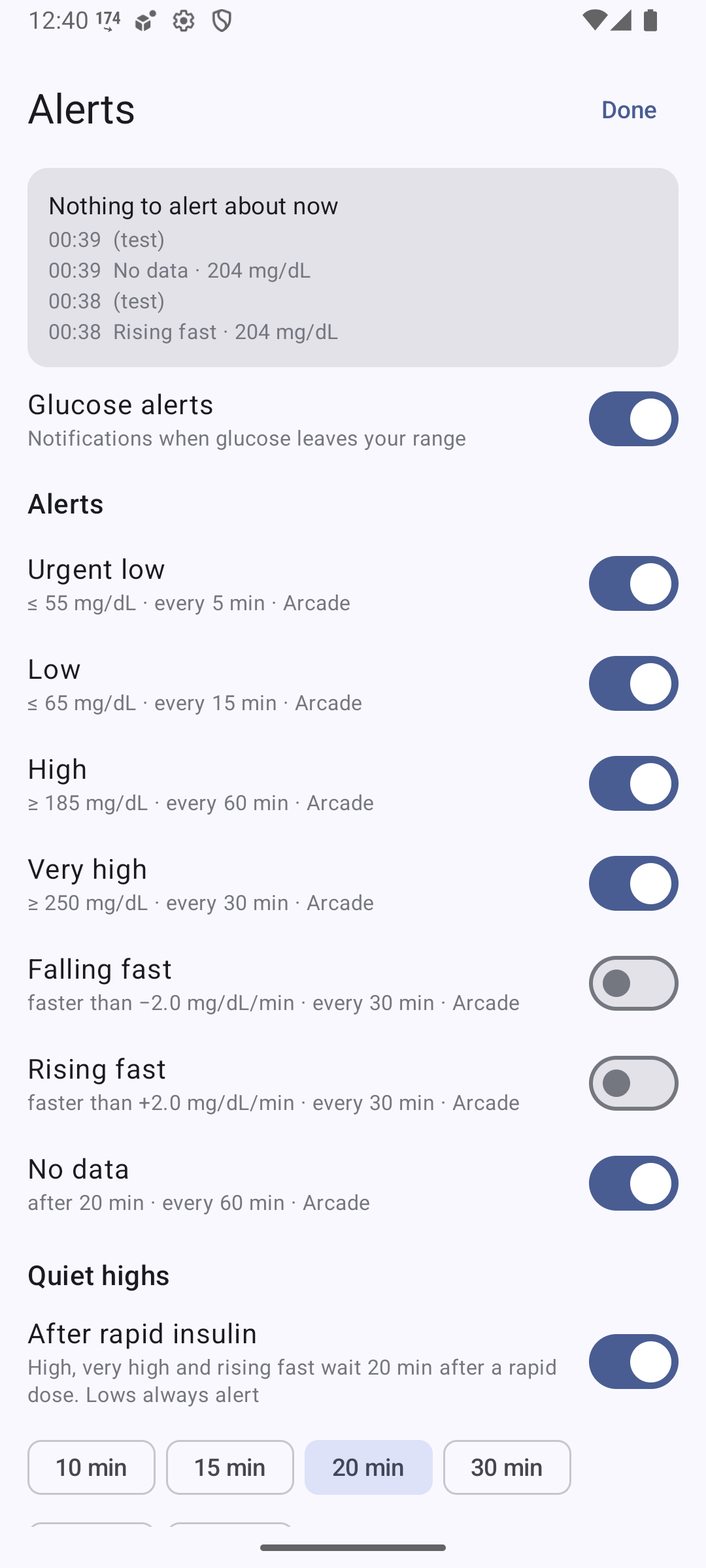
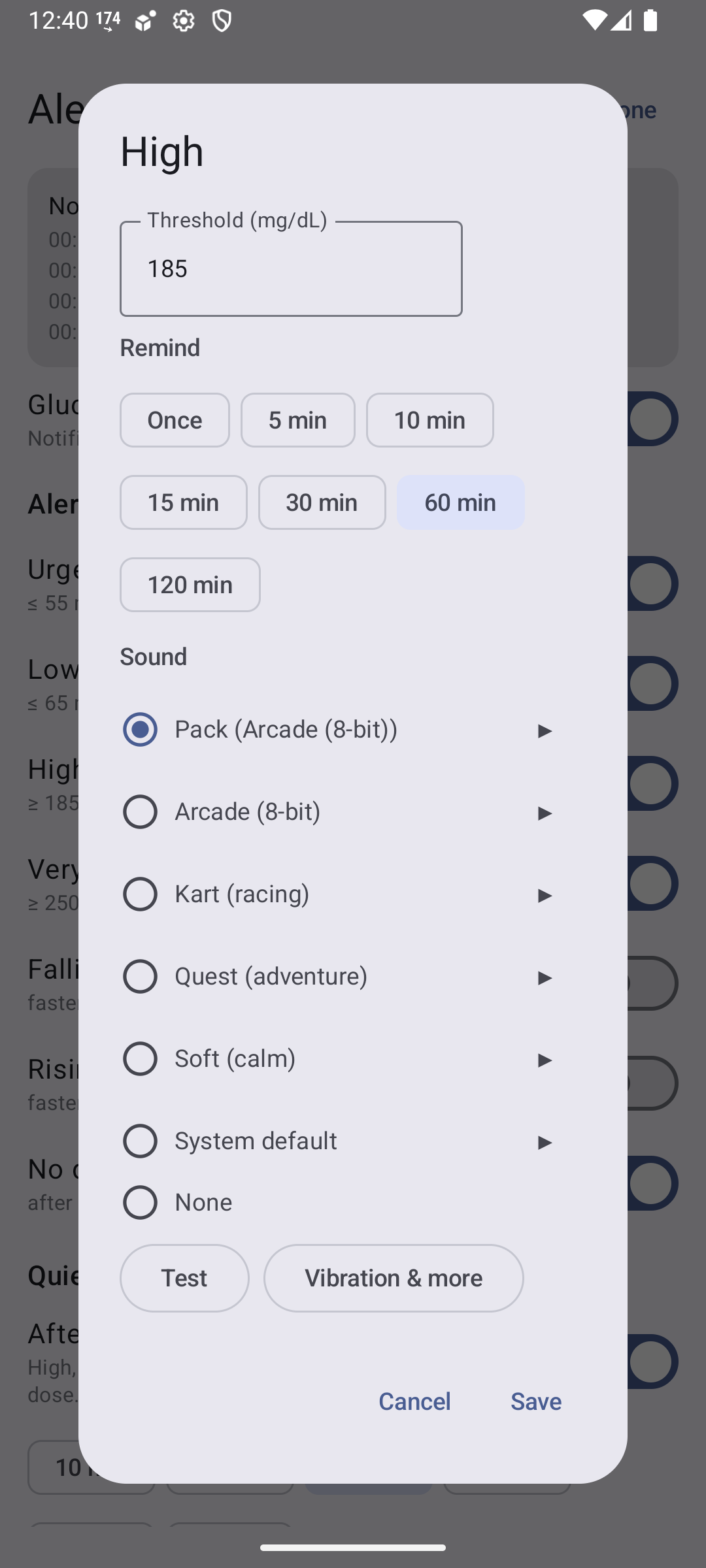
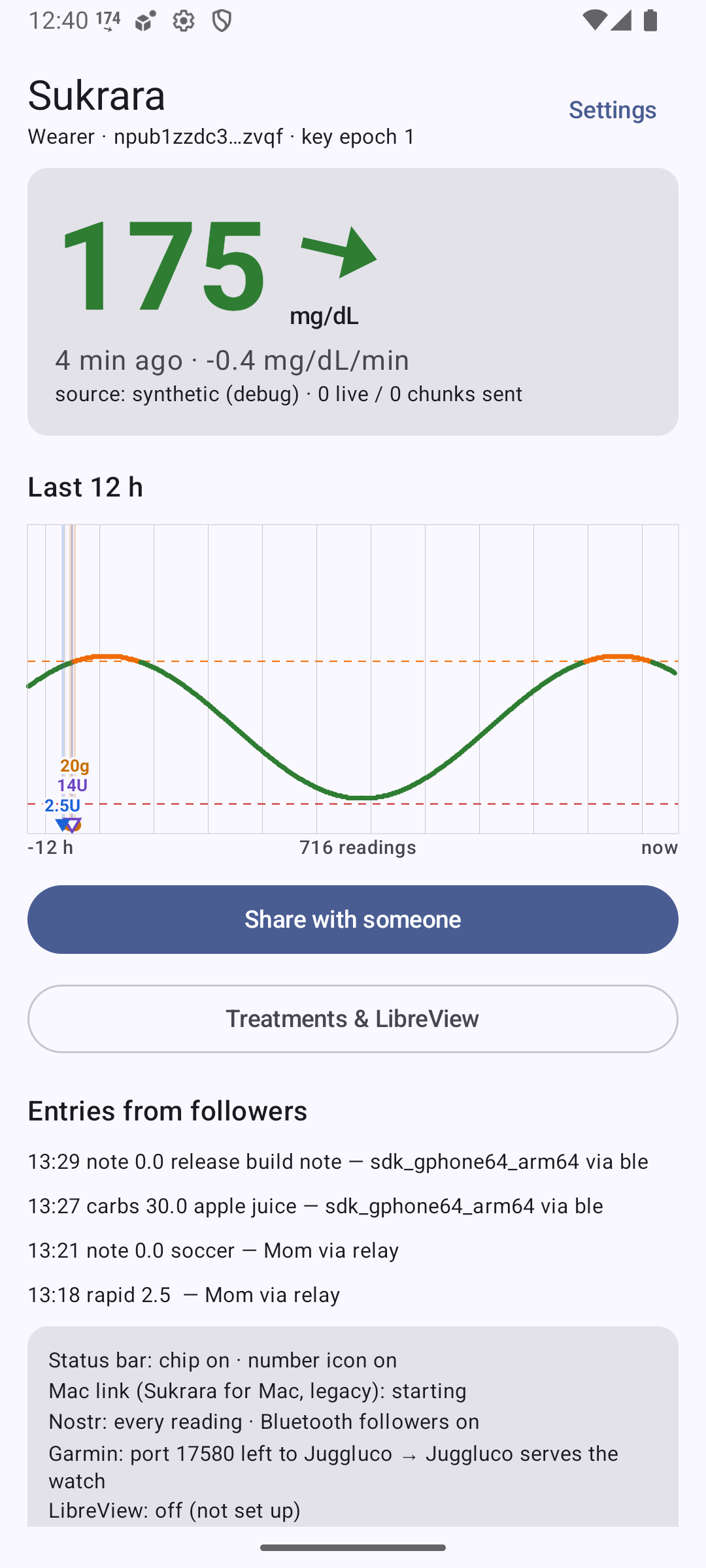
Screenshots (emulator, debug build):
 |
 |
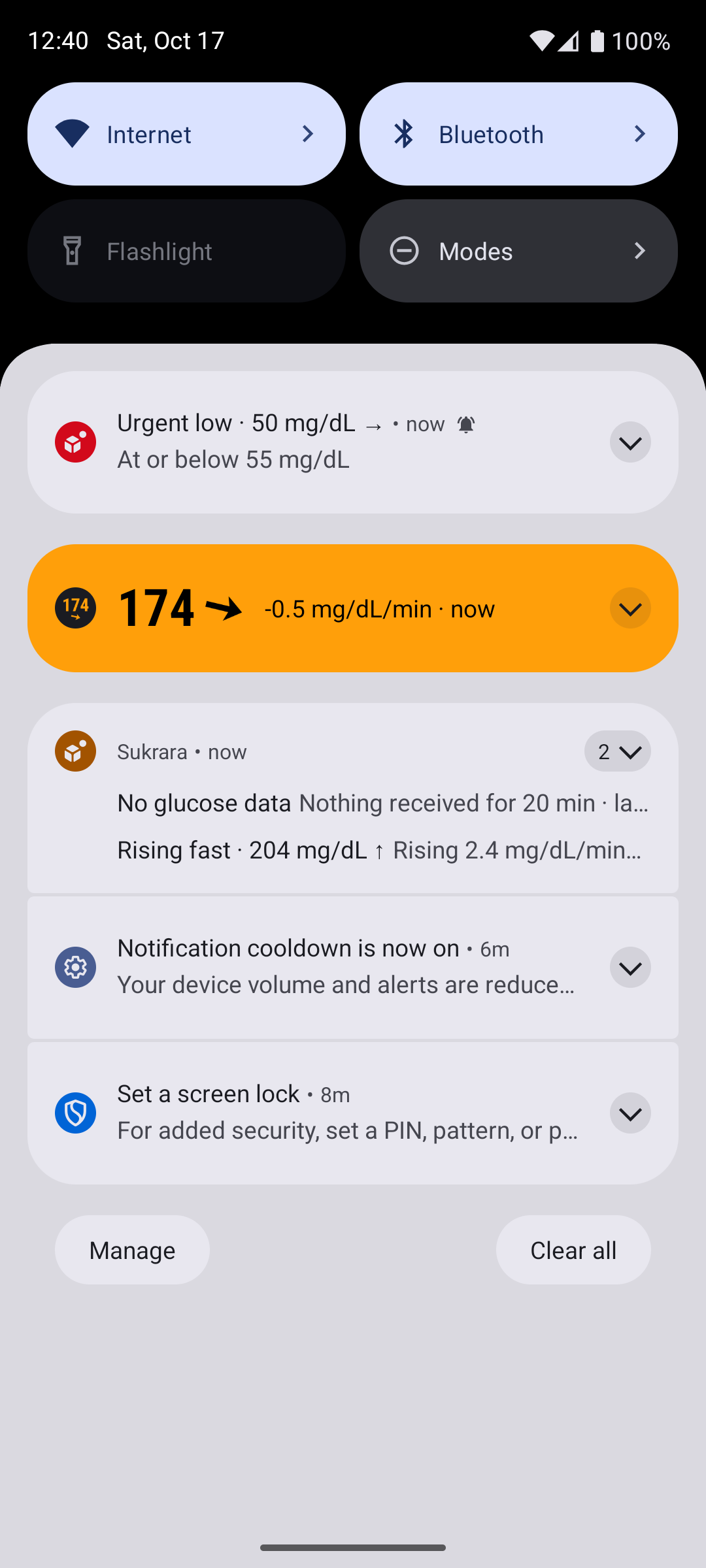 |
| Settings → Alerts: what’s active now, the master switch, one row per alert | One alert: threshold, reminders, sound (pack or any pack just for this alert, ▶ to listen), Test, Vibration & more opens the system channel | Urgent low in red with the alarm icon (alarm stream); high-side alerts in orange |
 |
 |
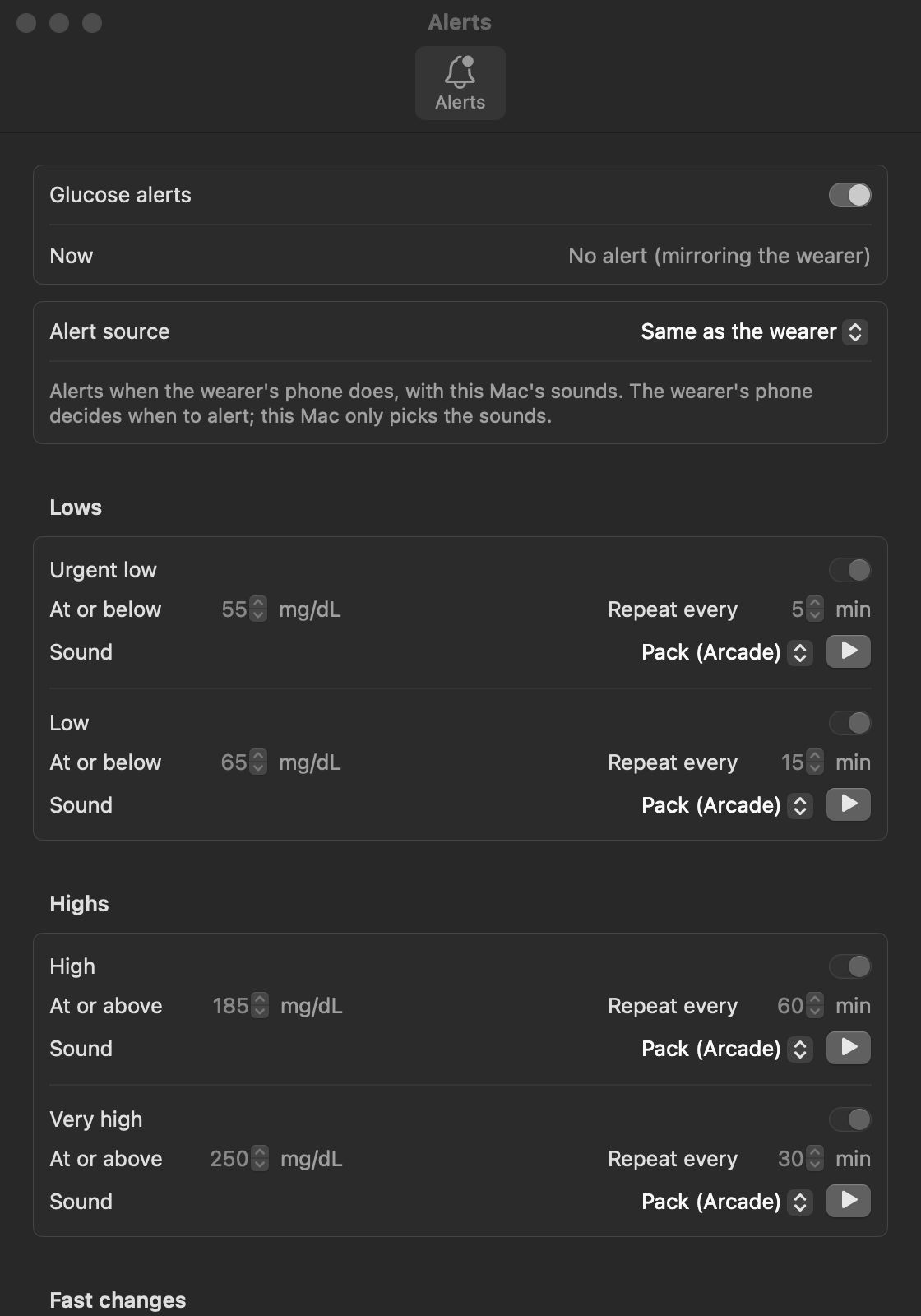 |
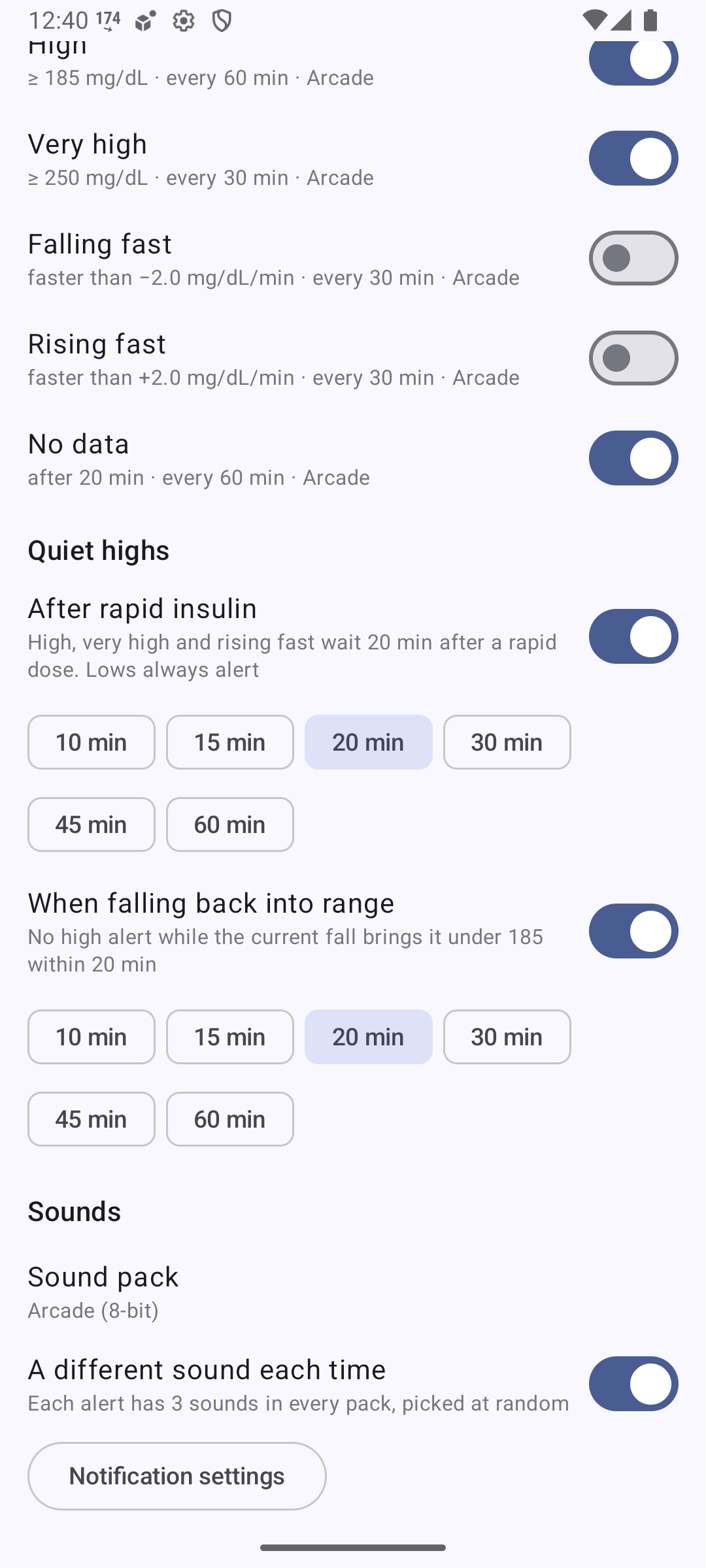
| Quiet highs: after rapid insulin, when falling back into range | Sounds: pack, “a different sound each time”, system notification settings | Sukrara for Mac → Alerts… (here mirroring the wearer: the rules are greyed out, sounds stay editable) |
The rules
Section titled “The rules”| Alert | Default | Re-alert | Sound mood |
|---|---|---|---|
Very low (very_low, “urgent low” until 2026-10-18) |
< 55 mg/dL | 5 min, alarm volume | game over: longer (3–4.5 s), unmistakable, not harsh |
| Low | < 70 | 5 min | lost a life: short, falling |
| High | ≥ 180 | 15 min | final lap: a riff, then the same riff faster and higher (≈ 1 s, it’s the frequent one) |
| Very high | ≥ 250 | 10 min | boss incoming |
| Extremely high | ≥ 300 | 5 min, alarm volume | final boss |
| Falling / rising fast | 2 mg/dL/min | 30 min, off | quick sweeps |
| No data | 20 min | 60 min | connection lost |
The defaults are the user’s own settings since 2026-10-18 (before: low 65, high 185, repeats 15/30/30/15, Arcade).
Lows were strictly below the threshold from 2026-10-18 (low 70 alerted at 69, not at 70: 70 was in range, as in
LibreView’s ranges); highs are at or above it. Very low 55 and very high 250 followed the consensus Time-in-Range levels
(Nightscout’s BG_LOW is also 55). Since 2026-11-12 low stays strictly below its threshold (default 70) and very
low is at or below its own (default 55), the card’s ranges too (the owner: “the 70 is the threshold, but 70 itself
is excluded from the interval -> (70, 55) is low [55,-Infinity) is very low”), so the alerts ring where the card names
the range: very low ≤ 55, low 56–69, in range 70–179. (Sukrara 0.14.3 briefly made low inclusive with a default of 69;
the next version went back to 70, the number people know.)
- Level alerts: one at a time, the most severe wins; moving to a worse one fires at once (high → very high).
- Episodes, treatment-anchored repeats and the headlines: see the 2026-10-18 round.
- Readings older than 15 minutes never alert (backfill, late chunks).
Notification text: the headline as the title (Low glucose · eat more), the value and arrow as the body (69 mg/dL ↘;
fast changes add the rate, 120 mg/dL ↓ · falling 2.4 mg/dL/min). Until the evening of 2026-10-18 the body also had the
threshold (· ≥ 180 mg/dL) and, on the Mac, · from the wearer's phone: too much text (user). Until 2026-10-18 the title was High · 185 mg/dL ↑ with
≥ 185 mg/dL · reminder 2 below.
Quiet highs (both on by default):
- After rapid insulin (60 min; 30/45/60/90/120/180, 20 until 0.11.11): high, very high and rising fast wait N minutes after a rapid dose. A high that already fired is cleared when you log the dose. If it’s still high when the window ends, it alerts then. 20 minutes was too short: rapid insulin barely acts by then (it peaks after 1–2 h), so glucose is usually still at or above the threshold and the alert fired 23 min after an 8 U dose on the user’s phone.
- When falling back into range (20 min): no high alert while
sgv + rate × N < high(the current fall brings it under 180 within N minutes). Re-checked on every reading. It only postpones: when the trend flattens, an alert that came due meanwhile fires at once, otherwise the repeat keeps its time.
Extremely high (0.11.11, extremely_high, on, ≥ 300 mg/dL, every 5 min, final boss sounds and vibration):
the high side’s safety net. No rule mutes it: not the insulin window, not the falling projection.
The user asked for it so the insulin mute can stay long (60 min) without hiding a real spike: with insulin logged,
251 stays quiet as very high, 300 alerts at once.
Quiet lows (0.11.11, on by default): After carbs (15 min; 10/15/20/30/45 on Android, 5–45 on the Mac): very low, low and falling fast wait N minutes after a carbs entry, the same way as the insulin rule (cleared when you log it, alerts when the window ends if it’s still low). 15 min follows the “15-15 rule” for treating a low (15 g, re-check after 15 min). Very low was never muted until 2026-10-18; the user asked for it to wait for the carbs too.
Prior art agrees: Nightscout’s treatmentnotify snoozes alarms after a treatment (TREATMENTNOTIFY_SNOOZE_MINS,
default 10), and xDrip+’s Smart Alerting (“Don’t alert if glucose is heading in the right direction”) is on by
default. Neither combines both, and neither has a projection: xDrip+ only checks that the last readings dropped.
Episodes and treatment-anchored repeats (2026-10-18)
Section titled “Episodes and treatment-anchored repeats (2026-10-18)”The user’s report: after a mute window ended while still low, the alert seemed to come only on a multiple of the repeat interval counted from the start of the low, and a reading back at 70 for a minute started everything over. They wrote down what should happen (repeat 5 min, carbs mute 5 min):
| min | alert | |
|---|---|---|
| 0 | glucose 69 | Low glucose (first of the episode) |
| 3 | logs 5 g carbs | (the alert goes away) |
| 5 | nothing: would have been the repeat, the count starts at the carbs now | |
| 8 | Low glucose · eat more | |
| 13 | Low glucose · eat more | |
| 14 | logs 5 g more | |
| 15–16 | 70 (in range), then 69 | nothing |
| 19 | Low glucose · eat more again | |
| 20–21 | 70, then 69 | nothing |
| 24 | Low glucose · eat more again |
Rules (both platforms, SPEC §1–§2):
- Episodes. One per group and side (lows, highs, falling fast, rising fast, no data). It ends once nothing of that side has matched for the hold time, the kind’s repeat interval (at least 5 min). A brief exit clears the notification, but doesn’t start a new episode: no new “first” alert, the repeat count and the logged treatments carry on. Getting better within the side (very low → low) doesn’t alert either.
- A treatment restarts the count. Carbs (for very low, low, falling fast) and rapid insulin (high, very high, rising fast) clear the alert and mute it for their window; when the window ends and it still matches, it alerts at once, and the next repeats count from there. Extremely high is never muted.
- Headlines acknowledge treatments logged in the episode:
Low glucose · eat more/· eat more again. On the high side they never advise more insulin (stacking rapid doses risks a hypo):High glucose · still high after insulin/· still high after more insulin. The wearer sends the count (tr) in thealertevent, so followers and the Mac show the same words. - Timer. Android schedules the next check with an exact alarm (
setExactAndAllowWhileIdle,USE_EXACT_ALARM, granted at install) instead of the inexactsetAndAllowWhileIdle; the Mac adds a one-shot timer at the engine’s next check to its 60 s tick.
Why the old alert looked repeat-aligned. Replaying the user’s timeline on the old Android engine (per-minute readings) gives alerts at 0, 8, 13, 19 and 24, the right times, so the Android carbs path itself wasn’t it. What the old code did get wrong:
- Every firing after a treatment was a new “first” alert (
n = 1, same text), and a reading at 70 counted as low (≤), so nothing told the user the alert knew about the carbs. - The Mac kept the episode’s last alert through a treatment mute and only re-alerted at
last alert + repeat: with a mute shorter than the repeat (e.g. low every 15 min, carbs mute 5–10) the alert after the carbs came on the episode’s repeat grid, exactly the reported pattern. - Android, falling-high mute: when it ended, the alert waited for
last alert + repeat. - Android timer: the check at the mute end was an inexact alarm;
AlarmManagermay deliver it well after the requested time (the window grows with the delay, more in Doze). With a reading every minute that doesn’t matter (the next reading re-checks), but with readings every 5 min or a gap, the alert at the mute end waited for the next reading, i.e. on the 5-minute grid.
Scenarios as the regression guard. The rules are now timelines in
poc/spikes/alerts/scenarios/ (the user’s table verbatim first, then one per rule), run by
both platforms: Android AlertScenarioTest and the Mac -alerts-selftest. Every change to the rules adds or updates
one (SPEC §7).
Mirroring (wearer → follower)
Section titled “Mirroring (wearer → follower)”The wearer publishes every firing and clearing as an alert event: kind 21079, the same envelope as live
readings (signed by the device key, NIP-44 to the read key, gk tag, 1 h expiration). Content:
{"v":2,"type":"alert","id","k","state":"fire"|"clear","at","t","sgv","r","th","n"}. It goes out at once on relays
(LIVE lane, also when the upload interval batches readings) and over Bluetooth, where it keeps its own backlog slot so
a follower that connects a minute later still gets it.
Followers accept it with the live-reading checks (roster device, known epoch, decrypts, v == 2), dedupe by id
(it arrives over BLE and several relays) and ignore anything older than 10 minutes. Then:
- Same as the wearer’s app (default): the follower posts the same alert with its own sound choice and removes it when the wearer clears it. The wearer’s quiet rules apply automatically (a muted alert is never sent). No data stays local: it’s about this phone’s link to the wearer, which the wearer can’t report.
- This phone’s own settings: the same rules run on the follower’s readings and the treatments it received.
Sukrara for Mac does the same, chosen by General › Settings from (round f28: Wearer mirrors, Default and Custom run the rules on the Mac with the defaults or its own values). It can only mirror while it follows over Sukrara sharing (v2). Otherwise the rules run on the Mac, and the window says so.
Measured (2026-10-17 01:31–01:33, two emulators running the debug build, relays only):
| Step | Wearer (medium_phone) | Follower (small_phone) |
|---|---|---|
| Test alert, shared | alertTest very_high |
Very high (from the wearer) · 262 mg/dL; SystemUI played arcade_very_high_1; notification “Very high · 262 mg/dL →”, sub-text Following |
| Real rules | reading 214 → High · 214 mg/dL at 01:32:03.9 |
High (from the wearer) · 214 mg/dL at 01:32:06.0 (2.1 s, emulator clocks) |
| Rapid insulin logged | next reading → High cleared at 01:32:13.9 |
High cleared (by the wearer) at 01:32:14.7; the notification is gone |
| Follower set to its own settings | alertTest low |
event received (alert low fire via nostr.mom), nothing posted |
Bluetooth uses the same publish path as live readings (each alert has its own backlog key) and the Mac’s
-v2selftest covers its BLE acceptance. A run on two real phones over Bluetooth only is still open.
Sounds
Section titled “Sounds”Native first. Android lets the user change each notification channel’s sound and vibration, and the app can’t change them afterwards (“you can’t change the notification channel’s visual and auditory behaviors programmatically”, channels). So every alert is its own channel, and you can set its sound, vibration and Do Not Disturb behaviour in the system settings (Vibration & more). macOS has no per-app sound picker, only “Play sound for notification” on/off (Mac help), so the Mac’s Alerts window is the only place to pick.
Packs inside a native channel. A channel’s sound is fixed when the channel is created, which seemed to rule out
packs and random variants. AOSP shows a way through. NotificationAttentionHelper calls SystemUI’s
RingtonePlayer.playAsync, and SystemUI’s NotificationPlayer builds a new MediaPlayer for every alert with
setDataSource(context, uri). For a non-Settings content:// URI that means a fresh
ContentResolver.openAssetFileDescriptor. So each channel’s sound is content://app.mauri.sukrara.poc.alertsound/<kind>,
and our provider decides at play time: the chosen pack (or one pack just for this alert), a random variant (never the
same one twice in a row), the system default sound, or silence. The emulator log proves it: SystemUI opens the
provider on every alert, and a different file plays each time.
Conditions found in AOSP:
NotificationRecord.calculateGrantableUris()checks that the app may grant read access to the sound URI. If not, it silently replaces it with the default sound (Replacing …). The provider is therefore exported without a permission. It serves only the bundled sounds.canonicalize()returns the URI itself, because backup/restore canonicalises channel sounds and the default (null) would reset them.- The provider keeps one pick per kind for 5 s, because a notification can open the URI more than once.
- If the user picks another sound in the channel settings, that wins, as with any app (the Alerts screen then says “sound set in system settings”).
The packs (gen.py): everything is synthesised with numpy (polyBLEP pulse/saw,
stepped triangle, additive brass, FM bells, Karplus-Strong harp, marimba, noise drums, echo/reverb). The melodies are
original, and loudness is normalised per kind. 84 files: OGG Vorbis for Android (1.5 MB in res/raw), IMA4 CAF for
the Mac (in the app bundle; files must be < 30 s), AAC for the web page. Mac fix (2026-10-21): naming the bundled
file played Apple’s default sound on the user’s Mac: Notification Center logged Playing notification sound { nam: quest_high_2.caf }, then systemsoundserverd played built-in action 22 (the default AIFF, ~1 s) and never logged
Playing sound … for …, which a working bundled sound (WhatsApp’s) does. The app’s bundle is found through the system’s
records, and many copies with this bundle id were registered (worktree builds, a dmg, deleted test copies). Now each
notification first copies its sound to ~/Library/Sounds/Sukrara <pack> <kind> <n>.caf (the documented “app
container’s Library/Sounds” of a non-sandboxed app, found by name) and names that copy (NotificationSounds.swift;
-alerts-selftest fails if any kind’s notification names anything else).
| Pack | Character |
|---|---|
| Arcade (the default until 2026-10-18) | 8-bit: pulse leads at 12.5/25/50 % duty, stepped-triangle bass, NES-style noise. Very low includes a “wah wah wah wahhh” variant |
| Kart | racing: supersaw riffs, brass stabs, snare rolls, an engine rev for very high, a turbo whoosh for rising fast |
| Quest (default) | adventure: harp arpeggios, flute runs, bells, timpani; very low is a slow “you have fallen” |
| Soft | calm, not a game: marimba and glass, no drums |
Haptics
Section titled “Haptics”You asked for vibrations that match the sounds, or at least one pattern per alert. Two mechanisms were checked:
- Haptics inside the sound file (an OGG with an extra haptic channel,
ANDROID_HAPTIC=1; the Pixel 10 Pro’s audio HAL has ahaptic-playbackprofile). Not possible for notifications:- AudioAttributes mute haptic channels by default.
- A channel’s attributes are saved without that flag.
- On the phone, every SystemUI notification player shows
flags=0x800(FLAG_MUTE_HAPTIC)(dumpsys audio). Only ringtones play audio-coupled haptics.
- A vibration effect per channel (
NotificationChannel.setVibrationEffect, API 36; the flagnotification_channel_vibration_effect_apiis enabled on the phone). Used. Each alert has a pattern built from the haptic primitives, shaped like its sounds:
| Alert | Pattern |
|---|---|
| Very low | three falls getting weaker, then two heavy thuds (≈ 2.2 s) |
| Low | two falls and a thud |
| High | clicks speeding up, then a rise (the “final lap”) |
| Very high | thud-click, thud-click, spin |
| Falling / rising fast | a fall + low tick / a slow rise + tick |
| No data | three ticks fading out |
- The system plays it together with the sound (delayed to line up with it), and alone in vibrate mode. It plays
nothing in silent mode (
!ringerModeSilent). - Built from primitives only: a channel persists “a composition created exclusively via addPrimitive” and nothing mixed. Delays are ≥ 50 ms and strengths 0.5 / 0.7 / 1.0, as the haptics principles recommend.
- The Pixel 10 Pro supports all 8 primitives (CLICK 29 ms, THUD 300 ms, SPIN 133 ms, QUICK_RISE 150 ms, SLOW_RISE 500 ms, QUICK_FALL 100 ms, TICK 5 ms, LOW_TICK 12 ms). Its resonance is 129.5 Hz.
- Phones without the primitives get an on/off waveform with the same rhythm, chosen when the channel is created.
- The patterns are per alert, not per variant: a channel has one vibration. Variants of one alert share their mood and length, so the pattern fits all three.
- The Mac has no notification haptics.
Volume: alarm or notification (0.11.4)
Section titled “Volume: alarm or notification (0.11.4)”Every alert has a Volume choice (the user’s request after 0.11.1): Alarm rings like an alarm clock, at the alarm volume, and comes through Do Not Disturb when alarms are allowed. Notification uses the notification volume and comes through Do Not Disturb only if reminders are allowed. Very low and extremely high default to Alarm, everything else to Notification (the user’s settings; lows were Alarm until 2026-10-18). It’s a per-device choice, also on a follower that mirrors the wearer.
Android doesn’t let an app change a channel’s audio attributes once it exists, so each alert has two channels:
alert_n_<kind> and alert_a_<kind>. In Android’s settings they appear in two groups, “Glucose alerts” and “Glucose
alerts at alarm volume”, and the setting picks which one Sukrara posts to. The 0.11.1 channels (alert_<kind>) are
deleted. Checked on an emulator: by default a low went to alert_a_low (category alarm, USAGE_ALARM →
STREAM_ALARM) and a high to alert_n_high (category reminder). With the two swapped, the high went to
alert_a_high and the low to alert_n_low (played as USAGE_NOTIFICATION_EVENT). All four played.
On the Mac there is no alarm volume. The same switch (“Like an alarm”) means Time Sensitive, which only works in a
build signed with that entitlement (a provisioning profile: Bundle/bundle.sh); a build without one shows it as a
normal notification and says a Focus can hold it back.
Notification behaviour learned on the way
Section titled “Notification behaviour learned on the way”- Notification cooldown muted the first test alerts. On the emulator, three high alerts in a row played no sound,
while the urgent low did; SystemUI then posted “Notification cooldown is now on”. In NotificationAttentionHelper the
cross-app avalanche strategy (after unlocking / many notifications) mutes everything except
CATEGORY_ALARM,CATEGORY_REMINDER,CATEGORY_EVENT, calls and important conversations. The fix:- Lows (by default; any alert set to Alarm volume since 0.11.4):
CATEGORY_ALARM+USAGE_ALARM. They follow the alarm volume, ring in “Alarms only” Do Not Disturb (ZenModeFiltering.isAlarm), and are exempt from every cooldown. - Everything else (Notification volume):
CATEGORY_REMINDER. Exempt from the avalanche, and let through Do Not Disturb only if you allow reminders, so highs don’t wake you through DND unless you want them to (since 2026-10-28 they postCATEGORY_ALARMwhenever that changes nothing in DND: see the per-app cooldown below). - After that, high, very high and no data played.
- Lows (by default; any alert set to Alarm volume since 0.11.4):
- Per-app cooldown softened the second alert of a reading (2026-10-28, from the AOSP source, main). Android 15+
Notification cooldown (one switch since the March 2025 Pixel drop;
notification_cooldown_enabled/notification_cooldown_alldefault 1 in the source) runsStrategyPerAppkeyed on the package (per channel only if the person changed that channel’s sound): any notification of the app that sounded in the last 60 s makes the next one play at 30 % volume and vibration, a third within 10 s is muted (MUTE_REASON_COOLDOWN); a tap on one of them resets it. OnlyCATEGORY_ALARM,CATEGORY_CAR_EMERGENCY/CATEGORY_CAR_WARNINGare exempt; the channel’s usage doesn’t count, and exempt posts still start the window. Low (alarm) and Falling fast (notification) fire in the same reading, so Falling fast played at 30 %. The fix (AlertCategory): every alert postsCATEGORY_ALARM, except a notification-volume alert while Do Not Disturb would treat an alarm and a reminder differently (ZenModeFiltering: Alarms only lets every alarm through; Priority checksallowAlarms/allowReminders), where it staysCATEGORY_REMINDERand DND decides as before. The channels keep their usage, sound and the person’s overrides; full screen stays alarm-only. Checked on an Android 17 emulator (cooldown on,logcat -b events -s notification_alert, fields buzz, beep, blink, politeness, mute reason; debugALERTS --es kinds … --el gapMs … [--ez reminder true]): three alerts 2 s apart asCATEGORY_REMINDERwent politeness 1, then 2 + mute 32768 (MUTE_REASON_COOLDOWN) twice; the same three asCATEGORY_ALARMright after all rang at politeness 0. In Priority DND (Android’s default policy) Falling fast posted asreminderand stayed intercepted (mute 512), the alarm-level very low rang. Limits: the exemption is behind thepolite_notifications_attn_updateflag (on in that build; a build without it quietens every category); Android 17’s policy also has hidden per-category sound / vibration allowances, so a Priority mode that lets reminders through silently but alarms with sound would ring a notification-volume alert (louder, not quieter); “Vibrate only when unlocked” (notification_cooldown_vibrate_unlocked, see #129 below) drops every notification sound while the phone is unlocked, alarms included. - One sound per app per second (
NotificationUsageStats/AlertRateLimiter, years old, any category): a second sounding notification within 1 s is muted (MUTE_REASON_RATE_LIMIT, 4096 on the emulator) and still shows; a newer sound would cut the first one off anyway. When one reading fires several alerts, the runtime posts the one that must be heard first (ringOrder: alarm level, most severe, then level → rate → no data;AlertRingOrderTest); the others show quietly. Only ringing alerts of different groups that follow each other move: a restart’s silent re-post, a Clear or a second alert of the same group keeps the engine’s order, so nothing replaces or outlives what the engine decided. The limit counts every notification of the app, so a sensor or status notice posted in the same second as an alert (the sensor lost, then No data) muted the alert (#130). Since 2026-11-10 every info notification that would sound (its channel at default importance or above, with a sound or a vibration) goes throughSoundGap: it waits 1.1 s, so an alert decided at the same moment rings first, and posts only 1.1 s after the last alert sound; a newer post of the same id replaces the waiting one, a cancel drops it (SoundGapTest). The Monitoring stopped notice still posts at once (Android is stopping the service, a waiting post could die with it), throughSoundGap.postNow. Since the follow-up the other direction is covered too: an alert that comes less than 1.1 s after any info sound (a waiting one that landed, or that notice) waits the rest of the gap before it posts (at most 1.1 s,AlertPresenter.beforeRing;AlertRingTurnTest): a short delay instead of an alert muted by the limit. Alerts among themselves still never wait (the ring order decides). - “Vibrate only when unlocked” (#129, 2026-11-10, from the AOSP source, main). NotificationAttentionHelper:
vibrateOnly = hasValidVibrate && mNotificationCooldownVibrateUnlocked && mUserPresent, then the sound plays onlyif (hasValidSound && !vibrateOnly);mUserPresentis set on ACTION_USER_PRESENT and cleared on SCREEN_OFF. No category is exempt, so every alert only vibrates while the person uses the phone; a channel without vibration still sounds. The value (Settings.System.notification_cooldown_vibrate_unlocked) is@hidewithout@Readable, so an app targeting S+ gets a SecurityException reading it, and the cooldown page has no public action (Settings declaresandroid.settings.MANAGE_ADAPTIVE_NOTIFICATIONSforPoliteNotificationsPreferenceFragment). In Sukrara: the checklist item Sound while the phone is unlocked (NotificationCooldowntries the read; null → the person answers from a test alert, see #183 below, schemaalerts.unlockedSound, Android-only); with It only vibrated (or Android saying it’s on)UnlockedAlertSoundplays the channel’s own sound itself while the user is present (screen on, past the keyguard), only for a ringing post on a channel that sounds and vibrates and only where Do Not Disturb lets the alert through, one per second, stopped by Clear / Mute. Left out: playing the sound when nobody answered (it would ring twice for everyone with the setting off, the 2026-10-18 double-sound bug); following later changes to the setting (Android sends nothing an app may read; the answer stays changeable in Settings › Alert reliability). Not checked on a device yet (QA Q8: setting on, phone unlocked, Test the sound). - Ask from a test alert, not from Android’s settings (#183, 2026-11-11, the owner on the phone). The first version
(Open the setting, then It’s off / Keep it on) was misread: Open the setting lands on Android’s Use
notification cooldown, not on the switch the text names; the two answers weren’t a pair (one describes Android’s
setting, the other an action) and didn’t cover what the person sees (cooldown off, the switch greyed out or missing);
nothing said which to pick. A wrong answer is a safety problem: It’s off while the switch is on mutes every alert
sound while the phone is unlocked; Keep it on while it’s off rings each alert twice (the 2026-10-18 double-sound
bug). Now the item asks what the person hears: Test the sound posts the real test alert (
AlertNotifier.showTestwithownUnlockedSound = false: Sukrara’s own unlocked sound stays off, so the test shows Android’s behaviour alone) on the first alert that is on whose channel sounds and vibrates, alarm level first (NotificationCooldown.testKind: Android drops the sound only where there is a vibration, so a test on a channel without one would sound either way); then What did the test alert do? I heard it / It only vibrated, both what the person observed. The answers show only once a test went out (or an answer exists, to change it). The test waits, saying why, while it couldn’t show Android’s behaviour (SoundTest): no alert on; a Do Not Disturb mode on (its silence isn’t the setting’s); the phone on vibrate or silent, or the test alert’s stream at 0 (AudioManager; a ringer-mode change re-reads it). Open Android’s setting shows after It only vibrated, as the way to turn the switch off (then test again). The stored values changed toheard/vibrated(no backwards compatibility: an earlieroff/appreads as not answered, so a phone that answered the old question is asked again, on purpose). The button is Test the sound, not Send a test alert, so it isn’t confused with the reliability page’s test of what gets through. Left out: a recommended answer (there is none: the answer is what the phone did); reading the switch (Android forbids it). - The alarm channels’ Do Not Disturb override needs access (#15, 2026-11-10, from the AOSP source, main).
PreferencesHelper.createNotificationChannelkeeps an app’ssetBypassDnd(true)only when the app holds Do Not Disturb access as the channel is created or updated (if (existing.getUserLockedFields() == 0 && hasDndAccess)), soalert_alarm.*channels created before the person granted access never overrode a mode that silences alarms. The app now declaresACCESS_NOTIFICATION_POLICY(to be listed under Do Not Disturb access), the checklist has Alarms in Do Not Disturb (while a kind rings like an alarm; Fix opensACTION_NOTIFICATION_POLICY_ACCESS_SETTINGS), and every checklist read creates the channels again once access is granted and an alarm channel doesn’t override yet: the existing ids take the bypass, and a channel the person edited keeps their choice (Fix then opens its page; no versioned ids needed).ACTION_NOTIFICATION_POLICY_ACCESS_GRANTED_CHANGEDis registered-only, so the resume refresh is what catches the grant. Not checked on an emulator yet (DND on, very low after granting). Superseded by #184 below: the override is no longer a checklist requirement and no longer the default. - Do Not Disturb and Focus are respected by default (#184, 2026-11-11, the owner’s decision). #15 left a question
open: a mode that doesn’t allow alarms mutes Android’s alarm volume, so even an alarm channel that overrides Do Not
Disturb shows and vibrates without sound; should Sukrara find a sound path around it? The owner: “By default respect
the user decision to mute notifications, including focus and do not disturb. But also allow them to get
notifications from Sukrara anyway. Ideally I expect the OS should handle these exceptions.” And the checklist item
stays, as a plain statement of where things stand with one easy button, never a fault or a nag. So:
- Default: no override and no sound path of Sukrara’s own around a mode. A new alarm channel is created without
setBypassDnd(AlertChannels.configure(…, bypassDnd)), and creating the channels again keeps each one’s override as it is (Channels.createpasses the existing value), so a choice made in Android’s own settings stays. The alerts that ring like an alarm still ring where the mode allows alarms (Android’s default policy does;USAGE_ALARM/CATEGORY_ALARMare alarms toZenModeFiltering): the mode’s own exception, set by the person. - The status:
AlertRequirement.AlarmsInDndbecameDoNotDisturb, never missing (no banner, no Missing, no red, a moon instead of a tick in setup): Sukrara doesn’t alert in Do Not Disturb / Sukrara alerts in Do Not Disturb (DndStatus.through= every alarm channel of the alerts that are on overrides,DndHold.through: what Android holds, not a stored setting) with Let Sukrara through / Don’t let Sukrara through (AlertReadinessSource.letThroughDnd). On: without Do Not Disturb access, Android’s access list (the grant seen on the way back applies it, only when the button sent the person there); with it,AlertChannels.setDndBypass(true)at once (#15’s move for edited channels, unchanged). Off:setDndBypass(false), which needs no access (an edited channel moves to a new id without the override). A channel whose sound Sukrara can’t read opens its own page either way. Where the choice is stored: in Android’s channels, not in Sukrara’s settings (so no schema entry on Android); the Mac stores its choice (alerts.throughFocus) because macOS has no per-app override an app can set. - A mode on now is shown, never flagged:
AlertChannelno longer counts Do Not Disturb (it is only a blocked or lowered channel now, Alert sound).DndHold.heldsays whether the alerts in use make a sound under the current policy (total silence: none; Alarms only: the alarm-level ones; Priority: alarm-level ones where alarms are allowed, override or not, as the alarm volume is muted otherwise; notification-volume ones where reminders are allowed or their channel overrides). Some / all held → the item adds Do Not Disturb is on now: [some of] Sukrara’s alerts make no sound until it ends., home shows Do Not Disturb is on: [some] alerts make no sound under the card with Change (Settings › Alert reliability), in the neutral colours, like the night-alerts line. - Mac (Focus), the same: alarms (and escalated alerts) post
.timeSensitiveonly when the person lets Sukrara through (alerts.throughFocus, off by default) and macOS allows it (TimeSensitive);FocusStatus/FocusChoicein setup’s notification step and Settings › Alerts with the same words (Sukrara doesn’t alert during a Focus / Sukrara alerts during a Focus, Let Sukrara Through / Don’t Let Sukrara Through; Open Notification Settings while Time Sensitive is off for Sukrara, Open Focus Settings on a build without the entitlement). The panel’s Focus warning went (it was a nag on every build without a profile). Left out: saying on the Mac when a Focus is on now (macOS tells an app only through the Focus Status capability,INFocusStatusCenter, and its own permission prompt; not worth a new prompt for a status line). - Left out: a sound of Sukrara’s own while a mode mutes the alarm volume (the owner’s decision); overriding the
notification-volume channels too (they follow the mode’s reminders, as since 0.11.4; the person picks Alarm for
an alert that must come through); a stored “let through” on Android (Android’s override is the truth, and a choice
made in Android’s settings must show as it is). Alert rules and
contracts/alerts/scenariosdon’t change: this is delivery.
- Default: no override and no sound path of Sukrara’s own around a mode. A new alarm channel is created without
- Two sounds at once after an app update (2026-10-18, user report). Measured on the Pixel (
dumpsys audio,notification_alertevents): every Sukrara update made SystemUI start two players within 0.5 s, the system default sound (USAGE_NOTIFICATION, LSPosed’s “Module update complete” notification, channellsposed_module_updatedof packageandroid, posted because Sukrara is an LSPosed module) and the alert sound (USAGE_NOTIFICATION_EVENT,alert_n_high). The update kills the process and removes its notifications; the new process started with an empty engine and took the ongoing high for a new one, so it rang again at once. Not the cause: every alert channel already had its owncontent://…alertsound/<kind>sound, alert notifications set no sound/defaults/group of their own, the app plays nothing itself outside the settings preview, and a normal repeat (12:34) started one player only. Fix:AlertEngine.snapshot()is saved after every evaluation andrestore()d on the first attach of a process; the alerts that were up come back silently (a group member withGROUP_ALERT_SUMMARY, whatNotificationCompat.setSilentdoes) and the repeats keep their times. After the fix a reinstall started only LSPosed’s player and logged “resumed High (no sound)”. LSPosed’s own sound stays (another app’s channel; the user can silence it in Settings → Apps → Android System → Notifications). Guards:AlertEngineTest.restartResumesWithoutRingingAgain,AlertNotifierTest(every channel has its own sound, no sound/group on the alert, the re-shown alert is silent; Robolectric, runs withGALLERY_JAVA_HOME). The Mac had the same restart gap (relaunch or update of Sukrara.app rang an ongoing alert again): it now saves the snapshot in UserDefaultsalertEpisodesafter every evaluation and restores it at launch (seeded with the last stored reading), re-posting the alerts that were up with the same identifier and no sound; same tests in-alerts-selftest, and the shared timeline eventrestart(SPEC §7,episodes.txt) runs on both engines. - Mac Time Sensitive needs
com.apple.developer.usernotifications.time-sensitive, which only a provisioning profile grants (Bundle/bundle.shsigns withapp-profile.entitlements.inwhen it finds one, #19). The app reads its own entitlement and the person’s setting (TimeSensitive): alarms are.timeSensitivewhen both allow it,.activeotherwise, and the panel / setup / Settings › Alerts say which.
Alert UX round f30 (2026-10-22)
Section titled “Alert UX round f30 (2026-10-22)”The user’s feedback on 0.11.38: two kinds of buttons on the notification, mutes that never end, a high’s mute that could hide the low after insulin, no global mute, very low / extremely high exceptions, “60 min” texts.
Added to Sukrara (Android + Mac, SPEC §2, scenarios actions.txt / devices.txt):
- Exactly two notification actions, Mute… (one direct reply / text input with the lengths as choices) and Relax (was Slow down; the interval in the secondary text), per Android’s guidance (up to three actions, none duplicating the tap; RemoteInput choices).
- Mute / Relax per side, covering very low and extremely high, ending at their time or back in range by a margin
(10 mg/dL for 10 min, settings
backMgdl/backMin), not with the episode. - Mute all (30 min … 8 h, Never, custom) on the Android home card and the Mac dropdown, a Muted pill on every card surface, the Mac menu bar’s bell.slash.
- One duration formatter per platform (
Durations, fixturepoc/spikes/durations/durations.json) and adurationscheck: on the code before this round it reported 98 hand-written minute texts.
Discarded: an Until tomorrow morning length (8 h covers a night without clock rules); ending a mute when merely back in range (the user: glucose oscillates at the edge); the one-tap Mute 30 min button beside Mute for… (the mixed chip styles the user found confusing); the very-low / extremely-high exception (the user’s decision).
| Where | What |
|---|---|
poc/spikes/alerts/SPEC.md |
the shared contract: kinds, mutes, settings JSON, alert event, platform notes |
poc/spikes/alerts/sounds/ |
gen.py (packs), preview.py (the sound test page, inline or for the site) |
showcase-android/…/alerts/ |
AlertEngine (pure rules), AlertSettings, Alerts (roles, timer, mirroring), AlertNotifier (channels), AlertSounds (provider + preview), AlertHaptics |
showcase-android/…/ui/AlertsScreen.kt |
settings screen; Settings → Alerts (wearer), home → Alerts (follower) |
menubar/Sources/GlucoseBar/Alerts*.swift |
the Mac engine, window and self-test |
Debug (DebugReceiver, adb only): --es alertTest high fires one alert (and sends it to followers) and
--es alertFeed '204,-0.5' runs a made-up reading through the rules, both debug builds only (the release
app never shows an alert that isn’t real; test them on the emulator), --es alertSettings '<json>'; the reply has
alerts (settings, state, last events). Mac: -alert-test, -alert-feed, -alertsSnapshot.
- Not a medical device. Alerts depend on the phone being on, the app not being killed, and Do Not Disturb. The very low can’t be set to bypass DND unless the user allows alarms.
- macOS Time Sensitive needs a provisioned build (Developer ID profile, docs/20-publishing.md): breaking through a Focus is checked by hand (QA.md Q8).
- The follower’s local “no data” uses its own threshold even when mirroring.
- Mirroring over Bluetooth only (no internet) between two real phones wasn’t run; the emulators have no Bluetooth.