
39 — Metrics beside the value (once "Rings")
2026-11-15 · decision · Android and Mac
The owner: Settings › Rings “needs a complete redesign … there isnt any hierarchy or grouping … if ring is disabled think how the group should be … maybe … individual toggles for each ring instead of a count select … copywriting … needs rewriting … we call this ‘Rings’, but they dont have to be rings”.
The person
Section titled “The person”| Moment | What they want from the round things beside the number |
|---|---|
| Lock screen, widget, a meal | Did I bolus? How long ago? The time since the last insulin is the most asked-for thing next to the value (people count needles, buy timer caps: “I really couldn’t remember if I had taken my insulin”; a parent wants to see the bolus “to ease my worries”) |
| End of the day | Today’s time in range: “a great motivator”, for others “obsessed about being in the green”, “burnout” |
| Before the clinic | GMI over weeks; a GMI next to the lab A1c leaves people “confused or disappointed”; “a daily A1C makes no sense” |
| A small widget, the notification | Fewer things fit; the one that matters must stay |
So: each thing on or off on its own (easy to drop what stresses), the last treatment first-class, a GMI only over weeks, words that say what each number is and its goal.
Problems found
Section titled “Problems found”| # | Problem | Fix |
|---|---|---|
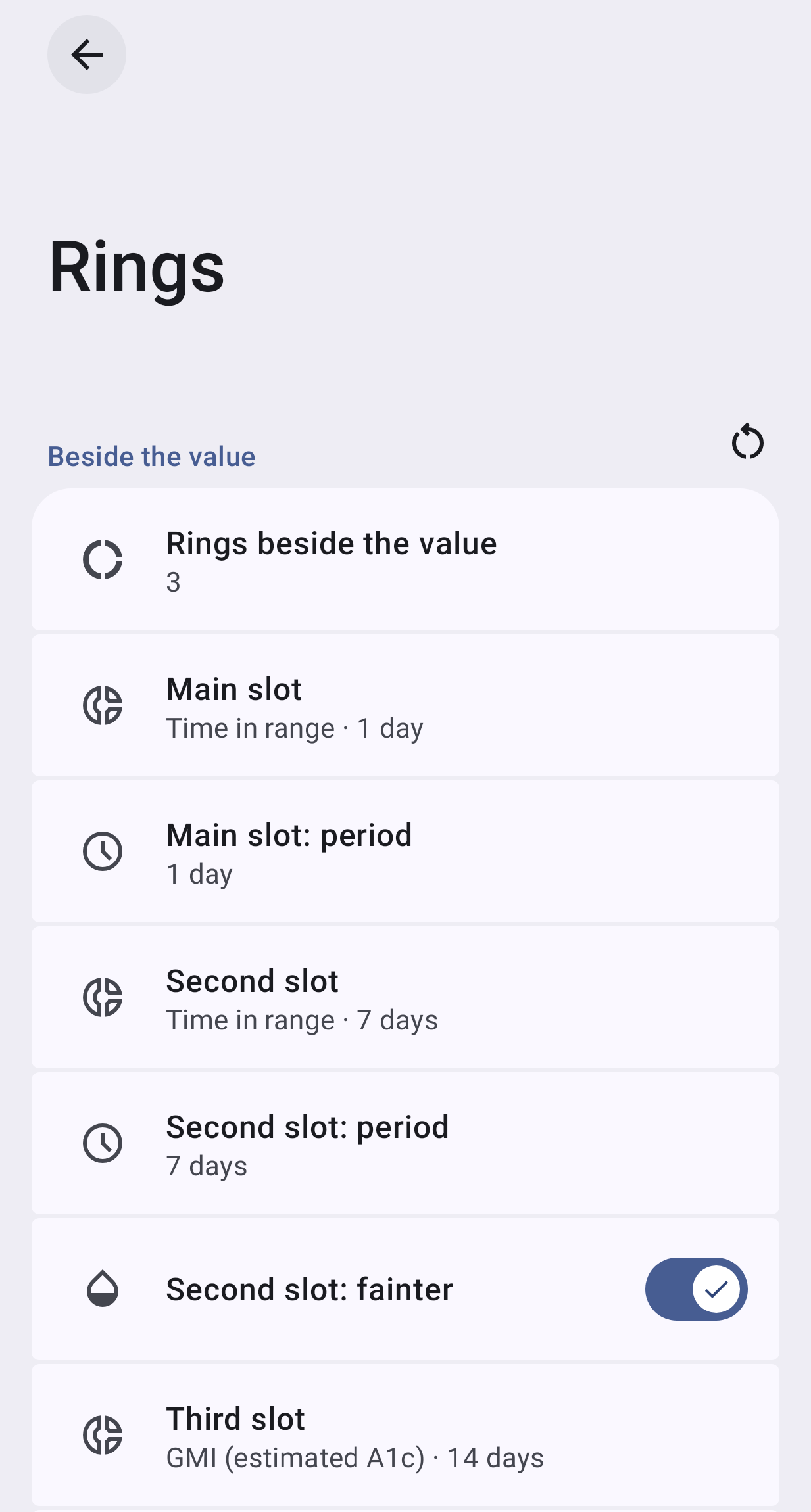
| 1 | One flat group of up to 14 rows; titles like Main slot: period, Without a recent treatment: fainter | A row per thing beside the value, each opening its page |
| 2 | A count (0–3) instead of switches: the second can’t be off while the third is on; hidden settings behind the count | A switch per metric |
| 3 | “Rings”: GMI, average and CV are gauges, the last treatment a timer | Metrics |
| 4 | Said twice: Time in range · 1 day, then Main slot: period · 1 day | The row says it once; the page has the parts |
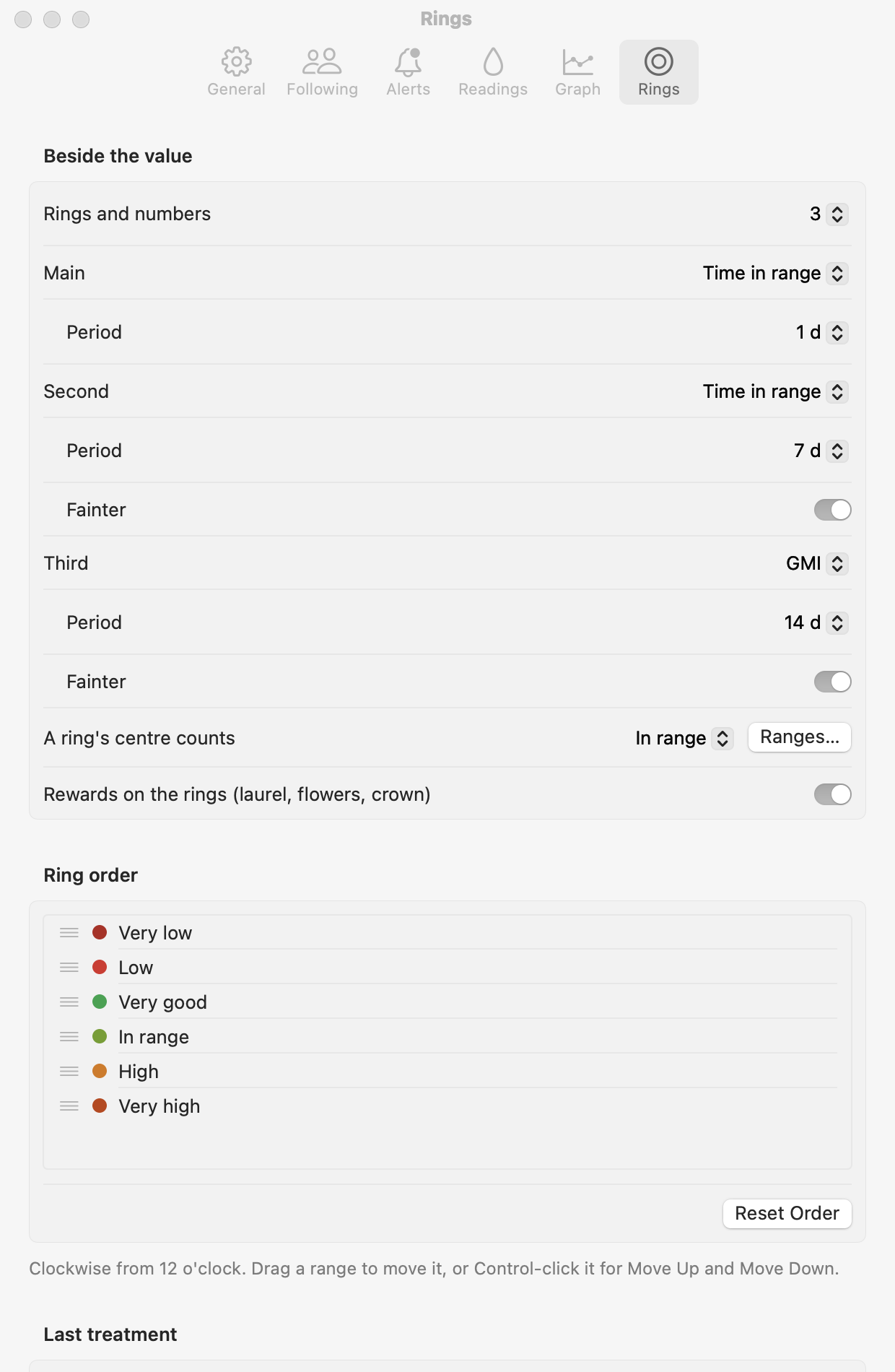
| 5 | Jargon: A ring’s centre counts, Fainter, slot | Number in the ring, Dimmed, no “slot” |
| 6 | The fallback’s rows appeared and disappeared with the last treatment’s place (the one exception left in a1ccea39); the Mac showed / hid rows with the count | Nothing appears or disappears: greyed with why |
| 7 | Ring-only options (number, rewards, a 6-row drag list) were siblings of the slots, also with no ring shown | Their own page / section Time-in-range rings |
| 8 | Turning the last treatment off lost its place (one enum OFF / NEAR / END) | graph.last switch + graph.lastPlace kept |
| 9 | A GMI over 12 h or 1 day was possible | GMI periods 7–90 days (gmiWindow); switching to GMI from less starts at 14 days |
| 10 | A widget’s Rings: 0 still showed the last treatment; its Rings count / Tight range didn’t match Settings’ words | Widget Metrics: None / Up to 1–3 things beside the value, in the card’s order; Number in time-in-range rings: In range / Very good |
| 11 | Android and Mac named things apart (Next to the value / After the other slots vs Next to the number / At the right end; Average vs Average glucose) | One set of words |
| 12 | The footer said everything applies to the widgets (a widget can differ); nothing said why a 30-day metric is missing on a new phone | Footer: shown once a quarter of the period has data; a widget can show fewer |
Found, not fixed: the Mac keeps 31 days of readings (Android 90), so a metric over more than 31 days counts only those on the Mac.
Choices
Section titled “Choices”| Decision | Chosen | Considered and discarded |
|---|---|---|
| Name | Metrics / Métricas: the owner’s own word (“info metrics”), the consensus’s “CGM metrics”, LibreView’s “Glucose Metrics”, Android 17 MetricStyle (its TimeDifference metric is a timer: the last treatment fits), Pixel Watch “Key Metrics”, Apple Workout “Metrics” |
Stats (Clarity, Tidepool, xDrip: friendly, but a “stat” isn’t the time since a dose either); Complications, pills, tiles (platform or shape jargon); Slots (the container); Beside the value (a place, and too long for the Mac toolbar) |
| On / off | A switch per metric, the stock two-target row (AOSP PrimarySwitchPreference; the app’s alerts and quiet times; Mac: switch + Details…, System Settings › Sharing) |
Count select (only Garmin sets a count, for a whole screen); slider (Android, NN/g, HIG: not for a few exact values); None as a kind (Pixel shortcuts, Apple Watch: turning off loses what it showed, two taps); an add / remove / reorder list (Quick Settings, Sugarmate: order is priority, but reordering three is rare); tabs (the owner’s idea: they hide the other metrics’ state, and tabs were rejected for places in docs/38) |
| Off state | Row Off, switch off; the page’s options greyed under its main switch (Google: “disabling the parent switch disables the dependent controls”); No recent treatment greyed with Needs the last treatment on | Hiding the options (the owner’s rule: nothing appears under a switch) |
| Names of the three | Main / Second / Third metric: priority, not position (the main is at the right end, wears the sensor countdown, stays on the smallest surface) | First / second / third (the first sits at the right: against reading order); position names (wrong when fewer fit); the content as title (two rows both “Time in range”) |
| The kinds | Radio rows on the page, each with what it is and its consensus goal (the gauge’s tick) | A dialog (radio buttons belong “in a dialog or child screen”: the page is the child screen, one tap, the live card shows it) |
| Time-in-range rings | One page (Android) / section (Mac): number in the ring (with the values each counts), rewards, colour order | Inline on the main page (ring-only options as siblings of the metrics) |
| The last treatment | Its own row and page (switch, Where), its fallback a row under it using the metric page | A fourth “kind” in the metric list (priority and position are separate in the renderer; a big layout change for no gain) |
| A widget’s own | Metrics: at most N things beside the value, in the card’s priority (the renderer’s new maxSlots) |
Keeping a ring count that ignored the last treatment |
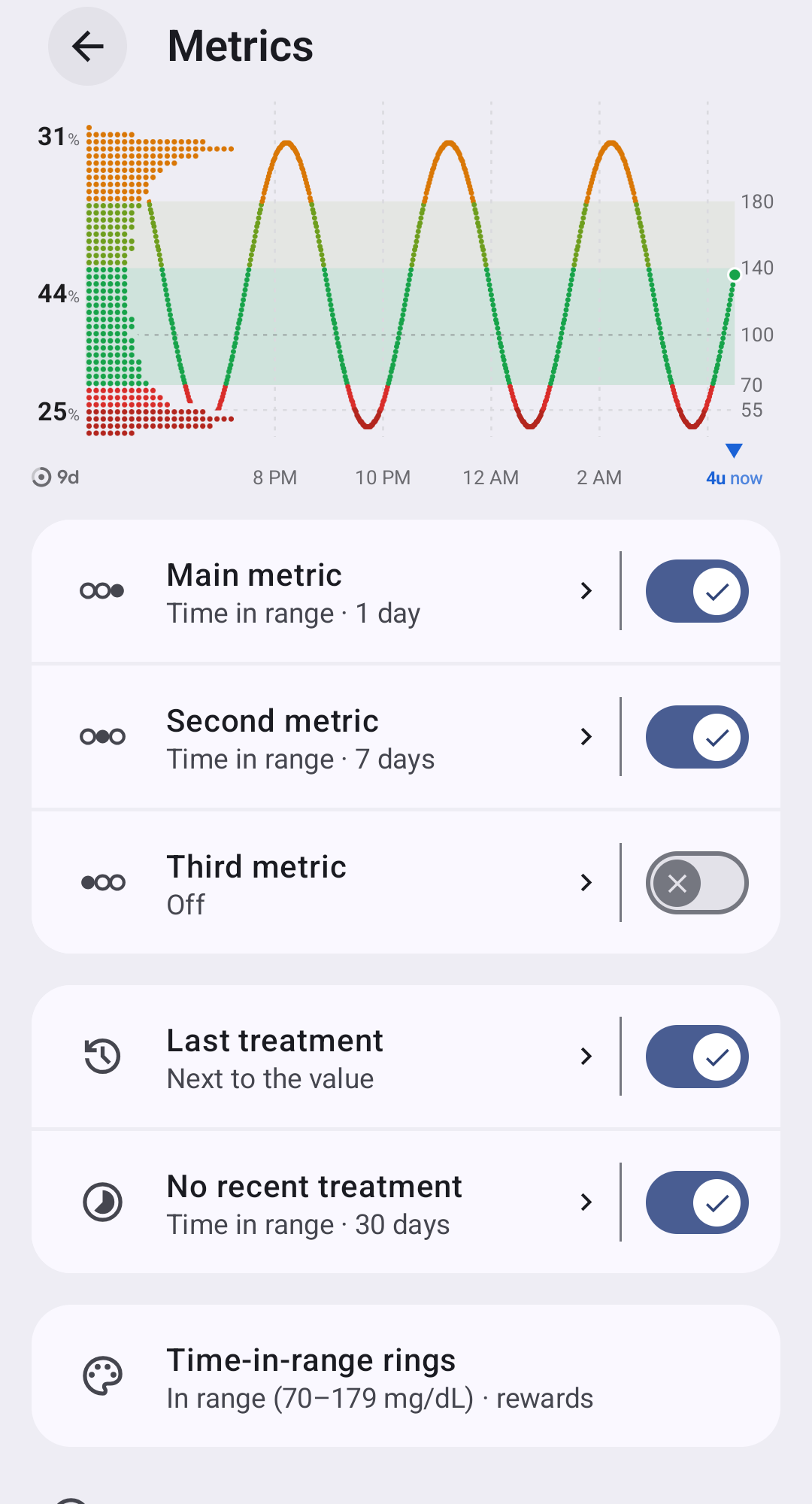
| Row icons | Each row its own (the owner: icons “make items easy to tell apart”): the three metrics a glyph of the card’s three places with theirs filled (the main at the right; the three the same size: the owner, 2026-11-15, “the filled ball is slightly smaller”: a ring’s stroke sits half outside its path, so the filled place now reaches the rings’ outer edge, MetricIconsTest), the last treatment a clock, no recent treatment a timelapse; the kinds a ring, a flask (the lab’s A1c), a line over time (the average), a trace between a low and a high (variability) |
The kind’s icon on each row (two rows both a ring when both show time in range) |
| The notification | Nothing of its own: the glucose notification (docs/36) draws the card’s slots and its Live Update metrics from the same settings, as many as fit | A notification-only metric setting (a second place to keep in step) |
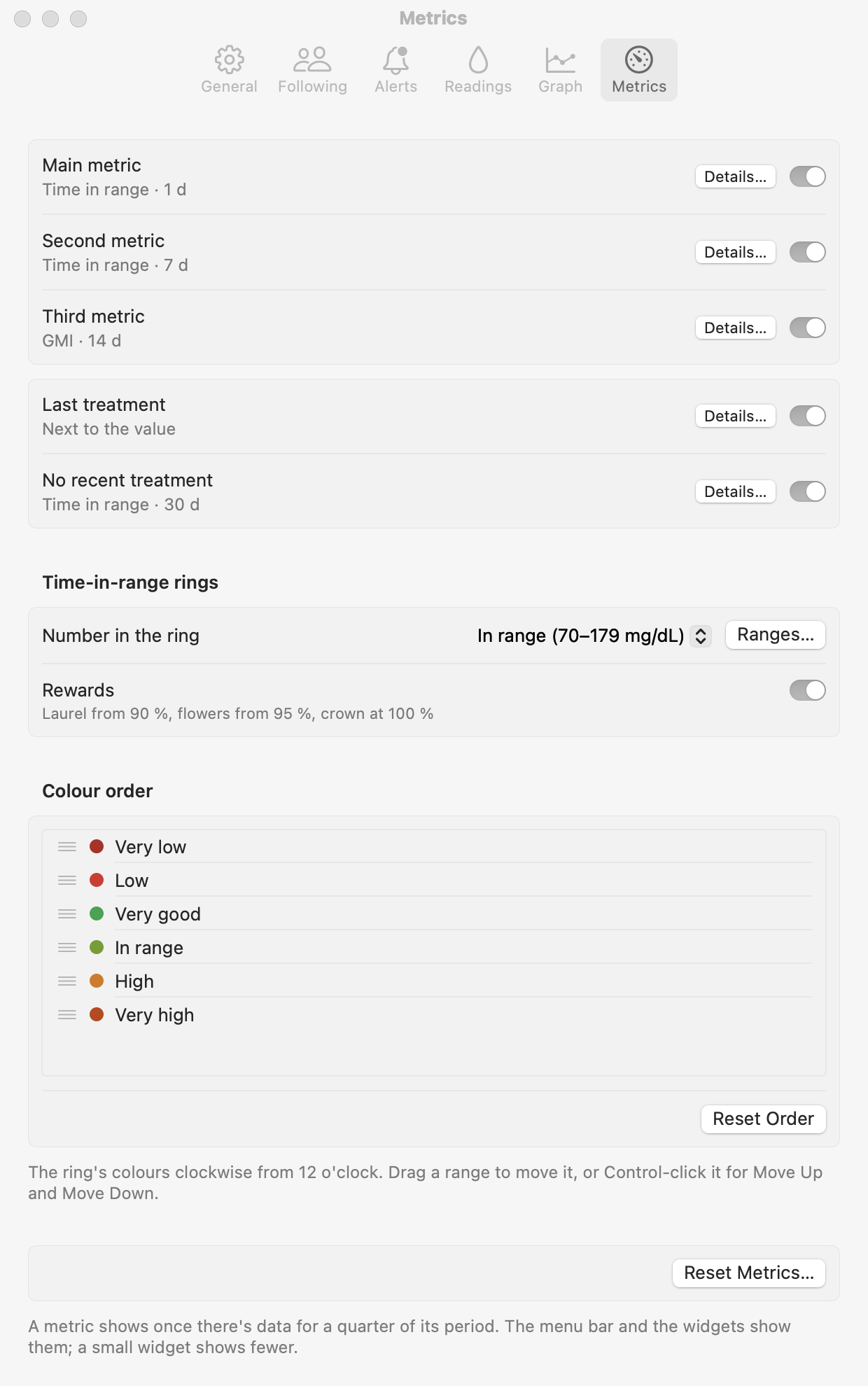
The Mac keeps Apple’s patterns: a grouped form, switches with Details… sheets (radio group, the period pop-up, Dimmed with its subtitle), the rings’ look inline. Discarded for later: highlighting the metric being edited on the live card (a renderer change on both platforms); a live card in the Mac pane (needs a registered surface).
| Was | Now |
|---|---|
| Rings / Anillos | Metrics / Métricas |
| Rings beside the value: 0–3 | a switch on each metric |
| Main slot · Second slot · Third slot | Main metric · Second metric · Third metric |
| Main slot: what it shows / period / fainter | Shows / Period / Dimmed (Lighter than the main metric) |
| GMI (estimated A1c) · Average · Variability (CV) | GMI · Average glucose · Variability, each with one line: Estimated A1c · goal under 7 %, Goal under 154 mg/dL, CV: how much glucose swings · goal 36 % or less |
| Last treatment: Off / Next to the value / After the other slots | Last treatment (switch) · Where: Next to the value / At the right end |
| Without a recent treatment (+ period, fainter) | No recent treatment (switch, its page) |
| A ring’s centre counts | Number in the ring: In range / Very good (with the values) |
| Ring rewards | Rewards |
| Ring order | Colour order |
| Widget: Rings / Rings count / Tight range | Metrics (None, Up to 1–3) / Number in time-in-range rings / Very good |
In Sukrara
Section titled “In Sukrara”- Added: schema
graph.last,gmiWindow;graph.slotsandgraph.lastElsecarry an on field (KIND:windowS:dimmed:on); section and Mac panemetrics;widgetSlots(a widget’s maximum). Renderer:RingSpec.on,CardStyle.maxSlots(AndroidSlots.MAX, MacSlots.maxCount),GraphConfig.lastOn/lastWherewithlastPlacederived. AndroidMetricsPages.kt(MetricsContent,MetricContent,LastTreatmentContent,TirRingsContent, routesMetrics,MetricPage,LastTreatment,TirRings, search entries); MacMetricsPane.swift(MetricDetails,LastTreatmentDetails, Reset Metrics…). PROTOCOL-v2 settings keys and thesettings-mirrorfixture; the widget snapshot version 3. - Discarded:
graph.ringCountandringCount(number),ringWindow(nowmetricWindow),RingsContent,RingsPane.swift, the slot dialogs,widgetRings, theOFFplace ofgraph.lastPlace; no migration.
Pictures
Section titled “Pictures”| Before | After |
|---|---|
 |
 |
 |
 |
img/metrics/: Android on an emulator with the synthetic sensor and 4 u of rapid insulin just logged
(the defaults: the panel shows the last treatment and the 1-day ring; a fresh emulator hasn’t the data a 7-day ring
or a GMI needs yet): metrics-light, metrics-rows-light, metrics-dark, metrics-es-dark, metric-third-light,
metrics-last-off-light (No recent treatment greyed), tir-rings-light. Mac (sukrara-snap windows):
mac-metrics-light / -dark, mac-metrics-wearer-light (outside Custom), mac-metric-details-light,
mac-last-treatment-details-dark, mac-no-recent-details-dark, mac-metrics-es-dark.
Sources
Section titled “Sources”- Android settings guide (groups, subscreens for equivalent items, dependency, parent switch, radio buttons in a dialog or child screen, sliders): https://developer.android.com/design/ui/mobile/guides/patterns/settings
- AOSP two-target row: https://source.android.com/docs/core/settings/patterns-components
- Android 17 MetricStyle and
Metric.TimeDifference: https://developer.android.com/develop/ui/views/notifications/metric-style · https://developer.android.com/reference/android/app/Notification.Metric - Wear OS complications (Empty): https://developer.android.com/training/wearables/watch-faces/adding-complications · Apple Watch complications (Off): https://support.apple.com/guide/watch/change-apple-watch-faces-apda6559ad78/watchos · Pixel lock-screen shortcuts (None): https://www.androidcentral.com/apps-software/how-change-lock-screen-shortcuts-android-14 · Quick Settings (order = what shows first): https://support.google.com/pixelphone/answer/14850259 · Garmin data fields (a count per screen): https://www8.garmin.com/manuals/webhelp/GUID-0221611A-992D-495E-8DED-1DD448F7A066/EN-US/GUID-638CD68D-11B0-4D9C-B8B7-E28D15EC4566.html · Pixel Watch / Fitbit Key Metrics: https://support.google.com/googlehealth/answer/14237206
- Apple HIG: toggles (primary and subordinate switches in a grouped form) https://developer.apple.com/design/human-interface-guidelines/toggles · radio buttons, pop-up buttons, steppers, settings https://developer.apple.com/design/human-interface-guidelines/settings · System Settings › Sharing (switch + ⓘ): https://support.apple.com/en-gb/guide/mac-help/mchl26e04309/mac
- NN/g on sliders: https://www.nngroup.com/articles/gui-slider-controls/ · users’ language: https://www.nngroup.com/articles/ten-usability-heuristics/
- CGM metrics (Battelino 2019): https://pmc.ncbi.nlm.nih.gov/articles/PMC6973648/ · LibreView “Glucose Metrics”: https://api.libreview.io/document/fsreporttour?lang=en · Dexcom G7 key metrics, GMI after 7 days: https://www.dexcom.com/en-us/faqs/how-do-i-see-my-gmi · Sugarmate tiles (GMI replaced eA1c): https://help.sugarmate.io/en/articles/4673390-customizing-tiles · xDrip+ extra status line: https://navid200.github.io/xDrip/docs/Extra-status-line.html · “A daily A1C makes no sense”: https://github.com/NightscoutFoundation/xDrip/issues/1653
- People: daily time in range as motivation and stress http://forum.diabetes.org.uk/boards/threads/freestyle-libre-app-issues.107616/ · https://forum.diabetes.org.uk/threads/time-in-range.122221/ · remembering a dose https://forum.diabetes.org.uk/boards/threads/ways-to-remember-taking-insulin.93214/ · a parent and the bolus https://forum.fudiabetes.org/t/remote-monitoring-boluses-from-childs-tslimx2-dexcom-g6/9415 · GMI vs lab A1c https://www.ncbi.nlm.nih.gov/pmc/articles/PMC11034459/
- Spanish words (LibreView es-ES “Glucosa promedio”, “Variabilidad de la glucosa”): https://www.juntadeandalucia.es/export/drupaljda/Formaci%C3%B3n%20avanzada%20sistema%20Flash.pdf