
40 — Feature checks, sharing permissions, *Can add treatments*
The owner, 2026-11-15: Settings › Sharing › Over Bluetooth nearby said in red that a permission was missing, and nothing outside that page did. Can add entries is off by default and easy never to find; the concept is called treatments; the followers list shows it poorly.
Android’s Nearby devices group is three runtime permissions. Granting some of them doesn’t grant the others: Android grants only what is requested (Bluetooth permissions, Request runtime permissions).
- The sensor flow and setup asked for
BLUETOOTH_SCANandBLUETOOTH_CONNECT. - Bluetooth sharing is on by default, and the wearer’s Bluetooth server needs
BLUETOOTH_ADVERTISE+CONNECT. Nothing ever asked forADVERTISE. - The first follower was allowed from the approve dialog or its notification. The server then wanted to run, found the
permission missing, and stayed
NeedsPermission. - The only sign was the red line on its page. It is not an alert item: followers still got readings over the internet, so the alert checklist was right not to show it.
A request for a permission in an already-granted group gets an immediate answer without a dialog (Calciati et al., MSR’20), but only if it is made. The fix is to make it at the right moment.
What was chosen
Section titled “What was chosen”| Point | Choice | Why |
|---|---|---|
| When to ask (wearer) | Bluetooth sharing stays on by default. Nearby devices is asked in context: (1) setup’s Bluetooth row asks all three at once (sensor + sharing, one dialog); (2) the in-app Allow of a follower asks right then while sharing is on; (3) turning the switch on asks. | Google: ask when the person starts using the feature (requesting, overview). The first follower is the moment it becomes useful. Same group, so (1) and (2) usually show no dialog at all. |
| When to ask (follower) | Setup’s permission step on a follower’s phone gets a Nearby devices row (Readings over Bluetooth when you’re near them and the internet is down). It is optional: the step goes on without it. The Mac already gets macOS’s prompt when following starts (CBCentralManager). |
That’s the moment the follower grants the other permissions. Bluetooth is the backup of the internet path, never the only path. |
| A check for every feature | Blocked features (BlockedFeature, Android core/model; Mac Panel/BlockedFeatures.swift): a feature that is on and in use but the system blocks. Each is listed only while it costs the person something. Home (the Mac’s panel) names the first: Allow asks the system, Turn off turns the feature off, and a feature without a switch has Not now instead. Settings marks the row whose page has the fix in the warning colour (Sharing, Share with apps). The page keeps its fix row. |
The alert checklist answers “may an alert not ring?” and stays the safety banner. These are quieter: below the safety banners, above the tips. Every state has a visible way to fix it and a way to leave it (CLAUDE.md “Complete flows”). |
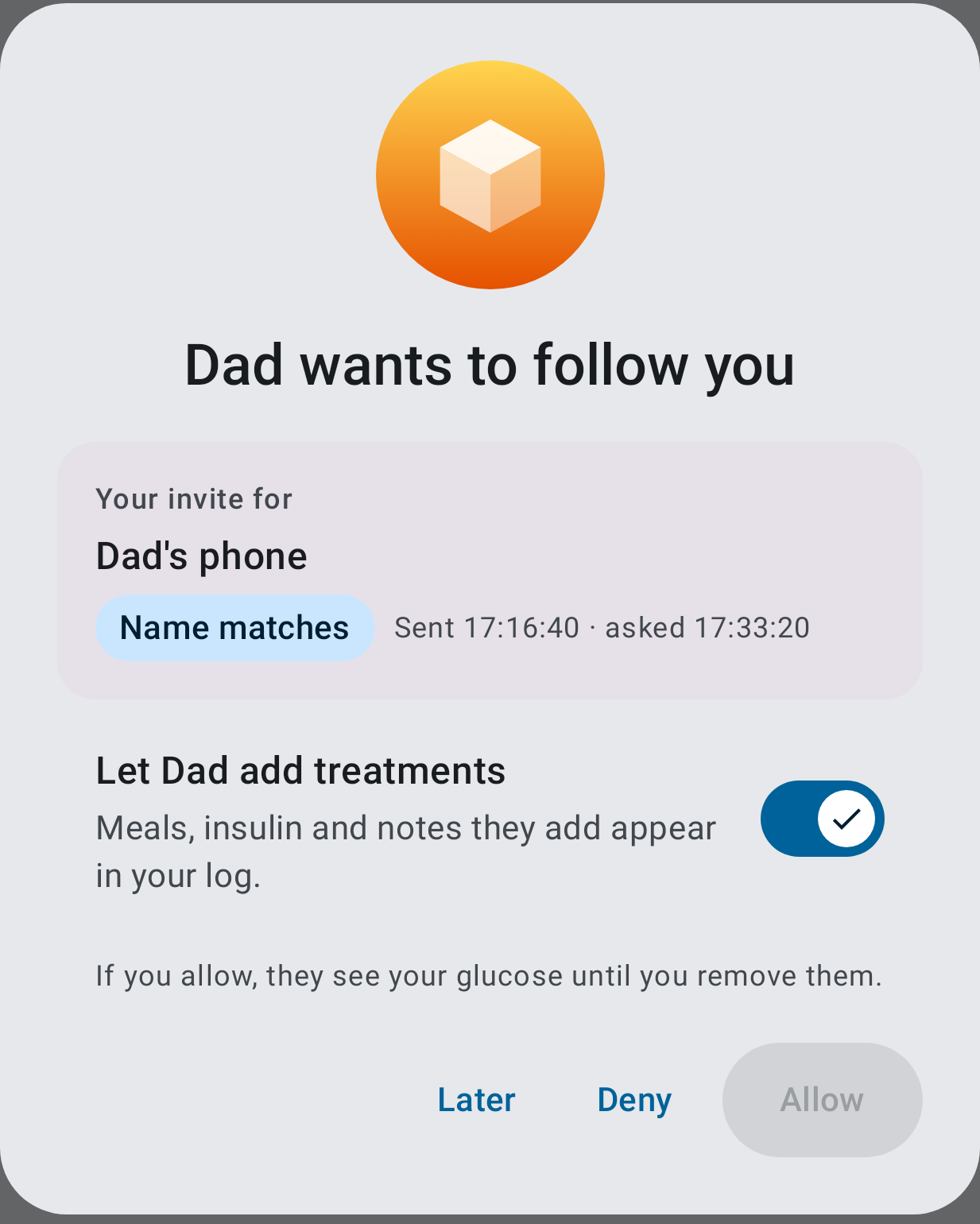
| Can add treatments at invite time | Share with someone has Let them add treatments (off). The choice travels with the invite (local InviteRecord.writer). The approve dialog shows Let Anna add treatments pre-set from it, changeable before Allow. Allow from the notification applies the invite’s choice. |
Dexcom Share, Google Home and Drive pick the role when the person is invited, then show it on accept (Dexcom, Google Home, Drive). Each place words the switch for itself (owner, 2026-11-15: a setting repeated elsewhere must make sense there). |
| “entries” → “treatments” | Every user-visible “entry/entries” that means a treatment, on both apps, in en and es (“tratamiento”), plus the docs and specs that quote the UI. | The owner’s word. |
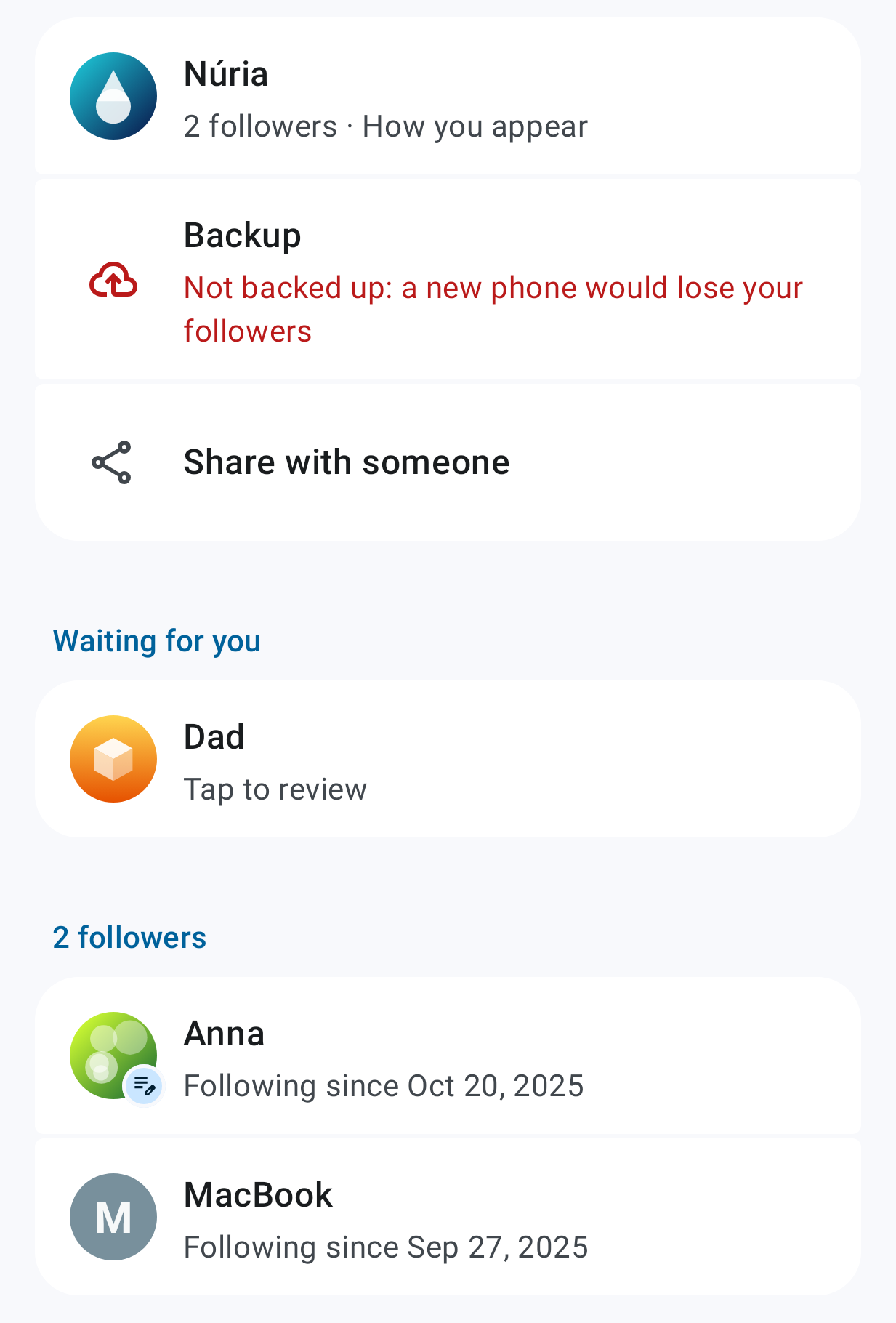
| Followers list | The summary line is just Following since …. A follower who can add treatments gets the Can add treatments icon (edit note) on their picture; TalkBack reads it as words. Tapping a follower opens THE app sheet (SukraraSheet, #207) instead of a dialog: picture, name, since, the nearby device’s state, the Can add treatments switch, then Remove (with icon, confirmed: it can’t be undone) and Done. |
#207’s lesson: show the exception as an icon, not a word on every row (the treatment list’s pen and cloud marks). Use one sheet for an item’s details everywhere, with icons on buttons. |
Every feature, checked
Section titled “Every feature, checked”| Feature | What can block it | Where it shows now |
|---|---|---|
| Alerts (both apps) | Notifications, full-screen, exact alarms, battery, channels, DND, sound when unlocked; Mac: notifications | Unchanged: the alert checklist (Android), the panel warning (Mac) |
| Sensor (Android wearer) | Bluetooth off or Nearby devices scan/connect | Unchanged: alert checklist item Bluetooth (no sensor = no alerts) |
| Bluetooth sharing (Android wearer) | ADVERTISE missing while someone follows |
New blocked feature |
| Bluetooth following (Android, Mac) | Nearby devices / macOS Bluetooth not allowed while following | New blocked feature (Not now); Mac Settings › Following gains Open Bluetooth Settings |
| Health Connect (Android wearer) | Permission removed in Health Connect | New blocked feature (it was only on its page) |
| Nightscout API on home Wi-Fi (Android 17) | Local network access refused | New blocked feature (it was only on its page) |
| Open at login (Mac) | Waiting for approval in Login Items: nothing starts after a restart | New blocked feature (it was only in Settings › General) |
| Pen / sensor NFC taps (Android) | Android blocks Sukrara’s tag intents | Unchanged: its own banner and cards |
| Juggluco on the LAN (Mac) | Local network refused | Unchanged: the panel’s no-data reason (it stops monitoring) |
| Keychain (Mac) | Follow key unreadable | Unchanged: the panel’s no-data reason |
| Camera (QR) | Refused | Asked at use; its screen has Open System Settings |
| Sensor-end calendar (Android) | Calendar permission removed | Discarded: the switch turns itself off on the next resume (visible, no silent “on”) |
Discarded
Section titled “Discarded”- Off by default for Bluetooth sharing: nearby readings without the internet help most at home and at night. The owner prefers on.
- Asking
ADVERTISEfrom the new-sensor flow: it doesn’t know about sharing, and the moment there is unrelated. Setup and the first Allow cover it. - Folding blocked features into the alert checklist: that would mix “an alert may not ring” with “a convenience is off”. The safety banner would fire for things that aren’t safety.
- One “Checks” page listing every feature with ✓: a list of ticks for features nobody uses is noise. Warnings show only where something is blocked, on home and on the Settings row.
- Merging the NFC taps banner into blocked features: its Allow is one Android screen for pen and sensor taps together, with its own wording. It keeps its banner, which has the same shape.
- A follower-side Bluetooth switch (as the exit): it would be a new setting with no use besides silencing the warning. Not now closes the tip, and Show closed tips brings it back.
- The invite’s choice in the backup or on the wire: an invite lives 24 h, so no protocol change is needed. A restore in that window falls back to off, and the dialog still shows the switch.
In Sukrara
Section titled “In Sukrara”- Android:
core/model/FeatureChecks.kt,app/AppFeatureChecks.kt,designsystem/rows/BlockedFeatures.kt, home’sBannerKind.FeatureBlocked, the Settings overview rows,sharing/NearbyRows.rememberAskNearby, setup’sNearbyFollowRow,WriterSwitch,FollowerSheet,InviteRecord.writer/PendingRequest.writer,OwnerEngine.approve(…, writer). - Mac:
Panel/BlockedFeatures.swift(panel row,AppModel.blocked), Open Bluetooth Settings in Settings › Following, the renamed strings. - Tests:
FeatureChecksTest,BannerSlotTest,OwnerEngineTest.theInvitesCanAddTreatmentsChoice…,BlockedFeaturesTests(Mac). - Pictures (synthetic data, Roborazzi /
sukrara-snap):
| Home: Bluetooth sharing blocked | A follower’s Bluetooth (no switch) | Mac panel |
|---|---|---|
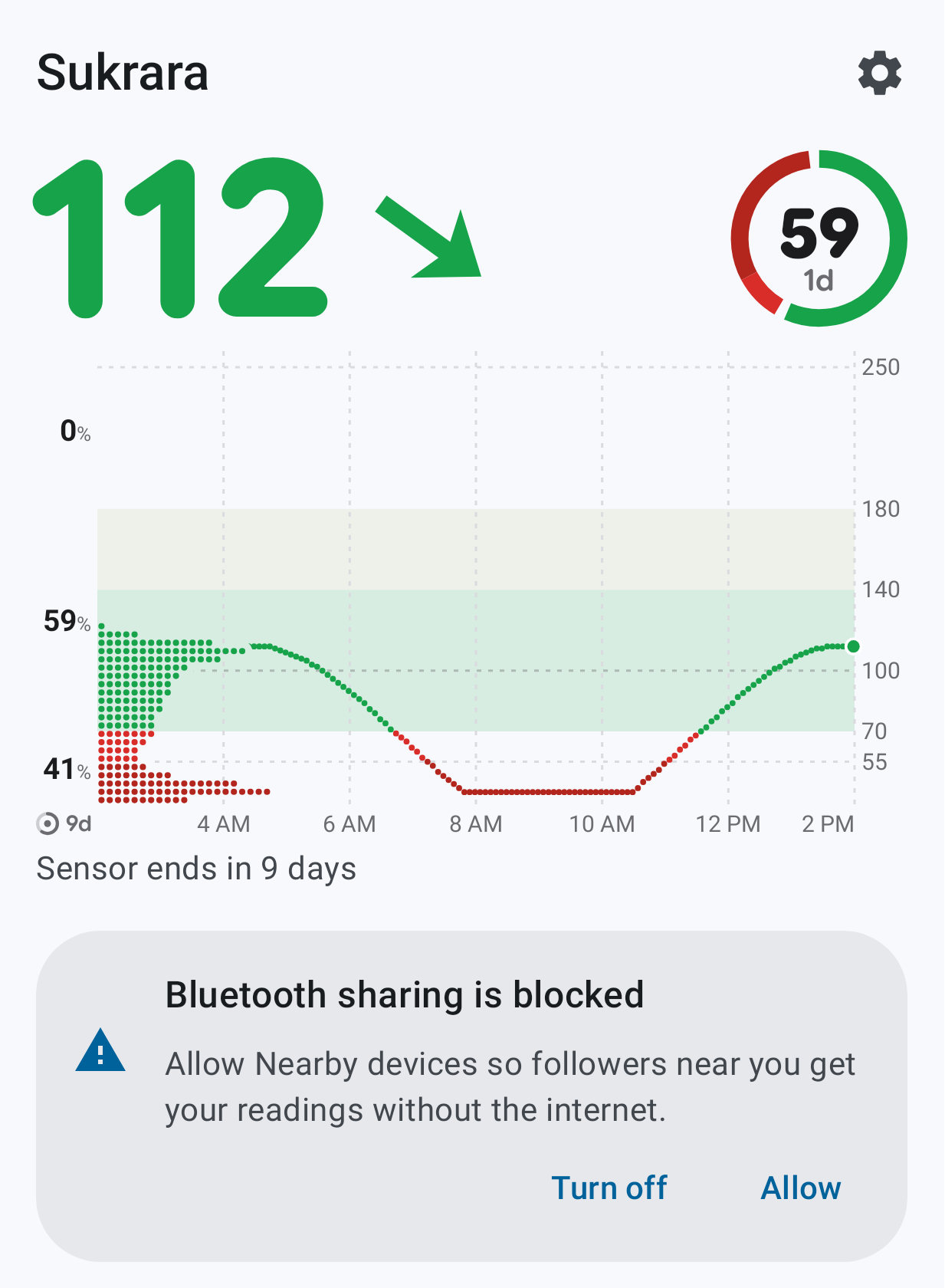 |
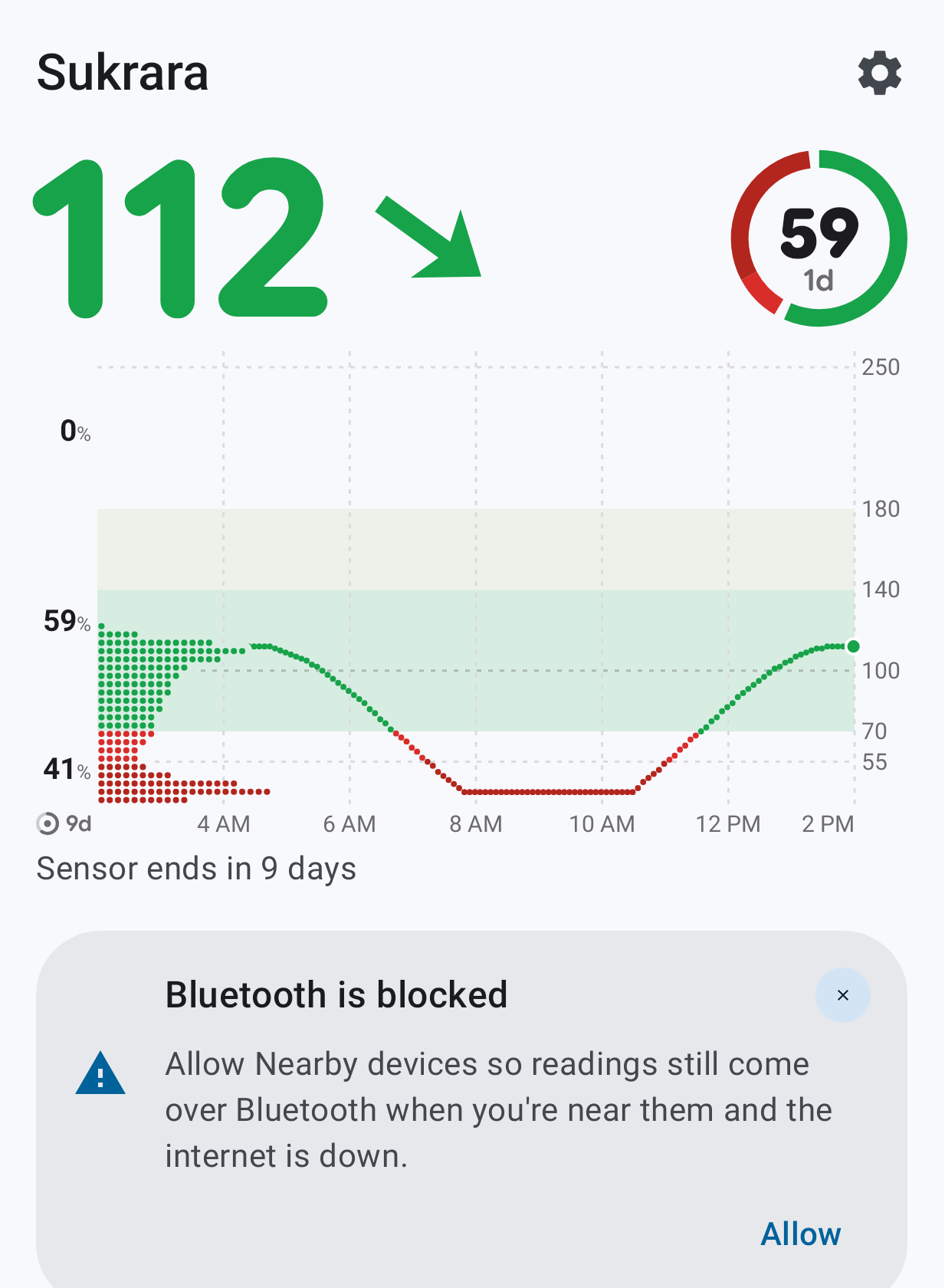 |
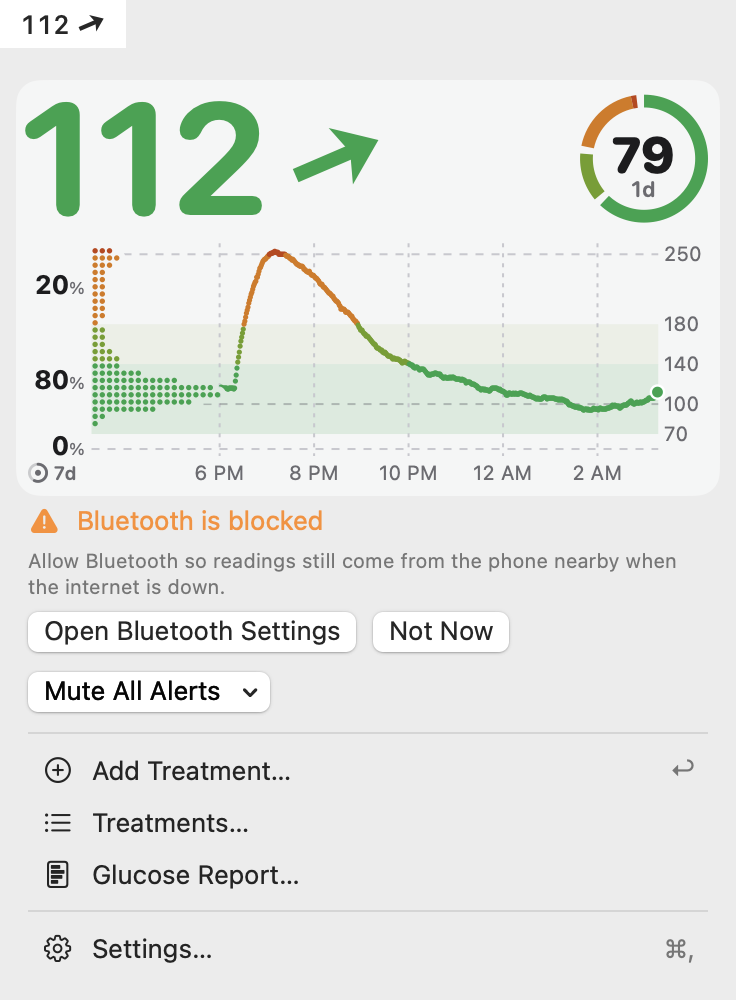 |
| Share with someone | Approve | Followers | Follower sheet |
|---|---|---|---|
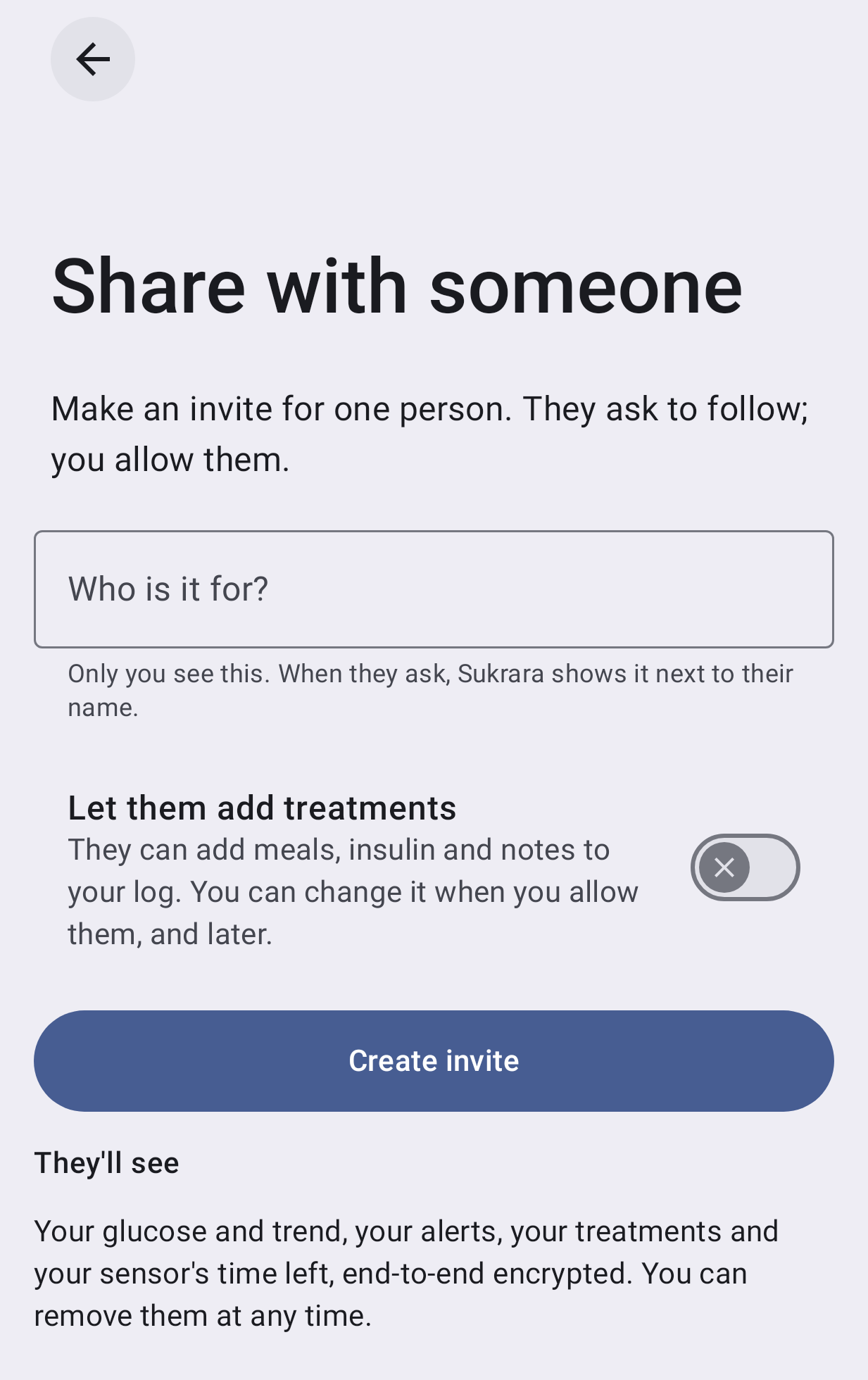 |
 |
 |
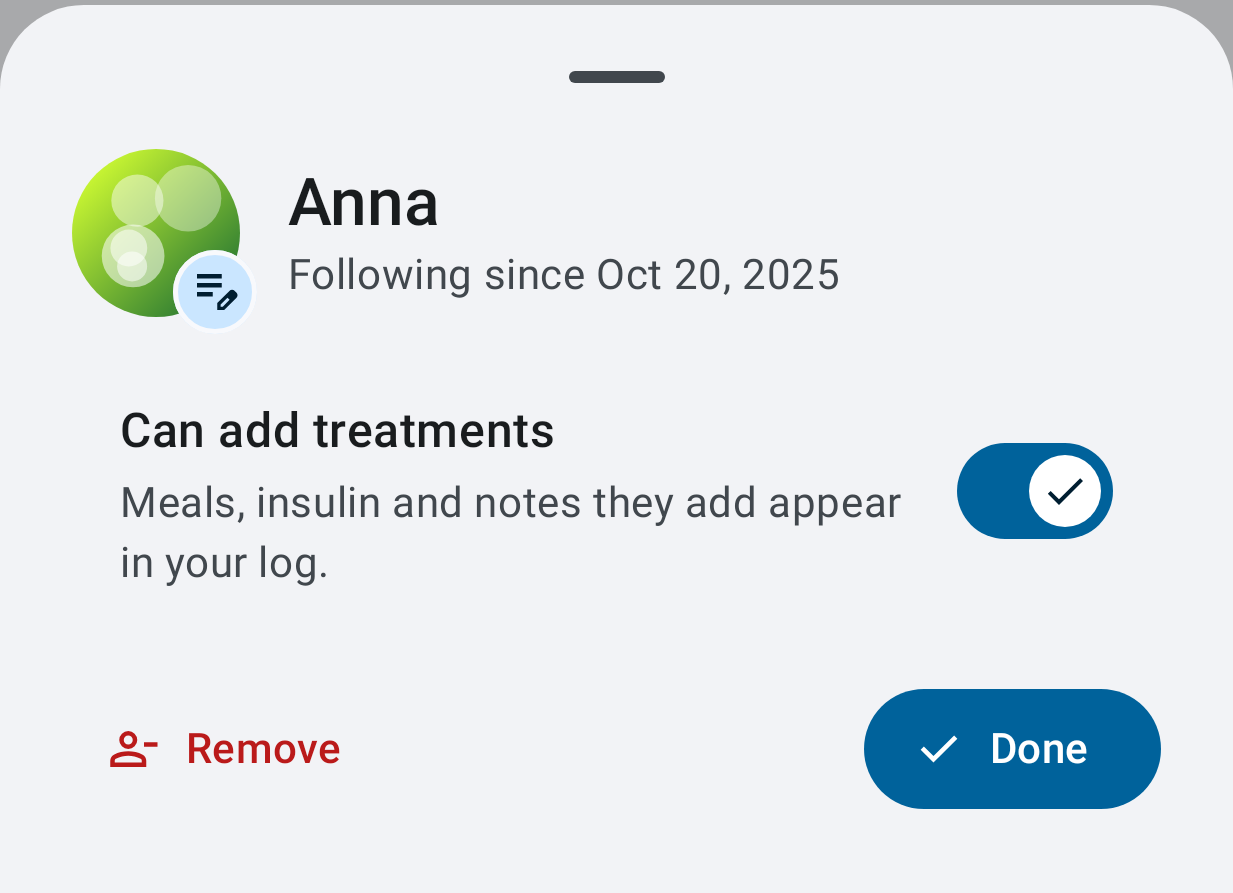 |
The Can add treatments switch has no icon anywhere (the owner’s earlier “no icon” on it; FEATURES “Settings”); the mark is on the follower’s picture.
Round 2: who is nearby, how readings come (2026-11-15)
Section titled “Round 2: who is nearby, how readings come (2026-11-15)”The owner: the Mac should say whether it is connected “through nearby Bluetooth or internet … on the mute select row, aligned to the right”; home’s “1 followe” could say who is nearby, “maybe just icons”; the followers list should say who is paired nearby, and Over Bluetooth nearby should also list the paired devices that aren’t connected.
| Point | Choice | Why |
|---|---|---|
| A path, not a log | One mark for how readings come now (LinkPath, both apps): Bluetooth while connected to the wearer’s phone, else the internet while a relay is connected, else offline. Not which path carried the last reading. |
Both paths run side by side and deduplicate; a per-reading origin would flicker. Apple Watch marks the link it has now with a different shape per path (iPhone, Wi-Fi, disconnected; status icons, 108038). No CGM sharing app shows the path at all (Dexcom Share labels only inactive followers, G7 manual; Juggluco users asked for the mirror’s state, #412, fork PR #47). |
| Mac | At the end of the mute row: Bluetooth mark + Nearby, globe + Internet, crossed network + Offline in red; tooltip and VoiceOver in words; a click opens Settings › Following. | The owner’s place. Beside the pop-up, not inside it: a pop-up holds choices (HIG). SF Symbols has no Bluetooth symbol, so the Mac draws Material’s, the Android glyph. Shape + word, never colour alone (HIG accessibility). |
| Home header (wearer) | 2 followers · ᛒ 1: the count stays in words, the nearby part is the mark and a number. TalkBack: 2 followers, 1 nearby over Bluetooth. | The owner’s “just icons”. The people count keeps its words (a bare icon + number is ambiguous, WCAG 1.4.1); Material’s top bar has a one-line subtitle slot (TopAppBar). |
| Home header (follower) | The same mark before Last heard … (Bluetooth / globe / crossed globe). | Parity with the Mac panel; first, so a long line never cuts it. |
| Mark colour | On home’s header lines and the Mac panel the Bluetooth mark takes the colour of the text beside it; Offline stays red. The followers list and sheet keep primary (connected) and dimmed (out of range): there the colour tells the two states apart. | The owner, 2026-11-15: “i want the bluettoth icon to be the normal text color, not colored… only… in homescreen and mac app in the main popup”. Their reasons: the Mac’s blue lacked contrast in dark mode, and on both apps a coloured mark was too noticeable for status text and broke the information hierarchy. |
| Followers list | A trailing mark on a follower paired nearby: Bluetooth-connected (primary) when connected, plain Bluetooth dimmed when out of range, nothing otherwise; the sheet repeats it with Connected / Disconnected. | #207: the exception as an icon, not a word on every row. Material lists put a status in a trailing icon (lists). |
| Paired nearby | A follower whose device connected over Bluetooth with its identity proof is paired nearby from then on (RememberNearby), like a Pair nearby follower; Nearby devices lists it Disconnected out of range, until Remove. |
The page listed only Pair nearby followers out of range, so a Mac invited by link vanished when it left. Android’s saved devices and iOS’s My Devices list paired devices that aren’t connected (Android, iOS). |
| “1 followe” | The followers line is one line that never wraps: where the words don’t fit, the people icon replaces them; where nothing fits, it is drawn smaller (FirstThatFits, HeaderFitTest at 1×–2×, en/es, 320 and 411 dp). |
The line wrapped freely in the top bar’s title slot: narrower than the word it broke inside it (1 / followe / r), reproduced with the phone’s own Google Sans in a window 220 dp wide (a slot of about 40 dp). Full screen at the default sizes the phone draws it whole (143 px), so what narrowed the slot there is not known; any narrower slot did it. |
Discarded: a mark per reading (flickers, says nothing the person acts on); the follower avatars in the header (too small to tell apart at 16 dp, and the list already names them); Last seen 3 h ago on paired devices (one more stored time for a fact nobody acts on); a Forget for a nearby device alone (it would pair again at the next contact: any active follower can connect nearby; Remove is the exit); Offline before the relays have said anything (it would flash at every launch).